
Your Next App Might Start With a Sentence
Your next useful digital tool might begin with a request instead of a download. Tell an AI assistant what you need, adjust the result, and return when life demands another update. That is the appealing idea behind Meta’s latest Muse feature, Spaces.
Meta announced Spaces in a newsroom post dated November 6. The update gives people a way to create personalized experiences inside Muse around their interests, projects, and routines.
The pitch feels refreshingly ordinary. Organize something. Follow something. Make something fun.
There is no need to imagine a robot running your entire household to understand the appeal. Sometimes, technological progress looks like finally finding the planning board you actually want to use. Preferably before the project itself becomes ancient history.
What Meta Actually Announced
According to Meta, users describe an idea to Muse, which builds a Space they can revisit and modify. The company’s examples include trackers, planners, project boards, and games.
Think of the announcement as a change in how people organize their relationship with an assistant. A request can become a destination inside the app, giving an ongoing activity somewhere recognizable to live.
That distinction matters. A conversation can contain excellent advice while still leaving the user responsible for turning it into a workable system.
Spaces attempts to shorten that journey. Its value will depend on whether the generated experience remains useful once the first burst of curiosity fades. A delightful first impression helps. A useful second week matters considerably more.
A Workspace That Survives the Conversation
For anyone who has buried an important answer beneath several unrelated chats, persistence has an obvious attraction. Work rarely ends when a conversation does.
Consider an illustrative home improvement project. You might research materials on Monday, compare options on Thursday, and discover an entirely new constraint over the weekend. The project needs continuity across those moments.
A dedicated place could make that continuity easier to maintain. Instead of reconstructing the discussion, you would return to the activity itself.
This is an interpretation of the feature’s potential, rather than evidence that every project will run smoothly. Still, the design question is compelling: can an assistant help people resume unfinished work with less effort? That is a practical problem worth solving.
You Can Change the Shape of Muse
The Verge reports that Spaces can occupy the sidebar or main tabs, with scheduled visibility for different parts of a user’s routine. Supported connected services can supply information for background updates.
The placement options carry an interesting implication. Personalization can affect what the app emphasizes, rather than merely the wording of its answers.
Imagine opening a workspace and seeing the activity that matters today without hunting through yesterday’s distractions. That would make organization part of the experience itself.
Of course, customization can become another chore if it demands constant maintenance. The strongest version of this idea would require little tending. Your organizational tool should not develop an organizational problem of its own. There are already enough demanding houseplants.
From Prompting to Refining
Meta says people can keep adjusting a Space after creating it, changing its appearance or how it works. The first description therefore serves as a starting point.
That approach could suit people who discover their requirements gradually. Many of us recognize a missing feature only after we start using something.
An illustrative request might begin with a simple reading list. Later, the user might ask for separate categories, a place for notes, or a clearer view of unfinished books.
The interesting shift is psychological. You do not need a complete specification before beginning. You need an idea you can explain and enough patience to refine it. Whether those revisions behave consistently will be an important part of the experience.
Connected Information Is the Bigger Promise
Investing.com’s coverage describes Spaces that refresh information in the background through connected apps. Its examples include changing prices, concert information, and progress toward savings goals.
That capability could address a familiar weakness in personal dashboards: they become stale unless somebody keeps feeding them.
A beautiful screen with outdated information quickly loses its usefulness. The challenge therefore extends beyond generating an attractive layout. The information needs to stay relevant to the task.
Readers should distinguish that announced capability from a guarantee about every connection or update. The launch materials do not establish a universal refresh interval. For practical use, knowing where information came from and when it changed would help people decide how much confidence to place in it.
A Better Starting Point for Busy Families
Investing.com also highlights Meta’s proposed school dashboard, which gathers relevant events from emails and adds them to calendars.
The attraction is easy to understand. Family coordination involves small details that become large problems when someone misses them.
In an illustrative household, one adult might remember the school activity while another remembers the transport arrangements. The difficulty lies in bringing those pieces together at the right moment.
A useful dashboard could reduce that coordination burden. It would still need careful checking when messages contain ambiguous dates or changing instructions.
The potential benefit is modest but meaningful: fewer searches, fewer repeated questions, and less time spent reconstructing plans. Nobody needs artificial superintelligence to appreciate avoiding a forgotten costume on school presentation day.
Freelancers Could Give Projects a Home
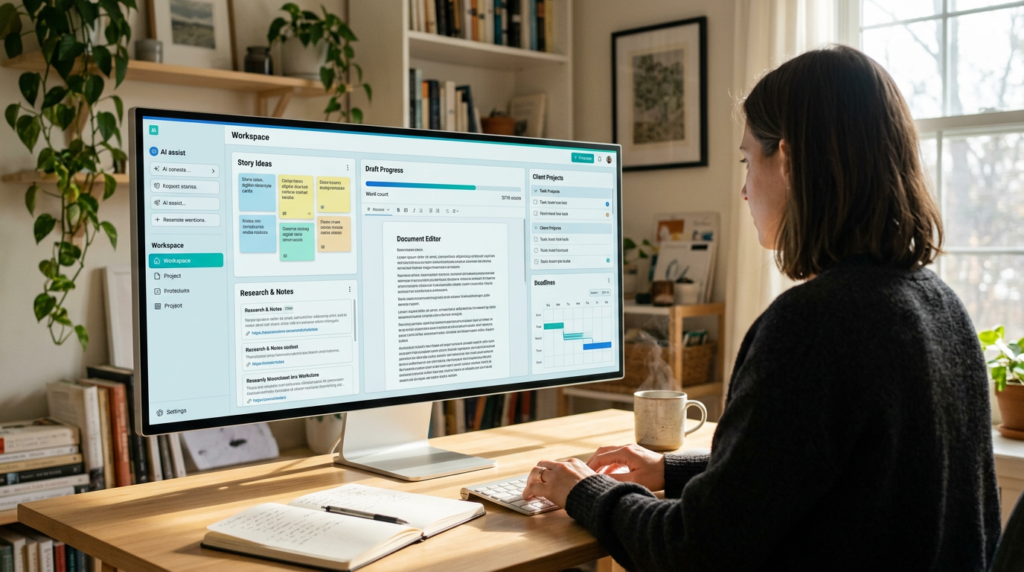
Meta lists a freelance client hub among its examples, alongside a podcast workspace and a small business order tracker.
For a writer or independent creator, those examples point toward a useful organizing principle: arrange information around the work you need to finish.
An illustrative editorial workspace might separate story ideas, research questions, draft status, and upcoming deadlines. That is a possible use, rather than a tested template or a promised feature bundle.
The benefit would come from reducing the mental effort of switching between projects. Clear organization helps people see the next action.
A generated workspace would still earn its place through everyday reliability. If maintaining it takes longer than checking the original notes, the attractive interface has missed the point.
Small Businesses Need Clarity More Than Spectacle
The order tracker example deserves attention because a small business rarely suffers from a shortage of things to remember.
Orders, messages, delivery arrangements, and unfinished followups compete for the same limited attention. A useful tool should make the next necessary action easier to identify.
Imagine a hypothetical seller who wants a simple overview of today’s outstanding work. The valuable result would be a clear picture of what needs attention and why.
That scenario does not establish accounting accuracy, inventory synchronization, or support for a particular commerce service. Those details require separate verification.
Still, the broader opportunity is straightforward. Personalized software could serve narrow operational needs that feel too specific for a general app, yet too persistent for a sticky note.
There Is Room for Play, Too
Productivity can dominate discussions of AI until every announcement sounds like an invitation to become a more efficient spreadsheet. Fortunately, Spaces also includes room for entertainment.
Meta’s examples include a daily word game and trivia experiences. These suggest that the feature can support personal interests alongside practical tasks.
The appeal of a small personalized game differs from the appeal of a commercial entertainment product. It might suit a particular interest, mood, or short break.
Consider a hypothetical quiz built around a family’s favorite films. Its value would come from relevance and enjoyment, rather than technical complexity.
That possibility broadens the feature’s audience. A useful AI experience can help someone finish a task. It can also give them a pleasant reason to pause.
What the Launch Leaves Unanswered
The announcement explains the concept more clearly than it establishes every operational detail. That distinction matters when readers move from curiosity to expectations.
Meta says Spaces is available wherever Muse is available. That wording should not be read as confirmation of access in every country, including the Philippines.
The announcement also does not provide a detailed Spaces pricing breakdown or comprehensive limits for every proposed use. Readers should check their own account for current access and applicable conditions.
There are practical questions, too. How gracefully does a complex Space handle conflicting instructions? What happens when a connected source becomes unavailable?
Those questions require product documentation or direct testing. The announcement alone cannot settle them, and a news article should not pretend otherwise.
Privacy Becomes Part of the Experience
Connected workspaces invite a reasonable question: what information does the assistant need to perform the job?
In its earlier Muse introduction, Meta said users choose connected apps and access levels, can disconnect services, and receive an activity trail. These are company descriptions of the broader agent, rather than independent findings about every Space.
For readers, the practical principle is simple. Match access to the purpose of the workspace.
A hypothetical game and a client dashboard involve different information needs. Treating those needs individually makes more sense than assuming every project requires the same connections.
Clarity would help here. People should be able to understand which source supplies which information without becoming investigators of their own dashboard. Convenience works best when the user can explain what is happening.
Sharing Remains a Future Possibility
Meta says it is exploring ways for people to share Spaces. The announcement does not establish a fully launched collaborative workspace system.
That leaves an interesting avenue for development. Many useful personal tools eventually encounter a second person: a partner, colleague, client, or friend.
An illustrative event planner might begin as one person’s checklist before needing contributions from others. Supporting that transition would involve more than displaying the same screen to everybody.
Permissions, ownership, conflicting changes, and responsibility would all become relevant. A shared plan needs a clear understanding of who can change what.
For now, the story concerns personalized experiences inside Muse. Collaborative possibilities belong in the discussion as a stated direction, with their eventual scope still to be demonstrated.
How to Judge the Feature Fairly
The fairest evaluation would start with a concrete task and a manageable amount of information. Choose something you already understand well enough to check.
For example, a hypothetical hobby tracker provides an easier starting point than a complicated business process. You can quickly see whether the arrangement makes sense and whether your edits persist.
Then watch what happens over time. Does returning to the Space reduce effort? Do changes remain understandable? Does the experience help you finish something?
These are suggested evaluation questions, not results from hands on testing.
They also offer a useful antidote to launch day excitement. A generated interface can impress immediately. Its lasting value becomes clearer when an ordinary week gives it ordinary problems to handle.
Why This Could Matter for Everyday Software
Spaces suggests a different relationship between people and software. Instead of accepting a fixed arrangement, users describe an experience around the activity they have in mind.
The potential benefit is particularly clear for temporary or highly personal needs. A project may deserve more structure than a note while remaining too small to justify learning an elaborate application.
A generated workspace could occupy that middle ground. Its success would depend on making the whole experience easier, including the adjustments and occasional corrections.
That is a demanding standard, but a sensible one. Personalization has value when it removes effort from the user’s day. An interface built especially for you still needs to justify the time you spend inside it.
There is also a useful distinction between flexibility and complexity. More options do not automatically make a tool more personal. Sometimes the best customization removes a column, hides a distraction, or presents one clear next step. If conversation makes those small adjustments easier, people could spend less time adapting themselves to software. That would represent a worthwhile improvement even for users who never build anything ambitious or especially elaborate in the first place.
A Promising Idea With an Everyday Test

Meta has given Muse users a new way to turn descriptions into ongoing, personalized experiences. The announcement brings an appealing question into focus: what would your software look like if it started with your actual routine?
For one person, the answer might involve creative work. For another, it might involve family plans, a hobby, or an entertaining diversion.
The possibilities make Spaces worth watching, while the unanswered details give users good reasons to evaluate it carefully.
The decisive test will happen after the announcement, when someone returns to a half finished project and tries to move it forward. If the workspace helps them do that with less friction, the feature will have achieved something valuable. Useful software earns its welcome through repeated visits.
Sources
- Meta — Spaces announcement, customization, availability, and proposed uses. about.fb.com
- The Verge — App-like Spaces, connected services, and scheduled placement. theverge.com
- Investing.com — Background updates, school dashboards, and business examples. investing.com
- Meta — Muse introduction, connected-app permissions, and user controls. about.fb.com