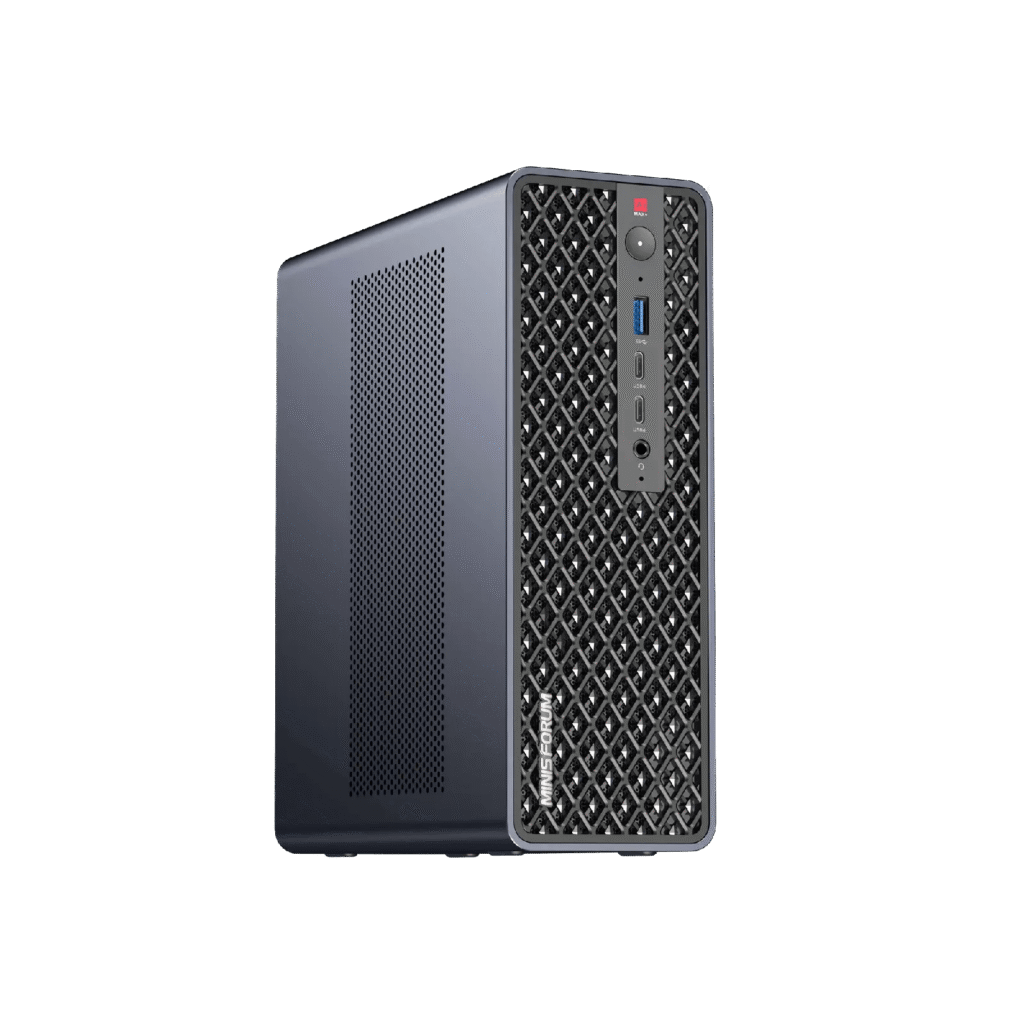
The MINISFORUM MS-S1 MAX-P495 makes a specific local-AI workload possible: keeping substantially more than 128GB of model weights and working memory inside one compact x86 workstation. At US$7,399, that capability needs a stronger justification than a long list of models that also run on a cheaper machine.
The clearest reasons to consider it are higher-precision Qwen3.5-122B, practical 4-bit versions of roughly 230B-class models, and less aggressive versions of DeepSeek-V4-Flash-0731. Extra memory also gives an existing model more room for context, concurrent requests, and supporting applications. The value depends on which of those limits you currently hit.
The speed improvement is a separate question. This platform increases total memory by 50%, while its theoretical memory bandwidth rises by about 6.7% against a Ryzen AI Max+ 395 configuration running LPDDR5x-8000. The largest benefit can come from avoiding CPU offload or storage streaming. A model that already fits comfortably needs a different buying argument.
Evidence and availability, checked October 13, 2026. The U.S. manufacturer listing offers 192GB RAM and a 2TB SSD for US$7,399, with an available variant and an Add to Cart button. We have not verified a dispatch date. Kingy has not physically tested this workstation or run a matched 128GB-versus-192GB benchmark. Model sizes below come from downloadable artifact metadata; fit, cache, bandwidth, and cost calculations are explicitly labeled estimates.
This article complements our local-AI hardware guide. Its focus is the memory boundary between an existing 128GB setup and this particular 192GB machine.
The hardware changes that matter
MINISFORUM introduced the P495 at IFA in September. AMD identifies the processor as a 16-core Zen 5 part with Radeon 8065S integrated graphics, 40 RDNA 3.5 compute units, and an XDNA 2 NPU. The memory specification is LPDDR5x-8533 over a 256-bit interface. AMD publishes 273GB/s for its own developer platform using the same processor and memory speed. Sources: MINISFORUM’s IFA announcement and AMD’s platform specifications.
| Local-AI specification | Ryzen AI Max+ 395 / 128GB reference | MS-S1 MAX-P495 / 192GB |
|---|---|---|
| CPU | 16 cores / 32 threads, Zen 5 | 16 cores / 32 threads, Zen 5 |
| Integrated GPU | Radeon 8060S, 40 compute units | Radeon 8065S, 40 compute units |
| Unified memory | 128GB | 192GB |
| Vendor dedicated graphics allocation | Up to 96GB | Up to 160GB |
| Memory interface | 256-bit LPDDR5x-8000 | 256-bit LPDDR5x-8533 |
| Theoretical bandwidth | 256GB/s, calculated from interface and transfer rate | About 273GB/s, also published by AMD |
| NPU / aggregate AI rating | 50 / 126 TOPS | 55 / 131 TOPS |
| U.S. configuration examined | An existing 128GB system; purchase price varies | 192GB + 2TB SSD, US$7,399 before applicable tax |
The reference combines AMD’s 395 specifications with MINISFORUM’s predecessor comparison. It is a hardware comparison, not a measured performance result.
The P495 listing specifies dual 10GbE, USB4 and USB4 V2, and two NVMe slots. The second SSD slot is PCIe 4.0 x1; the first is x4. Its physically x16 expansion slot is electrically PCIe 4.0 x4. Those distinctions matter for model loading and expansion. Neither a second SSD nor an expansion connector increases the APU’s resident model memory.
192GB RAM, 160GB graphics memory, and the limits of the 96GB comparison
Unified memory is one physical pool used by the CPU and integrated GPU. Allocating 160GB to graphics does not create an additional 160GB beside the machine’s 192GB. The operating system, model runtime, display, file cache, and other applications still need memory.
MINISFORUM’s comparison changes the dedicated graphics allocation from 96GB to 160GB. That is a 66.7% increase in the advertised allocation, compared with a 50% increase in total memory. For a loader constrained to the dedicated graphics budget, that difference is substantial.
However, 96GB is not a universal ceiling for all 128GB local-AI systems. Framework’s memory-allocation documentation describes a 128GB configuration with 96GB dedicated graphics memory plus access to 16GB of shared memory, totaling 112GB. It also describes dynamic allocation under Linux. The memory a particular inference backend can allocate efficiently depends on its OS, driver, memory heap, and configuration. A Windows dedicated-memory comparison cannot settle a Linux allocation question.
A 128GB Mac and a 128GB DGX Spark also have their own runtime and operating-system budgets. They should be compared with their actual available bytes and model traces. A desktop with 128GB of ordinary RAM and a 24GB discrete GPU presents another problem: most of that system RAM does not offer the GPU’s local memory bandwidth.
The purchasing test is therefore straightforward. Record how many bytes your existing backend can use, how many it uses for the desired model and context, and whether it falls back to CPU execution or streaming. Compare that with the P495 using the same workload.
Keep GB and GiB separate
Model repositories often display decimal gigabytes: 1GB equals 1,000,000,000 bytes. Runtime logs commonly report binary gibibytes: 1GiB equals 1,073,741,824 bytes. A 142.65GB file is about 132.85GiB. That file alone exceeds 128GiB, before any operating system or context cache.
Hardware specifications and firmware sometimes use “GB” for binary-sized memory allocations. We report both units for weights and preserve the vendor’s labels for graphics capacity. Borderline cases require the allocator’s byte count. For example, 166.89GB is 155.43GiB: it exceeds a literal 160-billion-byte cap, yet leaves only 4.57GiB under a 160GiB cap. Neither interpretation gives a comfortable general-purpose configuration.
Model parameters are only the beginning of the memory budget
A first approximation for weight storage is:
Weight bytes ≈ total parameters × effective bits per weight ÷ 8
Resident requirement ≈ loaded weights + context state + runtime buffers
                       + optional vision/speculative components
Quantized files include scales, block metadata, tensors stored at different precisions, and sometimes extra prediction layers. “Q4” does not guarantee exactly four bits for every parameter. The download’s actual byte size is a better starting point than multiplying the headline model size by 0.5.
Consider the claim that a machine can run a 300B model. At exactly four bits per parameter, 300 billion weights occupy 150GB, or 139.70GiB. At an illustrative effective 4.5 bits per parameter, they occupy 168.75GB, or 157.16GiB. The latter would leave only 2.84GiB under a 160GiB graphics allocation, before cache and runtime allocations. This calculation describes a capacity boundary; it is not a benchmark for a particular 300B model.
Mixture-of-experts models complicate the speed calculation, but they do not remove the storage requirement. Qwen3-235B-A22B has 235B total parameters and 22B active per token. The inactive experts normally remain available in memory because a later token can select a different set. Offloading experts to CPU memory or storage changes the execution path and can change latency. Source: Qwen’s official model card.
The local LLM options that change between 128GB and 192GB
The following sizes were calculated by summing all GGUF shards for each selected artifact at the repository revision checked on October 13. They are file sizes, not measured resident allocations. Vision projectors and separately downloaded speculative models are excluded unless already inside the selected files.
“Candidate” means the weights leave plausible room to investigate the pairing. It does not establish backend support, long-context fit, stable speed, or answer quality. The 128GB column distinguishes total physical capacity from a 96GB dedicated graphics allocation.
| Exact artifact | Weights: GB / GiB | Existing 128GB setup | 192GB P495 assessment |
|---|---|---|---|
| gpt-oss-120b, MXFP4 | 63.39 / 59.03 | Already a strong capacity candidate | More cache and concurrency room; no new model tier |
| Llama-3.3-70B-Instruct, Q8_0 | 74.98 / 69.83 | Weights fit within the dedicated allocation | Extra context and supporting-model room |
| Qwen3-Coder-Next, Q8_0 | 84.81 / 78.99 | Already a capacity candidate; reserve runtime space | Main benefit is operating headroom |
| Qwen3.5-122B-A10B, Q4_K_M | 77.62 / 72.29 | Already a capacity candidate | Can retain this quant and increase working memory |
| Qwen3.5-122B-A10B, Q6_K | 108.41 / 100.96 | Above 96GB dedicated; some 128GB unified/shared configurations may accommodate it | Substantially easier capacity target |
| Qwen3.5-122B-A10B, Q8_0 | 132.60 / 123.49 | Leaves too little room in a conventional 128GiB system | Meaningful higher-precision candidate |
| Qwen3.8-Flash-Next, UD-Q4_K_XL | 111.33 / 103.69 | Possible in some shared/unified configurations; above 96GB dedicated | More room for runtime and multimodal use |
| Qwen3.8-Flash-Next, UD-Q5_K_XL | 158.29 / 147.42 | Weights exceed total 128GiB capacity | Borderline graphics fit; exact allocation and extras matter |
| MiniMax-M2.7, Q4_K_M | 138.81 / 129.27 | Weights alone exceed 128GiB | New practical 4-bit capacity candidate |
| Qwen3-235B-A22B-Instruct-2507, Q4_K_M | 142.65 / 132.85 | Weights alone exceed 128GiB | New 4-bit candidate, with a context budget to calculate |
| DeepSeek-V4-Flash-0731, UD-Q4_K_XL | 155.10 / 144.44 | Weights exceed total capacity | Near the graphics boundary; require an exact load test |
| DeepSeek-V4-Flash-0731, UD-Q8_K_XL | 161.87 / 150.75 | Weights exceed total capacity | Allocation-dependent; shared/CPU memory may be necessary |
| Qwen3.5-397B-A17B, Q4_K_M | 244.09 / 227.33 | Does not fit fully resident | Does not fit fully resident in one box |
Artifact sources: gpt-oss GGUF; Llama 3.3 GGUF; Coder-Next GGUF; Qwen3.5-122B GGUF; Qwen3.8-Flash-Next GGUF; MiniMax M2.7 GGUF; Qwen3-235B GGUF; DeepSeek-0731 GGUF; Qwen3.5-397B GGUF. Revisions are pinned because conversions and included components can change.
Qwen3.5-122B is the clearest precision upgrade
The selected Q4 artifact occupies 72.29GiB; Q6 occupies 100.96GiB; Q8 occupies 123.49GiB. On a conventional 128GiB machine, the Q8 file leaves about 4.51GiB for everything else. That is an inadequate shopping assumption for an OS, inference runtime, cache, and normal desktop use.
With 192GB, Q8 becomes a serious capacity candidate. Even interpreting the vendor’s graphics cap conservatively as 160 billion bytes, the file leaves about 25.52GiB inside that cap. An allocator reporting 160GiB would leave 36.51GiB. Both are materially better starting points, although neither is a promise that every context length fits.
For an owner whose Q4 result is already good, the practical experiment is Q4 versus Q6 versus Q8 on the same tasks. Higher precision reduces the amount of weight approximation. Whether it improves a coding fix, structured extraction, or mathematical answer enough to matter remains an empirical question. The extra purchase may be justified by context or concurrency even if Q8 provides little visible quality gain.
MiniMax M2.7 and Qwen3-235B become more credible at 4-bit
These are the strongest examples of a model-size boundary. Their selected Q4_K_M files exceed 128GiB outright. A 128GB owner must choose a smaller artifact, offload part of the model, or use another machine. The P495 offers enough total capacity to investigate the larger quants without assuming continuous storage streaming.
For Qwen3-235B, the selected IQ3_XXS is 93.07GB, or 86.68GiB, compared with 142.65GB for Q4_K_M. That is a substantial change in quantization. It creates a plausible quality benefit, particularly when the smaller file causes task failures. It does not prove that this older 235B checkpoint beats a newer, smaller model on your workload.
MiniMax M2.7’s selected Q4 artifact occupies 129.27GiB. Its Q5_K_M occupies 151.50GiB, putting it much closer to the P495 graphics boundary. The 192GB upgrade makes Q4 a more defensible initial target than an assumption that every higher-precision variant will be comfortable.
There is also a commercial-use issue. The current M2.7 license permits specified personal and non-commercial uses and requires prior written authorization for commercial use. Buying the workstation does not provide that authorization. Check the license against the planned deployment before choosing the model.
Qwen3.8-Flash-Next needs an architecture-specific comparison
Qwen describes Flash-Next as a 125B core with 6B active parameters, plus 51B of n-gram embeddings and a 4B prediction component. Its hybrid attention and large embedding table make the simple “180B model” label incomplete. The publisher specifically identifies embeddings as amenable to offloading. Source: official Flash-Next card.
The selected Unsloth Q4 file is 103.69GiB, so a well-configured 128GB unified-memory system may already be a candidate. Moving to 192GB improves the margin rather than automatically unlocking the model. The selected Q5 file is 147.42GiB and is much more demanding. Under a 160GiB allocation, only 12.58GiB remain before extras; under a literal 160GB cap, only about 1.60GiB remain.
The repository separately lists vision projectors of about 0.90GB and speculative components of roughly 1.91–7.77GB, depending on format. Add the exact chosen components, rather than every alternative file. The base Q8 shard set reaches 175.30GiB; adding the 4.14GB Q8 speculative component brings the combined files to about 179.15GiB. Both require an execution path that uses memory beyond the advertised dedicated GPU allocation. More installed RAM does not make that a straightforward all-GPU configuration.
Flash-Next also uses the Qwen Community License, which includes additional licensing requirements for some model-service and AI work-assistant businesses. The older Qwen checkpoints in this article should not be assumed to have identical terms.
DeepSeek-V4-Flash-0731 is a precision opportunity with very little spare graphics memory
Use the exact July 31 checkpoint name when comparing results. DeepSeek says this release supersedes the preview and includes a speculative component. A result from the earlier preview does not establish the current model’s speed or quality. Source: DeepSeek’s release card.
The checked GGUFs are 144.44GiB for UD-Q4_K_XL and 150.75GiB for UD-Q8_K_XL. The small gap between them is unusual but explicable: the model already uses low-precision expert weights. Unsloth says its Q8 conversion preserves the original checkpoint’s mixed-precision representation, while Q4 changes a relatively small set of non-expert tensors. Its “lossless” description is a conversion-provider claim, not a Kingy test of P495 output equivalence.
Unsloth’s deployment guide recommends at least about 169GB available RAM/VRAM for the Q8 path and roughly 10GB more for DSpark acceleration. Total unified capacity and dedicated graphics capacity are different budgets here. The P495’s 192GB pool makes the deployment worth investigating, but 160GB advertised graphics memory does not by itself prove a fully resident GPU run with acceleration and long context.
This is a good reason to request an exact loader trace from the seller or test a review unit. Record where the weights, cache, and speculative component land. A successful short prompt with CPU offload should be described as such. It should not become evidence for an all-GPU, million-token workload.
gpt-oss, 70B models, and coding models that already fit
The checked gpt-oss-120b MXFP4 GGUF is about 59.03GiB. OpenAI explains that the expert weights were post-trained with MXFP4 and that its published evaluations used that representation. Loading those weights into a larger machine does not recover an imagined higher-quality original by converting them to a wider format. Extra memory can support larger caches or more simultaneous work. Source: OpenAI’s model card.
Llama-3.3-70B at Q8 occupies 69.83GiB, and Qwen3-Coder-Next at Q8 occupies 78.99GiB. Their selected weights already fall comfortably below the P495’s advertised capacity and below the predecessor’s dedicated-memory figure. The purchase decision should turn on working memory, measured response time, or another workload that fails on the current machine.
A 70B model at nominal 16-bit precision would require roughly 140GB for weights alone, before exact tensor counts and packaging. That is another possible 192GB research use. It also roughly doubles weight traffic relative to an 8-bit representation, and the quality gain may be small. Treat it as a fidelity experiment rather than the default deployment.
Context length can consume the entire upgrade
The KV cache stores attention information for tokens already processed. With conventional grouped-query attention, a simplified estimate is:
KV bytes ≈ 2 × attention layers × KV heads × head dimension
           × cached tokens × bytes per cache element × sequences
The factor of two represents keys and values. This estimate excludes padding, allocator overhead, graph buffers, and other model state. Actual implementations can use quantized caches, sliding windows, sparse layouts, or shared prefixes.
Qwen3-235B’s configuration specifies 94 layers, four KV heads, and a head dimension of 128. Using two-byte cache elements gives 188KiB per cached token per sequence.
| Cached tokens per sequence | Estimated FP16 KV cache | What this means for 142.65GB Q4 weights |
|---|---|---|
| 8,192 | 1.47GiB | A useful initial load-test target |
| 32,768 | 5.88GiB | Possible working budget; runtime buffers still count |
| 65,536 | 11.75GiB | A much tighter graphics-memory proposition |
| 131,072 | 23.50GiB | Weights plus cache reach about 156.35GiB before runtime buffers |
| 262,144 | 47.00GiB | About 179.85GiB before runtime; beyond 160GiB graphics allocation |
This gives a concrete distinction between loading Qwen3-235B and using its full advertised context. The 192GB machine moves the weights into range. It does not automatically move every context target into the dedicated GPU budget.
Qwen3.5-122B has a different structure. Its configuration uses 48 layers, with one full-attention layer for every four layers, two KV heads, and a head dimension of 256. Applying the formula to its 12 full-attention layers gives a conventional FP16 KV contribution of 24KiB per token: 0.75GiB at 32,768 tokens, 3GiB at 131,072, and 6GiB at 262,144. Linear-attention state, optional prediction layers, and runtime buffers must be added. These are calculations, not measured total allocations.
That architecture is one reason Qwen3.5-122B Q8 may be a more comfortable 192GB target than a model with smaller weights but a much larger conventional cache. Parameter count alone misses this difference. The conventional formula also should not be applied unchanged to DeepSeek’s compressed attention or Flash-Next’s sparse and hybrid attention.
Quantizing KV state can reduce its footprint, with format-dependent overhead and quality effects. The KIVI research paper demonstrates that careful cache quantization can preserve quality on evaluated models while reducing memory. It does not establish that a particular Q4 cache setting is safe for every model, runtime, or long-context task. Weight quantization and cache quantization require separate checks.
When extra RAM can improve output quality
Extra RAM changes answer quality indirectly. It lets you select a different representation or supply a different amount of information. The same checkpoint and quantization, using the same context, prompt, template, reasoning settings, and sampling parameters, do not become more capable merely because another 64GB is installed.
Three changes can justify the upgrade. First, you can move from an aggressive low-bit artifact to a less compressed one. Second, you can use a different model that performs better on the work you care about. Third, you can retain relevant document or repository context that was previously truncated. Each needs its own comparison.
Quantization quality is not determined by bit count alone. AWQ’s research shows why selected weight channels and calibration matter. Different quantizers can preserve different tensors, use different calibration data, and pack weights for different kernels. Q4 from one repository is not necessarily equivalent to Q4 from another.
Higher precision may reduce numerical error without changing the final answer on most tasks. Conversely, an occasional failure can matter enormously when it produces invalid JSON, silently breaks a tool call, or introduces a bug. The useful metric is the task failure rate and its cost. A perplexity change is informative, but it cannot substitute for testing the workflow.
For coding, compare patches against hidden tests and inspect unintended edits. For extraction, grade exact field values, missing evidence, and fabricated entries. For long documents, ask questions that require combining information from different sections, rather than only retrieving a planted phrase. For agent work, record completed tasks, invalid tool calls, retries, and total elapsed time.
Keep reasoning effort and output limits fixed. A model allowed to spend more tokens reasoning may score better while taking longer. A newer 27B model can beat an older 235B model on a particular job. Buying memory around an assumed leaderboard hierarchy is a poor substitute for grading the exact local artifacts.
Speed depends on bandwidth, architecture, and avoiding offload
For batch-one decoding of a large dense model, weight movement is often a major bottleneck. A simplified bandwidth ceiling is bandwidth divided by weight bytes read per generated token. It is a useful scale check when the weights are much larger than cache, but it excludes many costs and is not a throughput forecast.
| Dense-model weight traffic per token | 256GB/s reference ceiling | 273GB/s P495 ceiling |
|---|---|---|
| 40GB | 6.40 tokens/s | 6.83 tokens/s |
| 75GB | 3.41 tokens/s | 3.64 tokens/s |
| 140GB | 1.83 tokens/s | 1.95 tokens/s |
These are deliberately idealized calculations. They assume the stated weight traffic occurs for every token and consumes the entire theoretical bandwidth. Real kernels, memory contention, cache behavior, dequantization, attention, and synchronization affect the result. They must not be applied by dividing bandwidth by a MoE model’s full file size: only selected experts and shared layers execute for a token, although the full expert set normally occupies memory.
The nominal bandwidth ratio is 273/256, approximately 1.067. A model that remains on the GPU at the same precision on both systems should not be expected to decode 1.5 times faster solely because capacity rose from 128GB to 192GB.
A larger speed improvement is plausible when the old system cannot keep the desired execution state resident. Eliminating CPU layers, expert transfers, or SSD reads can remove a bottleneck that dominates the old run. Measure that improvement with the exact placement logs attached. It is a different claim from a faster GPU running an already-resident model.
Higher precision can also make the new configuration slower. Moving Qwen3.5-122B from the checked Q4 file to Q8 increases stored weight bytes by about 71%. More precision can consume the modest bandwidth improvement and then some. MoE routing, kernel support, and tensor layouts determine the actual change, but additional capacity certainly permits choices that trade speed for fidelity.
Time to first token and prompt processing need their own measurements
Prefill processes the input before generation begins. It uses a different mixture of compute and memory operations from batch-one decoding. A machine can generate at an acceptable rate after spending several minutes processing a large document. That experience matters for a user who repeatedly submits long prompts.
Record cold model-loading time, uncached prompt-processing time, warm-prefix behavior, time to first token, and decode speed separately. Run long-document tests with genuinely long input. Setting the context option to 128K while submitting a 200-token prompt does not test 128K behavior.
Speculative decoding can improve generation speed, but it requires a draft or prediction component, acceptance behavior, and additional memory. It should have a separate enabled/disabled comparison. A speed result using DSpark or multi-token prediction cannot be compared fairly with an unaccelerated baseline without labeling the difference.
The other benefit is keeping more work resident
Suppose a deployment holds a 75GiB main model, a 10GiB supporting model, 8GiB of retrieval and application working data, and 6GiB of runtime buffers. Add four distinct 4GiB context caches. That totals 115GiB before the operating system and display. This is an illustrative allocation, not a measured application.
The same workload has much more room in 192GiB. A developer can retain an embedding model, reranker, speech component, or vision model without repeatedly unloading the main LLM. Larger caches may help a local service serve several requests without evicting useful state.
Four agents using one shared model normally share its weights and allocate separate context state. Running four independent model processes can duplicate weights unless the runtime explicitly shares them. “Four agents” therefore is not a meaningful memory specification without the process and serving architecture.
Capacity still does not multiply the GPU’s compute or bandwidth. Batching can improve aggregate throughput, while individual request latency and queueing can worsen. Test concurrency one, two, and four with the same arrival pattern. Report both completed requests per minute and each user’s latency.
Software support has to cover the exact model, format, and backend
A downloadable GGUF proves an artifact exists. It does not prove your application version supports its architecture, tools, vision input, cache format, or speculative module. New architectures can need a recent runtime or a particular branch.
llama.cpp provides Vulkan and HIP build paths. For GGUF experimentation on this APU, compare the exact supported backend builds, then pin the one that passes your workload. Avoid converting a general claim of AMD support into a claim that every quantized kernel and model feature works equally well.
AMD’s ROCm 7.14 release notes explicitly added Ryzen AI Max+ PRO 495 support. Its GPU specification table identifies Radeon 8065S as RDNA 3.5 with the gfx1151 target. Older Ryzen-specific documentation may still stop at earlier releases. Use a matching OS, driver, runtime, and framework combination rather than mixing instructions from different generations.
The 55-TOPS NPU figure and 131-TOPS aggregate rating cannot be converted into LLM tokens per second. Applications need explicit support to execute a model on the NPU. A GGUF runtime using Vulkan or HIP on the Radeon GPU does not automatically combine all CPU, GPU, and NPU peak ratings.
Likewise, Windows 11 Pro on the specification sheet is not a promise of frictionless deployment for every PyTorch, vLLM, or SGLang configuration. The seller should demonstrate the intended model on the intended OS. AMD’s separate AI Halo developer-platform software bundle should not be assumed to ship on the MINISFORUM machine.
Power, heat, and operating cost need wall measurements
MINISFORUM specifies operating modes around 120W, 95W, and 60W, and advertises 120W sustained package power with 160W fast peak power. The built-in PSU is rated at 320W. Package power and PSU capacity are different from measured electricity drawn at the outlet.
Whole-system draw includes memory, storage, networking, fans, conversion losses, and any attached peripherals. Extra memory capacity does not establish a 50% rise in draw, nor does the product page establish an energy advantage over your current setup. A larger model can run longer and use more energy per completed task even if average power looks reasonable.
For scale, an assumed 150W wall draw for eight hours each day consumes 438kWh per year. At an illustrative US$0.20/kWh, that costs US$87.60 annually. Running at the same assumed draw continuously consumes 1,314kWh and costs US$262.80. These are calculated scenarios; 150W is not a P495 measurement and the electricity rate is not a local tariff quotation.
Compare watt-hours per completed job, including prompt processing and retries. A slower high-precision model may consume fewer watts but more total energy. A more reliable model may use more energy for one attempt while requiring fewer attempts to finish.
Log sustained behavior for at least 30–60 minutes: throughput, wall power, temperatures, and fan noise. Use the same power mode and ambient conditions. Processor peak ratings and a brief first-token demonstration cannot establish performance during a long coding or document workload.
Two boxes are a different purchase and execution model
The listing describes a two-unit Qwen3.5-397B demonstration at 16 tokens/s. Treat that as a MINISFORUM cluster claim: the listing does not provide a complete reproducible model, quant, backend, context, and power record for the run.
At the checked price, two machines cost US$14,798 before tax, networking, and other additions. Their two 192GB pools do not become one transparent 384GB GPU allocation. Distributed inference must place the model and exchange intermediate data between nodes.
A 10Gb/s network port has a theoretical payload ceiling of 1.25GB/s before overhead, compared with about 273GB/s of local memory bandwidth. Those numbers describe different operations, but they show why local RAM and network transport cannot be substituted casually. Multiple ports require a suitable topology and software; they do not automatically double a single flow.
The checked Qwen3.5-397B Q4 weights total 227.33GiB, exceeding one 192GiB machine before runtime allocations. A much smaller quant can change that arithmetic, but then quality changes too. A cluster demonstration is useful evidence for a different system, with its own cost, failure modes, and validation needs.
When an existing 128GB owner should consider the P495
The strongest case is a recurring workload that fails the current machine’s memory budget and passes a larger local model’s quality test. Qwen3-235B Q4 and MiniMax M2.7 Q4 are concrete examples of selected weights that exceed 128GiB. Qwen3.5-122B Q8 is a concrete example of weights leaving too little 128GB operating headroom.
A second case is a service that repeatedly unloads models or rejects concurrent requests because it lacks working memory. Here the upgrade can improve workflow continuity without changing the main model. A third is a requirement to keep a useful model locally when external inference does not meet the organization’s data-handling needs.
The case is weaker when a 70B Q8, gpt-oss-120b, or a smaller coding model already meets the task requirements. Measure any current slowdown before replacing the machine. Cache configuration, runtime upgrades, and supported shared-memory allocation may solve a particular problem with less capital.
For an owner keeping the existing 128GB system, the incremental hardware outlay is the full US$7,399. Spread across 36 months with no residual value, that is US$205.53 per month before electricity, setup time, and maintenance. A resale changes that calculation; its value must be checked rather than assumed.
Compare the purchase against actual monthly external-inference costs and required local capacity. Local inference can have a strong operational justification without being cheaper for occasional use. The model, completed-job rate, privacy requirement, and utilization determine the decision. RAM capacity alone does not calculate a return.
It is also worth evaluating a higher-bandwidth unified-memory workstation or a discrete-GPU system when response time is the main constraint. Compare the exact model and software path. A 128GB machine with faster memory may remain the better tool for a model that fits; a 192GB machine may be the only viable single-box option for a different artifact.
A fair 128GB-versus-192GB comparison
Separate the hardware comparison from the capability upgrade. The first asks how both machines run the same artifact. The second asks whether the larger machine’s additional model choices produce enough useful improvement to justify their cost and latency.
| Test | Hold constant | Record |
|---|---|---|
| Same-model hardware test | Checkpoint, quant, runtime commit, backend, template, context, sampling and reasoning effort | Load time, prefill, first token, decode, resident allocation, wall energy |
| Qwen3.5-122B precision test | Tasks and generation settings; compare Q4, Q6, Q8 | Failure rate, useful output, total task time, memory placement |
| New model-capacity test | Tasks and scoring; compare current best 128GB artifact with a selected larger artifact | Capability gained, latency paid, setup changes, commercial-use terms |
| Context test | Actual input lengths of 8K, 32K, 64K and 128K where supported | Allocation, retrieval and synthesis accuracy, prefill delay, failures |
| Concurrency test | One, two and four users; identical request arrival pattern | Per-user latency, aggregate completion rate, cache pressure |
| Sustained test | 30–60-minute workload, ambient conditions, power mode | Throughput decline, wall energy, temperatures, noise, crashes |
Start with speculative decoding disabled on both machines. Add it as a separate test, recording the prediction component and acceptance rate. Run one warm-up and several measured repetitions, retain raw logs, and report medians and failures. Reuse real tasks with objective grading rather than selecting the most impressive single answer.
llama-bench can isolate prompt-processing and token-generation throughput, but it does not grade application quality or establish long-conversation stability. Pair it with saved end-to-end tasks and the allocator logs from the actual server.
Before ordering, request a demonstration of the exact desired quant at the intended context, plus the graphics allocation in bytes, OS and driver versions, complete power measurement, and dispatch terms. For a Qwen3.5-122B Q8 workload, ask for that file. For DeepSeek-0731 with DSpark, ask for that checkpoint and acceleration mode. A different model running successfully answers a different buying question.
Sources and calculation method
Research used manufacturer listings and announcements, AMD specifications and runtime documentation, model-publisher cards and licenses, quantization-provider artifact metadata, and original quantization research. Repository revisions are retained above. Weight totals sum every shard in the chosen GGUF variant; separate projectors and speculative models are handled separately. Decimal-to-binary conversions divide bytes by 230. Cache estimates use the cited configuration fields and two-byte elements, with explicit exclusions.
Retail price and orderability were checked on October 13, 2026. Manufacturer bandwidth, power envelopes, and cluster demonstrations remain manufacturer specifications or claims. The comparative speed, output quality, noise, and energy of a shipping P495 against an existing 128GB setup remain unmeasured here. AI assisted the research and drafting; publication does not imply hands-on testing.
The buying decision should identify a specific artifact and workload that outgrow 128GB. Obtain a matching load trace, quality comparison, latency result, and wall-energy measurement before spending US$7,399 to solve that problem.
Trending on Kingy
Keep reading with the stories getting the most attention now.
The Kingy Brief
Get The Kingy Brief.
AI changes, original tests and one practical thing to try. Fridays at 09:00 Vancouver time.
Free · Double opt-in · Unsubscribe anytime
Signup help and newsletter schedule
Signup form provided by Beehiiv. After submitting, check your inbox for "Confirm your subscription to The Kingy Brief" and open its confirmation link. Check Spam or Promotions if you cannot find it.
Fridays at 09:00 Vancouver time: source-checked AI changes, original tests and one practical thing to try. The weekly restart begins October 9, 2026. We skip a week when there is not enough verified material. Free. Unsubscribe anytime.