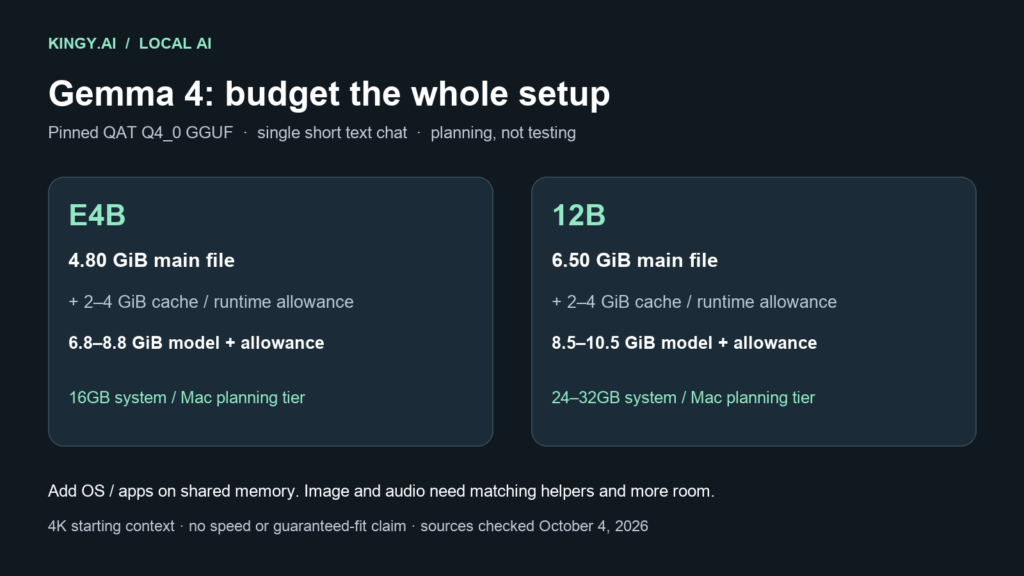
For a first local text-chat setup, start with Gemma 4 E4B on a 16GB machine, or Gemma 4 12B on a 24GB–32GB machine. Those are conservative buying and setup recommendations based on the exact four-bit files below and explicit headroom allowances. They are not measured minimums. An 8GB GPU is a tighter E4B experiment; a 12GB GPU gives the 12B model more room for short chats.
The distinction matters because “E4B” is not four billion stored parameters, and a model download is only part of the memory bill. Your context cache, runtime buffers, display, operating system and any image/audio components also need space.
Evidence scope: checked October 4, 2026. This is a source-reviewed hardware planning guide. Kingy has not benchmarked these two artifacts for this article. No tokens-per-second, battery-life or successful-load result is claimed. Google's release log dates 12B to June 3 and the original E4B family to March 31; this is a current practical guide to existing models. Google's release history
Choose the exact model before choosing the machine
Google lists E4B as 4.5 billion effective parameters, with about eight billion including embeddings. The 12B Unified model has 11.95 billion parameters. Both accept text, images and audio and produce text, but application support for each modality must be checked separately. E4B has a 128K advertised context window; 12B has 256K. Neither number establishes a laptop memory requirement. Google's model card
Use the instruction-tuned it variant for chat. Google publishes Apache 2.0-licensed official QAT checkpoints. QAT means quantization-aware training; an ordinary community four-bit conversion is a different artifact. We use Google's Q4_0 GGUF files as the starting point because their provenance and file sizes can be inspected directly. This choice is practical; we have not run a comparison that establishes a universally best quant. Official 12B QAT card, official E4B QAT card
The downloads we used for the memory calculation
Sizes below are binary GiB, calculated as bytes ÷ 1,073,741,824. They describe files, not measured peak RAM or VRAM. Revisions pin this article's evidence; a later file with a similar name needs its own check.
| Artifact | Pinned repository revision | Main GGUF | Multimodal helper |
|---|---|---|---|
| Google Gemma 4 E4B IT QAT Q4_0 | 4b4a2c1d584be7264f87aac328a1bc739ce81b6c |
4.80 GiB | 0.92 GiB |
| Google Gemma 4 12B IT QAT Q4_0 | 29d097773436b69ff9feafd636ab4cf873786537 |
6.50 GiB | 0.16 GiB |
The E4B file tree contains gemma-4-E4B_q4_0-it.gguf at 5,154,941,280 bytes. The 12B file tree lists the main file at 6,975,879,296 bytes. For image/audio use, keep the matching helper from the same revision; do not mix projectors across models.
Google's overview also provides approximate loading figures, including a 20% overhead assumption: 4.5GB for E4B Q4_0 and 6.7GB for 12B Q4_0. Its table uses GB and a general model estimate. Our recommendations use the specific GGUF files above, in GiB, with separate planning allowances. Do not treat those two bases as interchangeable or add Google's 20% twice. Google's memory overview
RAM, VRAM and unified-memory planning
For one text conversation starting at 4,096 context tokens, our planning envelope is: main GGUF size + 2–4 GiB reserved for cache, runtime and working buffers. This allowance is deliberately conservative and is not an architecture-derived or measured KV-cache size. On a shared-memory or CPU machine, reserve another 4–6 GiB for the operating system and ordinary applications. Close memory-heavy applications first.
| Setup | E4B QAT Q4_0 | 12B QAT Q4_0 |
|---|---|---|
| Model plus chosen 2–4 GiB runtime allowance | 6.8–8.8 GiB planning envelope | 8.5–10.5 GiB planning envelope |
| Dedicated GPU | 8GB is tight; prefer 12GB for headroom | Start with 12GB; 16GB gives more room |
| CPU/system RAM | Prefer 16GB total for a first short-chat setup | Prefer 24GB–32GB total |
| Apple Silicon unified memory | 16GB is the first sensible planning tier | Prefer 24GB–32GB; 16GB is a constrained experiment |
These tiers are estimates for the stated workload, not validated machine compatibility. A display using the same GPU reduces available VRAM. CPU offload moves part of the workload into system RAM; it does not make the memory disappear, and it can change speed substantially. A CPU-only load says nothing about whether the response time suits you.
For multimodal use, add the matching helper and allow further temporary input-processing buffers. Even that file addition is not a peak-memory measurement. More images, longer audio, larger batches and concurrent conversations need a new budget.
Which quant and runtime should you use?
GGUF on Windows, Linux or Apple Silicon: start with the official QAT Q4_0 artifact in a current compatible llama.cpp build. Its project supports local CPU/GPU execution; Google's QAT cards list the local GGUF ecosystem. Keep the runtime version in your notes. A familiar application's support for an older Gemma model does not prove it supports 12B Unified or its audio path. llama.cpp project
Ollama: its Gemma 4 catalog documents 12B and E4B packages. Inspect the selected package, digest and version before using it. The package sizes differ from Google's pinned QAT GGUF files, so recalculate the table for that package. This guide does not establish that a mutable Ollama tag is identical to our GGUF revision.
MLX on an Apple Silicon Mac: the community provides 12B IT four-bit and E4B IT four-bit conversions. Their inspected revisions are 73bcf09092aa277861d5a191b989b666f7f32e8f and 475b9088d29754a3379866cf5aeb6b41acd313c2, respectively. They are affine four-bit/group-64 conversions, not the official QAT GGUFs. Use a compatible MLX-VLM version and the model's actual configuration. We have not tested these conversions here.
Move to a larger quant only after recording a specific quality problem on your own task and confirming enough spare memory. Lower-bit variants can save space, but this article has no retained quality comparison that makes one a safe default replacement.
Start small, then inspect the allocation
Set one conversation and a 4K context first. Read the runtime's reported weight, cache and buffer allocations, then watch total memory while generating. A short successful load does not validate a long document, image batch or several simultaneous chats.
Gemma's hybrid attention makes a generic “layers × full context” cache calculation unreliable: some attention is local, and the runtime's allocation policy matters. Raising context to 128K or 256K therefore requires its own allocation check. If memory fails, reduce context and concurrency before reaching for a smaller quant. Keep enough free disk space for the model, helper and any download/cache copies.
For comparison with a separately measured larger-model workload, see our Qwen3.8/Qwen3.6/Gemma 4 31B RTX 4090 study. Those results belong to their recorded 31B artifacts and test conditions. They are not E4B or 12B measurements. Kingy Local Lab likewise separates historical observations from planning estimates; its existing Gemma 31B artifact warning remains relevant to that exact binding.