Source documents checked: October 4, 2026 (UTC). Previous update and verification labels: July 23, 2026.
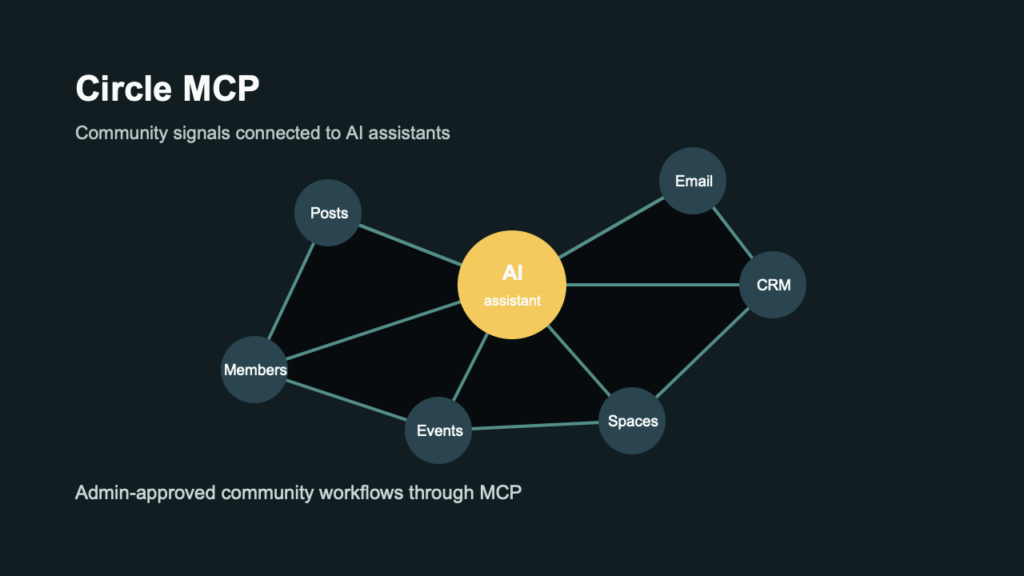
This guide follows official documentation; it does not report an authenticated integration test. The featured image is an editorial illustration, not a live connected community.
TL;DR: Circle MCP connects a Circle community to compatible AI tools so an administrator can query community data and run supported admin operations from chat. It is available on Circle Business plans and above.
What launched?
Circle published its MCP use-case guide on June 12, 2026. Circle’s product page lists Claude, ChatGPT, Gemini, and other MCP-compatible clients. Setup depends on the client’s remote-connector support, plan, and workspace controls; use Circle’s current documentation rather than assuming the June guide’s interface steps still apply.
Community data is most useful when an assistant can see the actual members, spaces, posts, events, and engagement signals behind a question. Circle MCP provides that context, but it also gives the connected assistant meaningful administrative reach.
What is Circle MCP?
Circle MCP can query community data and use operations exposed by Circle’s Admin API. Typical work includes finding inactive spaces, reviewing member activity, drafting outreach from live community context, and coordinating community data with other connected tools.
Key capabilities and questions
- Circle MCP lets authorized administrators query community data and use operations exposed by Circle’s Admin API from a compatible AI client.
Real use cases
- Identify inactive spaces or silent new members
- Draft personalized onboarding and retention messages from live community context
- Mine community posts for content strategy and course ideas
- Chain community data with CRM, email, or billing MCP connectors
What teams should review
For community operators: begin with reporting tasks such as identifying quiet spaces or recent member activity. Check the result in Circle before using it to drive outreach, moderation, or access decisions.
For administrators: only admins can authorize the connector. Circle’s current docs offer Read only, which hides write tools, or Full access, which permits administrative changes. Each admin chooses their own connection level. Client approval settings are an additional safeguard for Full access; keep member changes, content publication, access updates, and deletion actions behind explicit approval.
Pricing and free plan
Pricing: Circle lists MCP as a Business-and-above plan feature. On the source-check date, Business is advertised at US$199 per month with annual billing, before applicable taxes. Confirm the current price and limits on the official pricing page.
Usage: the MCP docs say each tool call counts as one Admin API v2 request; Business includes 5,000 monthly requests. The docs also list a rate limit of 2,000 requests per five minutes. Pricing lists extra-request charges and says API calls are part of combined AI credits, without defining a conversion here. Higher-tier names differ between pricing and quota docs. Confirm your account’s quota, credit treatment, and excess-request billing before automating; do not assume unlimited usage or automatic paid overages.
Free plan: no standalone free Circle MCP plan is documented. Circle promotes a general trial, but ongoing MCP access requires an eligible paid plan.
How to try it
From an eligible Circle account, follow the client-specific instructions in Circle’s MCP docs using https://app.circle.so/api/mcp. Sign in as an administrator, choose the intended community, and select Read only for the first connection. Check answers against Circle before enabling changes. To change access levels, disconnect and reconnect; the docs say this revokes the old connection. If you later select Full access, also require client approval for writes and deletions.
Comparison snapshot
| Question | Documentation snapshot |
|---|---|
| Primary job | Circle MCP lets authorized administrators query community data and use operations exposed by Circle’s Admin API from a compatible AI client. |
| Best fit | Small Business Owners, Creators, Marketers, Operators |
| Pricing status | Circle MCP is available on Business plans and above and is not priced as a separate product. Confirm the current eligible plan price on Circle’s official pricing page. |
| Free plan | No standalone free MCP plan; Circle Business or above is required |
| Access | Circle Business or above; admin-authorized connection. Start with Read only, which hides writes. Full access enables changes and should also use client approvals. |
| Main alternatives | Mighty Networks AI features, Discord bots plus custom MCP tooling, Slack workflows with AI assistants, Notion MCP for community operations docs, Zapier AI actions connected to community tools |
Alternatives
Compare Circle MCP with native community automation, custom API integrations, and general workflow tools on data coverage, approval controls, admin effort, and the sensitivity of member information exposed to the assistant. These options cover different layers: Mighty’s AI Cohost supports its own community strategy and setup; Slack workflows and Notion MCP operate on their respective workspaces. The Discord option needs a custom bot/MCP implementation, not an official Discord MCP established by this guide. Zapier offers Circle actions through its own MCP service; check its separate permissions and task billing.
- Mighty Networks AI features
- Discord bots plus custom MCP tooling
- Slack workflows with AI assistants
- Notion MCP for community operations docs
- Zapier AI actions connected to community tools
Risks and unknowns
Circle MCP’s Full access level exposes administrative actions; Read only hides write tools but still shares community information with the connected client. A mistaken prompt can affect members, content, spaces, or access groups if Full access writes are allowed without review. Confirm client approvals, administrator scope, and data-handling expectations before using it with a production community.
Should you try it?
Test Circle MCP if your team already runs a Circle community and wants reporting or routine admin work inside an AI client. Begin with a narrow read-only workflow, compare the output with Circle’s dashboard, and add approved actions one at a time.
FAQ
What does Circle MCP do?
Circle MCP lets authorized administrators query community data and use operations exposed by Circle’s Admin API from a compatible AI client.
Is Circle MCP free?
Circle MCP is available on Business plans and above and is not priced as a separate product. Confirm the current eligible plan price on Circle’s official pricing page.
Who is Circle MCP for?
Small Business Owners, Creators, Marketers, Operators
What are alternatives to Circle MCP?
Mighty Networks AI features, Discord bots plus custom MCP tooling, Slack workflows with AI assistants, Notion MCP for community operations docs, Zapier AI actions connected to community tools
Official links
Related Kingy AI links
The Kingy Brief
Get The Kingy Brief.
AI changes, original tests and one practical thing to try. Fridays at 09:00 Vancouver time.
Free · Double opt-in · Unsubscribe anytime
Sign up for The Kingy Brief on Beehiiv.
Signup help and newsletter schedule
Signup form provided by Beehiiv. After submitting, check your inbox for "Confirm your subscription to The Kingy Brief" and open its confirmation link. Check Spam or Promotions if you cannot find it.
Fridays at 09:00 Vancouver time: source-checked AI changes, original tests and one practical thing to try. We skip a week when there is not enough verified material. Free. Unsubscribe anytime.