Kingy Video Test
OpenClaw on UGREEN NAS: What the Video Proves + Secure Setup
Disclosure: UGREEN sponsored this coverage by supplying the NAS shown in the video for Kingy to keep. UGREEN paid no cash, had no editorial approval, and the original links could not earn Kingy a commission or account credit. A complete evidence audit and safer OpenClaw-on-NAS setup guide.
Disclosure: this video was sponsored.
Video published June 26, 2026. The snapshot records below are tied to that publication date; their latest verification date is July 26, 2026. Live data is labeled separately and updates from current KALI records.
Video
Exact moments from this test
Commercial relationship: unknown — No retained commercial-relationship fact; do not infer independence.
Where did Kingy explain the OpenClaw installation workflow on the UGREEN NAS?
At 5:03, Kingy explains launching the installer, selecting the workspace and allowed file paths, and generating the gateway token; the installer interface itself is not shown at this anchor.
Evidence boundary: Workflow explanation, not a visible installer demonstration or command-level reproducibility test.
Commercial relationship: unknown — No retained commercial-relationship fact; do not infer independence.
Where did Kingy show smart file search with OpenClaw?
At 5:53, he describes asking OpenClaw to find project documents by context instead of browsing folders.
Evidence boundary: This is an in-video scenario; the Atlas has not benchmarked retrieval accuracy.
Commercial relationship: unknown — No retained commercial-relationship fact; do not infer independence.
Does the NAS workflow always keep data local?
At 6:48, Kingy says data stays on the home network unless the user explicitly chooses a cloud model.
Evidence boundary: This is Kingy's stated architecture boundary, not an independent privacy or network audit.
Commercial relationship: unknown — No retained commercial-relationship fact; do not infer independence.
What was Kingy's verdict on the UGREEN NAS for OpenClaw?
He says it holds its own for file serving, streaming, backup, and running an OpenClaw agent, with unusually strong hardware specs.
Evidence boundary: A first-impression verdict; Kingy says a deeper review is still planned.
Commercial relationship: unknown — No retained commercial-relationship fact; do not infer independence.
Full evidence
Record what your NAS setup actually passed
A local acceptance worksheet with explicit passed, failed and untested outcomes, evidence paths and rollback records.
This new worksheet helps you record your own results. It is not the original filmed project. Its local checker flags missing entries and failed checks; it cannot independently verify your results.
- Use synthetic canary files; exclude private documents and tokens from the pack.
- Run denied-access checks as well as happy-path checks.
- If any boundary check fails, stop exposing the service and correct the configuration.
- An Ollama response alone does not establish a working OpenClaw deployment.
- The video does not prove a completed OpenClaw installation; this sheet records your own outcome.
Dated evidence: The source checks below retain their original dates. The new worksheet does not re-test provider access, pricing, compatibility or generation quality. Check current provider terms before starting paid work.
Useful next step
Download the OpenClaw verification pack
What should you verify before giving OpenClaw access to a NAS? Download the UGREEN verification worksheets and use the secure setup checklist to distinguish local processing from the external services and permissions the workflow can still involve.
OpenClaw-on-UGREEN verification worksheets and secure setup checklist—not proof of a completed OpenClaw deployment.
The video shows a capable UGREEN NAS, Docker, and a small Ollama model. It does not show a verified OpenClaw deployment. This companion separates the captured evidence from the narration, then gives you a safer, reproducible path based on the OpenClaw documentation reviewed July 28, 2026.
Verdict: powerful for careful self-hosters, wrong for one-click private AI
Best for: technically comfortable UGREEN NAS owners who want a self-hosted OpenClaw gateway, can restrict mounts and permissions, and will run the acceptance tests below. Skip it if you expect the stock 8 GB configuration to match hosted frontier models or want a maintenance-free appliance.
Historical pricing and access — checked July 28, 2026
- OpenClaw: the self-hosted software is available through the official project repository and container path; there is no per-seat OpenClaw subscription in this local setup. Hardware, storage, electricity and any optional cloud-model API usage remain separate costs.
- UGREEN NAS: hardware pricing and promotions vary by region, storage configuration and date. Check the linked UGREEN product page rather than relying on the expired offer shown in the video.
- Local models: Ollama can run locally without a hosted inference subscription, but each model has its own licence and hardware requirements. Cloud providers bill separately if you configure them.
What changed after filming
The OpenClaw deployment documentation reviewed July 28 described the project container image and provider configuration more clearly. Its security guidance also makes the trust boundary explicit: this is designed around one trusted operator, not a hostile multi-user tenancy. The practical conclusion has not changed—start with narrow mounts, no unnecessary host access, and a test model before connecting private data. The video’s sponsor promotion has expired, so this page does not repeat it as current pricing.
Download the UGREEN verification pack
This practical pack contains a NAS baseline worksheet, a copyable acceptance-test CSV and a concise README for documenting ports, mounts, model choice, rollback and evidence before you expose the service.
Download the free OpenClaw verification pack
The short version
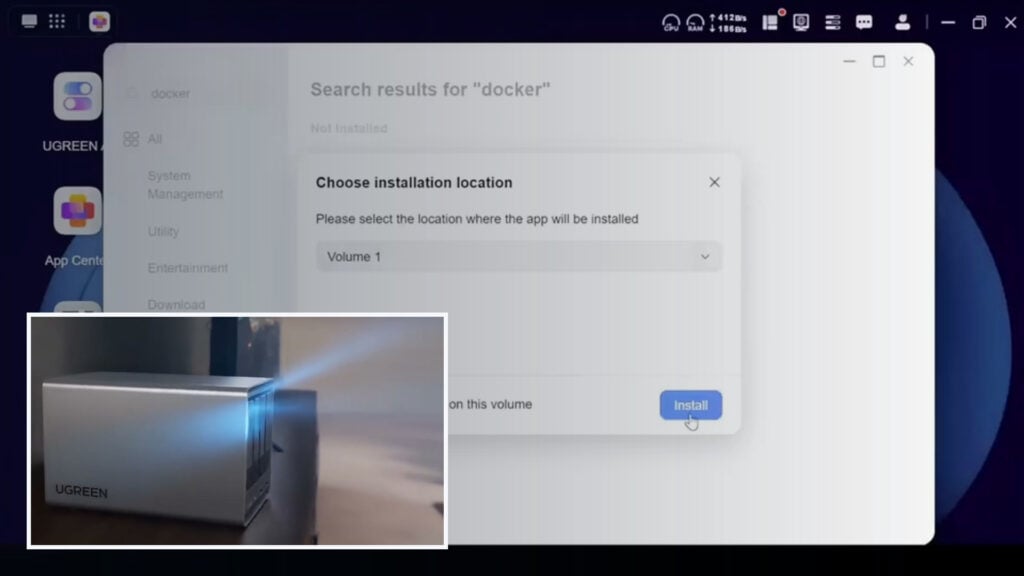
Kingy visibly verified three relevant things: Docker can be installed from UGOS Pro to Volume 1; a folder named Ollama exists under the NAS Docker directory; and llama3.2:latest produced a response in Open WebUI on a private LAN address.
The footage does not visibly verify OpenClaw. It never shows an OpenClaw container, version, image digest, Compose project, gateway configuration, workspace mount, model endpoint, logs, security audit, or a real end-to-end tool run. The search, invoice, and watch-folder inserts were made with a deterministic local Python simulation. They demonstrate the intended workflow, not an OpenClaw execution on the NAS.
This matters because a locally hosted gateway, a locally inferred model, and a cloud model API are three different architectures. “Self-hosted” describes where OpenClaw runs. It does not, by itself, prove where prompts are processed or where selected file content goes.
Complete timestamped video audit
The labels below mean: observed is visible in the owned footage; spoken is narration that the footage does not independently prove; and simulated is a locally generated demonstration rather than an OpenClaw run.
- 00:00–01:12 — Spoken: the NAS is introduced as a personal cloud that can run “private AI.” The storage explanation is broadly sound, but privacy depends on the model, channels, remote access, logs, backups, and tool permissions.
- 01:13–02:03 — Observed: the four-bay UGREEN NASync DXP4800 Pro and two M.2 slots are shown. Vendor-verified: UGREEN’s current product page lists four SATA bays, two M.2 slots, and up to 144 TB raw capacity under its stated drive assumptions. Drives are sold separately.
- 02:04–02:45 — Observed/spoken: 13th-generation Intel hardware, 8 GB DDR5, memory expansion, and 10GbE plus 2.5GbE are described. The current DXP4800 Pro specification identifies an Intel Core i3-1315U and 8 GB DDR5 expandable to 96 GB. The “over a gigabyte per second” line is a theoretical network-rate inference, not a measured transfer result from this video.
- 02:46–04:16 — Observed: UGOS Pro and general NAS/AI visuals. Spoken: OpenClaw is described as an always-on, self-hosted agent that can use cloud or local models. No OpenClaw runtime appears in this section.
- 04:17–04:40 — Observed and verified: UGOS Pro’s App Center is searched for Docker and the installer is pointed at Volume 1. This proves the Docker app installation step on the represented NAS.
- 04:41–05:02 — Observed: File Manager shows a Docker directory and an empty folder named
Ollama. Spoken but not shown: the narration calls this an OpenClaw workspace. The visible folder name and properties do not support that claim. - 05:03–05:25 — Spoken but not shown: searching the App Center for OpenClaw, launching an installer, selecting access paths, generating a gateway token, pulling a container, and opening the OpenClaw dashboard. None of those screens, values, logs, or container records are visible.
- 05:26–05:49 — Observed: Open WebUI at a private LAN address shows
llama3.2:latestand a successful text reply. Open WebUI is an optional chat front end; it is not the OpenClaw Control UI and does not prove that OpenClaw was connected to Ollama. - 05:50–06:40 — Simulated: file search, invoice extraction, and watch-folder results are shown in an “OpenClaw Demo Assistant.” The archived production package identifies these inserts as deterministic Python workflows with no external OpenClaw API call. The filenames and outputs are demo fixtures.
- 06:41–07:24 — Spoken, conditional: data stays on the home network unless a cloud model is selected. That can be true only if every model, embedding, channel, update, remote-access, telemetry, and tool path is local or deliberately controlled. The footage does not contain that network audit.
- 07:25–07:58 — Opinion and expired promotion: the hardware is recommended and viewers are referred to then-current deals. This guide removes the expired offer language and does not repeat an unmeasured competitive-performance claim.
Local hosting is not local inference
- Local hosting
- OpenClaw’s gateway, configuration, workspace, and logs run on the NAS. This gives the operator control over the host, but a configured cloud provider can still receive prompts, selected file content, tool output, or conversation context.
- Local model inference
- The model weights and inference service run on the NAS or another private-network machine, for example Ollama at a private endpoint. Model requests do not need to go to OpenAI or Anthropic, although channels, downloads, updates, DNS, and remote-access services may still create outbound traffic.
- Cloud model API
- OpenClaw can remain on the NAS while model requests go to a hosted provider. Files may stay stored locally, but whatever the agent includes in the request leaves the NAS and becomes subject to the provider’s service, account, logging, and retention terms.
- Open WebUI
- This is a separate chat interface for model servers such as Ollama. Seeing a reply in Open WebUI proves that the UI can reach that model endpoint; it does not prove OpenClaw can reach it or use its tools reliably.
Will this hardware and model work?
OpenClaw gateway and Docker: compatible. The represented DXP4800 Pro is an x86-64 system with an Intel Core i3-1315U. UGREEN documents Docker support for the model, and OpenClaw’s container path requires Docker Engine plus Compose v2, at least 2 GB of memory for an image build, and enough space for images and logs. That is a compatibility floor, not a performance guarantee.
llama3.2:latest: compatible for a narrow local test, with limits. Ollama currently maps that tag to the 3B, 2.0 GB, text-only model with a listed 128K context window and tool-use support. It is small enough to run without a discrete GPU, but the video records no tokens-per-second result, concurrent-NAS load, OpenClaw tool loop, context stress test, or failure rate.
Full local-agent quality: not verified and not recommended on the stock configuration without careful testing. OpenClaw’s current local-model guidance says reliable agent loops raise the hardware, context, and prompt-injection bar substantially. It warns that small or aggressively quantized models can be weaker against prompt injection. The stock 8 GB NAS can be useful for lightweight experimentation, but storage, Docker, indexing, and model workloads compete for the same memory and CPU. Treat a small local model as a constrained lab configuration, not as a private equivalent of a strong hosted model.
Other UGREEN models: do not generalize this guide to the whole lineup. Docker and virtual-machine support vary by model. Confirm the exact CPU architecture, available memory, UGOS Pro version, Docker/Compose support, and drive layout before using the steps below.
A reproducible OpenClaw-on-UGREEN setup
This is the setup the video should have captured. It follows the current official container, Ollama, and security documentation. Pin a tested OpenClaw release or image digest; do not copy a mutable latest deployment into production without recording what it resolved to.
1. Record the NAS baseline
- Record the exact NAS model, CPU, installed RAM, UGOS Pro version, Docker and Compose versions, storage pool/RAID, and free space.
- Update UGOS Pro and Docker, confirm a current backup, and create a dedicated low-privilege NAS account for the service.
- Create separate directories for OpenClaw configuration, workspace data, and authentication-profile secrets. Do not give the agent a broad home, photo-library, backup, or Docker-management mount.
2. Use the official OpenClaw image and setup flow
OpenClaw documents its repository setup script as the supported container path. It builds locally by default or accepts the official GitHub Container Registry image. The setup performs onboarding, asks for provider credentials, creates a gateway token, writes the required state, and starts the gateway with Compose.
Clone the official OpenClaw repository, enter the repository directory, and record the checked-out identity before setup:
cd openclaw

# Record the checked-out release or commit before deployment.
git rev-parse HEAD

# Use a tested version-specific tag or immutable digest.
export OPENCLAW_IMAGE="ghcr.io/openclaw/openclaw:<tested-version>"
export OPENCLAW_CONFIG_DIR="/volume1/docker/openclaw/config"
export OPENCLAW_WORKSPACE_DIR="/volume1/docker/openclaw/workspace"
export OPENCLAW_AUTH_PROFILE_SECRET_DIR="/volume1/docker/openclaw/auth-secrets"

./scripts/docker/setup.sh
The official image runs as user ID 1000. If the NAS reports permission errors, change only the three dedicated OpenClaw directories to the expected ownership. Never “solve” a mount problem by making the entire NAS volume world-writable.
3. Keep the gateway off the public internet
The container setup uses a LAN bind so the host can reach its published port. Binding and publishing are different controls: keep the published port restricted to the NAS host or trusted LAN, require a strong gateway token, and do not create a router port-forward. For remote administration, prefer an authenticated VPN such as Tailscale or an SSH tunnel. Do not expose an unauthenticated Control UI through a public reverse proxy.
Open the Control UI only through the approved path, then paste the generated gateway token from the protected environment file. Do not put that token in Compose YAML, screenshots, shell history, support tickets, or article images.
4. Choose one model path and document it
Local Ollama path: run Ollama as a separate service and make it reachable only on the private Docker network or trusted LAN. If it is a second service in the same Compose project, use the service hostname and the native Ollama port. If it runs on the Docker host, the official OpenClaw container docs use host.docker.internal because 127.0.0.1 inside the OpenClaw container means that container itself.
- Same private Compose network: use HTTP with host
ollamaand port11434. - Ollama on the NAS host: use HTTP with host
host.docker.internaland port11434.
Use Ollama’s native API endpoint—do not add /v1. During onboarding select Ollama and “Local only,” verify that /api/tags lists the exact pulled model, then set the model by its full reference.
docker compose run --rm openclaw-cli models list --provider ollama
docker compose run --rm openclaw-cli models set ollama/llama3.2:latest
Cloud API path: select the intended hosted provider during onboarding, store the API key through OpenClaw’s secret handling, and document which prompts, files, tool results, and conversation history can be sent to it. Calling this configuration “local AI” is inaccurate; only the gateway and storage are local.
5. Start with read-only workspace access
Mount one disposable test workspace first. Enable a read-only sandbox profile and deny write, edit, patch, shell, process, browser, and elevated tools until the workflow requires one of them. Add write access only to a dedicated output folder. Never mount the Docker socket into an agent sandbox.
OpenClaw assumes one trusted operator boundary per gateway. If mutually untrusted people need access, separate them into different gateways and preferably different NAS users or hosts. A shared gateway is not a hostile multi-tenant boundary.
6. Treat files as untrusted input
A PDF, email, webpage, or document can contain prompt-injection instructions. A system prompt alone is not a hard control. Use narrow tool policies, channel allowlists, explicit execution approvals, sandboxing, and a workspace-only filesystem boundary. For a family or team inbox, isolate direct-message sessions and review exactly who can trigger the agent.
7. Verify before granting real data
docker compose ps
docker compose logs --tail=200 openclaw-gateway
docker compose exec openclaw-gateway node dist/index.js health --token "$OPENCLAW_GATEWAY_TOKEN"

docker compose run --rm openclaw-cli doctor
docker compose run --rm openclaw-cli security audit
docker compose run --rm openclaw-cli security audit --deep

export OLLAMA_API_KEY=ollama-local
export MODEL=ollama/llama3.2:latest
export PROMPT="Reply with exactly: pong"
openclaw infer model run --local --model "$MODEL" --prompt "$PROMPT" --json
Then test a canary workspace containing harmless files and one tempting file outside the mount. Confirm the agent can read only the intended inputs, cannot access the out-of-scope file, cannot write outside the output directory, survives a container restart, and still reports the pinned image/version. Save redacted command output, configuration, input hashes, expected results, failure cases, and the security-audit report.
Publication-grade security checklist
- Identity: one trusted operator boundary per gateway; separate gateways for mixed-trust users.
- Network: no public port-forward; authenticated LAN/VPN/SSH access only; Control UI protected by a long random token.
- Secrets: provider keys and gateway tokens live in protected secret storage; no keys in Compose files, screenshots, logs, prompts, or Git.
- Filesystem: dedicated NAS user; narrow workspace mount; read-only first; dedicated write/output path; no broad home, backup, photo, root, or Docker-socket mount.
- Tools: deny shell, process, browser, elevated, and write tools until a tested workflow needs them; keep approvals enabled for consequential actions.
- Models: record the exact provider, endpoint, model tag/digest, context, tool support, and whether inference is local, cloud, or hybrid.
- Data flow: list model, embedding, channel, update, DNS, telemetry, remote-access, logging, and backup destinations.
- Verification: run
doctor, health, the normal and deep security audits, a model smoke test, an out-of-scope file test, restart/persistence tests, and a backup restore drill. - Operations: pin versions, monitor logs and disk growth, define an update/rollback window, rotate compromised credentials, and rerun security QA after every configuration change.
Secret and footage QA
The complete owned footage was inspected at interval and detail-frame level. The visible password field is masked. A private LAN address and local interface details appear in the Ollama/Open WebUI segment, but no readable provider API key or OpenClaw gateway token was found in the audited frames.
No interface frame containing the LAN address, account details, or demo filenames is embedded in this article. The featured image is a different owned-footage frame showing the NAS and UGOS Pro’s Docker installation dialog; it contains no credential, public IP, private IP, token, email address, or unmasked password. Any future use of the interface footage must redact private addresses, account names, paths, tokens, and customer-like demo data before upload.
Sponsorship and link disclosure
Kingy’s owner attestation confirms that UGREEN sponsored the coverage by supplying the NAS for Kingy to keep. UGREEN paid no cash, had no editorial approval, and the original links could not earn Kingy a commission or account credit. The original YouTube description contained campaign-attributed and time-limited shopping links but no plain-language relationship disclosure in the captured text; expired promotional wording is not reproduced here.
Primary sources
- OpenClaw Docker installation — official image, setup flow, prerequisites, persistence, container networking, health checks, and host-provider routing.
- OpenClaw gateway security — trust model, security audit, prompt injection, workspace boundaries, sandboxing, tools, and exposure controls.
- OpenClaw exposure runbook — preflight and rollback checks for remote access or network changes.
- OpenClaw’s Ollama provider guide — local, cloud, and hybrid modes; discovery; endpoint rules; and model smoke tests.
- OpenClaw local-model guidance — hardware and prompt-injection cautions for small or quantized models.
- Ollama’s Llama 3.2 model record — current tag mapping, size, context, text modality, and listed tool capability.
- UGREEN DXP4800 Pro product page — current CPU, memory, storage, networking, and Docker/VM specifications.
- UGREEN software and app support — UGOS Pro and model-specific Docker/VM support boundaries.
Open the verified setup and security checklist
What the download contains — checked September 19, 2026
The existing ZIP opens successfully and contains a README, a blank NAS/deployment baseline worksheet and 15 blank acceptance-test rows. No executable installer or completed deployment result is included. The checks have not been run against a NAS for this update. The July 28 source review and owner-provided sponsorship disclosure above remain the evidence boundary; no fresh compatibility or security certification is implied.
The Kingy Brief
Get The Kingy Brief.
AI changes, original tests and one practical thing to try. Fridays at 09:00 Vancouver time.
Free · Double opt-in · Unsubscribe anytime
Sign up for The Kingy Brief on Beehiiv.
Signup help and newsletter schedule
Signup form provided by Beehiiv. After submitting, check your inbox for "Confirm your subscription to The Kingy Brief" and open its confirmation link. Check Spam or Promotions if you cannot find it.
Fridays at 09:00 Vancouver time: source-checked AI changes, original tests and one practical thing to try. We skip a week when there is not enough verified material. Free. Unsubscribe anytime.
Keep checking the evidence
Current Product Facts
These links resolve only to approved public Product Facts records. Unresolved records are omitted.
As of publication
These values come only from the verified, write-once snapshot stored for this video. Current tool values are never substituted here.
OpenClaw
- Pricing at publication
- Software: Open-source software under the MIT license; no software price was stated in the video; Separate Costs: NAS hardware, storage, electricity, model APIs, and third-party services are separate.
- Features at publication
- Release Record: OpenClaw release 2026.6.6 was published before the video date; Video Scope: The video names local hosting plus cloud and Ollama model options, but does not reveal or visibly prove an installed OpenClaw version.
Historical record date: June 26, 2026. Snapshot verification date: July 26, 2026.
Live now
These modules read the current KALI tool records. Their verification dates are current-record dates, not historical evidence.
OpenClaw
Current pricing
- Pricing
- Global: MIT source $0; hardware, models and hosting cost extra
- Free plan
- Yes
Current record verification date: July 26, 2026. This identifies the current record only; it is not historical evidence.
Current feature summary
- What it does
- An open-source personal-agent framework connecting models, tools and messaging/workspace integrations.
- Best for
- Technical creators who want a self-hosted assistant and can manage permissions, model costs and updates.
- API
- Yes
- Open source/open weight
- Yes
Current record verification date: July 26, 2026. This identifies the current record only; it is not historical evidence.
Verification & Sources
- Evidence state
- Recheck due
- Sources
- 3 sources
- Freshness
- Needs recheck: checked July 26, 2026
- Last verified
- July 26, 2026
- Last updated
- October 22, 2026
What this evidence state means
- Definition
- The claim was previously checked, but its review window expired or a material change may have invalidated it.
- Required provenance
- The prior evidence and check date are retained, together with the expiry or change signal that triggered recheck.
- Owner
- Kingy freshness queue owner and assigned editorial reviewer
- Freshness rule
- This is already outside its freshness rule. It must not be presented as current until reviewed against current evidence.
- Disputes and corrections
- Use “Suggest a correction” on the record. Kingy editorial reviews the cited evidence, records material corrections, and changes or removes the state when it is not supported.
Key source checks
Suggest a correction
What's changed since this video
Compare the verified publication snapshot with the current KALI record. This side-by-side view does not claim changes that the evidence cannot verify.
OpenClaw
At publication
OpenClaw
- Pricing at publication
- Software: Open-source software under the MIT license; no software price was stated in the video; Separate Costs: NAS hardware, storage, electricity, model APIs, and third-party services are separate.
- Features at publication
- Release Record: OpenClaw release 2026.6.6 was published before the video date; Video Scope: The video names local hosting plus cloud and Ollama model options, but does not reveal or visibly prove an installed OpenClaw version.
Historical record date: June 26, 2026. Snapshot verification date: July 26, 2026.
Current record
Current pricing
- Pricing
- Global: MIT source $0; hardware, models and hosting cost extra
- Free plan
- Yes
Current record verification date: July 26, 2026. This identifies the current record only; it is not historical evidence.
Current feature summary
- What it does
- An open-source personal-agent framework connecting models, tools and messaging/workspace integrations.
- Best for
- Technical creators who want a self-hosted assistant and can manage permissions, model costs and updates.
- API
- Yes
- Open source/open weight
- Yes
Current record verification date: July 26, 2026. This identifies the current record only; it is not historical evidence.
Canonical tool guides
Use the canonical tool, pricing, and comparison pages for the latest entity-level guidance.