What is Unabyss?
Every serious AI user eventually runs into the same quiet frustration: the model is smart, but it does not know enough about your world.
You explain your company once in ChatGPT. Then again in Claude. Then again in Cursor. Then again in a coding agent. You paste the same product positioning, the same writing preferences, the same customer notes, the same “please don’t do it that way” instructions.
The issue is not that AI tools lack capability. The issue is that context is fragmented.
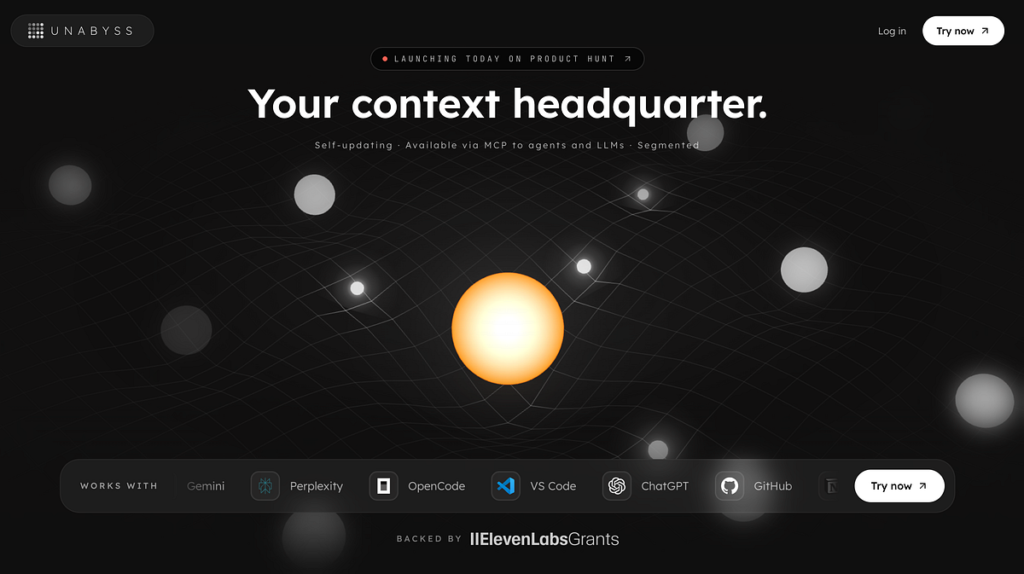
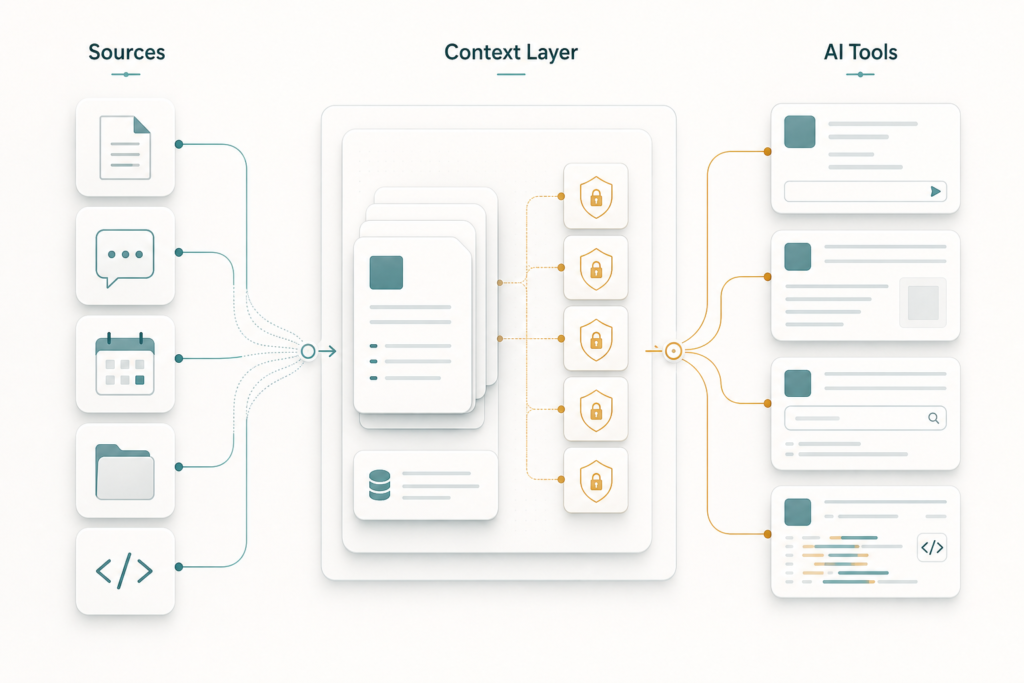
Unabyss is a new product trying to solve that specific problem. Its own positioning is direct: “the universal context layer for AI tools.” In practical terms, Unabyss connects to the apps where your working context already lives, structures that information into usable context, and exposes it to AI tools through Model Context Protocol, or MCP.
The useful way to understand Unabyss is not as “AI memory” in the vague sense. It is better understood as a context infrastructure layer: a place where identity, preferences, company knowledge, documents, conversations, and source-specific facts can be organized, permissioned, refreshed, and made available to multiple AI tools.
That distinction matters.
The Problem: AI Context Is Scattered
Most AI tools now have some version of memory, projects, custom instructions, files, or connected apps. Those features help, but they usually stay inside one product.
A ChatGPT memory does not automatically help Claude. Claude Projects do not automatically inform Cursor. A .cursorrules file does not help Perplexity. A Notion knowledge base does not automatically become usable, scoped context inside a coding agent unless you wire it up.
Unabyss frames this as “context chaos”: your work is spread across Slack, Gmail, Notion, GitHub, Google Drive, calendars, meeting transcripts, documents, and personal notes. Meanwhile, every AI client starts with only what it can see in that session or what you manually provide.
That creates three practical costs:
| Problem | What It Looks Like | Why It Matters |
|---|---|---|
| Repetition | You keep re-explaining your role, company, tone, goals, and constraints | Time gets wasted before useful work begins |
| Fragmentation | Different AI tools know different things | Output quality varies across tools |
| Over-sharing | You paste large files or broad context manually | Sensitive or irrelevant data can enter the model prompt |
Unabyss’s thesis is that context should be extracted once, structured clearly, kept current, and shared selectively.
Where MCP Fits
MCP is the important technical layer underneath the story.
Anthropic introduced Model Context Protocol in November 2024 as an open standard for connecting AI assistants to external systems where data lives: tools, repositories, business apps, files, and development environments. The official MCP documentation describes it as an open-source standard for connecting AI applications to external systems such as local files, databases, tools, and workflows.
In MCP architecture, AI applications can act as clients, while external systems expose data or capabilities through MCP servers. That makes it possible for different AI tools to retrieve context through a common interface instead of each vendor needing a bespoke integration.
Unabyss uses MCP as the delivery mechanism. According to its site, you connect sources once, generate a token for an MCP host, plug in tools such as Claude Code, Cursor, OpenClaw, Perplexity, Codex, or other compatible agents, and then choose access levels for what the tool can retrieve.
Here is the simplified shape:
flowchart LR
    A[Work apps: Gmail, Slack, Notion, GitHub, Drive, Calendar] --> B[Unabyss context extraction]
    B --> C[Structured context files and segments]
    C --> D[Permission and sensitivity layer]
    D --> E[MCP server]
    E --> F[Claude]
    E --> G[Cursor]
    E --> H[Codex]
    E --> I[Other MCP-compatible tools]
The promise is not that MCP magically makes AI correct. It does not. MCP is a connection standard. Unabyss’s value, if it works well, is in the layer before the connection: extracting, cleaning, segmenting, refreshing, and permissioning context so AI tools receive the right slice instead of a messy dump.
What Unabyss Says It Does
Based on the Unabyss website and its Product Hunt launch page, the product has five core ideas.
First, it connects to everyday sources. The site lists tools and platforms including GitHub, Notion, Slack, X/Twitter, LinkedIn, Gmail, Google Drive, Google Calendar, OneNote, Fathom, Fireflies, tl;dv, Granola, Claude, Cursor, ChatGPT, Codex, VS Code, Gemini, and Perplexity. The site also says it supports “hundreds of integrations,” though the exact integration list should be checked inside the product before relying on it.
Second, it extracts and structures context. On Product Hunt, Unabyss describes this as turning source data into clean, layered files such as persona.md, voice.md, and company.md. This is an important product choice. Human-readable context files are easier to inspect and correct than opaque “memory” hidden inside a model or app.
Third, it segments context. Unabyss says incoming context is tagged by topic, confidence, sensitivity, source app, and personal versus professional axes. The practical goal is retrieval precision: when an AI asks for context, it should get the relevant bucket, not your whole life history.
Fourth, it adds a permission layer. The site describes four retrieval scopes: no restriction, exclude private information, exclude company confidential information, or exclude an entire source app. The meaningful part is that these filters are supposed to apply at retrieval time, before blocked context reaches the model.
Fifth, it exposes context through MCP and exports. The MCP server is for live AI tool access. The one-click exports are for outputs such as investor updates, meeting prep, ideal customer profiles, and bios.
What It Is Not
It is worth being precise here.
Unabyss is not an AI model. It does not replace Claude, ChatGPT, Gemini, Cursor, or Codex.
It is not an agent framework. It does not appear to be a planner that decides goals and executes complex workflows by itself.
It is not simply a vector database. Vector search may be part of how retrieval works, but the product positioning is broader: extraction, segmentation, permissions, MCP delivery, and exports.
It is also not a guarantee that AI tools will always use context correctly. Unabyss’s own terms say that once context data is distributed to third-party AI tools via MCP, those tools are governed by their own terms and behavior. That is a sober and important boundary.
Why The Approach Is Interesting
The most interesting part of Unabyss is the “pre-extracted, user-owned, cross-platform” framing from its Product Hunt launch.
Many memory systems learn passively from interactions. That can be convenient, but it can also be hard to inspect. You may not know what the system thinks it knows about you. You may not know which memory caused a bad answer. You may not have a clean way to correct a specific fact.
A structured context layer is different. If context is represented as files, topics, scopes, and source-linked segments, users have a better chance of understanding and governing it.
That matters for high-value work. A founder does not just need an AI tool to “remember” that the company sells to B2B teams. They need the assistant to know the current positioning, pricing caveats, investor tone, customer objections, and which internal information should not leak into a public draft.
A coding team does not just need a bot to know the repository. It needs the assistant to pick up recent GitHub changes, product decisions from Slack, design notes from Notion, and repo-specific conventions without copying everything into every prompt.
A marketer does not just need brand voice. They need campaign history, audience segments, past winners and losers, approval constraints, and channel-specific patterns.
Unabyss is aimed at that middle layer: not the model, not the source apps, but the operating context between them.
The Practical Workflow
A reasonable Unabyss workflow would look like this:
sequenceDiagram
    participant User
    participant Sources as Work Sources
    participant Unabyss
    participant MCP as MCP Server
    participant AI as AI Tool

    User->>Unabyss: Connect approved sources
    Sources->>Unabyss: Provide documents, notes, messages, metadata
    Unabyss->>Unabyss: Extract, tag, segment, refresh
    User->>Unabyss: Set access rules
    AI->>MCP: Request relevant context
    MCP->>Unabyss: Retrieve scoped context
    Unabyss->>AI: Return only allowed context
    AI->>User: Produce grounded output
The key question is not “does this sound useful?” It does. The real question is whether the product can do four difficult things reliably:
- Extract signal without pulling in noise.
- Keep context fresh without introducing stale assumptions.
- Respect permissions consistently.
- Make errors visible and correctable.
Those are not small problems.
The Hard Part: Freshness
A context layer can become dangerous if it is confidently outdated.
On Product Hunt, one user asked how Unabyss handles drift: if your LinkedIn, Notion, or positioning changes over time, what triggers re-extraction? A Unabyss maker replied that they refresh social data at least once per day unless users opt out, compare it with previously seen data, and use source-change detection, refresh schedules, and manual user signals.
That is a useful answer, but it should not be interpreted as a solved problem for every kind of context. Some changes are explicit: a job title changes, a document is updated, a pricing page is edited. Other changes are subtle: your tone evolves, your customer profile shifts, your company strategy changes before anyone updates the canonical document.
So the buyer question is not just “does Unabyss update?” It is:
| Risk | Question To Ask |
|---|---|
| Stale context | Can I see when this context was last refreshed? |
| Conflicting sources | Can I choose the canonical version? |
| Sensitive data | Can I test what a given AI tool is allowed to see? |
| Bad extraction | Can I edit or delete the extracted context? |
| Auditability | Can I trace output back to the underlying source? |
The Product Hunt discussion suggests Unabyss is aware of these issues. The product should still be evaluated hands-on before being trusted with sensitive business workflows.
Token Efficiency And Latency
Unabyss claims on its site that it can produce the same response with “up to 10× fewer tokens” by extracting only the lines that answer the question rather than dumping loosely matched chunks into the prompt. Treat that as a vendor claim, not an independently verified benchmark.
The underlying idea is sound: scoped retrieval should usually be more efficient than broad retrieval. If an AI assistant needs your company tone, it should not receive your entire Gmail history. If it needs a sprint decision, it should not receive every product document.
But MCP calls can add latency. A Unabyss maker acknowledged on Product Hunt that latency is “slightly worse,” as with MCP tool calls, while arguing that token efficiency improves as the knowledge base grows.
That tradeoff is plausible: pay a small retrieval cost to avoid large, repeated prompt payloads. Whether it is worth it depends on workflow size, retrieval quality, and how often you switch tools.
Who Unabyss Is For
Unabyss is probably most relevant for people and teams who already use several AI tools every day.
That includes founders who need consistent company context across writing, fundraising, hiring, customer work, and planning. It includes builders who move between Cursor, Claude Code, Codex, GitHub, docs, and chat. It includes operators whose decisions live across email, meeting transcripts, Slack, and dashboards. It includes marketers and GTM teams that need brand voice, customer context, and campaign memory available in multiple tools.
It is probably less useful if you use one AI tool casually, rarely repeat context, or do not want to connect sensitive work apps to another service.
The Security And Governance Lens
Any product that connects Gmail, Slack, GitHub, Drive, calendars, and AI tools deserves serious scrutiny.
Unabyss says users control what context is shared with external tools, and its terms state that context data remains the user’s property. The terms also say context may be processed by AI models, including third-party services, to provide features, and that context data is not used to train Unabyss’s or third-party AI models.
Those are important statements, but they are not a substitute for reviewing the actual privacy policy, integration permissions, enterprise controls, retention settings, and deletion behavior. For teams, the bar should be higher: SSO, audit logs, role-based controls, source-level permissions, data residency, retention policy, and a clear incident response posture.
The product category is powerful because it sits close to sensitive context. That is also why it needs trust.
Bottom Line
Unabyss is best understood as an MCP-native context layer for AI tools. It tries to solve a real workflow problem: your context is spread across apps, while your AI tools are increasingly numerous and disconnected.
The product’s practical promise is simple: connect sources once, structure the useful context, keep it updated, and let different AI tools retrieve only what they are allowed to see through MCP.
That is a strong architectural idea. It is also an execution-heavy one. The value will depend less on the landing-page promise and more on the everyday details: extraction quality, freshness, permission reliability, auditability, latency, and how easy it is to correct the system when it gets your context wrong.
For serious AI users, Unabyss is worth watching because it points toward where the AI stack is going. The model is only one layer. The context around the model may become just as important.
The Kingy Brief
Get The Kingy Brief.
AI changes, original tests and one practical thing to try. Fridays at 09:00 Vancouver time.
Free · Double opt-in · Unsubscribe anytime
Signup help and newsletter schedule
Signup form provided by Beehiiv. After submitting, check your inbox for "Confirm your subscription to The Kingy Brief" and open its confirmation link. Check Spam or Promotions if you cannot find it.
Fridays at 09:00 Vancouver time: source-checked AI changes, original tests and one practical thing to try. The weekly restart begins October 9, 2026. We skip a week when there is not enough verified material. Free. Unsubscribe anytime.