TL;DR
- Image-to-video prompts should describe the image, the desired motion, and what must stay unchanged.
- Beginners should use one camera move and one subject action per prompt.
- Negative prompts help reduce obvious visual problems but do not guarantee perfect results.
- The Kingy AI Video Prompt Generator includes a safer image-to-video prompt version for this exact workflow.
Choose that one move in the AI Camera Simulator to see the path, set the lens and timing, and copy a clean direction.
The beginner image-to-video formula
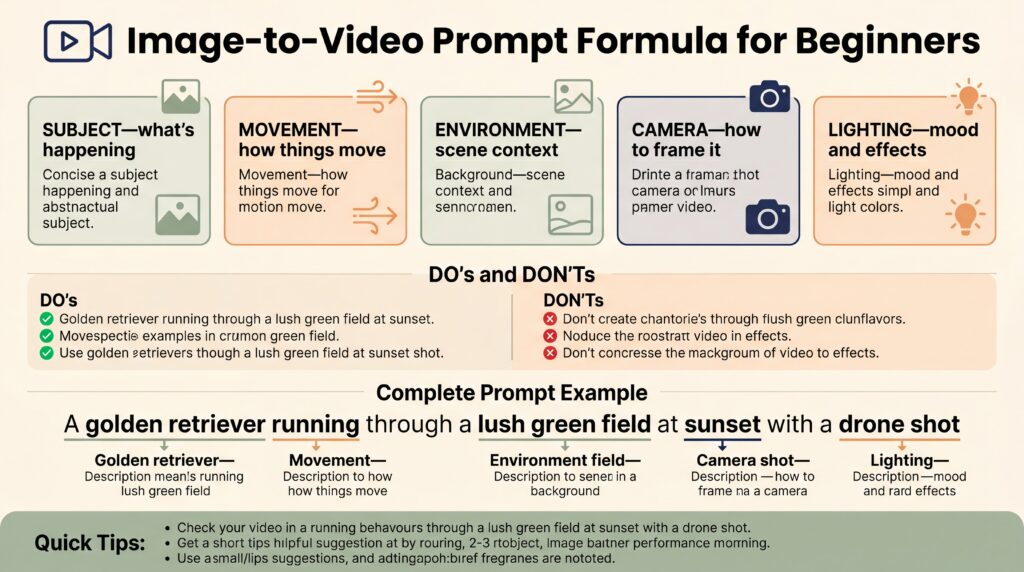
Describe the image + preserve the important details + add one motion idea + add one camera move + choose lighting/style/mood + set duration/aspect ratio + add negative promptThat formula works because image-to-video models already have a visual reference. Your prompt should guide motion and protect the source image, not rewrite the whole scene from scratch.
Step-by-step example
Original idea
Make my product image cinematic.Better image-to-video prompt
Use the reference image as the first frame. Preserve the product shape, color, logo, label placement, and composition. Add a slow dolly-in camera move while soft studio light moves gently across the product surface. Keep the background clean and minimal. Premium commercial style, calm mood, 8 seconds, 9:16. Negative prompt: warped logo, changed product shape, unreadable text, flicker, bad reflections, low resolution.Copyable templates
Product template
Use the reference image of [product]. Preserve [shape/logo/color/material/key details]. Add [single motion idea] with [camera movement]. Lighting: [lighting]. Style: [style]. Mood: [mood]. Duration: [duration]. Aspect ratio: [ratio]. Negative prompt: blurry, warped text, changed logo, inconsistent product shape, flickering, bad reflections.Portrait template
Use the reference portrait as the first frame. Preserve the person identity, face shape, clothing, pose, and composition. Add subtle natural motion: blinking, breathing, and a slight camera push-in. Lighting stays consistent. Realistic cinematic style, calm mood. Negative prompt: changed face, distorted eyes, extra teeth, warped hands, flickering, plastic skin.Scene template
Use the reference scene as the starting frame. Preserve the environment, composition, colors, and main subject. Add subtle environmental motion such as moving light, drifting atmosphere, or gentle camera parallax. Keep the scene stable and realistic. Negative prompt: new objects, changing architecture, flicker, warped perspective, low resolution.Beginner mistakes to avoid
- Do not ask for a totally different scene if you want to preserve the image.
- Do not use five camera moves in one short clip.
- Do not rely on AI video tools for exact readable typography.
- Do not skip the manual image description. The prompt still matters.
Use the Kingy AI Video Prompt Generator
Want to turn one idea into multiple prompt versions faster? Use the Kingy AI Video Prompt Generator to create short, detailed, image-to-video, camera direction, Shorts, product commercial, and safer prompt versions.
For AI companies and founders
Launching an AI video tool, creator app, model, workflow, or agent product? Kingy AI helps AI companies reach creators, founders, marketers, and AI tool buyers with practical launch coverage and creator-first education.
Related AI video tools
Want to move from article examples into working prompt assets? Use the Kingy AI video tool hub:
- AI Video Prompt Generator
- AI Video Prompt Examples Library
- AI Video Script Generator
- Image-to-Video Shot List Generator
- YouTube Shorts Hook Generator
- AI Product Commercial Prompt Generator
FAQ
What is image-to-video prompting?
Image-to-video prompting uses a still image as a visual reference and a text prompt to guide motion, camera movement, style, and constraints.
How long should an image-to-video prompt be?
Long enough to define the image, motion, and preservation rules. If results drift, make the prompt simpler.
Do negative prompts always work?
No. They are useful guardrails, but every output should be reviewed before posting or sharing.
Sources checked
Last checked: June 4, 2026.
Choose the next AI-video workflow
Keep this page’s exact job, then move to the adjacent prompt or production workflow that matches what you are making.
The Kingy Brief
Get future Kingy Brief editions.
Source-checked AI changes, original tests and one practical thing to try.
Free · Choose your subjects · Double opt-in · Unsubscribe anytime
Regular sending is paused; no restart date is set.