Claude Tag is official. Anthropic announced it on June 23, 2026 as a new way to bring Claude into Slack, not just as a chatbot, but as a shared AI coworker that can read channel context, remember useful information, use approved tools, and follow up on work over time.
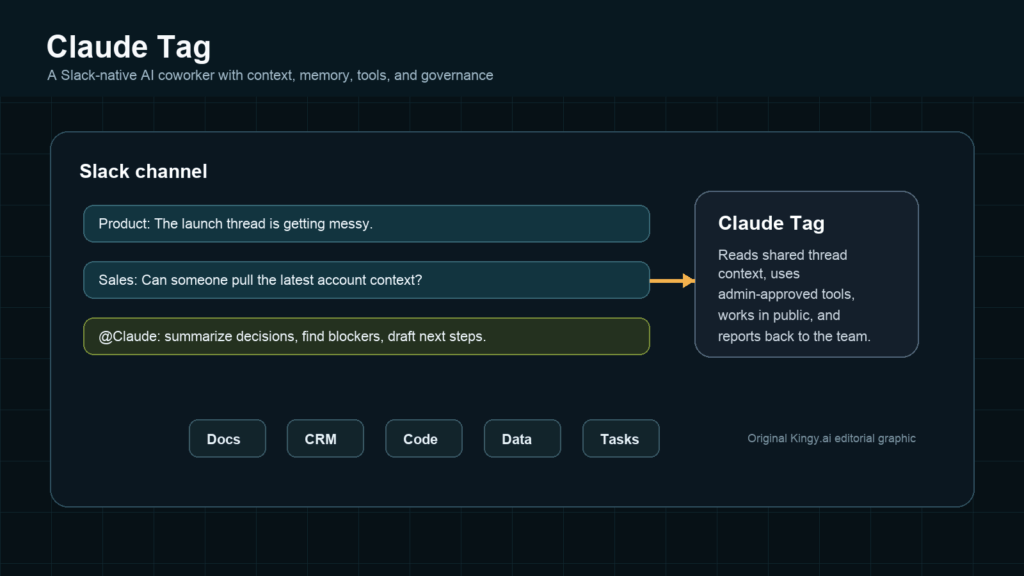
Image note: Claude Tag puts Anthropic’s AI agent model directly into shared Slack channels, where context and permissions matter as much as the model.
The important part is not “AI in Slack.” We have had Slack bots for years. The important part is the direction: persistent, collaborative workplace agents that sit inside the conversation, understand what the team is doing, and can move work forward across tools.
That makes Claude Tag worth paying attention to if you run a business, build AI products, manage a team, create content, or write software. It is one of the clearest signs yet that the AI assistant market is moving away from private chat boxes and toward agents that live inside the tools where work already happens.
What Is Claude Tag?
Claude Tag is Anthropic’s new Slack-based AI coworker experience. A team can bring Claude into a Slack channel by mentioning @Claude, then ask it to summarize a thread, pull context, organize decisions, investigate a task, query approved tools, draft work, or follow up later.
Anthropic says Claude Tag starts in Slack because Slack is a natural home for collaborative work. The company’s stated goal is to expand the idea into more places teams work, but Slack is the confirmed launch surface today.
Confirmed facts:
- Claude Tag launched on June 23, 2026.
- It is available in beta for Claude Enterprise and Claude Team customers.
- It works in Slack today.
- Users can tag
@Claudein a channel or thread. - Claude can read shared context in the channels it is granted access to.
- Claude can remember relevant channel and workspace context, with boundaries and admin controls.
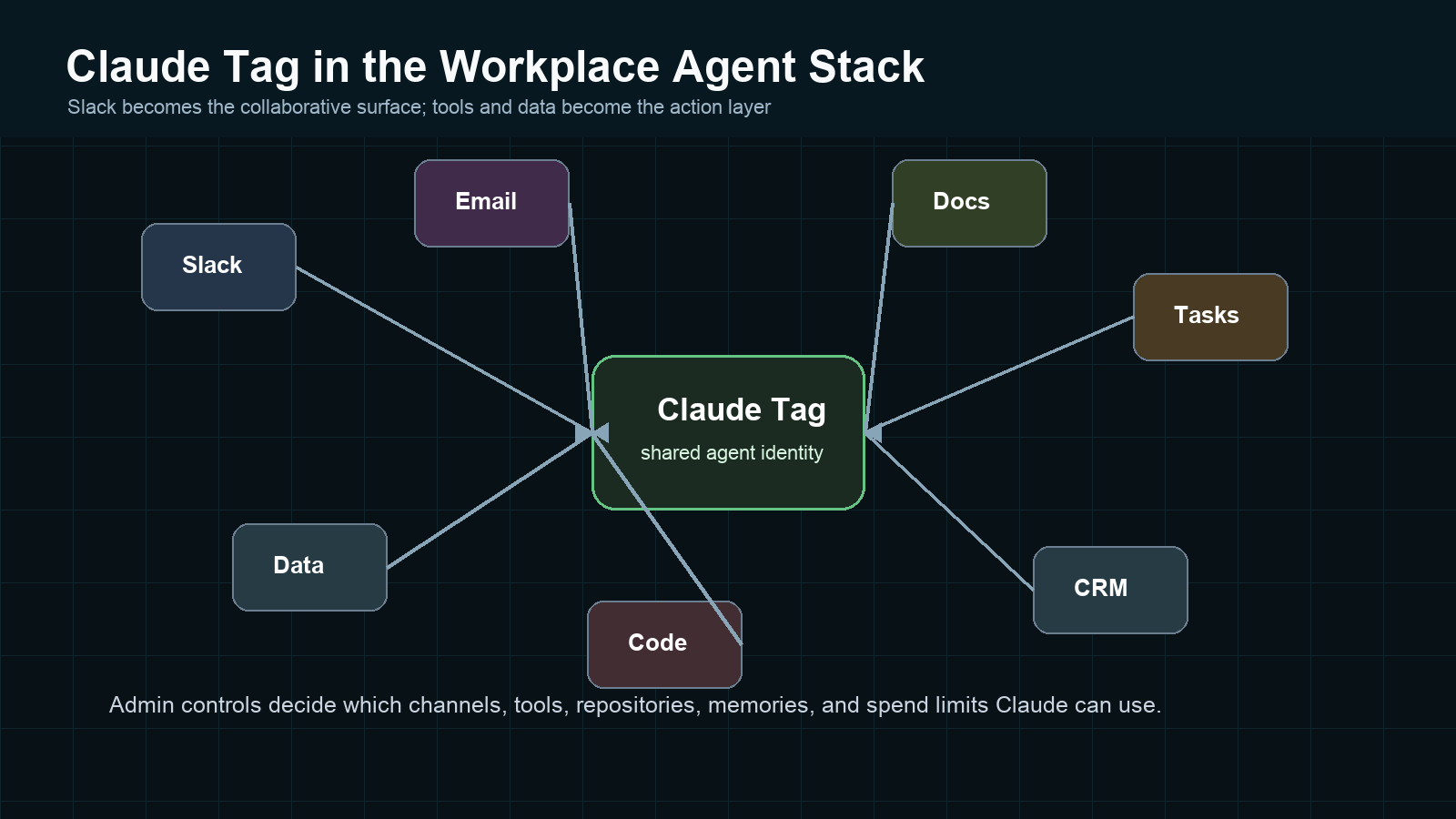
- Admins decide which tools, repositories, credentials, channels, spend limits, and member access rules apply.
- Anthropic says Claude Tag replaces the existing Claude in Slack app, with admins able to opt in to migrate.
- Claude Tag works with Opus 4.8, according to Anthropic’s launch post.
Likely implication:
This is Anthropic testing a more durable workplace agent interface. The interface is not “open a chatbot and ask for help.” It is “tag the agent into the room where the work is happening.”
How Claude Tag Works
The basic user flow is simple. Someone tags @Claude in Slack and describes a task. Claude reads the current thread or channel context, plans the work in stages, uses whatever tools admins have connected, and posts results back in the Slack thread.
Anthropic’s product page says Claude can be used to catch up on long threads, pull numbers, draft PRs, prepare for calls, and monitor channels. The Help Center says channel tagging works differently from DMs: in channels, Claude acts under the organization’s identity and uses the tools and access configured for that channel. In DMs and the assistant panel, Claude uses the personal capabilities enabled in the user’s own Claude account.
That distinction matters. A private AI assistant is a single-player tool. Claude Tag is designed as a multiplayer agent. Everyone in a channel sees the same Claude activity, and anyone in that channel can steer or continue the task.
What Claude Tag Can Do
Based on Anthropic’s own launch materials and docs, Claude Tag can do several categories of work:
- Thread catch-up: summarize long conversations, identify decisions, open questions, and stakeholders.
- Channel memory: retain useful context across threads and days, subject to workspace and channel boundaries.
- Tool use: work with approved tools, APIs, repositories, data sources, and skills that admins configure.
- Proactive follow-up: when enabled, watch a channel, surface stalled work, flag urgent items, and tag people back.
- Scheduled work: run recurring digests or standing routines without a new mention every time.
- Long-running tasks: continue work asynchronously and return when done or when human input is needed.
- Coding tasks: Anthropic says internal usage includes writing code, chasing bugs, and creating PRs. Claude Code remains the coding-specific product, but Claude Tag is described as part of Claude Code’s evolution.
Some examples from Anthropic’s product page are explicit, including prompts like “What got decided here and what’s still open?”, “Top 20 enterprise accounts by spend, last 7 and 28 days”, and “Fix the bug in this thread and open a draft PR.”
Here are practical hypothetical prompts a business team might try, assuming Claude has the needed permissions:
@Claude summarize this thread and list the decisions.@Claude turn this discussion into an action plan.@Claude identify blockers in this project.@Claude draft a client update based on this thread.@Claude compare the options discussed above.@Claude remind us what we decided last week if available.
Those are hypothetical examples unless your workspace has the right permissions and memory enabled. The safe habit is to ask Claude what it can access in a channel before handing it a serious task.
Why Slack Matters
Slack is where a lot of workplace context already lives: launch debates, customer escalations, bug reports, incident threads, product decisions, sales handoffs, marketing approvals, founder updates, and “does anyone remember why we did this?” archaeology.
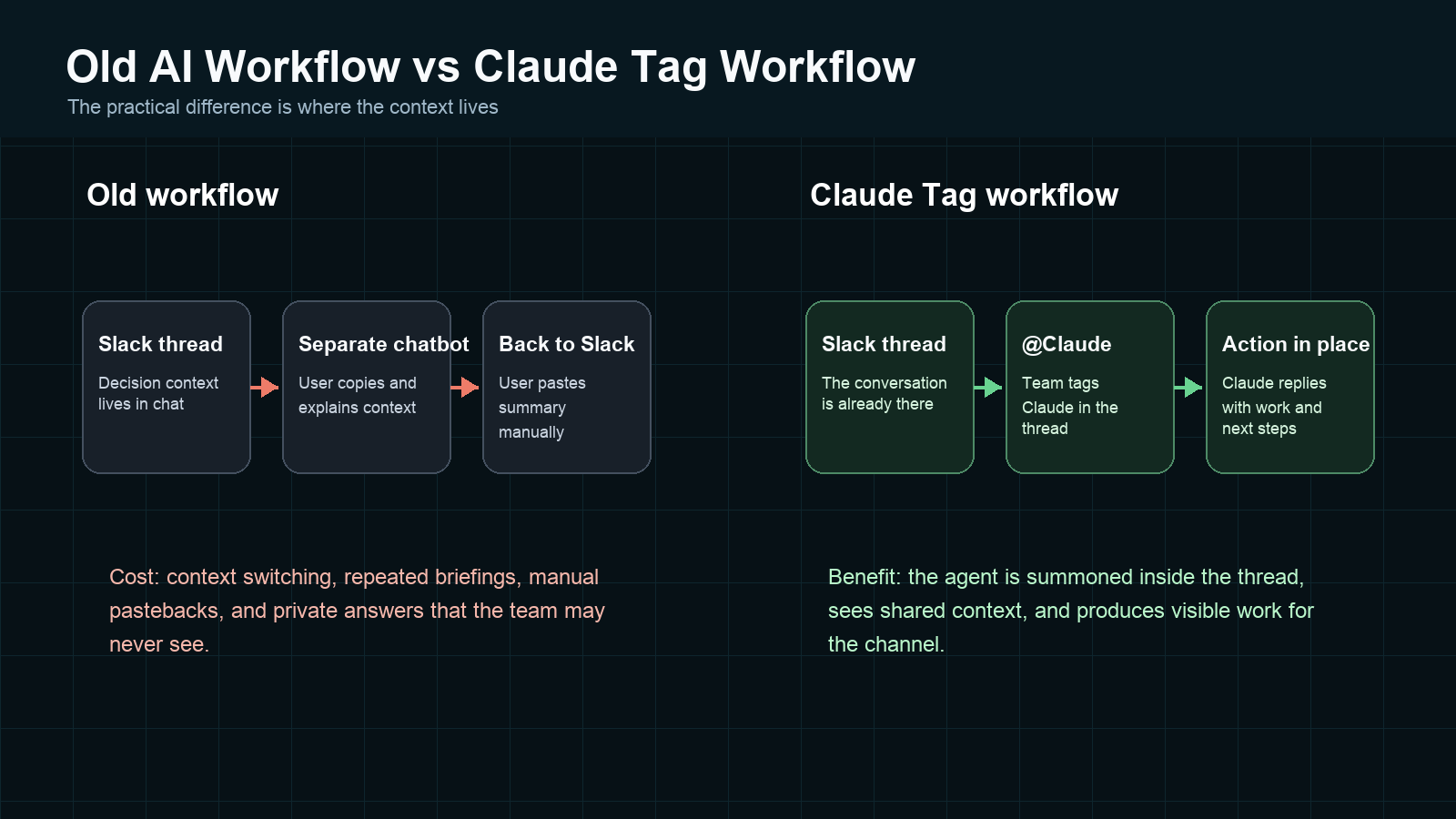
Traditional chatbots make the user carry that context out of Slack. You open a separate assistant, paste the thread, add missing details, ask for an answer, then paste the result back. That is useful, but it is not native to how teams work.
Claude Tag flips the path. The conversation stays in Slack. The AI is summoned into the thread. The answer, checklist, draft, or follow-up is visible to the team. That is why this could matter more than the label “Slack bot” suggests.
It also makes Slack more strategically valuable. Salesforce has been positioning Slack as an AI work platform, and Slack’s own AI features already emphasize summaries, recaps, and search. Claude Tag adds an Anthropic agent layer that can potentially do more than summarize.
Why This Is Different From A Normal Chatbot
A normal chatbot usually waits for a user, answers in a private conversation, and forgets the operational state unless you paste it back in. Claude Tag is different in four practical ways.
First, it is shared. In a Slack channel, Claude is part of the team conversation. People can see the task, add direction, and review the output.
Second, it has channel context. Anthropic says Claude builds context from channels it is in, remembers relevant information, and can use previous conversations when appropriate.
Third, it can act under agent identity. Anthropic’s agent identity model means Claude can have its own accounts and credentials in connected systems rather than borrowing a human user’s login.
Fourth, it can be proactive when enabled. Anthropic says Claude Tag can watch channels, run scheduled work, flag urgent items, and follow up on unresolved threads.
That does not make it autonomous in the sci-fi sense. It does make it more operational than a chatbot that only writes text into a private chat.
Claude Tag Vs Claude Code Vs Claude For Work
Anthropic’s product line is getting broader, so the naming can get messy. Here is the clean version.
| Product | Where it lives | What it is best for | Key difference |
|---|---|---|---|
| Claude Tag | Slack beta for Team and Enterprise | Shared workplace tasks, channel context, async work, tool-connected workflows | Multiplayer, channel-based, with agent identity and memory boundaries |
| Claude Code | Terminal, IDE, web, desktop, browser, GitHub, and Slack routing for coding tasks | Software engineering, repo-aware coding, tests, PRs, bug fixes | Developer-focused agentic coding tool |
| Claude for Work | Claude plans and enterprise integrations | Business users using Claude across docs, email, research, analysis, and connected tools | Broader productivity and enterprise Claude experience |
| Claude in Slack legacy experience | Slack app | DMs, thread assistance, summaries, drafting, quick help | Being replaced by Claude Tag according to Anthropic Help Center |
The simplest mental model: Claude Code is for coding work. Claude for Work is the broader business product layer. Claude Tag is the shared Slack-native agent interface that can use company context and tools in a channel.
Claude Tag Vs ChatGPT, Gemini, Copilot, And Slack AI
Claude Tag is entering a crowded category. Microsoft, Google, OpenAI, Salesforce, and Slack all want to be the AI layer for work. The differences are less about “who has a chatbot” and more about where the agent lives, what context it can use, and how much work it can safely do.
| Tool | Where it lives | Best use case | Strength | Limitation | Agentic potential |
|---|---|---|---|---|---|
| Claude Tag | Slack channels and threads | Shared team workflows, async follow-up, tool-connected channel work | Multiplayer context, memory, agent identity, proactive routines | Beta, currently Slack-first, admin setup required | High if tool access and governance are configured well |
| Claude Code | Developer environments and coding workflows | Repo-aware engineering work | Strong coding agent, can work across files and tools | Less relevant for non-technical workplace tasks | High for software teams |
| ChatGPT Projects and team workspace features | ChatGPT workspace, shared projects, connectors, GPTs | Research, writing, data analysis, project context, collaborative AI workspaces | Flexible general-purpose interface and strong ecosystem | Not natively inside a Slack thread by default | High, especially as apps, connectors, and workspace governance mature |
| Microsoft 365 Copilot | Word, Excel, PowerPoint, Outlook, Teams, Copilot Chat | Microsoft 365 organizations | Deep Microsoft Graph and Work IQ context, enterprise governance | Best value inside Microsoft-heavy companies | Very high because Microsoft is building agent APIs around work data |
| Slack AI | Slack | Thread summaries, channel recaps, search, AI inside Slack | Native Slack context and low-friction summaries | Less clearly positioned as a long-running cross-tool agent than Claude Tag | Medium to high as Slack becomes an agent surface |
| Gemini for Workspace | Gmail, Docs, Sheets, Slides, Meet, Chat, Vids, Drive, Gemini app | Google Workspace productivity | Deep Google app integration and document/email workflows | Most compelling inside Google Workspace | High as Workspace AI becomes more tool-aware |
The big strategic split is this: Microsoft and Google are embedding AI into productivity suites. OpenAI is building a powerful workspace and app ecosystem around ChatGPT. Slack is becoming a conversational work surface. Anthropic is using Claude Tag to make the agent feel like a colleague inside the team channel.
Why This Matters For AI Agents
Claude Tag points at the next agent battleground: shared context plus safe action.
An agent that cannot see the workplace context is just guessing. An agent that can see everything without boundaries is a security problem. An agent that can act but cannot be audited will scare admins. Claude Tag is interesting because Anthropic is explicitly trying to solve those problems with channel-level context, agent identity, admin controls, spend limits, audit logs, and memory boundaries.
This is also why AI startups should care. The interface for SaaS may change. Instead of users opening ten apps and clicking through dashboards, teams may ask an agent in Slack to pull the dashboard, compare options, file the ticket, draft the client update, and notify the owner.
If that happens, SaaS products will need to be usable by agents: clear APIs, clean permissions, audit trails, good documentation, and action surfaces that can be safely delegated.
Should Businesses Care?
Yes, but with a pilot mindset.
Claude Tag could be valuable for marketing, sales, product, engineering, support, founders, operations, and creators. The obvious use cases are the tasks teams already discuss in Slack but struggle to finish.
- Marketing: turn campaign debates into briefs, recap performance, draft launch copy, collect creative feedback.
- Sales: summarize account threads, prepare call notes, draft follow-ups, pull CRM context if connected.
- Product: organize feature feedback, identify decision owners, track open questions, turn discussions into specs.
- Engineering: summarize bug threads, investigate incidents, draft PRs, connect discussion context to code work.
- Support: triage repeated issues, summarize escalations, draft internal updates, identify unresolved customer blockers.
- Founders: keep a pulse on scattered work, ask what is stalled, generate board or investor update inputs.
- Operations: create recurring digests, monitor channels, chase missing approvals, turn messy handoffs into checklists.
- Creators: convert sponsorship threads into deliverables, summarize editorial decisions, draft client updates.
The business case is not replacing employees. It is reducing context loss, handoff friction, and repetitive coordination work.
Should Creators Care?
Creators should care if they work with teams, clients, editors, agencies, sponsors, or communities in Slack.
Think about a sponsored video workflow. The sponsor drops product notes in one thread. The editor asks about cutdowns in another. The founder changes the CTA. The posting calendar is in a doc. A creator could tag Claude to summarize requirements, list open approvals, draft a client update, or turn feedback into a production checklist.
That is not glamorous AI. It is coordination AI. For creators, that may be more useful than another image generator because the bottleneck is often not ideas. It is keeping work moving without losing the thread.
This connects naturally to Kingy.ai’s sponsored video and distribution work, where the hard part is usually not just making content but coordinating the whole campaign.
Should Developers Care?
Developers should care a lot.
Claude Code already changed how many developers think about AI coding. Claude Tag brings the coding agent closer to the conversations where bugs, feature requests, launch blockers, and architecture decisions actually begin.
Anthropic says its internal product team creates 65% of code with an internal version of Claude Tag. Treat that as an Anthropic-reported internal data point, not an industry benchmark. Still, it signals where Anthropic is aiming: a developer workflow where you tag an agent in the bug thread, let it investigate, and have it return with a draft PR or analysis.
For developers building SaaS products, the lesson is even bigger. Your product may need to serve human users and agent users. The agent user needs permissions, logs, rate limits, documentation, test environments, and action review points.
For a deeper coding-agent comparison, see Kingy.ai’s OpenAI Codex guide and the broader AI tools directory.
What Feels Genuinely Important
The important part is not that Claude can answer in Slack. It is that Claude Tag combines several pieces that agents need to become useful at work:
- Shared channel context.
- Memory across threads and days.
- Admin-scoped tool access.
- Agent identity instead of borrowed human credentials.
- Visible team collaboration.
- Proactive follow-ups and scheduled routines.
- Long-running work that can come back with results.
That combination is the actual product idea. The Slack UI is just the first surface.
If Anthropic makes this reliable, Claude Tag could become a practical bridge between chat-based AI and real workplace automation. Not a replacement for business systems, but a coordination layer across them.
What Feels Unproven
Several things are still unproven.
Reliability at scale. It is one thing for Anthropic employees or design partners to get value. It is another for thousands of companies with messy permissions, inconsistent channel habits, and uneven data quality.
Admin burden. Agent identity is smart, but someone has to configure it. If setup is confusing, Claude Tag becomes an enterprise toy instead of a team habit.
Cost predictability. The Help Center says Claude Tag is consumption-based with spend limits and alerts. That is useful, but teams will still need to learn what routine agent work costs.
Quality of proactive behavior. Proactive AI sounds great when it catches a blocker. It is annoying when it interrupts with low-value noise. Teams will need norms for where Claude should speak up and where it should stay quiet.
Cross-tool action safety. The more tools Claude can reach, the more valuable it gets. Also, the more risky it gets. Approval gates, logs, and least-privilege setup will matter.
Privacy, Permissions, And Enterprise Risk
This is where Claude Tag becomes serious.
Anthropic’s docs say admins configure access by organization, workspace, and private channel. Public channels share a workspace-level identity. Private channels can have separate identities. Memory and access respect those boundaries. Admins can review, edit, and delete memory. The audit view lists scheduled and one-time tasks plus network calls made using Agent Identity.
The Slack Marketplace listing also makes the permission surface visible: the Claude app can view content and info about channels, conversations, and the workspace, and can perform actions in channels and the workspace. That does not mean it can access everything by default; it means admins need to review what the app is allowed to do before rollout.
For enterprise teams, the risk checklist should include:
- Which channels can use Claude Tag?
- Which members can invoke it?
- Which repositories, docs, CRM records, dashboards, and APIs can it reach?
- Does each channel have least-privilege access?
- What does Claude remember, and who can review or delete that memory?
- What actions need human approval?
- How are spend limits set by organization and channel?
- How are agent actions audited in Slack and in connected tools?
The most dangerous version of Claude Tag would be “turn it on everywhere and hope.” The best version is deliberate: start with low-risk channels, read the audit trail, then expand where the work justifies it.
What We Still Do Not Know
Even after the official launch, there are open questions:
- When Claude Tag will move from beta to general availability.
- Which non-Slack surfaces Anthropic will support next.
- How pricing will feel for typical small, mid-market, and enterprise teams.
- How well proactive behavior performs in noisy real-world workspaces.
- How often teams will need admins to tune access, memory, and channel profiles.
- What third-party tooling ecosystem will form around Claude Tag skills and connectors.
- How Anthropic will handle high-risk actions that require human approval.
Those unknowns matter. Claude Tag is promising, but the beta label is doing real work here.
The Bigger Trend: AI Coworkers Inside The Tools We Already Use
Claude Tag is part of a larger shift.
Microsoft is pushing Copilot and Work IQ deeper into Microsoft 365. Google is weaving Gemini into Gmail, Docs, Sheets, Slides, Meet, Chat, Vids, and Drive. OpenAI is building shared projects, connectors, apps, and business workspaces around ChatGPT. Slack is positioning itself as an AI work platform.
The pattern is obvious: AI is moving from a separate destination to an embedded layer inside work software.
For business users, that means less copy-paste and more “ask inside the workflow.” For SaaS companies, it means the interface may shift from dashboards to agents. For AI startups, it means distribution will be fought inside the places teams already spend their day.
That is why Claude Tag could matter even if you never use Slack. It is a signal that the next AI platform war is not only model quality. It is context, permissioning, collaboration, and action.
Final Verdict
Claude Tag is one of Anthropic’s most interesting workplace launches because it moves Claude from private assistant to shared coworker.
The product is still early. It is Slack-first. It is in beta for Team and Enterprise customers. It needs careful admin setup. The proactive parts need real-world proof. Businesses should not treat it as magic.
But the direction is right. Work does not happen in clean prompt boxes. Work happens in messy threads, half-finished docs, CRM notes, code repos, task boards, customer calls, analytics dashboards, and people asking “who owns this?” Claude Tag is Anthropic’s attempt to put an AI agent into that mess with memory, permissions, tools, and a visible team workflow.
If it works, it is bigger than another Slack bot. It is a preview of where workplace AI is going.
FAQ
What is Claude Tag?
Claude Tag is Anthropic’s Slack-native AI coworker experience. Teams can tag @Claude in a Slack channel or thread and ask it to work with the shared context and approved tools available to that channel.
Is Claude Tag available now?
Yes, but in beta. Anthropic says Claude Tag is available today for Claude Enterprise and Claude Team customers in Slack.
Is Claude Tag just a Slack bot?
No. It uses Slack as the launch surface, but the key ideas are shared context, memory, agent identity, tool access, asynchronous work, and proactive follow-up when enabled.
Who can use Claude Tag?
Anthropic says Claude Tag is available for Claude Team and Enterprise customers. Setup requires the right organization owner permissions, and admins control member access.
How is Claude Tag different from Claude Code?
Claude Code is Anthropic’s coding agent for software development. Claude Tag is the shared Slack-based workplace agent interface. Claude Tag can route or support coding-related work, but it is broader than coding alone.
Does Claude Tag have access to company data?
Only to the data and tools admins configure for the relevant organization, workspace, or channel. Anthropic says access and memory are scoped by boundaries such as workspace and private channels.
Why does Claude Tag matter?
It shows where workplace AI is heading: away from isolated chatbots and toward shared agents that live inside team conversations, use company context, and take action across approved tools.
Sources
- Anthropic announcement
- Claude Tag product page
- Claude Help Center
- Agent identity explainer
- Best practices for using @Claude
- Slack Marketplace listing
- TechCrunch report
- Slack AI features
- Microsoft 365 Copilot
- Microsoft Work IQ APIs
- Google Workspace with Gemini
- OpenAI Academy on ChatGPT Projects
Also see Kingy.ai’s AI Launch Tracker, AI tools directory, AI News coverage, and AI business and startup articles.
The Kingy Brief
Get the next Kingy Brief.
Source-checked AI changes, original tests and one practical thing to try.
Free · Choose your subjects · Double opt-in · Unsubscribe anytime