The extra 64 GB buys you room for a specific build of DeepSeek V4.1 Flash. On the 192 GB Framework Desktop with a Ryzen AI Max+ PRO 495, Framework kept about 163 GB of the model’s main weights in memory while leaving its Engram lookup tables on SSD. The complete Q2 download is about 366 GB. A 128 GB M5 Max Mac Studio can store that file, but it lacks the physical memory to keep the same main weights resident. Framework measured about 14 output tokens per second without speculative decoding and about 16.5 with it at 64K of existing context. Framework’s vendor test and settings
That is the reason to buy the 192 GB machine. If your model and working context already fit on the Mac, the 40-core M5 Max offers 614 GB/s versus 273 GB/s of rated memory bandwidth and costs less in the configurations below. The Mac’s rated bandwidth is 2.25× as high. Actual prompt processing and generation rates depend on the model, quantization and inference engine. Apple specifications · AMD platform specifications
The model files that need more than 128 GB
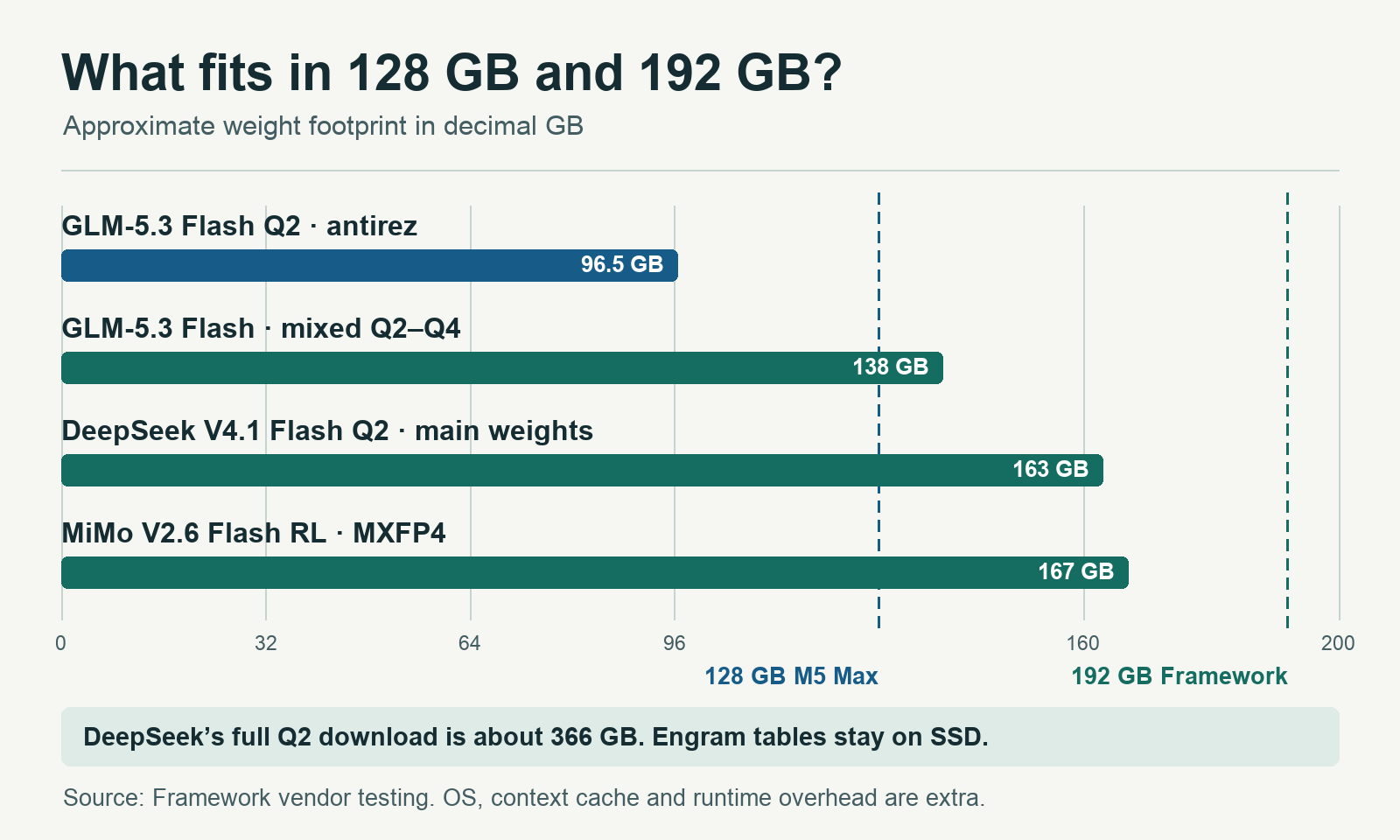
The lines mark advertised system memory. Bars show approximate weight footprints, with DeepSeek’s SSD-resident lookup tables excluded. The OS, context cache and runtime need additional memory. The AMD results refer to Framework’s Linux setup. Framework’s weight and storage figures
| Exact build | Weight footprint | 128 GB Mac Studio | 192 GB Framework Desktop |
|---|---|---|---|
| Qwen3.8-27B MLX 4-bit | About 16.1 GB of model files | Measured on 128 GB M5 Max silicon with oMLX | Use a supported AMD build, such as a GGUF quant |
| GLM-5.3-Flash-Q2.gguf, antirez | About 96.5 GB | Ran resident in a community test on a 128 GB M5 Max MacBook Pro | Framework measured it |
| GLM-5.3-Flash-Q4K-Base-Q2-Experts-L03-28.gguf | About 138 GB | Above physical capacity for full weights | Framework measured it |
| DeepSeek-V4.1-Flash-Q2.gguf, antirez calibrated Q2 | About 163 GB main weights. About 366 GB on disk | Main weights exceed RAM. DwarfStar can stream from SSD | Framework ran the main weights resident with Engram tables on SSD |
| MiMo-V2.6-Flash-RL-MXFP4, both GGUF shards | About 167 GB | Above physical capacity for full weights | Framework measured it |
The rows describe specific weight builds. Change the quant, runtime or placement of tensors and the answer can change. A smaller build can fit where a larger one cannot. CPU placement, SSD streaming and splitting a model across machines each come with their own latency and throughput trade-offs. The 96.5 GB GLM build also shows how much the quantization recipe can matter. Framework’s mixed build takes roughly 42 GB more before context and working buffers. Even 128 GiB is only about 137.4 decimal GB, below that 138 GB file. The same DeepSeek uploader lists a Q4 build at 294.15 GiB for the main weights alone, beyond both desktops. Framework’s test notes · Community MacBook test · DeepSeek quant notes
There are three budgets to check. The first is SSD space for the files. The second is resident memory for the model tensors, KV cache, temporary buffers and everything else the OS is running. The third is the memory the runtime can actually allocate. AMD advertises up to 160 GB of dedicated graphics memory on this processor. On Linux, ROCm can also use dynamically shared system memory, and AMD documents how the driver’s default shared-memory limit can be raised. On the Mac, Metal exposes a recommended GPU working-set size, and the CPU and GPU share the pool with macOS. A spec-sheet RAM figure alone is a poor way to predict the largest useful context or batch size. AMD graphics memory specifications · ROCm shared-memory documentation · Apple Metal working-set documentation
What 14 tokens per second feels like
Framework published a useful test because it separates prompt processing from generation and repeats the run as the session fills. Each trial fed 2,048 new input tokens and generated 256 output tokens at zero, 32K or 64K of existing context. The DeepSeek run used DwarfStar on Linux, decoder SWA bounded replay and a 67,840-token context setting in the published command. The speculative configuration also used a separate DSpark MXFP4 draft file. Framework’s test configuration
| Framework vendor test | Fresh session | 32K existing | 64K existing |
|---|---|---|---|
| DeepSeek V4.1 Flash Q2, replay | 360 / 14.0 | 342 / 13.8 | 304 / 13.8 |
| DeepSeek V4.1 Flash Q2, replay + DSpark | 350 / 16.3 | 337 / 16.5 | 300 / 16.5 |
| MiMo V2.6 Flash RL, MXFP4 | 477 / 18 | 354 / 17 | 283 / 16 |
| GLM-5.3 Flash, Q2 with native MTP | 227 / 12 | 162 / 10 | 148 / 11 |
| GLM-5.3 Flash, mixed Q2–Q4 | 116 / 8 | 96 / 7 | 91 / 7 |
Each cell gives input / output tokens per second. Framework measured these values on its 192 GB Ryzen AI Max+ PRO 495 desktop. DSpark gains vary with the text it predicts. Framework’s benchmark data
At 13.8 tokens per second, 1,000 output tokens take about 72 seconds. At 16.5, they take about 61 seconds. Those are generation-only estimates. A coding agent can spend many more tokens reasoning, rereading tool results and trying fixes. MiMo processed a fresh prompt faster in this test. By 64K of existing context, DeepSeek without DSpark processed the new input at 304 tokens per second to MiMo’s 283. The faster choice depends on how far into the session you are and how much text the agent generates. Framework’s benchmark data
The same DeepSeek Q2 file has also run on an M5 Max MacBook Pro with 128 GB using DwarfStar’s SSD streaming mode. In one community run with a 32,768-token context allocation, it generated at 13.68 tokens per second and processed the prompt at 5.66 tokens per second. Those figures come from a different prompt and benchmark procedure. The concrete distinction is that the Mac streamed main weights from storage while Framework kept them resident. A decode figure alone can hide a long wait for the first token. Community MacBook test · DwarfStar documentation
On the Apple side, a public oMLX 0.7.3 submission for the 40-core M5 Max with 128 GB measured the Qwen3.8-27B MLX 4-bit build at 32.3 output tokens per second at 1K and 22.7 at 64K. Reported peak memory rose from 16.0 GB to 20.8 GB. In a separate Mac Studio test, Petronella measured Qwen3.8 27B on the 40-core, 64 GB M5 Max at 29.7 tokens per second under plain llama.cpp with Q4_K_M. With a DFlash2 draft, the same llama.cpp setup reached 72.6 on its coding prompt and 45.6 on its prose prompt. The 64 GB test provides a useful view of the same GPU tier and the effect of the runtime. Kingy.ai found no matched run across the two exact desktops with the same file, context, backend settings and workload, so these published measurements describe specific setups. oMLX run and recipe · Petronella’s Mac Studio measurements
Bandwidth matters most when single-stream decoding is waiting on weight reads. Prompt processing can be more sensitive to compute, kernel efficiency and attention. A mixture-of-experts model can keep a very large bank of weights resident while using a small subset for each token. Concurrent requests can also increase aggregate throughput while leaving each user with a slower stream. For an agent, measure time to first token, output speed after the context grows, and time to a correct result. The last number includes all the turns, tools and retries. DeepSeek architecture and active parameter counts · oMLX context and batching measurements
What DeepSeek’s evals tell you about the local Q2
DeepSeek reports 74.2% on DeepSWE v1.1, 90.6% on Terminal-Bench 2.1 and 31.2% on Terminal-Bench 4.0 for its instruct model at maximum reasoning effort. Its code-agent evaluation uses a one-million-token context window, with the mini-SWE harness used for DeepSWE v1.1. Framework’s throughput figures come from a community Q2 GGUF at a far smaller tested context and measure processing speed. The local artifact’s task pass rate under the same harness is unverified. DeepSeek’s instruct model evaluation · Framework’s throughput methodology
A later local eval offers a closer look at what a compressed build can do. Donato Capitella, who wrote Framework’s benchmark, published a Gorgon Halo run that passed all 19 Core-19 terminal tasks on the first attempt. It used a Q2-family quant of the later DeepSeek V4.1 Flash 1017 checkpoint, DwarfStar with ROCm, a 262,144-token context allocation and reasoning effort 75. The run mixed baseline and speculative decoding across tasks. Core-19 is a selected local suite with its own harness and timeout, and it evaluated a later checkpoint than Framework’s September test. Core-19 methodology · Committed run results
DeepSeek’s architecture helps explain the unusual storage split. The model card describes a 552-billion-parameter backbone, 8 billion active during prompt processing and 16 billion during generation, plus a sparsely accessed Engram component. In Framework’s DwarfStar run, Engram lookups still touch the SSD. A buyer whose workflow depends on images must also account for the optional vision encoder. Likewise, DSpark’s draft model consumes memory and disk space of its own. Verify the combination you plan to use, at the context length you expect to serve. DeepSeek’s model card · Framework’s vision and speculation settings
To decide whether the extra memory buys better work, compare the exact Q2 and your preferred smaller model on copies of real tasks. Use the same agent, tools, task limits, context and acceptance tests. Score whether patches pass your tests, answers cite the right passages and structured outputs validate. Record elapsed time, peak memory, tool-call errors and retries. If the 192 GB system’s larger model solves work your smaller model consistently misses, you have a reason to pay for it. If both pass, the faster or cheaper pipeline has an advantage you can measure.
US pricing and hardware
These are US prices before tax, checked November 22, 2026. Match the storage and OS before comparing checkout totals. “Ryzen AI Halo” below is AMD’s own developer box. Framework sells a separate machine with the same processor and memory capacity. AMD box specifications · Framework specifications
| Configuration | US price | Storage and OS |
|---|---|---|
| Mac Studio M5 Max, 40-core GPU, 128 GB | $5,399 at B&H | 1 TB SSD, macOS |
| Mac Studio M5 Max, 40-core GPU, 128 GB | $5,899 at B&H | 2 TB SSD, macOS |
| Framework Desktop PRO 495, 192 GB DIY | From $6,799 | Supply or add an NVMe SSD and install an OS |
| AMD Ryzen AI Halo PRO 495, 192 GB | $7,299.99 at Micro Center | 2 TB M.2 SED, Linux retail listing. In-store pickup |
| Framework Desktop PRO 495, 192 GB prebuilt | From $7,449 | 2 TB NVMe, Fedora 44 KDE Plasma |
At the same 2 TB storage capacity, the prebuilt Framework lists for $1,550 more than the Mac, and AMD’s developer box lists for $1,400.99 more. The DIY Framework starts $900 above the 2 TB Mac before adding storage. Apple’s $2,499 starting price is for the 36 GB configuration with a 32-core GPU and 460 GB/s, so it describes a different machine. Framework’s November shipping update said its current run was on preorder and expected to ship before year-end. B&H marked both 128 GB Mac configurations as coming soon. Availability at Micro Center depends on the store. Apple’s launch pricing · B&H 1 TB listing · B&H 2 TB listing · Framework prices · Framework shipping update · Micro Center listing
Apple sells a way past 128 GB in the same chassis. The M5 Ultra Mac Studio offers 256 GB or 512 GB with the top chip and rates memory bandwidth at 1.2 TB/s. The $5,499 Ultra starting price buys 96 GB. B&H lists the 256 GB Ultra with a 1 TB SSD at $10,799, or $3,350 above the prebuilt Framework, with availability listed as coming soon. Mac Studio configurations · Apple configurator · B&H’s 256 GB listing
macOS, Linux, Windows and iOS development
Mac Studio. For Apple silicon, MLX LM supports local text generation and quantized fine-tuning, and llama.cpp offers a Metal path for supported GGUF builds. A file built for MLX and a GGUF from the same model can have different quantization and performance. macOS also gives you Xcode and the iOS simulator if the machine will double as an iPhone app development workstation. A phone can call an inference API hosted on either desktop. The desktop is where the model lives and runs. MLX LM · llama.cpp backends · Xcode requirements
Ryzen AI Max+ PRO 495. AMD lists Linux and Windows 11 for its Halo box. Framework ships the prebuilt with Fedora and documents its Linux tooling. Pick Linux if you are buying specifically to reproduce the 192 GB DwarfStar result. Check the exact ROCm version, kernel and GPU target (gfx1151) for your intended engine. llama.cpp offers HIP and Vulkan backends, while specialized architectures can call for a dedicated engine such as DwarfStar. Check support for Windows and WSL separately when an application depends on a particular library or container. The Mac pairs its 40-core GPU with an 18-core CPU. The PRO 495 pairs a 40-CU Radeon 8065S with 16 Zen 5 CPU cores and 32 threads. Apple GPU cores and AMD compute units describe different architectures. Both chips have dedicated AI hardware. The useful buying metric here is how the engine serves your chosen model on the integrated GPU and shared memory. AMD’s ROCm support matrix · llama.cpp supported backends · Framework’s Linux stack
What you can actually upgrade
| System | Expansion that matters for local AI |
|---|---|
| 128 GB Mac Studio M5 Max | Choose memory at purchase. Internal storage options up to 8 TB at order, four rear Thunderbolt 5 ports for external storage and 10 Gb Ethernet. Two front USB-C ports are rated at 10 Gb/s. |
| 192 GB Framework Desktop | Soldered memory and processor on a Mini-ITX mainboard. Two internal PCIe 4.0 ×4 M.2 2280 sockets, user-selectable front ports, two rear USB4 and 5 Gb Ethernet. The open-ended PCIe ×4 slot is hidden by the standard case and rated at up to 25 W. Wider cards still get four lanes and need a compatible enclosure and power. |
| 192 GB AMD Ryzen AI Halo | 2 TB M.2 SSD, 10 Gb Ethernet, three USB-C ports plus USB-C power, and a smaller enclosure. Check the enclosure and port layout before buying an AMD system from another vendor. |
Framework lets you replace the board, storage, fan and power supply, and it sells the 192 GB mainboard separately. Replacing the board is the route to changing the soldered memory and CPU configuration. On either system, an SSD upgrade gives you room for more model files, which matters when one download takes over a third of a terabyte. A larger SSD gives DwarfStar more room for Engram tables and offloaded weights. SSD reads are far slower than DRAM access. For sustained speed and efficiency comparisons, use measured wall power on the same workload. The published power supply rating and the processor’s TDP describe different things. Framework expansion and board specifications · Framework’s mainboard availability · Apple I/O and storage · AMD Halo I/O and storage
Which one should you buy?
- Buy the M5 Max if your working set fits with room to spare. For a daily 27B model, start by pricing a lower memory tier as well. Data from the 40-core 64 GB model shows why GPU configuration and the runtime deserve as much attention as RAM. The 128 GB configuration earns its keep when you have larger quants, concurrent jobs or long contexts. Mac Studio benchmark
- Buy the 192 GB Gorgon Halo if you have a specific workload that needs it. Framework’s exact DeepSeek Q2 setup is the clearest example. The mixed GLM build, the tested MiMo file and two-model serving are other reasons to consider it. Framework also tested a fast Qwen3.8 Flash Next server alongside a second DwarfStar model. Keeping both loaded saves weight-loading time, but switching still requires the second model to process the context you send it. Framework’s two-model workflow
- Price the 256 GB M5 Ultra or a discrete-GPU workstation if you need capacity and higher sustained throughput. Bring the exact files and your largest real prompt to that comparison. If you need to run one model every day, an hour benchmarking that workload is more useful than a higher advertised TOPS number. M5 Ultra capacities
Sources and test scope
Kingy.ai compared published specifications, store listings, model files and test results. Framework’s speed and fit figures are vendor testing. The cited Mac measurements are separate third-party runs. Not tested by Kingy.ai.