
OpenAI has added Accounting, a plugin for reviewing workbooks, matching bank transactions to a general ledger, and explaining why actual results differ from budget. Kingy saw version 1.0.0 and an Install plugin button in a signed-in ChatGPT workspace on November 18. OpenApps, a directory tracker, first recorded the listing on November 10. Accounting in the ChatGPT Plugin Directory · OpenApps listing history
What the Accounting skill does
The plugin contains one accounting skill, a set of instructions that shapes how ChatGPT approaches the work. For a reconciliation, it tells ChatGPT to investigate partial payments, fees, reversals and settlement timing before deciding whether records match. One payment can correspond to several ledger entries. For a workbook review, it calls for pointing to the relevant cell or transaction, explaining the financial effect and suggesting a specific correction. It also directs ChatGPT to preserve existing formulas when editing. Accounting skill in the plugin listing
That makes the first question to ask simple. Can you trace each conclusion back to a record? If ChatGPT says a deposit ties out, you should be able to follow the calculation from the bank statement to the ledger rows and see what it did with the fee.
Which apps it works with
OpenAI lists QuickStart, NetSuite, Xero, FreshBooks, Rillet and Campfire under Accounting & Close. The same listing names Gmail and Outlook Email for email and Google Drive and SharePoint for files. Each connected app controls which records and actions are available, subject to your workspace and provider permissions. Xero, for example, documents access to data including profit and loss, balance sheets, invoices and bills through its own ChatGPT plugin. Accounting plugin listing · OpenAI’s plugin documentation · Xero’s integration announcement
What Accounting could read through Thara Demo
On November 18, we ran a test on ChatGPT web with Accounting 1.0.0 and the private Thara Demo connector. We selected both in a new project with project-only memory, asked for one order from Thara’s fictional Siam Horizon Group, and checked the report against a direct query to the demo. Thara’s public demo
| Record | What ChatGPT retrieved |
|---|---|
Sales order SO-20260918-01-0002 |
THB 4,264.91 total, including THB 279.01 in tax |
Payment PAY-000505685-1 |
THB 4,141.91 captured |
Posted journal JE001078960 |
THB 3,985.90 credited to sales revenue |
The captured payment was THB 123.00 short of both the order total and the journal’s payment-clearing debit. Posted sales revenue matched the order net exactly. Thara also flagged a ledger mismatch, and the report left the reason for that label open.
Which approval prompts appeared
ChatGPT asked us to select I understand and want to continue on the custom-server warning before creating the plugin. It then showed Connect Thara Demo with the label Approved by your admin and asked us to connect it. The order lookup ran without a separate approval card under the workspace’s current settings. Thara Demo exposes read-only queries. Verifying a write approval would require a separate sandbox with write access. OpenAI’s custom connector setup · OpenAI’s app permissions guide · Thara’s read-only architecture
A first workflow to try
Start with copies of a bank statement export, the corresponding ledger activity and a processor settlement report. Pick a payout that combines multiple receipts and subtracts a fee. Ask Accounting to show the source rows, calculate the net deposit and list anything that still needs review.
In a separate test with pasted fictional records, ChatGPT matched $1,500 in receipts less a $35 fee to a $1,465 deposit and matched a separate $425 receipt. It left the $120 bank debit open. This check used cash movements for a short period. A full bank reconciliation also needs opening and closing balances and any timing items.
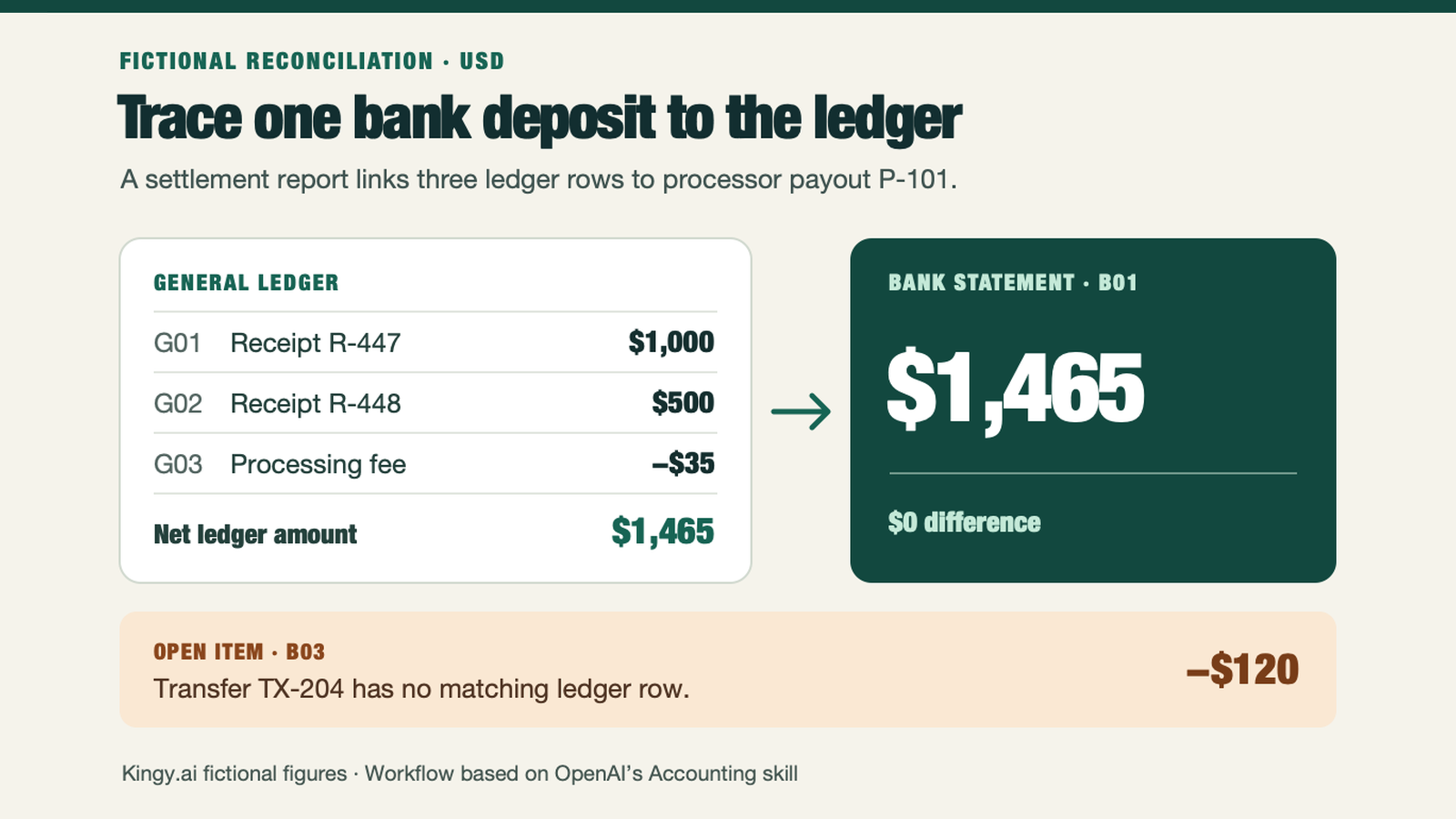
Illustration uses fictional Kingy.ai figures. The approach follows the reconciliation guidance in the OpenAI Accounting skill.
Open Plugins in ChatGPT and look for Accounting by OpenAI. In our workspace, Install plugin changed to Try in chat after installation. That opened a new chat with Accounting selected and a starter prompt in the composer. Keep Accounting selected and replace the starter text with a request for a review report. Ask for the source rows and keep the source files unchanged. OpenAI’s installation and use instructions
- Tested
- One pasted fictional bank-to-ledger check and one connected lookup of a fictional Thara Demo order with Accounting 1.0.0.
- Runner
- ChatGPT web
- Settings
- Accounting and the private Thara Demo connector were selected in a project with project-only memory for the connected lookup.
- Grading
- Checked the pasted reconciliation against the input rows and checked the connected result against a direct query to Thara Demo.
- Dates
- run 2026-11-18 · checked 2026-11-18
Limits
We checked one pasted reconciliation against the fictional input rows and one connected lookup against the demo’s source records. OpenAI says plugin access can depend on plan, region, workspace and role. Accounting’s rollout timing, plan-by-plan eligibility and any plugin-specific pricing remain unconfirmed. Accounting plugin listing · OpenAI’s plugin availability documentation