
There is a particular kind of excitement that happens when a tool stops feeling like a demo and starts feeling like infrastructure. For years, AI-generated 3D has been firmly in the first category — impressive screenshots, viral tech demos, blobby meshes that fell apart the moment you tried to do anything real with them. Then you open Tripo Studio and something shifts. The blobs are gone. In their place are clean, textured, riggable assets that look like they came out of a studio pipeline, generated in the time it takes to refill your coffee.
This review takes a detailed look at Tripo AI, the generative 3D platform at tripo3d.ai, pulling from the company’s own product pages, their API platform documentation, their pricing tiers, and a hands-on walkthrough captured in the YouTube video “This AI Creates 3D Assets You Can Actually Use | Tripo 3.1” by Kingy AI, filmed partly on the floor of GDC in San Francisco. The goal is to figure out whether Tripo actually delivers on its pitch — “the best AI 3D workspace” — or whether it’s another entry in a long line of 3D tools that look great until you try to ship something with them.
What Tripo Actually Is
Tripo bills itself, in its own words from the landing page, as “The Best AI 3D Workspace” that takes “texts, images, or sketches to production-ready 3D Assets in seconds — all in one seamless workflow.” That framing matters, because Tripo is not a single model. It is a stack.
At the bottom you have the foundational generation models — currently spanning v1.4, v2.0, v2.5, v3.0 and v3.1 according to the company’s API product page and third-party references like the 3D AI Studio Tripo API docs. The progression goes from “fast” (v1.4) through “balanced” (v2.5) to “sculpture-level geometry precision with sharp edges” (v3.0) and the newer v3.1. On top of those models sits Tripo Studio, the browser-based workspace where most users actually live. And surrounding all of it is a developer layer — the Tripo API, official plugins for Blender, Unity, Unreal Engine, ComfyUI, Cocos, and Godot, and the open-source TripoSR model that Tripo AI and Stability AI released together back in March 2024.
The company claims a community of “6.5M+ Creators Worldwide,” “40K+ Active Developers,” “700+ Industry Clients,” and “100M+ 3D Models Created,” and lists Tencent, NetEase Games, Bambu Lab, HTC, Sony, Haier, Replit, Stability AI, Lovart and Civitai among its partners on the homepage. That is a surprisingly heavyweight roster for a space that, two years ago, barely existed.
The Studio Experience: Two Generators, One Philosophy
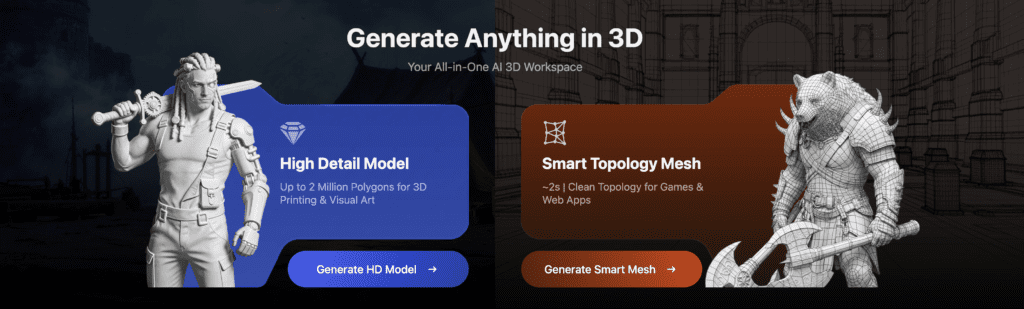
When Kingy AI walks through Tripo Studio in his video review, the first thing he flags is the split between the two generation modes: the High Detail Model and the Smart Topology Mesh. This bifurcation is the single most important design decision in the whole product, and it reveals that Tripo has actually been paying attention to how 3D artists work.
The HD Model can push up to roughly 2 million polygons, aimed squarely at 3D printing and visual art where fidelity matters more than polycount budgets. Smart Topology, by contrast, hovers around 2k polys with clean edge flow — the stuff you actually want dropping into Unity, Unreal, or a web app. As the video narrator puts it, “HD model focuses on high detail, high fidelity assets” while “Smart Mesh is all about speed, clean topography and game ready meshes.”
What’s genuinely novel here is that you are not choosing between “AI slop” and “usable asset.” Both outputs are intended to be production-ready. The marketing claim on the site — “10x Efficiency boost, 90% Time saved, 50% Cost reduction” — sounds like standard AI vendor language, but watching the GDC footage in the Kingy AI video shows a batch generation of multiple armored chest models at “7921 faces in under 1 second.” That’s not marketing. That’s a real benchmark, and it reframes 3D generation from “one-off toy” to “iteration tool.”
Input Modes: Text, Image, Multi-View, Batch
Tripo’s generation entry points are stacked up in the Studio sidebar: Image to Model, Multi-view images to 3D, Batch images to 3D, and Text to Model. Each exists for a reason.
Text-to-3D is the most forgiving and the least predictable. Tripo’s own prompt suggestion on the landing page — “Create a Warrior in a combat stance” — hints at the tool’s sweet spot: characters, props, and stylized objects. The API documentation shows that text prompts accept up to 1024 characters, support a negative_prompt field, and can be paired with toggles for PBR textures, quad remeshing, smart low-poly optimization, and part segmentation.
Image-to-3D is where the tool earns most of its reputation. In the YouTube walkthrough, Kingy uploads a single image of an armored soldier and watches Tripo reconstruct it into a complete 3D figure in seconds. The background is removed automatically. The model is coherent from every angle — arguably the hardest problem in single-image reconstruction, since the back of the object is almost entirely hallucinated.
Multi-view generation is where the fidelity ceiling gets pushed. Upload front, side, and top views, and the system has real geometric constraints to work with rather than guesses. The API page calls out “unmatched accuracy” for multi-view reconstruction, and that’s consistent with what third-party hosts like fal.ai’s Tripo3D v2.5 endpoint support. Batch processing — dropping ten reference images in and generating ten meshes — is reserved for Professional and up plans, and it is, frankly, the feature that makes Tripo genuinely useful at studio scale.
Texturing, PBR, and the Magic Brush
Geometry is half of a 3D asset. Texture is the other half, and it is usually where AI-generated models fall apart — splotchy projections, stretched UVs, diffuse-only outputs that look fine in a portfolio render and broken everywhere else.
Tripo’s answer is what it calls “One-Click Texturing & Magic Brush.” The product page promises “high-resolution 4K, PBR-ready textures in one click, with Magic Brush for seamless local repaint and precise detail control.” PBR matters here because physically based rendering is the default lighting model in every modern game engine and DCC app. If your textures don’t include albedo, roughness, metalness, and normal maps, you are already behind.
In the HD mode walkthrough, Kingy explicitly flips the texture settings to 4K and PBR, then cycles through six different viewing modes on the finished asset: Solid View (clay), Textured View, Unlit, Normal Look (the rainbow-colored normal map visualization), Cartoon Style, and his personal favorite, the Hologram Effect. Being able to QA a model visually across those modes inside the same browser tab that generated it is a quietly important workflow feature. It means you don’t need to export to Blender just to see whether your normals are inverted or your topology is smooth.
The Natural Language Editing feature extends this further. In the video, Kingy types “Change the texture” with a creativity strength of 0.6 and watches Tripo propose an alternative texture pass. Combined with a texture upscaler that bumps resolution dramatically, this starts to look like a real iteration loop — generate, review, tweak with a prompt, re-review — that actual artists could use.
Intelligent Segmentation and Magic Brush Control
Buried on the homepage, but arguably one of the more powerful features, is Intelligent Segmentation. The company’s description reads: “Split complex models into structured, editable parts with clean edges, full control, and a seamless workflow.”
This matters because generated meshes are usually fused single-object blobs. Want to remove the helmet from your armored character? Tough luck without segmentation. Tripo’s system uses AI to identify semantic parts — head, torso, arm, weapon — and exposes them as editable components you can move, delete, or regenerate individually. The API docs for generation even expose this through a generate_parts parameter (which, notably, requires texture=false and pbr=false, meaning you trade textures for part editability).
Combined with the Magic Brush repaint tool, segmentation turns a generated mesh from a take-it-or-leave-it output into something that behaves like any other 3D asset in your project. This is the kind of feature that doesn’t get top billing in marketing but ends up being the reason you stay with a tool.
Rigging and Animation: The Sleeper Feature
Every AI 3D tool can now generate a mesh. Most of them cannot hand you a rigged, animated character you can drop into your engine. Tripo can.
In the Kingy AI video, the rigging walkthrough happens around the 4:40 mark. After generating a detailed character model, Kingy opens the “Animate” section, selects the v1.0 humanoid rig (there’s also an option for animals), and hits Auto Rig. The system produces a skeleton with weighted skin. He then applies a “run” animation and a “climb” animation, and the character performs both with what the narrator calls “full body motion” that looks “nice and lifelike.”
This is not cosmetic. Auto-rigging is one of the most tedious tasks in traditional 3D production. Tools like Mixamo have automated it for years, but only for humanoid characters you first had to build elsewhere. Tripo collapses the “generate a character” and “rig a character” steps into a single workspace. According to the Tripo homepage, the rigs come with “clean skeletons, smooth skin weights, and export-ready files.” Export-ready is the key phrase. On the Professional tier and above, you can export models with skeletons included, as confirmed on the pricing page.
Pricing: Surprisingly Sensible
Speaking of the pricing page, Tripo’s tier structure is worth examining in detail because it reveals how the company thinks about user segments.
- Basic (Free): 300 credits monthly, 1 concurrent task, 1 trial generation with Tripo v3.0 Ultra, public-only models under CC BY 4.0, 20 models stored.
- Professional ($11.94/month annually, $19.90 monthly): 3,000 credits, 10 concurrent tasks, multi-view and batch generation, part segmentation, Smart Low Poly, private and commercial use, Tripo v3.0 Ultra, 60 models stored, and skeleton export.
- Advanced ($29.94/month annually, $49.90 monthly): 8,000 credits, 15 concurrent tasks, 1 free pro refine, 200 models stored.
- Premium ($83.94/month annually, $139.90 monthly): 25,000 credits, 20 concurrent tasks, unlimited storage, 3 free pro refines, permanent history.
The 40% annual discount is aggressive enough to push most serious users onto yearly billing. The free tier is genuinely usable for evaluation — 300 credits will get you through a handful of full generations — but the real value kicks in at Professional, where commercial use becomes available. For a solo indie developer or a small studio, $11.94/month for commercial-grade AI 3D generation is, frankly, a steal compared to the cost of hiring a modeler or subscribing to an asset store.
The Tripo API: Where It Gets Serious
Plenty of AI tools have a slick web app and a broken API. Tripo has the opposite problem — or rather, the opposite advantage. The Tripo API platform is a fully documented REST interface covering general task submission, uploads, model imports, image and multi-view image generation, texture application, mesh editing, animation, and post-processing. Endpoints live at https://api.tripo3d.ai/v2/openapi/task, as shown in both the platform documentation and the Apidog developer guide.
The API exposes the same model progression available in Studio — v1.4, v2.0, v2.5, v3.0, v3.1 — along with the same toggles for texture, pbr, quad, smart_low_poly, generate_parts, face_limit, and auto_size. There is an official Python SDK (pip install tripo3d) with async support for long-running tasks, and output models come out as GLB by default, with FBX available when quad remeshing is enabled. The base credit cost for a default generation (texture on, standard quality) is 20 credits, with detailed textures costing 40, detailed geometry costing another 40, and quad remeshing costing 10.
Failed generations refund credits automatically, which is the kind of detail that tells you the team has thought about real-world developer pain points. The API is also integrated into third-party platforms — Tripo endpoints are available on fal.ai, 3D AI Studio, and AIMLAPI, giving developers multiple billing and infrastructure options.
Plugins and the Pipeline Question
One of the most underrated parts of Tripo’s strategy is the plugin ecosystem. The site lists integrations for Blender, Unity, Unreal Engine, ComfyUI, Cocos, and Godot. For a 3D tool, this is make-or-break. No professional is going to export GLBs manually and drag them into Blender as their production workflow. They want a button in their DCC that says “Generate in Tripo,” and then a finished asset in their scene.
The ComfyUI integration in particular is strategically important. ComfyUI has become the de facto pipeline builder for AI content workflows, and having Tripo as a node in that graph means you can chain image generation with Flux Kontext, GPT-4o image gen, or Nano Banana — all of which Tripo lists as native image generation options inside Studio — directly into 3D asset creation, with no intermediate steps.
Use Cases: Where Tripo Actually Lands
The homepage lists six target industries: Gaming, 3D Printing, Animation & Film, Product Design, AR & VR, and Architecture & Interior. The customer stories page references partnerships with Makerworld (the Bambu Lab 3D printing platform) for watertight printable meshes, Layer AI for game art production, and Nilo Technologies for broader integrations.
Kingy AI’s video captures the gaming angle particularly well — “turn concept art or sketches into production-ready 3D assets in seconds,” with clean geometry, detailed textures, and animation-ready rigs — but the 3D printing use case is arguably more commercially significant right now. The HD model’s 2-million-polygon ceiling, combined with watertight mesh guarantees, is exactly what consumer 3D printer platforms need. And Bambu Lab, one of the fastest-growing 3D printer manufacturers in the world, is already on board via Makerworld.
The architecture and interior design angle is further off from mass adoption, but the “transform floor plans or sketches into 3D visualizations” pitch is plausible. AR/VR applications for immersive experiences and Product Design for concept-to-review workflows round out what is probably the most comprehensive industry positioning of any AI 3D vendor.
The Open Source Undercurrent: TripoSR
It is easy to forget, but Tripo AI’s credibility was significantly boosted by their co-release of TripoSR with Stability AI in March 2024. TripoSR is a transformer-based image-to-3D model that generates meshes in under half a second on an NVIDIA A100 GPU, released under the MIT license, and trained on a curated subset of the Objaverse dataset. It uses a DINOv1 pre-trained vision transformer as its image encoder, an image-to-triplane decoder, and a triplane-based NeRF for the final 3D representation.
For a commercial AI company to release a state-of-the-art model fully open source — with permissive MIT licensing that allows commercial use — is both a research contribution and a smart brand move. It established Tripo as a serious player rather than just another API wrapper, and it means anyone evaluating the platform can inspect the research DNA underneath it. The newer v3.x models are proprietary, but the lineage is public.
The Honest Critiques
No review worth reading is uniformly positive. Tripo has limitations. Text-to-3D, while improving, still skews toward character and prop generation — complex mechanical assemblies and architectural interiors are harder. Generated topology, even on Smart Topology mode, is not always a drop-in replacement for hand-retopologized meshes; most professional workflows will still want a cleanup pass. The credit system, while fair, requires some budgeting — 300 free credits monthly sounds generous until you realize a single detailed HD generation can chew through 100+ credits.
There is also the question of IP and training data, which Tripo — like every AI vendor — addresses briefly in its Terms of Service but doesn’t dwell on. Commercial users on Professional and above get private models and commercial rights, which covers the most pressing concern, but anyone producing assets for regulated or legally sensitive markets should still do their diligence.
And finally: generative 3D is not going to replace human artists in 2026. It is going to replace the 60% of their time spent on tedious blocking, retopology, UV unwrapping, and rigging. The artists who adapt will produce ten times the work. The artists who don’t will be outcompeted. Tripo is a tool that sharpens that pressure.
Final Verdict
The central line of the Kingy AI video is worth quoting in full, because it captures the thesis of this entire review: “Most AI 3D tools either give you something fast, but messy, or something detailed, but hard to work with. What Tripo is doing is combining both.”
That’s it. That’s the whole story. Tripo is the first AI 3D workspace where the full pipeline — image to model to rig to animation to engine-ready export — actually works end to end, in a browser, with quality that doesn’t require apologizing. The Studio experience is polished. The Smart Topology meshes are genuinely usable. The HD models hold up under close inspection. Natural language editing and Magic Brush give you iteration loops that previously required leaving the tool. Auto-rigging and animation turn static meshes into playable characters. The API is well-documented, the pricing is reasonable, and the plugin ecosystem covers every major DCC and engine.
Is Tripo perfect? No. Is it the state of the art in generative 3D as of 2026? Almost certainly yes. And more importantly, is it the first AI 3D tool that a working studio could actually bet a pipeline on? For the first time, the answer appears to be yes.
If you are a game developer, a 3D printer, a designer, a film or animation professional, or just someone curious about where generative 3D is heading — start with the free tier at studio.tripo3d.ai and see for yourself. As the Kingy AI video ends with: “Faster pipelines, more accessible 3D creation, and way less manual work.”
The future of 3D content creation has a name, and it’s Tripo.
Continue Reading
- HunyuanWorld-1.0: Revolutionizing 3D World Generation with AI-Powered Innovation
- Pacdora: Your Ultimate Solution for Custom 3D Packaging
Latest News
- Image to 3D Models in Seconds? Meshy AI Review
- Unlocking Creativity with CGDream: A Comprehensive Guide
- Nvidia 3D AI Blueprint: Empowering Artist with latest in AI Tech
Recent Launches
The Kingy Brief
Get The Kingy Brief.
AI changes, original tests and one practical thing to try. Fridays at 09:00 Vancouver time.
Free · Double opt-in · Unsubscribe anytime
Sign up for The Kingy Brief on Beehiiv.
Signup help and newsletter schedule
Signup form provided by Beehiiv. After submitting, check your inbox for "Confirm your subscription to The Kingy Brief" and open its confirmation link. Check Spam or Promotions if you cannot find it.
Fridays at 09:00 Vancouver time: source-checked AI changes, original tests and one practical thing to try. We skip a week when there is not enough verified material. Free. Unsubscribe anytime.