
Short answer: NVIDIA’s Nemotron 3.5 Bolt 74B “24GB” is a 74-billion-parameter model squeezed into a 22.02 GB file. On our Ryzen AI Max+ 395 with 128 GB of shared memory it ran at about 30 tokens per second (29.9 tok/s), quick enough for comfortable chat, and used about 29 GB of memory with NVIDIA’s own “32GB recipe” with the drafter off. (A token is a word or piece of a word.) The name promises a 24GB card, but the file alone uses almost all of the 22.5 GB such a card can really give a model, and NVIDIA’s own run recipes start at 32GB cards. On 16GB laptops and 24GB Macs it does not fit.
Lucy AI Studio sent free by Cephalon, which paid for an earlier Kingy AI video. Cephalon has no say in results. NVIDIA was not involved in this test.
What NVIDIA released
NVIDIA put Nemotron 3.5 Bolt 74B-A9B 24GB on Hugging Face on Oct 15, 2026. It is a shrunk version of the bigger Nemotron 3.5 Super VL (120B total, 12B active), built to run everyday agent jobs on one machine. It reads text, images and video and writes text.
- Size and design: 74 billion parameters in total, but only about 9 billion work on each word (a “mixture of experts”). 40 of its 88 layers are Mamba-2 layers, a newer design that keeps a fixed-size memory, and only 8 use classic attention, whose memory grows with the chat, per the model’s config file. That keeps the chat memory small.
- Built for 2 bits: NVIDIA tuned it for 2-bit precision with quantization-aware training, so it was built to be stored very compactly. Its model card calls this “a native 2-bit quantization”, so the 2-bit file is the official release, not a community squeeze. The experts use the storage format IQ2_XXS (about 2.06 bits each), the Mamba layers NVFP4 and the embedding and output layers Q8_0.
- Context: up to 256K tokens.
- License: OpenMDW 1.1. NVIDIA says the model is ready for commercial or non-commercial use.
The official files
| File | What it is | Size |
|---|---|---|
| NVIDIA-Nemotron-3.5-Bolt-74B-A9B-24GB.gguf | The model | 22.02 GB |
| mmproj-NVIDIA-Nemotron-3.5-Bolt-74B-A9B-24GB.gguf | Image and video add-on (only needed for pictures) | 1.73 GB |
| NVIDIA-Nemotron-3.5-Bolt-74B-A9B-24GB-LiLiCorr.gguf | Small “drafter” that guesses ahead to speed up replies | 1.00 GB |
Sizes from NVIDIA’s Hugging Face pages, checked Nov 15, 2026, in GB of 109 bytes. All three together are 24.75 GB. Every copy we downloaded matched the SHA-256 fingerprint NVIDIA published.
Does “24GB” mean it runs on a 24GB graphics card?
Not comfortably. NVIDIA’s research page says it designed the model “to fit into 24GB of memory”. But a 24GB card cannot give all 24 GB to a model: the driver and the screen take some, so we count 22.5 GB as usable. The model file alone is 22.02 GB. Add a working chat memory for an 8,192-token (about 6,000-word) conversation and the usual working overhead, and our estimate is about 24.5 GB, roughly 2 GB more than the card has. The rest would spill into slower system memory.
NVIDIA’s own setup guide agrees. Its two llama.cpp recipes are called the “28GB recipe” (for 32GB+ cards or 64GB machines, up to 65,536 tokens of context) and the “32GB recipe” (for 48GB+ cards or 128GB machines, up to 262,144 tokens). Neither targets a 24GB card. The model card also lists only NVIDIA Ada Lovelace and Blackwell chips as supported hardware.
What Kingy measured
We ran NVIDIA’s official files on our Lucy AI Studio mini PC: AMD Ryzen AI Max+ 395 with Radeon 8060S graphics and 128 GB of shared memory, on Linux. We used llama.cpp build 12429 (commit 9fba51d2c) with its Vulkan backend, built from source on Nov 15, 2026 as NVIDIA’s card asks. llama.cpp is the free program that runs the model; Vulkan is the graphics interface it uses on AMD chips. llama.cpp put the whole model on the graphics side of the chip.
| Test | Reply speed | Reading speed |
|---|---|---|
| llama-bench, empty chat | 30.1 tok/s | about 481 tok/s |
| llama-bench, 8K already in the chat | 29.8 tok/s | about 469 tok/s |
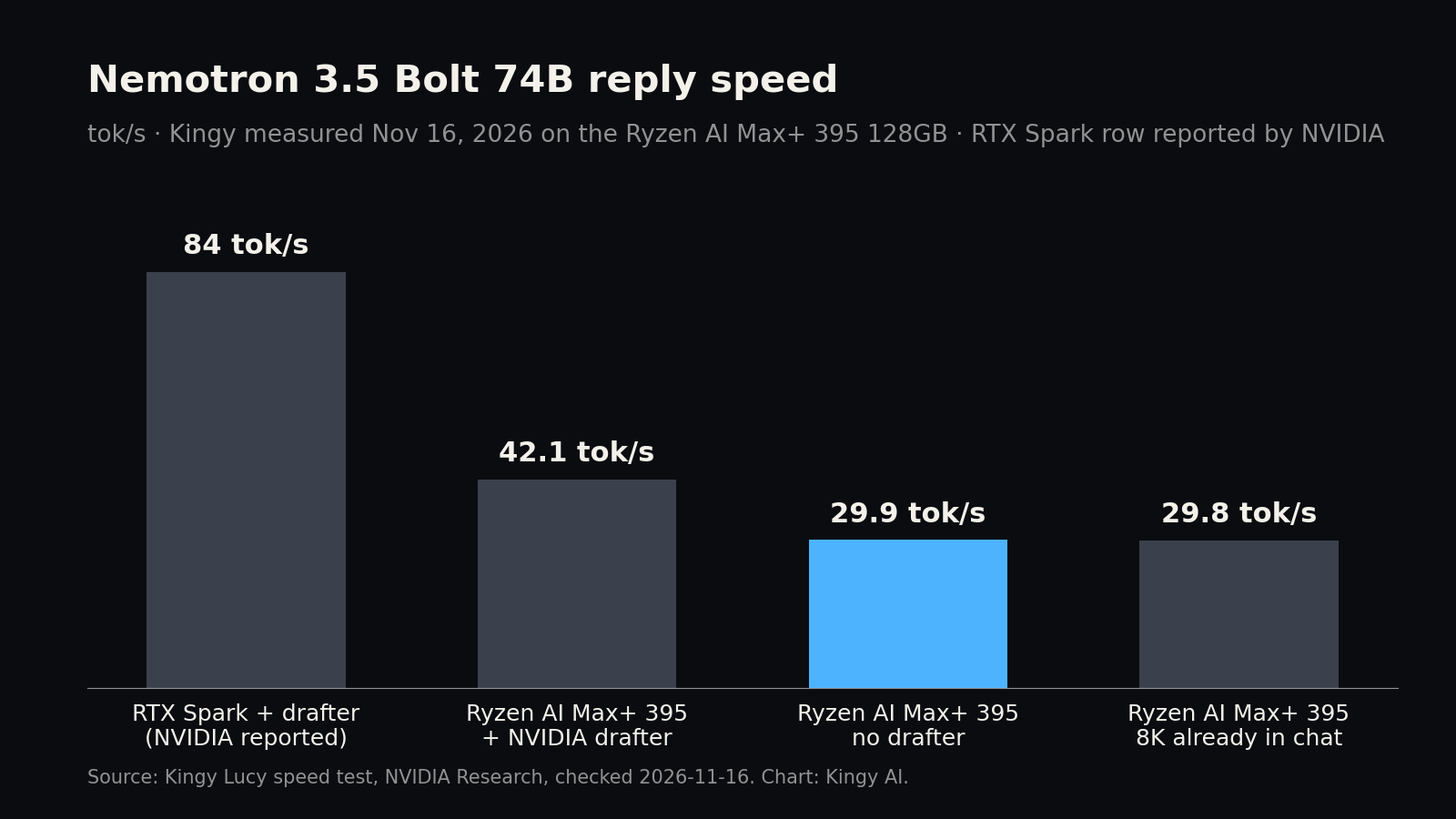
| Chat server, NVIDIA’s 32GB recipe, no drafter | 29.7 to 30.0 tok/s, 29.9 tok/s on average | short prompts only |
| Chat server, NVIDIA’s 32GB recipe, with the LiLiCorr drafter | 32.8 to 47.8 tok/s, 42.1 tok/s on average | short prompts only |
Kingy measured, Nov 16, 2026 (Vancouver time). Reply speed is how fast it writes; reading speed is how fast it takes in your prompt. llama-bench is llama.cpp’s own speed test, and its figures are the average of 3 runs; the 8K reply-speed figure is the average of 5, from a re-run (see Limits). Chat-server figures are three fixed prompts (Python code, a 300-word explainer and a ten-item list), up to 512 reply tokens each, at NVIDIA’s recommended sampling settings (temperature 1.0, top-p 0.95), which control how varied the replies are.
- Memory: with NVIDIA’s 32GB recipe and its full 262,144-token context, the machine’s graphics memory use rose by about 29 GB (28.9 GB) once the model loaded, and by about 33 GB (32.9 GB) with the drafter added. That includes the 1.73 GB image add-on, which the recipe loads, and fits the recipe’s name. The other picture test that briefly overlapped our run (see Limits) was running when we took the starting reading, so the true rise could be slightly different.
- Long chats barely slow it: with 8,192 tokens already in the chat it still wrote 29.8 tok/s. Only 8 of its 88 layers keep a growing chat memory, so long chats cost little.
- Reading takes a while: at about 470 to 480 tokens per second, an 8,192-token document takes roughly 17 seconds to read before the first word of the reply.
- The drafter helps, unevenly: it kept 62% and 59% of its guesses on the code prompt and the list (45.6 and 47.8 tok/s), but only 36% on the explainer (32.8 tok/s). NVIDIA reports 84 tok/s with the drafter on its own RTX Spark machine. Our verdict uses the speed without the drafter, because our rules count speeds with guess-ahead tricks separately.
Can you run it at home?
Can you run Nemotron 3.5 Bolt 74B on a 128GB Ryzen AI Max+ 395? Yes. Ryzen AI Max+ 395, 128 GB shared memory · NVIDIA’s official NVIDIA-Nemotron-3.5-Bolt-74B-A9B-24GB.gguf (22.02 GB, native 2-bit IQ2_XXS) · llama.cpp build 12429 (commit 9fba51d2c), Vulkan · 29.9 tok/s with NVIDIA’s 32GB recipe, drafter off, 29.8 tok/s with 8K already in the chat, about 29 GB of memory in use · Kingy measured Nov 16, 2026
Can you run it on a PC with a 24GB graphics card? Tight: about 2 GB too big, speed not measured yet. RTX 4090 24GB with 64 GB system memory · NVIDIA’s official 22.02 GB file · llama.cpp · about 24.5 GB needed with an 8K chat, about 2 GB over the 22.5 GB usable, so part of it would run from slower system memory · Estimated Nov 15, 2026
Can you run it on a PC with a 32GB graphics card? Fits in about 24.5 GB, speed not measured yet. RTX 5090 32GB · NVIDIA’s official file with its “28GB recipe” · llama.cpp · needs about 24.5 GB with an 8K chat, about 6 GB under the 30.5 GB usable; NVIDIA’s recipe uses a longer 65,536-token chat and the drafter, which need more · Estimated Nov 15, 2026
Can you run it on a 64GB Mac? Fits in about 24.5 GB, speed not measured yet. Mac Studio M4 Max 64GB · NVIDIA’s official file · llama.cpp · NVIDIA lists only NVIDIA hardware as supported, so Mac support for these file types is not confirmed · Estimated Nov 15, 2026
Can you run it on a 512GB Mac Studio? Fits in about 24.5 GB, speed not measured yet. Mac Studio M3 Ultra 512GB · NVIDIA’s official file · llama.cpp · same Mac support caveat · Estimated Nov 15, 2026
Can you run it on a 24GB Mac or a 16GB laptop? No (estimated). MacBook Pro 24GB or MacBook Air 16GB · NVIDIA’s official file · the 22.02 GB file alone is more than the roughly 16 GB and 10.5 GB macOS lets a model use by default · Estimated Nov 15, 2026
Can you run it on a laptop with an 8GB graphics card? Barely (estimated). RTX 5070 Laptop 8GB with 32 GB system memory · NVIDIA’s official file · more than 60% of the model would sit in system memory · Estimated Nov 15, 2026
Estimates use our Can You Run It at Home rules: file size plus chat memory plus 10% overhead, compared with the memory each machine can give a model. We only call something a “Yes” when we have measured it, or when an estimate leaves plenty of room and speed.
Want the small one instead? NVIDIA’s much smaller Bolt E4B is a separate model; we tested it on an 8GB laptop in Can You Run Nemotron 3.5 Bolt E4B at Home?
How to run it (NVIDIA’s official steps)
- Get a recent llama.cpp. NVIDIA’s card says to use the latest llama.cpp and build it from source. On the Lucy we built a fresh copy on Nov 15, 2026 (build 12429) rather than use our Oct 9 build, which is older than the model.
- Download the files from nvidia/NVIDIA-Nemotron-3.5-Bolt-74B-A9B-24GB-GGUF and, for the drafter, nvidia/NVIDIA-Nemotron-3.5-Bolt-74B-A9B-24GB-LiLiCorr-GGUF. NVIDIA’s card uses the
hf downloadcommand for this. - Start the server with the recipe that matches your machine. For a 32GB card or a 64GB machine, NVIDIA’s “28GB recipe” is:
llama-server --model "$MODEL" --mmproj "$MMPROJ" \
  --batch-size 2048 --ubatch-size 512 --ctx-size 65536 --parallel 1 -ngl 999 \
  --spec-type draft-dflash --spec-draft-n-max 6 \
  --spec-draft-model "$SPEC_DRAFT" --spec-draft-ngl 999 \
  --cache-type-k q8_0 --cache-type-v q8_0 \
  --temp 1.0 --top-p 0.95 --flash-attn on --jinja
For a 48GB+ card or a 128GB machine, the “32GB recipe” raises the context to 262,144, the batch sizes to 4096 and 2048, the drafter to 7 tokens, and drops the two
--cache-typelines. - Talk to it through llama.cpp’s OpenAI-compatible API (the same request format most chat apps use) at the address the server prints, or its built-in web page. Leave out
--mmprojif you only need text; that saves 1.73 GB.
What NVIDIA reports
- Speed: NVIDIA reports 84 tokens per second on its AIPerf SPEED-Bench test with the LiLiCorr drafter, on a Surface Laptop Ultra with an RTX Spark and 128 GB. That is reported by NVIDIA, not Kingy tested.
- Quality: NVIDIA’s card reports scores such as 86.43 on GPQA Diamond and 50.98 on Terminal-Bench 2.1. These are vendor-reported; we did not test answer quality.
How we tested
- Speed:
llama-bench -p 512 -n 128 -d 0,8192 -r 3 -fa on, the same settings as all our earlier runs, with all layers on the graphics side. - Chat server: NVIDIA’s 32GB recipe (262,144-token context, batch sizes 4096 and 2048, drafter with 7 guesses, no
--cache-typelines), image add-on included. We ran it first with the drafter and then without, with the server stopped between runs. - Idle machine: before starting, our script waited until the graphics side stayed under 10% busy and no other model, test or picture job was running. See Limits for one overlap.
- Files: we checked all three files’ SHA-256 fingerprints before testing and deleted them afterwards.
Limits of this test
- One machine measured. Kingy measured the 128GB Ryzen AI Max+ 395 only. The other lines are estimates from the official file sizes and are labelled that way.
- Speed only. We did not grade the answers. The quality figures above are NVIDIA’s.
- Not NVIDIA hardware. NVIDIA tuned this model for its own chips. Our AMD machine runs it through llama.cpp’s Vulkan backend, which NVIDIA does not list as supported.
- One short overlap, re-run. A picture-generation test on the same machine started about 8 seconds before our llama-bench run ended and was stopped about 30 seconds later. It overlapped the 8K reply-speed row (29.6 tok/s), so we re-ran that row on its own with nothing else running (29.8 tok/s) and report the re-run. It also overlapped the loading of the drafter server; the first drafter reply began within about 2 seconds of the other test being stopped. Drafter speeds are not used for our verdict.
- Short chat-server prompts. Our chat-server prompts were short; long-document speed comes from llama-bench.
- Versions move. llama.cpp changes daily, and new releases can change these speeds.
Sources
- Kingy measured: speed tests on the Ryzen AI Max+ 395 128GB (Nov 16, 2026), as described in How we tested
- nvidia/NVIDIA-Nemotron-3.5-Bolt-74B-A9B-24GB-GGUF on Hugging Face: file sizes, fingerprints, recipes, supported hardware and benchmark scores, checked Nov 15, 2026
- nvidia/NVIDIA-Nemotron-3.5-Bolt-74B-A9B-24GB-LiLiCorr-GGUF on Hugging Face: drafter file size and fingerprint, checked Nov 15, 2026
- nvidia/NVIDIA-Nemotron-3.5-Bolt-74B-A9B-24GB on Hugging Face: native 2-bit description, license and config file (layer layout), checked Nov 15, 2026
- NVIDIA Research, Nemotron 3.5 Bolt 24GB, published Oct 15, 2026: the 24GB design goal and the 84 tokens per second report, checked Nov 15, 2026
Revision log
- Nov 16, 2026: first published.