
Maestro coordinates AI agents that can plan an offer, draft emails and social posts, and set up cart recovery. The owner still decides what goes live.
Kingy.ai reviewed Wix’s public documentation for this guide.
At 7 a.m. on Black Friday, your launch email is ready and a customer is already asking why their coupon won’t apply. The answer might sit in the store dashboard, in the offer brief, or in a conversation you had three days ago. While you look it up, someone still has to check the social posts and make sure last night’s shoppers get the right cart reminder.
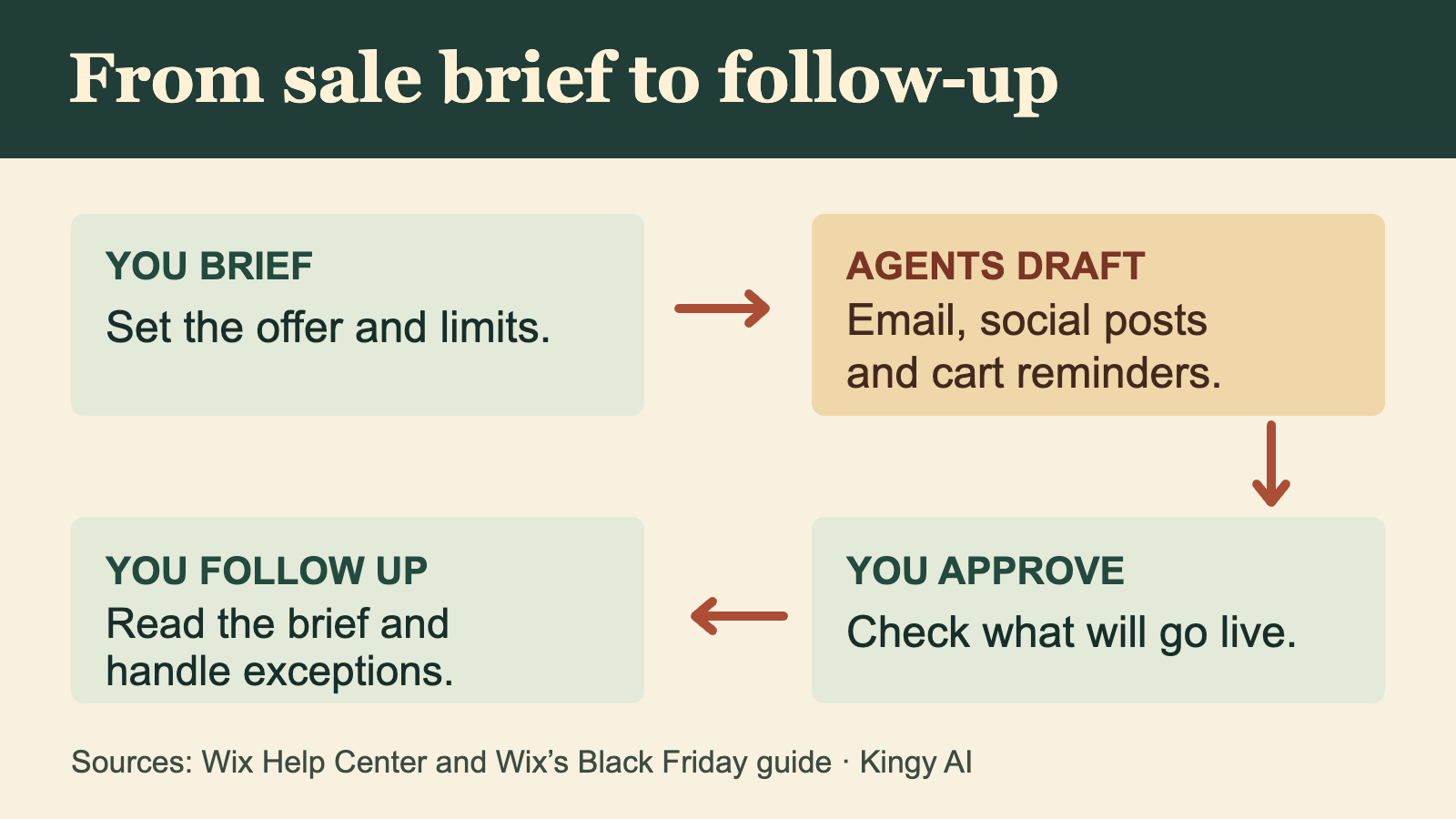
Symphony by Wix is built for that pileup. You brief one AI coordinator, called Maestro, and it assigns the work to specialized agents. The same promotion can inform your customer emails, social copy and cart follow-up. You set the terms of the sale, review the work and approve important actions. With the right tools connected, the agents can also carry out approved tasks. Wix’s Symphony overview and guide to the approval flow.
Kingy.ai may earn a commission if you make a qualifying purchase through the link below.
Meet your AI team for Black Friday!
What is Symphony by Wix?
Symphony is a standalone AI agent platform for small businesses. Wix began rolling it out on August 11, 2026. It works with an existing Wix business, can connect to tools outside Wix, and is available to businesses without a Wix website. Wix documents a Shopify connection, for example. That connection is a starting point. What your agents can read or change depends on the tools and permissions available for the specific job. Wix’s launch announcement and Symphony’s Shopify integration.
Maestro is the agent you talk to. Tell it what you sell, what you’re trying to achieve and which tools you use. It can recommend next steps, put together a team around your business and delegate work to the appropriate specialists. Symphony organizes work into workspaces with their own agents, tools and chats. You can look up what’s in progress, see what’s completed and get a morning brief covering work done and decisions that need attention. Wix’s Symphony overview and app walkthrough.
| Who does the work | What you could ask for |
|---|---|
| Maestro | Turn a sales target, product list and discount cap into a campaign plan, then coordinate the work. |
| Marketing | Draft launch and last-call emails, suggest audience segments and build a campaign calendar. |
| Outreach | Draft replies to common customer questions or follow up on inquiries. |
| Design | Create branded campaign content and adapt it for different channels. |
| Research | Look for opportunities, such as which products or customer groups might warrant a closer look. |
| Scheduling | Coordinate appointments and meetings, useful for a service business running a holiday promotion. |
| Finance | Help monitor invoices and payments, or flag items for the owner to review. |
Those are examples of work you can delegate. Your team is shaped around your business, and a campaign can involve several specialties. Wix also lets you create a custom agent with its own instructions. A retailer could ask one to check proposed copy against the store’s rules for discount wording, shipping promises and excluded products. Wix’s guide to Symphony features and Symphony product page.
Why the coordination matters
A chatbot can write a good subject line. The harder job is keeping the subject line, email, landing page, social caption and checkout consistent. Change the expiry from Sunday to Monday and every reference to the old deadline needs to be caught. Exclude one product and both the copy and the actual coupon rules need to reflect it. With Symphony, you can give Maestro that brief once and ask it to bring the related work back for review. Before sending, you still need to check the live store and the final drafts against the agreed terms. How Wix describes Symphony’s shared context and review workflow.
There’s also a difference between using an agent to plan a workflow and using an automation to run it. A cart automation starts from a defined event and follows the rules you configured. Maestro can help you decide which rule you need, draft the reminders and, where supported, help set up the automation. If you already have a reliable cart sequence, ask Symphony to review it first. An audit may be all you need. Running a second sequence over the same carts can leave customers with two reminders and two versions of the offer. Wix Automations overview and Wix’s guide to email marketing with agents.
Wix describes an example from The Little Matching Shop, a family apparel retailer. Its owner used Symphony while getting the store ready for the holidays. The work covered discount codes, welcome and cart-recovery emails, and a fourth-quarter content calendar. A brand agent reviewed the work. The example illustrates the range of tasks one owner can coordinate. Wix’s account leaves open how much the workflows contributed to sales. Wix’s account of The Little Matching Shop.
How to use Symphony for Black Friday and Cyber Monday
Black Friday falls on November 27 in 2026, and Cyber Monday follows on November 30. If you’re starting during sale week, give Maestro a narrow brief. One tested offer, a launch email, a few coordinated social posts and a working cart reminder are enough to make a useful first campaign. Wix’s 2026 Black Friday planning calendar.
Start in Symphony on the web or in the mobile app. Tell Maestro what you sell, which products you want to promote and how customers buy. Connect the store and any sending tools the workflow needs. Ask Maestro to identify the store and sender it intends to use and show you what it can access. In the approval summary, check which steps are drafts and which would make a change in a connected tool. Approve each phase when you’re ready for it to run. Wix’s app setup and approval instructions and Symphony’s supported platforms.
1. Plan the offer around what you can afford to sell
Give Maestro your eligible products, current stock, sale dates, margin floor, fulfilment limits and any exclusions. Ask it to propose an offer and spell out how it would work at checkout. Wix describes Symphony creating discount codes and setting their start and end dates in supported workflows. Review the exact products and variants, the time zone, whether discounts can stack and how returns will work before you approve anything. Wix’s Black Friday workflow and campaign planning checklist.
Consider a hypothetical $80 product with $42 in variable costs per sale. It contributes $38 before overhead at full price. A 15% discount takes the price to $68 and the contribution to $26, assuming the same costs. You’d need to sell about 46% more units to match the original contribution. Include packaging, payment fees and any shipping subsidy in your own calculation. A campaign that lifts order volume can still leave you with less money to cover overhead.
2. Give the email and social drafts one set of facts
Ask the marketing agents for a launch email, a last-call email and a few social captions that use the same product names, offer and deadline. Add a couple of past emails and approved product photos so the team can see how you actually talk to customers. If you split the list, give each group a reason to care. Repeat buyers might get a note about a relevant bundle, while first-time shoppers may need the basics on shipping or returns. Wix says Symphony can propose segments using purchase history and draft a version for each group when it has the relevant data. Wix’s email marketing guide.
Review the audience and opt-outs in your sending tool. Send a test email, open it on your phone and follow its link to the offer. Make sure the same terms appear in the social caption and at checkout. Symphony can help prepare the social copy and creative brief. If you want it to schedule or publish, verify that the connector supports that action for the exact account and post format. You can still use your existing scheduler to post the approved drafts. Wix’s Black Friday strategy guide and Symphony feature guide.
3. Test abandoned-cart follow-up before turning it on
Ask Maestro to check for an existing recovery flow and show you what would trigger each message, when it would send and what would stop it. Wix describes Symphony setting up or switching on a cart-recovery sequence that stops once the shopper buys. That depends on the store and checkout supplying the events the workflow needs. Wix Stores requires, among other conditions, that the store already have the shopper’s email address for a cart to qualify for recovery. Wix’s Symphony email workflow and Wix Stores’ abandoned-cart requirements.
Start with one reminder and a working return-to-cart link. Run two scenarios with test addresses. In the first, leave an eligible cart and check that the reminder arrives with the correct product and offer. In the second, complete the purchase before a scheduled follow-up and check that later reminders are suppressed. Also check that a reminder queued before the sale ends won’t promise a discount after it expires. Only add an extra incentive if you can afford it and have checked how it interacts with the main promotion.
Some shoppers leave because they only wanted to look. Others encounter shipping costs late in checkout or struggle with the checkout itself. If the same issue keeps coming up in customer messages, fix it before adding another reminder. Baymard’s checkout research.
4. Use the morning brief to make decisions during the sale
Agree on what should reach you right away. A failing coupon, a sold-out item featured in a scheduled email and a shipping promise you can no longer meet each need a person to decide what to do. Ask Maestro to summarize everything else in its morning brief, with links or references to the underlying records wherever available. The brief is a useful place to start, and the store dashboard is where you verify the order, stock or promotion before acting. Wix’s overview of task tracking and morning briefs.
After Cyber Monday, record the time you and your team spent on setup, edits and approvals. Alongside orders and revenue, track contribution after discounts and variable costs, recovered orders and unsubscribes. A recovered-cart report can tell you that a shopper returned and completed their order. To estimate how many orders the reminder actually caused, you’d need a comparable group that received no reminder. For a first campaign, compare your own time and costs with the quality of the work Symphony helped you deliver. Wix’s definitions for recovered and recoverable carts.
A brief you can give Maestro
Plan a Black Friday through Cyber Monday campaign for a homewares shop. Use the two collections I list below and a 15% discount that cannot combine with other codes. The sale starts November 27 at 8 a.m. and ends November 30 at 11:59 p.m. Pacific. Gift cards and clearance items are excluded. Draft a launch email, a last-call email and three social captions. Check whether a cart email already runs. Propose one reminder that stops on purchase and uses the offer only while it’s valid. Show the intended audiences, send times, channels and store changes for my review. Keep all sends, posts, live changes and automation activation pending my approval. Flag any missing data or connection before proceeding.
How much does Symphony by Wix cost?
Wix lists a free plan and three main paid tiers. These were the rates displayed for annual billing on November 23, 2026. Wix also offers monthly subscriptions. Confirm the currency, taxes and amount charged on the checkout screen. Symphony pricing and Wix Help Center plan details.
| Plan | Monthly equivalent on annual billing | Included AI credits |
|---|---|---|
| Free | $0 | 500 a month, up to 100 a day |
| Basic | $16 | 2,000 a month |
| Pro | $40 | 5,000 a month |
| Max | $80 | 12,000 a month |
Wix’s Help Center also documents a Max+ option with 30,000 monthly credits and access to paid credit top-ups. Credit use varies by task complexity and by the tool the agent uses, so the allowance alone won’t tell you how many campaigns you can run. Unused monthly credits expire at reset. When credits run out, agent background work pauses until credits renew, you upgrade or, on Max+, you buy more. Wix’s public pricing FAQ calls Maestro chat free, while its current Help Center says chat uses credits on the free plan and is free on paid plans. Budget using the Help Center rule and check your balance after a small trial. Wix’s AI credit documentation and pricing FAQ.
Where Symphony fits beyond the sale
The same setup can help a service business reply to inquiries and coordinate appointments, or help an online retailer plan welcome emails and review product descriptions. Wix says a second agent can review work before it reaches the owner. That gives you another pass on the draft. Keep final approval with the person who knows whether the promise is accurate, the customer is eligible or the business can deliver it. Share the data the task needs and review which connected tools can read or change it. Wix’s launch announcement and Wix’s AI output guidance.
Symphony makes the most sense when the same job crosses several tools and the same person is responsible for all of them. If you already have a stable offer calendar, an email platform with reliable cart flows and someone who keeps social posts aligned, look for one handoff where it can save you work. If the job is a single fixed reminder, your store’s existing automation may be enough. Wix Stores’ automated email options.
Start with a task you can judge in one sitting. Give Maestro an existing offer and ask for a launch email, two social captions and an audit of your cart reminder. Check the work against your checkout, see how much editing it takes and check the credits used. You’ll have enough information to decide whether to trust it with a live workflow before the holiday rush.