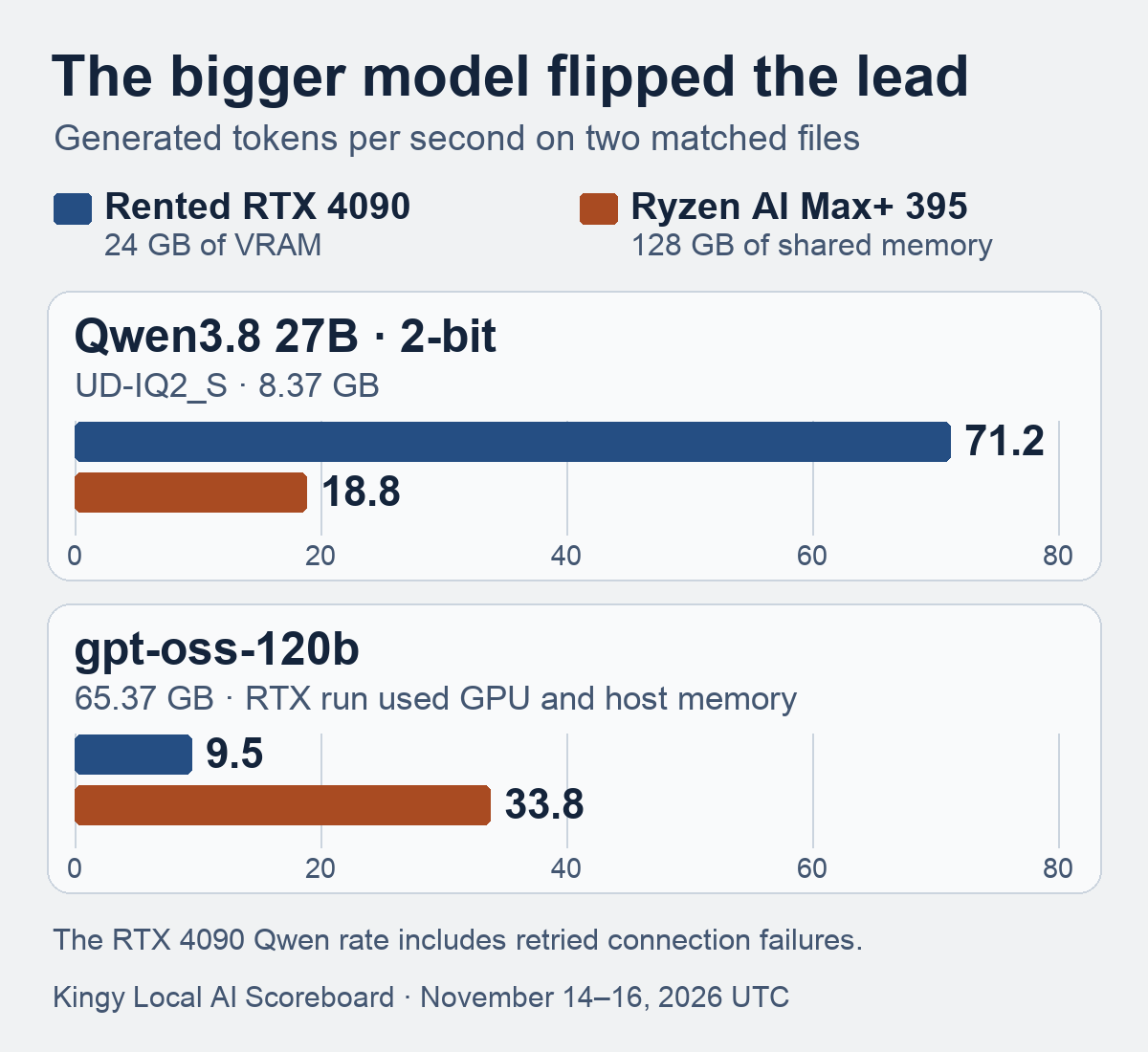
On the same 2-bit Qwen3.8 27B file, our rented RTX 4090 generated 71.2 tokens per second. The 128 GB Ryzen AI Max+ 395 mini PC managed 18.8. On the 65.37 GB gpt-oss-120b file, the mini PC took the lead at 33.8 tokens per second. The 4090 host, which had to split the file between its graphics card and system memory, reached 9.5. That made the Ryzen setup 3.56× as fast on this file. Kingy Local AI Scoreboard
If you already have a 4090, keep it for the models that run comfortably in your GPU memory. Consider the 128 GB mini PC if a much larger model is central to your work and the host-memory fallback is too slow. Check the exact file and context you plan to use before buying either machine. Kingy Local AI Scoreboard
Eight matched files, from 2.50 GB to 65.37 GB
The table uses generated tokens per second from llama.cpp’s own timing. Those rates exclude loading, prompt processing, network travel and grading. The download size is the size of the exact GGUF file, in decimal GB. The memory needed to run it also depends on the runner and the context. Kingy Local AI Scoreboard, downloadable data and file fingerprints
| Model and file | GB | RTX 4090 host tok/s | Ryzen 395 tok/s | Faster setup |
|---|---|---|---|---|
Qwen3 4B Q4_K_M |
2.50 | 176.8† | 52.6 | RTX 4090, 3.36× |
Qwen3 8B Q4_K_M |
5.03 | 133.8† | 36.5 | RTX 4090, 3.67× |
Qwen3.8 27B UD-IQ2_S |
8.37 | 71.2† | 18.8 | RTX 4090, 3.79× |
Qwen3.8 27B UD-Q3_K_XL |
13.15 | 54.4 | 14.2 | RTX 4090, 3.83× |
Gemma 4 26B A4B Q4_K_M |
16.80 | 165.8 | 54.5 | RTX 4090, 3.04× |
Gemma 4 31B Q4_K_M |
18.69 | 20.0‡ | 10.5 | RTX 4090, 1.90× |
Qwen3.6 35B A3B Q4_K_M |
21.72 | 137.6 | 62.0 | RTX 4090, 2.22× |
| gpt-oss-120b, MXFP4 experts | 65.37 | 9.5§ | 33.8 | Ryzen 395, 3.56× |
† Timing for these three RTX 4090 rows includes output from disconnected attempts that Kingy retried and excluded from grading. ‡ The logs leave Gemma 4 31B’s memory placement on the RTX 4090 unresolved. § The gpt-oss-120b result is for the RTX 4090 and host memory working together. Ratios use the displayed rates. Kingy Local AI Scoreboard
The RTX 4090 setup led on seven files. Its lead ranged from 2.22× to 3.83× on six of them and was 1.90× on the 18.69 GB Gemma 4 31B file. The runner also needs memory for the context cache and working buffers. The archived placement records are incomplete, so treat these as measured results for the whole setup. Kingy Local AI Scoreboard
What the 65.37 GB result means for a 4090 owner
The 4090 has 24 GB of dedicated GDDR6X. The Lucy AI Studio’s Radeon 8060S graphics and CPU share 128 GB of system memory. On the 4090 host, llama.cpp could run gpt-oss-120b by using both memory pools. On Lucy, the model ran on a system with a much larger shared pool. The operating system, context cache and other apps also need memory, so the 128 GB capacity is a starting point for sizing the workload. NVIDIA RTX 4090 specifications, AMD Ryzen AI Max+ 395 specifications, Kingy’s test
At the measured rates, generating 1,000 tokens of gpt-oss-120b would take about 105 seconds on the split 4090 setup and 30 seconds on Lucy. For the 2-bit Qwen3.8 file, those illustrations are 14 seconds on the 4090 and 53 seconds on Lucy. The calculations cover generation only. Your CPU, system memory and offload settings can change the rate when a model runs across the GPU and host. Kingy Local AI Scoreboard
What Kingy tested
We ran the original Scoreboard job set 0.2 on a self-paid RunPod RTX 4090 host and a Lucy AI Studio with Ryzen AI Max+ 395 and 128 GB. Both ran Linux and llama.cpp build 11538 with hardware-specific backends. We matched the full SHA-256 fingerprints and per-model inference settings. Each file ran nine jobs three times on each machine, for 216 scored job runs per setup. The jobs included fixing a bug, finding facts in a set of files and cutting a video. Lucy ran the prompts and grading. The rented host handled inference for the RTX 4090 side. The runs took place November 14–16, 2026 UTC. Scoreboard methods, downloadable runs
The 2-bit Qwen file was Qwen3.8-27B-UD-IQ2_S.gguf with SHA-256 prefix 7897d2c5a5ce. It ran with thinking enabled and a 32,768-token reply cap. The gpt-oss file was gpt-oss-120b-F16.gguf, with MXFP4 experts and fingerprint prefix 2d1f0298ae4b. Both gpt-oss runs used medium reasoning and a 16,384-token reply cap. The caps apply to generated replies. The runtime also needs context for inputs and chat history. Scoreboard file and settings table, downloadable fingerprints
Cephalon supplied the Lucy AI Studio and paid for an earlier Kingy video. It did not fund the scoreboard or control the results. Kingy paid for the RunPod rental. Scoreboard disclosure
Speed and finished answers are separate checks
The 3-bit Qwen3.8 file generated 3.83× as fast on the 4090 setup, and 24 of 60 replies hit the length limit there, compared with 16 of 56 on Lucy. The faster rate says how quickly the model generated tokens. To judge whether a setup is better for your work, also check which replies finish and pass your tests. All eight same-file quality gaps were below the scoreboard’s 14.7-point tie threshold, which uses variation across three passes. Seven jobs count toward that score. The landing page and animated title are reported separately. Scoreboard results and tie method
How to choose
- Keep the 4090 for a workload that fits. Load the exact GGUF in your preferred app and set the context you use for real work. A larger configured context can require more memory. Check the runtime log for memory allocation and the number of layers placed on the GPU. llama.cpp GPU and memory options, llama.cpp server settings
- Try a smaller file if you are close to the limit. A different quantization can change both speed and answer quality. Run your own test prompt against each file and compare finished replies. Record the exact file fingerprint, since a filename can stay the same across uploads. Kingy’s Qwen quantization guide
- Look at the 128 GB Ryzen configuration if the big file is the reason you run locally. Our gpt-oss-120b result shows what the tested 128 GB system did with this exact file. Confirm how much shared memory your app can use and what it does with the context and software you need. AMD Ryzen AI Max+ 395 specifications, Kingy Local AI Scoreboard
- Tested
- Eight matched GGUF files, Scoreboard job set 0.2. Nine jobs, three repeats per file and setup. 216 scored job runs per setup.
- Machine
- Rented RunPod RTX 4090 (24 GB) and Lucy AI Studio, Ryzen AI Max+ 395, Radeon 8060S and 128 GB of shared memory.
- Runner
- Linux and llama.cpp build 11538 on both setups, with hardware-specific backends.
- Files
- Matching full SHA-256 fingerprints. Qwen3.8 27B UD-IQ2_S prefix 7897d2c5a5ce. The 65.37 GB gpt-oss-120b file, prefix 2d1f0298ae4b, used GPU and host memory on the 4090.
- Settings
- Same per-model settings across machines. Rates use llama.cpp generated tokens divided by generation time and exclude prompt processing.
- Grading
- Fixed checks grade seven of nine jobs in the headline score. The landing page and animated title are excluded from that score.
- Cost
- Kingy paid for the RunPod RTX 4090 rental. Cephalon supplied the Lucy AI Studio.
- Measurement window
- November 14–16, 2026 UTC
- Dates
- run 2026-11-16 · checked 2026-11-22
Limits
Kingy compared one rented 4090 host with one 128 GB mini PC. This comparison does not establish a universal memory cutoff, performance at a specific context length, wall power or a winner for concurrent users. If speed is the reason you are considering a purchase, time a complete run in your own app with your actual file and prompt. Include the wait for the first token and the time to a finished answer.