
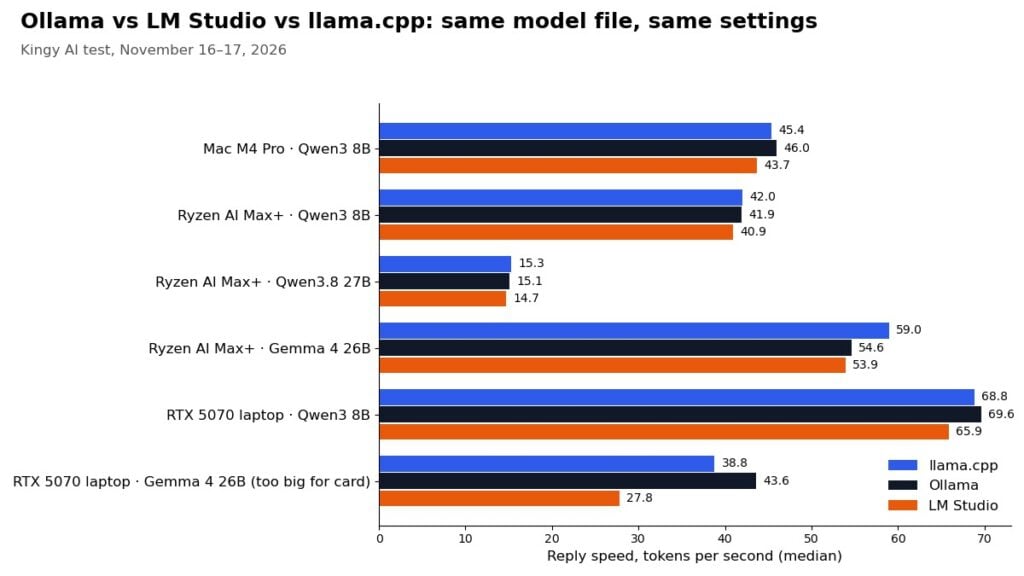
Short answer: when the model fits in your graphics memory, Ollama, LM Studio and llama.cpp wrote replies at almost the same speed in our tests: within 6% of each other in four of five tests, and 9.5% in the fifth. The bigger differences were how fast each app started and loaded a model, how much memory it used, and what happened when the model was too big for the graphics card.
We ran the same model file in all three apps on three computers we own or were given: an Apple Mac with an M4 Pro chip, an AMD Ryzen AI Max+ 395 mini PC (the Lucy AI Studio) and a Windows laptop with an 8 GB RTX 5070. Same file, same settings, same prompts, three runs each. Here is what we found.
What we found
- Reply speed is a near tie. On the Mac, Qwen3 8B wrote 43.7–46.0 tokens per second in all three apps. On the Lucy, Qwen3.8 27B wrote 14.7–15.3. A token is roughly a word piece.
- Ollama loaded fastest on the Lucy. On the Lucy it went from a cold start to the first word of a reply in 10.3 s with Qwen3 8B (llama.cpp 14.3 s, LM Studio 13.4 s) and 11.4 s with Gemma 4 26B A4B. On the Mac the three were within a second of each other (6.5–7.5 s). On the laptop, llama.cpp loaded fastest (6.8 s against Ollama’s 11.4 s).
- Ollama read long prompts faster on the Lucy with two of the three models (1,667 against about 1,500 tokens per second with Gemma, 1,124 against about 997 with Qwen3 8B). With Qwen3.8 27B all three read at about 365. On that machine Ollama ran on AMD’s ROCm software while the other two used Vulkan, so the Lucy results also compare two graphics drivers.
- Too big for the card, the choice matters. Gemma 4 26B A4B (16.8 GB) does not fit the laptop’s 8 GB card, so part of it runs from main memory. There Ollama wrote 43.6 tokens per second, llama.cpp 38.8 (with a split setting we chose by hand) and LM Studio 27.8 with its automatic setting.
- Memory use varied more than speed. With Qwen3 8B on the laptop, Ollama used 8.3 GB extra against 12.7–13.2 GB for the other two. On the Mac and the Lucy the three apps were within 1.5 GB of each other.
Which one should you use?
Pick on ease of use, not speed, if your model fits your graphics memory: the reply speed differences we measured were under 10%. LM Studio is the easiest to start with because everything happens in one window. Ollama suits you if you mostly want a model running in the background for other apps to use. llama.cpp gives the most control, but you set it up from the command line. If your model is bigger than your graphics card, try Ollama first: its automatic split wrote and read fastest in our laptop test without any manual tuning, though it took the longest to load.
Full results
Mac (M4 Pro, 24 GB): Qwen3 8B
| App | Start, load and first word | Writes reply (tokens/s) | Reads a long prompt (tokens/s) | Extra memory used |
|---|---|---|---|---|
| llama.cpp | 6.8 s | 45.4 | 393 | 5.8 GB |
| Ollama | 6.5 s | 46.0 | 389 | 5.4 GB |
| LM Studio | 7.5 s | 43.7 | 396 | 6.3 GB |
Lucy AI Studio (Ryzen AI Max+ 395, 128 GB): Qwen3 8B
| App | Start, load and first word | Writes reply (tokens/s) | Reads a long prompt (tokens/s) | Extra memory used |
|---|---|---|---|---|
| llama.cpp | 14.3 s | 42.0 | 997 | 7.7 GB |
| Ollama | 10.3 s | 41.9 | 1,124 | 8.3 GB |
| LM Studio | 13.4 s | 40.9 | 992 | 7.4 GB |
Lucy AI Studio (Ryzen AI Max+ 395, 128 GB): Qwen3.8 27B
| App | Start, load and first word | Writes reply (tokens/s) | Reads a long prompt (tokens/s) | Extra memory used |
|---|---|---|---|---|
| llama.cpp | 35.5 s | 15.3 | 371 | 15.1 GB |
| Ollama | 24.7 s | 15.1 | 365 | 15.6 GB |
| LM Studio | 31.8 s | 14.7 | 364 | 14.3 GB |
Lucy AI Studio (Ryzen AI Max+ 395, 128 GB): Gemma 4 26B A4B
| App | Start, load and first word | Writes reply (tokens/s) | Reads a long prompt (tokens/s) | Extra memory used |
|---|---|---|---|---|
| llama.cpp | 27.3 s | 59.0 | 1,500 | 18.5 GB |
| Ollama | 11.4 s | 54.6 | 1,667 | 19.4 GB |
| LM Studio | 22.4 s | 53.9 | 1,504 | 17.9 GB |
Laptop (RTX 5070 Laptop, 8 GB): Qwen3 8B
| App | Start, load and first word | Writes reply (tokens/s) | Reads a long prompt (tokens/s) | Extra memory used |
|---|---|---|---|---|
| llama.cpp | 6.8 s | 68.8 | 2,795 | 12.7 GB |
| Ollama | 11.4 s | 69.6 | 2,738 | 8.3 GB |
| LM Studio | 8.7 s | 65.9 | 2,730 | 13.2 GB |
Laptop (RTX 5070 Laptop, 8 GB): Gemma 4 26B A4B
| App | Start, load and first word | Writes reply (tokens/s) | Reads a long prompt (tokens/s) | Extra memory used |
|---|---|---|---|---|
| llama.cpp | 11.8 s | 38.8 | 806 | 17.0 GB |
| Ollama | 25.9 s | 43.6 | 1,775 | 19.6 GB |
| LM Studio | 19.0 s | 27.8 | 882 | 24.3 GB |
“Start, load and first word” is the time from starting the app with nothing loaded until the first word of a short reply appears. “Extra memory used” is how much more memory (main memory plus graphics memory) was in use with the model loaded than with the app closed, so it includes each app’s own overhead and its working memory for a 16,384-token context.
How we tested
- One model file, loaded into all three apps (checked by its SHA-256 fingerprint). We did not use each app’s own download, which can be a different build of the model.
- Same settings everywhere: 16,384-token context, temperature 0, fixed seed, thinking turned off, and the whole model on the graphics chip where it fits. Everything else, such as flash attention, was left at each app’s default, because that is what most people run.
- Three prompts: a short question, a long document of about 8,000 tokens, and a coding task. Each was run three times after a warm-up, with a unique tag at the start so no app could reuse a cached answer. Load time was measured three times from a fully stopped app (on the Lucy, also with the file cache cleared).
- Speeds were timed by our own script from outside each app, the same way for all three. Results are medians.
- Versions: Ollama 0.40.16; LM Studio 0.4.28+2 (its llama.cpp engine 2.73.0); llama.cpp build 12359 (commit b1b770d90). The laptop ran in Turbo mode with a 115 W graphics power limit.
- On the laptop’s Gemma test, llama.cpp needs a setting to decide which parts of the model stay in main memory. We set it to keep all expert layers there (-ncmoe 99). Ollama and LM Studio chose their own split.
Limits
These are one set of runs per machine on the app versions available on November 16, 2026; all three apps update often and results can change. We tested single requests only, not several at once. We tested only GGUF files, so LM Studio’s MLX engine on the Mac was not part of this test. Speeds depend on the model, the quantization and the hardware; use them to compare the apps, not as a promise for your computer.
By Kingy AI. Lucy AI Studio sent free by Cephalon, which paid for an earlier Kingy AI video. Cephalon has no say in results. Mac and laptop bought by Kingy AI.