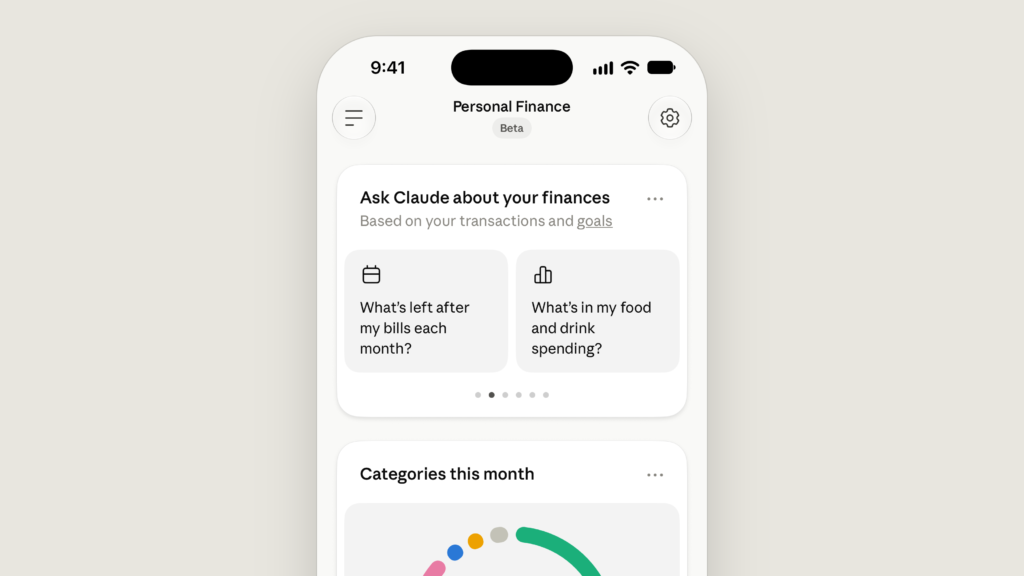
Anthropic announced Personal Finance in Claude on November 5, 2026. Claude can now answer questions about the money in your linked financial accounts. Anthropic’s new Personal Finance feature combines a configurable dashboard with conversational analysis of balances and transactions, so you can investigate spending, recurring bills and cash flow without assembling every account’s figures yourself.
The launch has clear boundaries. Personal Finance is a gradually rolling out US beta for individual Pro, Max and Ultra subscribers. It connects to US banks through Plaid, with read-only access. Claude cannot transfer money, pay a bill, cancel a subscription or make an investment through the feature.
The useful proposition is account-grounded explanation: ask where your money went, request the transactions behind an answer, then follow up in ordinary language. The important qualification is that bank data can be incomplete or delayed, and Claude can misinterpret it.
Checked November 5, 2026. Not tested by Kingy. This guide is based on Anthropic’s announcement, current pricing and help documentation. We have not connected bank accounts or measured the feature’s accuracy.
What you can access today
| Question | Launch position |
|---|---|
| Where is it available? | United States only, in a gradual beta rollout. |
| Which plans qualify? | Personal Pro, Max and Ultra subscriptions. |
| Which plans are excluded? | Free, Team and Enterprise. |
| Where can you use it? | Claude on the web, Claude Desktop, iOS and Android. |
| Which financial institutions? | US banks supported by the connection flow; a complete bank list is not provided in the checked documentation. |
| How many banks? | Up to 16 bank links, rather than a stated limit of 16 individual accounts. |
| Can it transact? | No. Access is read-only. |
These conditions come from Anthropic’s Personal Finance help article. An eligible subscription does not guarantee the feature has reached your account yet. Paying for a higher tier also does not remove the US restriction or make an unsupported bank connect.
For readers in Canada, the UK or elsewhere, the checked launch documents do not announce an expansion date. General Claude availability in your country is separate from eligibility for this particular feature.
Pricing: the cheapest eligible plan is Pro
Anthropic has not announced a separate Personal Finance add-on fee. The feature is included for eligible subscribers during this beta, subject to rollout and regional conditions. The current US web subscription prices are:
| Plan | Price before applicable tax | Personal Finance |
|---|---|---|
| Free | $0 | Unavailable |
| Pro, monthly | US$20 per month | Eligible for the US beta |
| Pro, annual | US$200 billed upfront each year | Eligible for the US beta |
| Max | US$100 per month | Eligible for the US beta |
| Ultra | US$200 per month | Eligible for the US beta |
| Team / Enterprise | Organizational pricing | Unavailable |
Annual Pro works out to about US$16.67 per month, calculated as $200 divided by 12. Anthropic rounds that display to $17 on its pricing page, but bills the $200 upfront. Twelve monthly payments total $240, so the annual option costs $40 less over a full year. App-store prices may differ; check the amount shown before subscribing.
If you already have Pro, the announced eligibility rules give you no reason to upgrade solely to unlock Personal Finance. Max and Ultra offer more capacity across Claude, but Anthropic does not document a better bank feed, more accurate financial answers or a higher bank-link limit for those tiers.
No dedicated allowance of finance questions, per-bank fee or finance-specific usage quota is stated in the sources we checked. Normal Claude plan limits still matter. Treat “included” as the current access arrangement, rather than a promise of unlimited use or permanent pricing.
How Personal Finance works
You choose which accounts to share through Plaid, the service connecting Claude to your bank. You authenticate through Plaid’s bank connection flow and approve the requested access. Anthropic says Claude does not ask for or see your bank password.
Claude then reads the permitted account information to populate the Personal Finance page and answer your questions. You can ask from that hub or use linked accounts in a regular Claude chat when the Plaid connector is enabled. Those locations have different training-data treatment, which we cover below.
This connection removes some manual copying from a financial question. Instead of pasting several statements and explaining their date ranges, you can ask Claude to examine the linked information. The answer still needs scrutiny: successful access to data does not establish that the model’s calculation, categorization or interpretation is correct.
What Claude can read
According to the help documentation, the available fields are:
- The bank’s name.
- Account names, account types and the last few account-number digits, usually four.
- Balances and credit limits.
- Up to 24 months of transactions, including amount, date, merchant, category and the bank’s transaction description.
“Up to” matters: do not assume every institution will deliver a complete two-year history. There is also an exception to the abbreviated-account-number description. If a bank includes a full number in an account name or transaction description, Claude may see it in that text.
What the connection does not provide
You can link bank, card, loan and investment accounts, but the current data access does not include investment holdings, trades, interest rates or loan and card terms. Seeing an investment-account balance does not give Claude a complete portfolio breakdown.
This also affects questions about APR. Claude can explain the term and examine recorded interest charges, but the connection does not automatically supply your contractual rate or terms. Ask it to distinguish information it read from an explanation or assumption. Plaid’s consent screens can mention broader data categories; Anthropic says Claude currently reads only the listed fields.
What you can do with it, and why it might help
Personal Finance offers widgets for spending, cash flow, accounts, subscriptions, upcoming bills and short insights. You can add, edit, remove and reorder them. The dashboard gives you an overview; the conversation lets you investigate a particular number.
Anthropic’s announcement describes questions about spending categories, comparisons with previous months, recurring payments, duplicate-looking charges, unexpected fees and rising bills. You can also ask for a spending chart, a calendar of upcoming commitments or a dashboard you keep adjusting. These are documented capabilities and examples, rather than outcomes Kingy has independently reproduced.
The strongest use case is someone with several accounts who wants a clearer explanation of their combined activity. A transaction list can tell you what happened. A follow-up question can ask which merchants drove a category increase, whether a payment repeats, or which accounts were included in a total.
There is value in making the reasoning inspectable. Asking “What transactions support that figure?” is more useful than accepting a polished paragraph at face value. For a cash-flow estimate, ask which future payments are known and which were inferred from past activity. A predicted bill is still a prediction.
Anthropic also says Personal Finance contains no ads or sponsored recommendations and offers no credit cards, loans or savings accounts of its own. That describes the product’s stated commercial approach; it does not establish that every answer is correct or suitable for a consequential decision.
How to set it up
The following steps follow Anthropic’s documentation. They have not been run with a bank account by Kingy.
- Open Claude on the web, Desktop or an updated mobile app using your eligible personal account.
- Find Personal Finance in the side menu. On the web or Desktop, check More if it is not immediately visible.
- Select Get started, choose your goals or skip them, then continue.
- Select Link accounts with Plaid and review the information Claude will be able to access.
- Continue into Plaid, select your bank, authenticate and choose the accounts you want to share.
- Return to Claude, wait for the accounts to appear, then choose whether to link another account or finish.
Complete the connection within 10 minutes and return to Claude promptly. Initial transaction syncing can take a few minutes. Plaid opens in a new window on the web, the default browser from Desktop, an in-app flow on iOS and a browser tab on Android. For Desktop, the browser must be signed into the same Claude account.
Start with one account and a narrow question whose answer you can compare with a statement. That is our suggested way to assess the usefulness of the feature before sharing more information, rather than a requirement imposed by Anthropic.
Adding accounts at an existing bank
Use Link another account at the top of the page on web or Desktop, or under the mobile gear menu. To add another account at a bank already connected, go through linking again and share every account you want Claude to retain access to.
If Claude detects an existing link, Switch to the new link replaces it with the newly selected accounts. Keep it as it is preserves the current connection. Keep both supports another login, such as a joint or business login, but creates a possible duplication problem: the same account can be counted twice if the bank represents it differently under each login.
Five useful questions to try
These are Kingy’s suggested prompts, not tested results or quotations from Anthropic. They ask Claude to expose the evidence and limits behind its answer.
- Spending review: “Break down last month’s spending by category. List the accounts and date range included, and show the transactions behind the three largest categories.”
- Recurring payments: “Find recurring payments whose amounts changed over the past six months. Separate likely subscriptions from payments you cannot confidently classify.”
- Cash flow: “Estimate what remains before my next payday after expected bills. List stale balances, missing accounts, assumed payments and anything you cannot verify.”
- Possible duplicates: “Show charges that might be duplicates, with merchant, date, amount and account. Explain why each pair looks similar without assuming fraud.”
- Interest: “Explain the interest charges recorded in these transactions. Show the rows you used and tell me which rates or account terms you cannot access.”
For any surprising finding, open the bank’s own records before acting. A similar-looking pair of charges may be two legitimate purchases; a merchant category may not reflect what you bought.
Accuracy limits that can change the answer
The biggest practical risk is a convincing answer built from an incomplete financial picture. Anthropic specifically identifies three data problems in its help article.
Balances can be a day or two old. Do not treat a displayed balance or an estimated amount left before payday as a real-time authorization to spend.
Accounts can be counted twice. Linking the same bank through multiple logins can inflate totals when the bank identifies an overlapping account differently.
Unavailable banks can disappear from spending figures. While Claude cannot read a connected bank, the page leaves that bank out of its spending totals. A budget can therefore suggest you have more money left than you really do.
Beyond these documented issues, the model itself can make mistakes. Ask for the included accounts, transaction dates, rows behind a total and any assumptions about transfers or future bills. A correct sum of the wrong transactions is still the wrong answer to your question.
Personal Finance is not designed to provide investment advice. Its inability to see holdings, trades and contractual terms also limits the questions it can answer from connected data. Important decisions still need the relevant bank records and, where appropriate, a qualified professional who can assess the full circumstances.
Privacy: the hub and regular chats have different rules
Anthropic says conversations inside the Personal Finance hub are not used to train its models. For financial information shared outside that hub, your normal Claude privacy settings apply. Do not extend the hub’s promise to every finance discussion across Claude.
Financial information used in an answer appears in the conversation and stays in chat history until you delete that chat, subject to Anthropic’s retention practices. Service providers hosting Claude also handle bank data, and Plaid handles data under its own terms and privacy policy. Read-only access limits what the feature can do to your accounts; information still passes through the services needed to answer your requests.
After a chat uses linked accounts, Anthropic says Claude is designed not to add information from that chat to memory, search it later or include it in the monthly recap. Those controls do not delete the conversation. For deletion details and exceptions, see Anthropic’s data-retention explanation.
Control when Plaid can be used
Claude can read linked accounts in chats without asking each time unless you change the connector permissions. On web or Desktop, open + in the message box, choose Connectors and toggle Plaid.
On iOS or Android, open + → Connectors → Plaid, then All tools or Android’s Set all tools. Blocked disables access; Always allow enables it. Needs approval requests approval before reads unless the chat is set to automatically approve. The choice also applies to new chats.
Shared links and artifacts need a separate check
A shared chat link can expose your messages, Claude’s replies and financial figures, including associated charts or artifacts. An artifact can survive deletion of its original chat. Stored figures in an artifact are visible to people who open it, even though access to a viewer’s own linked accounts requires that viewer’s eligibility and permission.
Check every figure before sharing anything created from connected accounts. The feature also has file and artifact compatibility limits, so do not assume a finance chat can run code, generate Office or PDF documents, or publish an interactive app. Text, tables and plain-text files such as CSV are supported in this context.
What happens when you unlink a bank or cancel Claude?
To unlink, open Personal Finance, then the three-dot menu and Manage linked accounts on web or Desktop, or the gear menu on mobile. Select the bank, choose Unlink and confirm.
This removes every account shared under that bank login; you cannot unlink just one account through that action. Claude stops reading that bank, but previous answers, artifacts and shared links remain until you remove them.
Unlinking the final bank resets the dashboard. Anthropic says this deletes the widgets, their settings, including budgets, and setup answers. That reset cannot be undone. Reconnecting a bank later does not make this deletion reversible.
You can unlink all banks through the hub or disconnect Claude through Plaid Portal. Removing access and deleting data held by a service are separate actions; consult Plaid’s access and deletion guidance for its controls.
When your paid plan ends, you lose access to Personal Finance and Claude cannot read those accounts in chats, but the bank links remain until you unlink them. If you do not plan to return, unlink before the subscription ends. Afterwards, the help article directs users to the web sidebar’s Customize or Plugins → Connectors → Plaid controls, with Plaid Portal or Support as alternatives.
Moving a personal account into a Team or Enterprise organization unlinks the banks when that move starts. Deleting your Claude account triggers automatic unlinking after the deletion is processed. The saved Personal Finance dashboard is not yet included in data exports, so do not assume an account export is a restorable dashboard backup.
Troubleshooting and workflow restrictions
| Problem | What Anthropic recommends |
|---|---|
| No Personal Finance menu | Check the personal subscription, US location, app version and gradual rollout. A VPN endpoint outside the US can hide the feature; linked banks remain connected. |
| Bank access expired | Open linked accounts and select “Sign in again,” using the original bank login. |
| New transactions are missing | Allow a few minutes for syncing. Reauthenticate if requested. If nothing has loaded a day after linking, the help article suggests relinking or waiting for the bank. |
| Claude cannot read a bank | Reconnect through “Link another account” before unlinking the old entry. If already at 16 banks, remove the broken link first to make room. |
| A chat will not use linked accounts | Check Plaid permissions and try a fresh chat outside a project. Chats that already ran code, made files or started from an artifact cannot use the accounts. |
| Desktop linking fails | Finish in the browser Claude opened, avoid reloading Plaid and use the same Claude account in that browser. |
The connected accounts cannot be used in scheduled tasks, Cowork tasks or Claude Code, and may not work in a project. Personal Finance is also unavailable in Claude Duet. This launch therefore does not provide an unattended daily financial-monitoring workflow through those tools.
Keep Personal Finance separate from Claude for Financial Advisors. That professional offering has different integrations and workflows. Its capabilities do not establish what the consumer bank connection can access.
Who should consider using it?
An eligible US subscriber who wants help understanding spending across several accounts has a clear reason to try it. Pro already meets the plan requirement, and the most useful first exercise is a question you can independently check.
People who need real-time balances, detailed holdings analysis, automated payments or guaranteed financial recommendations should keep using the appropriate bank, investment or professional tools. Readers outside the US need an announced regional expansion before this beta becomes an option.
Begin with one account and one completed month. Ask for the transactions behind the answer, compare them with your statement and check the privacy controls before connecting additional accounts.
Featured image: Anthropic’s official Personal Finance product illustration. It shows a demonstration interface, not a Kingy bank account or test result.
Sources
Official sources checked November 5, 2026:
- Anthropic: Introducing Personal Finance in Claude — launch, purpose and product examples.
- Claude Help Center: Use Personal Finance in Claude — eligibility, setup, data access, privacy, unlinking and limitations.
- Claude plans and pricing — current individual subscription prices.
- Claude Max plan and Claude Ultra plan — plan and billing context.
- Anthropic data retention and Claude data exports — retention and dashboard-export limits.
- Plaid End User Privacy Policy and Plaid access and deletion controls — the connection provider’s separate policies.
- Claude for Financial Advisors — the separate professional product.
Revision log
November 5, 2026: First published guide, based on the launch announcement and current official documentation. No connected-account testing performed.
The Kingy Brief
Get the free AI price sheet.
25 AI plans and models on one page, from official pricing pages, updated every month. Free when you join The Kingy Brief: AI changes, original tests and one practical thing to try, Fridays at 09:00 Vancouver time.
Free · Double opt-in · Unsubscribe anytime
Signup help and newsletter schedule
After submitting, check your inbox for "Confirm your subscription to The Kingy Brief" and open its confirmation link. Your price sheet download is on the page that opens. Check Spam or Promotions if you cannot find it.
Fridays at 09:00 Vancouver time: source-checked AI changes, original tests and one practical thing to try. We skip a week when there is not enough verified material. Free. Unsubscribe anytime.