OpenAI’s November 4 release of ChatGPT Images 2.6 adds tools for making animated GIFs, static SVGs and more targeted image edits. Developers get two model choices, Sunburst and Flare, plus a control for how much planning the model does before rendering. The API launch is documented; the consumer rollout has been reported separately. This launch reference summarizes documentation. Our separate November 4 Images 2.6 vs. 2.5 hands-on comparison now supplies original output files, timings and usage-derived costs. We found no 2.6 score on the independent leaderboards checked for this launch reference.
What you actually get today
GPT Image 2.6 (Sunburst and Flare): Available now.
| Where | Who | Status | Notes |
|---|---|---|---|
| OpenAI Image API: image generation and image edit endpoints (gpt-image-2.6-sunburst, gpt-image-2.6-flare) | OpenAI API developers | Available now | OpenAI does not say every account in this group has it. Rate limits vary by usage tier and account. (source) |
Not included:
- The Responses API image tool, Chat Completions and the Batch API: the model pages mark image generation and image edits as supported, and these other endpoints as unsupported (source)
- SVG and GIF output when editing: both work only on image generation (source)
- A dated snapshot to pin: each model has only its undated name so far (source)
- Regions: Not stated in the OpenAI pages we checked.
- Price: $5 per 1M text input tokens, $8 per 1M image input tokens and $30 per 1M image output tokens, the same for Sunburst and Flare (source)
- Limits: No tier table on the model pages yet: OpenAI says rate limits vary by usage tier and account (source)
- Tested by Kingy: See the separate November 4 hands-on comparison. This page remains the documentation-based launch reference.
Checked against OpenAI’s own pages on Nov 5, 2026, 00:18 UTC. Rollouts change in the first days; this box is re-checked for 72 hours.
What launched, and where can you use it?
OpenAI calls the API models gpt-image-2.6-sunburst and gpt-image-2.6-flare. Its Sunburst page describes detailed visual work; its Flare page emphasizes fast iteration. Both accept text and image inputs, return images, and list the Image API generation and edit endpoints. Neither page gives a numerical speed comparison between them.
The Verge reported a rollout across ChatGPT and Codex on web, desktop and mobile, including GIF creation from a prompt or photo. That is reported availability, not an account-by-account check by Kingy. We have not verified which subscription tiers receive each feature, their quotas or when rollout will reach every user. API access and ChatGPT subscription access are separate questions; OpenAI says API organization verification may be necessary.
This launch reference reports documentation and published evaluations. Kingy’s original Images 2.6 and 2.5 output, editing, timing and usage-cost observations are in the separate November 4 hands-on comparison, with exact prompts, original files and limitations. The experiment is a small first-output set and does not establish a general model ranking.
Specifications at a glance
| Feature | Documented API behavior |
|---|---|
| Models | GPT Image 2.6 Sunburst and Flare |
| Endpoints | Image generation and image edits |
| Planning | complexity: low, medium or high; default high |
| Rendering | Separate quality control, including low, medium, high, xhigh and max |
| Vector output | Static SVG on generation; one per request |
| Animation | GIF on generation; 2–64 frames, subject to size and pixel limits |
| Guided editing | Transparent annotation layer on the first input image; also available for supported 2.5 models |
Source: OpenAI image generation guide and changelog, checked November 4. The guide’s nearby resolution paragraph explicitly names 2.5 models. We would not apply its maximum dimensions to 2.6 without a specific confirmation. OpenAI has not established a parameter count or training dataset in the sources we checked.
Complexity and quality do different jobs
The new complexity setting controls planning effort before the image is rendered. OpenAI offers low, medium and high, with high as the default. Its guide suggests lower complexity for a focused change and higher complexity for work with more elements or relationships. Higher planning effort can increase latency and can also introduce unwanted changes, according to the guide.
quality is a separate rendering control. That distinction matters when an edit is already compositionally correct: a team can try lower planning effort while choosing the rendering quality it needs, then compare the result with a higher-complexity run. There is no separate complexity fee listed, but that does not make every combination equal in total cost or waiting time. We have not measured either.
Draw on an image to guide an edit
Markup lets an application submit an image and a separate transparent PNG containing annotations. A person might circle a lamp and ask the model to replace it, leaving the rest of the room alone. This gives the instruction a spatial reference; it is not a guarantee that the model will leave every unmarked pixel untouched.
OpenAI says the overlay applies to the first input image and must match its oriented dimensions. The image and annotation are each limited to 16,777,216 pixels, and the annotation file can be no larger than 50 MB. The guide says markup cannot be combined with a mask or prompt_rewriter. The changelog also lists markup for supported 2.5 models, so it should not be treated as exclusive to 2.6.
For production editing, save the original and inspect the entire result. Check faces, product labels, lighting and objects outside the marked area as well as the requested change. A circle can clarify intent without providing the pixel-level guarantees of a conventional selection tool.
SVG: editable shapes with a review step
On the generation endpoint, output_format: svg requests a static vector. OpenAI describes a process that first creates a reference image and then converts it to vector output. The returned SVG contains static vector content, with editable paths, shapes and colors, and no scripts, external resources or embedded raster images. Requests return one SVG at a time; SVG output is not available from the edit endpoint. SVG output also excludes streaming, partial images, custom compression and prompt_rewriter.
For an icon, diagram or illustration, vectors can be useful because shapes can be resized and edited in compatible software. Inspect the file before shipping it: an SVG container does not guarantee clean paths, manageable layers, correct spelling or a legally suitable logo. OpenAI says SVG output is charged at the image model’s rate for the reference image, plus the authoring model’s rate for the tokens used to produce the SVG. Total cost depends on usage in both stages; the sources reviewed do not establish a fixed price per SVG.
GIFs: frame controls, not a video editor
OpenAI’s guide now documents GIF output on the generation endpoint. Developers can set frame_count from 2 to 64 and frame_duration_ms from 20 to 2,000 milliseconds, rounded to 10 ms. Defaults are nine frames at 200 ms each, or 1.8 seconds in total. All frames must fit the applicable size limits and total pixel budget, so the maximum values cannot be combined into a promised maximum-length animation.
GIF output is not supported by the image edit endpoint. Streaming, partial images, custom compression and prompt_rewriter are also unavailable for GIF output, according to the guide. The Verge reports that ChatGPT users can create GIFs from text or photos, change playback speed and edit individual frames; those consumer controls and limits should not be assumed to match the API parameters.
A useful evaluation would check whether the subject holds its shape across frames, whether text flickers and whether the loop joins cleanly. None of those properties follows from the file format alone.
API pricing: calculate tokens, then count retries
Both 2.6 models have the same standard token rates as their 2.5 counterparts on OpenAI’s pricing page. Prices below are US dollars per million tokens, checked November 4, 2026.
| Token type | GPT Image 2.6 standard | GPT Image 2.5 standard |
|---|---|---|
| Text input | $5 | $5 |
| Cached text input | $1.25 | $1.25 |
| Image input | $8 | $8 |
| Cached image input | $2 | $2 |
| Image output | $30 | $30 |
| Image output, Batch | Not listed | $15 |
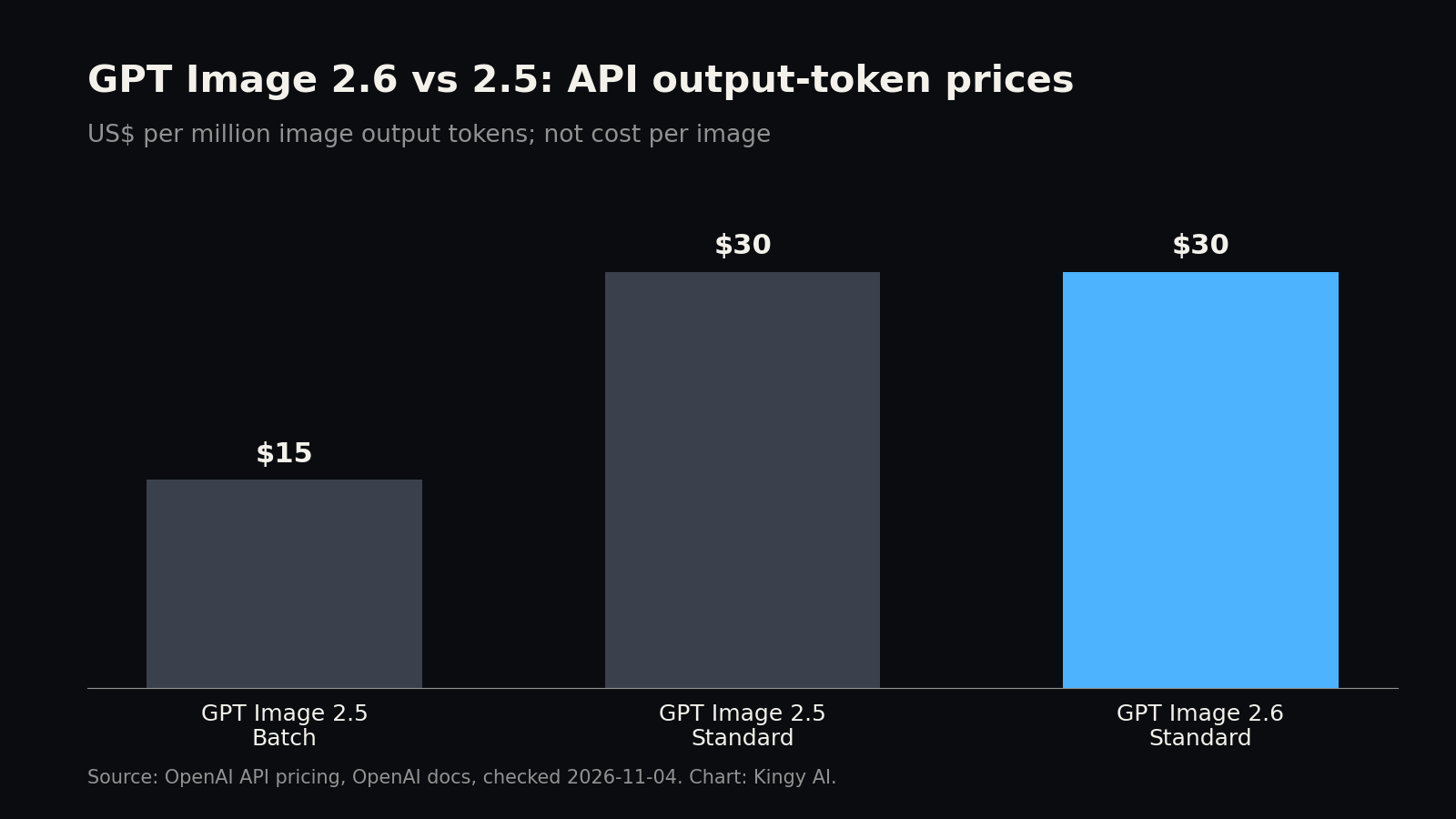
The chart compares image output token rates: $15 per million for 2.5 Batch and $30 per million for each model’s standard rate. It does not show prices per picture. OpenAI lists cached rates for 2.6, but the caching explanation we checked explicitly describes earlier models in Responses workflows; verify eligibility for the particular 2.6 request before budgeting a discount. The checked Batch table does not list 2.6, so do not assume the 2.5 Batch rate applies.
For an illustrative uncached request, 1,000 text input tokens at $5 per million cost $0.005. Add 3,000 image output tokens at $30 per million, or $0.09, and the total is $0.095. This is arithmetic for hypothetical token usage, not a measured price for one image. Image inputs, other models or tools, retries, taxes and applicable regional charges can add to it.
At the output rate alone, 1,000 tokens cost $0.03, 5,000 cost $0.15 and 10,000 cost $0.30. Equal rates between 2.5 and 2.6 do not establish equal cost per accepted image: token usage and the number of attempts may differ. Record actual usage and count the images your team accepts when comparing workflows.
For a queued overnight job, the listed 2.5 Batch output rate is half the 2.6 standard output rate per token. That comparison does not tell us which model is cheaper per finished asset, and a migration may also depend on the endpoint your app uses. The 2.6 model pages list generation and edits, while the older 2.5 documentation includes additional workflows. Check your integration before replacing a model ID.
Benchmarks: what the independent boards show
We found no GPT Image 2.6 result on the Artificial Analysis text-to-image or editing boards checked November 4. The Arena text-to-image board we opened was dated November 2 and listed 2.5, not 2.6. This bounded check cannot establish that nobody has tested 2.6 elsewhere. It means we cannot give it an independent rank from these sources.
The existing scores help show the field 2.6 enters. They are not 2.6 scores. Artificial Analysis v2.1 results below are from separate generation and editing boards; the ± values are the reported 95% confidence-interval half-widths.
| Model | Text-to-image Elo | Editing Elo |
|---|---|---|
| GPT Image 2.5 Sunburst (max) | 1223 ± 10 | 1199 ± 11 |
| GPT Image 2.5 Flare (max) | 1207 ± 10 | 1183 ± 11 |
| Nano Banana 2.1 | 1176 ± 12 | 1151 ± 13 |
| Grok Imagine Image 2.0 | 1168 ± 12 | 1118 ± 13 |
| FLUX 3 Image | 1119 ± 12 | 1123 ± 14 |
| MAI-Image-2.7-Preview | Not listed | 1196 ± 15 |
Artificial Analysis uses blind comparisons by human judges and fits an Elo-style preference score, as described in its methodology. Its generation and editing boards are separate scales. The scores reflect preferences on the sampled prompts and presentation conditions; they do not measure a client’s acceptance rate, exact text accuracy, SVG path quality, GIF consistency or production latency. Sunburst 2.5 and MAI 2.7 Preview have overlapping editing uncertainty and both have a reported rank range of 1–2, so a three-point difference is not a decisive win.
Arena uses a different voting pool and scoring system. Its 2.5 scores should not be placed on the same numerical scale as Artificial Analysis. We also found no credible published 2.6 GenEval, DPG-Bench or DrawBench result in the sources checked. A benchmark result arriving later could change the comparison.
How it compares with other image models
Google Nano Banana 2.1. Google documents gemini-nano-banana-2.1 for still images and conversational edits, with 1K, 2K and 4K outputs and search grounding. Its model documentation and pricing put a standard 1K image output equivalent at $0.0336, before input and other applicable costs. One thousand such outputs would be $33.60 at that output rate. Google publishes a per-resolution equivalent. OpenAI provides a calculator that estimates image output cost from model, quality and size; we have not verified a matching fixed 2.6 1K quote. These figures do not establish a percentage-cheaper comparison.
FLUX 3 Image. Black Forest Labs presents FLUX 3 Image for generation and editing, with native 2K and 4K and bounding-box controls. Its pricing calculator showed $0.048 per 1K image when checked, or $48 for 1,000 outputs before other charges. Its controls may appeal to teams that need to specify where objects go; compare actual results and integration requirements against the OpenAI workflow.
Grok Imagine Image 2.0. xAI lists Grok Imagine Image 2.0 with text and image inputs and image output. Its Imagine documentation describes editing with up to five reference images. The published 1K low and medium output prices are $0.04 and $0.06 respectively; input images are listed separately at $0.01 each. A thousand 1K outputs at those rates would be $40 or $60 before image inputs. Settings and acceptance rates differ, so the arithmetic is not a quality ranking.
Microsoft MAI-Image-2.7-Preview. Microsoft describes 2.7 Preview as an image-editing release, with text-to-image generation coming later. Its strong editing-board result is worth watching, but a preview editing model is not a like-for-like replacement for every generation API. We found no generally available API price to compare.
GPT Image 2.5. The predecessor remains relevant if an established integration depends on a supported Responses or Batch workflow. Its documented standard token prices match 2.6, and supported 2.5 models also gained markup. A team that needs SVG or GIF output should examine 2.6’s documented generation endpoint; a team seeking a measurable quality upgrade still needs a matched test.
Midjourney V8.2. Midjourney identifies V8.2 as its current default, with personalization and an edit model. Its website and Discord workflow is a different buying decision from a metered API. Monthly plans start at $10, with higher tiers offering more fast GPU time and additional features. A subscription price cannot be directly compared with OpenAI’s token rates.
Ideogram 4.5. Ideogram lists version 4.5 in its app, MCP and API, with native 2K generation, reference images and a separate Precise Edit endpoint. Prompt-only API prices are $0.03, $0.06 and $0.10 per output at low, medium and high settings respectively. Reference and edit pricing has different options; high is $0.22 per output. Those rates describe Ideogram’s settings, not equivalent OpenAI output quality.
Adobe Firefly Image Model 5. Adobe identifies Image Model 5 in its API documentation, with native 4-megapixel images and Instruct Edit. The Firefly app plans use subscriptions and credits, and the app also offers models from multiple providers. Check the model and credits for the exact feature before comparing a plan with an API bill. We found no matched independent 2.6 comparison against these three products.
What to test before switching
Build a representative set of prompts and source images from real work, then run each model with recorded settings. Include small localized edits, dense text, object relationships and cases where the original image must remain recognizable. Have reviewers score the requested change and unintended changes separately. Record failures and refusals as well as successful outputs.
For SVGs, inspect geometry and editability in the tool your team uses. For GIFs, check frame-to-frame consistency, loop boundaries and file size. Track elapsed time and total cost per accepted asset, including retries and image inputs. That comparison will be more useful than an isolated token rate or a predecessor’s leaderboard position.
Sources
- OpenAI API changelog, checked November 4, 2026.
- OpenAI GPT Image 2.6 Sunburst, checked November 4, 2026.
- OpenAI GPT Image 2.6 Flare, checked November 4, 2026.
- OpenAI image generation guide, checked November 4, 2026.
- OpenAI API pricing, checked November 4, 2026.
- The Verge, ChatGPT Images 2.6 rollout report, checked November 4, 2026.
- Artificial Analysis text-to-image leaderboard, checked November 4, 2026.
- Artificial Analysis image editing leaderboard, checked November 4, 2026.
- Artificial Analysis image methodology, checked November 4, 2026.
- Arena text-to-image leaderboard, checked November 4, 2026.
- Google Nano Banana 2.1 documentation, checked November 4, 2026.
- Google Gemini API pricing, checked November 4, 2026.
- Black Forest Labs FLUX 3 Image, checked November 4, 2026.
- Black Forest Labs pricing, checked November 4, 2026.
- xAI Grok Imagine Image 2.0, checked November 4, 2026.
- xAI Imagine documentation and pricing, checked November 4, 2026.
- Microsoft MAI-Image-2.7 Preview, checked November 4, 2026.
- Midjourney version documentation, checked November 4, 2026.
- Midjourney plans, checked November 4, 2026.
- Ideogram 4.5, checked November 4, 2026.
- Adobe Firefly API, checked November 4, 2026.
- Adobe Firefly plans, checked November 4, 2026.
Revision log
- November 4, 2026: first published.
Trending on Kingy
Keep reading with the stories getting the most attention now.
The Kingy Brief
Get the free AI price sheet.
25 AI plans and models on one page, from official pricing pages, updated every month. Free when you join The Kingy Brief: AI changes, original tests and one practical thing to try, Fridays at 09:00 Vancouver time.
Free · Double opt-in · Unsubscribe anytime
Signup help and newsletter schedule
After submitting, check your inbox for "Confirm your subscription to The Kingy Brief" and open its confirmation link. Your price sheet download is on the page that opens. Check Spam or Promotions if you cannot find it.
Fridays at 09:00 Vancouver time: source-checked AI changes, original tests and one practical thing to try. We skip a week when there is not enough verified material. Free. Unsubscribe anytime.