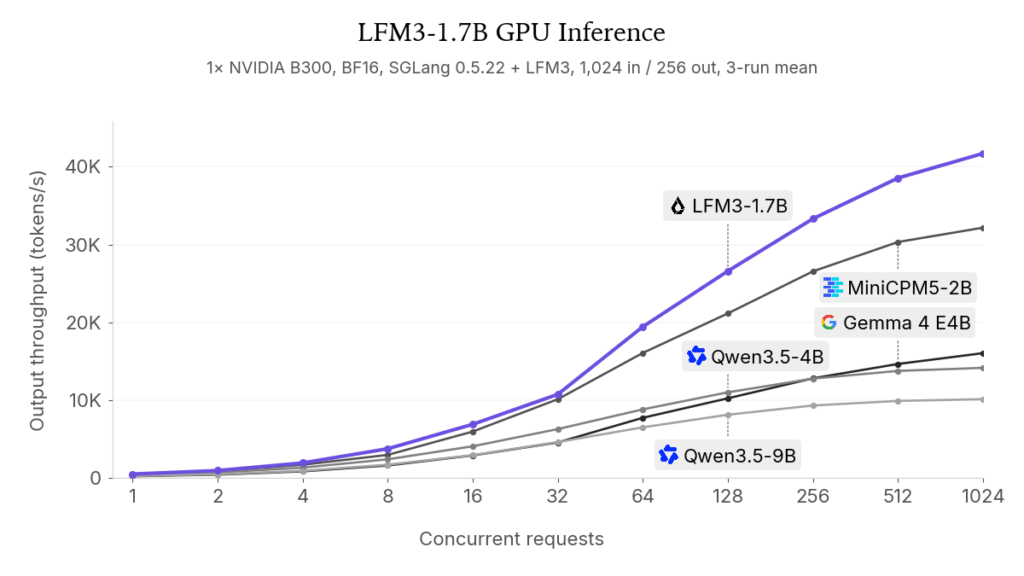
Featured figure: Liquid AI’s GPU-throughput comparison on one NVIDIA B300. Vendor-reported results; Kingy.ai has not reproduced these runs.
Liquid AI’s LFM3-1.7B is a small text model with a large advertised context window. Its official 4-bit GGUF files are about 1.05–1.10 GB, but that figure is the download size, not the total memory a running model needs. The model’s context cache and runtime add to it, especially with long prompts.
As of October 29, 2026, the most straightforward documented starting point is Ollama 0.40.13 or later on Apple silicon, Linux or Windows. Liquid also documents GGUF support in llama.cpp and LM Studio. Native mlx-lm support is still in progress. We have not installed or benchmarked the model for this guide.
What the model can do
LFM3-1.7B is a 1.73-billion-parameter text checkpoint. Its model card lists a maximum context of 262,144 tokens, counting input and output together. Images and audio belong to separately named LFM3 family models; this checkpoint accepts text.
Liquid advises using retrieval or search to supplement factual knowledge and does not recommend this small checkpoint for agentic coding or complex multistep reasoning. Treat its output as something to check, particularly when the answer needs current facts or a reliable calculation. Liquid’s published performance comparisons are vendor results, and we have not independently tested them.
The weights use the LFM Open License v1.0, which includes conditions for use and redistribution and a revenue-related commercial restriction. The license defines “Threshold” as annual revenue of US$10 million or more, while section 5 restricts commercial use by a legal entity that “exceeds the Threshold.” Read the complete terms, including the definitions and notice obligations, before commercial use; consult counsel if the threshold or your circumstances are unclear. This guide is not legal advice.
Choose a runtime
| Runtime | Documented support | What to check |
|---|---|---|
| Ollama | Version 0.40.13 adds Linux and Windows support alongside Apple silicon. | Check ollama --version and update if needed. |
| llama.cpp | Version 0.8.0 includes LFM3 text support. | Check the version of the build you intend to use; Liquid’s GGUF card lists b11960/v0.8.0 as the minimum. |
| LM Studio | Liquid’s GGUF card specifies llama.cpp engine 2.65.1 or newer on macOS, Windows and Linux. | Check the installed engine version separately from the LM Studio app version. |
| Native mlx-lm | Liquid’s MLX card says support is in progress. | Wait for a supported release or treat development work as experimental. |
Sources: Ollama 0.40.13 release notes, llama.cpp 0.8.0 release, Liquid’s GGUF card, and Liquid’s MLX card. Liquid documents the LM Studio engine requirement; we have not independently tested that configuration.
For Ollama, first check your installed version with ollama --version. If it is older than 0.40.13, update Ollama using the instructions for your operating system. Then the official Ollama library documents this command:
ollama run lfm3This is a documented recipe, not a command we ran. Ollama 0.40.12 introduced LFM3 for Apple hardware only; the later 0.40.13 release added Linux and Windows. If a loader does not recognize the architecture, check the runtime and engine versions before assuming the model file is damaged.
Apple users may notice an official MLX download. The artifact exists, but its card says upstream mlx-lm support is still in progress. An open LM Studio issue also reports an architecture-loading failure with an 8-bit MLX model on app 0.4.26 and MLX engine 1.13.1. That is one user’s report, not our test or a finding about the GGUF route.
Pick a model file
Liquid’s official GGUF repository offers several quantizations. Quantization changes how weights are represented, trading file size against potential quality and runtime behavior. These are exact file sizes rounded to decimal GB, not measured memory requirements:
| GGUF file | Download size |
|---|---|
| QAD-Q4_0 | 1.050 GB |
| Q4_K_M | 1.100 GB |
| Q5_K_M | 1.259 GB |
| Q6_K | 1.428 GB |
| Q8_0 | 1.846 GB |
| BF16 or F16 | 3.467 GB each |
Q4_K_M is a practical starting file to consider if you are using a GGUF-compatible runtime. Liquid describes QAD as a method for recovering accuracy after quantization; that does not establish that every 4-bit answer matches the higher-precision version. We have not compared the files’ quality or speed. Ollama manages its own model download, so use the runtime’s model selection rather than assuming that the command above selects this particular GGUF file.
The separate MLX 4-bit file is approximately 0.973 GB for model.safetensors; its tokenizer and supporting files add to the download. Its existence does not establish released native mlx-lm compatibility.
Budget for the context cache
The model file is only one part of memory use. The runtime also needs a key-value cache for attention, convolution state, temporary computation buffers and memory for the app and operating system. Four-bit weights do not mean the cache is also stored at four bits.
To show how context affects the cache, we calculated an idealized payload from the model’s published configuration. This assumes one sequence, a 16-bit key-value cache and sliding-attention layers that retain at most 256 tokens. It is arithmetic, not a runtime measurement:
| Tokens retained | Calculated cache only |
|---|---|
| 4,096 | 50.5 MiB |
| 8,192 | 98.5 MiB |
| 32,768 | 386.5 MiB |
| 131,072 | 1,538.5 MiB (1.502 GiB) |
| 262,144 | 3,074.5 MiB (3.002 GiB) |
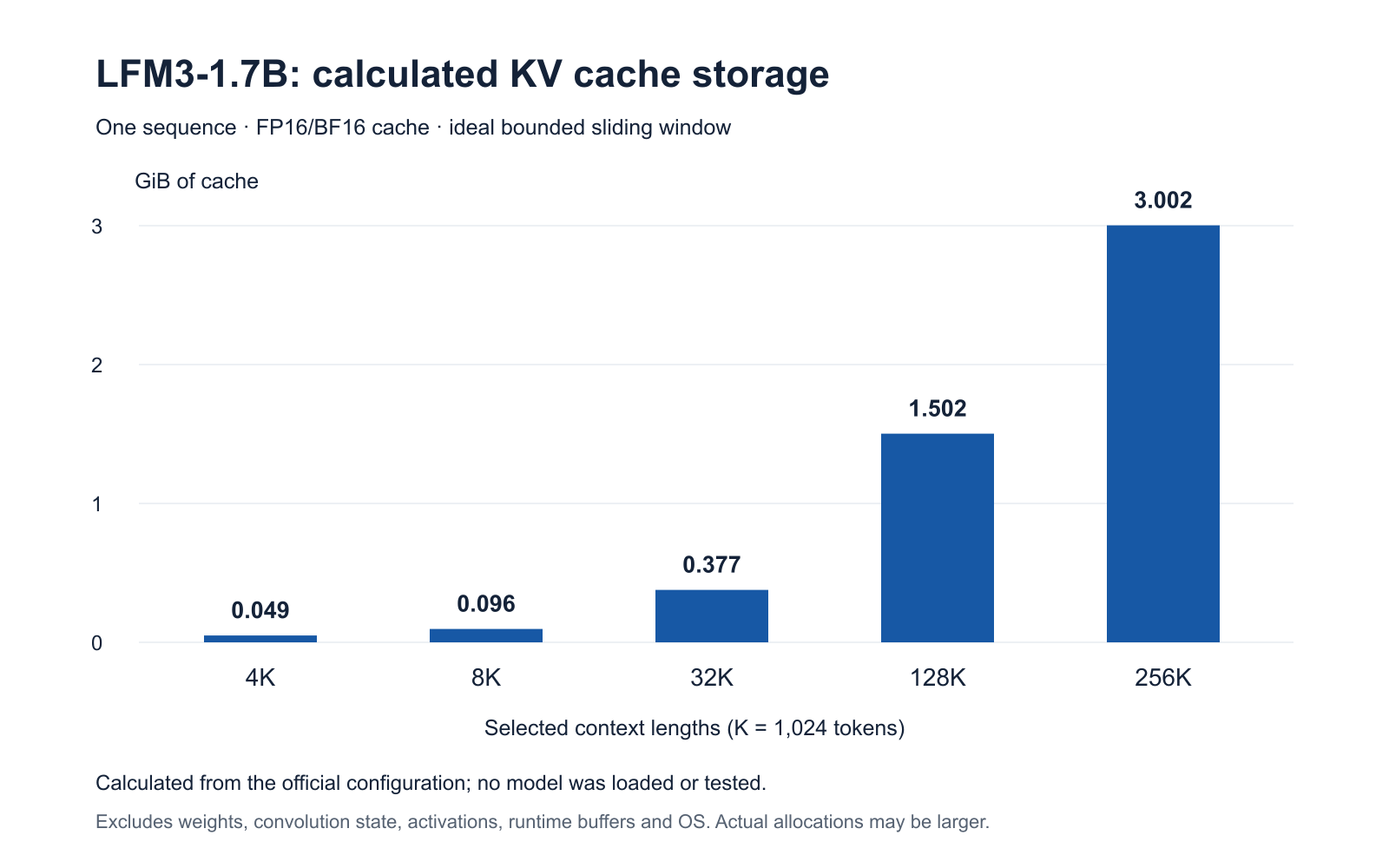
The calculation uses four key-value heads, a head dimension of 128, six global attention layers and five sliding attention layers. For N retained tokens, its formula is 2 × 4 × 128 × 2 × [6N + 5 × min(N, 256)] bytes. The first two factors account for keys and values and the four heads; the second 2 is bytes per 16-bit value.
At the maximum context, the Q4_K_M file plus that ideal cache alone total about 4.323 GB, before the other memory needs above. Actual allocation can differ with cache precision, batching, concurrent sessions and implementation choices; a runtime may reserve a larger sliding cache. The calculation does not establish a safe device RAM minimum or prove that the maximum context will work on a given machine.
Start with a modest context for your task, then measure memory on the device and runtime you intend to use. Increase the context only when the extra room is useful and the machine has enough headroom.
The Kingy Brief
Get The Kingy Brief.
AI changes, original tests and one practical thing to try. Fridays at 09:00 Vancouver time.
Free · Double opt-in · Unsubscribe anytime
Sign up for The Kingy Brief on Beehiiv.
Signup help and newsletter schedule
Signup form provided by Beehiiv. After submitting, check your inbox for "Confirm your subscription to The Kingy Brief" and open its confirmation link. Check Spam or Promotions if you cannot find it.
Fridays at 09:00 Vancouver time: source-checked AI changes, original tests and one practical thing to try. We skip a week when there is not enough verified material. Free. Unsubscribe anytime.