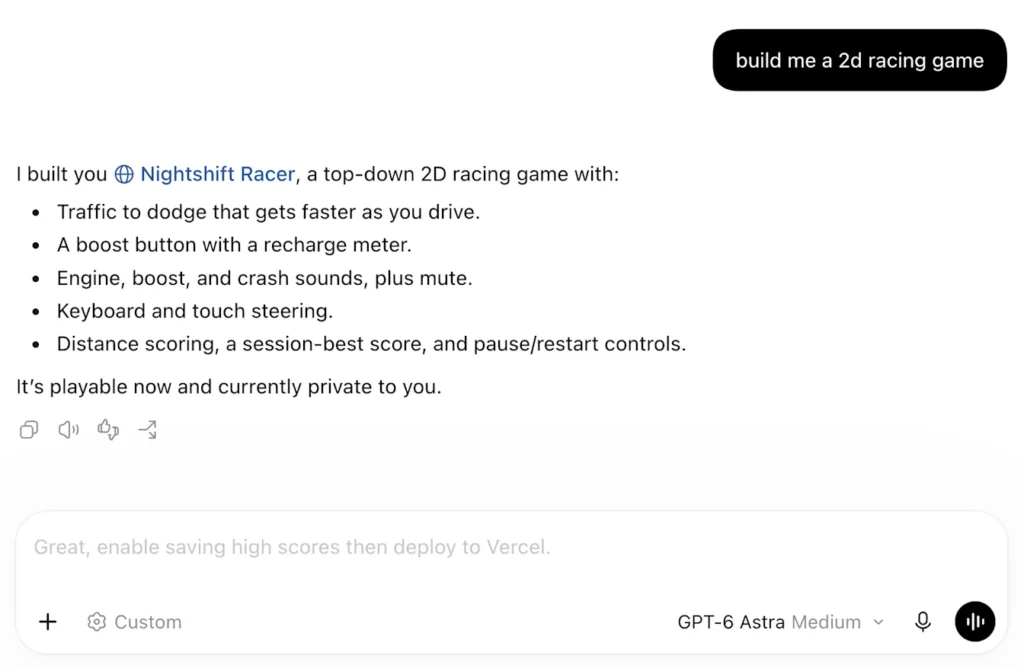
Codex composer predictions look worth trying if you already pay for ChatGPT Pro and spend much of your day directing an agent. A good suggestion could save you from rewriting the same testing, revision or documentation request for the twentieth time. The feature earns its place when it captures the next step you intended and preserves the limits you set.
It also puts an AI-written instruction where your own instruction normally goes. That deserves attention. A follow-up can quietly change the scope of a project, approve a deployment or ask for more work than you need. The typing saved is useful only if reviewing the suggestion costs less time than writing the message yourself.
On October 9, 2026, OpenAI announced composer predictions in beta for Pro users. Codex suggests a next message using your conversation and how you communicate with it. OpenAI described the feature as “One of the most loved new features we’ve ever tested internally.” That is an internal reception claim; the announcement provides no numerical productivity result.
Who gets the beta, and where it works
| Requirement | Current beta |
|---|---|
| Account | Personal ChatGPT Pro; age 18 or older |
| Regions | All supported regions |
| Client and threads | Codex desktop app; local and SSH threads |
| Models | GPT-6 Astra and GPT-6.1 Sol |
| Suggestion type | A complete next message, after a response; no word-by-word completion |
| Other surfaces | No Chat web/desktop support; eligible local Work conversations may show predictions |
These requirements come from OpenAI’s composer predictions documentation. General Codex access on another plan does not establish eligibility for this feature.
How to accept a suggestion without sending it
OpenAI’s follow-up announcement gives the basic sequence: press Tab, edit if needed, then send. Acceptance places the proposed instruction in the message box. You still choose to submit it.
That separate send step gives you room to check the verbs. “Explain,” “change,” “commit” and “deploy” have different consequences. An instruction that starts with a sensible request to fix a bug can end with an action you never intended to authorize.
Read the whole message before sending, including any second sentence that expands the work. Check the target, the requested action and the stopping point. If those match what you meant, the suggestion has done a useful job. If they do not, rewrite it.
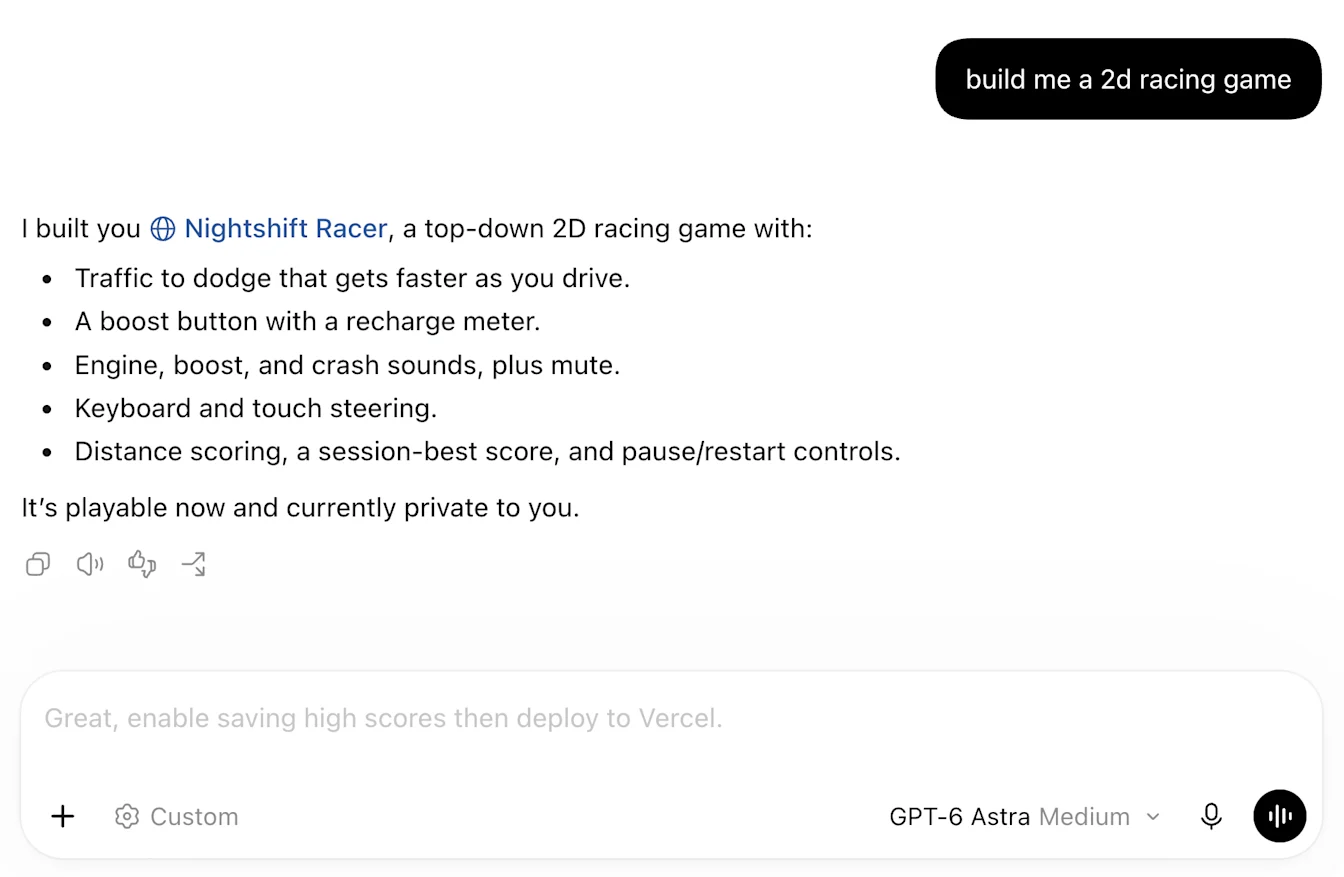
The official example above makes the scope issue concrete. Adding persistent high scores and deploying a game are two distinct decisions. A reader who wants a local prototype could keep the first request and remove the deployment. Someone ready to publish would still need to check the destination, environment and cost.
The feature’s name uses “composer” to mean the message box. It should not be confused with Cursor’s Composer model family.
Where the feature could save useful time
The best candidates are recurring transitions in work you already understand. After a code change, you may want the relevant checks. After a failed check, you may want a narrow repair. After an explanation, you may want the trade-offs or a concrete example. Writing those instructions takes attention even when the wording is routine.
Consider a developer working through a small authentication fix. The agent reports a change to the session-expiry logic. The developer’s intended next step might be to check the expired-session case and ensure that a valid session still works. A draft of that request would be useful if it includes both cases and stays within the existing task.
For a designer, the transition could be from an initial layout to a mobile inspection. For an analyst, it could be from a chart to checking its denominator. For a writer, it could be from a draft to verifying the names, dates and links. These are proposed use cases, not claims about suggestions we have observed.
Here are three illustrative messages a user might want to send. They are written by Kingy.ai to show what a well-scoped continuation looks like:
Run the relevant checks for this change, fix any failures caused by it, and report what passed and what remains unresolved.
Check the layout at desktop and mobile widths. Fix clipping and unreadable text, then show the resulting page.
Review this draft against the linked primary sources. Correct unsupported claims and keep the approved figures unchanged.
Each example has a purpose and an end condition. The benefit would be having that instruction ready when you need it. A generic invitation to keep improving the project has less value because it leaves the amount of work open.
Pricing: the prediction is free in beta, the resulting work uses your allowance
During beta, generating predictions costs no extra money, Codex quota or credits. Sending one invokes normal usage and billing. Source: OpenAI’s feature FAQ.
For an existing eligible subscriber, that removes the direct metering penalty for looking at a suggestion. The indirect cost still matters: a prompt that launches unnecessary work can consume time and usage. Count useful completed tasks, not the number of suggestions accepted.
“Pro” also needs a current price check. OpenAI now lists three personal Pro tiers:
| Plan | Monthly price, USD | Relevant distinction |
|---|---|---|
| Pro 100 | $100 | Lowest-priced Pro tier |
| Pro 200 | $200 | More included usage than Pro 100 |
| Pro 500 | $500 | Highest included usage; Ultrafast access |
Prices and tier distinctions are from OpenAI’s Pro tier guide, checked October 9. The prediction eligibility document does not specify a Pro 500 requirement. Ultrafast is a separate benefit, so do not buy the $500 tier merely because it appears beside other new Codex features.
The Pro 200 guide also describes a temporary grandfathered usage allowance for qualifying subscriptions, ending October 29, 2026. Two people paying $200 can therefore have different included allowances during this transition. Check your account’s usage display before treating someone else’s experience as a limit you can expect.
Should someone upgrade from Plus for predictions alone? Our view is that the case is weak until they measure a benefit. OpenAI lists Plus at $20 per month, so moving to Pro 100 adds $80 per month before any applicable taxes or regional differences. A subscription decision should include the rest of Pro’s capabilities and allowance, as well as the value of this particular feature.
Here is a deliberately hypothetical calculation. If suggestions saved five seconds across 60 useful follow-ups per working day, over 20 days, they would save 6,000 seconds: 100 minutes. At an assumed value of $60 per hour, that is $100 of time. If reviewing and correcting those suggestions took most of the five seconds, the benefit would shrink sharply. We have measured none of those inputs; the example shows what an upgrade would need to earn.
Context, memory and the limits of personalization
Predictions use the current thread. Memory or connected-app material already present can inform them; they do not independently retrieve it. Memory can stay off. Source: context documentation.
That gives the feature a sensible limit to its knowledge. If you changed your mind after the last message, or made a decision in a meeting the thread never saw, the suggested next step can be plausible and wrong. A tidy conversation history cannot represent an unspoken intention.
Make changes in direction explicit. If the project is now ready for review, say that. If an earlier deployment plan has been canceled, record the new stopping point. Good context would help any assistant you are directing, regardless of whether the next message is typed or suggested.
OpenAI’s separate memory documentation explains that local Codex clients use a local memory store and that memory generation can happen later in the background. It recommends keeping required team guidance in AGENTS.md or checked-in documentation. That is a useful distinction for teams: recurring preferences can be recalled, while project requirements need a dependable place to live.
Do not assume that a personalized tone implies complete knowledge of your rules. A suggestion can sound like you while omitting an important condition. Judge it by whether it carries the instruction you intended.
Privacy controls deserve a separate check
A task running on your computer does not, by itself, establish that every part of the service is processed offline. The feature announcement makes no offline-processing promise. For confidential work, evaluate the account’s data controls and your organization’s policy before supplying context.
OpenAI’s data controls guide says that turning off Improve the model for everyone prevents new personal-plan conversations and Codex tasks from being used for model training. It identifies a separate Codex Include environments setting for additional environment context; changing the ChatGPT training setting does not change that setting. Review both.
Training choices, saved history and memory are separate controls. Turning off predictions is a preference about suggestions. Turning off memory changes personalization. Neither should be treated as a substitute for the training controls.
There is a feedback caveat too. OpenAI’s model-improvement policy says that a conversation associated with feedback may be used for training even after an opt-out. If reporting an inappropriate suggestion, avoid attaching confidential project details that are unnecessary to explain the issue.
For retained history, OpenAI says kept Codex chats remain until deleted, and deletion is generally scheduled within 30 days, subject to its stated exceptions. Archiving hides a conversation from the sidebar without deleting it. See the Codex archive and deletion guide. These policies do not establish a separate retention schedule for every unsent prediction; that detail is not specified in the feature guide.
The practical question for a team is what information employees may place in a personal Pro thread. Eligibility for a convenient feature does not establish approval to use that account for company data.
Claude Code has a close comparison; Cursor Tab works at a different level
The idea of suggesting a follow-up prompt already exists elsewhere. Anthropic’s Claude Code documentation describes next-prompt suggestions based on conversation history, with acceptance into the input followed by submission. It says generation uses a short background request to the session’s model and counts toward plan limits or API costs. Its disable controls include /config and settings.
Cursor’s Tab product page describes prediction of code changes and cross-file jumps using the current task, recent changes and relevant files. That targets editing behavior rather than a complete natural-language instruction.
| Feature | What it proposes | Where to evaluate the benefit |
|---|---|---|
| Codex composer predictions | A follow-up message | Time to give the agent the right next instruction |
| Claude Code prompt suggestions | A follow-up prompt | Prompt review time and added model usage |
| Cursor Tab | Code edits and navigation | Editing speed and correctness in the codebase |
Those are differences in documented mechanics, not a ranking of quality. We have not run a controlled comparison of the three. Acceptance rate, suggestion latency and useful task completion would all need to be measured before declaring a winner.
Cursor offers a useful historical lesson about restraint. In a September 12, 2025 research post, it reported a model producing 21% fewer suggestions with a 28% higher acceptance rate than its predecessor. Those are Cursor’s results for its own system; they say nothing about Codex’s performance. They illustrate why the number of suggestions shown is a poor proxy for usefulness.
A system should be comfortable leaving the user alone when the next step is uncertain. More visible activity can create more review work.
The main risk is a plausible instruction that changes your intention
A follow-up prediction occupies an unusual position in the workflow. The model has helped perform the work, and now it offers words for the person directing that work. That can make a proposed continuation feel like a decision already made.
Suppose an agent finishes a small database migration. A reasonable next request might be to inspect the migration and run it in a disposable development environment. A message asking to apply it to production would skip a decision about timing, backups and the target system. The language might be concise and technically coherent while still being inappropriate for the task.
Or suppose a draft has reached the requested standard. A suggestion to expand it with more sections may sound helpful and create another hour of work. Finishing is a valid next step. A feature that favors continuation needs to be judged partly on whether it recognizes that the requested outcome has been delivered.
This is our analysis of the interface, not evidence that Codex systematically makes either mistake. Useful review questions are concrete: Did the suggestion preserve the target? Did it add an external action? Did it keep the original constraint? Is another turn necessary?
A prediction can also inherit a mistaken premise from the preceding response. If an agent incorrectly says all checks passed, a follow-up built on that premise can carry the mistake forward. Review the evidence behind the proposed action before treating fluent wording as confirmation.
Experts and beginners may get different value
Experienced users often know their next instruction before the agent finishes. For them, the likely benefit is faster expression of a settled intention. They are also well placed to spot a missing constraint, an irrelevant check or an action aimed at the wrong environment.
A beginner may use the suggestion to decide what to do next. That can introduce useful habits, such as testing a change or checking an assumption. It also puts more weight on the suggestion’s judgment. The beginner may be less able to distinguish a necessary follow-up from optional polish.
A CHI 2025 study by Lee and colleagues surveyed 319 knowledge workers and collected 936 examples of AI use. Higher confidence in generative AI was associated with less reported critical thinking; higher task-specific self-confidence was associated with more. The research describes an association based on self-reports, not a causal test of Codex predictions.
It supports a reason to evaluate oversight alongside speed. A feature can reduce typing while increasing the amount of judgment users need to exercise. For someone learning to direct an agent, a useful habit is to state the intended next step in their own words before deciding whether the proposed prompt matches it.
Latency, missing suggestions and the off switch
Predictions may take seconds, longer in lengthy threads, and can be skipped. Keep typing if you know your request. Source: OpenAI’s FAQ.
Waiting for a suggestion that saves only a few seconds can eliminate the saving. The relevant measurement includes the pause between a completed response and a useful instruction, plus any time spent editing the proposed text.
If nothing appears, use the eligibility table above and verify your app version and account. An empty composer after one response is insufficient evidence of a broken feature. There is little reason to interrupt useful work solely to make a suggestion appear.
Predictions are enabled by default for eligible users. Disable them at Settings → General → Composer → Show predictions. Source: settings instructions.

Turning the feature off is a reasonable choice if it distracts you or nudges you toward work you would not otherwise request. The evaluation should reflect your work pattern. Someone issuing short, precise commands all day has different needs from someone developing a task through a long conversation.
What the launch evidence establishes, and what remains unmeasured
The checked sources establish the product’s documented behavior and commercial terms. OpenAI’s internal enthusiasm is encouraging as a product signal, but it gives readers no baseline, sample size, acceptance rate or measured time saving.
The announcement and feature guide do not publish a dedicated prediction model name, parameter count, training recipe or accuracy benchmark. The supported models identify eligible conversations; they do not, by themselves, identify the architecture producing a suggestion. Claims about a separate small model, local inference or a particular training method would need additional evidence.
For a useful evaluation, we would want to see how often suggestions capture a user’s intended next step, how much editing they require, whether they preserve constraints, and whether they lead to unnecessary agent turns. We would also want the time to a completed acceptable task, rather than a count of prompts accepted.
A suggestion that people accept frequently can still be costly if it encourages extra work. A suggestion that appears infrequently can be valuable if it arrives at the right moment with a precise instruction.
Reporting note: Sources and prices were checked October 9, 2026. This is a researched launch analysis. Kingy.ai has not benchmarked composer predictions or verified access on every eligible account. Screenshots are OpenAI’s official material. Example prompts, workflow assessments and the time-value calculation are our analysis, not measured results. Beta behavior and commercial terms can change.
A practical way to decide whether to keep it on
For an existing Pro subscriber, use a normal work session to compare the feature with your usual way of directing Codex. Before reading each suggestion, note the next step you intended. Record whether the proposed message matches it, whether you need to restore a constraint, and whether it saves time after review.
A small trial can be simple. Keep a tally across 20 follow-ups: accepted unchanged, accepted after editing, ignored, or absent. Beside each acceptance, record whether it produced work you needed. A few examples of wrong targets or expanded scope are more informative than a high acceptance count on their own.
If you compare enabled and disabled sessions, use similar tasks and the same model, and account for differences in conversation length. Do not treat one fast suggestion or one awkward miss as a representative result.
Keep composer predictions if they help you express decisions you have made and reduce the time to useful completed work. If you are considering a Pro upgrade, measure that benefit against the additional subscription cost before paying for it.
The Kingy Brief
Get The Kingy Brief.
AI changes, original tests and one practical thing to try. Fridays at 09:00 Vancouver time.
Free · Double opt-in · Unsubscribe anytime
Signup help and newsletter schedule
Signup form provided by Beehiiv. After submitting, check your inbox for "Confirm your subscription to The Kingy Brief" and open its confirmation link. Check Spam or Promotions if you cannot find it.
Fridays at 09:00 Vancouver time: source-checked AI changes, original tests and one practical thing to try. The weekly restart begins October 9, 2026. We skip a week when there is not enough verified material. Free. Unsubscribe anytime.