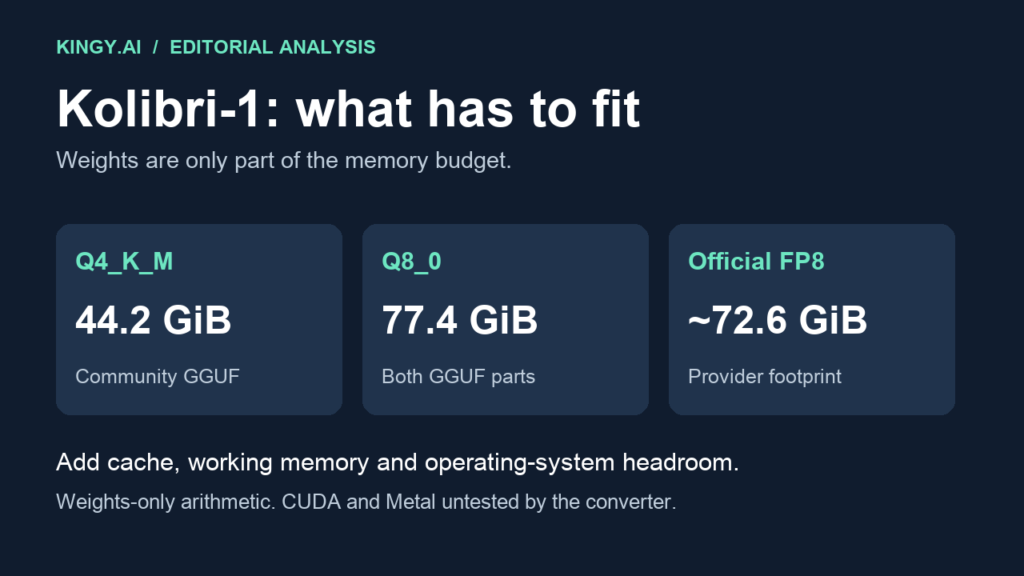
Aleph Alpha released Kolibri-1 on October 3, and a community GGUF conversion is already available. The useful question for local-AI users is whether their machine can hold it—and whether their software can load the architecture.
The smallest listed conversion, Q4_K_M, is about 47.5 GB before runtime overhead. A 24 GB graphics card cannot hold those weights entirely in VRAM. A 64 GB computer has plausible memory headroom for an experiment, but GPU and Mac support still need verification. The conversion's creator has tested CPU inference and explicitly lists CUDA, Vulkan and Metal as untested. Sources: Aleph Alpha's announcement and the community GGUF model card.
This guide combines repository file sizes, the converter's reported measurements and labeled memory calculations. Kingy has not run Kolibri locally. All sizes and compatibility notes were checked on October 4, 2026.
Why 3.46 billion active parameters still need much more memory
Kolibri is a mixture-of-experts model: only part of the network participates in each token's computation. Aleph Alpha lists roughly 78.1 billion total parameters and 3.46 billion active parameters per token. The active count does not turn the downloadable model into a 3.46B checkpoint; the other experts' weights still need to be available. Its focus is German and English, with reasoning and tool calling under Apache 2.0. Official model card.
For a purchase or deployment decision, start with the actual checkpoint footprint. Then add memory for the cache, intermediate computation, application and operating system. An impressive active-parameter number answers a different question from how much storage and RAM you need.
The same distinction matters in our Gemma 4 local-hardware guide: a model's name or headline size is only the beginning of a fit check.
Which Kolibri quant should you use?
Hob-forge's repository is an independent conversion, not an Aleph Alpha or llama.cpp release. Its file listings give the following weights-only comparison. The GiB column is Kingy's conversion of decimal bytes to binary gibibytes, rounded; it is not a measurement of peak runtime memory. Files and sizes.
| Checkpoint | Approximate file footprint | Weights-only GiB | Practical starting point |
|---|---|---|---|
| Community Q4_K_M | 47.45 GB | 44.2 GiB | Lower-memory experimental route |
| Community Q8_0, both parts | 83.14 GB | 77.4 GiB | More memory; still a community conversion |
| Official FP8 | About 78 GB | About 72.6 GiB | Official serving route and its supported hardware |
For an initial community CPU experiment, I would start with Q4_K_M. It leaves substantially more room than Q8_0 for everything that accompanies inference. That is a capacity recommendation, not a claim that Q4 preserves all of the original model's accuracy.
Q8_0 may be worth checking when memory is plentiful and your own tasks show a meaningful benefit. Do not choose it just because its quant label is larger. The converter says neither quant has been evaluated against the original FP8 checkpoint with a benchmark suite. Their published checks are useful implementation evidence, with a narrower scope than a broad quality comparison. Conversion and validation notes.
The official FP8 route is separate. Aleph Alpha's minimum configurations include two 80 GB A100s or one H200, among others. Those are the provider's serving recommendations, not proof that every smaller experimental configuration fails. Official hardware table.
RAM and unified-memory planning
Here is a deliberately bounded planning calculation: take the Q4 file's 44.2 GiB and reserve 8–16 GiB for the operating system, runtime, cache and working space. That produces a 52.2–60.2 GiB planning envelope. The reserve is an assumption, not a tested requirement; large contexts, batches or a different backend can exceed it.
Capacity labels below are treated as GiB for this arithmetic. Check the memory your system actually exposes and how much is free.
| Machine memory | Q4 capacity assessment | What to check before proceeding |
|---|---|---|
| 32 GiB | Cannot hold the full weights in resident memory | Choose a smaller model rather than assuming the active count makes it fit |
| 48 GiB | Only about 3.8 GiB beyond the file footprint | Too little for the illustrative 8–16 GiB reserve |
| 64 GiB | About 19.8 GiB beyond the file footprint | Plausible experiment; measure actual peak use and keep context modest |
| 96 GiB | More Q4 headroom; Q8 leaves about 18.6 GiB | Verify software first, then compare quants on your tasks |
| 128 GiB | Ample weights-only capacity for either listed quant | Still no promise about speed, context or output quality |
A Mac's unified memory must accommodate more than model weights, and capacity alone does not establish that this patched architecture works on Metal. A 64 GB Mac belongs in the “possible memory fit, unverified runtime” category. Treat 96 GB and 128 GB machines the same way on compatibility, even though their memory budget is less constrained. Do not buy a Mac for Kolibri based solely on this table.
What 24, 32 and 48 GB graphics cards change
For full GPU residency, 24 GiB and 32 GiB VRAM are below Q4's 44.2 GiB weights-only footprint. A 48 GiB card leaves roughly 3.8 GiB; that does not meet our illustrative overhead reserve. A 64 GiB GPU has more capacity, but the conversion's untested GPU backends remain a separate limitation.
Partial CPU offloading could change where memory is held. It also changes the performance question. We have no retained Kolibri GPU-offload measurements and cannot tell you the speed of a particular mixed CPU/GPU machine.
The creator does report a CPU run on a Ryzen 7 7800X3D with eight threads, 128 GB RAM and no GPU: Q4 generation ranged from 11.9 to 14.9 tokens per second across the listed smoke tests. Those are the converter's results, not Kingy's tests or a forecast for another processor. Reported configuration and results.
Software support is the first gate
The community card says stock llama.cpp does not yet support kolibri1. It supplies a patch targeting upstream commit 836d571; llama.cpp-based apps such as Ollama and LM Studio need architecture support before loading these files. Downloading a GGUF is not enough. Recheck the card and your application's release notes because this is changing software. Compatibility instructions.
For a controlled experiment, confirm the documented build and backend, use the recommended chat template, begin with a short prompt and capture memory use. Then try a checkable German or English task and a simple tool-call output. Increase context only after those checks pass. The converter has not verified contexts above 8,192 tokens, despite the official model's much larger advertised window.
Keep three decisions separate: whether the weights fit, whether your runtime implements Kolibri correctly, and whether the output meets your needs. Today Q4_K_M gives memory-rich CPU users a documented experimental route. Mac and GPU users should wait for backend evidence or produce and retain their own measurements before treating it as a supported setup.
The Kingy Brief
Get future Kingy Brief editions.
Source-checked AI changes, original tests and one practical thing to try.
Free · Choose your subjects · Double opt-in · Unsubscribe anytime
Regular sending is paused; no restart date is set.