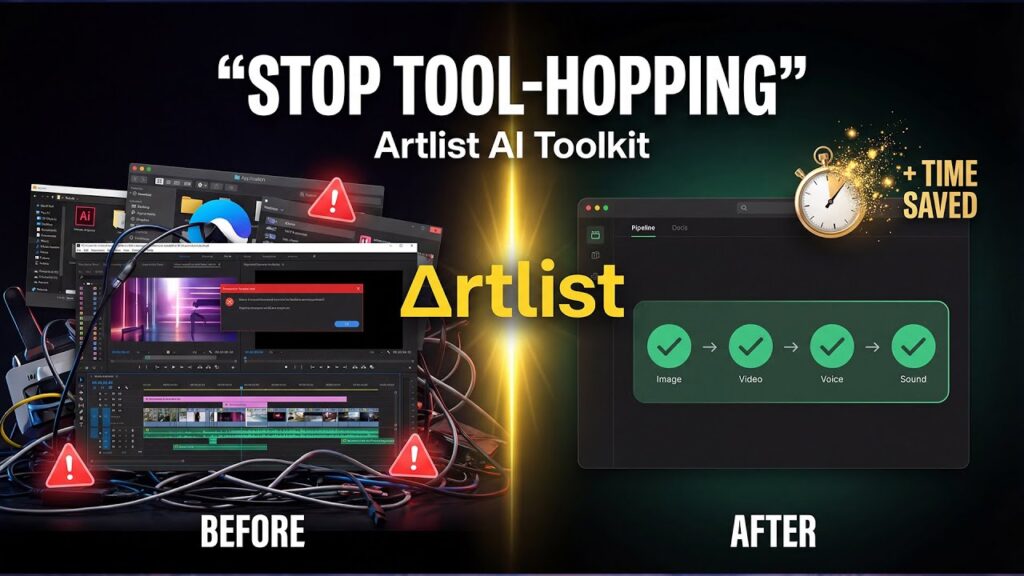
There’s a familiar frustration that every video creator knows well. You’re mid-project, and your workflow looks something like this: generate an image in Midjourney, download it, upload it to Runway for video generation, export that clip, jump to ElevenLabs for a voiceover, download the audio, open Premiere Pro, import everything, and then realize the music you need is sitting in a completely different browser tab on Artlist. Multiply this by a dozen assets and you’ve lost half your day to file management.
Artlist’s answer to this problem is the AI Toolkit — a consolidated creative environment that promises to bring image generation, video generation, AI voiceover, royalty-free music, sound effects, stock footage, templates, and LUTs under one roof. It’s an ambitious pitch, and in many ways, it delivers. But as with most ambitious products, the devil is in the details — and in this case, the credits.
This review draws on hands-on demonstrations, multiple independent reviews, real user feedback from Trustpilot, and competitive analysis to give you an honest picture of what Artlist’s AI Toolkit actually is, who it’s for, and where it still needs work.
What Is Artlist, and Why Does the AI Toolkit Matter?
Before diving into the AI features, it’s worth understanding what Artlist actually is — because the AI Toolkit only makes sense in the context of the broader platform.
Artlist was founded in 2016 by Ira Belsky, who was frustrated by the complexity of licensing music for video projects. The platform grew into one of the most respected royalty-free music libraries in the creator economy, eventually expanding to include sound effects, stock footage, video templates, LUTs, and Premiere Pro plugins. Today, over 26 million users — including global brands like Google, Apple, Amazon, Microsoft, and Calvin Klein — rely on Artlist for creative assets.
The AI Toolkit is the platform’s most significant evolution yet. Rather than building a standalone AI tool, Artlist has layered generative AI capabilities directly on top of its existing ecosystem. The result is a platform where you can generate an AI image, animate it into a video, add an AI voiceover, and score it with royalty-free music — all without leaving a single browser tab.
That’s the pitch. Let’s see how it holds up.
The Core Features: What’s Actually Inside the Toolkit
AI Image Generation
The image generation suite is one of the most impressive aspects of the toolkit, primarily because of the sheer breadth of models available. Rather than building a single proprietary model and calling it a day, Artlist has aggregated many of the leading AI image models into one interface.
At launch, the toolkit includes access to Google Nano Banana 2, Nano Banana Pro (described as offering “state-of-the-art 4K visuals with flawless typography”), Seedream 5.0, Kling 3.0, Kling O3, Grok Imagine, ImagineArt 1.5 Pro, Flux 2.0, and GPT Image 1.5, among others. Artlist also launched its own proprietary model, Artlist Original 1.0, positioned as delivering “cinema-grade visuals for high-end storytelling.”
Users can specify aspect ratio (e.g., 16:9), resolution (up to 2K or 4K depending on the model), and the number of images to generate per prompt — typically up to four at a time. There’s also an auto-prompt feature that analyzes and refines your text input before sending it to the model, which is genuinely useful for beginners who haven’t yet mastered the art of prompt engineering.
One standout capability is image-to-image generation: upload a reference image (say, a character on a green screen), and the toolkit can generate variations of that character in entirely new environments, poses, and styles — while maintaining visual consistency across generations. This is particularly powerful for brand work and ad campaigns where character consistency matters.
That said, independent testing has found that results can be “slightly AI-ish on complex prompts,” and that Nano Banana in particular “struggles with hyper-specific details” — it’s better for broad visual concepts than surgical precision. Multiple iterations are often required to get exactly what you’re after.
AI Video Generation
The video generation suite follows a similar model-aggregation approach. Available models include Google Veo 3.1, Veo 3.1 Fast, Sora 2 Pro, Sora 2, Kling 3.0, Kling O3, Grok Imagine, Seedance 1.5 Pro, and several others. Each model comes with a description of its strengths, credit cost, supported resolutions, and maximum generation length.
The workflow is designed to be seamless: generate an image, mark it as a favorite, and use it as a “start frame” for video generation — all within the same session. You can specify camera movements, dialogue, actions, and mood through text prompts. For video, you can also add audio directly within the generation interface, including music, sound effects, and AI voiceovers.
In independent testing by massive.io, which ran the same cinematic prompt through ten leading AI video tools, Artlist served as one of the primary platforms for accessing models like Kling and Veo 3.1 — a testament to its role as a model aggregator rather than just a single-model tool.
The quality of video outputs varies significantly by model. Veo 3.1 produced “fantastic details” with “excellent” light and sky rendering in testing, while Kling 2.6 delivered “solid B-plus” results with some inconsistencies in sky rendering. Sora 2 created “a sense of depth to the cityscape” but “doesn’t look or behave in a realistic fashion at all” in some test scenarios. The takeaway: the toolkit gives you access to best-in-class models, but no AI video generator is perfect yet, and results require iteration.
AI Voiceover
The voiceover suite is one of the toolkit’s most distinctive features. Artlist offers access to 30+ voices in 15+ languages via models including ElevenLabs Multilingual v2, Minimax O2 HD, Cartesia Sonic 2, and Eleven v3. Voices are categorized by gender, age, language, and use case (tutorials, social media, commercials, health and wellness, etc.).
What sets Artlist’s voiceover offering apart from competitors is the range of specialty voices — including options like “upstairs neighbor” and “monster” — and the ability to clone your own voice from a 10-second audio clip. This voice cloning feature is powerful for creators who want consistent brand narration without recording every line themselves.
One independent reviewer ranked Artlist’s AI voiceover capabilities at the top of their voice generator comparison, citing “exceptional versatility” and unique specialty voices “unavailable in other platforms.”
The Stock Catalog: The Foundation That Makes It All Work
It’s easy to get distracted by the AI features and forget that Artlist’s stock catalog is what makes the platform genuinely unique. No pure AI tool can offer what Artlist offers here: 28,000+ curated music tracks, 72,000+ sound effects, 1M+ stock footage clips, 5,000+ video templates, professional LUTs, and a Premiere Pro extension that puts all of it directly inside your editing timeline.
The music library in particular is where Artlist has always excelled. Unlike generic stock music platforms, Artlist’s tracks are sourced from independent artists and are professionally produced and mastered. “Every track feels professionally produced, cinematic, and usable. Less filler than larger libraries.” The library also provides stems for many tracks — isolated vocals, drums, and instruments — giving editors granular control over how music sits in a mix.
The Stems feature, combined with advanced filtering by BPM, key signature, duration, and instrument, makes Artlist’s music library one of the most editor-friendly in the market.
The Workflow: Does It Actually Eliminate Platform Hopping?
The central promise of the AI Toolkit is workflow consolidation. In practice, it largely delivers on this promise — with some caveats.
The image-to-video pipeline is genuinely smooth. You can move from a text prompt to a generated image to an animated video clip to a voiced-over sequence within a single session, with all your previous generations saved and accessible in your session history. The auto-prompt feature reduces the friction of getting started, and the model selection interface is clear and informative, showing credit costs and best use cases for each option.
The Premiere Pro extension is a significant workflow advantage for professional editors. Rather than downloading assets and importing them manually, you can search and preview the entire Artlist library — music, SFX, footage, and AI-generated assets — directly inside your editing timeline.
However, it’s important to be clear about what the toolkit is not: it is not a non-linear editor (NLE). You cannot do your final edit inside Artlist. The platform generates assets; you still need Premiere Pro, DaVinci Resolve, or Final Cut Pro to assemble your final cut. For some users, this is a non-issue. For others expecting a true end-to-end production environment, it may be a disappointment.
Pricing: Flexible, But Read the Fine Print
Artlist’s pricing structure has evolved significantly with the introduction of the AI Toolkit, and it’s worth understanding carefully before subscribing.
The platform now offers several tiers, as detailed in Artlist’s own pricing guide:
AI Suite Plans (AI tools only, no stock catalog):
- AI Starter: From $15.99/month (7,500 credits) or $13.99/month billed annually
- AI Professional: From $149.99/month (180,000 credits) or $99.99/month billed annually, with priority generation speed and up to 5 team members
Artlist Max (AI tools + full stock catalog):
- $39.99/month billed annually — includes 7,500 AI credits plus unlimited access to music, SFX, footage, templates, LUTs, and plugins
Music & SFX Plans (no AI tools):
- From $9.99/month for social creators
For most creators who want both AI generation and the stock catalog, Artlist Max at $39.99/month is the most logical entry point. The AI Suite plans make sense for creators who only need AI generation and already have music and footage covered elsewhere.
The Credit System: Where Things Get Complicated
The credit system is where Artlist’s pricing requires the most careful attention. Credits are consumed per generation, and costs vary dramatically by model:
- Artlist Original 1.0 (image): From 80 credits
- Seedream 5.0 (image): From 100 credits
- Nano Banana 2 (image): From 150 credits
- Nano Banana Pro (image): From 400 credits
- Kling 3.0 (image or video): From 1,050 credits
- Veo 3.1 (video): From 1,200 credits
- Veo 3.1 Fast (video): From 700 credits
- Sora 2 Pro (video): From 2,800 credits
At the Artlist Max tier (7,500 credits/month), a single Sora 2 Pro video generation consumes roughly 37% of your monthly credit allowance. Heavy users of premium video models will find the base credit allocation insufficient and will need to purchase additional credits.
The no-rollover policy is the most significant pain point flagged by users and reviewers alike. As ucstrategies.com puts it: “Any unused credits simply vanish. For creators with fluctuating workloads, seeing paid-for resources disappear into thin air is a genuine source of friction and frustration.”
One genuinely positive note on pricing: when Google reduced Veo 3 pricing by 60%, Artlist passed those savings directly to users — reducing the credit cost of Veo 3 videos by 40%.
Licensing: A Genuine Competitive Advantage
Licensing is one area where Artlist has a clear and meaningful advantage over many competitors, and it’s worth dwelling on.
All AI-generated content created through the toolkit is commercially licensed. Users own the rights to their outputs, and Artlist explicitly states that it does not use your creations to train its internal models. The Clear List feature — which links your YouTube channel to your Artlist account and whitelists your content against automated copyright claims — is a practical tool that prevents the kind of copyright strikes that have plagued creators using other platforms.
The lifetime usage rule is also significant: if you publish a video while your subscription is active, that video remains licensed forever, even if you later cancel your subscription. This is a meaningful protection for creators who build a back catalog of content.
For freelancers and agencies doing client work, the Pro and Max licenses cover commercial use across multiple platforms and channels, providing the legal clarity that brands and legal teams require.
How Does It Compare to the Competition?
Artlist’s AI Toolkit occupies an interesting position in the competitive landscape. It’s not trying to be the best AI video generator — that’s a race being run by Runway, Kling, Veo, and Sora directly. Instead, it’s trying to be the best platform for creators who need AI generation and a professional asset library and commercial licensing and workflow integration.
Compared to Runway ($12/month), Artlist offers far more model variety and a vastly richer asset ecosystem, but Runway’s own Gen-4.5 model is specifically optimized for physics-accurate motion and advanced video effects in ways that Artlist’s aggregated models can’t fully replicate. Runway is the better choice for creators who need fine-grained video control; Artlist is better for creators who need a complete production toolkit.
Compared to Adobe Firefly ($9.99–$19.99/month), Artlist offers a more creator-focused asset library (Artlist’s music catalog is significantly stronger than Adobe Stock’s), but Adobe has the advantage of deep integration with Photoshop, Premiere Pro, and After Effects. For creators already embedded in the Adobe ecosystem, Firefly’s Creative Cloud integration is hard to beat. For independent creators who aren’t Adobe-dependent, Artlist’s ecosystem is arguably more practical.
Compared to pure AI aggregators like OpenArt or Freepik AI, Artlist’s model selection is described as “solid, but still catching up” — offering the essentials but fewer advanced models than some competitors. The key differentiator remains the stock catalog: no pure AI platform can match Artlist’s music, SFX, and footage library.
What’s Coming: Artlist Studio
The AI Toolkit launched alongside the announcement of Artlist Studio, described as “the future of AI video production” and slated for Spring 2026. Based on the preview shown at Artlist’s launch event, Studio promises a more structured production environment with character voice selection, asset integration, and location generation from text prompts — essentially a more directed, scene-based approach to AI video creation rather than the current prompt-and-generate workflow.
If Studio delivers on its promise, it could meaningfully address the current toolkit’s most significant limitation: the gap between asset generation and final production. For now, it remains an announcement, and creators should evaluate the toolkit on what it offers today.
The Ethical Dimension
Any honest review of a tool with these capabilities has to address the ethical questions it raises.
The voice cloning feature — which allows users to create a professional AI voice from a 10-second audio clip — is powerful and potentially problematic. Artlist’s terms of service require that users only clone voices they have the right to use, but enforcement of this in practice is limited. The same applies to the character consistency features: the ability to maintain a specific person’s likeness across generated images and videos raises real questions about consent and potential misuse.
The broader question of AI-generated content’s impact on human creators is also worth acknowledging. Artlist’s platform was built on the work of independent musicians, filmmakers, and sound designers. As AI generation becomes more capable, the economic relationship between the platform and those human creators will inevitably evolve — and not necessarily in the creators’ favor. One Trustpilot reviewer put it bluntly: “They introduced AI and the platform became AI bombardment. It’s lost its core essence and pushes the human creators who made the songs, SFX and stock content.”
These are industry-wide questions, not unique to Artlist. But they’re worth keeping in mind as you evaluate whether and how to use these tools.
The Verdict: Who Should Use Artlist’s AI Toolkit?
Artlist’s AI Toolkit is best suited for:
- High-volume content creators — YouTubers, social media managers, and freelance video editors who produce content regularly and need consistent access to both AI generation and professional assets
- Marketing teams and agencies — who need commercially licensed AI outputs, clear usage rights, and a centralized asset library for client work
- Filmmakers and cinematographers — who want to supplement their production with AI-generated B-roll, concept visuals, and voiceovers while maintaining access to a high-quality music and footage library
- Creators already using Artlist — for whom the AI Toolkit is a natural extension of an existing workflow
Artlist’s AI Toolkit is probably not the right fit for:
- Casual or occasional creators — who post infrequently and won’t use enough credits to justify the subscription cost
- Power users who need maximum AI model depth — platforms like OpenArt or Weevi offer broader model selection and more advanced workflow customization
- Creators on tight budgets — the no-rollover credit policy and the high cost of premium video models can make the platform expensive for inconsistent usage patterns
- Those expecting a full video editor — the toolkit generates assets; it does not replace Premiere Pro or DaVinci Resolve
Final Score
| Category | Score |
|---|---|
| Model Selection & AI Capabilities | 4/5 |
| Workflow Integration | 4.5/5 |
| Stock Asset Library | 5/5 |
| Pricing & Value | 3.5/5 |
| Licensing & Legal Clarity | 5/5 |
| User Experience | 4/5 |
| Real-World Reliability | 3/5 |
| Overall | 4.1/5 |
Artlist’s AI Toolkit is a genuinely impressive product that solves a real problem for working creators. The consolidation of leading AI models, a world-class stock library, and ironclad commercial licensing into a single platform is a compelling value proposition — particularly for creators who are currently paying for multiple separate tools.
The credit system, the no-rollover policy, and the still-maturing reliability of AI generation are real limitations that prevent it from being a straightforward recommendation for everyone. But for the right user — a high-volume creator who needs both AI generation and professional assets, and who plans their credit usage carefully — Artlist’s AI Toolkit is one of the most complete creative platforms available today.
The platform is clearly in a period of rapid evolution. With Artlist Studio on the horizon and a track record of integrating new models quickly (Nano Banana was added on its launch day), the trajectory is encouraging. The question is whether the credit economics and reliability issues get addressed before users lose patience.
For now: if you’re a serious creator who produces content regularly, Artlist’s AI Toolkit deserves a serious look. Just go in with clear eyes about what it costs, what it can and can’t do, and how to use your credits wisely
Artlist AI Toolkit
Artlist Studio
AI Creative Suites
Artlist Workflow Guides
Artlist Reviews
Artlist Campaigns
Watch the Kingy AI video
Watch Let’s See How Good AI Avatars Are These Days | Plus Dubbing & Lip Sync! for Kingy AI’s corresponding test of Artlist’s AI avatar, dubbing, and lip-sync tools.
The Kingy Brief
Get future Kingy Brief editions.
Source-checked AI changes, original tests and one practical thing to try.
Free · Choose your subjects · Double opt-in · Unsubscribe anytime
Regular sending is paused; no restart date is set.