Last updated: June 19, 2026.
This AI agent adoption guide is for people who want practical leverage from AI agents without pretending the technology is magic. Agents can research, draft, click, code, summarize, file tickets, update websites, check spreadsheets, prepare sales follow-ups, and run multi-step workflows. They can also hallucinate, misunderstand your business, spend money, expose private data, email the wrong person, break code, or confidently complete the wrong task.
The useful position is not “agents are useless” and it is not “agents can run the company.” The useful position is this: AI agents are powerful when they operate inside supervised workflows with clear goals, limited permissions, review gates, tests, cost controls, and human accountability. Blind autonomy is still the wrong default for most small businesses.
If you are learning how to use AI agents inside a real company, think in terms of safe AI agents, not flashy demos. The practical path is an AI agent workflow with bounded tool access, useful AI automation, visible review, and agent tools that match the business job. That is how AI agents for business become profitable instead of chaotic.
If you are tracking the space, Kingy has live directories for AI agent launches, the broader AI tools market, AI coding tool launches, and AI search and research tool launches. If you want to build rather than just browse, the Build With AI Academy has companion guides including How to Build an AI Agent Safely, How to Write Better Codex Prompts, and How to QA an AI-Built Website.

The Short Version
An AI agent is an AI system that can pursue a goal across multiple steps, use tools, keep track of state, and return evidence or artifacts. A normal chatbot answers. An agent acts. That action may be small, such as searching three sources and drafting a summary. It may be larger, such as opening a browser, reading a page, editing a document, running code, creating a pull request, or sending a draft email for approval.
The best first uses are low-risk, reversible, reviewable tasks. Good examples include research briefs, competitor monitoring, SEO outlines, first-pass customer support drafts, code review suggestions, WordPress draft cleanup, YouTube topic research, meeting prep, CRM hygiene suggestions, and personal task planning. Bad first uses include unsupervised payment actions, legal advice, medical advice, deleting files, changing production systems, emailing customers without approval, or making high-stakes decisions without human review.
The adoption path is simple:
- Start with one painful workflow, not a vague desire to “use agents.”
- Map inputs, outputs, tools, risks, and human review points.
- Give the agent narrow permissions first.
- Run the workflow on test cases before using it on real customers or systems.
- Measure quality, time saved, errors caught, and cost.
- Expand permissions only after the agent repeatedly behaves well under review.
Agents should earn trust with evidence. They should not receive trust because their answers sound polished.
What Is an AI Agent?
An AI agent is a system that combines a model, instructions, tools, context, memory or state, and a control loop. It receives a goal, decides what to do next, uses available tools, observes the results, and continues until it reaches a stopping condition or asks for help.
That sounds abstract, so here is a plain business example. You ask an agent to prepare a weekly YouTube sponsor prospecting brief. A chatbot might give general advice about sponsor prospecting. An agent can search for recent AI launches, open official product pages, collect pricing notes, classify which tools fit your channel, draft outreach angles, write a Google Sheet row, and flag uncertain claims for review. It has moved from answering to working.
OpenAI’s building agents materials frame agents around models, instructions, tools, and guardrails. Claude’s tool use documentation is another useful reminder that tool access changes the risk profile. The key distinction is between workflows, where code orchestrates predefined steps, and agents, where the model has more freedom to plan and use tools. That distinction matters. Most businesses should start with workflows that contain agentic pieces, not wide-open agents that can improvise across everything.
Think of an agent as a junior operator with software access. It can be fast, tireless, and surprisingly useful. It still needs a manager, a clear brief, limits, and review.
Agent vs Chatbot vs Workflow vs Automation
People use the word “agent” too loosely. That creates bad buying decisions. A chatbot, a workflow automation, and an agent can all use AI, but they are not the same thing.
| Term | What it is | Best use | Main risk |
|---|---|---|---|
| Chatbot | A conversational interface that answers questions or generates text. | Brainstorming, explanations, simple drafting, first-pass answers. | It may sound certain while being wrong or incomplete. |
| Workflow | A defined sequence of steps, often with AI inside one or more steps. | Repeatable business processes with known inputs and outputs. | A bad step can quietly repeat the same error at scale. |
| Automation | Rules that run when triggers happen, such as “new form submission creates a task.” | Deterministic tasks where the logic is clear. | Rigid rules fail when real-world inputs vary. |
| Copilot | An assistant embedded beside a human in a tool or workspace. | Writing, coding, analysis, support, and editing with human control. | The human may accept convenient output without checking it. |
| AI agent | A goal-driven system that can take multiple steps and use tools. | Supervised multi-step work with reviewable outputs. | Tool access can turn a model mistake into a real-world mistake. |
| Coding agent | An agent that reads code, edits files, runs commands, tests, and creates diffs or pull requests. | Bug fixes, migrations, tests, documentation, refactors under code review. | It may break behavior that tests do not cover. |
| Browser agent | An agent that can navigate websites, click buttons, extract data, and fill forms. | Research, data collection, admin tasks, website QA, repetitive web operations. | It can click the wrong thing, accept prompts from webpages, or expose credentials. |
| Voice agent | An AI system that speaks with users by phone or voice interface. | Appointment intake, call routing, FAQ triage, scripted follow-up. | Bad escalation handling can frustrate or mislead customers. |
| Research agent | An agent that searches, reads, extracts, compares, and summarizes evidence. | Market scans, source-backed briefs, competitor research, launch tracking. | Weak sources or hallucinated citations can contaminate decisions. |
A practical test: if the system only replies, call it a chatbot or copilot. If it follows fixed steps, call it a workflow or automation. If it can decide the next step, use tools, and keep working toward a goal, call it an agent. If it can also change files, send messages, spend money, publish pages, or deploy code, treat it as a risk-bearing agent.
What AI Agents Can Do Today
Agents are already useful for work that has enough structure to evaluate but enough variation to benefit from AI. That is the sweet spot. They are not best at jobs where every step is legally sensitive, emotionally nuanced, financially irreversible, or impossible to verify.
Marketing
A marketing agent can turn a product brief into campaign angles, audience segments, landing page outlines, ad variants, creator sponsorship angles, and SEO briefs. It can inspect competitor pages, identify messaging patterns, summarize customer reviews, and draft a content calendar. The right review gate is not “publish everything.” It is “give me ten angles with source notes, confidence level, and claims that need verification.”
Good first marketing workflow: the agent reads your product page, three competitor pages, and five customer objections. It returns a messaging matrix with proposed headlines, proof points, riskier claims to avoid, and a human-editing checklist. A marketer approves or rewrites before anything goes live.
Sales
A sales agent can research an account, summarize a lead’s company, draft outreach, prepare discovery questions, update a CRM draft field, and assemble follow-up notes after a call. It should not promise pricing, terms, legal commitments, or availability without human review.
Good first sales workflow: after a lead books a call, the agent creates a one-page prep brief with company context, likely pain points, recent news from official sources, and three suggested questions. The salesperson uses it as prep, not as truth carved in stone.
Customer Support
Support agents are useful when they classify tickets, retrieve relevant help docs, propose replies, and escalate edge cases. They become risky when they invent policies or autonomously close complaints. For support, the safest pattern is retrieval plus draft plus approval, especially when refunds, safety, billing, or angry customers are involved.
Good first support workflow: the agent reads a ticket, finds relevant docs, drafts a response, marks confidence, and routes low-confidence or emotional cases to a person. The support rep clicks send only after checking the facts.
Research
Research agents can save huge time because they can open sources, compare claims, extract definitions, and build evidence tables. They are also dangerous because a clean summary can hide weak sourcing. Require citations, source type, date checked, and a “what I could not verify” section.
Good first research workflow: ask the agent to produce a source-backed brief with official docs prioritized, direct links, conflicting claims separated, and volatile facts marked for manual verification. Research agents are especially useful when paired with internal pages like Kingy’s AI search and research tool launches.
Coding
Coding agents can inspect a repository, propose a plan, edit files, run tests, and summarize a diff. GitHub’s Copilot coding agent documentation describes the pattern of assigning work that leads to a pull request for review. That is the correct mental model: the agent creates a reviewable change, and the human still owns code review, tests, and deployment decisions.
Good first coding workflow: ask a coding agent to add tests around an existing bug, make the smallest fix, run the local test suite, and report files changed plus residual risk. Do not ask it to refactor half the app and deploy directly to production.
Content Creation
Content agents can help with outlines, research, source gathering, headline variants, editing passes, repurposing, and publishing checklists. They are weakest when asked to write long content from memory without sources. For serious content, require a source plan first, then a draft, then a factual review pass.
Good first content workflow: the agent creates an outline with target audience, search intent, internal links, source links, examples, and claims requiring verification. A person reviews the outline before the agent drafts the article.
WordPress
A WordPress agent can draft posts, clean HTML, suggest internal links, optimize alt text, check broken links, inspect mobile layout, and prepare metadata. If it uses the WordPress REST API, it can also create or update real content, which is why permissions matter. It should not publish, delete, edit theme files, change SEO settings, or install plugins without approval. WordPress work is a good agent use case because the output is visible and testable, but it still touches a live public site.
Good first WordPress workflow: the agent prepares a draft post with title, slug, meta description, categories, internal links, images, and QA notes. A human reviews the draft, checks the live preview, and publishes.
YouTube Workflows
YouTube agents can research topics, compare launch announcements, build sponsor prospect lists, write scripts, extract timestamps, summarize comments, generate thumbnail briefs, and repurpose video transcripts into posts. They should not upload, edit monetization, reply to sensitive comments, or make sponsor claims without human review.
Good first YouTube workflow: the agent turns a transcript into title options, chapter markers, shorts hooks, newsletter copy, and a pinned comment draft. The creator chooses what matches their voice.
Internal Business Operations
Agents are useful for internal ops because much of the work is repetitive, document-heavy, and reviewable. Examples include meeting summaries, SOP drafts, policy comparisons, invoice triage, vendor research, hiring scorecards, project status updates, and backlog cleanup.
Good first ops workflow: after a weekly meeting, the agent creates decisions, action items, owners, due dates, blockers, and unresolved questions. A manager verifies before the summary becomes the source of truth.
Personal Productivity
Personal agents can plan your day, summarize inbox threads, prepare meeting briefs, turn notes into tasks, draft replies, and create decision lists. Be careful with email, calendar, and private documents. Productivity agents often see more sensitive information than business agents because they sit close to your identity.
Good first personal workflow: the agent reviews selected notes you provide and creates a task list with priorities, estimated effort, and questions. Avoid giving it unlimited inbox access on day one.
What to Ask Before Buying an Agent Tool
The market is full of agent products, and many demos look more complete than the product will feel inside your actual workflow. Before paying for an AI agent tool, ask practical questions. What systems can it access? Can permissions be limited by user, workspace, folder, repository, inbox, or action type? Does it create drafts before final action? Can you inspect the agent’s steps? Does it keep logs? Can you export those logs? What happens when the model is uncertain? Can you force approval before publishing, emailing, buying, deleting, deploying, or changing customer records?
Also ask about data handling. Will your prompts, files, emails, calls, customer records, or code be used for model training? Where is data stored? Can admins disable risky tools? Can you revoke access quickly? Does the vendor support single sign-on, audit logs, role-based permissions, and restricted API keys? Small businesses may not need enterprise bureaucracy, but they still need a basic answer to “who can see what, and what can the agent do with it?”
Finally, test the product on one workflow before buying the story. Run five real examples, five edge cases, and one deliberately out-of-scope request. A good agent should produce useful work, show its reasoning trail or evidence, refuse blocked actions, and make review easier. A flashy agent that cannot explain what it did will create hidden review debt.
Good Agent Tasks vs Bad Agent Tasks
The safest agent task is specific, bounded, reversible, and easy to review. The riskiest task is vague, high-impact, permission-heavy, and hard to verify.
| Good agent tasks | Why they work | Bad agent tasks | Why they fail |
|---|---|---|---|
| Draft a research brief from supplied sources. | The sources are known and reviewable. | Tell me what the market thinks with no source limits. | The agent may over-rely on weak or invented evidence. |
| Prepare sales call notes from a lead profile. | A salesperson can verify before the call. | Negotiate pricing with a lead. | Commercial commitments need human authority. |
| Suggest support replies using approved docs. | The answer can be checked against policy. | Close refund disputes automatically. | Refunds, anger, and policy exceptions need judgment. |
| Create a pull request with tests. | Diffs, tests, and review make quality visible. | Deploy directly to production after editing code. | Production changes can create hard-to-reverse damage. |
| Clean a WordPress draft and check links. | The draft can be previewed and reverted. | Change theme files on a live site without review. | Theme edits can break the whole site. |
| Summarize comments and suggest video ideas. | The creator keeps editorial control. | Reply to all comments as the creator. | Voice, tone, and relationship context matter. |
| Find duplicate subscriptions for review. | The agent can surface candidates, not spend money. | Cancel, buy, or upgrade services without approval. | Payment actions are consequential and sometimes irreversible. |
Low-Risk Agent Uses vs High-Risk Agent Uses
Risk is not just about the model. It is about what the agent can touch.
| Low-risk use | Conditions that make it safer | High-risk use | Extra controls needed |
|---|---|---|---|
| Private brainstorming | No sensitive data, no external action. | Customer-facing advice | Approved knowledge base, escalation rules, human review. |
| Drafting internal summaries | Read-only source access and human correction. | Emailing customers | Approval before send, tone rules, audit log. |
| Website QA notes | Read-only browser access. | Publishing website changes | Preview, link check, rollback, final human publish. |
| Code suggestions | Local branch, tests, pull request review. | Production deployment | CI gates, approval, staged rollout, monitoring. |
| Research with citations | Official sources prioritized and dated. | Legal, medical, tax, or financial decisions | Qualified professional review and policy controls. |
| Subscription inventory | Read-only billing export. | Payment, refund, purchase, or cancellation actions | Strict approval, limited keys, spend caps, logs. |

Human-in-the-Loop Review
Human-in-the-loop is not a slogan. It is a design choice. It means a person reviews the right thing at the right time before the agent’s output becomes public, expensive, legally meaningful, or operationally real.
Bad human review is vague: “Check this.” Good human review is specific: “Verify all factual claims, confirm every external link opens, check that no private data is included, approve or reject the email, then publish only if all checks pass.” The difference matters because agents can create polished work that feels finished before it is actually verified.
Use human review at five points:
- Before tool access. A person decides what the agent can read or change.
- Before external communication. A person approves emails, comments, posts, replies, and outreach.
- Before money moves. A person approves purchases, refunds, cancellations, ad spend, and subscriptions.
- Before production changes. A person reviews code diffs, migrations, site edits, and deploys.
- Before high-stakes advice. A person verifies anything legal, medical, financial, safety-related, or reputation-sensitive.
The agent should return a review packet, not just an answer. A useful review packet includes the requested output, sources used, assumptions, confidence, known gaps, files changed, commands run, tests run, and decisions that still require a person.
Permissions and Tool Access
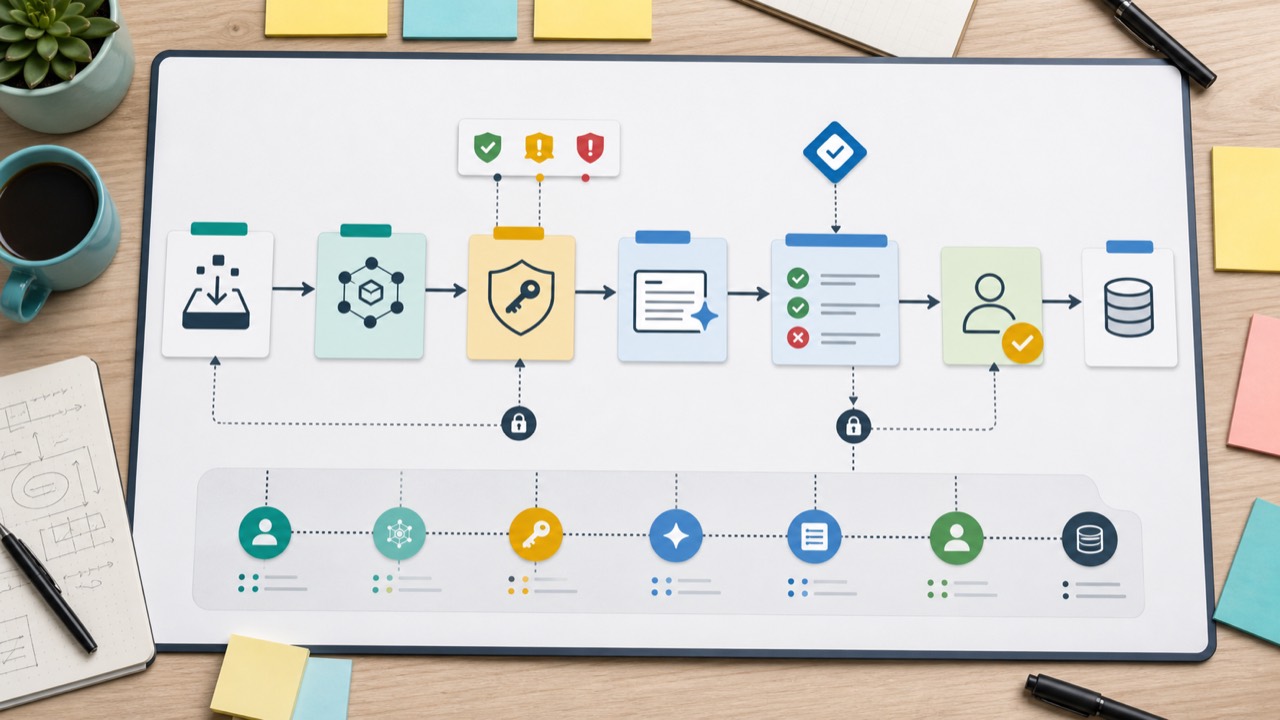
Most agent failures become serious only after the agent gets tools. A wrong answer is annoying. A wrong answer with browser, email, file, GitHub, calendar, payment, and publishing access can become an incident.
The rule is least privilege. Give the agent the smallest set of permissions needed for the current workflow, then expand only after testing. Security teams already use this principle for humans and software. Agents deserve the same treatment.
File Access
File access lets an agent read drafts, spreadsheets, contracts, code, customer exports, private notes, and credentials. Start with a working folder that contains only the files needed for the task. Do not point a new agent at your whole drive. Do not let it rewrite or delete files unless you have version control, backups, or a manual review step.
For coding agents, use branches and pull requests. For documents, use copies or tracked changes. For business files, use read-only exports where possible. If the agent needs to edit a file, require a summary of what changed.
Browser Access
Browser agents are useful because many business systems still live behind web interfaces. They can research, compare pages, test forms, and collect screenshots. They are risky because websites can contain instructions that try to manipulate the agent. OWASP’s Top 10 for Large Language Model Applications treats prompt injection and excessive agency as real risks when LLM systems consume untrusted content and can take actions.
Browser agents should not have open-ended authority. Limit them to specific URLs or tasks. Use test accounts where possible. Require confirmation before submit, purchase, delete, invite, publish, accept terms, or change account settings.
Gmail and Calendar Access
Email and calendar access are powerful because they reveal identity, relationships, business timing, private documents, and customer context. Google’s OAuth scope documentation is a useful reminder that different scopes grant different levels of access. A read-only calendar scope is not the same as permission to modify events. A narrow Gmail send workflow is not the same as full mailbox access.
Start with drafts, not sends. Let the agent propose replies, classify threads, and prepare meeting briefs. Require human approval before sending email, creating invites, changing attendees, or forwarding attachments.
GitHub Access
GitHub access lets an agent read code, create branches, write commits, open pull requests, and interact with issues. That is useful and risky. The safest pattern is branch plus pull request plus CI plus review. Do not give a new agent direct write access to protected branches. Do not let it change secrets, deployment files, billing settings, or infrastructure without a second review.
For coding workflows, require the agent to report tests run, tests skipped, files changed, and risk. Anthropic’s Claude Code security guidance is a useful example of how coding agents need explicit attention to permissions, trust boundaries, and review. If the repo lacks test coverage, treat agent output as unproven, not as complete.
Payment-Related Risks
Payment actions deserve a separate gate. Stripe’s API key guidance distinguishes between secret keys, restricted keys, and publishable keys. That distinction matters for agents. Do not give an agent a broad secret key when a restricted key or no payment key would do.
Agents should not be allowed to spend money, issue refunds, upgrade plans, cancel accounts, create ad campaigns, or change billing settings without explicit approval. For business experiments, use spending limits, test mode, restricted keys, and logs.
Official Security Frameworks
For a general risk lens, use the NIST AI Risk Management Framework. For LLM-specific application risks, use the OWASP Top 10 for Large Language Model Applications. These are not small-business bedtime reading, but they make the right point: agent safety is system design, not vibes.
Agent Cost Control and Token Usage
Agents can be more expensive than normal chat because they loop. A single user request may trigger planning, search, page reading, file reads, tool calls, retries, summaries, code execution, and final synthesis. Each step can consume tokens or tool costs.
Cost control starts before model selection. You need to know what the agent is allowed to read, how long it can run, which model it uses for which step, and when it should stop. A high-end model may be worth it for final reasoning or code review. A cheaper model may be fine for classification, extraction, formatting, or first-pass summaries.
Use these controls:
- Set a run budget. Define max tool calls, max pages, max files, max time, and max retries.
- Use staged models. Use smaller or cheaper models for routine extraction and stronger models for judgment-heavy steps.
- Limit context. Give the agent relevant files, not the entire drive or repo history.
- Cache repeated context. Reuse stable product docs, FAQs, policies, and examples instead of reloading everything every run.
- Stop on uncertainty. If sources conflict or confidence is low, ask for human input instead of letting the agent wander.
- Measure cost per useful output. A cheap run that creates bad work is not cheap.
OpenAI’s evaluation guidance is useful here because it pushes teams to define what good means, test representative cases, and compare changes. Cost is part of quality. A workflow that saves three hours but costs a few dollars may be excellent. A workflow that burns tokens and creates review debt is not.
Testing and QA Before You Trust an Agent
Do not test an agent only on the happy path. Test it on boring inputs, messy inputs, missing data, conflicting instructions, malicious pages, weird formatting, stale sources, and edge cases. The goal is not to prove that the agent can work once. The goal is to learn where it fails before the failure matters.
A practical QA plan has six parts:
- Golden tasks. Create 10 to 30 example tasks where you know the expected output.
- Bad inputs. Include incomplete, ambiguous, duplicated, and misleading examples.
- Permission tests. Confirm the agent refuses actions outside scope.
- Source tests. Check whether it cites real sources and marks uncertainty.
- Regression tests. Re-run the same cases after prompt, model, or tool changes.
- Human review logs. Track corrections so you know whether quality is improving.
For website and WordPress workflows, QA should include preview inspection, mobile layout, link checks, image alt text, metadata, page speed, forms, and rollback. Kingy’s AI-built website QA guide is a good companion because it treats AI output as something to verify, not admire.
The Kingy AI Agent Safety Checklist
Use this checklist before trusting an agent with a real workflow.
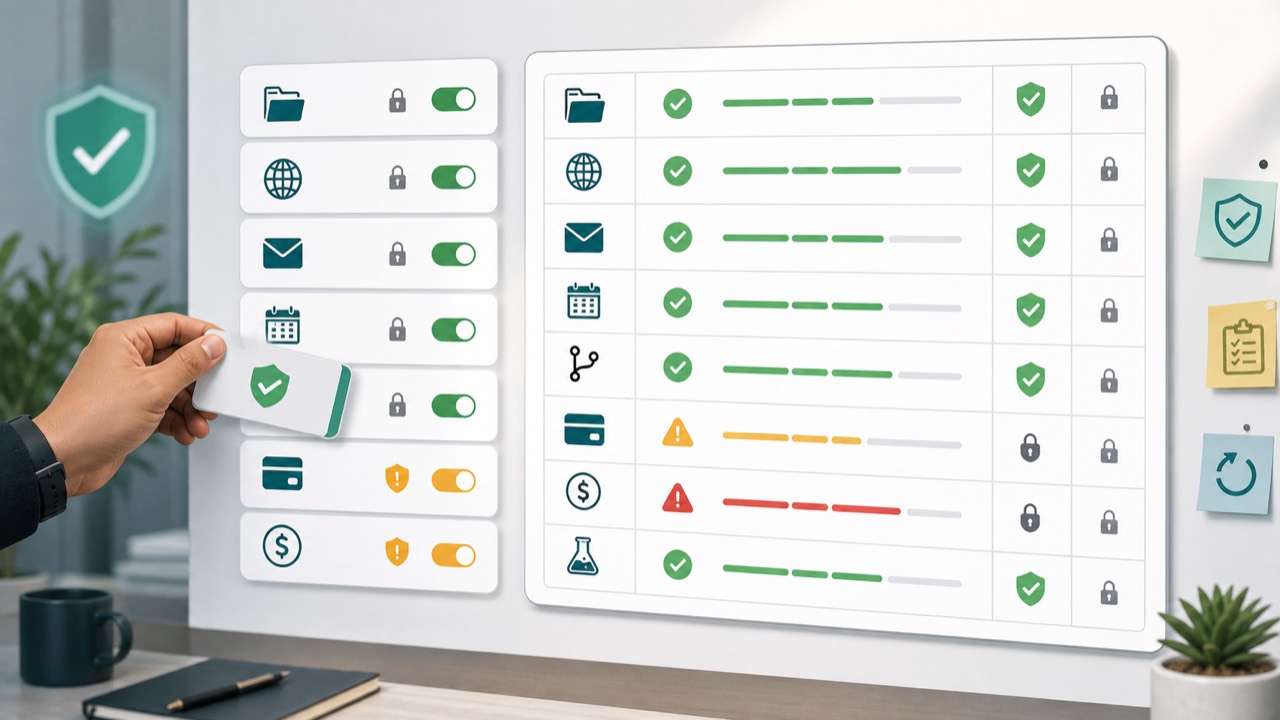
| Checklist item | Question to answer | Minimum acceptable answer |
|---|---|---|
| Goal | What exact business outcome should this workflow produce? | A specific output, owner, and done condition. |
| Scope | What is the agent allowed to do? | A short list of allowed actions and blocked actions. |
| Data | What files, systems, and personal data can the agent access? | Only the data needed for the task. |
| Tools | Which tools can the agent call? | Read-only tools first, write tools only with gates. |
| Review | Where does a human approve or reject work? | Before external, financial, production, or high-stakes action. |
| Evidence | What proof must the agent return? | Sources, files changed, tests run, assumptions, uncertainty. |
| Cost | How much can a run cost? | Limits on time, tokens, retries, tool calls, and spend. |
| Testing | How did the agent perform on representative cases? | Passed test cases and known failure modes documented. |
| Rollback | Can mistakes be reversed? | Drafts, branches, backups, logs, or manual revert path. |
| Ownership | Who is responsible for the final outcome? | A named human owner. |
Safer Agent Workflow Prompts
Good prompts do not make an unsafe workflow safe by themselves. They do help define boundaries. Use these as starting points.
General Safe Agent Brief
You are acting as a supervised AI agent for [business/workflow].

Goal:
[Describe the exact outcome.]

Allowed tools:
[List tools.]

Allowed actions:
[List actions the agent can take without approval.]

Blocked actions:
Do not send messages, publish, delete, deploy, spend money, change permissions, or modify customer records without explicit approval.

Evidence required:
For every recommendation, include the source, file, or observation that supports it.

Stop conditions:
Stop and ask for review if sources conflict, confidence is low, the task needs private data, or an action would affect customers, money, production, or public content.

Return:
1. Work completed
2. Evidence
3. Assumptions
4. Risks
5. Recommended next action
6. Items needing human approval
Marketing Research Agent Prompt
Research [market/product/audience] for a marketing brief.

Use official sources first, then credible third-party sources.
Do not invent numbers, quotes, customers, case studies, or claims.
Mark any volatile information as "needs verification."

Return a table with:
- Claim
- Source URL
- Why it matters
- Confidence
- How we could use it
- What a human should verify before publication
WordPress Draft Agent Prompt
Prepare a WordPress post draft for human review.

You may improve headings, structure, internal links, alt text, and metadata.
Do not publish.
Do not modify theme files.
Do not install plugins.
Do not delete existing content.

Return:
- Proposed title
- Slug
- Meta description under 155 characters
- Categories and tags
- Internal links used
- External sources used
- Image alt text
- QA checklist
- Any risks or manual checks before publish
Coding Agent Prompt
Work on this code task in a branch-style workflow.

Task:
[Describe bug or feature.]

Rules:
- Inspect the current code before editing.
- Make the smallest change that solves the task.
- Add or update focused tests if appropriate.
- Run the relevant tests.
- Do not change unrelated files.
- Do not deploy.

Return:
- Summary
- Files changed
- Tests run and results
- Tests not run and why
- Risks
- Suggested human review focus
Gmail or Calendar Agent Prompt
Help prepare drafts and meeting notes only.

You may:
- Summarize selected threads or calendar events.
- Draft replies.
- Prepare agendas and follow-up notes.

You may not:
- Send email.
- Forward attachments.
- Create, modify, or cancel calendar events.
- Invite attendees.
- Use private information outside this task.

Return drafts for approval and list any uncertainty.
The 30-Day AI Agent Adoption Plan
Do not try to automate the company in a month. Use 30 days to find one workflow that is worth supervising.
Days 1-3: Pick the Workflow
Choose one workflow with a painful bottleneck, repeated inputs, a clear output, and low blast radius. Examples: weekly research brief, support draft triage, sales prep notes, content outline generation, WordPress draft QA, YouTube transcript repurposing, or internal meeting summaries.
Write down the current process, average time spent, quality problems, and what would count as a win. If you cannot describe success, the agent cannot optimize for it.
Days 4-7: Map Inputs, Outputs, and Risks
List the data the agent needs, the tools it would use, the output it should return, and the actions it must not take. Decide what a human must approve. Create the first prompt and review checklist.
At this stage, avoid write permissions. Use read-only research, draft creation, and recommendations.
Days 8-12: Build the First Supervised Workflow
Run the agent manually or semi-manually. Do not worry about full automation yet. Your job is to learn whether the agent can produce useful work when supervised. Save the prompt, examples, outputs, errors, and corrections.
Measure time saved, but also measure review burden. A workflow that saves 20 minutes and adds 30 minutes of checking is not ready.
Days 13-17: Test Against Edge Cases
Create test cases that include missing data, conflicting sources, messy formatting, sensitive information, and tasks outside scope. Confirm the agent asks for help instead of guessing. Confirm it does not try to perform blocked actions.
If you are testing a coding or website agent, run tests, inspect diffs, and use preview environments. If you are testing content, verify sources and links. If you are testing support or sales, review tone and policy accuracy.
Days 18-21: Tighten Permissions
Now decide whether the agent needs more access. Maybe it only needs selected files, not a whole Drive. Maybe it needs browser read access, not form submission. Maybe it needs GitHub issue access, not branch write access. Maybe it needs Gmail draft permission, not send permission.
Write the permission policy in plain language. If a teammate cannot understand it, it is not ready.
Days 22-25: Add QA and Logging
Require the agent to log sources, files changed, commands run, assumptions, and human approval points. Create a simple scorecard: accepted as-is, accepted with edits, rejected, dangerous error, unclear. This gives you a practical quality trend.
For recurring workflows, build a small regression set. Re-run the same examples after changing prompts, models, or tools.
Days 26-30: Decide Whether to Scale
At the end of 30 days, choose one of four outcomes:
- Keep manual. The agent did not help enough.
- Use as copilot. The agent is useful for drafts, but not for workflow automation.
- Use as supervised workflow. The agent can run repeatably with human approval gates.
- Expand carefully. The agent earned slightly more tool access or a second related workflow.
This is also where vendors can be useful. If you sell an AI product and want Kingy to evaluate it for creators or business buyers, Sponsor Kingy AI is the commercial path. For adoption inside your own business, the main point remains the same: prove usefulness before scale.
FAQ
What is the best first AI agent workflow for a small business?
Start with a workflow that creates drafts or recommendations, not final actions. Good first choices are research briefs, support reply drafts, sales call prep, meeting summaries, content outlines, WordPress QA, and YouTube transcript repurposing.
Are AI agents safe for business?
They can be safe enough for many business workflows if you limit permissions, test them, require evidence, keep humans in the loop, and block high-risk actions. They are not safe as blind autonomous operators across email, payments, code, customer records, and publishing.
What is the difference between AI automation and an AI agent?
AI automation usually follows predefined steps. An AI agent has more freedom to choose steps, use tools, and respond to changing conditions. That extra flexibility is useful, but it also increases risk.
Should I give an agent access to Gmail or Calendar?
Only after you know the exact workflow and scope. Start with selected threads or drafts. Avoid full mailbox access and do not allow sending, forwarding, inviting, or changing events without approval.
Can AI agents replace employees?
For most small businesses, agents are better treated as supervised assistants that reduce busywork and create drafts. They can change roles and workflows, but replacing judgment, relationships, accountability, and domain context is a much higher bar.
How do I know whether an agent is working?
Measure accepted outputs, correction rate, time saved, error severity, cost per run, and user trust after review. Do not rely on demo quality. Test real cases.
What should an agent never do without approval?
It should not spend money, send external messages, publish content, delete files, change permissions, deploy code, modify production data, issue refunds, or make high-stakes advice decisions without human approval.
The Verdict
AI agents are real, useful, and still easy to misuse. The strongest current pattern is supervised workflows: narrow goals, limited tools, source-backed outputs, human review, QA, logs, and gradual permission expansion.
That is not a timid view. It is how useful systems earn trust. Let agents do the repetitive work, the first pass, the source gathering, the test running, the draft creation, and the workflow stitching. Keep humans responsible for judgment, public commitments, money, production systems, customer relationships, and anything hard to reverse.
The businesses that win with agents will not be the ones that give them the most freedom on day one. They will be the ones that build the best loops: clear goal, useful context, constrained action, strong review, practical QA, and measured expansion.