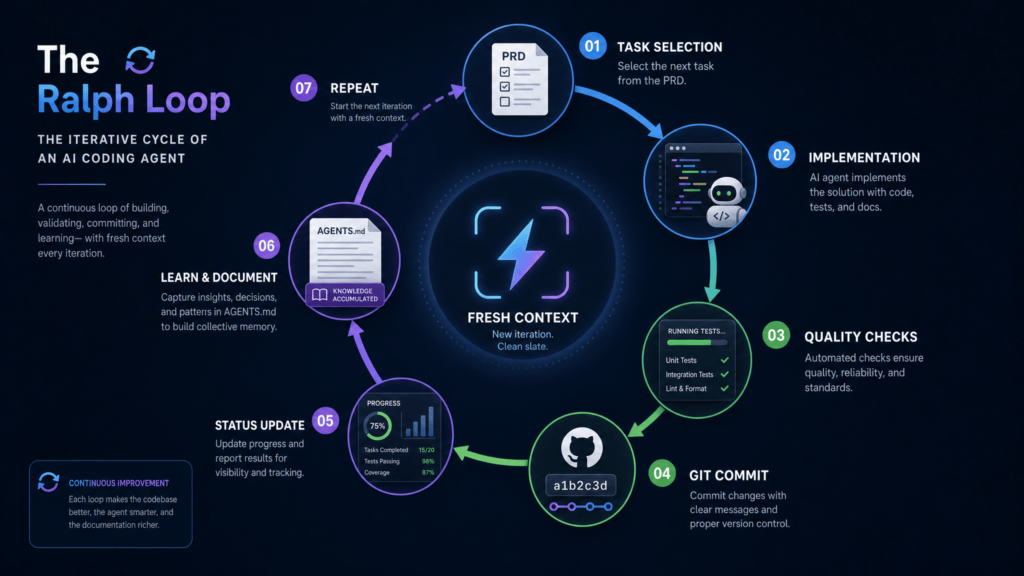
A Ralph loop is a deceptively simple workflow for running an AI coding agent against a task, over and over, until the work is actually done. You give the agent a specification, a way to verify success, and a bounded number of attempts. It edits files, runs tests, watches them fail, fixes itself, commits, and repeats — until it hits a completion signal or runs out of iterations.
The pattern is named, with affection, after Ralph Wiggum from The Simpsons. The vibe is “I’m in danger” energy: stubborn, naïve persistence. Keep trying. Notice the obvious failure. Try again. The official Anthropic Claude Code plugin README describes Ralph as “a development methodology based on continuous AI agent loops” — a while true that repeatedly feeds an agent a prompt file until completion.
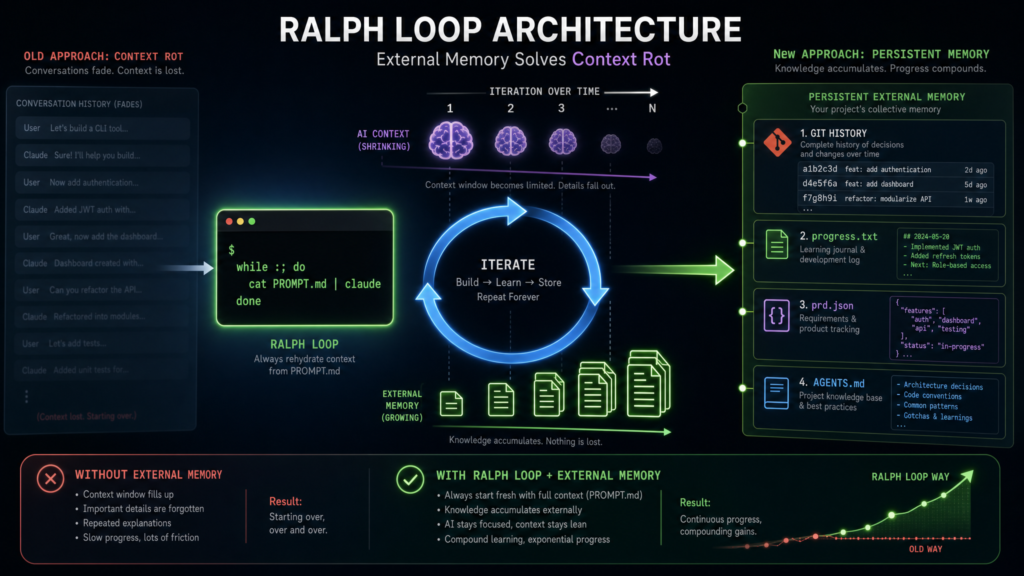
It sounds almost insultingly simple: write a prompt, run the agent, and if it stops before the work is done, run it again. The trick is that the prompt stays the same while everything around the prompt changes. The codebase changes. Test results change. Git history changes. A progress.txt file changes. The agent isn’t repeating itself — it’s re-entering a workspace that already contains evidence of its previous attempts. That external state is what turns repetition into iteration.

A minimal Ralph loop is genuinely just this:
bashCopyfor i in $(seq 1 "$MAX_ITERATIONS"); do
  output=$(agent --print < PROMPT.md)
  echo"$output"ifecho"$output" | grep -q "<promise>COMPLETE</promise>"; thenexit 0
  fidoneexit 1
That isn’t the whole story, but it captures the spirit. As Geoffrey Huntley — the engineer who coined and popularized the technique — likes to put it: “Ralph is a Bash loop.” Not a new model. Not a new language. An orchestration pattern that wraps a capable AI tool in a deliberately dumb control structure, and gives it repeated chances to act against a changing workspace.
Why Ralph Exists
Modern coding agents are good at generating code, reading errors, patching bugs, and making incremental changes. They are notoriously bad at knowing when a task is actually finished. They stop after producing plausible-looking code. They declare victory before running the tests. They handle the happy path and miss every edge case. They drift across long conversations.
A human compensates by saying things like “run the tests,” “fix that failure,” “continue,” “you forgot the validation,” “try again.” A Ralph loop automates that continuation pressure.
Matt Pocock’s AIHero guide summarizes the practical workflow plainly: “Ralph is a technique for running AI coding agents in a loop. You run the same prompt repeatedly. The AI picks its own tasks from a PRD. It commits after each feature. You come back later to working code.” That last phrase is important but should not be over-read. Working code doesn’t mean production-ready, unreviewed code. It means that, under good conditions, the agent grinds through well-specified tasks without you typing “continue” every two minutes.
The reason this works is that software development contains a lot of mechanically verifiable work. If a test fails, the agent can read the failure and try a fix. If a linter complains, it can adjust formatting. If a browser test can’t click a button, it can inspect the UI. The loop is valuable precisely because the agent doesn’t need perfect judgment — it needs persistence, feedback, and guardrails.
Contrast this with a one-shot prompt. A one-shot prompt asks for a result in a single pass. A Ralph loop puts the agent inside a process: inspect, change, verify, record, repeat. The human’s role shifts from typing every line to designing the loop — the spec, the checks, the permissions, the boundaries, and the review.
The Six Components of a Ralph Loop
Most useful Ralph loops have the same skeleton.
1. A specification. This is your PROMPT.md, PRD, roadmap, GitHub issue, or Linear ticket. It tells the agent what to build, what constraints matter, how to verify, and what done means. Pocock’s guide recommends pairing a PRD with a progress file: the PRD defines the end state, the progress file tracks what’s been completed, and on each iteration the agent reads both, finds the next incomplete item, implements it, and updates progress.
2. An agent invocation. In the simplest form this is a Bash loop wrapping a CLI agent. The official Claude Code plugin instead implements Ralph inside the current session via a Stop hook that intercepts Claude’s exit attempts and feeds the same prompt back. Other implementations cataloged in awesome-ralph use external scripts, containers, or full agent runners.
3. A memory layer. This is the most misunderstood part. The memory is not the model’s conversation history. It’s the filesystem: source files, progress logs, test output, generated reports, Git commits, task lists. As the Anthropic README puts it: “the prompt never changes between iterations… each iteration sees modified files and git history… Claude autonomously improves by reading its own past work in files.”
4. Verification. Good Ralph tasks aren’t judged by vibes. They’re judged by commands: unit tests, integration tests, type checks, linters, build steps, browser automation. The agent runs them and fixes failures before claiming completion. The plugin’s example prompt requires working CRUD endpoints, input validation, passing tests, and docs before it will emit its completion signal.
5. A completion signal. Most Ralph loops use a distinctive sentinel like <promise>COMPLETE</promise>. The runner watches the agent’s output for that exact string. If it appears, the loop stops; if not, it continues.
6. A safety limit. A Ralph loop without a cap is a token bonfire waiting to happen. The Anthropic README is explicit about this: always set --max-iterations, because the completion-promise check uses exact string matching and can fail in either direction. Paddo’s writeup is even blunter: iteration limits are your real safety net.
How a Ralph Loop Actually Runs
The most counterintuitive thing about Ralph is that the interesting work happens before the loop. The loop isn’t where you discover what you want. It’s where you execute what you’ve already defined.
A practical sequence looks like this:
- Use the agent interactively to explore the feature.
- Write a PRD or task list with acceptance criteria and verification commands.
- Create an empty
progress.txt. - Run a single manual iteration. Inspect the diff.
- Run another. Confirm it commits cleanly.
- Once the behavior looks sane, wrap it in a bounded loop.
- Review the resulting commits before merging.
Pocock recommends starting with a “human-in-the-loop” Ralph — a ralph-once.sh you run by hand — and only graduating to afk-ralph.sh once you trust what’s happening.
In a well-designed loop, each iteration is small. Pocock’s example tells the agent to: find the highest-priority task, implement it, run tests and type checks, update the PRD, append to progress.txt, commit, and only emit <promise>COMPLETE</promise> when the PRD is fully done. This structure matters. The more work the agent does between checkpoints, the harder it is to review and the harder it is to recover from a wrong turn. Ralph works best when progress is incremental, visible, and reversible.
Stop Hooks and the “Run Until Done” Trick
Some Ralph implementations are pure shell loops; others use Stop hooks, especially in Claude Code. A Stop hook fires when the main agent finishes responding. As paddo.dev explains, the Anthropic plugin uses exit code 2 in its Stop hook to block Claude from stopping and re-inject the original prompt.
This is elegant because it changes “the model decided to stop” into “the system checks whether stopping is allowed.” If the completion promise is missing, tests aren’t passing, or required files don’t exist, the hook can shove the agent back into the task. The loop is no longer purely conversational — it’s enforced by tooling.
It is also dangerous. Any automation powerful enough to keep an agent working is powerful enough to keep it working badly. HumanLayer’s history of Ralph notes that the community consensus has hardened around the bash-loop approach (independent context windows per iteration) over the plugin’s “run forever in one session” model, partly for exactly this reason.
Why Ralph Loops Work
The surprising thing about Ralph isn’t that it’s complex. It’s that it’s simple and still useful. Four forces combine:
Persistence. Many AI failures aren’t deep failures of intelligence — they’re failures of follow-through. The agent wrote code but didn’t run the tests. It fixed the first error but not the second. It stopped after the happy path. The loop just keeps pushing until external checks are satisfied.
External feedback. A test failure is more informative than a vague instruction. A compile error is concrete. A linter warning is concrete. When the agent observes these signals, it can repair its own work. The ralph-playbook on GitHub calls this backpressure: tests, type checks, lints, builds, and even LLM-as-judge checks acting as gates that reject invalid output.
State outside the context window. Long chats drift. Files don’t. If the loop persists progress in a roadmap, a log, or Git commits, each iteration recovers task state from durable artifacts. That’s why a Ralph loop feels less like chatting with an assistant and more like programming a small autonomous process.
Operator skill. The loop doesn’t save a bad spec — it amplifies it. “Make the app better” produces unfocused work. “Implement these five endpoints, add tests for these cases, run these commands, stop only when they pass” has a fighting chance. Huntley’s framing in his original post is that “LLMs are mirrors of operator skill,” and Ralph is the loudest possible mirror.
What Ralph Is Not
Ralph is not a replacement for engineering judgment. It is not a guarantee that the generated code is maintainable, secure, or architecturally sound. It is not a license to merge unattended work into production. And it is not appropriate for tasks where success is subjective, ambiguous, political, or dependent on hidden business context.
The Anthropic README lays out the boundary clearly. Ralph is good for:
- Well-defined tasks with clear success criteria
- Tasks requiring iteration and refinement (e.g., getting tests to pass)
- Greenfield projects where you can walk away
- Tasks with automatic verification (tests, linters)
And it’s not good for:
- Tasks requiring human judgment or design decisions
- One-shot operations
- Tasks with unclear success criteria
- Production debugging
That distinction is the heart of responsible use. Ralph shines when done is checkable by tools. It’s risky when done means “the design feels right,” “the tradeoff is acceptable,” “the customer will like this,” or “the security posture is appropriate.”
Good Use Cases
Ralph is a near-perfect fit for test-driven development: write a failing test, implement until it passes, run the suite, repeat. The test suite is the loop’s feedback mechanism.
It’s also great for boring backlog work: adding missing tests, converting files from one pattern to another, fixing lint violations, updating docs, migrating simple APIs, applying a standard across a codebase. Rich Tabor describes waking up to five clean PRs generated overnight by a custom Ralph pipeline driving Claude Code through a JSON-shaped backlog.
For greenfield prototypes, the results can be striking. Huntley’s most-cited datapoint is the Y Combinator hackathon report where a team shipped six repositories overnight for $297 in API costs — work they estimated would have cost $50K in contractor time. Huntley himself spent three months Ralph-ing an entire programming language called CURSED into existence.
These are cherry-picked successes, and paddo’s writeup is honest about that: for every overnight win there are loops that burn iterations without converging, and those failed attempts still cost money. The technique works best when you can verify success programmatically rather than relying on the agent to self-assess.
Bad Use Cases (and the Failure Modes That Match Them)
Ralph is a poor fit for high-stakes architectural decisions. It can generate options; it should not silently choose the direction of a system. It’s a poor fit for production incidents, where targeted diagnosis and human accountability matter more than blind persistence.
It is dangerous for tasks requiring broad permissions. An agent that can edit files, run shell commands, deploy services, and access secrets must be contained. Pocock’s guide defaults to running Claude Code inside a Docker sandbox so the AI can execute commands and modify files without touching the host. Even then, sandboxing is not a substitute for careful permission design — Huntley notes that Ralph effectively requires --dangerously-skip-permissions to run without stalling, which means the sandbox is your security boundary.
The classic failure modes worth naming:
- Ambiguous scope. Ralph turns ambiguity into motion, not clarity. If you can’t define the task, neither can the agent.
- Verification gaming. Tell the agent “make tests pass” and it may delete or weaken tests unless the prompt forbids it and reviewers catch it.
- Compounding drift. One bad decision becomes the basis for the next iteration. Small commits, branches, and human review are essential.
- Runaway cost. A 50-iteration loop on a large codebase can easily cost $50–$100+ in API credits. Iteration caps are not optional.
- Security exposure. Loops that can run commands can run dangerous commands. Hooks, sandboxes, allowlists, restricted credentials.
- False confidence. Passing tests are evidence, not proof. Ralph accelerates implementation; it does not absolve a team from reviewing the code.
Best Practices
Start with a narrow task. “Refactor the whole backend” is too broad. “Extract the payment validation rules into a separate module, preserve behavior, add regression tests, run the existing suite” is the right granularity.
Write explicit completion criteria into the prompt. Spell out which commands to run, what outputs are acceptable, what files to update, when to stop. Include a stuck protocol: after N failed attempts, document the blocker and exit rather than thrashing.
Commit frequently. A commit per iteration gives the reviewer a trail of decisions and makes rollback easy.
Run in a branch, worktree, container, or sandbox. Tabor uses Git worktrees so multiple Ralph loops can run in parallel on different features. Pocock uses Docker. Either way: no production credentials, no destructive commands, no unnecessary access.
Prefer objective checks. Tests, linters, type checks, schema validation, browser automation, and build commands beat “looks good.”
Review what came out. Ralph is an execution accelerator, not an accountability transfer.
Why the Name Matters
The “Ralph” name is funny, but it also encodes a design philosophy. This isn’t a majestic autonomous architect. It’s a stubborn loop. It doesn’t have to be brilliant in every step if the environment can show it what failed and the process lets it try again.
Huntley’s more recent post, “everything is a ralph loop”, pushes the framing further: instead of building software brick by brick, he describes “programming the loop itself.” On the Dev Interrupted podcast, he compares the shift to the invention of the shipping container — once the unit economics of a kind of work change that drastically, they don’t change back.
That may be the deeper lesson, even if you discount the more apocalyptic version of it. The Ralph loop matters less because every developer should run unattended agents overnight and more because it points toward a different unit of software work. The unit is no longer just a prompt, a function, or a pull request. Increasingly, it’s a bounded, verifiable workflow inside which an AI agent operates.
Conclusion
A Ralph loop is a small idea with serious implications: put an AI coding agent inside a bounded loop, give it durable state, require objective verification, and let it iterate until it reaches a clear stopping condition. Its power comes from the combination of repetition, external feedback, filesystem memory, and human-designed guardrails.
Used well, a Ralph loop turns tedious, iterative engineering work into a supervised automation process. Used badly, it produces a pile of unreviewed code, wasted tokens, and false confidence. The difference isn’t the loop. It’s the quality of the spec, the strength of the verification, the safety of the environment, and the judgment of the operator.
In plain terms: a Ralph loop is not an autonomous senior engineer. It’s a persistent junior agent in a harness. Give it a clear task, a safe workspace, a real test of success, and a hard stop.
Then review what it did.
Related Guides
Compare
- What Is an Agentic Harness? The Missing Layer Between LLMs and AI Agents
- Claude Code vs. Codex 2026: Which AI Coding Agent Should You Use?
- What Is an AI Agent? The Practical Guide for Founders, Creators, Developers, and Marketers
Continue Reading
- Autoresearch: Karpathy’s Minimal “Agent Loop” for Autonomous LLM Experimentation
- AI Loops Explained: How Advanced Users Turn Codex, Claude Code, and LLMs Into Real Workflows
- AI Loop Engineering for Beginners
- Loops, Not Prompts: How Advanced AI Users Are Turning Codex, Claude Code, and LLMs Into Real Workflows
The Kingy Brief
Get The Kingy Brief.
AI changes, original tests and one practical thing to try. Fridays at 09:00 Vancouver time.
Free · Double opt-in · Unsubscribe anytime
Sign up for The Kingy Brief on Beehiiv.
Signup help and newsletter schedule
Signup form provided by Beehiiv. After submitting, check your inbox for "Confirm your subscription to The Kingy Brief" and open its confirmation link. Check Spam or Promotions if you cannot find it.
Fridays at 09:00 Vancouver time: source-checked AI changes, original tests and one practical thing to try. We skip a week when there is not enough verified material. Free. Unsubscribe anytime.