A quick note before we dive in: the techniques below come from a workflow we demonstrated using the free plans of Claude (claude.ai chat, not the paid Claude Code CLI) and ChatGPT. Claude Code is technically the terminal-based agent reserved for paid plans (Prompt Optimizer breakdown), so everything here uses the in-browser chat — meaning $0 out of pocket. Pair the outputs with a free editor like CapCut Desktop, and you’ve got a surprisingly capable post-production stack.
1. Generate Your Own .cube LUTs in Claude
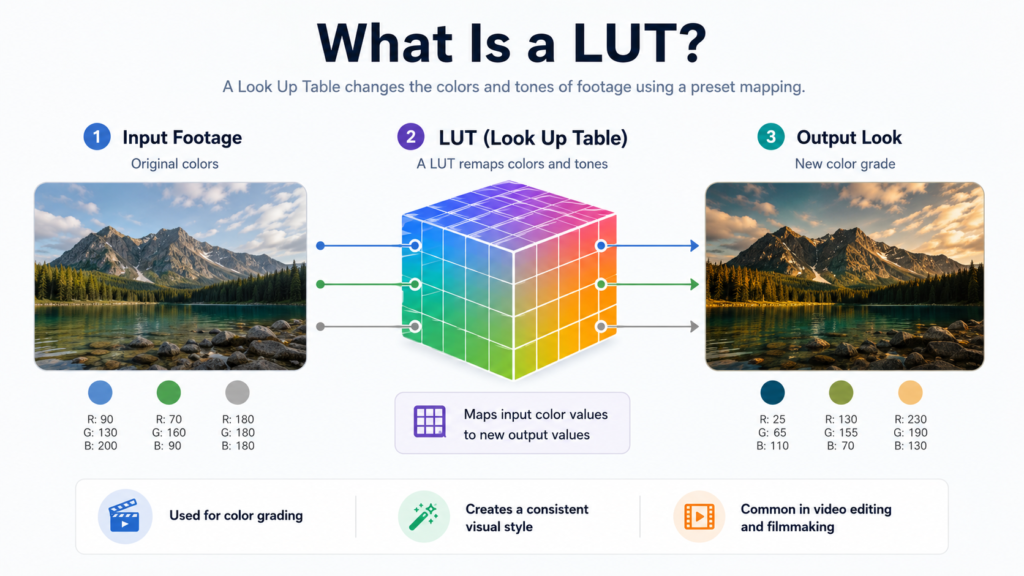
Lookup tables (LUTs) are the fastest way to lock in a consistent color grade — usually a job for DaVinci Resolve or paid LUT packs.
How to do it:
- Open a new chat at claude.ai (free Sonnet 4.6 access is included on the free tier).
- Prompt it with the style you want, e.g. “Build me a soft, professional orange-and-teal
.cubeLUT for talking-head studio video. Preserve natural skin tones, keep whites clean, don’t crush the shadows. Also build a live before/after preview widget.” - Claude generates an Artifact with a side-by-side comparison slider and a download button for the
.cubefile. - Refine in plain English (“more teal, less pink, lift the blacks 3%”) until it matches.
Drop it into CapCut: open the Adjustment panel → LUT → Import, select your .cube, then drag the thumbnail to the timeline as an adjustment layer. Use the intensity slider to dial it back. Full walkthrough at SparkleStock’s CapCut LUT guide — note that LUT import is desktop-only; CapCut Mobile no longer supports it.
2. Number-Countdown Motion Graphics via SRT
Animated counters (0 → 100, $1M → $0, etc.) traditionally require an After Effects expression. Claude can fake the entire thing as a subtitle file.
Prompt Claude:
“Create an SRT subtitle file counting upward from 50 to 100. Each subtitle is 0.1 seconds long, and each number has a
$in front of it.”
Download the .srt, drag it onto your CapCut timeline, then style the text exactly like any other caption — font, color, stroke, position. Right-click → Create Compound Clip to retime the whole counter (2× speed, 0.5×, etc.). Want commas, decimals, currency suffixes, or a reverse countdown? Just say so in the prompt.
3. Custom Sound Effects in ChatGPT
ChatGPT’s free tier can run Python in its sandbox, which means it can synthesize and export raw .wav audio.
Prompt:
“Create a sound effect of an annoying car horn. Output as a .wav file I can download.”
The trick is the word “create” — without it, ChatGPT just describes the sound (“beep, honk, honk”). With it, ChatGPT writes Python (typically using numpy + scipy.io.wavfile) and hands back a downloadable file. Drag the .wav straight into CapCut. Vague prompts give you vague results, so be specific about pitch, duration, and texture (“short metallic ding, ~0.4s, with light reverb tail”).
4. Transparent-Background Stickers and Emotes
ChatGPT Free includes a daily allotment of GPT image generations, and it handles transparency natively.
Prompt:
“Create a sticker that says ‘Curtis is Hilarious’ in bold red and blue lettering. Transparent background. Square aspect ratio.”
Click Edit to switch aspect ratios (square → 16:9 → 9:16) on the fly without burning a fresh generation. Download the PNG — the alpha channel is preserved — and drop it onto your CapCut timeline. The sticker animates, scales, and composites cleanly over any clip. Same trick works for lower-third badges, end-card logos, emojis, and channel watermarks.
⚠️ Free-tier image generations are rate-limited and reset on a rolling window, so batch your sticker requests in one session.
5. Visual Storyboards From a Script
Once you have a script (write it in either tool: “Help me write a 60-second script about French Bulldogs with shot directions”), feed it back in for a storyboard.
- In Claude: “Create a visual storyboard based on this script.” Claude will render an SVG storyboard Artifact with shot numbers, timestamps, music cues, and scene descriptions. Download as HTML for a clean, scrollable reference doc.
- In ChatGPT: Same prompt, but you’ll get a photoreal image of the full storyboard grid (or one polished hero frame). Better for client pitches; SVG is better for shot-list reference.
If you have credits to spare, generate one image per scene rather than a single grid — but on the free tier the single-grid approach stretches your quota the furthest.
Why This Stack Works
The free tiers are genuinely usable in 2026 — claude.ai’s free plan now includes Sonnet 4.6, Artifacts, Projects, and a 200K context window (per Anthropic’s February 2026 expansion) — and ChatGPT Free covers image generation plus Python execution. Combined with CapCut Desktop for assembly, you can replicate workflows that used to require After Effects, Audition, and a stock LUT subscription.
The catch is rate limits: roughly 9–40 messages per 5-hour window on Claude Free and a daily image cap on ChatGPT (StartupHub.ai breakdown). Plan your session, batch your prompts, and you’ll rarely hit the wall.