Short answer
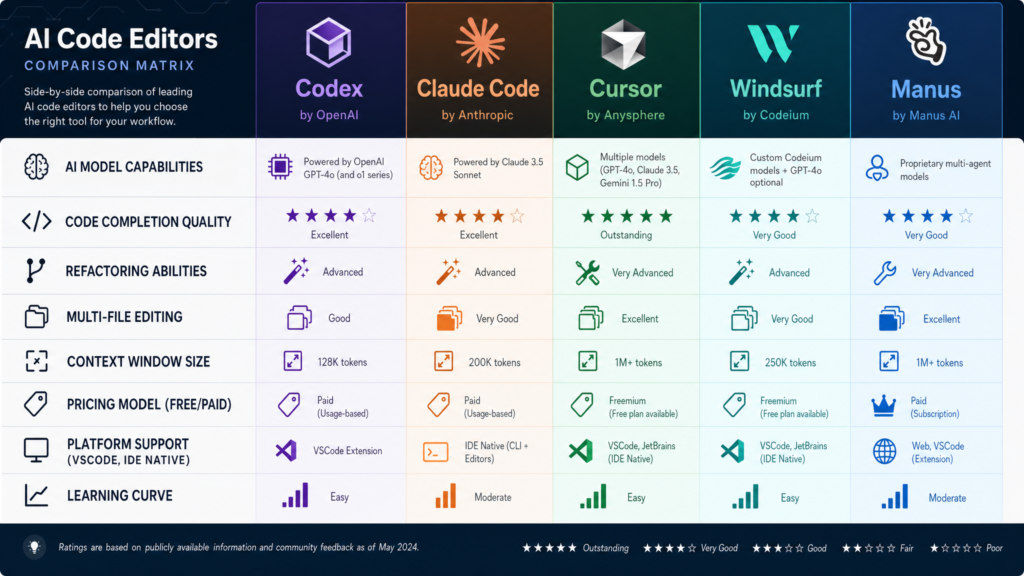
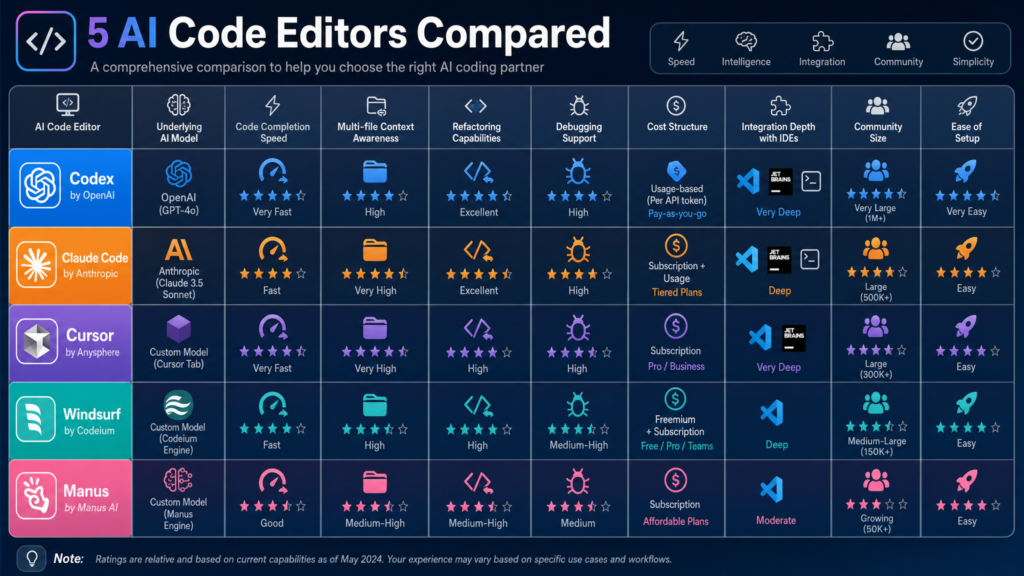
If you are choosing among Codex, Claude Code, Cursor, Windsurf, and Manus, do not think of them as five interchangeable “AI coding tools.” They sit at different layers of the development workflow:
| Tool | Practical category | Best fit |
|---|---|---|
| Codex | OpenAI coding agent across app, editor, terminal, and cloud | Parallel coding tasks, cloud worktrees, PR review, engineering teams standardizing around ChatGPT/OpenAI |
| Claude Code | Anthropic terminal-first coding agent with IDE, desktop, web, Slack, and API paths | Deep repo understanding, terminal workflows, multi-file edits, issue-to-PR style work, teams that want local execution and strong permissioning |
| Cursor | AI-native IDE, CLI, cloud agents, Slack/GitHub workflows | Daily coding, autocomplete, interactive editing, agentic development inside an editor |
| Windsurf | AI-native IDE centered on Cascade plus Devin cloud sessions | Greenfield building, previews, local-plus-cloud agent workflows, agent dashboarding, approachable UX |
| Manus | General-purpose autonomous agent with coding as one capability | Broader “do the whole task” automation: research, slides, websites, browser tasks, files, business workflows |
A good 2026 stack is usually not one tool. It is often:
- Cursor or Windsurf as the day-to-day IDE.
- Claude Code or Codex for heavier agentic work, terminal tasks, issue-to-PR flows, and large refactors.
- Manus for tasks where code is only one part of a broader deliverable.
Note: Product pages and pricing pages change often, so treat prices and model names as snapshots rather than permanent facts.
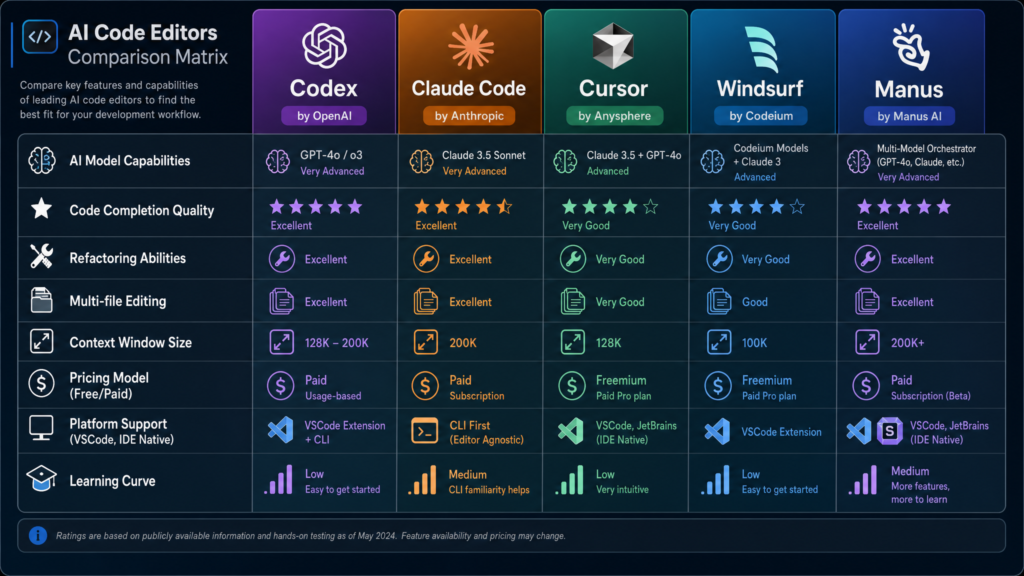
1. The 2026 mental model: AI coding agents are workflow layers, not just chatbots
The best way to compare these tools is to stop asking, “Which one writes better code?” That question is too vague. In 2026, the more useful question is:
Where does the agent live, what tools can it use, how much autonomy does it have, and how reviewable are its changes?
A modern coding agent typically has some or all of these components:
- Context ingestion
- Reads files.
- Searches the repo.
- Builds an index or uses agentic search.
- Watches errors, logs, tests, and terminal output.
- Planning
- Breaks a task into steps.
- Identifies files to inspect.
- Proposes edits.
- May ask permission before running commands or modifying files.
- Tool use
- File read/write.
- Shell commands.
- Test runners.
- Linters.
- Package managers.
- Git.
- Browser preview.
- GitHub/GitLab issue and PR workflows.
- External tools via MCP or vendor integrations.
- Execution environment
- Local machine.
- IDE-integrated process.
- Terminal.
- Cloud sandbox.
- Background worktree.
- Remote machine controlled by the agent.
- Review surface
- Inline diff.
- Git diff.
- Pull request.
- Logs.
- Test output.
- Summary of changed files and rationale.
- Governance
- Permissions.
- SSO.
- audit logs.
- usage analytics.
- privacy controls.
- data retention policies.
- model/provider controls.
On that map, these products do not occupy the same point.
- Cursor and Windsurf are primarily AI-native editors.
- Claude Code is primarily a coding agent that meets you in the terminal and now also in IDE, desktop, web, Slack, and mobile-adjacent workflows.
- Codex is OpenAI’s coding agent layer across ChatGPT, editor, CLI, and cloud.
- Manus is a general autonomous agent that can code, but is not primarily a code editor or terminal coding assistant.
The Artificial Analysis coding agents comparison classifies these tools across surfaces like standalone IDE, IDE extension, local/CLI, and cloud. It lists Cursor as standalone IDE/local CLI/cloud, Claude Code as IDE extension/local CLI/cloud, Codex as IDE extension/local CLI/cloud, Windsurf as standalone IDE, and Manus as cloud/general-purpose agent with coding workflows.
For the broader decision path, use Kingy’s AI Coding Agents hub to compare execution surfaces, workflows, permissions and product fit.
2. Codex: OpenAI’s coding agent for parallel engineering work
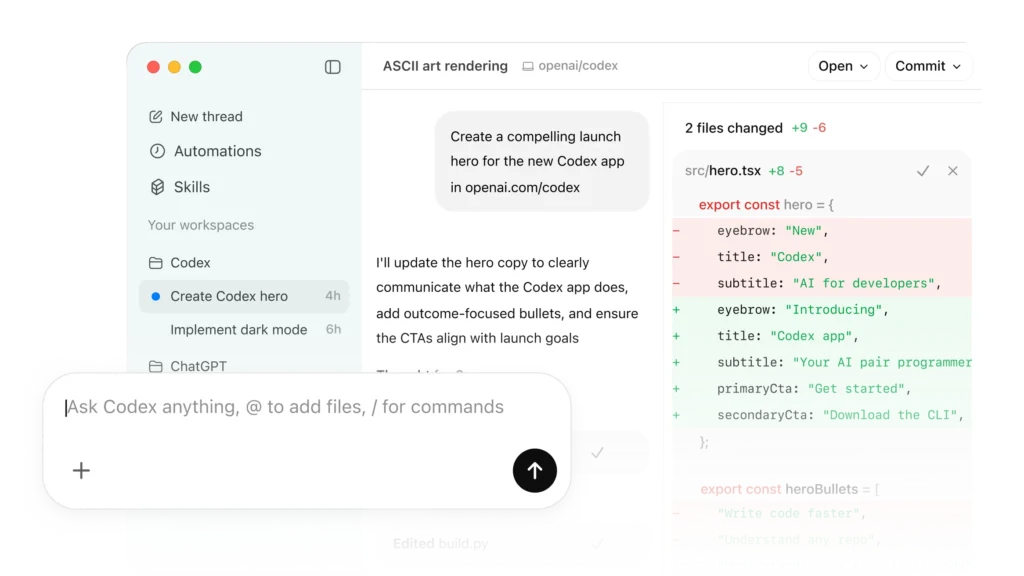
OpenAI describes Codex as “a coding agent that helps you build and ship with AI—powered by ChatGPT.” The current Codex page emphasizes several themes that matter in practice: real engineering work, multi-agent workflows, worktrees, cloud environments, Skills, Automations, code review, and connection across app, editor, and terminal.
What Codex is best understood as
Codex is not simply “autocomplete from OpenAI.” It is positioned as a coding partner for tasks such as:
- routine pull requests,
- complex refactors,
- migrations,
- feature work,
- prototyping,
- documentation,
- testing,
- code review,
- CI/CD-adjacent workflows,
- issue triage,
- alert monitoring.
The Codex product page says it is designed for multi-agent workflows with built-in worktrees and cloud environments, allowing agents to work in parallel across projects. That is a major architectural clue. Codex is intended less as “one chat pane next to your code” and more as a command center for multiple background or semi-background coding tasks.
OpenAI also says Codex works across multiple surfaces connected by a ChatGPT account: Codex app, editor, and terminal. The OpenAI ChatGPT pricing page lists Codex access across Free, Plus, Pro, Business Codex, Business ChatGPT & Codex, and Enterprise-style plans, with Business Codex described as a development-focused plan with usage-based pricing, built-in worktrees, cloud environments, automated code and security reviews, admin controls, SAML SSO, MFA, and no training on business data.
Practical strengths
Codex’s practical strength is parallelism. The official product language repeatedly points to multiple agents, worktrees, cloud environments, and background work. That makes it attractive when you want to ask:
- “Implement these three independent fixes.”
- “Refactor this subsystem while I keep working locally.”
- “Review this PR for security and backward compatibility.”
- “Triage these issues and propose patches.”
- “Generate tests for these modules.”
- “Run a migration in an isolated branch.”
If you work in a team that already uses ChatGPT heavily, Codex also fits naturally into an OpenAI-centered workflow. Its value is not only model quality; it is the operational shell around the model: cloud execution, PR-style work, skills, automations, and review.
Technical implications
The key technical idea is the worktree/cloud-agent pattern. A worktree lets multiple branches or task states coexist without trampling each other. In an agentic coding setup, this matters because agents often need to:
- inspect the repo,
- edit files,
- run tests,
- possibly break things,
- retry,
- produce a diff,
- hand control back to a human.
A cloud worktree gives each agent an isolated place to attempt the task. That reduces conflict with the developer’s local working directory. It also makes background tasks more scalable: one developer can keep coding while several agent tasks progress elsewhere.
Codex’s “Skills” concept is also important. A generic agent can write code, but a team needs agents to follow conventions: folder structure, design-system rules, testing practices, deployment process, security review expectations, and documentation standards. Skills are a way to encode repeatable behavior beyond one prompt.
Where Codex may be less ideal
Codex may be less attractive if you want:
- a VS Code-like editor-first experience as the main product surface,
- a pure local-first workflow,
- bring-your-own-model flexibility,
- simple low-cost autocomplete,
- total transparency into every model/tool call.
The Artificial Analysis comparison lists Codex as not BYOM in its landscape table, meaning it is mainly tied to OpenAI’s own model stack. That is not inherently bad; it is a trade-off. You get an integrated OpenAI experience, but not a neutral multi-model shell.
3. Claude Code: terminal-first agent with strong repo and tool workflows
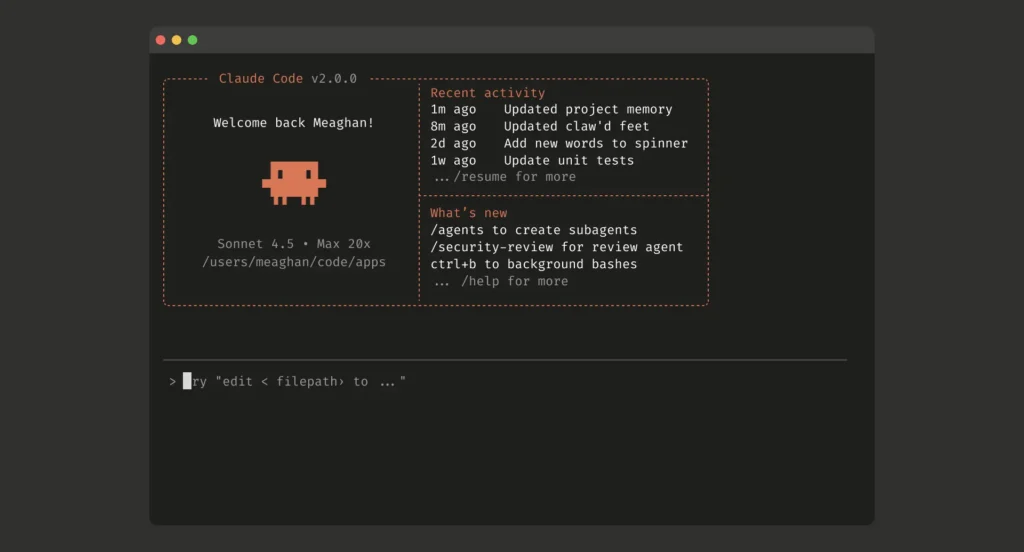
Claude Code is Anthropic’s developer-focused coding agent. The page describes it as a tool that lets you “work with Claude directly in your codebase” from terminal, IDE, Slack, web, desktop, and iOS research preview paths. It can build, debug, and ship; explore codebase context; answer questions; make changes; use CLI tools; and produce reviewable work.
What Claude Code is best understood as
Claude Code’s center of gravity is the terminal and local development environment. The official FAQ says Claude Code runs locally in your terminal, talks directly to model APIs, does not require a backend server or remote code index, and asks for permission before changing files or running commands. That is a very different posture from a purely cloud coding agent.
Claude Code also integrates with IDEs. The product page says native extensions are available for VS Code, VS Code forks like Cursor and Windsurf, and JetBrains. That is important because Claude Code can coexist with Cursor or Windsurf rather than replace them.
Practical strengths
Claude Code is especially useful for:
- onboarding to unfamiliar repositories,
- multi-file refactors,
- debugging with local test suites,
- turning GitHub/GitLab issues into patches,
- running CLI-heavy workflows,
- explaining architecture,
- generating tests,
- making coordinated edits,
- using existing shell tools,
- working in projects where the terminal is the real source of truth.
The official page highlights that Claude Code connects with command-line tools, version control, deployment tools, databases, monitoring tools, and MCP servers. In practice, that means Claude Code is often strongest when the solution requires more than generating a code snippet. It can inspect the project, run a test command, read the failure, edit, rerun, and iterate.
Pricing and access
The Claude Code product page and Claude pricing page show that Claude Code is included in Claude Pro, Max, Team, and Enterprise paths. The pricing page lists:
- Free Claude plan,
- Pro at $17/month annually or $20 monthly,
- Max from $100/month,
- Team standard and premium seats,
- Enterprise with seat plus usage pricing,
- API pricing for Opus, Sonnet, and Haiku models.
The Claude Code page states that Pro includes access to Sonnet 4.6 and Opus 4.7, Max offers more usage, and API usage consumes tokens at standard API pricing. It also says enterprise users can run Claude Code using models in Amazon Bedrock or Google Cloud Vertex AI instances.
Technical implications
The most important technical distinction is local agency with explicit permissions. Claude Code can read files, edit files, and run commands in your environment, but the product page emphasizes control: it asks for permission before modifying files or running commands.
That matters for risk management. A coding agent with shell access is powerful but dangerous if unconstrained. A good Claude Code workflow usually looks like:
- Ask Claude to inspect the issue.
- Ask it to propose a plan.
- Let it read relevant files.
- Approve edits step by step or in a controlled mode.
- Let it run tests.
- Review the diff.
- Commit manually or let it prepare a PR depending on your process.
Claude Code’s CLAUDE.md style customization, referenced from the Claude page’s documentation links, is also important. Repo-level instruction files are becoming a standard pattern across coding agents. They let you document:
- test commands,
- style conventions,
- architectural rules,
- dependency policies,
- forbidden changes,
- deployment notes,
- code review expectations.
Where Claude Code may be less ideal
Claude Code may be less ideal if:
- your team wants a fully editor-native visual experience as the primary interface,
- you prefer a polished autocomplete-first product,
- you want a cloud-only autonomous agent,
- you want broad model selection inside one product,
- you want non-coding business automation.
It can integrate with IDEs, but its soul is still more terminal-agent than AI IDE.
4. Cursor: the AI-native IDE for daily coding and agentic editing
Cursor is best understood as an AI-native development environment. It is built around daily software creation: autocomplete, inline edits, agent workflows, codebase indexing, cloud agents, CLI, Slack integration, GitHub PR review, and model choice.
Cursor’s homepage says it offers Agents, Code Review, Cloud, Tab, CLI, and Marketplace. It describes agents that turn ideas into code, cloud agents that work autonomously and in parallel, and Cursor running in the terminal, collaborating in Slack, and reviewing PRs in GitHub. Cursor’s next bet also extends beyond the editor: our Cursor Origin analysis examines its attempt to rebuild code hosting for AI agents.
What Cursor is best understood as
Cursor is the closest thing in this comparison to a full replacement for a traditional editor. It is not just an agent; it is an AI-first IDE experience.
The product page emphasizes:
- Agent Composer,
- Cursor CLI,
- cloud agents,
- Tab autocomplete,
- secure codebase indexing,
- semantic search,
- support for models from OpenAI, Anthropic, Gemini, xAI, and Cursor,
- Slack and GitHub workflows,
- enterprise security and scale.
The Cursor pricing page lists individual plans:
- Hobby: free, limited Agent requests and Tab completions.
- Pro: $20/month, extended Agent limits, frontier models, MCPs, skills, hooks, cloud agents.
- Pro+: $60/month, 3x usage on OpenAI, Claude, Gemini models.
- Ultra: $200/month, 20x usage on OpenAI, Claude, Gemini models and priority access.
Business plans include Teams at $40/user/month with shared chats, commands, rules, centralized billing, analytics, privacy mode controls, RBAC, and SAML/OIDC SSO. Enterprise adds pooled usage, invoice/PO billing, SCIM, AI code tracking API and audit logs, granular admin/model controls, and priority support.
Practical strengths
Cursor is strongest when you want AI in the loop constantly:
- autocomplete,
- inline edit,
- chat with files,
- codebase Q&A,
- quick refactors,
- feature scaffolding,
- terminal help,
- agent tasks,
- cloud tasks,
- PR reviews.
Its biggest advantage is the interaction gradient. You can use very low-autonomy help, like autocomplete, or higher-autonomy agent mode. That “autonomy slider” is essential. Sometimes you want a suggestion for the next line. Sometimes you want a multi-file implementation plan. Sometimes you want a cloud agent to go off and produce a diff.
Cursor’s workflow is especially compelling for product engineers, frontend engineers, full-stack developers, and teams that live in the editor all day.
Technical implications
Cursor’s core technical bet is contextual editing. The editor knows what file you are in, what symbols are nearby, what the repo looks like, what you selected, what terminal errors occurred, and what previous agent messages said. That gives the model high-quality local context.
The Cursor homepage also highlights secure codebase indexing and semantic search. Repo indexing is technically important because large codebases cannot simply fit into a prompt. The agent needs retrieval: symbols, file chunks, dependency paths, recent edits, semantic matches, and sometimes build/test metadata.
Cursor also exposes cloud agents and a CLI. That means the product is expanding from “AI editor” toward “development operating system.” If the agent can work in the IDE, terminal, Slack, GitHub, and cloud workers, then Cursor becomes a coordination layer for coding work.
Where Cursor may be less ideal
Cursor may be less ideal if:
- your organization cannot standardize on a VS Code-derived editor,
- you require a strict local-only terminal-first workflow,
- you want a non-editor autonomous agent,
- you are cost-sensitive and use agents heavily,
- you dislike IDE lock-in.
Cursor is excellent as an AI-native IDE, but if your preferred workflow is Neovim plus terminal plus Git, Claude Code or Codex CLI-style workflows may fit better.

5. Windsurf: Cascade, previews, Devin, and local-plus-cloud agent orchestration
Windsurf is another AI-native editor, now presented under Cognition AI branding. Its homepage introduces Windsurf 2.0, emphasizing local and cloud agents working together. It centers on Cascade, Devin, MCP support, lint fixing, drag-and-drop images, Agent Command Center, and Spaces.
What Windsurf is best understood as
Windsurf is an AI IDE with a strong emphasis on agent flow and developer UX. It is often compared to Cursor, but the current Windsurf page leans heavily into orchestration:
- Cascade for local agentic edits.
- Devin for autonomous cloud tasks.
- Agent Command Center for managing local Cascade sessions and cloud Devin sessions.
- Spaces for bundling agent sessions, PRs, files, and shared context around a task.
- Previews, lint fixing, and image-to-code workflows.
- MCP setup through curated servers.
The Windsurf pricing page lists:
- Free: $0/month.
- Pro: $20/month.
- Max: $200/month.
- Teams: $40/user/month.
- Enterprise: custom/“let’s talk.”
It also lists feature categories like Cascade, usage allowance, extra usage at API price, Tab, Previews, Deploys, premium models, Fast Context, SWE-1.5, Devin Cloud sessions, centralized billing, admin analytics, priority support, knowledge base, SSO, access controls, RBAC, discounts, hybrid deployment, and account management.
Practical strengths
Windsurf is attractive if you want:
- agentic coding in a polished editor,
- a smoother beginner or intermediate UX,
- integrated previews,
- easy MCP setup,
- local agent sessions plus cloud Devin delegation,
- lint-aware iteration,
- design/image-to-code workflows,
- a dashboard for multiple agent tasks.
For teams building web apps, Windsurf’s preview-oriented experience can be valuable. The homepage highlights workflows where a user prompts the agent, leaves, and returns to a web preview or a PR-like result. That is not unique to Windsurf, but Windsurf’s UX appears designed to make that flow visible and manageable.
Technical implications
Windsurf’s key technical pattern is local-plus-cloud orchestration. Cascade can work inside the editor; Devin can work on its own cloud machine. That resembles a split between:
- immediate pair-programming agent,
- background autonomous development agent.
The Agent Command Center and Spaces features are important because agentic development creates state explosion. If you have multiple tasks, each with files, PRs, plans, logs, previews, and sessions, you need a way to track them. Otherwise, agent outputs become chaotic.
MCP support is another major technical feature. MCP-style tool integration allows the agent to access external systems through structured interfaces: Figma, Slack, Stripe, GitHub, databases, Playwright, and so on. Windsurf’s homepage explicitly shows curated MCP servers and one-click setup patterns. For production teams, this is often the difference between “the agent writes code” and “the agent can actually interact with the workflow.”
Where Windsurf may be less ideal
Windsurf may be less ideal if:
- your team is already deeply committed to Cursor,
- you need terminal-first workflows,
- you want direct Anthropic/OpenAI agent products rather than an IDE shell,
- you require a mature enterprise procurement path proven in your company,
- you want minimal abstraction around the model and tool calls.
Windsurf competes most directly with Cursor, but its 2026 positioning is more “editor plus agent operations center” than just “AI code editor.”
6. Manus: broad autonomous work, not a pure coding agent
Manus describes itself as “Hands On AI” and says “Manus is now part of Meta.” Its homepage presents broad tasks: create slides, build websites, develop desktop apps, design, browser operation, wide research, mail, Slack integration, API, team plan, SSO, and business features.
The Artificial Analysis coding agents comparison lists Manus as a cloud product and describes it as a general-purpose agent that also supports coding workflows: it can research, run multi-step tasks, produce working code/artifacts, and deliver reports plus files/diffs.
What Manus is best understood as
Manus is not primarily an IDE, a terminal coding assistant, or a code review bot. It is a general-purpose autonomous agent that can include coding in a larger workflow.
That makes it relevant when the deliverable is something like:
- “Research this market and build a landing page.”
- “Create slides and a prototype.”
- “Use a browser to gather information and produce an app.”
- “Automate a business process involving documents, websites, email, and code.”
- “Generate a demo website and supporting materials.”
In those cases, code is part of the job, not the whole job.
Practical strengths
Manus’s strength is breadth. It can be useful when the problem statement is not a GitHub issue but a business objective.
For example:
- A product marketer might ask for research, slides, and a prototype.
- A founder might ask for a website, competitive analysis, and outreach copy.
- An operator might ask for browser-based research plus a dashboard.
- A non-engineer might ask for a working artifact without caring about the underlying repo workflow.
That is a different buyer and user than Claude Code or Cursor.
Technical implications
A general-purpose cloud agent must manage heterogeneous tools: browser, documents, files, generated artifacts, APIs, and maybe code execution. That changes the risk profile. Instead of asking, “Can it modify my local repo safely?” you ask:
- What external accounts can it access?
- What browser actions can it take?
- Where are generated files stored?
- What data is retained?
- How are permissions managed?
- How do I verify code quality?
- Can I export the result into a real repo?
- Does it create maintainable code or just a demo artifact?
Because Manus is broader, it should not be judged only as a coding agent. It should be judged as an autonomous work agent with coding capability.
Where Manus may be less ideal
Manus is probably not the first choice if your task is:
- refactor a large production repository,
- run local tests and produce a minimal diff,
- preserve strict code style,
- work inside an IDE,
- use detailed repo-specific instructions,
- interact with a mature CI/CD review process.
For serious production engineering, Manus should usually be paired with a code-specialized tool. Use Manus to produce broad artifacts or prototypes; use Cursor, Windsurf, Claude Code, or Codex to harden and integrate the code.
7. Head-to-head comparison by workflow
Daily coding and autocomplete
Winner candidates: Cursor and Windsurf.
Cursor’s Tab autocomplete and editor-native flow make it strong for constant, low-friction assistance. The Cursor homepage emphasizes Tab, autocomplete, inline editing, codebase understanding, and model selection. Windsurf also has Tab and Cascade, and its pricing page lists Tab and premium-model access.
If your main need is “make me faster every minute while I code,” you probably want an AI IDE rather than a cloud-only or terminal-first product.
Choose Cursor if you want a mature AI-native editor with strong model flexibility, CLI, cloud agents, Slack, GitHub PR review, and enterprise controls.
Choose Windsurf if you want a highly guided agentic IDE experience, integrated previews, Cascade, Agent Command Center, Spaces, and Devin cloud sessions.
Large refactors
Winner candidates: Claude Code, Codex, Cursor, Windsurf depending on environment.
For large refactors, the key is not just writing code. The agent must:
- understand architecture,
- find all call sites,
- update tests,
- run the right commands,
- preserve behavior,
- produce reviewable diffs,
- avoid unrelated churn.
Claude Code is strong here because it works directly in your terminal and can use local tools. The Claude Code page emphasizes multi-file edits, codebase understanding, CLI tools, tests, and permissioned changes.
Codex is strong if the refactor can happen in cloud worktrees or parallel tasks. The Codex page explicitly emphasizes worktrees, cloud environments, complex refactors, migrations, and multi-agent workflows.
Cursor and Windsurf are strong if you want to supervise the refactor inside an editor with live diffs, previews, and contextual navigation.
Bug fixing
Winner candidates: Claude Code, Codex, Cursor, Windsurf.
Bug fixing is highly dependent on reproduction. The best agent is the one that can:
- run the failing test,
- inspect logs,
- trace code paths,
- edit minimally,
- rerun tests,
- summarize the fix.
Claude Code’s local terminal loop is excellent for this. Codex’s cloud background loop is useful for issue-to-PR work. Cursor and Windsurf are excellent for interactive debugging when you want to inspect and edit along the way.
For production bugs, insist on a workflow where the agent shows:
- exact files changed,
- failing command before fix,
- passing command after fix,
- reasoning for root cause,
- any remaining risks.
Greenfield prototypes
Winner candidates: Windsurf, Cursor, Manus, Codex.
For “build me a new app,” Windsurf’s previews and Cascade flow are attractive. Cursor is also excellent for greenfield work because it combines editor, agent, autocomplete, and model choice. Manus can be useful when the prototype includes non-code deliverables such as research, copy, slides, or website assets. Codex is useful if you want the project implemented through OpenAI’s agent workflow and then reviewed through PRs or cloud tasks.
A practical pattern:
- Use Manus for market research, concept, and rough artifact.
- Use Windsurf or Cursor to build the first real app.
- Use Claude Code or Codex to harden tests, refactor, and prepare reviewable changes.
Codebase onboarding
Winner candidates: Claude Code and Cursor.
Claude Code’s page explicitly shows code onboarding examples and says it uses agentic search to understand project structure and dependencies. Cursor’s strength is editor-native codebase understanding and semantic search. Both are strong.
A good onboarding prompt is not “Explain this repo.” Better:
- “Map the main entry points.”
- “Explain the request lifecycle.”
- “Find the database access layer.”
- “List the top five architectural risks.”
- “Show how authentication works with file references.”
- “Create a reading path for a new backend engineer.”
Background PRs
Winner candidates: Codex, Cursor cloud agents, Windsurf with Devin, Claude Code web/desktop/Slack flows.
This is one of the biggest 2026 shifts. Agents are no longer only copilots. They are becoming background workers. The relevant questions are:
- Can it work in a separate environment?
- Can it create a PR or diff?
- Can it run tests?
- Can it report progress?
- Can multiple agents run in parallel?
- Can the human review before merge?
Codex’s official page is very explicit about background work, automations, cloud environments, and worktrees. Cursor’s homepage highlights cloud agents that work autonomously and in parallel. Windsurf highlights Devin cloud sessions and Agent Command Center. Claude Code describes web/iOS research preview and Slack/task workflows that can come back to a pull request.
Enterprise adoption
Winner candidates: depends on stack.
Cursor’s pricing page lists Teams and Enterprise features including SAML/OIDC SSO, RBAC, usage analytics, privacy controls, SCIM, audit logs, granular admin/model controls, and AI code tracking API.
Claude’s pricing page lists Team and Enterprise controls including SSO, central billing, connector controls, enterprise desktop deployment, RBAC, SCIM, audit logs, compliance API, custom data retention, HIPAA-ready offering, and no model training by default for team/enterprise contexts.
OpenAI’s ChatGPT pricing page lists Business Codex and Business ChatGPT & Codex with dedicated workspace, SAML SSO, MFA, admin controls, no training on business data, and compliance alignment references.
Windsurf’s pricing page lists Teams and Enterprise capabilities such as centralized billing, admin analytics, priority support, knowledge base, SSO/access control, RBAC, volume discounts, hybrid deployment, and account management.
For Manus, the homepage lists Team plan, SSO, API, business, help center, and trust center links, but the retrieved Manus pricing page did not expose detailed plan numbers or controls in the scrape. So I would verify directly with Manus/Meta before making an enterprise decision.
8. The technical evaluation checklist
Use this checklist before standardizing on any coding agent.
Repository context
Ask:
- Does it index the repo?
- Does it use semantic search?
- Can it cite files and symbols?
- Can it handle monorepos?
- Can it understand generated code?
- Can it exclude secrets, build outputs, and vendor folders?
- Can it respect repo instruction files?
Cursor explicitly emphasizes codebase indexing and semantic search. Claude Code emphasizes agentic search and local repo context. Codex emphasizes adapting to team standards through Skills. Windsurf emphasizes Fast Context and Spaces. Manus is broader, so validate repo-specific behavior carefully.
Execution environment
Ask:
- Does it run locally or in the cloud?
- If cloud, where is the code copied?
- If local, what permissions does it request?
- Can it run tests?
- Can it install dependencies?
- Can it access the browser?
- Can it run multiple tasks safely?
Claude Code’s local permission model is a major differentiator. Codex’s worktrees and cloud environments are a major differentiator. Cursor and Windsurf combine local IDE workflows with cloud agents. Manus is cloud/general-purpose.
Change review
Ask:
- Does it produce clean diffs?
- Does it minimize unrelated edits?
- Does it create PRs?
- Does it summarize changes accurately?
- Does it show test results?
- Does it preserve formatting?
- Can it split large changes into commits?
If an agent cannot produce reviewable changes, it is not ready for serious production work.
Tool integration
Ask:
- Does it support MCP?
- Can it use GitHub/GitLab?
- Can it interact with Slack?
- Can it access Figma, databases, browser automation, observability, issue trackers?
- Can administrators restrict tools?
Cursor pricing lists MCPs, skills, and hooks. Windsurf prominently advertises MCP support and curated MCP servers. Claude Code says it can use MCP servers and command-line tools. Codex has Skills and Automations. Manus offers browser operator, Slack integration, API, and business-oriented integrations.
Security
Ask:
- Is code used for model training?
- Are model providers allowed to store code?
- Is there SSO?
- Is there SCIM?
- Are there audit logs?
- Is there role-based access?
- Can admins control models?
- Can you restrict external network access?
- Can you prevent secrets from being read?
- Does the agent require cloud indexing?
The official pricing pages for Cursor, Claude, OpenAI, and Windsurf all list enterprise security/governance features to varying degrees. Do not rely on marketing pages alone for regulated environments. Require a security review, data processing agreement, retention details, and tests with sample sensitive repos.
9. Recommendations by user type
Solo developer
Use Cursor Pro or Windsurf Pro if you want an AI IDE. Use Claude Pro/Max with Claude Code if you prefer terminal workflows. Use ChatGPT/Codex if you already live in ChatGPT and want OpenAI’s coding agent capabilities.
A very practical solo stack:
- Cursor or Windsurf for daily coding.
- Claude Code for hard debugging/refactors.
- Codex for parallel tasks if you are already paying for ChatGPT with Codex access.
- Manus only when the task includes research, web work, slides, or broad artifact generation.
Startup engineering team
Pick one editor standard only if you need shared rules and onboarding. Cursor Teams and Windsurf Teams are both positioned at $40/user/month in their retrieved pricing pages. Claude Team and OpenAI Business/Codex paths may make more sense if your team already standardizes on those AI ecosystems.
A good startup pattern:
- Cursor or Windsurf as the shared IDE layer.
- Claude Code for senior engineers who like terminal autonomy.
- Codex for background PRs and code review experiments.
- Manus for non-engineering operators and founder workflows.
Enterprise engineering organization
Do not start with model quality. Start with governance:
- SSO/SAML/OIDC.
- SCIM.
- audit logs.
- privacy mode/no training.
- model controls.
- usage analytics.
- vendor risk.
- data residency.
- retention.
- admin controls.
- procurement.
Cursor, Claude, OpenAI, and Windsurf all publish enterprise-facing controls. The correct choice depends on whether your organization wants an IDE standard, a terminal agent, a cloud coding agent, or a general AI productivity platform.
Non-technical founder or operator
Start with Manus or a high-level agentic product if the task is broad. But when the result becomes real software, move it into Cursor, Windsurf, Claude Code, or Codex for maintainability.
A prototype is not a codebase. Before shipping, require:
- version control,
- tests,
- dependency review,
- security review,
- deploy pipeline,
- secrets management,
- maintainable architecture,
- human code review.
10. The practical decision tree
Choose Codex if…
- You want OpenAI’s coding agent integrated with ChatGPT.
- You care about cloud worktrees and parallel agent tasks.
- You want code review and PR-oriented workflows.
- You want automations for routine engineering work.
- Your team is already adopting OpenAI Business or Enterprise products.
- You like the idea of a coding command center rather than only an editor.
Source: OpenAI Codex and OpenAI ChatGPT pricing.
Choose Claude Code if…
- You live in the terminal.
- You want a local agent that can use your CLI tools.
- You care about explicit permissions.
- You need deep codebase understanding and multi-file edits.
- You want to integrate with VS Code, Cursor, Windsurf, JetBrains, Slack, desktop, web, or API workflows.
- You are comfortable with Anthropic’s subscription or API pricing.
Source: Claude Code and Claude pricing.
Choose Cursor if…
- You want the most editor-native AI coding experience.
- You want autocomplete, chat, inline edits, agents, CLI, cloud agents, Slack, and GitHub workflows.
- You want model choice across major providers.
- You want enterprise controls around privacy, SSO, RBAC, audit logs, and model administration.
- You want AI assistance at every level of autonomy.
Source: Cursor and Cursor pricing.
Choose Windsurf if…
- You want an AI IDE with a strong agentic workflow.
- You value previews, Cascade, lint fixing, design/image-to-code flows, MCP setup, and task spaces.
- You want local Cascade sessions plus Devin cloud sessions.
- You want an Agent Command Center for managing multiple agent tasks.
- You prefer a guided, flow-state UX.
Source: Windsurf and Windsurf pricing.
Choose Manus if…
- The task is broader than coding.
- You want research, browser operation, slides, websites, documents, or business workflows.
- You want an autonomous agent that can produce artifacts, not just diffs.
- You are prototyping or delegating multi-step work.
- You will still validate production code with a code-specialized tool.
Source: Manus and Artificial Analysis coding agents comparison.
11. Final practical map
For 2026, I would map the tools like this:
- Codex: best as an OpenAI-powered engineering agent for parallel work, worktrees, automations, PR review, and cloud coding tasks.
- Claude Code: best as a terminal-first, repo-aware agent for serious local development, debugging, refactoring, and tool-driven workflows.
- Cursor: best as the everyday AI-native IDE for developers who want AI woven into editing, autocomplete, agents, CLI, cloud, Slack, and PR review.
- Windsurf: best as an agentic AI IDE with strong UX around Cascade, previews, MCP, Devin cloud sessions, Spaces, and task orchestration.
- Manus: best as a broad autonomous agent for business deliverables where coding is only one part of the job.
The most robust answer is not “Codex beats Claude Code” or “Cursor beats Windsurf.” The real answer is:
Use an AI IDE for flow, a terminal/cloud coding agent for heavy engineering tasks, and a general agent only when the deliverable extends beyond code.
If I had to pick one default for a professional developer in 2026, I would start with Cursor or Windsurf as the daily environment, then add Claude Code or Codex for deeper autonomous tasks. If I had to pick one for a terminal-heavy senior engineer, I would start with Claude Code. If I had to pick one for an OpenAI-standardized team doing parallel background engineering, I would evaluate Codex first. If I had to pick one for a non-engineering business user who needs artifacts, I would evaluate Manus, but I would not treat it as a replacement for production software engineering discipline.
What a same-calculator comparison adds
A May 18, 2026 Kingy snapshot used one identical tip-calculator brief across Claude Code, OpenAI Codex, and Cursor. The useful result was not a permanent league table. It was a workflow distinction:
- Cursor reduced friction for an IDE-first or non-technical builder who wanted to see and adjust the app in one place.
- Claude Code was strongest as a terminal/repository operator for debugging, review, and controlled changes.
- Codex fit well as a planning, parallel-task, and second-pass engineering agent when the work had a clear definition of done.
For a fair comparison, give every tool the same repository state, prompt, acceptance tests, time limit, and retry budget. Record manual interventions and failures; otherwise the result measures operator behavior as much as the product.
Security and procurement check
Before standardizing on any agent, verify repository access, execution environment, approval controls, change review, retention policy, model routing, team administration, and rollback. Product and pricing details change quickly, so date every buying decision.
The Kingy Brief
Get The Kingy Brief.
AI changes, original tests and one practical thing to try. Fridays at 09:00 Vancouver time.
Free · Double opt-in · Unsubscribe anytime
Signup help and newsletter schedule
Signup form provided by Beehiiv. After submitting, check your inbox for "Confirm your subscription to The Kingy Brief" and open its confirmation link. Check Spam or Promotions if you cannot find it.
Fridays at 09:00 Vancouver time: source-checked AI changes, original tests and one practical thing to try. The weekly restart begins October 9, 2026. We skip a week when there is not enough verified material. Free. Unsubscribe anytime.