The Complete Task-by-Task Guide to Choosing Between GPT, Claude, Gemini, Frontier Models, and Cheaper Open-Weight Models
Last updated: June 7, 2026
Most people choose AI models backwards.
They start with a model name: GPT, Claude, Gemini, Llama, Mistral, Qwen, DeepSeek, or whatever is currently winning a leaderboard. Then they try to force every task into that model.
That is the wrong way to think about model selection.
The better question is not:
“What is the best AI model?”
The better question is:
“What is the cheapest, fastest, safest model or workflow that can reliably complete this specific task at the required quality level?”
That distinction matters. A frontier model may be the right choice for complex coding, agentic workflows, legal document synthesis, strategic reasoning, or high-stakes customer-facing output. But the same model may be wasteful for tagging support tickets, extracting fields from invoices, rewriting product descriptions, classifying leads, or cleaning spreadsheet rows.
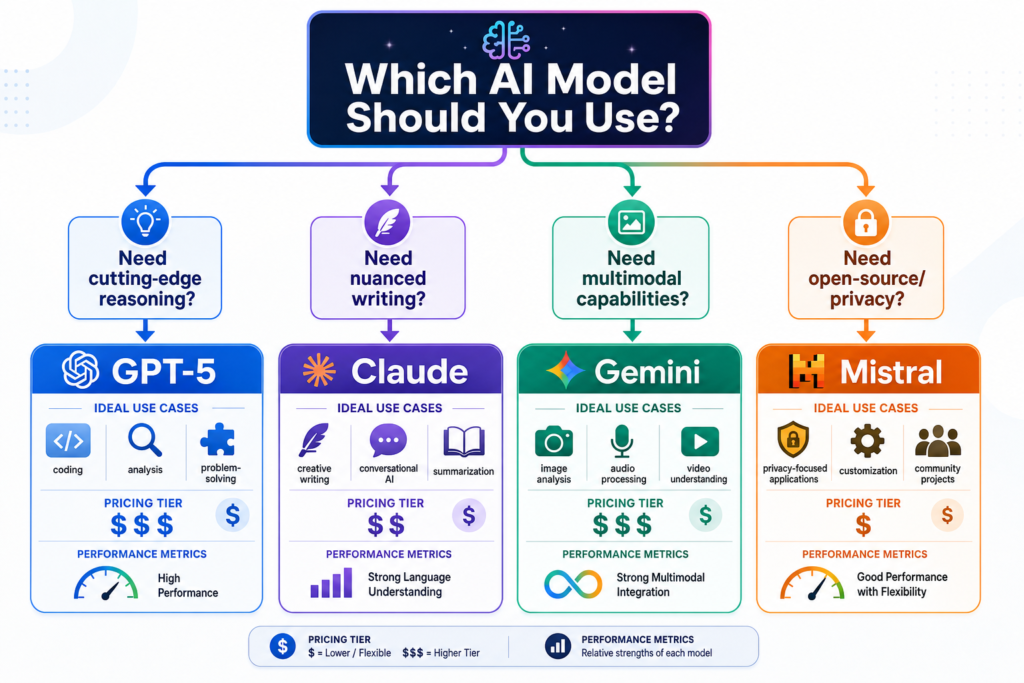
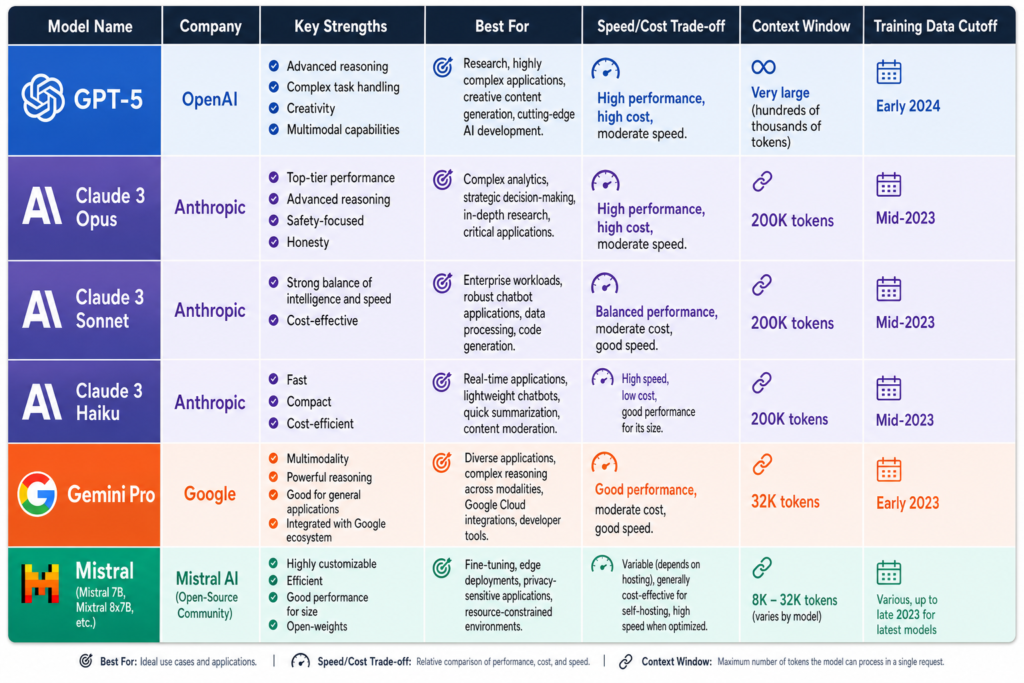
As of June 2026, the model market is no longer just “big model vs small model.” OpenAI’s current API docs position GPT-5.5 as a frontier model for complex reasoning and coding, while pointing developers toward smaller GPT-5.4 mini and nano variants for lower-latency, lower-cost workloads. Anthropic’s Claude docs similarly separate Opus 4.8, Sonnet 4.6, and Haiku 4.5 into different capability, speed, context, and cost tiers. Google’s Gemini pricing and model pages split Pro, Flash, and Flash-Lite models across different quality, speed, and price points. Open-weight ecosystems from Meta, Mistral, Qwen, DeepSeek, and others create even more options, especially for teams that care about privacy, customization, local inference, or cost control.
So this guide is not a leaderboard.
It is a decision system.
TL;DR: The One-Page Answer
Use the strongest frontier models when the task is complex, ambiguous, high-stakes, agentic, customer-facing, or expensive to get wrong.
Use cheaper models when the task is repetitive, structured, high-volume, easy to verify, and low-risk.
Use open-weight or local models when privacy, offline use, vendor independence, customization, or self-hosting matters.
Use RAG, embeddings, reranking, tools, validators, and human review when the workflow needs grounded answers, private knowledge, deterministic checks, or safety controls.
Use no LLM at all when deterministic software is better.
Here is the simplest decision table:
Task Situation
Best Starting Point
Complex reasoning
Frontier reasoning model
Difficult coding
Frontier coding/reasoning model
Large codebase agent
Frontier model first, optimize later
Simple classification
Cheap/small model
Bulk extraction
Cheap/small model with schema validation
Blog/article drafting
Mid-tier model, frontier editor for important work
High-stakes legal/medical/financial support
Retrieval + frontier model + human expert review
Customer support
RAG + mid/frontier answer model + escalation
Private document processing
Local/open-weight model or private deployment
Internal knowledge assistant
Embeddings + reranker + answer model
Voice agent
Fast realtime model + strict caps + escalation
Exact calculations
Deterministic code, not an LLM
Irreversible action
Human approval required
The rule of thumb:
Use the smallest model that does not embarrass you.
That does not mean “always use the cheapest model.” It means use the least expensive model or system that passes your real-world evaluation.
1. The Core Rule: Use the Smallest Model That Does Not Embarrass You
The best AI model is not always the smartest model. It is the model that reliably crosses the Good Enough Threshold for your exact task.
A model is good enough when it:
follows instructions
produces the required format
avoids serious hallucinations
meets latency requirements
fits your budget
handles edge cases well enough
fails safely
reduces human work instead of creating more of it
A model is not good enough when it:
invents citations
breaks JSON
ignores business rules
gives confident wrong answers
requires constant rewriting
mishandles private data
fails tool calls
creates customer support problems
makes the company look careless
This is why model selection should be based on accepted output, not token price.
A cheap model that costs $0.01 per attempt but fails half the time may be more expensive than a stronger model that costs $0.05 but works almost every time. The real cost includes retries, human editing, escalations, tool-call failures, customer frustration, compliance risk, and reputation damage.
For a personal writing assistant, failure cost may be low. For a medical triage app, legal assistant, billing support bot, or coding agent with production access, failure cost can be enormous.
That is why “cheapest model” and “best-value model” are not the same thing.
2. The Current AI Model Landscape
The modern model landscape has four broad groups.
First, there are frontier proprietary models: the strongest commercial models from labs such as OpenAI, Anthropic, Google, and others. These are usually the safest starting point for difficult reasoning, coding, long-context synthesis, agentic tool use, and high-value customer-facing work.
Second, there are fast mid-tier models: models that are not always the absolute smartest, but are strong enough for many production workflows. These often provide the best balance of speed, price, and quality.
Third, there are cheap small models: excellent for high-volume, structured, repetitive, and verifiable tasks. They are especially useful as classifiers, routers, extractors, taggers, and first-pass summarizers.
Fourth, there are open-weight and local models: models whose weights can be downloaded, run, fine-tuned, or self-hosted under specific licenses. These are useful when privacy, customization, infrastructure control, or vendor independence matters. But “open-weight” is not automatically the same as “open-source.” The Open Source Initiative says open-source AI requires more than downloadable weights; it also requires sufficient data information, code, and parameters needed to study, modify, and share the system.
Current Examples, as of June 2026
Provider / Ecosystem
Current Positioning
Best-Fit Use Cases
Verify Before Publishing
OpenAI GPT-5.5 / GPT-5.4 family
Frontier and mini/nano variants for reasoning, coding, agents, high-volume work
coding, tools, agents, grounded assistants, professional workflows
model docs, pricing, context, output limits
Anthropic Claude Opus / Sonnet / Haiku
Opus for hardest tasks, Sonnet for speed/intelligence balance, Haiku for fastest/lower-cost work
private/local inference, dev testing, self-hosting
hardware, model license, throughput
OpenAI’s current model pages say GPT-5.5 is the newest frontier model for complex professional work, and OpenAI’s pricing docs list GPT-5.5, GPT-5.4, GPT-5.4 mini, and GPT-5.4 nano with different input/output pricing. Anthropic’s docs list Claude Opus 4.8, Sonnet 4.6, and Haiku 4.5 with different pricing, context windows, output limits, and latency descriptions. Google’s Gemini pricing page shows major differences between Pro, Flash, and Flash-Lite pricing, including separate treatment for audio, caching, and grounding.
The practical lesson: the market is moving toward model portfolios, not single-model decisions.
3. Model Classes Explained
Not every AI model does the same job. Saying “use an LLM” is like saying “use a vehicle.” A bicycle, van, race car, excavator, and airplane are all vehicles, but they solve different problems.
The same is true for AI models.
Frontier Reasoning Models
These are the strongest models for hard, ambiguous, multi-step tasks.
Use them for:
complex coding
difficult debugging
long-context synthesis
strategic reasoning
high-stakes drafting
agentic tool use
research synthesis
complex business analysis
customer-facing answers where quality matters
Tradeoff: they cost more, may be slower, and can still be wrong.
OpenAI’s GPT-5.5 guide describes it as a strong fit for coding, tool-heavy agents, grounded assistants, long-context retrieval, and customer-facing workflows where execution quality matters. Anthropic’s docs describe Claude Opus 4.8 as its most capable model for complex reasoning, long-horizon agentic coding, and high-autonomy work.
Flagship General Models
These are strong all-around models that can handle a wide range of business tasks without always being the most expensive option.
Use them for:
content drafting
business analysis
customer support
meeting summaries
proposals
internal assistants
coding help
multimodal understanding
Tradeoff: they may not match frontier models on the hardest reasoning, coding, or agent tasks.
Fast Mid-Tier Models
These are often the best default for production applications.
Use them for:
standard support answers
content drafts
rewriting
summarization
document Q&A
normal coding help
chat interfaces
workflow automation
Tradeoff: they may fail on edge cases that a stronger model handles.
Mini / Small Models
Small models are often the best economic choice for scale.
Use them for:
classification
extraction
tagging
routing
deduplication
sentiment
grammar cleanup
first-pass summaries
structured JSON outputs
simple transformations
Tradeoff: they are more likely to fail at deep reasoning, long context, nuanced instruction following, and complex tool use.
OpenAI’s docs explicitly position GPT-5.4 nano for speed- and cost-sensitive tasks such as classification, data extraction, ranking, and sub-agents, while GPT-5.4 mini is described as a faster, more efficient model for high-volume workloads.
Open-Weight Models
Open-weight models provide access to the model weights, but the license, training data transparency, commercial restrictions, and allowed uses vary.
Use them for:
self-hosting
local privacy
cost control at scale
customization
fine-tuning
offline workflows
vendor independence
Tradeoff: you now own more of the operational burden.
Meta describes Llama 4 Scout and Maverick as open-weight, natively multimodal mixture-of-experts models, while Mistral says Mistral 3 models were released under Apache 2.0. Those are different openness and licensing conversations, so the article should never casually label every downloadable-weight model as “open source” without checking the license.
Embedding Models
Embedding models do not write answers. They convert text, images, or other content into vectors so systems can search by meaning.
Use them for:
semantic search
RAG
deduplication
recommendation
document clustering
similarity matching
Tradeoff: embeddings help find relevant information; they do not replace an answer model.
Reranking Models
Rerankers take retrieved results and reorder them by relevance.
Use them for:
better RAG accuracy
enterprise search
legal document search
support knowledge bases
citation-grounded answers
Tradeoff: reranking adds latency and cost, but it can reduce hallucination by giving the answer model better evidence.
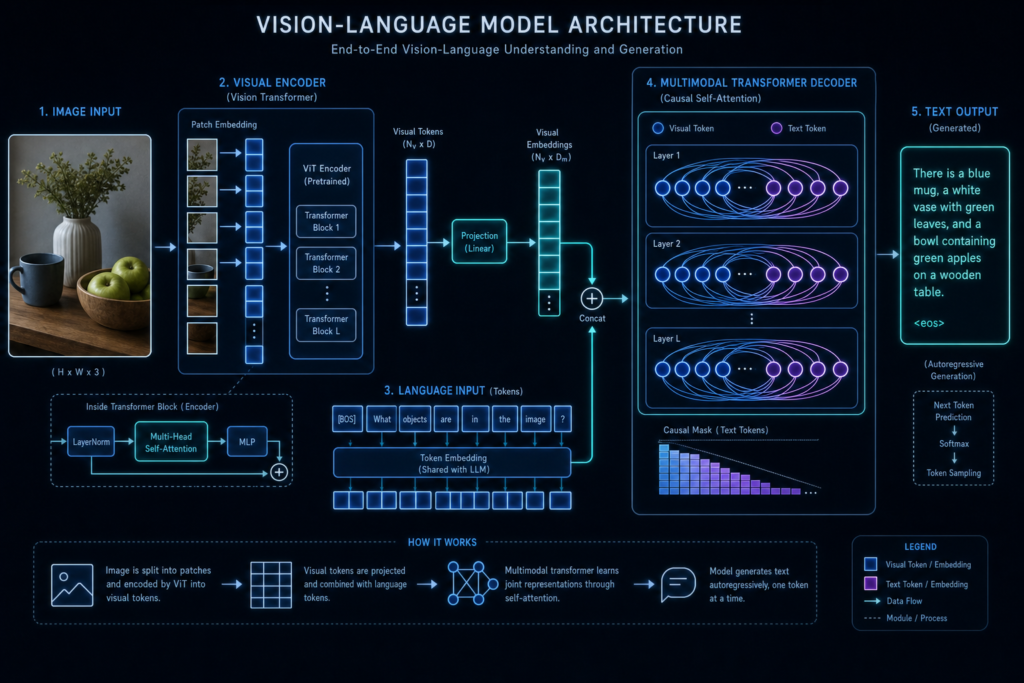
Vision-Language Models
These models can understand images, screenshots, charts, diagrams, PDFs, and sometimes video frames.
Use them for:
chart interpretation
screenshot analysis
UI critique
document understanding
visual QA
product image analysis
Tradeoff: visual models can still misread small text, charts, tables, and spatial relationships.
Speech and Realtime Models
These power transcription, voice agents, text-to-speech, and live audio interactions.
Use them for:
call screening
voice assistants
interview agents
dictation
meeting notes
customer service calls
Tradeoff: voice workflows must handle silence, interruptions, latency, consent, call length, and escalation.
Agentic / Tool-Use Models
These models interact with APIs, browsers, files, calendars, CRMs, codebases, and other tools.
Use them for:
browser agents
coding agents
research agents
workflow automation
customer support agents
multi-step business processes
Tradeoff: tool errors compound quickly. A model that is good at chat is not automatically reliable as an agent.
Benchmarks such as BFCL and τ-bench exist because tool use and agent behavior are separate skills from normal chatbot preference. τ-bench, for example, was designed to evaluate agents that must interact with users and tools while following domain-specific policies.
4. The Decision Tree: Which Model Should I Use?
Here is the practical decision tree.
Step 1: Can This Be Solved Without an LLM?
Use deterministic software first when the task is:
exact math
sorting
filtering
calculating
database lookup
payment logic
account deletion
permission checking
compliance rule matching
form validation
Decision rule:
If normal software can do it reliably, do not use an LLM just because AI is exciting.
Step 2: Is the Task High-Risk?
A task is high-risk if a wrong answer could affect:
health
legal rights
money
employment
safety
minors
regulated data
account access
irreversible actions
customer trust
Decision rule:
High-risk tasks require retrieval, verification, logging, guardrails, and human review. A better model helps, but it does not remove responsibility.
Step 3: Does the Task Require Deep Reasoning?
Use a frontier model first if the task involves:
ambiguous goals
complex tradeoffs
multi-step reasoning
unfamiliar code
dense documents
strategic judgment
agentic planning
high-stakes writing
Decision rule:
If you cannot easily explain what a correct answer looks like, start with a stronger model.
Step 4: Is the Task High-Volume and Easy to Verify?
Use a cheap/small model if the task is:
high-volume
repetitive
structured
easy to validate
low-risk
cheap to retry
Examples:
“Classify this support ticket.”
“Extract the invoice date.”
“Tag this article category.”
“Rewrite this sentence in our brand voice.”
“Detect whether this message is spam.”
Decision rule:
If the answer can be automatically checked, you can use cheaper models more aggressively.
Step 5: Does the Task Need Private or Regulated Data?
Use local, self-hosted, private cloud, or redaction-first workflows if data includes:
health data
legal files
HR records
customer PII
financial statements
private code
confidential business documents
Decision rule:
Sensitive data creates privacy gravity. The more sensitive the data, the more it pulls you toward local, private, or tightly governed infrastructure.
Step 6: Does Latency Matter?
If users are waiting live, speed matters.
Use faster models for:
chat
voice agents
customer support
onboarding
autocomplete
real-time coding assistance
Decision rule:
The best model is not useful if users abandon the workflow before it responds.
Step 7: Can a Smaller Model Handle 80%?
Many production systems should route work like this:
Input → cheap model → confidence check → stronger model if needed → human if high-risk
Decision rule:
Use a frontier model for the hard 20%, not necessarily for the easy 80%.
The key pattern: hard, ambiguous, high-risk, or agentic tasks move upward. Simple, structured, high-volume, verifiable tasks move downward.
6. The Frontier Model Tax
The Frontier Model Tax is the extra cost of using the strongest model everywhere.
It includes:
higher input token cost
higher output token cost
higher long-context cost
tool-call cost
search/grounding cost
retry cost
latency cost
human review cost
failure cost
OpenAI’s pricing docs show different prices for GPT-5.5, GPT-5.4, GPT-5.4 mini, and GPT-5.4 nano, including differences for cached input, batch processing, and long-context pricing. Google’s Gemini pricing page similarly separates model tiers and shows additional costs around caching and grounding. Anthropic’s pricing page lists separate input, output, batch, and caching-related rates across Claude Opus, Sonnet, and Haiku.
The mistake is thinking token price alone is the bill.
For example, imagine a customer support bot.
Model A costs less per token but gives weak answers. It causes extra escalations, frustrated users, and longer support queues.
Model B costs more per token but resolves more tickets correctly.
The most expensive model is not always the most expensive system. The cheapest model is not always the cheapest system.
How to Reduce the Frontier Model Tax
Use these patterns:
Cost Problem
Fix
Repeating same instructions
prompt caching
Long documents in every prompt
RAG and chunking
Too many output tokens
stricter output formats
Frontier model on easy tasks
router or classifier
Expensive retries
validation before response
Manual review of everything
risk-based review
Slow responses
fast model default + escalation
Repetitive batch work
batch processing
Hallucinated answers
retrieval + citations
Agent failures
tool validation and approval gates
The best AI systems use frontier models where the value is highest and cheaper models where the work is routine.
7. The Quality Ladder
Many businesses jump straight to a powerful LLM when they should start lower.
Use this ladder.
Level
System Type
Use When
1
Deterministic code
exact logic, math, payments, database operations
2
Rules, regex, templates
predictable patterns
3
Search / embeddings
finding relevant information
4
Small model
extraction, classification, tagging
5
Mid-tier model
drafting, summarization, normal business chat
6
Frontier model
complex reasoning and synthesis
7
Frontier model with tools
multi-step actions
8
Agent with memory, tools, evals, human review
high-autonomy workflows
9
Multi-model routed system
production-scale AI system
The ladder matters because more AI is not always better AI.
If the task is “calculate sales tax,” use code.
If the task is “find the five most relevant policy documents,” use search and reranking.
If the task is “extract invoice number, vendor, date, and total,” use a small model with schema validation.
If the task is “compare 12 vendor proposals and recommend the best procurement strategy,” use a frontier model with human review.
Decision rule:
Start at the lowest level that can pass your eval. Move up only when the task demands it.
8. The Small Model Sweet Spot
Small models are not “bad models.” They are often the best tool for the job.
They are strongest when the task is:
narrow
repetitive
low-risk
structured
high-volume
easy to verify
inexpensive to retry
Great small-model tasks include:
ticket classification
lead routing
email tagging
document type detection
spam detection
simple sentiment
entity extraction
field extraction
PII detection
deduplication
grammar cleanup
search query rewriting
first-pass summaries
JSON formatting
simple support triage
A small model can classify 1 million customer messages far more economically than a frontier model, especially if the labels are clear and outputs are automatically validated.
But small models need structure.
Do not ask:
“Analyze this customer message.”
Ask:
Classify the message into one of these categories: - billing - cancellation - bug - feature_request - account_access - other
If confidence < 0.75 → send to stronger model.
If category = billing and customer is angry → escalate.
If output is invalid JSON → retry once, then escalate.
That is how small models become reliable production components.
9. The Cheap Model Trap
The Cheap Model Trap happens when a model looks inexpensive in pricing tables but becomes expensive in real workflows.
This usually happens through hidden failure.
Common cheap-model failure modes:
brittle instruction following
weak long-context performance
hallucinated facts
fake citations
inconsistent JSON
missed edge cases
tone drift
poor tool use
bad code that almost works
shallow summaries
false confidence
more retries
more human editing
The worst version is the silent failure: the output looks plausible, but it is wrong.
That is dangerous in:
legal summaries
financial analysis
medical education
compliance
security review
customer support
HR decisions
code changes
sales promises
A cheap model is a good choice only when its failure is detectable, tolerable, or easily routed upward.
Decision rule:
Use cheap models where mistakes are cheap, detectable, and reversible.
10. When to Start With a Frontier Model
Sometimes the right move is to start with the strongest model, even if you later optimize down.
Use frontier-first when:
the workflow is new
quality requirements are unclear
the task is ambiguous
the output is customer-facing
the failure cost is high
the task requires real reasoning
the task involves complex code
the agent can use tools
the task uses long context
the task spans many documents
the system will influence business decisions
This is especially true for coding agents. SWE-bench is designed to test whether models can resolve real software issues from GitHub, and SWE-bench Verified is a human-validated 500-problem subset intended to provide a more reliable coding-agent benchmark. But even those benchmarks do not prove a model will succeed inside your private codebase with your dependencies, tests, architecture, and business constraints.
The best workflow is:
Start with a frontier model.
Define what “good” means.
Build a small eval set.
Run cheaper models against the same tasks.
Compare accepted-output rate, latency, and total cost.
Route easy cases downward only after they pass.
Frontier models are also useful as teachers. They can help create rubrics, edge cases, test examples, evaluation prompts, and review criteria for smaller models.
11. Hybrid Model Routing
The future is not one model. The future is routing.
A mature AI system may use:
a small model to classify requests
embeddings to retrieve relevant documents
a reranker to improve evidence quality
a mid-tier model to draft the answer
a frontier model to handle hard cases
a judge model to score the output
deterministic validators to enforce format
a human to approve high-risk actions
This is the Intern / Manager / Expert Stack.
Role
Model/System
Job
Intern
small model
classify, extract, tag, route
Manager
mid-tier model
draft, summarize, answer normal cases
Expert
frontier model
reason, synthesize, solve hard problems
Librarian
embeddings/reranker
find the right evidence
Auditor
validator/judge model
check output before release
Human
accountable reviewer
approve high-risk actions
Pattern 1: Cheap Draft, Frontier Review
Use this for:
articles
proposals
sales emails
newsletters
support responses
Workflow:
Small/mid model draft → frontier model review → human publish
Pattern 2: Frontier Plan, Cheap Execution
Use this for:
bulk content production
code migrations
documentation updates
spreadsheet cleanup
SEO page generation
Workflow:
Frontier model creates plan → small model executes subtasks → frontier reviews sample
Private document → local redaction → cloud reasoning → human review
Local tools matter here. Ollama exposes a local API for running and interacting with models, LM Studio can serve local models through OpenAI-compatible and Anthropic-compatible endpoints, and vLLM supports high-throughput serving with OpenAI-compatible APIs for self-hosted deployments.
12. Benchmark Reality Check
Benchmarks are useful. They are not destiny.
Use benchmarks to decide what to test first, not what to ship blindly.
Artificial Analysis compares models across intelligence, price, speed, latency, context window, and other metrics. LMArena uses large-scale human preference voting across many models and categories. SWE-bench focuses on real software engineering issues. BFCL focuses on function calling. τ-bench focuses on agents interacting with users and tools under domain rules. Each benchmark answers a different question.
The common benchmark mistakes:
treating one leaderboard as universal truth
ignoring latency
ignoring cost
ignoring your actual prompts
ignoring your users
ignoring private data
ignoring tool reliability
ignoring output format
ignoring failure cost
ignoring long-context degradation
assuming a model’s benchmark result equals your workflow result
A model can win a chat leaderboard and still be poor at your structured extraction workflow.
A model can perform well on a coding benchmark and still fail in your private monorepo.
A model can advertise a large context window and still miss details buried in a long document.
A model can call tools well in simple examples and still fail in messy customer conversations.
Decision rule:
Public benchmarks tell you what to test first. Your own evals tell you what to ship.
13. How to Evaluate Models for Your Own Use Case
The only benchmark that ultimately matters is your task.
Here is the practical evaluation process.
Step 1: Define the Task
Be specific.
Bad:
“We need an AI support bot.”
Better:
“We need a bot that answers tier-one billing and account questions from our help center, refuses policy exceptions, cites the exact help article used, and escalates angry or high-value customers.”
Step 2: Define Acceptable Output
Write down:
required format
required tone
allowed sources
required citations
maximum length
required fields
refusal behavior
escalation rules
safety rules
Step 3: Define Unacceptable Failure
Examples:
inventing a policy
fabricating a citation
giving legal advice
producing invalid JSON
exposing private data
calling the wrong tool
deleting an account
promising a refund
writing code that fails tests
giving medical diagnosis
sending customer-facing nonsense
Step 4: Build a Gold Set
Create:
20 easy cases
20 medium cases
20 hard cases
10 adversarial cases
10 edge cases
real historical failures
Use examples from your actual workflow, not generic prompts.
Step 5: Test Multiple Options
Test:
one frontier model
one mid-tier model
one small/cheap model
one open-weight/local model if relevant
one hybrid workflow
Step 6: Score the Outputs
Use a rubric.
Criterion
What to Measure
Accuracy
Is it correct?
Grounding
Is it based on the right sources?
Instruction following
Did it follow the rules?
Format compliance
Did it return the required structure?
Completeness
Did it answer the whole task?
Concision
Is it clear without being bloated?
Tone
Does it match the brand/use case?
Safety
Did it avoid risky claims/actions?
Latency
Was it fast enough?
Cost
Was the accepted result economical?
Retry rate
How often did it fail?
Human edit time
How much work remained?
Step 7: Calculate Accepted-Output Cost
Do not stop at token cost.
Accepted-output cost =
total workflow cost / number of outputs accepted without major correction
Step 8: Pick the Workflow, Not Just the Model
Sometimes the winning solution is not:
“Model A beats Model B.”
It is:
“Cheap model handles 70% of cases, mid-tier handles 25%, frontier handles 5%, and humans approve sensitive outputs.”
That is real model selection.
14. Model Selection by Business Type
Solo Creator
Use frontier models for:
strategy
article angles
YouTube scripts
technical explanations
final quality review
Use cheaper models for:
repurposing
social posts
summaries
meta descriptions
formatting
Best setup:
Frontier model for ideas and structure → mid-tier draft → cheap repurposing
Small Business
Use hosted tools first. Avoid self-hosting unless there is a clear privacy or cost reason.
Good uses:
email drafts
FAQ support
proposal writing
meeting summaries
local SEO content
simple automations
Decision rule:
Do not build complex AI infrastructure until the workflow is proven.
AI Startup
Start with the strongest model to prove the product experience. Then optimize with routing.
Good uses:
frontier model for early product quality
evals from day one
cheaper models for high-volume subtasks
router once usage patterns are clear
Decision rule:
First prove quality. Then optimize cost.
Agency
Agencies need repeatable workflows.
Best setup:
client-specific evals
reusable prompts
model router
human QA
strong privacy policies
clear escalation rules
Enterprise
Enterprise model selection is about more than intelligence.
Consider:
compliance
data retention
procurement
audit logs
access control
regional deployment
model deprecations
vendor risk
fallback systems
AWS Bedrock and Microsoft Foundry both present multi-model catalogs for accessing foundation models from multiple providers, which is useful for enterprises that want centralized procurement and deployment options.
Regulated Company
Use:
retrieval
human approval
audit trails
private deployment
deterministic rules
conservative model permissions
Avoid:
autonomous final decisions
undocumented outputs
invisible model routing
unsupported legal/medical/financial claims
15. Model Selection by Constraint
Constraint
Best Strategy
Cheapest possible
small model, short prompts, caching, batch jobs, strict output
Fastest possible
small/Flash-style model, streaming, short context
Best quality
frontier model + retrieval + human review
Best for coding
frontier coding/reasoning model first, repo-specific evals
Best for long context
long-context model + retrieval; test buried-detail recall
Best for privacy
local/open-weight, private cloud, redaction
Best for local/offline
Ollama or LM Studio for simple use; vLLM for serving
Best for structured extraction
small/mid model + JSON schema validation
Best for agents
frontier model until cheaper models pass tool evals
Best for RAG
embeddings + reranker + answer model
Best for voice
low-latency realtime model + strict call controls
Best for vision
multimodal model tested on your images
Best for production reliability
router, evals, monitoring, fallback, human review
The important thing is to decide which constraint is actually dominant.
If you need the lowest cost at massive scale, optimize for small models and validation.
If you need the best answer for a high-stakes executive memo, optimize for quality.
If you need a voice agent, optimize for latency and interruption handling.
If you need legal document search, optimize for retrieval, citation accuracy, and expert review.
16. When Not to Use an LLM
Some tasks should not use an LLM.
Use deterministic software for:
exact math
tax calculations
payment execution
account deletion
password resets
permission enforcement
irreversible database writes
compliance yes/no gates
identity verification
safety-critical controls
final legal/medical/financial decisions
An LLM can draft, explain, summarize, or recommend. But it should not be the final authority in workflows where correctness must be guaranteed.
A good architecture often looks like this:
LLM proposes → deterministic system validates → human approves if risky
The No-LLM Zone is not anti-AI. It is good engineering.
17. Deployment Options: API, Cloud, Local, or Hybrid
Direct API
Best for:
fast development
high-quality models
simple integration
startups and creators
early products
Tradeoff:
vendor lock-in
changing pricing
rate limits
data governance questions
Cloud Marketplaces
Best for:
enterprise procurement
centralized governance
access to multiple providers
compliance workflows
Tradeoff:
pricing complexity
regional availability
extra abstraction
OpenRouter-Style Routing
Best for:
experimentation
comparing models
fallback systems
multi-provider access
Tradeoff:
dependency on routing provider
inconsistent provider behavior
production governance complexity
Managed Open-Model Providers
Best for:
open models without running infrastructure
lower cost
fast experimentation
Tradeoff:
less control than self-hosting
model/provider variability
Self-Hosting
Best for:
high scale
privacy
control
customization
predictable workloads
Tradeoff:
DevOps burden
GPU cost
monitoring
security
scaling
model updates
vLLM is a common serving option because it supports high-throughput inference and OpenAI-compatible APIs, while Ollama and LM Studio are more approachable for local desktop and developer workflows.
Hybrid
Best for:
private preprocessing
cloud frontier reasoning
regulated workflows
cost optimization
high-volume SaaS
Example:
Local model redacts private data → cloud model reasons → local system reinserts safe fields → human approves
18. Real-World Examples
Example 1: Blogger Publishing 50 SEO Articles Per Month
Bad model choice:
Use the most expensive frontier model for every outline, draft, rewrite, excerpt, meta description, and social post.
Better workflow:
SERP research → frontier model for angle and outline
→ mid-tier model for draft
→ cheaper model for formatting and snippets
→ frontier model or human for final fact/style review
Frontier is worth it for:
original angle
competitive analysis
expert synthesis
final quality control
Cheaper models are enough for:
formatting
summaries
social posts
title variants
basic rewrites
Example 2: Startup Building an AI Support Agent
Bad model choice:
Cheap model answers every support ticket from memory.
Better workflow:
Ticket → classifier → retrieve help docs → answer model
→ citation check → escalation if low confidence or high risk
Frontier is worth it for:
angry customers
billing ambiguity
policy exceptions
multi-step troubleshooting
Cheaper models are enough for:
tagging
routing
language detection
summary
low-risk FAQ answers
Example 3: Developer Working in a Large Codebase
Bad model choice:
Small model edits files across a repo without tests.
Better workflow:
Issue → frontier model reads context and plans
→ coding model edits
→ tests run
→ frontier model reviews failures
→ human PR review
The answer model matters, but retrieval quality may matter more.
Example 6: YouTuber Researching and Scripting Videos
Best workflow:
Current research → frontier model angle
→ script outline → mid-tier draft
→ multimodal model for thumbnail critique
→ cheap model for Shorts and social repurposing
Use frontier models for:
big idea
narrative structure
complex explanation
final script polish
Use cheaper models for:
clips
captions
descriptions
tags
repurposed posts
Example 7: SaaS Company Classifying Millions of Messages
Bad model choice:
Frontier model classifies every message.
Better workflow:
Message → small classifier → confidence threshold
→ accept or escalate → sample audit
Small models win here because classification is narrow, high-volume, and measurable.
A world-class version of this guide should include an interactive tool called:
AI Model Router Calculator
It should ask:
What task are you doing?
Is it high-risk?
What happens if the model is wrong?
How many monthly requests?
Average input tokens?
Average output tokens?
Does latency matter?
Does privacy matter?
Do you need long context?
Do you need tool use?
Do you need vision or audio?
Do you need local/offline use?
Can a human review outputs?
Can the output be automatically verified?
What is your maximum monthly budget?
Then it should return:
recommended model class
cheapest acceptable option
premium option
hybrid workflow
estimated monthly cost
risk warning
evaluation checklist
human-review recommendation
The output should not say:
“Use GPT” or “Use Claude.”
It should say:
“For this task, start with a mid-tier model plus retrieval. Use a frontier model only for low-confidence cases. Human review is required for billing exceptions.”
That would make the guide more than an article. It would become a decision product.
retrieval and evals becoming more important than prompt tricks
regulation and data residency shaping enterprise model choice
benchmark fatigue pushing teams toward real-world evals
Model recommendations expire. Decision frameworks last longer.
That is why the article should avoid saying:
“This is the best model.”
Instead, say:
“Here is how to choose the right model class for the task, and here is what to verify before you ship.”
FAQ
What is the best AI model overall?
There is no universal best model. The best model depends on the task, risk, latency, cost, privacy, context length, tool use, and evaluation results.
Should I use GPT, Claude, or Gemini?
Use all three as candidates. GPT, Claude, and Gemini each have strong frontier models and cheaper variants. Test them on your actual workflow before choosing.
Are open-weight models as good as frontier models?
Sometimes, for some tasks. Open-weight models can be excellent for privacy, cost control, self-hosting, and narrow workflows. But the best proprietary frontier models often remain stronger for the hardest reasoning, coding, and agentic tasks.
What is the difference between open-source and open-weight?
Open-weight means model weights are available. Open-source AI, under the OSI definition, requires broader access to the preferred form for modification, including sufficient data information, code, and model parameters.
When should I use a local model?
Use local models when privacy, offline use, experimentation, or cost control matters and the model is good enough for the task.
When is a frontier model worth it?
Use a frontier model when the task is hard, ambiguous, high-value, high-risk, agentic, or expensive to get wrong.
When is a cheap model good enough?
A cheap model is good enough when the task is structured, repetitive, low-risk, and easy to verify.
What is the best model for coding?
Start with frontier coding/reasoning models for serious codebase work. Then test cheaper coding models for narrow tasks. Use your own repo, tests, and PR acceptance rate as the real benchmark.
What is the best model for RAG?
RAG is not just an answer model. You need good embeddings, chunking, retrieval, reranking, answer generation, citation validation, and monitoring.
Should I use one model for everything?
Usually no. Mature systems often use multiple models: cheap models for easy work, stronger models for hard work, and humans for high-risk approval.
How often should I re-evaluate models?
For production AI workflows, re-evaluate whenever pricing changes, a model is deprecated, a new model launches, your task changes, or your failure rate drifts.
Kingy AI Verdict
The best AI teams will not use one model for everything.
They will use:
deterministic software when no LLM is needed
small models for structured high-volume work
mid-tier models for normal business workflows
frontier models for complex reasoning, coding, agents, and high-stakes output
open-weight/local models when privacy and control matter
RAG when answers must come from documents
human review when failure is expensive
The winning question is not:
“What is the smartest model?”
The winning question is:
“What is the cheapest reliable system for this exact job?”
That is how you avoid overpaying for intelligence you do not need — and avoid underpaying your way into bad answers, broken workflows, hallucinations, customer problems, and expensive mistakes.
The Kingy Brief
Get The Kingy Brief.
AI changes, original tests and one practical thing to try. Fridays at 09:00 Vancouver time.
Signup form provided by Beehiiv. After submitting, check your inbox for "Confirm your subscription to The Kingy Brief" and open its confirmation link. Check Spam or Promotions if you cannot find it.
Fridays at 09:00 Vancouver time: source-checked AI changes, original tests and one practical thing to try. We skip a week when there is not enough verified material. Free. Unsubscribe anytime.