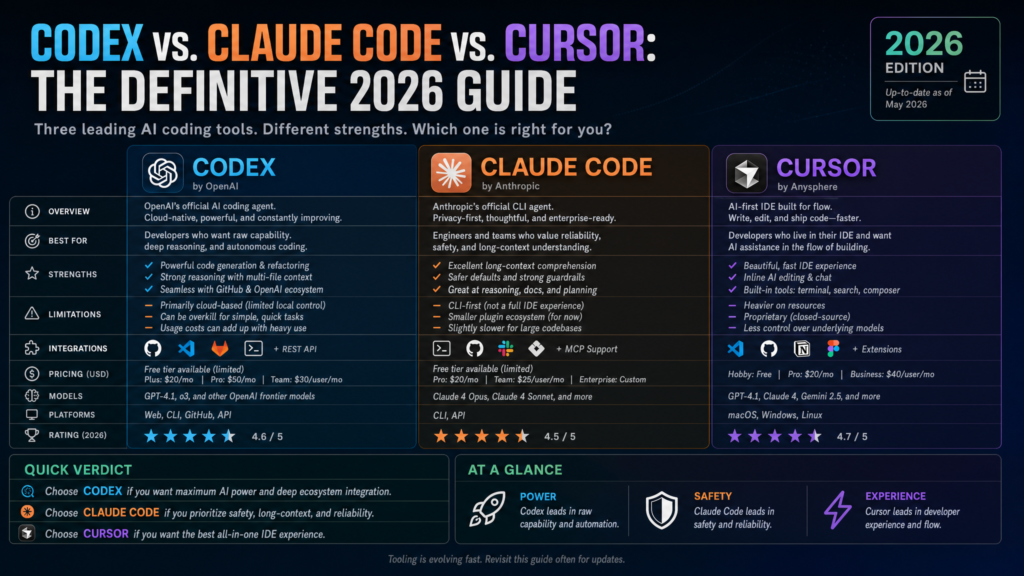
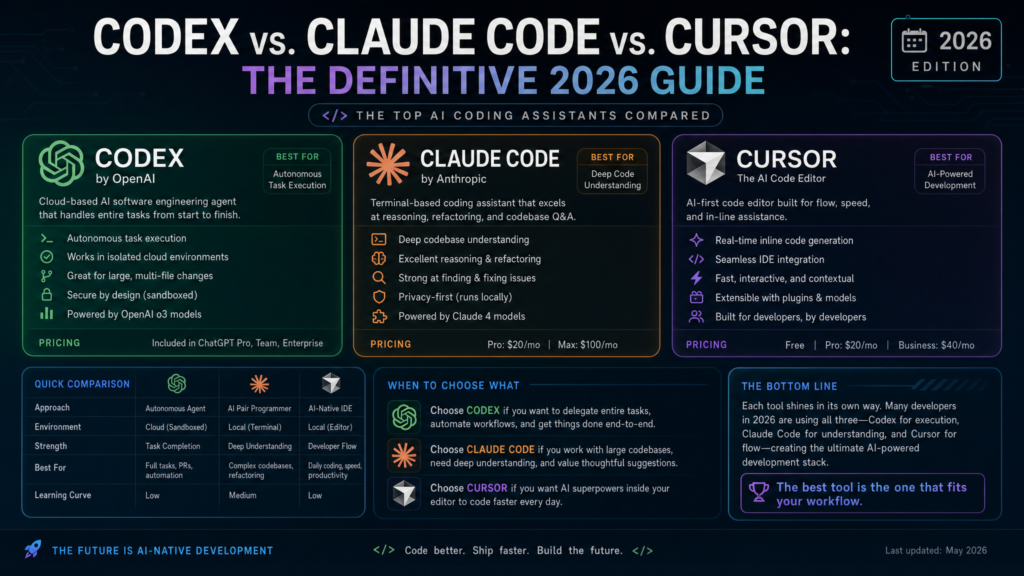
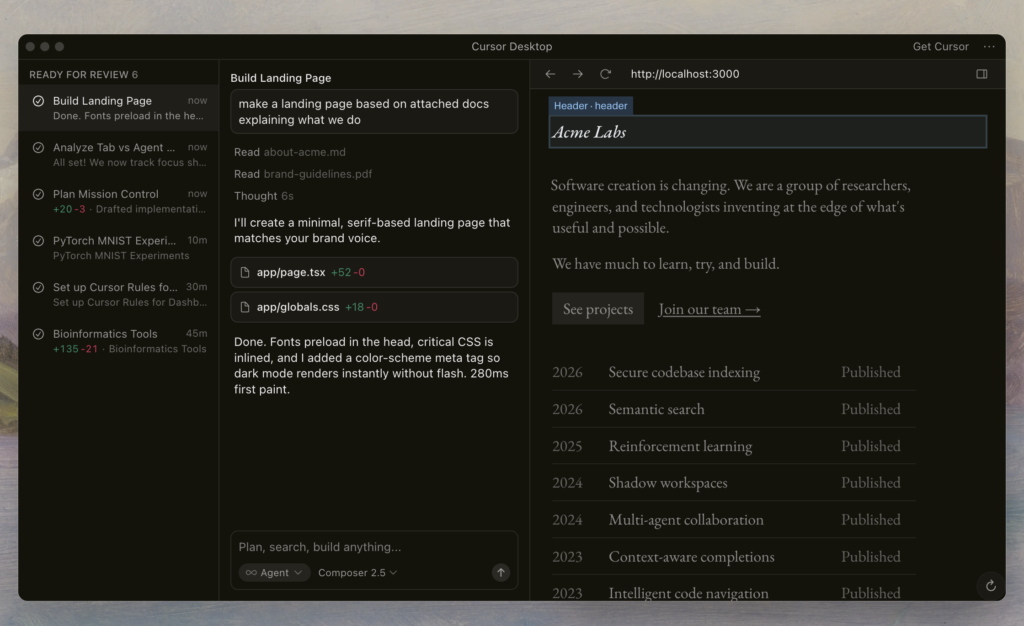
Cursor is the strongest default choice for many developers who want an AI-native IDE for daily coding, autocomplete, multi-file edits, chat, and agent-assisted work inside a familiar editor.
Claude Code is the strongest choice for developers who like terminal-first workflows, want a high-agency coding agent that can inspect a repo, edit files, run commands, and work through messy engineering tasks with close supervision.
OpenAI Codex is the strongest choice for builders and teams already deep in the OpenAI / ChatGPT ecosystem, especially those who want an agentic coding workflow that spans ChatGPT plans, the Codex app, CLI, IDE extension, web, GitHub-connected work, app screenshots, browser work, subagents, and OpenAI model access.
The honest recommendation is not “one tool wins.” The better answer is:
Choose Cursor for daily IDE-based software development.
Choose Claude Code for terminal-first agentic repo work.
Choose Codex for OpenAI-native agentic development and ChatGPT-connected coding workflows.
Use more than one if your work spans prototyping, refactoring, debugging, code review, and production engineering.
The biggest caveat: none of these tools removes the need for engineering judgment, code review, testing, architecture, security review, and product thinking.
1. Executive Summary
The Simplest Explanation
OpenAI Codex is OpenAI’s agentic coding product family. In 2026, Codex is not just a historical model name or a basic coding chatbot. OpenAI describes Codex as “an AI agent” that helps users write, review, and ship code. It is included with several ChatGPT plans and appears across multiple surfaces, including the Codex app, CLI, IDE extension, and web experience.
Claude Code is Anthropic’s agentic coding tool. Anthropic describes it as a coding tool that reads your codebase, edits files, runs commands, and integrates with development tools. It is available through terminal, IDE, desktop, and browser surfaces, but its identity is still strongly associated with serious terminal-first developer workflows.
Cursor is an AI-native code editor built around the IDE workflow. It is not merely a chatbot bolted onto VS Code. Cursor’s product direction in May 2026 includes agent workflows, cloud agents, Jira integration, automations, model/provider controls, team plugin marketplaces, Privacy Mode, enterprise controls, and usage-based frontier model access.
The Major Difference
The simplest way to separate them is by workflow ownership:
Tool
Core workflow
Best mental model
Codex
OpenAI-native coding agent across ChatGPT, app, CLI, IDE, web, and cloud-connected workflows
“OpenAI’s coding agent layer”
Claude Code
Terminal-first / agentic engineering assistant that works inside real repos
“A serious coding agent for developers who live in the terminal”
Cursor
AI-native IDE for daily coding, chat, autocomplete, multi-file edits, agents, and team workflows
“The AI-first editor”
The Market Context in 2026
The AI coding market has shifted from autocomplete to agentic development. Autocomplete helps you finish a line. AI pair programming helps you understand, edit, and generate code interactively. Coding agents go further: they can inspect a codebase, plan changes, edit multiple files, run commands, read errors, and sometimes produce branches or pull requests for human review.
This shift is visible across the broader market, not only in Codex, Claude Code, and Cursor. GitHub Copilot’s current docs and changelog discuss agent mode, cloud agents, PR workflows, organization-level model targeting, and applying review feedback through agents. JetBrains is also positioning AI inside IDE workflows, including agentic tooling and model/agent flexibility.
The category is converging around a few layers:
The model layer: OpenAI, Anthropic, Google, xAI, open models, and other providers.
The editor layer: Cursor, VS Code, JetBrains, Windsurf, and others.
The terminal/CLI layer: Claude Code, Codex CLI, Cursor CLI, and related agent CLIs.
The cloud agent layer: background agents that work on issues, tickets, branches, and PRs.
The enterprise control layer: SSO, SCIM, model controls, audit logs, policy, privacy, retention, and procurement.
The key buying question is no longer: “Which tool writes the best single function?”
The better question is:
Which tool fits the way your team actually builds, reviews, secures, and ships software?
Biggest Caveat for Each Tool
Tool
Biggest caveat
Codex
OpenAI’s Codex surface is broad and evolving quickly, which is powerful but can make product boundaries, limits, and best workflows harder to understand without hands-on testing.
Claude Code
It is extremely powerful for serious developers, but terminal-first agentic workflows can be intimidating or risky for beginners who do not know how to review changes.
Cursor
Cursor owns the IDE experience well, but heavy AI usage can introduce pricing, model-selection, privacy, and governance questions that teams must manage carefully.
Quick Recommendation Table
Use case
Best choice
Runner-up
Why
Important caveat
Beginner learning to build apps
Cursor
Codex
Cursor’s IDE-first workflow is easier to see, edit, and learn from. Codex is approachable for ChatGPT-native users.
Beginners may accept bad code because it “runs.”
Non-technical founder
Cursor
Codex
Cursor gives a visible project workspace; Codex is strong if the founder already uses ChatGPT heavily.
A founder still needs technical review before production.
Solo indie hacker
Cursor
Claude Code
Cursor is great for daily shipping; Claude Code is strong for deeper repo tasks.
Use tests and version control aggressively.
Professional software engineer
Cursor
Claude Code
Cursor fits daily coding; Claude Code fits terminal-first multi-step work.
Best choice depends on editor vs terminal habits.
Startup engineering team
Cursor
Claude Code
Cursor has team features and model controls; Claude Code is strong for serious engineering workflows.
Tool sprawl can become expensive.
Enterprise engineering team
Cursor / Codex / Claude Code after security review
Depends on existing vendor stack
All three have enterprise-relevant controls, but the right answer depends on procurement, identity, data policy, and deployment model.
Do not choose without legal/security review.
Regulated/security-sensitive company
Enterprise-reviewed deployment only
None by default
All three require due diligence around code retention, training, logs, secrets, auditability, and data residency.
No public page alone proves suitability.
Codebase refactoring
Claude Code
Cursor
Claude Code’s terminal-first workflow is well suited to repo inspection, edits, and command execution.
Large refactors still need tests and human review.
Greenfield app building
Cursor
Codex
Cursor is excellent for creating and editing app structure inside an IDE; Codex is strong for OpenAI-native app-building workflows.
AI-generated architecture can age badly.
Debugging existing projects
Claude Code
Cursor
Claude Code can inspect files and run commands; Cursor is strong when debugging inside the editor.
Agents can chase symptoms without understanding root cause.
Agentic multi-step work
Claude Code / Codex
Cursor
Claude Code and Codex both expose strong agentic primitives; Cursor is rapidly expanding agent workflows.
Multi-step autonomy remains brittle.
Pair programming
Cursor
Codex
Cursor is closest to always-on AI pair programming inside the IDE.
Pair programming is not the same as code ownership.
Repository-scale code understanding
Claude Code
Cursor / Codex
Claude Code docs explicitly emphasize entire-codebase understanding; Cursor and Codex also support repo-level workflows.
Public docs do not prove benchmarked repo comprehension.
Frontend prototyping
Cursor
Codex
Cursor’s editor UX is strong for UI iteration; Codex adds app screenshots and browser-oriented workflows.
Visual correctness still needs human review.
Backend/API work
Claude Code
Cursor
Claude Code’s command-running terminal workflow fits backend iteration; Cursor is strong for IDE-based edits.
Auth, security, and data handling need review.
DevOps/infrastructure work
Claude Code
Codex
Terminal-first tools are natural for infrastructure scripts and command-driven workflows.
Destructive commands must be gated.
Teams already using VS Code
Cursor
Codex IDE extension
Cursor is an IDE-first workflow familiar to VS Code users. Codex also offers an IDE extension.
VS Code familiarity does not equal enterprise readiness.
Teams already using OpenAI
Codex
Cursor
Codex is included across ChatGPT plans and connects to OpenAI’s coding surfaces.
Confirm data, retention, and admin controls by plan.
Teams already using Anthropic
Claude Code
Cursor
Claude Code fits Anthropic model and enterprise workflows.
Plan limits and auth model matter.
Teams wanting maximum model control
Cursor
Claude Code / Codex API-based workflows
Cursor documents provider/model controls and allow/blocklists for teams.
Model control can create policy complexity.
2. What These Tools Actually Are
OpenAI Codex
OpenAI Codex in 2026 is best understood as a multi-surface AI coding agent product, not merely a chat window that answers programming questions.
OpenAI’s current Help Center describes Codex as an AI agent that helps users write, review, and ship code. It is included with ChatGPT Free, Go, Plus, Pro, Business, Enterprise, and Edu plans, with plan-specific access and limits.
Codex appears across several surfaces:
Codex app
Codex CLI
IDE extension
Web
ChatGPT plan integration
Cloud-connected workflows
GitHub-connected workflows
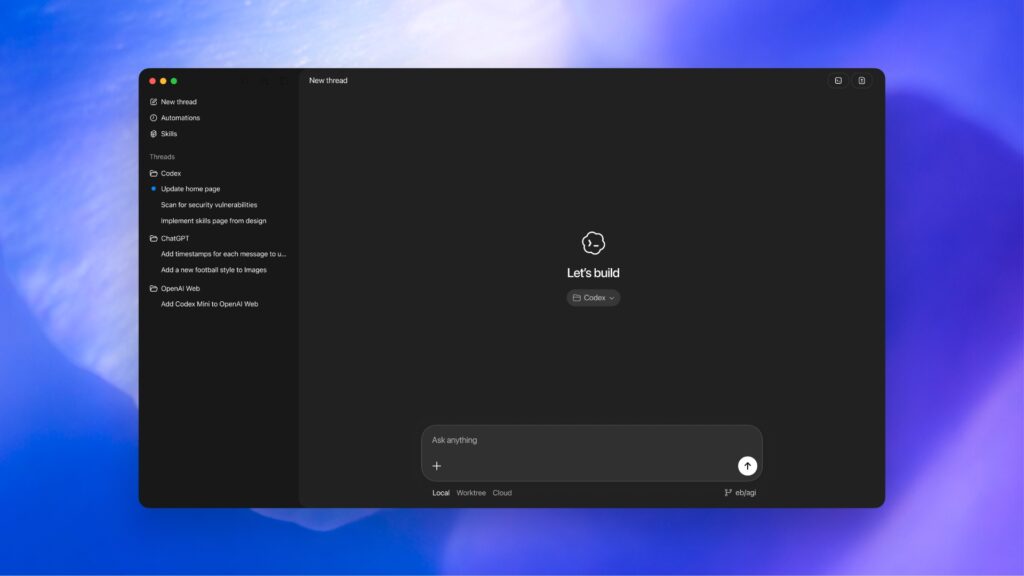
OpenAI’s Codex app documentation describes a desktop experience for working on multiple Codex threads in parallel, with built-in worktree support, automations, and Git functionality. The app is available for macOS and Windows, and users can sign in with ChatGPT or an API key, although the docs state that API-key usage does not provide the same cloud functionality as ChatGPT sign-in.
Recent Codex updates include Appshots, which allow users to attach app-window context to Codex; Goal Mode general availability; browser annotations; locked computer use; and browser improvements.
OpenAI’s docs also describe Codex subagents: specialized agents that can explore codebases in parallel for tasks such as understanding unfamiliar code, decomposing feature plans, and navigating large codebases. The docs caution that subagents consume more tokens and run only when explicitly requested.
What Codex Is Confirmed To Be
Codex is confirmed to be:
A coding agent included across several ChatGPT plans.
Available through app, CLI, IDE extension, and web surfaces.
Connected to OpenAI’s broader ChatGPT and model ecosystem.
Capable of multi-threaded app workflows, worktrees, automations, Git functionality, and subagent-style codebase exploration.
An enterprise-relevant product with plan-based controls, including Business and Enterprise/Edu admin/security features listed on OpenAI’s pricing page.
What Remains Unclear
The public source base does not prove:
Codex is objectively better than Claude Code or Cursor across all coding tasks.
Codex’s agentic workflows are reliable enough for unsupervised production changes.
Codex’s repo understanding is superior to Cursor or Claude Code.
Codex’s current user adoption relative to Cursor or Claude Code.
The exact productivity gain a team should expect from Codex.
The safe conclusion: Codex is OpenAI’s serious coding-agent layer, but teams still need hands-on evaluation before treating it as a default development platform.
Claude Code
Claude Code is Anthropic’s agentic coding tool. Anthropic’s docs describe it as a tool that reads your codebase, edits files, runs commands, and integrates with development tools. It is available through terminal, IDE, desktop app, and browser surfaces.
Claude Code’s identity is especially strong among developers who like terminal-first workflows. The terminal is not just a UI choice. It shapes the tool’s job: inspect a repo, understand project structure, run tests, read failures, edit files, and continue iterating.
Anthropic documents multiple authentication and deployment options for Claude Code: individual Claude.ai subscriptions, Team and Enterprise plans, Console API billing, and cloud providers including Amazon Bedrock, Google Vertex AI, and Microsoft Foundry.
Anthropic’s enterprise deployment docs position Claude for Teams and Enterprise as the best starting point for most organizations because they provide centralized billing, no infrastructure setup, and administrative controls.
Claude Code is also evolving rapidly. A May 27, 2026 GitHub release lists changes such as /code-review --fix, tool restrictions for skills and slash commands, skill reload behavior, fallback model settings, remote MCP fixes, and changes to auto mode.
What Claude Code Is Confirmed To Be
Claude Code is confirmed to be:
An agentic coding tool that can read code, edit files, and run commands.
Available across terminal, IDE, desktop, and browser surfaces.
Configurable through individual, team, enterprise, API, and cloud-provider authentication paths.
Supported by enterprise controls such as SSO, domain capture, role-based permissions, compliance API, and managed policy settings for Enterprise customers.
Actively released and maintained, with a current May 27, 2026 release.
What Remains Unclear
The public source base does not prove:
Claude Code is always better than Cursor for daily coding.
Claude Code is safe to run without supervision in production repos.
Claude Code produces fewer bugs than Codex or Cursor.
Claude Code’s terminal-first approach is best for beginners.
Enterprise security suitability without reviewing plan, deployment, and contractual terms.
The safe conclusion: Claude Code is one of the most credible serious-developer coding agents, but its power makes human supervision more important, not less.
Cursor’s advantage is not only that it can call frontier models. Many tools can do that. Its advantage is that the AI workflow is built into the editor experience: autocomplete, chat, agent tasks, multi-file edits, code navigation, model selection, team controls, and increasingly cloud-agent workflows.
Cursor’s May 2026 changelog shows the product expanding beyond the local editor. Cursor in Jira lets teams assign work items or mention @Cursor to kick off a cloud agent that uses ticket context and team repo settings, with Jira showing the resulting PR link. Cursor’s Composer 2.5 update claims improvements in sustained long-running tasks, complex instructions, and collaboration.
Cursor has also added team-level controls such as soft spend limits, spend alerts, and model/provider allowlists and blocklists. It has introduced a team plugin marketplace involving MCP servers, skills, subagents, rules, and hooks. It has added Automations through the Agents Window.
Cursor’s current pricing page lists a Free Hobby plan, a $20/month Pro plan, a $40/user/month Teams plan, and custom Enterprise pricing. Teams includes shared team context, team-wide rules/skills/automations, SAML/OIDC SSO, enforced team Privacy Mode, a team plugin marketplace, usage analytics, and centralized billing. Enterprise adds pooled usage, invoice/PO, SCIM, AI code tracking API/audit logs, granular admin/model controls, priority support, account management, and custom Bugbot.
Cursor’s enterprise page states that Privacy Mode can be enabled org-wide, that code is not used for training, that Cursor has zero-data-retention agreements with model providers, and that Cursor is SOC 2 Type II certified with regular penetration testing.
What Cursor Is Confirmed To Be
Cursor is confirmed to be:
An AI-native IDE with individual, team, and enterprise plans.
Moving into agentic, cloud-agent, automation, Jira, and team-workflow territory.
Offering team-level spend controls and model/provider controls.
Offering Privacy Mode, SOC 2 Type II claims, and enterprise controls.
Recognized by Cursor’s own blog as a Leader in Gartner’s 2026 Magic Quadrant for Enterprise AI Coding Agents, based on Gartner’s May 20, 2026 report. This should be treated as a vendor summary of an analyst result, not a substitute for reading the licensed Gartner report.
What Remains Unclear
The public source base does not prove:
Cursor’s UX advantage will persist if model providers close the product gap.
Cursor is better than Claude Code for every complex repo task.
Cursor is always the cheapest option for heavy users.
Cursor’s agent reliability is sufficient for unsupervised production development.
The full details of enterprise contracts, data processing terms, and data residency for every customer.
The safe conclusion: Cursor is the best default IDE-first AI coding tool for many users, but enterprises and heavy users must actively manage model choice, privacy mode, usage, and governance.
3. Market Context: Why This Comparison Matters
This comparison matters because “AI coding tool” no longer means one thing.
In 2023 and 2024, many developers thought of AI coding as autocomplete plus chat. By 2026, that framing is too small. The category now includes:
Autocomplete.
Chat-based editing.
Multi-file edit planning.
Terminal-running agents.
Repo exploration.
Browser-based task execution.
Cloud agents.
PR review.
Jira/ticket-driven agents.
Team memory and rules.
Enterprise governance.
Security containment.
Model/provider control.
Codex, Claude Code, and Cursor are all participating in the same shift, but from different starting points.
Codex starts from OpenAI’s model and ChatGPT ecosystem. Its strategic question is: can OpenAI turn model quality, ChatGPT distribution, and multi-surface agent workflows into a first-class software development platform?
Claude Code starts from Anthropic’s Claude model family and a serious developer/terminal workflow. Its strategic question is: can Anthropic become the preferred coding agent for engineers who trust Claude’s reasoning and want command-line power?
Cursor starts from the editor. Its strategic question is: can an independent AI-native IDE own the daily development workflow even as model providers build their own coding agents?
The broader market is also moving. GitHub Copilot is not staying in autocomplete; it now includes agent mode and cloud-agent workflows that can research a repo, create implementation plans, make code changes on branches, and prepare changes for human review. JetBrains is also pushing AI deeper into IDEs and agent workflows.
This means the real competition is not merely:
Which model writes better code?
It is:
Which product owns the loop from requirement → plan → code → test → review → deploy → maintain?
That is why the interface matters. An IDE, a terminal, a hosted agent, and ChatGPT are not interchangeable. They shape what the user notices, what the agent can safely do, how changes are reviewed, and how much context the tool can access.
4. Product Positioning
Codex Positioning
Codex is trying to be the OpenAI-native coding agent layer.
Its advantage is breadth. Codex spans ChatGPT plan access, a desktop app, CLI, IDE extension, web workflows, Git functionality, worktrees, app screenshots, browser-based work, and subagents.
Its weakness is also breadth. When a product spreads across many surfaces, users need clarity about which surface is best for which job. A beginner might ask: should I use ChatGPT, Codex app, CLI, IDE extension, or web? A professional developer might ask: should Codex be my daily editor companion, a background agent, a code-review tool, a cloud worker, or a CLI agent?
The long-term wedge is clear: OpenAI wants Codex to convert model capability and ChatGPT distribution into software-building workflows.
Claude Code Positioning
Claude Code is trying to be the serious agentic coding assistant for developers who want power and control.
Its advantage is that it fits the shape of real software work: read files, run commands, edit code, inspect output, and iterate. Anthropic’s docs explicitly describe Claude Code as a tool that reads your codebase, edits files, runs commands, and integrates with development tools.
Its weakness is that power users benefit most. The terminal-first mental model can be harder for beginners, and agentic command execution creates safety issues if the user does not understand what the agent is doing.
The long-term wedge is: Anthropic wants Claude to become trusted infrastructure for knowledge work and software work, with Claude Code as one of the most concrete proofs of Claude’s agentic usefulness.
Cursor Positioning
Cursor is trying to be the AI-native IDE that developers use every day.
Its advantage is workflow. The editor is where developers already read, modify, navigate, test, and review code. Cursor’s May 2026 features show the product expanding from local IDE assistance into team agents, Jira-connected cloud agents, automations, plugin marketplaces, model controls, usage controls, and enterprise workflows.
Its weakness is strategic exposure. If OpenAI, Anthropic, GitHub, JetBrains, or VS Code-native products match enough of Cursor’s UX, Cursor must continue winning on product taste, speed, integrations, model flexibility, team features, and developer love.
The long-term wedge is: Cursor wants to own the AI-native software development environment.
Strong on Team/Enterprise/cloud-provider deployment
Strong on Teams/Enterprise, model controls, privacy, SOC 2 claim
Beginner friendliness
Mixed to strong; ChatGPT familiarity helps
Mixed; terminal workflow can be hard
Strongest of the three for visual editing
Power-user appeal
Strong
Very strong
Very strong
Model flexibility
Strong in API-style workflows; strongest inside OpenAI stack
Strong across Anthropic, Console, cloud providers, some third-party-provider paths
Strong model/provider controls and frontier model access
Codebase understanding
Strong, especially with app/worktrees/subagents
Strong, explicitly documented as understanding the codebase
Strong, especially inside editor and team context
Agentic autonomy
Strong and expanding
Strong and explicitly agentic
Strong and expanding through agents/cloud agents
Safety/review controls
Plan/admin controls, worktree/Git workflows, approvals/settings need evaluation
Strong containment discussion from Anthropic, but Anthropic explicitly says model-level and human approval are not enough
Strong enterprise controls and privacy claims; agent changes still require review
Pricing clarity
Good, but usage limits and promos require careful reading
Good for Claude plans; API usage can vary
Good, with usage-based complexity for heavy users
Strategic moat
Model + ChatGPT distribution + OpenAI ecosystem
Claude reasoning trust + terminal workflow + enterprise/cloud deployment
IDE workflow ownership + UX + model flexibility
Biggest unresolved question
Can Codex become the daily default coding environment, not just an OpenAI agent surface?
Can Claude Code remain powerful while safe and approachable enough for broader teams?
Can Cursor defend the IDE layer as model providers and incumbents move deeper into coding?
5. Deep Dive: OpenAI Codex
Product Overview
OpenAI Codex is OpenAI’s coding-agent product family. OpenAI’s Help Center describes Codex as an AI agent that helps users write, review, and ship code. It is included with multiple ChatGPT plans and available through Codex app, CLI, IDE extension, and web surfaces.
The product’s center of gravity is not just code completion. It is agentic software work.
The Codex app documentation describes a desktop environment for working on Codex threads in parallel, with built-in worktree support, automations, and Git functionality. That matters because worktrees and Git workflows are not cosmetic features. They indicate a product designed to work on real code changes in a way that can be inspected, separated, and reviewed.
Recent Codex release-note updates include Appshots, Goal Mode GA, browser annotations, locked computer use, and browser improvements. These features suggest that OpenAI is not treating coding as a text-only problem. It is trying to give Codex more context from apps, browsers, and goals.
Current Capabilities
Based on current OpenAI sources, Codex supports:
Coding-agent workflows across ChatGPT plans.
App, CLI, IDE extension, and web access.
Desktop app threads.
Parallel work via worktrees.
Git functionality.
Automations.
Appshots.
Browser-related interaction and annotations.
Subagents for codebase exploration and task decomposition.
Enterprise plan controls and administrative features depending on plan.
User Experience
Codex’s user experience is likely strongest for people who already think in ChatGPT-style workflows but want those workflows to become more operational.
A user might start with a plain-language task:
“Review this repo and find the safest way to add passwordless login.”
In a weak coding chatbot, the response would be a generic explanation. In an agentic workflow, the tool should inspect files, identify relevant frameworks, propose a plan, modify code, run tests, and present changes for review.
Codex is clearly moving toward the second category. The existence of app, CLI, IDE, web, worktrees, automations, and subagents shows that OpenAI is building workflow infrastructure around coding tasks rather than merely answering programming questions.
Interface and Workflow
Codex is best evaluated as a multi-interface product:
Use the Codex app when you want multiple agent threads, app context, Git/worktree organization, and desktop workflow.
Use the CLI when you want agentic development from the terminal.
Use the IDE extension when you want Codex closer to the editor.
Use the web when the task can be managed remotely or through OpenAI’s browser-accessible surface.
Use ChatGPT plan access when Codex is part of a broader OpenAI subscription and workflow.
This breadth is powerful, but it also means Codex needs user education. The best Codex workflow for a beginner building a toy app is not the same as the best workflow for a professional engineer reviewing a production migration.
Agentic Coding Capabilities
Codex should be treated as a coding agent, not just a coding assistant. OpenAI explicitly describes it that way.
The important distinction:
A coding assistant suggests code.
A coding agent can inspect context, make edits, run or reason through checks, and move a task forward through multiple steps.
A production-ready coding workflow still requires review, tests, approval, observability, and human accountability.
Codex’s subagent docs are especially relevant here. Specialized subagents can explore a codebase in parallel, help understand unfamiliar code, and break down complex feature plans, but they consume more tokens and only run when explicitly asked.
That is the right tradeoff: more autonomy can help, but it should be visible and intentional.
Repo and Codebase Understanding
Codex appears designed for repository-level tasks through app workflows, Git functionality, worktrees, and subagents.
However, public docs do not prove that Codex understands every large repo better than Claude Code or Cursor. Repository understanding depends on:
Context selection.
Indexing quality.
Model reasoning.
Tool access.
Test execution.
Project conventions.
Prompting.
Human review.
Whether the repo is clean, documented, and testable.
The responsible claim is: Codex has credible repo-level tooling, but comparative repo-understanding superiority is not proven from the current public source base.
App Building
Codex is well suited for app-building workflows when the user can express a goal and then review generated changes. Its integration with ChatGPT plans and app/CLI/IDE/web surfaces makes it appealing to founders, creators, and builders who already use OpenAI heavily.
Codex may be particularly appealing for:
AI-native apps.
OpenAI API projects.
Developer tools.
Prototypes.
Internal automation.
App repair tasks.
Code review and shipping workflows.
The caveat: app generation is not the same as software engineering. Codex can help produce code, but it does not guarantee product-market fit, maintainability, secure defaults, clean architecture, or production readiness.
Debugging
Codex can be useful for debugging when it can inspect relevant files, reason through errors, and run or interpret commands. The current docs show Codex surfaces that support agentic workflows, but the exact debugging experience depends on configuration, local/cloud environment, project setup, and command access.
Debugging is a good fit for agents when:
Tests exist.
Error logs are available.
The reproduction path is clear.
The agent can inspect files and dependencies.
The human can verify the proposed fix.
Debugging is a poor fit when:
The bug is intermittent.
The failure depends on production-only data.
Logs are incomplete.
The agent cannot safely run the system.
The user does not understand the domain logic.
Refactoring
Codex’s worktree and Git-oriented workflows make it promising for refactoring because refactors should be isolated, reviewed, and testable.
Good Codex refactor tasks:
Rename a module across files.
Split a large component.
Improve test coverage before changing behavior.
Convert callbacks to async/await.
Extract repeated logic.
Add types.
Clean up dead code.
Risky Codex refactor tasks:
Large architecture rewrites.
Database migrations.
Security-sensitive auth changes.
Multi-service changes without integration tests.
Performance refactors without benchmarks.
Testing
Codex can help write and update tests, but teams should not treat AI-generated tests as proof of correctness.
Good test workflows:
Ask Codex to inspect the feature.
Ask for a test plan before code.
Generate tests in small batches.
Run tests.
Review whether tests assert real behavior.
Add edge cases manually.
Require human approval for production changes.
Pull Requests and Code Review
Codex is positioned around writing, reviewing, and shipping code. OpenAI’s plan documentation explicitly frames Codex as helping users write, review, and ship code.
The key is not whether Codex can create or help review code. The key is whether the organization’s workflow forces:
Diff review.
Test execution.
Security review.
Human approval.
Rollback planning.
Ownership assignment.
Without those controls, agentic coding can produce more changes faster than teams can responsibly evaluate.
Integration With OpenAI Models and ChatGPT
Codex’s biggest strategic advantage is its connection to the OpenAI ecosystem. Codex is included in ChatGPT plans and integrated across OpenAI’s coding surfaces.
For OpenAI-heavy users, this matters because they may already have:
ChatGPT user accounts.
Enterprise procurement with OpenAI.
Internal policies for ChatGPT.
Existing OpenAI API projects.
Familiarity with OpenAI models.
Developer interest in GPT-family coding models.
Pricing and Access
OpenAI’s Codex pricing page says Codex is included in ChatGPT Free, Go, Plus, Pro, Business, Edu, and Enterprise, with plan-specific limits and access. It lists Free at $0, Go at $8/month, Plus at $20/month, Pro starting at $100/month, and Business/Enterprise/Edu configurations with more advanced controls.
Business includes features such as workspace admin controls, SAML SSO, MFA, and no training by default. Enterprise/Edu adds controls such as SCIM, encryption key management, analytics, domain verification, role-based access control, audit logs, Compliance API, and data retention/residency controls.
Pricing caveat: current plan limits, promotional multipliers, and usage windows can change. Editors should re-check OpenAI’s pricing page immediately before publication.
Security and Privacy Considerations
Codex can touch source code. That means buyers should evaluate:
Whether code is retained.
Whether prompts or code are used for training.
Whether logs are stored.
Whether secrets can leak into context.
Whether local or cloud execution is used.
Whether GitHub access is scoped.
Whether approvals are required.
Whether audit logs exist for the plan.
Whether enterprise data controls apply.
OpenAI’s pricing page lists enterprise-relevant controls, including no training by default for Business, SAML SSO, MFA, SCIM, EKM, RBAC, audit logs, Compliance API, and retention/residency controls for Enterprise/Edu.
That is enough to say Codex has enterprise-relevant controls. It is not enough to say Codex is automatically safe for every regulated environment.
Ideal Users
Codex is best for:
ChatGPT-native builders.
Teams already using OpenAI.
Developers who want app/CLI/IDE/web flexibility.
AI product teams building on OpenAI APIs.
Founders who want agentic coding inside a familiar ecosystem.
Teams that want coding agents connected to broader OpenAI workflows.
Non-Ideal Users
Codex may frustrate:
Developers who want one simple IDE-first workflow.
Teams that do not use OpenAI and prefer Anthropic or model-agnostic tooling.
Beginners who do not understand which Codex surface to use.
Enterprises that need a mature, deeply configured procurement process before exposing source code to any agent.
Teams that expect autonomous coding to work without tests or review.
What We Can Verify
We can verify that Codex:
Is described by OpenAI as an AI agent for writing, reviewing, and shipping code.
Is included across several ChatGPT plans.
Has app, CLI, IDE, and web surfaces.
Has a desktop app with worktrees, automations, and Git functionality.
Has recent May 2026 features such as Appshots and Goal Mode GA.
Has subagents for specialized codebase exploration.
Has Business and Enterprise/Edu controls listed on OpenAI’s pricing page.
What Remains Unclear
We cannot verify from the current public source base that Codex:
Beats Claude Code or Cursor in independent benchmarked production tasks.
Has the best daily developer UX.
Is the best choice for all enterprises.
Produces safer code than competitors.
Requires less review than competitors.
Has higher enterprise adoption than competitors.
6. Deep Dive: Claude Code
Product Overview
Claude Code is Anthropic’s agentic coding product. Anthropic’s docs describe it as a coding tool that can read a codebase, edit files, run commands, and integrate with development tools.
That description matters because it positions Claude Code as more than a coding chat interface. It is built for hands-on engineering work.
The product is available through:
Terminal.
IDE.
Desktop app.
Browser.
Claude subscriptions.
Console/API access.
Cloud provider deployments.
Team and Enterprise plans.
Current Capabilities
Claude Code supports:
Codebase reading.
File editing.
Command execution.
Development-tool integration.
Terminal workflows.
IDE integration.
Desktop and browser usage.
Multiple authentication models.
Enterprise deployment.
Managed settings and policies.
Code review workflows.
MCP-related integrations.
A May 27, 2026 Claude Code release mentions /code-review --fix, tool restrictions for skills and slash commands, fallback model configuration, remote MCP fixes, and auto-mode behavior changes.
Terminal-First Workflow
Claude Code’s terminal-first identity is both a strength and a weakness.
It is a strength because serious development often happens through:
Running tests.
Reading logs.
Installing dependencies.
Inspecting build failures.
Grepping files.
Running formatters.
Executing scripts.
Committing changes.
Reviewing diffs.
A terminal-first agent can participate in that loop naturally.
It is a weakness because beginners can be overwhelmed. A beginner may not understand the consequences of a shell command, dependency change, migration, or file deletion. The same power that makes Claude Code appealing to strong developers can make it dangerous in the hands of users who cannot review what happened.
Why Developers Like It
Based on the product’s documented capabilities, Claude Code is appealing because it fits a real engineering loop:
Understand the repo.
Form a plan.
Edit files.
Run commands.
Read failures.
Fix issues.
Review the diff.
Repeat.
That is closer to how developers actually work than a static chat answer.
Claude Code is especially appealing for:
Debugging.
Refactoring.
Test-writing.
Legacy-code exploration.
Backend work.
CLI-heavy environments.
DevOps-adjacent work.
Tasks where the agent needs to run commands and inspect output.
Repository-Level Understanding
Anthropic’s docs say Claude Code understands your entire codebase and works across files and tools.
That is a meaningful product claim. But it should not be overread. “Understands the entire codebase” does not mean “always understands the architecture, business logic, deployment environment, hidden constraints, and production behavior.”
For large repos, Claude Code’s effectiveness depends on:
Anthropic writes about containment across Claude products, including Claude Code. It identifies risks from user misuse, model misbehavior, and external attackers. It also says human-in-the-loop approvals are fallible and that model-layer controls are not enough.
The post says Claude Code’s human-in-the-loop sandbox runs on the user’s machine and gives Claude access to the filesystem, shell, and network, with reads allowed and approvals required for writes, bash, and network activity. Anthropic also discusses sandbox options such as Seatbelt on macOS and bubblewrap on Linux, workspace writes, network denial by default, and reductions in approval prompts.
This is a strong sign of seriousness. It is also a warning. Anthropic explicitly notes future risks around prompt injection, memory poisoning, trust escalation, and agent identity.
The correct interpretation is:
Claude Code is powerful enough to need containment, and Anthropic is publicly discussing containment because coding agents are risky when they can access real files, commands, and networks.
Pricing and Access
Anthropic’s pricing page lists Claude Free at $0, Pro at $17/month billed annually or $20 monthly, and Max from $100/month. The Pro plan includes Claude Code and Claude Cowork in the listed features. The Max plan offers higher usage than Pro and early access features.
For teams, Anthropic lists Team pricing with standard and premium seats, central billing/admin, SSO, connector controls, enterprise deployment options, and no model training by default. Anthropic lists Enterprise with usage at API rates and features including spend limits, RBAC, SCIM, audit logs, compliance API, custom retention, network controls, IP allowlisting, HIPAA-ready offering, and Claude Security beta.
Pricing caveat: heavy Claude Code usage can depend on plan limits, model choice, API usage, cloud-provider deployment, and enterprise contracts. Re-check pricing before publication.
Ideal Users
Claude Code is best for:
Professional developers.
Backend engineers.
Terminal-heavy engineers.
DevOps/platform engineers.
Engineers debugging complex projects.
Teams that already trust Anthropic.
Teams that want command execution and repo-level work.
Power users who want an agent that can work through multi-step tasks.
Non-Ideal Users
Claude Code may frustrate:
Absolute beginners.
Non-technical founders who dislike the terminal.
Designers or PMs who want visual editing.
Teams without tests or version control discipline.
Organizations that are not ready to define agent permissions.
Users who expect unsupervised autonomous engineering.
Examples of Tasks Where Claude Code Is Strong
Claude Code is likely strong for:
“Find why this test suite is failing and propose a minimal fix.”
“Inspect this repo and explain how authentication works.”
“Refactor this module while preserving behavior.”
“Add tests around this API endpoint.”
“Trace where this error originates.”
“Update this dependency and fix breakages.”
“Review this PR and suggest changes.”
“Generate docs from the current code.”
These tasks fit a read-edit-run-review loop.
Examples of Tasks Where Claude Code May Struggle
Claude Code may struggle with:
Ambiguous product requirements.
Poorly tested legacy systems.
Huge refactors without clear boundaries.
Production incidents where logs are incomplete.
Security-sensitive changes without human review.
Design-heavy frontend work without visual feedback.
Tasks requiring organizational context that is not in the repo.
What We Can Verify
We can verify that Claude Code:
Reads codebases, edits files, runs commands, and integrates with tools.
Is available through terminal, IDE, desktop, and browser surfaces.
Supports multiple auth/deployment paths.
Has enterprise controls documented by Anthropic.
Has active May 2026 releases.
Has a detailed Anthropic engineering discussion of containment, sandboxing, and agent security risks.
What Remains Unclear
We cannot verify that Claude Code:
Is the best coding tool for beginners.
Outperforms Cursor for IDE-native daily coding.
Outperforms Codex in OpenAI-heavy workflows.
Is safe to run without supervision.
Solves prompt injection, secret leakage, or destructive-agent risks.
Has superior enterprise adoption relative to competitors.
7. Deep Dive: Cursor
Product Overview
Cursor is an AI-native IDE. Its core advantage is that it lives where developers already work: the editor.
Cursor’s current product direction shows three things:
It is still focused on coding UX.
It is expanding into agentic workflows.
It is building enterprise controls around teams, models, privacy, usage, and governance.
Cursor’s May 2026 changelog includes Jira-connected cloud agents, Composer 2.5 improvements, model/provider allowlists and blocklists, soft spend limits, team plugin marketplaces, and Automations.
Relationship to VS Code
Cursor’s adoption has historically benefited from familiarity with VS Code-style editing. The important 2026 point is not simply that Cursor resembles an existing editor. It is that Cursor uses the editor as the control surface for AI-assisted software development.
That means:
The user sees files.
The user sees diffs.
The user can navigate code.
The user can ask for edits in context.
The user can accept or reject changes.
The user can combine autocomplete, chat, and agent workflows.
Cursor’s advantage is not merely model access. It is workflow compression inside the editor.
Autocomplete
Cursor remains strongest among these three for autocomplete-style daily assistance because autocomplete is a native IDE/editor behavior. Codex and Claude Code can help generate code, but Cursor’s identity is closer to “always-on AI inside the editor.”
This matters for professional developers because a large share of AI coding value comes from small moments:
Completing a function.
Writing boilerplate.
Renaming code.
Explaining a local block.
Updating tests.
Editing across files.
Fixing TypeScript errors.
Converting a component.
Navigating unfamiliar code.
Chat, Agents, and Composer
Cursor’s May 18, 2026 Composer 2.5 changelog claims improvements over Composer 2, including sustained long-running tasks, complex instructions, and collaboration. It also lists token pricing for Composer 2.5 modes.
This positions Cursor as more than a code autocomplete product. It is building toward agentic editing and larger task execution.
The important caveat: a product can improve long-running tasks without making long-running tasks safe to trust blindly. Agents should still be scoped, diffed, tested, and reviewed.
Cloud Agents and Jira
Cursor in Jira is strategically important. It lets teams assign work items or mention @Cursor to kick off a cloud agent using ticket title, description, comments, and team repo settings, with Jira showing a PR link once work is produced.
This moves Cursor closer to the enterprise software workflow:
ticket → agent work → pull request → review
That is a different category from “AI suggests code in my editor.”
Model Selection and Team Controls
Cursor’s May 4, 2026 changelog documents model/provider allowlists and blocklists, blocking newly added providers or model versions by default, and soft spend limits with alerts at 50%, 80%, and 100%.
These features matter because enterprise AI coding is not only about developer productivity. It is about:
Which model providers are allowed.
Which models can touch code.
What happens when a new model appears.
Whether usage can exceed budgets.
Whether teams can enforce policy.
Cursor’s advantage here is that it is acting like an AI development control plane, not just a local editor.
Pricing and Access
Cursor’s pricing page lists:
Hobby: Free.
Pro: $20/month.
Teams: $40/user/month.
Enterprise: custom pricing.
Pro includes extended limits on agent usage, frontier models, MCPs, skills, hooks, cloud agents, and usage-based Bugbot. Teams includes shared team context, team-wide rules/skills/automations, security review agent, SAML/OIDC SSO, enforced team Privacy Mode, team plugin marketplace, usage analytics, and centralized billing. Enterprise adds pooled usage, invoice/PO, SCIM, AI code tracking API/audit logs, granular admin/model controls, priority support, account management, and custom Bugbot.
Pricing caveat: Cursor’s value depends heavily on usage patterns. A light user may fit Pro comfortably. A heavy agent user may need to understand usage-based pricing, model pricing, team budgets, and administrative controls.
Security and Privacy
Cursor’s enterprise page states that Privacy Mode can be enabled organization-wide, that code is not used for training, that Cursor has zero-data-retention agreements with model providers, and that Cursor is SOC 2 Type II certified with regular penetration testing.
These are meaningful enterprise claims. But enterprises still need to verify:
Contract terms.
Data processing agreement.
Subprocessors.
Retention periods.
Telemetry.
Model-provider routing.
Repo access scope.
Audit-log details.
Data residency.
Incident response.
Secret handling.
Admin enforcement.
Ideal Users
Cursor is best for:
Developers who want AI inside the editor.
Beginners who need visual feedback.
Professional engineers doing daily coding.
Frontend-heavy teams.
Full-stack product teams.
Startups shipping quickly.
Teams wanting model/provider controls.
Teams that want agent workflows without leaving the development environment.
Non-Ideal Users
Cursor may frustrate:
Developers who prefer terminal-only workflows.
Organizations that want to stay entirely inside OpenAI or Anthropic.
Teams that do not want another editor.
Users who dislike usage-based AI pricing complexity.
Enterprises that need fully custom deployment arrangements not covered by available plans.
Examples of Tasks Where Cursor Is Strong
Cursor is likely strong for:
Editing React components.
Generating frontend UI.
Fixing TypeScript errors.
Writing tests near code.
Explaining unfamiliar files.
Making multi-file IDE edits.
Pair programming.
Refactoring visible code.
Turning design/product notes into first-pass implementation.
Daily code navigation and editing.
Examples of Tasks Where Cursor May Struggle
Cursor may struggle with:
Deep terminal-first workflows if the user prefers pure CLI.
Highly complex backend debugging without clear reproduction.
Large cross-repo architectural changes.
Production incidents requiring operational context outside the editor.
Heavy usage cost predictability if budgets are not managed.
What We Can Verify
We can verify that Cursor:
Has May 2026 features around Jira, Composer 2.5, automations, team marketplace, model controls, and spend controls.
Offers Hobby, Pro, Teams, and Enterprise plans.
Offers team and enterprise controls including SAML/OIDC SSO, enforced Privacy Mode, usage analytics, SCIM, audit logs/API claims, model controls, and pooled usage for enterprise.
Claims Privacy Mode, no code training, zero-data-retention agreements, SOC 2 Type II certification, and penetration testing on its enterprise page.
What Remains Unclear
We cannot verify that Cursor:
Is always better than Claude Code for deep repo work.
Is always cheaper than Codex or Claude Code for heavy users.
Has superior code correctness.
Is universally enterprise-ready without contract review.
Will maintain its UX lead against model-provider tools.
8. Feature-by-Feature Comparison
Ratings use:
Excellent: strong current evidence and clear product fit.
Strong: supported by current evidence, but not necessarily category-leading.
Mixed: useful but with meaningful caveats.
Limited: not the main workflow or weakly supported.
Unknown / unclear: current evidence is insufficient.
Feature
Codex
Claude Code
Cursor
Autocomplete
Limited / Mixed — Codex is agent-first, not primarily documented as autocomplete.
Limited — Claude Code is not primarily an autocomplete product.
Excellent — Cursor is editor-first and built around daily coding assistance.
Chat-based coding
Strong — Connected to ChatGPT and Codex surfaces.
Strong — Claude surfaces support interactive coding.
Multiple surfaces. Terminal, IDE, desktop, and browser surfaces are documented.
Enterprise/auth flexibility. Claude Code supports Claude subscriptions, Console, Team/Enterprise, and cloud-provider authentication.
Cloud-provider deployment options. Anthropic documents deployment through Anthropic or cloud providers.
Managed settings. Global, project, local, and managed settings support organizational policy.
Active release cadence. A May 27, 2026 release shows ongoing development.
Security candor. Anthropic’s containment post is unusually direct about risks and mitigations.
Strong for debugging/refactoring. The read/edit/run/test loop is a natural fit.
Claude Code: Top 10 Weaknesses / Limitations
Less beginner-friendly. Terminal-first workflows can intimidate non-technical users.
Power increases risk. File, shell, and network access require careful approvals and sandboxing.
Human approval is fallible. Anthropic explicitly says human-in-the-loop approval is not enough by itself.
Prompt injection remains a concern. Anthropic discusses external-content risks and future agent-security challenges.
Not the most visual workflow. Cursor is likely better for UI-heavy iteration.
Not necessarily best for autocomplete. Claude Code is agentic, not primarily autocomplete.
Plan usage can be complex. Usage depends on plan, model, and deployment path.
Enterprise suitability still requires review. Security docs do not replace contractual due diligence.
Can encourage large changes. Powerful agents can produce big diffs that are hard to review.
Requires strong engineering discipline. Best used with tests, branches, approvals, and logs.
Claude Code: Biggest Open Questions
Can Claude Code become approachable enough for broader teams without losing power?
How well do its containment systems perform across real enterprise environments?
Will IDE-first developers prefer Cursor even if Claude Code is stronger in terminal tasks?
How will Anthropic price and package heavy agentic coding usage over time?
Will Claude Code become a default enterprise agent or one tool among many?
Cursor: Top 10 Strengths
Best IDE-native workflow. Cursor puts AI directly inside the editor.
Strong beginner-to-pro bridge. Beginners can see files and diffs; pros can move fast.
Autocomplete advantage. Cursor is naturally suited to line-level and block-level coding assistance.
Agent expansion. Jira, cloud agents, Composer, and Automations show active agent development.
Model/provider controls. Cursor documents allowlists, blocklists, and default controls for new providers/model versions.
Spend controls. Soft limits and alerts help teams manage usage.
Team marketplace. MCP servers, skills, subagents, rules, and hooks create workflow extensibility.
Clear pricing tiers. Hobby, Pro, Teams, and Enterprise are listed.
Enterprise privacy claims. Cursor documents Privacy Mode, no code training, zero-data-retention agreements, and SOC 2 Type II certification.
Market recognition. Cursor reports being named a Leader in Gartner’s 2026 Magic Quadrant for Enterprise AI Coding Agents.
Cursor: Top 10 Weaknesses / Limitations
Strategic squeeze risk. Model providers and IDE incumbents can copy features.
Heavy usage can become complex. Agent and frontier-model usage needs monitoring.
Not terminal-first. Claude Code may feel more natural for CLI-heavy engineers.
Not OpenAI-native. OpenAI-heavy teams may prefer Codex.
Not Anthropic-native. Anthropic-heavy teams may prefer Claude Code.
Agent reliability still needs review. Good UX does not remove the need for tests.
Enterprise claims need contract review. Public pages are not enough for regulated buyers.
May encourage fast but shallow shipping. IDE agents can produce code faster than teams can review.
Model selection requires governance. Flexibility can become policy complexity.
UX advantage must keep compounding. Cursor must keep beating both incumbents and model providers on product feel.
Cursor: Biggest Open Questions
Can Cursor remain the AI-native IDE leader as OpenAI, Anthropic, GitHub, and JetBrains deepen agent workflows?
Will developers pay for multiple AI tools or consolidate around one?
Can Cursor maintain model flexibility without increasing complexity?
Will enterprises trust an independent AI IDE more than a model provider?
Can Cursor make agentic work reliable enough for large teams?
10. Which Should You Use?
1. Absolute Beginner Trying to Build a First App
Best choice: Cursor Second-best: Codex Be careful with: Claude Code as a first tool.
Cursor is the easiest starting point because beginners can see the project, files, errors, and edits in an IDE. Codex is also approachable for users who already understand ChatGPT prompting. Claude Code can be excellent, but the terminal introduces risk and cognitive load.
Suggested workflow: Start with Cursor, build a tiny app, ask for small changes, review diffs, run the app locally, and ask the tool to explain every file. Use Codex when you need broader planning or OpenAI-specific help.
Caveat: Beginners often cannot tell the difference between code that works once and code that is maintainable.
2. Non-Technical Founder Building MVPs
Best choice: Cursor Second-best: Codex Be careful with: Any tool used without technical review.
Cursor gives founders a visible workspace. Codex is strong for founders already using ChatGPT and wanting an OpenAI-native coding agent.
Suggested workflow: Use Cursor for the project, Codex for planning and implementation help, and hire a developer for review before real users touch sensitive features.
Caveat: Do not ship payment, auth, user data, or security-sensitive code without professional review.
3. Solo Developer Shipping Small Products
Best choice: Cursor Second-best: Claude Code Be careful with: Overusing agents for architecture.
Cursor is excellent for daily shipping. Claude Code is excellent when tasks become debugging-heavy or repo-wide.
Suggested workflow: Use Cursor as the IDE, Claude Code for terminal-heavy debugging/refactoring, and keep changes small.
Caveat: Solo developers need tests even more because they lack team review.
4. Professional Developer Working Inside an Existing Codebase
Best choice: Cursor or Claude Code Second-best:Codex Be careful with: Big unsupervised diffs.
Cursor is better if the developer lives in the editor. Claude Code is better if the developer lives in the terminal. Codex is strong if the team already uses OpenAI or wants multi-surface agent workflows.
Suggested workflow: Ask for a plan first, constrain file scope, make small commits, run tests, and review every diff.
5. Startup Engineering Team
Best choice: Cursor Second-best: Claude Code Be careful with: Tool sprawl and uncontrolled usage.
Cursor’s team features, model controls, spend controls, and shared team context make it attractive for startups. Claude Code is excellent for serious developers handling backend/refactor/debug tasks.
Suggested workflow: Standardize one primary tool, allow one secondary power tool, define model policy, set spend alerts, and require PR review for AI-generated code.
6. Enterprise Engineering Team
Best choice: Depends on procurement and security review Second-best: Depends on current vendor stack Be careful with: Buying based on developer enthusiasm alone.
All three have enterprise-relevant features. OpenAI lists Business/Enterprise controls. Anthropic lists Enterprise deployment and controls. Cursor lists Teams/Enterprise controls, Privacy Mode, SOC 2 Type II claims, SCIM, audit/API features, and model controls.
Suggested workflow: Run a 30–60 day pilot with security, platform engineering, legal, and representative developers. Measure review burden, bug rate, adoption, satisfaction, cost, and policy fit.
7. Regulated Company / Security-Sensitive Environment
Best choice: None without enterprise review Second-best: The one that best fits your approved vendor stack Be careful with: Private code, secrets, logs, and model routing.
Claude’s containment post is a useful reminder that agents with tool access create real security challenges.
Suggested workflow: Start with read-only or tightly scoped permissions, private repos only after approval, no secrets in prompts, audit logs enabled, and mandatory human review.
8. AI-Native Product Team
Best choice: Codex or Cursor Second-best: Claude Code Be careful with: Letting prototypes define architecture.
Codex is compelling for teams building on OpenAI. Cursor is compelling for daily product engineering. Claude Code is powerful for deeper implementation work.
Suggested workflow: Use Cursor for product iteration, Codex for OpenAI-native implementation, and Claude Code for complex repo tasks.
9. Agency Building Client Apps
Best choice: Cursor Second-best: Claude Code Be careful with: Client data and code confidentiality.
Cursor is strong for fast visible iteration. Claude Code helps with debugging, refactors, and tests.
Suggested workflow: Use separate workspaces per client, define data-handling rules, disable training where required, and document AI usage in client agreements.
10. Creator Building Demos and Prototypes
Best choice: Cursor Second-best: Codex Be careful with: Demo code mistaken for production code.
Cursor is excellent for quick visual builds. Codex is great for OpenAI-connected app demos and ChatGPT-native workflows.
Suggested workflow: Use AI to build demos fast, then label them clearly as demos unless reviewed.
11. Student Learning Software Development
Best choice: Cursor Second-best: Codex Be careful with: Outsourcing learning.
Students should use AI as a tutor, not a ghostwriter.
Suggested workflow: Ask the tool to explain concepts, then write the code yourself, then ask for review.
12. Developer Doing Large Refactors
Best choice: Claude Code Second-best: Cursor Be careful with: Large diffs without tests.
Claude Code’s terminal-first read/edit/run loop fits refactoring. Cursor’s IDE diffs make review easier.
Suggested workflow: Ask for a refactor plan, add characterization tests first, split into small PRs.
13. Developer Debugging Production Issues
Best choice: Claude Code Second-best: Cursor Be careful with: Exposing production logs/secrets.
Claude Code is strong when debugging involves commands, tests, logs, and file inspection.
Suggested workflow: Sanitize logs, reproduce locally, ask for hypotheses, test one fix at a time.
14. Team Writing Tests
Best choice: Claude Code Second-best: Cursor Be careful with: Tests that simply mirror implementation.
Claude Code is strong when it can run tests and iterate. Cursor is strong for writing tests near code.
Suggested workflow: Ask for behavior-based tests, not implementation-based tests.
15. Team Modernizing Legacy Code
Best choice: Claude Code Second-best: Cursor Be careful with: Hidden dependencies.
Claude Code can inspect, run, and iterate. Cursor helps review and edit.
Suggested workflow: Map the system, add tests, modernize one boundary at a time.
16. Frontend-Heavy Product Team
Best choice: Cursor Second-best: Codex Be careful with: Visual correctness and accessibility.
Cursor is strongest inside UI code. Codex’s Appshots and browser improvements make it increasingly relevant for visual app workflows.
17. Backend/API-Heavy Product Team
Best choice: Claude Code Second-best: Cursor Be careful with: Auth, data validation, and migrations.
Claude Code is strong for terminal-driven backend workflows.
18. DevOps / Platform Engineering Team
Best choice: Claude Code Second-best: Codex Be careful with: Destructive commands.
Terminal-first agents are natural for infra work, but permissions must be strict.
19. Open-Source Maintainer
Best choice: Cursor Second-best: Claude Code Be careful with: AI-generated PR noise.
Cursor helps maintainers understand and edit code; Claude Code helps inspect issues and run tests.
20. Product Manager or Designer Collaborating With Engineers
Best choice: Cursor for visibility; Codex for planning Second-best: Claude Code only with engineer support Be careful with: Mistaking generated implementation for engineering signoff.
PMs and designers can use these tools to understand code and prototype ideas, but production changes need engineering ownership.
11. Workflow Examples
Building a Simple SaaS Landing Page
Codex: Good for turning a prompt into a plan, creating files, and using app/browser context if visual iteration is needed. Claude Code: Can build it, but terminal-first flow is less visually natural. Cursor: Best fit because the user can edit UI files, see structure, and iterate quickly in the IDE.
Likely best: Cursor. Human must review: responsive design, accessibility, performance, forms, analytics, and deployment config.
Adding Authentication to an App
Codex: Strong if the app uses OpenAI-adjacent workflows or if the user wants agentic implementation across files. Claude Code: Strongest for backend/auth tasks because it can inspect code, run tests, and update multiple files. Cursor: Strong for editing and reviewing auth-related files in the IDE.
Likely best: Claude Code for serious backend auth; Cursor for frontend auth flows. Human must review: security model, session handling, passwordless/token flows, secrets, data storage, redirects, and tests.
Debugging a Failing Test Suite
Codex: Can inspect failures and propose fixes if configured to run commands. Claude Code: Excellent fit because debugging is a read-run-edit loop. Cursor: Strong if failures are easy to locate inside the editor.
Likely best: Claude Code. Human must review: whether the fix addresses root cause or merely changes the test.
Refactoring a Messy React Component
Codex: Good if the task is framed as a step-by-step refactor with tests. Claude Code: Good if the refactor requires command/test loops. Cursor: Excellent because React component refactoring is editor-native and visual.
Likely best: Cursor. Human must review: props, state behavior, accessibility, edge cases, and styling.
Adding a New API Endpoint
Codex: Strong for planning and implementing across routes, handlers, tests, and docs. Claude Code: Strongest if the endpoint requires running tests, database checks, and backend conventions. Cursor: Strong for editing route/controller/model/test files.
Likely best: Claude Code or Cursor depending on workflow. Human must review: auth, validation, schema, rate limits, logging, and error handling.
Writing Documentation for an Existing Codebase
Codex: Strong for generating docs after codebase exploration. Claude Code: Strong for repo-aware docs. Cursor: Strong for editing docs inline.
Likely best: Tie. Human must review: accuracy, outdated assumptions, setup commands, and examples.
Reviewing a Pull Request
Codex: Good because OpenAI positions Codex around writing, reviewing, and shipping code. Claude Code: Strong, especially with current code-review release improvements. Cursor: Strong for editor-based review and team workflows.
Likely best: Claude Code for deeper review; Cursor for IDE review. Human must review: business logic, security, tests, and whether the PR should exist at all.
Exploring a Legacy Repo
Codex: Strong with subagents and codebase exploration. Claude Code: Strong because Anthropic emphasizes codebase understanding. Cursor: Strong for navigating files and building mental models.
Likely best: Claude Code for terminal users; Cursor for visual navigation. Human must review: architectural conclusions, undocumented behavior, and production dependencies.
Turning a Product Spec Into a Working Feature
Codex: Strong for translating goals into tasks and code. Claude Code: Strong if the feature requires careful backend integration. Cursor: Strong for daily implementation.
Likely best: Cursor for most app teams; Codex if the team is OpenAI-native. Human must review: product intent, edge cases, rollout plan, and analytics.
Fixing TypeScript Errors Across a Project
Codex: Strong if it can inspect and edit multiple files. Claude Code: Strong if it can run tsc and iterate. Cursor: Excellent because TypeScript errors are IDE-native.
Likely best: Cursor or Claude Code. Human must review: whether types were fixed correctly or silenced.
Making a Safe Change in a Production Repo
Codex: Use worktrees/Git and scoped tasks. Claude Code: Use strict permissions and run tests. Cursor: Use small diffs and review inside IDE.
Likely best: Depends on team workflow. Human must review: everything.
Using AI Coding Tools Without Creating Technical Debt
The safest workflow is tool-agnostic:
Ask for a plan before code.
Keep changes small.
Require tests.
Review diffs.
Run formatters and linters.
Use branches.
Keep secrets out of prompts.
Ask the AI to identify risks.
Ask a human to review architecture.
Reject changes you cannot explain.
12. Market Size and Business Analysis
The Honest Market-Size Answer
A precise 2026 market-size number should not be included unless the editor adds a current, reliable, post–May 1, 2026 source such as a licensed Gartner, IDC, Forrester, PitchBook, CB Insights, or public-company filing.
I did not find a strong, freely accessible, current post–May 1, 2026 market-size estimate that cleanly covers the AI coding assistant / AI coding agent category. Therefore, this article should avoid a fake number.
The correct framing is:
The AI coding tools market is clearly strategically important and fast-moving, but exact market-size estimates vary depending on whether the category is defined as code completion, AI coding assistants, AI coding agents, developer tools, IDEs, DevOps automation, or broader AI software development platforms.
Why Developer Tooling Budgets Are Changing
AI coding tools are moving from “nice-to-have productivity helpers” into line items that touch:
Developer productivity.
Engineering headcount leverage.
Code review throughput.
QA and testing.
Security review.
DevOps workflows.
Platform engineering.
Internal tooling.
New-product prototyping.
That shift changes budgets. A $20/month personal coding assistant is easy to expense. A team-wide AI coding platform with usage-based model charges, enterprise controls, data processing terms, audit logs, and procurement review is a different buying motion.
Individual Adoption Before Enterprise Adoption
AI coding tools often spread bottom-up. A developer starts using Cursor or Claude Code. A founder uses Codex. A team sees faster prototypes. Then security and procurement catch up.
This creates tension:
Developers want speed.
Security wants control.
Finance wants predictability.
Legal wants data terms.
Engineering leadership wants measurable outcomes.
Platform teams want standardization.
Cursor’s spend controls and model/provider allowlists are an example of product features built for that transition from individual usage to team governance. OpenAI’s and Anthropic’s enterprise plan controls are another example.
How Startups Use These Tools Differently From Enterprises
Startups typically optimize for speed:
Build MVPs.
Prototype features.
Reduce boilerplate.
Ship UI faster.
Generate tests.
Investigate bugs.
Stretch small teams.
Enterprises optimize for controlled scale:
Vendor approval.
Data handling.
Identity.
Audit logs.
Admin policies.
Model controls.
Procurement.
Training policies.
Secure deployment.
Integration with existing tools.
That is why “best AI coding tool” is a different question for a two-person startup than for a bank.
Overlap With Adjacent Markets
Codex, Claude Code, and Cursor overlap with:
IDEs.
Code editors.
DevOps tools.
Cloud development environments.
Issue trackers.
Pull request tools.
Code review tools.
Low-code/no-code tools.
App builders.
AI model platforms.
Internal developer platforms.
Cursor’s Jira integration shows movement into issue-to-PR workflows. GitHub Copilot’s cloud agent and PR workflows show similar convergence.
Why This Category Is Strategic
For OpenAI, Codex helps turn model capability and ChatGPT distribution into practical software-building workflows.
For Anthropic, Claude Code demonstrates Claude’s usefulness in one of the highest-value knowledge-work domains: software engineering.
For Cursor/Anysphere, the opportunity is to own the AI-native IDE workflow, even if the underlying models come from multiple providers.
The strategic question is:
Will the winning layer be the model, the editor, the terminal, the cloud agent, or the enterprise control plane?
The likely answer is: different customers will buy different layers, and the best products will integrate several layers at once.
13. Strategic Moats and Competitive Dynamics
Model Quality
OpenAI and Anthropic have obvious model-layer advantages. They can integrate new models directly into their coding products. Cursor, as an independent IDE company, can benefit from multiple model providers but does not own the frontier model layer in the same way.
That does not mean model providers automatically win. In developer tools, UX matters. The best model is less valuable if it is awkwardly integrated into the workflow.
Product UX
Cursor’s moat is product experience. It sits in the editor, where developers already think and act. This is a real advantage.
Claude Code’s moat is terminal-native power. For many engineers, the terminal is the real control surface of software work.
Codex’s moat is ecosystem integration. It can connect ChatGPT, app workflows, CLI, IDE, web, OpenAI models, and enterprise plans.
Ecosystem Lock-In
Codex benefits from OpenAI accounts, ChatGPT usage, API adoption, and enterprise OpenAI relationships.
Claude Code benefits from Anthropic model trust, Claude subscriptions, cloud-provider deployment paths, and Anthropic enterprise relationships.
Cursor benefits from editor workflow lock-in. Once a developer’s daily coding habit moves into Cursor, switching away is not just a model choice; it is a workflow change.
Enterprise Distribution
OpenAI and Anthropic may have advantages with enterprises already procuring foundation model services. Cursor may have advantages with developer-led adoption and AI-native IDE mindshare.
Cursor’s enterprise page and pricing page show serious enterprise packaging: Privacy Mode, no-code-training claims, SSO, SCIM, audit/API features, pooled usage, model controls, centralized billing, and priority support.
OpenAI and Anthropic also list enterprise controls such as SAML/SSO, SCIM, audit logs, compliance APIs, retention controls, and no-training-by-default policies depending on plan.
Could Cursor Be Squeezed by Model Providers?
Yes. That is a real risk.
If OpenAI and Anthropic make their own coding tools as smooth as Cursor while bundling them into existing subscriptions, Cursor could face pressure.
But Cursor has counteradvantages:
It can support multiple models.
It owns an AI-native editor UX.
It can move faster on workflow details.
It can build team-level IDE features independent of one model provider.
Developers may prefer a model-flexible workspace.
Could Codex or Claude Code Struggle if They Do Not Match Cursor’s UX?
Yes. Developers spend hours inside editors. If Codex or Claude Code feel less integrated into daily code editing, many developers will still use Cursor even if they also use Codex or Claude Code for agentic tasks.
Could Enterprises Prefer Model-Provider Tools?
Yes. Enterprises may prefer OpenAI or Anthropic when:
They already have contracts.
They want model-provider accountability.
They want fewer vendors.
They need cloud-provider deployment.
They have approved data-processing terms.
Could Developers Prefer Independent Tools?
Yes. Developers may prefer Cursor when:
They want model flexibility.
They want a better editor workflow.
They want UX optimized for coding rather than model-provider strategy.
They do not want to be locked into one model provider.
Winning Layer
The winning layer may not be one layer.
For individuals, the winning layer may be the IDE.
For power users, it may be the terminal agent.
For enterprises, it may be the control plane.
For model companies, it may be the model + agent stack.
For AI-native teams, it may be a toolchain: Cursor for daily coding, Claude Code for deep repo work, Codex for OpenAI-native agent workflows.
14. Pricing and Value Analysis
Current Pricing Table
Tool
Plan / tier
Approximate price
What you get
Best for
Watch-outs
Source
Codex
Free
$0
Limited Codex access under ChatGPT Free plan
Trying Codex
Limits apply; current promos/access may change
Codex
Go
$8/month
Codex access with plan limits
Budget users in supported markets
Plan availability and limits matter
Codex
Plus
$20/month
Codex in app/CLI/IDE/iOS, cloud integrations, latest models/mini access, credits
Serious individual users
Usage windows and credits need review
Codex
Pro
From $100/month
Higher limits, Pro model access, temporary/promotional multipliers as listed
Heavy individual Codex users
Current promos expire/change
Codex
API key
Usage-based
Token-based API usage, no full cloud functionality
Developers wanting API billing
No same cloud features as ChatGPT sign-in
Codex
Business
Pay-as-you-go / business plan terms
Workspace admin, SAML SSO, MFA, no training by default, larger VMs
Shared team context, team rules/skills/automations, SSO, Privacy Mode, marketplace, analytics, billing
Startups/teams
Model and usage policies needed
Cursor
Enterprise
Custom
Pooled usage, SCIM, AI code tracking API/audit logs, granular admin/model controls, priority support
Larger orgs
Contract and security review required
Value for Solo Developers
For solo developers, the key question is not just monthly price. It is:
How many hours does the tool save?
Does it improve quality or only speed?
Does it reduce friction?
Does it create review burden?
Does it help you learn the codebase?
Does it fit your editor/terminal habits?
Cursor Pro at $20/month is easy to justify for many daily developers if it becomes the default editor. Claude Pro or Max can be valuable for developers who use Claude Code heavily. Codex is compelling for ChatGPT-heavy users because it is included across OpenAI plans.
Value for Startups
Startups should evaluate:
Seat cost.
Usage-based model spend.
Time saved.
PR review quality.
Test coverage.
Onboarding speed.
Tool standardization.
Security needs.
Whether the tool reduces or increases engineering chaos.
A startup should not simply buy every AI coding tool for everyone. It should choose a default, allow exceptions, and measure usage.
Value for Enterprises
Enterprises should evaluate:
Vendor risk.
Identity integration.
Audit logs.
SCIM.
SAML/OIDC.
Admin controls.
Model/provider controls.
Data retention.
Training policy.
Data residency.
Legal terms.
Security review.
Procurement.
Support.
Compliance.
Actual engineering outcomes.
Enterprise ROI should be measured through controlled pilots, not vendor demos.
15. Security, Privacy, and Enterprise Readiness
What Is Confirmed
OpenAI Codex
OpenAI’s Codex pricing page lists Business features including workspace admin controls, SAML SSO, MFA, and no training by default. It lists Enterprise/Edu features including SCIM, encryption key management, analytics, domain verification, RBAC, audit logs, Compliance API, and data retention/residency controls.
Claude Code
Anthropic documents Team and Enterprise authentication, SSO, domain capture, role-based permissions, compliance API, managed policy settings, cloud provider authentication, and enterprise deployment options.
Anthropic’s pricing page lists Team and Enterprise controls such as central billing/admin, SSO, connector controls, enterprise deployment, no model training by default, spend limits, RBAC, SCIM, audit logs, compliance API, custom retention, network controls, IP allowlisting, and a HIPAA-ready offering.
Anthropic also published a detailed May 25, 2026 containment post discussing Claude Code sandboxing, human-in-the-loop limits, prompt injection, model misbehavior, and future agent-security risks.
Cursor
Cursor’s pricing page lists Teams features such as SAML/OIDC SSO, enforced team Privacy Mode, team marketplace, usage analytics, centralized billing, shared team context, team-wide rules/skills/automations, and security review agent. Enterprise adds pooled usage, invoice/PO, SCIM, AI code tracking API/audit logs, granular admin/model controls, priority support, and account management.
Cursor’s enterprise page states that Privacy Mode can be enabled org-wide, that code is not used for training, that Cursor has zero-data-retention agreements with model providers, and that Cursor is SOC 2 Type II certified with regular penetration testing.
What Is Unclear
For all three tools, buyers should verify:
Exact retention periods.
Whether prompts are stored.
Whether code snippets are logged.
Whether telemetry includes file paths or content.
Which subprocessors receive data.
Which models are used by default.
Whether model routing changes over time.
Whether data residency is available.
Whether audit logs are exportable.
Whether secret scanning is built in.
Whether destructive commands are blocked.
Whether admin policy can enforce human review.
Whether contracts override public docs.
Enterprise Due Diligence Checklist
Before purchasing or deploying any AI coding tool, ask:
Is source code retained? For how long?
Is source code used for model training?
Are prompts and completions logged?
Can logs include secrets?
Are secrets detected or redacted?
Which model providers receive code or prompts?
Are zero-data-retention agreements in place with model providers?
Does Privacy Mode apply to all users by default?
Can admins enforce Privacy Mode?
Does the tool support SSO/SAML/OIDC?
Does it support SCIM?
Does it support RBAC?
Are audit logs available?
Are audit logs exportable through API?
Does it support data residency?
Does it support custom retention?
Does it support encryption key management?
Are SOC 2 reports available?
Are penetration-test reports available?
Is HIPAA support available if needed?
Can model/provider usage be restricted?
Can new models be blocked by default?
Are usage limits enforceable?
Are spend alerts available?
Can risky commands be blocked?
Can repo access be scoped?
Can agents access private dependencies?
Can agents access internal docs?
Can agents run network calls?
What happens if an agent makes a destructive change?
Are human approvals required?
Can approvals be logged?
Can AI-generated code be tagged?
Who owns AI-generated output?
What indemnities exist?
What incident response commitments exist?
What contractual terms override public docs?
Can the tool be disabled centrally?
Can users export their data?
What is the offboarding process?
16. Honest Limitations of AI Coding Tools
None of these tools fully solves software engineering.
Hallucinated Code
AI tools can generate code that looks plausible but uses nonexistent APIs, wrong imports, outdated patterns, or unsafe assumptions.
Shallow Product Understanding
A tool can implement the request you typed while missing the product requirement you actually meant.
Brittle Multi-Step Execution
Agentic workflows can fail silently, chase the wrong problem, or produce a partially correct implementation spread across many files.
Security Mistakes
Auth, authorization, secrets, encryption, input validation, dependency security, and data handling require careful review. AI-generated code should not be trusted by default.
Dependency and Version Issues
Tools may suggest libraries, flags, or APIs that do not match your installed versions.
Bad Architecture
An AI can write a working feature in the wrong place. It can duplicate logic, create hidden coupling, or make future changes harder.
Overconfidence
AI tools often sound confident even when the answer is incomplete.
Difficulty Validating Business Logic
Tests can catch syntax and behavior. They may not catch whether the business rule is correct.
Hidden Technical Debt
AI makes it easier to create more code. More code is not automatically better software.
Code That Works Locally But Fails in Production
Local success does not prove production readiness. Environment variables, scale, permissions, data, latency, and infrastructure matter.
Beginner Review Problem
Beginners are least able to review the code they are most excited to generate.
Team Process Problem
Teams need new workflows:
AI code labeling.
Mandatory tests.
Smaller PRs.
Security checks.
Prompt/log policies.
Review guidelines.
Tool usage budgets.
Uneven Productivity Gains
A senior engineer may use AI to move faster while maintaining quality. A beginner may use AI to generate code they do not understand. The same tool can produce very different outcomes.
17. Future Outlook
Coding Agents Will Become More Autonomous
The direction is clear: coding tools are moving from suggestions to actions. Codex, Claude Code, Cursor, GitHub Copilot, and JetBrains are all adding agentic workflows, cloud tasks, PR support, model controls, or deeper IDE/terminal integration.
The uncertainty is how far autonomy can go safely.
IDEs Will Become Agent Orchestration Layers
The editor is becoming the place where humans supervise multiple agents, models, rules, skills, hooks, context sources, and diffs. Cursor’s team marketplace and automations are examples of this direction.
Terminals Will Become AI Control Surfaces
Claude Code shows how the terminal can become an agentic environment rather than just a command prompt. Codex CLI and Cursor CLI-style workflows point in the same general direction.
Model Providers Will Move Deeper Into Development Workflows
OpenAI and Anthropic do not want to be only API providers. Codex and Claude Code are proof that model companies want to own more of the software-development workflow.
AI Coding Tools Will Expand Beyond Coding
The category is moving into:
Product specs.
Jira tickets.
PR review.
QA.
Documentation.
DevOps.
Security review.
Migration planning.
Incident response.
Internal tooling.
Agent orchestration.
Cursor in Jira is a concrete example of the issue-to-code direction.
What To Watch Over the Next 6–18 Months
Watch for:
Better sandboxing.
Better secret handling.
More enterprise model controls.
More AI-generated PR workflows.
More cloud agents.
Better local/devcontainer environments.
Better test generation.
Better code-review agents.
More auditability.
More toolchain consolidation.
More pricing complexity.
More procurement scrutiny.
More failures from unsupervised agents.
More successful AI-native teams using agents as normal workflow.
18. Final Recommendation
Best Overall Choice for Most Professional Developers
Cursor is the best default for many professional developers because the IDE is where daily coding happens. It combines visible code, diffs, autocomplete, chat, agent workflows, and team controls.
Best Choice for Beginners
Cursor is the best first tool for most beginners because it is visual and editor-first. Codex is a close second for ChatGPT-native users.
Best Choice for Enterprise Teams
There is no universal winner. Choose after security review.
Choose Codex if your organization is already OpenAI-heavy.
Choose Claude Code if your organization trusts Anthropic and wants terminal/agent power with enterprise deployment options.
Choose Cursor if your organization wants an AI-native IDE with team/model controls and strong developer adoption.
Best Choice for Agentic Coding
Claude Code and Codex are the strongest agentic-first choices. Cursor is rapidly moving deeper into agentic workflows, especially inside IDE and cloud-agent contexts.
Best Choice for IDE-Based Daily Work
Cursor.
Best Choice for OpenAI-Heavy Users
Codex.
Best Choice for Anthropic-Heavy Users
Claude Code.
Best Choice for Model Flexibility
Cursor, especially for teams using provider/model controls. Claude Code and Codex can also support flexible deployment or API-style paths, but Cursor’s team-level model/provider controls are especially explicit.
Best Choice for Fast Prototyping
Cursor for visual/full-stack prototyping. Codex for OpenAI-native prototypes.
Best Choice for Serious Repo Work
Claude Code for terminal-first repo work. Cursor for IDE-first repo work. Codex for OpenAI-native repo workflows with app, worktree, subagent, and Git support.
Choose Codex If…
You already use ChatGPT heavily.
Your team already buys OpenAI.
You want an OpenAI-native coding agent.
You want app, CLI, IDE, and web surfaces.
You want Codex tied into OpenAI models and workflows.
You are building OpenAI-powered products.
You value subagents, worktrees, app context, and OpenAI ecosystem integration.
Choose Claude Code If…
You are a serious developer who likes the terminal.
You want an agent that can read files, edit files, and run commands.
You do backend, debugging, refactoring, tests, or DevOps-heavy work.
You already trust Anthropic.
You want enterprise/cloud-provider deployment options.
You are comfortable supervising powerful agents closely.
Choose Cursor If…
You want the best AI-native IDE workflow.
You want autocomplete, chat, and agents inside your editor.
You are a beginner who needs visible code context.
You are a professional developer who wants daily productivity.
You want team controls, model controls, and spend controls.
You want model flexibility inside a coding environment.
Use Codex + Cursor Together If…
You want Cursor as your daily IDE and Codex as your OpenAI-native agent for planning, OpenAI-specific coding, app-context tasks, and ChatGPT-connected workflows.
Use Claude Code + Cursor Together If…
You want Cursor for daily editing and Claude Code for terminal-first debugging, refactoring, and repo exploration.
Use All Three If…
You are an AI-native team doing serious experimentation and can afford the cost, policy complexity, and workflow management.
Do Not Use Any of Them As a Replacement for Engineering Judgment If…
The code touches auth.
The code touches payments.
The code touches private user data.
The code changes infrastructure.
The code changes permissions.
The code changes database migrations.
The code changes security boundaries.
The code is going to production.
You cannot explain the diff.
The Kingy Brief
Get The Kingy Brief.
Every week: what launched, what changed price, and what scored well — built on KALI.