Last updated: July 11, 2026
Last verified: July 11, 2026
TL;DR: Hugging Face now sends supported model pages directly into the matching Amazon SageMaker Studio workflow. One button opens model customization with the selected model carried over; another opens endpoint deployment. The handoff removes model re-search and can bootstrap permissions for a new Studio environment, but it does not make every Hugging Face model compatible, erase AWS quotas, or make training and inference free.
What Hugging Face and AWS launched
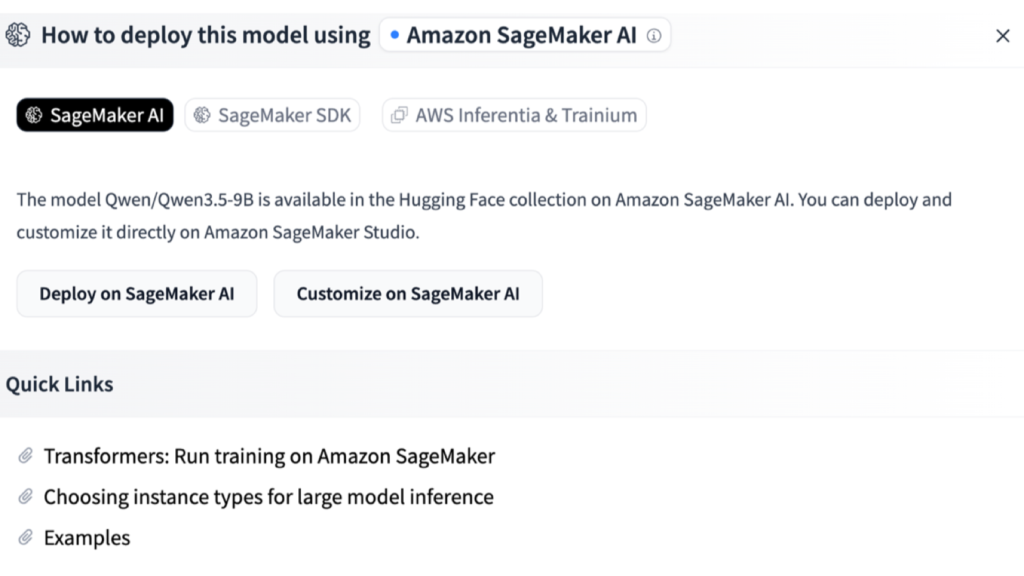
On July 7, Hugging Face published an official launch article for a deep-link integration with Amazon SageMaker AI. On a supported Hugging Face model page, the Deploy menu can now expose two SageMaker actions: Deploy on SageMaker AI and Customize on SageMaker AI.
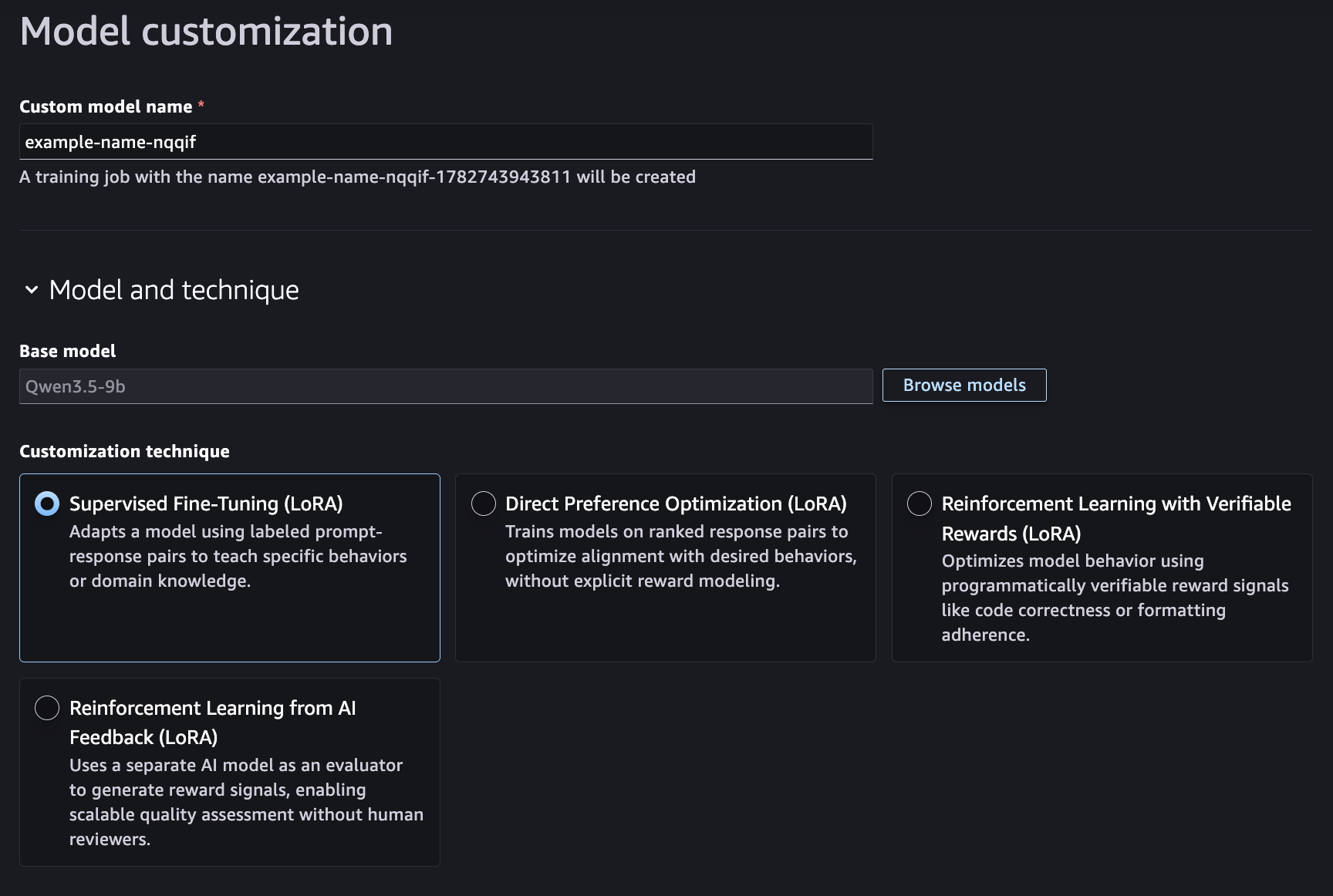
The important change is context transfer. Choosing one of those actions signs the user into AWS, opens the relevant page in SageMaker Studio, and carries the selected model into the workflow. Deploy opens endpoint configuration. Customize opens model customization, where the user still has to supply or select training data, choose a supported technique, set the relevant parameters, and submit the job.
This is a workflow improvement, not a new model-serving layer. Hugging Face remains the discovery surface; SageMaker Studio remains the place where the AWS job is configured, billed, monitored, and governed. That distinction matters because the convenience is real, but the operating responsibilities stay with the customer’s AWS account.
What the one-click handoff actually removes
Before this integration, a developer who found a model on Hugging Face could still use it with SageMaker, but the path often involved opening the AWS console separately, finding or creating a Studio domain, checking the right permissions, locating the model again in the AWS interface, and confirming GPU quota. The deep link collapses the discovery-to-configuration handoff.
According to the launch documentation, a new Studio environment entered through this path can be provisioned with model-customization permissions already attached. An existing environment is handled differently: Studio can show guidance for adding the required permissions rather than silently changing an established setup. In both cases, the selected model remains in context so the user does not have to search for it again.
The supported-model qualifier is essential. The launch does not say that every repository on the Hugging Face Hub can be deployed or fine-tuned this way. The practical test is visible on the model page: if the SageMaker deployment and customization actions are not present, this exact handoff is not available for that model.
How the workflow proceeds
- Start on a supported model page. Open the Deploy menu and choose Amazon SageMaker AI. Hugging Face then shows the deployment or customization action that the model supports.
- Authenticate with AWS. The flow uses the customer’s AWS credentials. An active console session can skip a separate sign-in prompt, but it does not bypass identity or account controls.
- Review the preloaded model in Studio. Customize lands on the Model Customization page; Deploy lands on the endpoint deployment page.
- Configure the actual job. A customization job still needs data, a supported training method, and job settings. An endpoint still needs an instance choice and deployment settings.
- Submit, monitor, and test. The official flow ends in SageMaker Studio, where the team monitors the job or tests the deployed endpoint. The deep link is the entry point, not an automatic production approval.
AWS’s model customization documentation describes serverless training, model evaluation, lineage, and supported interfaces in more detail. Teams should use that documentation—not the button label—as the source of truth for data requirements and job behavior.
Permissions and GPU quotas still matter
For new environments created through the flow, the launch article says SageMaker attaches the AmazonSageMakerModelCustomizationCoreAccess managed policy. AWS documents that policy as covering model-customization workflows such as serverless training, evaluation, and deployment to SageMaker or Amazon Bedrock endpoints. Organizations with stricter IAM standards should still review what the managed policy grants before making the new domain part of an approved environment.
AWS’s official prerequisites guide explains the split clearly: Quick setup includes model-customization permissions, custom setup can add the model-customization activity, and manually created domains may require the managed policy or an equivalent inline policy. The deep link reduces setup work; it does not replace an organization’s least-privilege review.
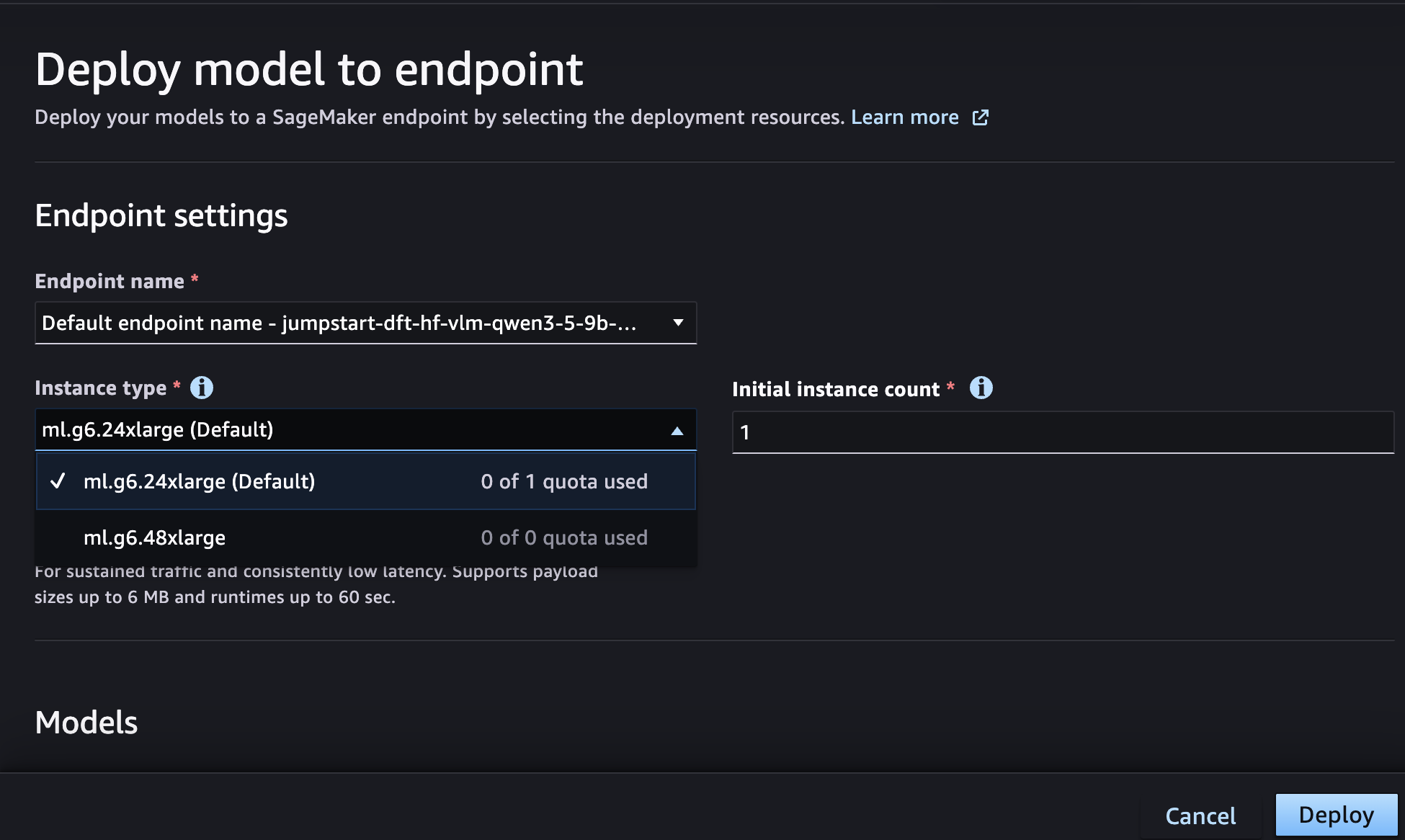
The same caveat applies to accelerators. Studio now shows G5 and G6 quota availability in the instance picker and links to Service Quotas when an increase is needed. Visibility is helpful because it reveals a blocker earlier, but a zero quota remains a blocker. The feature surfaces capacity limits; it does not grant capacity.
What it costs
Neither the launch article nor the AWS pricing page presents a separate charge for clicking the deep link. That should not be read as “free SageMaker.” The bill comes from the work the link starts.
The current Amazon SageMaker AI pricing page lists different meters for different stages. Supervised fine-tuning and direct preference optimization are priced by training tokens for supported model-customization jobs. Reinforcement-learning customization is priced by job duration, with rates that vary by model. Evaluations can add input- and output-token charges, and use of a Bedrock model as a judge is billed separately. Endpoint deployment adds the applicable inference compute and related storage or data-processing costs.
That makes a generic “price” misleading. The cost depends on the model, training technique, amount of data, number of epochs, evaluation method, endpoint type, region, instance choice, runtime, and traffic. Teams should estimate the exact customization and serving path before submitting a job, then add budgets and billing alerts in the AWS account. A convenient entry point is not a cost ceiling.
Who benefits most
AI engineers evaluating open-weight models get a faster route from discovery to a managed endpoint. The gain is largest when the candidate already has the SageMaker actions and the team wants to compare it inside an AWS environment.
Applied ML teams fine-tuning supported models can avoid rebuilding model context by hand. AWS publishes the current technique-by-model matrix in its supported open-weight model documentation; that matrix should be checked before preparing a dataset or assuming a particular method is available.
Platform teams onboarding internal builders may value the guided setup and quota visibility. It gives a developer a clearer starting point while keeping the resulting resources inside the organization’s AWS account.
The feature is less consequential for teams that already automate SageMaker through infrastructure as code, use a private model registry, or require every role and network path to be provisioned through a controlled platform pipeline. Those teams may prefer their existing process even when the deep link is available.
What the integration does not solve
- Model eligibility: availability is limited to supported models that expose the SageMaker actions on Hugging Face.
- License review: a model’s license, acceptable-use terms, and any gated-access requirements remain separate from AWS deployment.
- Data governance: teams still need to decide what training and evaluation data may enter the workflow, where artifacts are stored, and who can access them.
- Network architecture: VPC-only environments, private endpoints, logging, encryption, and multi-account controls are not replaced by the shortcut.
- Capacity and cost control: quota visibility does not guarantee an available instance, and the button does not set a budget.
- Production validation: a deployed endpoint still needs quality, latency, security, rollback, and load testing before customer traffic is routed to it.
How it compares with the existing routes
The closest alternative is to start inside SageMaker Studio or JumpStart, find the model there, and configure the same customization or deployment workflow. That route takes more navigation but keeps discovery inside AWS and may fit organizations that do not want developers moving from a public model page into an account workflow.
A second option is a code-first SageMaker deployment using the SDK and infrastructure-as-code controls. It is more work up front, but it is usually easier to review, reproduce, and promote across environments. A third option is Amazon Bedrock when the required model and customization path are available there and the team prefers a managed foundation-model API over direct SageMaker control.
The deep link wins on time to first configuration. The other routes can win on repeatability, platform governance, or a broader internal catalog. The right comparison is therefore not “one click versus many clicks”; it is “fast exploration versus the deployment path the organization can operate safely.”
Kingy AI verdict
This is a useful bridge between two products that already worked together. Its value is concrete: supported model context crosses from Hugging Face into the correct SageMaker Studio page, permissions can be bootstrapped for a new environment, and quota problems are visible earlier. The launch does not change the economics or responsibilities of model customization and serving.
Try it when a supported model is already on your evaluation list and your team is authorized to create SageMaker resources. Before submitting anything billable, confirm the model’s license, supported technique, IAM role, region, quota, dataset location, and cost estimate. Kingy AI reviewed the official Hugging Face and AWS materials for this article; it did not run a paid customization or endpoint workload.
FAQ
Does the button work on every Hugging Face model?
No. The announcement repeatedly limits the experience to supported models. Check the Deploy menu on the exact model page for the SageMaker actions.
Does one click deploy a production endpoint automatically?
No. It opens the deployment page with model context preloaded. The user still reviews the instance and endpoint settings and submits the deployment.
Is the integration free?
The official sources do not list a separate deep-link fee, but customization, evaluation, inference, storage, and related AWS services can generate charges. Price the specific workflow before running it.
What happens if the AWS account has no GPU quota?
Studio shows quota availability in the instance selector and can link to the Service Quotas request page. The workflow cannot use capacity that the account has not been granted.
Related Kingy AI coverage
The Kingy Brief
Get The Kingy Brief.
AI changes, original tests and one practical thing to try. Fridays at 09:00 Vancouver time.
Free · Double opt-in · Unsubscribe anytime
Sign up for The Kingy Brief on Beehiiv.
Signup help and newsletter schedule
Signup form provided by Beehiiv. After submitting, check your inbox for "Confirm your subscription to The Kingy Brief" and open its confirmation link. Check Spam or Promotions if you cannot find it.
Fridays at 09:00 Vancouver time: source-checked AI changes, original tests and one practical thing to try. The weekly restart begins October 9, 2026. We skip a week when there is not enough verified material. Free. Unsubscribe anytime.