


JBL is back with the PartyBox On-The-Go 2 Plus, and for once, the “Plus” suffix isn’t just marketing paint on an already-released speaker. We’ve all been burned by the lazy refresh treatment before — a slightly different grille, a new color option, and a press release pretending it’s a generational leap. This isn’t that. The On-The-Go 2 Plus introduces a feature set built around real-time, on-device AI vocal removal — JBL calls it EasySing — and it fundamentally changes what a portable party speaker can be. After putting this thing through several gigs, a backyard birthday, two impromptu karaoke nights, and one ill-advised attempt to walk it three blocks on a shoulder strap, here’s the honest breakdown.
If you’d rather watch first and read later, my full hands-on video walkthrough is embedded in this review and shows the AI tricks, the singer features, and a few moments that genuinely surprised me.
The First Impression: This Thing Is a Tank
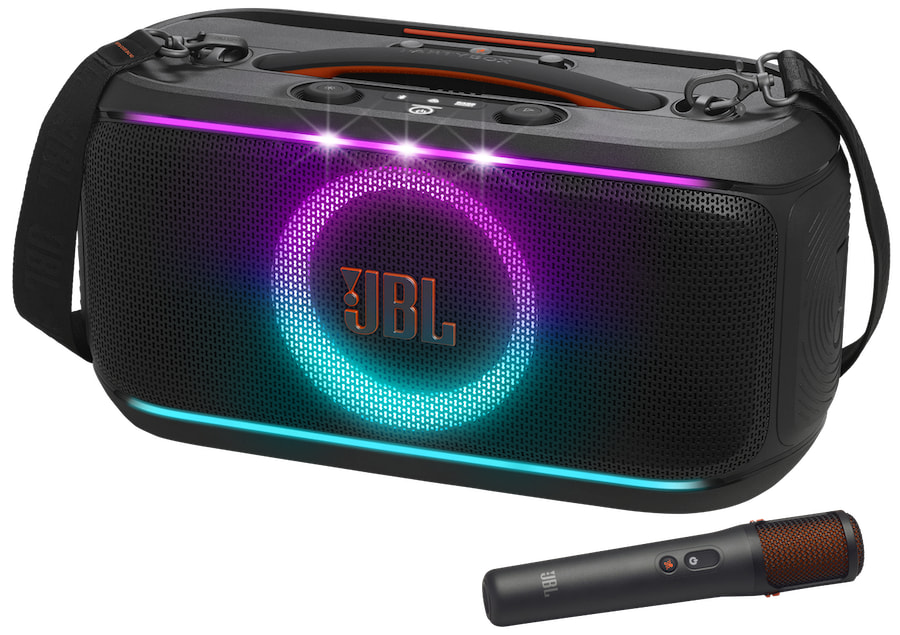
Pick this speaker up and your first thought is going to be the same as mine: this is heavy. JBL’s spec sheet lists the PartyBox On-The-Go 2 Plus at 6.45 kg (14.22 lbs) with dimensions of 501 mm × 258 mm × 221 mm (roughly 19.7″ × 10.2″ × 8.7″). Those numbers don’t sound monstrous on paper, but a brick of that weight slung over your shoulder while you perform a 45-minute set on the street is going to leave you booking a massage afterward. I’m being only half-facetious.
Where the speaker absolutely nails portability is short-distance, point-A-to-point-B work. JBL redesigned the central handle so the weight balances correctly under your hand, and the included shoulder strap is noticeably wider and thicker than the strap on the original PartyBox On-The-Go. It’s a real upgrade. Carrying it from the car to the beach, or from the trunk into a bar, is genuinely easy. But once you arrive, do yourself a favor and put it down. As I said in my video review, this speaker is lovable, not wearable. It’s the difference between a backpack and a duffle bag full of bricks — fine for transit, miserable as a long-term shoulder accessory.
The build itself feels reassuringly solid. JBL has stuck with IPX4 splash-proofing, which means a few rogue beach waves, poolside splashes, or a passing drizzle aren’t going to end your evening. Don’t dunk it. But don’t baby it either. The chassis also incorporates post-consumer recycled plastic, and the box itself is FSC-certified paper with soy ink — small details, but worth noting if sustainability factors into your buying decisions.
Sound Quality: JBL Pro Sound, Genuinely Better Than Before
JBL almost always nails the sound signature, and the On-The-Go 2 Plus is no exception. They crushed it here. The speaker is rated at 100 W RMS, driven by a single 5.25-inch (135 mm) woofer paired with two 0.75-inch (20 mm) silk-dome tweeters. The frequency response is officially listed as 40 Hz – 20 kHz (–6 dB), with a signal-to-noise ratio above 80 dB.
Translated out of spec-sheet language: the highs are crystalline, the mids stay cohesive even when you crank it, and the bass goes deeper and hits harder than it has any right to for this size class. Compared with the original PartyBox On-The-Go — which tops out at a 50 Hz low end — the new speaker reaches a full 10 Hz lower, and you can feel that difference in kick drums, sub-bass synth lines, and hip-hop production. JBL also moved from the older 1.75-inch tweeters in the original to silk-dome tweeters here, and the high-end clarity reflects that.
What’s particularly impressive is how clean the sound stays even when DSP is doing real work in the background — reverb on the vocal channel, EasySing isolating vocals from the music in real time, and the lightshow firing off LEDs in sync. Even with all that processing going on, the audio stays punchy and clear. There’s no noticeable compression artifact during normal listening, no distortion creeping in at higher volumes until you really push the speaker into “outdoor block-party” territory. For a ~$420 portable, that’s a strong showing.
The Headline Feature: EasySing AI Vocal Removal
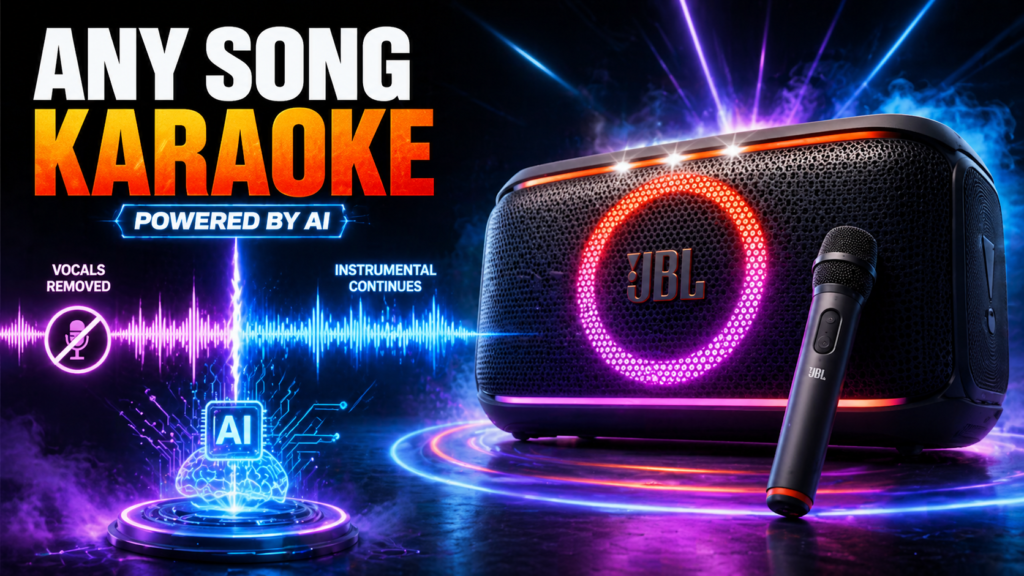
Here’s where the “Plus” earns its keep. The headline feature on the PartyBox On-The-Go 2 Plus is real-time AI vocal removal — what JBL is branding as EasySing. You can play any song from any source, press a button, and the speaker strips the lead vocal track in real time. No special karaoke files, no subscription service, no preprocessing in some mobile app, no cloud round-trip. Just play a song, hit the knob, and start singing.
This is, quite literally, the AI inside this JBL speaker. And it works.
JBL gives you four discrete settings. According to their official product page, you can lower the original vocals by 25%, 50%, or 100%, with the fourth option being “no reduction” (i.e., the song plays normally). In my video review, I describe these as 100%, 50%, 25%, and 0% — meaning the amount of original vocal remaining in the mix. Same four steps, just framed from the opposite direction. Either way, the takeaway is that you have meaningful control over how much of the original singer stays in the mix while the backing vocals, instruments, and harmonies stay right where they belong.
Practically speaking, this means you can leave the lead vocal in a little bit for support — handy if you’re not 100% confident on a verse — or strip it completely when it’s your moment to shine. You change settings by clicking the knob on top of the speaker. Easy.
A small honesty note worth flagging: even when you’ve got the setting dialed all the way down, there are moments when you can still hear the original singer ghosting underneath the music. EasySing is doing source separation in real time on a portable speaker, and that’s an extraordinarily hard problem; even cloud-based stem-splitting tools don’t always get it perfect. So it’s not a perfect studio-grade acapella. But once you’re singing? You stop noticing. For a party or a casual karaoke night, it does the job incredibly well. Just don’t expect it to replace a professionally produced karaoke track.
Vocal Tools: Where the On-The-Go 2 Plus Actually Wins
Once we got past the AI novelty, this is where I started to genuinely like the speaker — the supporting vocal toolkit. JBL didn’t just throw EasySing in and call it a day. They surrounded it with the kind of features that actually make non-professional vocalists (read: most of us) sound better.
Echo / Reverb. The natural reverb effect is a massive help. It smooths out the rough edges, hides the cracks, and gives you that polished, “I sound like I’m in a concert hall” feel. And critically, it’s adjustable — you can have a touch of it for a subtle gloss, or absolutely drench your voice in cathedral reverb if that’s the vibe. It made a noticeable difference in how confident I felt singing.
Pitch shift / Smart Key Change. This is my MVP. Honest. You can shift the key of the music to match your specific vocal range. If you’re trying to sing Whitney Houston and the song lives a fourth above your comfortable range, you can drop it down a couple of semitones and suddenly the song is singable. This single feature takes most of the stress out of karaoke. You stop preemptively avoiding songs you love just because they’re written for a register you don’t have. It’s a huge win in my book — and I mean that as someone who definitely does not sing Whitney Houston.
Voice Boost / High-Pitch Enhancement. JBL specifically calls out that EasySing includes high-pitch enhancement to support your upper range. In practice, this is a subtle bit of EQ and dynamics processing that ensures your voice still cuts through when you’re reaching for a high note rather than getting buried under the instrumental.
Built-in Feedback Suppression. Anyone who’s ever used a wireless mic with a portable speaker knows the screech: that high-frequency squeal when you accidentally point the mic at the speaker or stand too close. JBL has built feedback suppression directly into the EasySing wireless mic included in the box, and in my testing I genuinely could not get the system to howl, even when I deliberately tried. That alone is worth a lot for casual users who don’t want to think about mic placement.
The included wireless microphone is rated for up to 10 hours of playtime on its own 240 mAh battery, with an effective range up to 30 meters. It charges off the speaker.
The Light Ring: Doubles as a UI
One thing JBL got exactly right, and that I want to give them specific credit for, is the user interface. The big circular light ring on the front of the speaker isn’t only for show. It actually displays the values for whatever setting you’re currently changing. Adjust the volume, and the ring fills like a gauge to show you where you are. Adjust the echo or the EasySing level, same thing — the ring becomes the readout.
It’s intuitive, it works at a glance, and it keeps you from menu-diving on a phone screen in the middle of a song. Combined with the physical knob, the entire control loop feels designed for the actual context where you’d use this speaker: dim rooms, mid-song adjustments, hands occupied with a microphone, no time to fiddle. Big win.
The Light Show
The dedicated light show is, to be honest, relatively basic compared with the bigger members of the PartyBox lineup. You’re not getting laser projection or moving heads here. What you get are glowing light patterns and strobe effects synced to the music, with the front ring acting as the main centerpiece.
In a brightly lit room, it’s a “yeah, that’s there” kind of feature — you’ll notice it but it doesn’t transform the space. In a dark room, a backyard at dusk, or a bar setting, however, it actually looks pretty slick. It sets the mood without being so distracting that it becomes a focal point of its own. I’d call it appropriate for the form factor: enough to feel like you’ve got a “real” party speaker, not so much that you’re embarrassed using it at a low-key gathering.
Battery: Reliable, with Limits
Battery life is rated at up to 15 hours of playtime on a single charge, assuming reasonable volume levels. Crank it to lightshow-pumping, neighbor-annoying levels with the lights on full and EasySing engaged, and you’re going to see that figure come down — that’s just physics. In my real-world testing at “loud party but not insane” levels with lights on and a mic in regular use, I got several solid hours before the battery indicator started getting nervous.
JBL has done two smart things with the battery system on the Plus:
- Replaceable battery. The On-The-Go 2 Plus uses a Li-ion 34 Wh battery (7.2 V / 4722 mAh) that you can swap for a spare, sold separately. For an all-day event, that’s the difference between “we need to find an outlet” and “let me grab the second one out of the bag.” It also extends the long-term lifespan of the speaker — when the cell eventually loses capacity in five years, you’re not buying a whole new product.
- Fast charge. A 10-minute top-up gives you roughly 80 minutes of additional playback. That’s a clutch feature when you realize 15 minutes before the toast that the speaker is at 6%.
Full charge time from empty is under 3.5 hours in standby mode. If you’re planning an all-day outdoor event with no plug nearby, you’ll still want a spare battery. It’s reliable, but it’s a battery — there are limits.
Connectivity: Bluetooth 5.4, Auracast, and the JBL One App
This is one of the quieter upgrades on the Plus that’s actually a big deal. The On-The-Go 2 Plus uses Bluetooth 5.4 and supports Auracast, JBL’s modern multi-speaker pairing protocol. Compared to the original PartyBox On-The-Go, which was stuck on Bluetooth 4.2 and used the older True Wireless Stereo standard, this is a generational leap.
Practically, that means:
- Stereo pair two On-The-Go 2 Plus speakers for a wider stage and bigger sound. If one isn’t enough, two of these covers a serious amount of yard or living room.
- Connect multiple Auracast-enabled JBL speakers wirelessly for larger gatherings — useful if you already own other JBL gear or plan to expand later.
The speaker also has a 3.5 mm aux input (rated 370 mV RMS) for plugging in directly, a mic-in at 20 mV RMS, and a USB-C port that supports MP3, WAV, and FLAC playback (USB playback is disabled in the EMEA region, per JBL’s spec sheet). The USB port also doubles as an 11 V / 2 A charge-out when the speaker is off, so you can top up your phone if you forgot a power bank.
App control runs through the JBL One app, which lets you adjust music, EQ, lightshow patterns, and EasySing levels from across the room. The phrase JBL uses on its own product page is “no more babysitting the speaker” — and that’s pretty much the experience. Set it down, walk away, control everything from the bar.
What’s in the Box
Here’s the unboxing checklist straight from JBL’s official spec sheet:
- 1 × JBL PartyBox On-The-Go 2 Plus
- 1 × Wireless EasySing microphone
- 1 × Microphone holder
- 1 × Shoulder strap
- 1 × AC power cord (varies by region)
- 1 × Quick-start guide
- 1 × Safety instruction and warranty card
The fact that the wireless mic is included rather than sold as an upcharge is genuinely worth noting at this price point. Several competitive party speakers either bundle a much cheaper wired-only mic or sell the wireless option separately for $100+. Here, the EasySing mic is in the box and ready to use.
Comparing the On-The-Go 2 Plus to the On-The-Go 2 (non-Plus)
JBL launched the PartyBox On-The-Go 2 and the On-The-Go 2 Plus in the same generation, and they look nearly identical on paper — same 100 W output, same 5.25-inch woofer + dual 0.75-inch tweeters, same 40 Hz – 20 kHz frequency response, same Bluetooth 5.4 with Auracast, same IPX4, same dimensions, near-identical weight (the Plus is 6.45 kg vs. 6.36 kg for the standard), and same 15-hour battery rating.
What separates them is almost entirely the AI vocal layer:
- The standard On-The-Go 2 comes with a Smart Key Change feature in the JBL PartyBox app and a wireless digital mic with built-in echo. It’s a great karaoke speaker by any standard.
- The On-The-Go 2 Plus adds the EasySing AI vocal-removal pipeline, the Voice Boost / high-pitch enhancement, the natural reverb effect tuned for vocals, the feedback suppression, and the upgraded EasySing wireless microphone.
If karaoke isn’t your thing, the standard On-The-Go 2 is going to give you the same booming JBL Pro Sound for less. If even half of your use case involves you, a friend, or a kid grabbing the mic and belting out a chorus, the Plus is the one to buy.
The Bottom Line
So what’s the verdict? If you need a rugged, loud, portable-ish karaoke and party setup — with features that actually help you sound better instead of just gimmicks tacked on for marketing — the JBL PartyBox On-The-Go 2 Plus is a very solid pick. Just mind your back when you’re carrying it.
What works:
- Real-time, on-device AI vocal removal that works well enough for actual parties
- A surprisingly thoughtful vocal-effects suite — pitch shift, reverb, Voice Boost, feedback suppression
- The light-ring UI that doubles as a gauge, so you don’t have to menu-dive
- Genuine JBL Pro Sound that holds up under DSP load
- Bluetooth 5.4 + Auracast for stereo pairing and multi-speaker chains
- Replaceable battery and 10-min fast-charge for 80 min of playback
- IPX4 splash-proofing and recycled-material build
What to keep in mind:
- It’s heavy. Don’t plan to wear it for an hour straight.
- EasySing is excellent for parties but isn’t a studio-grade vocal isolator.
- The lightshow is good for the form factor, but it’s not the spectacle of the larger PartyBox models.
- All-day events still need a spare battery or an outlet.
For roughly $420, this is the first time in a while where I’ve felt like a “Plus” model genuinely justified its existence rather than being a cynical refresh. The combination of the AI vocal layer, the supporting effects suite, the light-ring UI, and the modern connectivity stack makes the PartyBox On-The-Go 2 Plus feel like a thoughtful product rather than a checkbox upgrade.
If your weekends involve any combination of backyard hangs, beach days, or impromptu karaoke sessions, this is one of the easiest portable speaker recommendations I’ve made in a while. Just remember to put it down once you arrive.
Want to see the EasySing tricks, the light-ring UI, and the pitch-shift demo in action? Watch my full hands-on video review above. And if you found this useful, hit like, subscribe, and drop a comment — if there’s anything else you want to see tested, I’ll cover it in the next one.





This is nice!