Think about what it used to cost to make a professional YouTube video. You’d hire a scriptwriter, a voice actor, a videographer, a motion graphics editor, and a thumbnail designer. Maybe a music producer for the intro. All in, you were looking at several thousand dollars before a single frame was published. And that was per video.
Now contrast that with today. A single creator, working from a laptop, can produce a polished, monetizable YouTube video in an afternoon — using a stack of AI tools that costs less than a gym membership. The script writes itself in ChatGPT. The voiceover renders in ElevenLabs. The visuals assemble in InVideo. The thumbnail materializes in Canva. Total production cost: under $15.
This is the shift. It’s real, it’s accelerating, and it’s creating an entirely new class of YouTube creator — one who never appears on camera, often never records their own voice, and in some cases, never writes a single sentence by hand.
But here’s what the breathless “make passive income with AI” content gets catastrophically wrong: AI doesn’t remove the need for quality. It removes the excuse for it. The barrier to entry has collapsed, which means the bar for standing out has risen. There are now thousands of AI-generated YouTube channels competing for the same eyeballs. Most of them are terrible. The ones making money aren’t.
This guide isn’t a fantasy. It’s a framework. You’ll find verified data on what YouTube actually pays, what its monetization policies actually say about AI content, a complete production workflow with real tools and real pricing, and — crucially — an honest account of how long this takes and what can go wrong.
Let’s get into it.

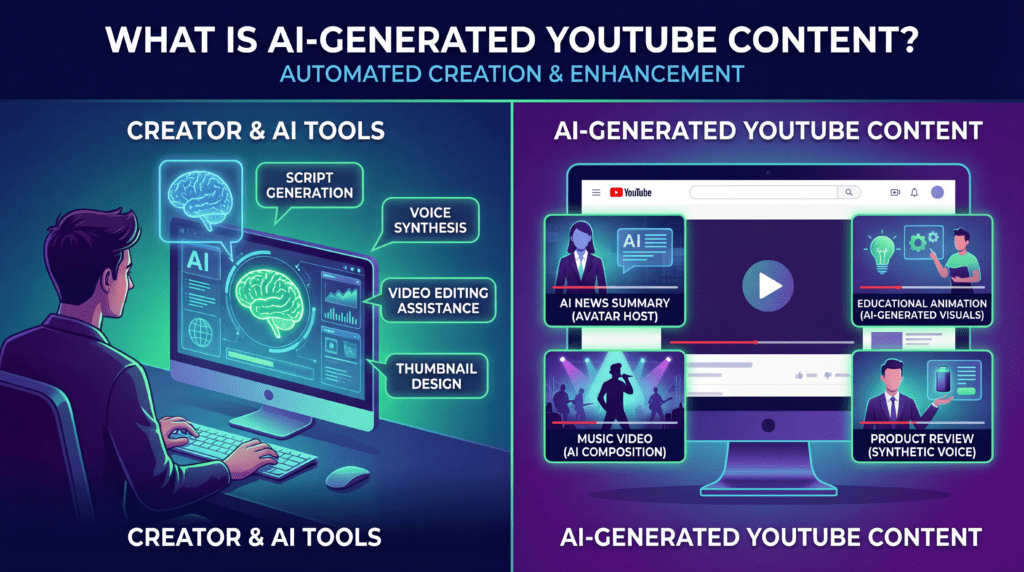
What Is AI-Generated YouTube Content?
Before anything else, let’s be precise about what we mean. “AI content” is not a monolithic category. It’s a spectrum, and where a channel sits on that spectrum has major implications for monetizability, quality, and audience trust.
At one end, you have fully human content that uses AI assistants for minor tasks — grammar checking, thumbnail text suggestions, maybe a few lines of script brainstorming. Most traditional creators already operate here without thinking of themselves as “AI creators.”
At the other end, you have fully automated pipelines where software ingests a topic keyword and outputs a complete video with no human in the loop. This end of the spectrum is where YouTube has drawn a hard line. We’ll cover the policy details shortly.
The sweet spot — and where the real opportunity lives — is somewhere in the middle. Human-directed, AI-executed. A creator who decides the topic, approves the script, selects the voice, curates the visuals, and edits the final product. AI handles the mechanical labor. The human handles the judgment.
A typical AI-assisted YouTube video involves five components:
Script: Written using tools like ChatGPT, Claude, or Jasper. The AI generates a first draft; you edit it for accuracy, originality, and voice.
Voiceover: Generated using text-to-speech tools like ElevenLabs or Murf AI. The voice is synthetic but increasingly indistinguishable from human narration at the premium tier.
Visuals and B-roll: Assembled from stock footage libraries via tools like InVideo AI or Pictory, or generated from scratch using image AI tools like Midjourney.
Editing: Handled through platforms like Descript, which lets you edit video by editing a text transcript — delete a word from the script, the corresponding audio and footage disappears automatically.
Thumbnail: Designed in Canva with AI-generated visuals, or produced in Midjourney for more stylized results.
Two dominant channel formats have emerged from this toolkit. The first is the faceless stock-footage channel: a documentary or explainer-style video where AI voiceover narrates over curated B-roll — think history channels, true crime, science explainers. The second is the AI avatar channel, where tools like Synthesia or HeyGen create a realistic on-screen presenter from a script, eliminating the camera entirely.
What AI cannot replace, at least convincingly: genuine reaction, lived experience, on-the-fly commentary, and charismatic personality. Reaction channels, interview shows, and creator-as-brand content still require a human. AI works best where information, narrative, and structure matter more than presence.
Can AI Content Be Monetized on YouTube? What the Policy Actually Says
This question gets more nuanced answers than most guides provide. The short answer is yes — but the conditions matter enormously.
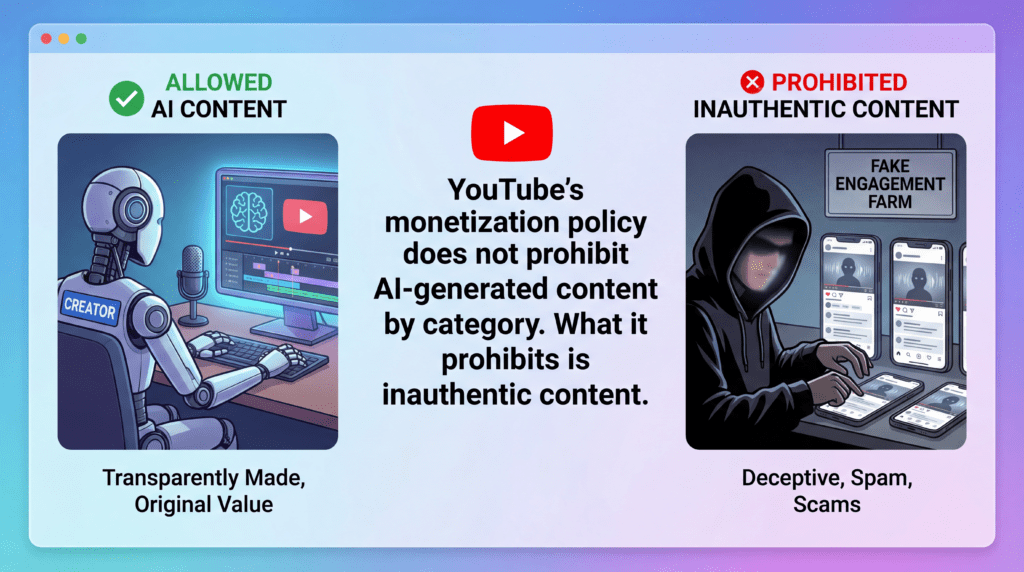
YouTube’s monetization policy does not prohibit AI-generated content by category. What it prohibits is inauthentic content — a term that was explicitly updated in July 2025 from the older language of “repetitious content.” That shift in terminology reflects a deliberate tightening. YouTube isn’t targeting the use of AI tools. It’s targeting the abuse of automation to flood the platform with low-effort, high-volume garbage.
What YouTube explicitly bars from monetization includes templated or programmatically generated content that lacks original value, image slideshows with no meaningful narration, and videos that are substantively identical to other content on the same channel. Channels that exist purely to game watch-time metrics without providing viewers anything worth watching will not be monetized — and if they somehow slip through, they’ll eventually be demonetized.
What YouTube permits — and what can be successfully monetized — is AI-assisted content that is original, demonstrates genuine value to viewers, and shows meaningful human editorial involvement. Using ChatGPT to write a draft script, ElevenLabs to narrate it, and InVideo to assemble it is fine, provided the result is a video that a real person would sit through and benefit from. That’s the test.
There’s an additional disclosure obligation worth understanding. YouTube’s synthetic content policy requires creators to disclose when content contains “realistic” AI-generated material — specifically, synthetic voices presenting as real people, AI-generated faces, or AI depictions of real events that didn’t occur. This disclosure happens in YouTube Studio during upload, not in the video itself. Failing to disclose when required can result in removal or strikes.
The Two-Tier Partner Program
YouTube now operates a two-tier monetization system, which matters for how you plan your growth trajectory.
Tier 1 — Early Access: You need 500 subscribers, at least 3 public video uploads in the prior 90 days, and either 3,000 watch hours in the past 12 months or 3 million Shorts views in the past 90 days. This tier does not include ad revenue. What it does unlock is fan funding features: Super Thanks, Super Chat during livestreams, channel memberships, and YouTube Shopping. It’s a meaningful stepping stone, and it gives smaller channels a way to begin earning before they’ve built a large audience.
Tier 2 — Full Monetization: This is the classic YouTube Partner Program. Requirements are 1,000 subscribers and either 4,000 valid public watch hours in the past 12 months or 10 million Shorts views in the past 90 days. Meeting these thresholds unlocks ad revenue sharing — the primary income engine for most YouTube creators. It’s worth noting, as some sources are refreshingly honest about, that hitting those numbers does not guarantee approval. YouTube reviews the entire channel for content quality and policy compliance before accepting an application.
Additional non-negotiable requirements across both tiers: an approved Google AdSense account linked to your channel, 2-step verification enabled on your Google account, no active Community Guideline strikes, and residence in a country where the YPP is available. The review process typically takes around one month, and YouTube considers your recent upload activity during that period — so keep posting while you wait.
The Four Ways to Make Money
Monetization on YouTube is not a single lever. It’s a portfolio. The most resilient channels combine multiple income streams, which matters because any single stream can shrink or disappear overnight. Here’s how each one works in practice.
1. YouTube Partner Program — Ad Revenue
Ad revenue is the most straightforward path, and also the most misunderstood. Most people think in terms of CPM — Cost Per Mille, the amount advertisers pay YouTube per 1,000 ad impressions. But CPM is the wrong number to track. The metric that actually hits your bank account is RPM — Revenue Per Mille, which is what you earn per 1,000 total video views after YouTube takes its 45% cut and after accounting for views that didn’t generate an ad impression at all.
The relationship between the two is consistently misrepresented: if your niche CPM is $10, your RPM will typically land around $5–$6. That’s the real number.
And RPM varies dramatically by niche. This is arguably the single most important variable in the entire monetization equation, and it’s the one most beginner creators ignore entirely when choosing what content to make.
Verified data from creator dashboards and industry benchmarks shows the highest-paying niches in 2026 are finance and investing ($9–$11 RPM), insurance ($9–$11 RPM), real estate ($8–$10 RPM), and marketing and business ($7.5–$9.5 RPM). At the other end of the spectrum: music channels ($1.5–$3 RPM), comedy and skits ($1.5–$3.5 RPM), gaming ($2–$4 RPM). These are not small differences. A finance channel and a gaming channel with identical view counts can generate income that differs by a factor of five or more.
Why does finance pay so much? Because advertisers in financial services — banks, brokerages, fintech apps, insurance companies — are competing fiercely for the same high-intent viewers. A person watching a video about index fund investing is a far more valuable lead than a person watching a gaming highlight. The advertiser economics drive the RPM, not the view count.
Geography compounds this further. Australia leads all countries with an average CPM of $36.21, edging out the US at $32.75. A channel with a primarily US or Australian audience will earn dramatically more per view than an identical channel whose audience is primarily in South Asia or Sub-Saharan Africa. You cannot force viewers to come from high-CPM countries, but you can create content that naturally appeals to those audiences — English-language tutorials, topics relevant to Western consumer markets, posting during hours when US viewers are online.
Seasonality is the third factor most creators learn about the hard way. Q4 — October through December — is peak RPM season, as brands exhaust their annual ad budgets. Finance content in December has hit CPMs of $25 or more. January is the opposite: some categories have dropped to $1.98 CPM as advertiser budgets reset. Plan your biggest, highest-quality content releases for Q4. Use Q1 to experiment and build your content library.
One more thing on ad revenue: video length matters mechanically. Videos under eight minutes can only run pre-roll and post-roll ads. Videos over eight minutes unlock mid-roll ad placements — meaning additional ads run during the video, and you get paid for each one. The practical implication is to write scripts that land between 10–15 minutes of finished runtime. That’s your monetization sweet spot.
A note on Shorts: Multiple 2025 creator reports show Shorts RPMs landing between $0.03 and $0.20 per 1,000 views — that’s $30 to $200 per million views, compared to thousands for equivalent long-form views. Shorts earn roughly 10–100x less than long-form content per view. Use them to build subscribers and drive traffic to your long-form videos. Don’t try to build your primary revenue stream on them.
2. Affiliate Marketing
Affiliate marketing is the income stream most AI creators overlook — and for faceless channels, it can outperform ad revenue entirely, especially in the early stages before the channel is large enough for the ad numbers to matter.
The mechanics are simple. You include trackable affiliate links in your video description and pinned comments. When a viewer clicks your link and completes a purchase, you earn a commission. No face required. No product to ship. No customer service. The video does the selling indefinitely after it’s published.
AI-driven documentary and educational formats lend themselves naturally to affiliate integration. A personal finance channel reviewing budgeting tools, a tech explainer channel covering software comparisons, a health and wellness channel discussing supplements — all of these can embed product recommendations organically without it feeling forced.
The easiest entry point is Amazon Associates, which accepts applications openly and covers virtually any physical product. Commission rates are modest (typically 1–8% depending on category), but the breadth of Amazon’s catalog means almost any niche has relevant products. For higher commissions, niche-specific programs are generally more lucrative. Software tools in particular often offer 20–40% recurring commissions — meaning you earn every month for as long as the viewer keeps their subscription. Impact.com and ShareASale are the largest networks for finding these programs.
One legal obligation that some creators treat as optional when it isn’t: the FTC requires clear disclosure of affiliate relationships in the US. “This video contains affiliate links” in the description isn’t sufficient by itself — the disclosure needs to be prominent and impossible to miss. Similar requirements exist in the UK, Canada, and the EU. Label your links. It’s not just legally required; it builds viewer trust.
At realistic scale: a channel averaging 10,000 views per video with a well-matched affiliate product recommendation can generate $500–$2,000 per month in commissions before ad revenue becomes meaningful. This is often the income stream that keeps a creator going during the growth phase.
3. Brand Deals and Sponsorships
Here’s a misconception that deserves to be killed outright: brands require on-camera creators. They do not.
What brands care about is audience. Specifically, the quality and specificity of that audience. A faceless AI channel with 15,000 subscribers in the personal finance niche, averaging 25,000 views per video, with an audience that skews 25–44 and US-based, is an attractive sponsorship partner for a fintech app or an investing platform. The absence of a face is irrelevant to that advertiser’s decision.
Industry data shows that brand deals can pay $50 to $100+ per 1,000 views — compare that to $2–$10 for ad revenue in the same niche. Sponsorships can pay five to twenty times what ads pay for identical view counts. This is why experienced creators treat ad revenue as their floor, not their ceiling.
The threshold at which sponsorships become accessible is lower than most people assume. Niche authority matters more than raw subscriber count. A 5,000-subscriber channel that is the definitive resource for a specific topic — say, AI tools for small business owners — can command sponsorships from software companies that would ignore a 50,000-subscriber general tech channel. Advertisers want audience fit, not audience size.
To approach brands directly, build a media kit: one page covering your subscriber count, average views per video, audience demographics (available in YouTube Analytics), content niche, and one or two example videos. Send it cold via email. Most will ignore you. Some won’t. For a more systematic approach, platforms like Grapevine, AspireIQ, and Passionfroot connect creators with brands actively looking for channel partnerships.

4. Patreon and Fan Memberships
The most counterintuitive item on this list. Can an AI-generated, faceless channel really build a paid community of fans? Yes — provided the channel is built around something specific enough to generate genuine loyalty.
Patreon and similar platforms (Ko-fi, Buy Me a Coffee) allow creators to offer exclusive content, early access, bonus episodes, or direct Q&A access in exchange for a monthly membership fee. The key isn’t your face. It’s your brand identity — the distinct voice, niche, and editorial perspective that makes your channel worth paying to follow more closely.
YouTube also has its own native membership feature, available once you hit 1,000 subscribers in the full YPP. YouTube takes 30% of membership revenue — less than the 45% it clips from ad revenue, making memberships slightly more creator-favorable. The tradeoff is that YouTube memberships require viewers to stay on-platform; Patreon builds a more portable, algorithm-independent relationship with your audience.
A realistic membership income estimate for a focused niche channel: 5,000–20,000 subscribers with a highly engaged, specific audience can generate $500–$5,000 per month in memberships. This is not passive. It requires consistently delivering exclusive value. But it’s also the income stream most insulated from YouTube’s algorithm changes, CPM fluctuations, and policy updates.
The Complete AI Production Workflow
This is the section you won’t find in most competitor articles. Not because the information is secret, but because most guides describe what to do without showing how to actually do it. What follows is a repeatable, tool-by-tool production system for a faceless AI YouTube channel.
Think of it as an assembly line, not a creative process. Each stage has defined inputs, defined outputs, and specific tools that handle the transformation. Run this system consistently, and you will produce videos. Whether those videos grow a channel depends on the quality of your judgment at the decision points — the niche you choose, the topics you select, the scripts you approve.
Stage 1: Niche and Topic Research
Do this once at the start, then revisit monthly. Skipping this stage is the single most common reason AI channels fail. You can have a perfect production workflow and still produce content nobody watches if you’re in the wrong niche or chasing the wrong topics.
Choose a niche that AI can serve well. The formats that work: documentary, history, science explainers, personal finance, self-improvement, true crime, language learning, technology tutorials, and business strategy. These are information-dense, research-driven formats where a well-written script and clear narration are more important than personality and presence.
Formats that don’t work well with AI: reaction content (requires a human response), live commentary, personality-led vlogs, any content where the creator’s face and energy are the product.
Tools for validation:
vidIQ is your primary keyword research tool. It shows search volume for YouTube-specific queries, indicates how competitive a keyword is, and surfaces trending topics in your niche before they peak. Use it to identify topics with genuine search demand that aren’t already owned by channels with millions of subscribers.
TubeBuddy complements vidIQ with competitor analysis and bulk metadata optimization. At the early stage, use it to study what’s working for established channels in your niche — not to copy them, but to understand the content gap you can fill.
Google Trends is free and underused. Run your potential niche keywords through it to confirm they have sustainable search interest rather than a spike-and-fade pattern. Evergreen topics that hold steady over multiple years are ideal for a content library strategy.
The question to answer before building anything: Does this niche have search volume, advertiser demand (which determines your eventual CPM), and content formats that AI can produce convincingly? All three must be yes.
Stage 2: Scripting
The script is the foundation of everything. A mediocre script with a good voice and slick visuals is still a mediocre video. A great script with imperfect production is a watchable one.
ChatGPT Plus is well-suited for ideation and rough first drafts. Give it a topic, a target length, and a specific audience, and it will produce a usable starting structure in seconds. It is not suited for final copy — it has a tendency toward filler language, false confidence about facts, and a generic rhythm that becomes recognizable and boring after extended reading.
Claude handles longer-form scripts with more natural narrative flow, particularly for explainer and documentary formats. Jasper is strong for teams that need to maintain a consistent brand voice across a high volume of content.
Three rules, non-negotiable:
Never publish a raw AI script. Every factual claim needs verification from a primary or authoritative source. AI language models hallucinate — confidently stating incorrect information as fact — and a YouTube channel that publishes falsehoods will eventually be called out in its own comments section, hurting both credibility and watch time.
Make it original. YouTube’s policy requires content that adds genuine value beyond what already exists. Your script should take a clear editorial position, include sourced data, and walk viewers through something in a way that competing videos don’t.
Target the right length. For mid-roll ad placements, you need videos over eight minutes. Write scripts targeting 1,200–1,800 words — that renders as roughly 10–14 minutes of narration at a natural conversational pace.
Stage 3: Voiceover Generation
The voiceover is the most consequential production choice you’ll make for an AI channel. It’s the primary sensory experience for your viewers. A robotic, monotone AI voice will kill retention within the first 60 seconds. A high-quality, naturalistic voice keeps viewers watching — and watch time is the primary signal YouTube uses to determine whether a video deserves algorithmic distribution.
ElevenLabs is the current industry benchmark. Its voice library offers hundreds of options across accents, genders, ages, and emotional registers. The highest-tier voices are genuinely difficult to distinguish from human narration in extended listening. Plans start at around $5/month, with commercial-use plans at $22/month (the Creator plan) that allow you to publish your generated audio to YouTube without licensing restrictions.
Murf AI is a strong alternative with a broad voice library and slightly simpler interface, better suited to creators who want less configuration overhead. Descript’s Overdub feature allows you to clone your own voice — meaning you record a short sample, and the AI generates speech that sounds like you. For creators who want brand consistency without recording every script personally, this is a compelling middle path.
Choose a voice and commit to it. Your AI voice becomes a brand asset. Switching voices mid-channel disrupts continuity and signals inconsistency to returning viewers.
Stage 4: Visuals and B-Roll
This is where production quality varies most dramatically between AI channels. The difference between a polished AI video and a cheap-looking one is almost always the visual layer.
InVideo AI is the most integrated solution for faceless YouTube channels. You paste your script, it selects stock footage, syncs it to your voiceover timing, adds transitions, and outputs a near-finished video. It’s not magic — you’ll still need to review and replace footage that doesn’t match — but it compresses what would be hours of manual editing into minutes. Plans run $25–$60/month.
Pictory specializes in converting written content — blog posts, articles, scripts — into video format. It’s particularly strong for research-based and educational content. Pricing starts at $23/month.
For visuals that stock footage can’t provide — stylized illustrations, fictional scenarios, abstract concepts — Midjourney generates custom images from text prompts. A well-crafted Midjourney image used as a chapter transition or key visual gives an AI channel a distinctive aesthetic that differentiates it from the stock-footage masses.
Pexels and Pixabay remain the best sources for royalty-free stock footage at zero cost. Build a habit of saving relevant clips to a local library organized by category — having your own searchable archive dramatically speeds up production.
Stage 5: Editing and Post-Production
Descript is the most transformative editing tool in the stack for spoken-word video content. It transcribes your audio automatically and lets you edit the video by editing the transcript — highlight a word, press delete, and that segment of audio and accompanying footage disappears. Removing filler words, awkward pauses, and script mistakes takes minutes rather than hours. Paid plans start at $12/month.
CapCut is free and surprisingly capable for creators who don’t need Descript’s transcript-based approach. Strong for shorter videos, Shorts, and quick-turnaround content where you want direct timeline editing without a subscription.
Opus Clip serves a specific but valuable function: it analyzes your long-form videos and automatically generates short clips optimized for Shorts, TikTok, and Instagram Reels. Building a Shorts cross-posting strategy from your long-form content extends your reach without producing any additional primary content.
Stage 6: Thumbnails
Thumbnails are not an afterthought. They are the single variable most responsible for whether someone clicks your video or scrolls past it. All other production quality is irrelevant if the thumbnail doesn’t generate a click.
Canva with its AI features is the fastest path to professional-looking thumbnails. Its YouTube template library gives you a starting point; customize colors, fonts, and imagery to match your channel’s visual identity. Canva Pro at $15/month unlocks the full image generation and brand kit features.
For more distinct, photo-realistic or illustrative thumbnails, Midjourney is the stronger tool. A properly crafted Midjourney image combined with high-contrast text in Canva can produce thumbnails that compete with channels spending far more on design.
Thumbnail fundamentals that don’t change regardless of tool: high contrast between subject and background, text legible at small sizes (your thumbnail will appear at thumbnail size in most contexts), and a clear emotional or curiosity hook that makes clicking feel necessary. YouTube Studio’s built-in A/B testing tool lets you test two thumbnails against each other and automatically serves the higher-performing version — use it every time.
Stage 7: SEO and Upload Optimization
The best video in the world earns nothing if it can’t be found. YouTube is the world’s second-largest search engine. Treat every upload like a search result you’re trying to rank.
Title: Lead with your primary keyword. Keep it under 60 characters. Make a promise you deliver on in the video — clickbait that doesn’t match the content devastates watch time and signals to the algorithm that viewers are dissatisfied.
Description: The first 150 characters appear in search results without being truncated — make them count. Include your primary keyword naturally in the opening line, then use the rest of the description for secondary keywords, timestamps, and relevant links.
Tags: Secondary and long-tail keywords. TubeBuddy’s tag explorer recommends high-opportunity tags based on search volume and competition. Use 10–15 tags per video.
Chapters: Add timestamps for every major section of your video. YouTube indexes chapters separately, which improves discoverability for specific sub-topics within your video.
End screens and cards: Add these to every video, every time. They route viewers to more of your content and cost nothing. Leaving them off is leaving watch time and subscribers on the table.
What This Costs
Here’s the complete monthly tool stack with honest pricing:
| Tool | Function | Monthly Cost |
|---|---|---|
| ChatGPT Plus or Claude Pro | Scripting | $20 |
| ElevenLabs Creator | Voiceover | $22 |
| InVideo AI | Video assembly | $25 |
| Canva Pro | Thumbnails and graphics | $15 |
| TubeBuddy Pro | SEO and optimization | $9 |
| CapCut Pro (optional) | Additional editing | $8 |
| Epidemic Sound | Music licensing | $15 |
| Total | ~$114/month |
At the higher end of a fully-loaded stack, you’re looking at $150–$200/month — a fraction of what a traditional video production team would cost. A single brand deal from a channel with 5,000 engaged subscribers in the right niche covers this overhead entirely.
Realistic Income Projections
Here is where honesty becomes the most important editorial choice a writer can make. The internet is saturated with “make $10,000 a month with AI YouTube” content that conveniently omits timelines, failure rates, and the amount of work involved. These projections are grounded in verified data and are designed to help you plan, not to sell you on a fantasy.
Stage 1: 0–1,000 Subscribers (Months 1–6)
You’re in the building phase. No ad revenue. No sponsorships. The objective is simple: publish consistently, get to the YPP Tier 2 threshold, and learn what your audience actually responds to.
Most channels that reach 1,000 subscribers get there in 3–12 months with weekly uploads. A minority get there faster through Shorts virality or a video that happens to rank well for a high-volume keyword. Start with affiliate links in your description from upload one — even at low traffic, commissions compound.
Realistic monthly income: $0–$100 (affiliate commissions on low traffic)
Stage 2: 1,000–10,000 Subscribers (Months 6–18)
Ad revenue begins. At 50,000 monthly views with a modest $4 RPM — achievable in a general niche — you’re earning approximately $200/month from ads. Add an affiliate program in a complementary niche and that number climbs to $400–$800/month.
This is the phase where most creators quit. The income is real but modest. The work is consistent and requires patience. The channels that push through this phase are the ones that treat it as proof of concept rather than a business.
At around 5,000 subscribers in a defined niche, your first brand deal becomes realistic. A single mid-tier sponsorship ($500–$1,500) can transform the economics of this stage entirely.
Realistic monthly income: $200–$2,000
Stage 3: 10,000–100,000 Subscribers (Month 18+)
This is where the model starts to become a real business. At 500,000 monthly views in a finance niche with a $9 RPM, ad revenue alone is approaching $4,500/month. Sponsorships at this scale command $2,000–$8,000 per video. Affiliate programs compound with the larger audience. A Patreon or YouTube membership adds a recurring revenue layer.
The creators at the top of this bracket — 50,000–100,000 subscribers in high-CPM niches — are generating $10,000–$30,000/month from combined income streams. These outcomes are real. They are not typical.
Realistic monthly income: $2,000–$15,000+
The honest context
Research analyzing all public YouTube data shows that 88% of videos generate fewer than 1,000 views, with only 3.67% of videos ever reaching 10,000 views — and that small fraction accounts for more than 93% of all views on the platform. Growth is not guaranteed. Niche selection, content quality, posting consistency, and a degree of luck all play meaningful roles. AI tools can accelerate your production. They cannot guarantee an audience.
Risks and Pitfalls Nobody Talks About
This section will not appear in a sponsored article. Read it carefully.
Demonetization Without Warning
YouTube can and does demonetize channels retroactively when content is reclassified as inauthentic or advertiser-unfriendly. It can happen to individual videos or to an entire channel. Appeals are possible but slow. Build multiple income streams from the beginning — affiliate links, a brand deal or two, a Patreon — so that a YouTube policy change doesn’t eliminate your entire revenue base overnight.
Copyright Traps
The most common mistake for AI creators isn’t the video script or the voiceover. It’s background music. Using an uncleared song — even briefly, even at low volume — can result in the video being claimed by the rights holder (meaning your ad revenue goes to them, not you) or taken down entirely. Use only licensed music from services like Epidemic Sound, Artlist, or the YouTube Audio Library within YouTube Studio, which is free and explicitly cleared for use on the platform.
AI Hallucinations in Scripts
Language models generate false information confidently and fluently. A script that states an incorrect statistic, misattributes a quote, or describes an event inaccurately can result in community notes flagging your video, viewers calling it out in comments, and a credibility hit that affects your channel’s long-term growth. Verify every factual claim against primary sources before publishing. This is non-negotiable, and it’s the most important place where human judgment cannot be outsourced to the machine.
Voice and Asset Licensing
Not all AI voice tools permit commercial YouTube use on all pricing tiers. ElevenLabs, Murf, and most paid tiers of similar tools explicitly allow commercial publication — but free tiers frequently do not. Read the terms of service for every tool you use before publishing content generated with it. Discovering a licensing violation after you have 50 videos live and 20,000 subscribers is a painful problem.
Platform Dependency
YouTube changes its monetization policies, algorithm behavior, and creator terms regularly. Channels that were built entirely around one content format have found themselves restructured or demonetized when that format fell out of policy favor. The mitigation: diversify off-platform from the start. Build an email list — even a small one. Build a website where your content is indexed independently of YouTube’s algorithm. A Patreon community is yours regardless of what YouTube decides next quarter.
Niche Saturation
The faceless finance channel and the AI history documentary are already crowded categories in 2026. A generic channel with no differentiated angle will be invisible. The solution is specificity. Don’t make a finance channel — make a channel about tax strategy for freelancers. Don’t make a history channel — make a channel about the Cold War’s covert operations. Go narrower than feels comfortable. Audiences form around specificity. Advertisers value it. The algorithm rewards it.
Frequently Asked Questions
Is AI-generated content allowed on YouTube?
Yes, provided it meets YouTube’s originality and value standards. As of the July 2025 policy update, YouTube permits AI-assisted content that provides genuine value to viewers. It prohibits mass-produced, templated, or programmatically generated content with no original editorial value.
Do I need to disclose that I used AI?
For realistic synthetic content — AI voices presented as human, AI-generated faces, AI depictions of real events — yes. YouTube’s synthetic content disclosure policy requires labeling via a toggle in YouTube Studio during upload. For AI-assisted editing and scripting that doesn’t involve synthetic realism, disclosure is not currently required by YouTube, though some creators choose to be transparent about their workflow as a trust-building measure.
How long does it take to monetize an AI YouTube channel?
Most channels reach the YPP Tier 2 threshold — 1,000 subscribers and 4,000 watch hours — somewhere between 3 and 12 months with consistent weekly uploads. Variables that most influence this timeline: niche search volume, content quality, upload frequency, and whether any video achieves early viral traction through Shorts or search ranking.
What is the best niche for an AI YouTube channel?
The highest-paying niches by RPM in 2026 are personal finance, investing, insurance, real estate, and business strategy. These also happen to be niches where well-researched, script-driven AI content performs well. The caveat is that they’re competitive. If entering finance, you need a specific angle — not another generic “how to invest” channel.
What is the best AI voice tool for YouTube?
ElevenLabs is the current standard for voice realism and commercial viability, with plans starting at $5/month for casual use and $22/month for the Creator plan that supports commercial YouTube publishing. Murf AI is a close alternative with a simpler interface.
How much can a faceless AI channel realistically earn?
At 50,000 monthly views in a moderate-CPM niche, ad revenue alone is typically $200–$600/month. Combined with affiliate commissions and modest sponsorships, a channel at that view level can generate $500–$2,000/month. Channels at 500,000+ monthly views in high-CPM niches can earn $5,000–$20,000/month or more from combined income streams. These are ranges, not guarantees.
Conclusion
Here’s the honest summary: AI has fundamentally changed the cost and the timeline of building a YouTube channel. What once required a team, a studio, and a significant budget now requires a laptop, a few subscriptions, and a consistent work ethic. That is a genuine structural shift in who can participate in the creator economy.
But the fundamentals of what makes a YouTube channel succeed have not changed. An audience forms around useful content delivered consistently in a recognizable voice. It trusts content that is accurate. It rewards specificity. It abandons channels that waste its time. None of those things are solved by tools.
Use AI for what it’s genuinely good at: compressing the mechanical work of production, enabling consistency at scale, and dramatically lowering your cost per video. Reserve your human judgment for the decisions that actually determine success: the niche you commit to, the topics you choose, the editorial standards you hold, and the patience to build something over time rather than overnight.
The best time to start was a year ago. The second-best time is to pick a niche today, write your first script this week, and publish your first video before you’re ready. Perfection is not the entry requirement. Consistency is.
All monetization data, YPP requirements, tool pricing, and platform policies in this article are based on verified sources current as of March 2026. YouTube policies and tool pricing change regularly — confirm specifics at YouTube’s official support pages and individual tool websites before making production or business decisions.
The Kingy Brief
Get The Kingy Brief.
AI changes, original tests and one practical thing to try. Fridays at 09:00 Vancouver time.
Free · Double opt-in · Unsubscribe anytime
Signup help and newsletter schedule
Signup form provided by Beehiiv. After submitting, check your inbox for "Confirm your subscription to The Kingy Brief" and open its confirmation link. Check Spam or Promotions if you cannot find it.
Fridays at 09:00 Vancouver time: source-checked AI changes, original tests and one practical thing to try. The weekly restart begins October 9, 2026. We skip a week when there is not enough verified material. Free. Unsubscribe anytime.