Is this AI-powered presentation tool really different from everything else on the market — or is it just another pretty face?
There’s a quiet crisis happening inside every office, classroom, and startup right now, and it’s happening inside PowerPoint. Every week, millions of people are staring at a blank slide, cursing themselves for agreeing to do “a quick deck,” and burning hours they don’t have on alignment guides, font weights, and whether the transition should be a “Push” or a “Fade.” The irony is brutal: we’ve been promised that AI would change all of this. And mostly, it hasn’t — not really.
Most AI presentation tools that have arrived over the past two years have shared the same fundamental flaw. They generate something that looks impressive in a demo, but the moment you try to use it in an actual business meeting, you’re back to square one — rewriting slide titles, untangling layouts that fell apart, and quietly asking yourself if the AI actually made this harder. That’s not a revolution. That’s just a fancier starting template.
Dokie AI has a different pitch, and it’s an interesting one. Founded in Singapore and launched in 2024, Dokie is positioning itself not just as an AI slide generator, but as what it calls an AI presentation agent — a tool that thinks about structure, design, interactivity, and brand alignment all at once. The promise is ambitious: go from idea to polished, business-ready, interactive presentation in minutes, with no design degree required.
After thoroughly analyzing a full Kingy AI walkthrough of the platform and cross-referencing user reviews, pricing details, and independent assessments, this is a comprehensive look at whether Dokie AI actually delivers on that promise — and who should be paying attention.
The Problem Dokie AI Is Trying to Solve
Before we get into the product itself, it’s worth being precise about the problem being solved, because not all “AI presentation tools” are solving the same thing.
There are essentially two categories of complaint about traditional slide-making. The first is time: it simply takes too long to build a deck from scratch. The second is fragility: even when you’ve built something that looks great, one small edit — a new data point, a content change from the client — can detonate the whole layout. You move one text box and three other things break.
As demonstrated in the Kingy AI walkthrough, Dokie’s founder-level critique of the current market is pointed: “Most AI tools still treat slides like static pages. One small edit throws everything off.” This is accurate. Tools like Canva, Beautiful.ai, and even Gamma have tried to address these problems with varying levels of success. But Dokie’s approach goes a step further by rethinking not just how slides are built, but what they fundamentally are.
The premise of Dokie is that a presentation doesn’t need to be static at all. And when you see that idea fully executed, it’s genuinely hard to go back.
First Impressions: What Makes Dokie Different
The first thing that separates Dokie from the crowded AI slides space is a concept the platform calls content-aligned design. Most AI tools generate content and then try to fit that content into a design template. Dokie inverts this, building the design around the content so that the visual layout is always in service of what’s being communicated, not fighting against it.
The result, as seen in multiple live demos, is that slides look balanced and intentional even after significant edits — something that sounds simple but is genuinely difficult to achieve at scale. When you change the text on a Dokie slide, the layout adapts rather than breaks. This is not magic; it’s the result of a content-first architecture that most competitors haven’t fully adopted.
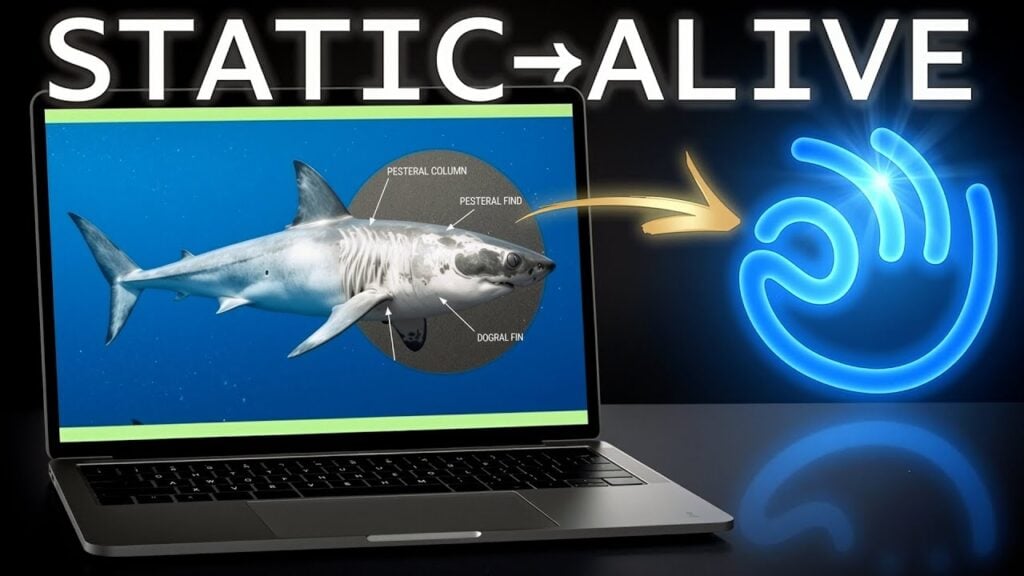
But what really makes Dokie stand out is its commitment to interactivity. These aren’t static slides. They’re living, clickable, animated experiences. We’re talking about slides that contain rotating 3D models, interactive X-ray overlays, embedded video loops, and animated data charts — all generated automatically from a text prompt. In the walkthrough, a simple prompt about ocean science produces a 3D Great White Shark that can be rotated in real-time, complete with a skeletal X-ray overlay that activates on mouse hover. The audience doesn’t just see a slide — they interact with it.
This is a genuine paradigm shift. Not a marketing-speak paradigm shift. A real one.
How Dokie Works: The Core Workflow
Getting started with Dokie is deliberately simple. There’s no steep learning curve, no design prerequisite, and no need to understand anything about slide architecture. The workflow breaks down into a few clean phases.
Step 1: The Prompt. You give Dokie a topic, a block of text, a set of notes, or a detailed brief. The platform responds well to structured prompts — specifying your audience, tone, goal, and desired slide count all improve the output significantly. A prompt like “Create a professional and persuasive marketing presentation for a high-oleic peanut butter launch. Style: fun, modern, hand-drawn elements. Audience: retailers and distributors” produces dramatically better results than simply typing “peanut butter presentation.”
Step 2: Theme Selection. Dokie offers a range of built-in themes, from minimalist corporate styles to bold visual-forward designs. Critically, paid plan users can also import a custom theme — including from a PDF of an existing brand document — and Dokie will adapt all generated content to match that brand’s color palette, typography, and visual language. This is a genuinely powerful feature for agencies and marketing teams who live and die by brand consistency.
Step 3: Generation. Dokie builds the full deck, including slide structure, content, layout, visuals, and any interactive elements. Based on the demos, this takes a matter of seconds to a few minutes depending on the complexity of the brief. The system doesn’t just generate text — it actively selects appropriate visual types (bar charts, flywheel diagrams, comparison tables, 3D models) based on the content of each slide.
Step 4: Refinement. Here’s where Dokie’s dual-editing approach comes in. You can manually adjust any element using the built-in toolbar — text, images, charts, animations, layouts. Or you can use a chat-based AI interface to make refinements via natural language. In the walkthrough demo, a prompt to “give slide 4 a cinematic AI B-roll backdrop” instantly transforms the slide with a dynamic, subtly moving gradient background. Another prompt asks Dokie to “find relevant market data on healthy nut butter products and generate a clear, visually compelling comparison chart” — and the AI doesn’t just rearrange what’s already there; it researches and builds a new, data-rich slide from scratch.
Step 5: Export. Completed presentations can be exported to PowerPoint (PPTX) and PDF formats, ensuring they play nicely with existing business workflows, client handoffs, and traditional presentation environments.
The Features That Actually Matter
A lot of AI tools lean on feature lists that sound impressive until you try to use them. Here are the Dokie features that genuinely move the needle.
Interactive 3D Models
This is Dokie’s most visually spectacular capability. The platform can embed fully interactive 3D models into slides — models that audiences can rotate, zoom, and explore in real time. In the ocean science demo, a Great White Shark model allows the presenter to literally spin the animal mid-presentation. A disassembled camera model separates into labeled components when clicked.
This isn’t a gimmick. For education, product launches, technical training, and science communication, the ability to turn a static image into an explorable 3D object is transformative. It’s the difference between showing someone a picture of an engine and letting them pull it apart.
X-Ray and Interactive Overlay Features
One of the more genuinely surprising features shown in the walkthrough is an X-ray vision overlay. When a cursor hovers over the Great White Shark model, the external view dissolves to reveal a labeled skeletal structure. The same concept is demonstrated on a Minecraft Creeper, revealing internal organs — a fun demonstration that also illustrates how deeply this feature could serve medical education, engineering, and anatomy instruction.
AI-Powered Content Refinement
The in-presentation chat interface is where Dokie distinguishes itself from tools that are purely generative. You’re not just creating a draft and then editing it manually — you’re having an ongoing conversation with the AI about the presentation’s content and design. Want a different visual metaphor? Ask for it. Need a new data slide? Describe it. The system executes immediately and the results integrate cleanly with the existing design.
Brand and Theme Customization
For professional users, the ability to upload a custom theme is not a luxury — it’s a requirement. Dokie’s implementation of this feature goes beyond simple color matching. The platform adapts its entire design vocabulary — font choices, layout proportions, visual tone — to match the imported brand style. This is a significant advantage for marketing agencies, consultants, and enterprise teams who need every deliverable to feel on-brand without manual intervention.
Smart Slide Structure
As noted in multiple independent reviews, including those from MEXC News and Digital Journal, Dokie’s structural output is one of its strongest differentiators. Unlike design-first tools that can produce visually polished but logically confused decks, Dokie consistently generates presentations with a coherent narrative arc: introduction → problem framing → data → solution → next steps. This is what “business-ready” actually means in practice.
Multiple File-to-PPT Conversion Tools
Beyond the core prompt-to-presentation workflow, Dokie also offers a suite of conversion tools: PDF to PPT, Word to PPT, Excel to PPT, Text to PPT, JPG/PNG to PPT, and HTML to PPT. These are genuinely useful for users who already have existing content in other formats and need to transform it quickly into a presentation without rebuilding from scratch.
Dokie in Action: Three Real Use Cases
The Kingy AI walkthrough is valuable precisely because it doesn’t shy away from showing the platform under real conditions, not just polished marketing demos. Three distinct use cases are explored, and each reveals something different about Dokie’s capabilities.
Use Case 1: Educational Science Presentation
Prompt: “Amazing Ocean World” — covering Great White Sharks, Jellyfish, and Sea Turtles.
The output is immediately striking. The Great White Shark slide features the rotatable 3D model and the skeletal X-ray overlay. The Jellyfish slide includes an embedded video loop showing natural swimming movement. The Sea Turtle slide integrates motion footage of open-water swimming. And the call-to-action slide — “Protect the Ocean” — balances impact messaging with clean visual design.
For educators, this is remarkable. The traditional process for building this kind of interactive, media-rich science presentation would require hours of sourcing visuals, embedding videos, and wrestling with PowerPoint’s limited animation tools. Dokie does it in minutes. The pedagogical impact of interactive 3D models in science education is well-documented, and Dokie is making that capability accessible to teachers who aren’t designers.
Use Case 2: AI Tools for Non-Technical Audiences
Prompt: “Create a presentation explaining how AI helps with everyday work tasks for a non-technical audience, using clear visuals, simple language, and real-world examples.”
Theme chosen: Black Industry Report — clean, minimalist.
What Dokie generates here is smart. The deck includes a cover slide with a 3D animated AI robot that appears to react to the viewer’s presence. The content flows through a clear narrative: what AI is and isn’t → how it speeds up work → concrete use cases in writing, research, and design → before/after comparisons → the AI workflow cycle. Each slide is appropriately dense — not over-packed with text, but substantive enough to anchor a real conversation.
The demo refinement moment is particularly telling: the presenter asks the AI chat to give one slide “a cinematic AI B-roll backdrop” and the result is instantaneous and genuinely beautiful. This kind of rapid, conversational iteration is what separates Dokie’s editing experience from drag-and-drop tools where every change is a manual decision.
Use Case 3: Product Marketing Launch Deck
Prompt: “Professional and persuasive marketing presentation for a high-oleic peanut butter. Fun, modern, hand-drawn elements. Audience: retailers and distributors.”
This is where the custom theme import feature gets its spotlight. The presenter imports a brand PDF, and Dokie immediately adopts the visual identity. The resulting deck is sophisticated: a modern organic cover slide, a benefits breakdown, a product definition slide, bar graphs comparing oleic acid profiles and shelf-life data, organic certification trust signals, a meal-time use case visualization, and a flywheel diagram showing the brand growth loop.
The AI-assisted slides are strong. But the standout moment comes at the end of the demo, when the presenter asks Dokie to “find relevant market data on healthy nut butter products and generate a visually compelling comparison chart.” What the AI returns includes a full “Market Opportunity” slide with four distinct data visualizations: global market growth projections, organic vs. conventional segment growth, regional market share breakdown, and consumer insight callouts. This level of agentic capability — researching market data and building new slides around it — is well beyond what most competing tools offer.
Pricing: What Does Dokie AI Actually Cost?
Dokie’s pricing page reveals a credit-based system that powers all AI tasks on the platform. Credits are the fuel for generating presentations, modifying slides, and creating images. Here’s how the tiers break down – note, this is subject to change as Dokie may update pricing at any time.
Starter (Free): 300 welcome credits on signup (valid for one year), plus 200 free credits every day you visit the platform. Enough to explore core features and generate a few complete presentations.
Plus ($19/month): 2,000 credits per month. Designed for regular users, students, and professionals. Unlocks custom templates, advanced export options, and more flexibility.
Pro ($59/month): 6,000 credits per month. Built for high-frequency users who rely on the platform daily. Includes expanded custom template access, faster support, and opportunities for product co-creation.
Ultra ($199/month): 20,000 credits per month. For high-volume creators and power users who need maximum capacity, priority support, deeper product collaboration, and early access to new features.
Enterprise (Custom Pricing): Tailored solutions with custom credit limits, dedicated support, and enterprise-grade security.
For context: generating a new presentation costs approximately 100 credits, and modifying a single slide costs around 20 credits. On the Plus plan, that translates to roughly 20 complete new presentations per month, or significantly more if you’re primarily refining existing decks.
The free daily credit refresh (200 credits/day) is a genuinely accessible entry point — light users can likely get meaningful value from the free tier without ever upgrading. As AI Tool Buzz notes, paid plans start from around $17/month when billed annually, and a free trial is available.
One notable promotional offer highlighted in the walkthrough video is a bonus of 1,200 free credits available via an affiliate link, alongside 2,375 bonus coins — a meaningful head start for new users evaluating the paid tier.
What Real Users Are Saying
Users repeatedly highlight speed of generation, quality of AI-assisted layout, and the responsiveness of the support team. “I uploaded a PDF to make a presentation and the AI processed it immediately. The value for the paid plan is great, and the AI handled layouts and design perfectly — everything felt seamless” — Vinnie Harlow, Trustpilot reviewer. “I used this tool to make a professional presentation from scratch. The slides were ready in minutes. Paid plans are worth it for extra credits, and everything from AI layout suggestions to final export went smoothly” — Jasmine Abbott.
The Reddit community is also warming to the product. One post in r/ArtificialInteligence describes a workflow of “dump rough notes → generate full deck → tweak key slides → export to PPT,” noting: “Compared to other tools, I spend way less time fixing structure or rewriting slides just to make them usable.” The consistent theme across user feedback is that the output is practical, not just pretty — a distinction that matters enormously in professional contexts.
Dokie vs. The Competition
How does Dokie stack up against the other major players in the AI presentation space?
Vs. Gamma: Gamma is arguably Dokie’s closest competitor in terms of ambition. Both offer AI-generated, visually rich presentations that go beyond static slides. Gamma has a polished UI and strong narrative-focused output, but its decks have a distinctive “web-first” feel that can make them awkward in traditional PPT export contexts. Dokie’s stronger PowerPoint compatibility and business-structure focus make it the better choice for corporate use. As noted in MEXC News, many users are treating Dokie specifically as a Gamma alternative when they want a more classic PPT style.
Vs. Beautiful.ai: Beautiful.ai focuses heavily on design automation — slides that automatically adjust and rebalance as you add content. It’s a strong product for design-conscious users, but its interactive and 3D capabilities are nowhere near what Dokie offers. Beautiful.ai is also more expensive at the team tier.
Vs. Canva Presentations: Canva is the incumbent for non-designers building visual content, and its AI features have been improving steadily. But Canva presentations are fundamentally template-based — you’re working within constraints rather than with an AI that reasons about your content. Dokie’s AI is more genuinely agentic; it makes decisions, not just suggestions.
Vs. Microsoft Copilot in PowerPoint: Microsoft’s Copilot integration in PowerPoint is the safe, enterprise-grade choice for teams already locked into the Microsoft ecosystem. It’s good. But it doesn’t do 3D models, interactive overlays, or the kind of cinematic one-prompt refinements that Dokie handles natively. Copilot enhances PowerPoint; Dokie reimagines it.
The competitive picture that emerges is this: for users who need speed, structure, interactivity, and design coherence — particularly in business and educational contexts — Dokie is currently offering something that no direct competitor fully replicates.
Who Should Use Dokie AI?
Marketing and Growth Teams are probably the clearest target audience. The platform handles campaign result decks, launch presentations, client-facing reports, and weekly performance updates with a naturalness that tools built primarily for individual use don’t quite match. The brand theme import feature alone is worth the paid tier for agencies.
Educators and Trainers are another natural fit. The 3D model and interactive overlay capabilities aren’t just impressive — they’re genuinely pedagogically powerful. Science teachers, medical educators, technical trainers, and anyone explaining complex physical systems will find tools here that simply don’t exist anywhere else at this price point.
Startup Founders and Consultants who need to turn rough ideas into polished decks quickly — for investor pitches, client proposals, or internal strategy reviews — will appreciate both the speed and the structural intelligence. The “dump notes → get deck” workflow is fast enough to be genuinely useful in time-pressured environments.
Sales Teams building quarterly business reviews, account reviews, and proposals will benefit from Dokie’s clean output and PPT export compatibility. The ability to incorporate real market data via AI prompts is a significant advantage for research-heavy sales contexts.
Anyone Who Makes Slides Regularly. This may sound obvious, but the time savings compound quickly. If you’re building two or three presentations a week, the difference between starting from scratch and starting at 70% is enormous across a month or quarter.
Who Might Not Love It
Designers who want granular creative control may find Dokie’s AI-first approach limiting. If you have a very specific visual vision and need pixel-level control over every element, a traditional design tool like Figma or Adobe Express will serve you better.
Users who need heavy data visualization built automatically from raw datasets — think full BI dashboard-style slides from complex Excel files — may find Dokie’s data handling sufficient for summary charts but not for the kind of deep data work that tools like Tableau or dedicated data storytelling platforms handle.
Occasional users who build slides once or twice a year and don’t care much about structure or efficiency will likely find the learning curve (gentle as it is) not worth it compared to simply using PowerPoint manually.
Areas for Improvement
No review is complete without honest criticism, and Dokie is not without its limitations.
The platform is still relatively young — launched in 2024 — and the Trustpilot sample size of 18 reviews, while positive, is too small to draw statistically confident conclusions about overall user satisfaction. More time in the market will reveal whether the quality of output holds up across diverse industries, languages, and content types.
The credit system, while transparent, may feel restrictive to heavy users on the Plus plan. Twenty complete presentations per month sounds like a lot, but for agencies or power users who are iterating constantly and requesting many AI refinements per deck, 2,000 credits can disappear faster than expected. The Pro tier at $59/month is more comfortable for intensive use cases, but that price point will require clear ROI justification for individual freelancers.
As noted across multiple independent reviews, AI-generated content — even Dokie’s — can lean toward the generic without specific, detailed prompts. The platform rewards investment in the briefing phase. Users who enter vague prompts will get vague results. This isn’t a criticism unique to Dokie, but it’s worth setting expectations: the AI is a powerful collaborator, not an autonomous creator.
The Verdict
Dokie AI is the most compelling AI presentation tool currently on the market for business and educational use cases — and it’s not particularly close. The combination of interactive 3D models, AI-powered refinement via chat, content-aligned design integrity, brand theme import, and genuine structural intelligence for business decks addresses nearly every complaint that has been leveled at the AI presentation category since it emerged.
The platform’s willingness to reimagine what a slide can be — not a static image with text on it, but an interactive, animated, clickable experience — is genuinely forward-looking. As audiences become increasingly habituated to interactive digital content, static presentations will feel more antiquated by comparison. Dokie is building toward that future.
It isn’t a perfect product. The credit model requires careful management for intensive users. The output quality is dependent on the quality of the input. And for designers who want absolute creative control, the AI-first approach will feel like a constraint rather than a feature. But for the vast majority of professionals, educators, and teams who just need to build better decks faster without becoming design experts — Dokie AI is, right now, the best tool for the job.
The future of presentations, as the Kingy AI video’s title suggests, is not static. And if Dokie AI continues to develop at its current pace, the future might arrive sooner than most people expect.
AI Presentation Tools
- Dokie AI campaign breakdown
- ChatLLM Teams PowerPoint generation
- Automated PowerPoint generation with ChatLLM Teams
PowerPoint Workflows
- ChatGPT inside Microsoft PowerPoint
- Create a PowerPoint from a document
- Create a PowerPoint from an idea
Presentation Agents
Presentation Comparisons
The Kingy Brief
Get The Kingy Brief.
AI changes, original tests and one practical thing to try. Fridays at 09:00 Vancouver time.
Free · Double opt-in · Unsubscribe anytime
Signup help and newsletter schedule
Signup form provided by Beehiiv. After submitting, check your inbox for "Confirm your subscription to The Kingy Brief" and open its confirmation link. Check Spam or Promotions if you cannot find it.
Fridays at 09:00 Vancouver time: source-checked AI changes, original tests and one practical thing to try. The weekly restart begins October 9, 2026. We skip a week when there is not enough verified material. Free. Unsubscribe anytime.