How a royalty-free music library quietly became one of the most ambitious AI creative platforms on the internet — and why it might actually work.
There’s a moment in one of the most striking demos I’ve seen recently where a single still image of a character — just pixels on a screen — transforms into a walking, talking, fully animated video sequence. Different backgrounds. Different camera angles. Different lighting. All built from a single reference photo and a handful of text prompts. No switching between tools. No downloading. No re-uploading. Everything happens in the same place.
That place is Artlist.
If you last checked Artlist when it was “that site with good royalty-free music,” you’re about three product generations behind. Artlist has quietly, methodically evolved from a music licensing library into something genuinely ambitious: a unified creative platform that combines an enormous stock catalog with a state-of-the-art AI generation toolkit — covering images, video, and voiceover — all under one subscription. And in early 2026, with the launch of its AI Toolkit, the company made its most definitive statement yet about where it’s headed.
This review takes a deep look at what Artlist is today, how its AI Toolkit actually performs in real-world use, what the licensing really means, how the pricing works, and whether this is the creative platform you should be building your workflow around.
From Royalty-Free Music Library to Creative OS
Founded in 2016, Artlist entered the market with a clear, creator-friendly proposition: one annual subscription, unlimited music downloads, royalty-free forever. It was a direct shot at the byzantine per-license model that plagued YouTube creators and filmmakers at the time. The formula worked. Today, Artlist claims over 50 million creators worldwide.
But the platform didn’t stay still. Sound effects came next. Then stock footage. Then video templates, LUTs, and editor plugins for Premiere Pro and DaVinci Resolve. By the time AI generation tools started going mainstream in 2022 and 2023, Artlist was already a multi-category creative platform with a massive library and a loyal user base. The move into AI wasn’t a pivot — it was an extension.
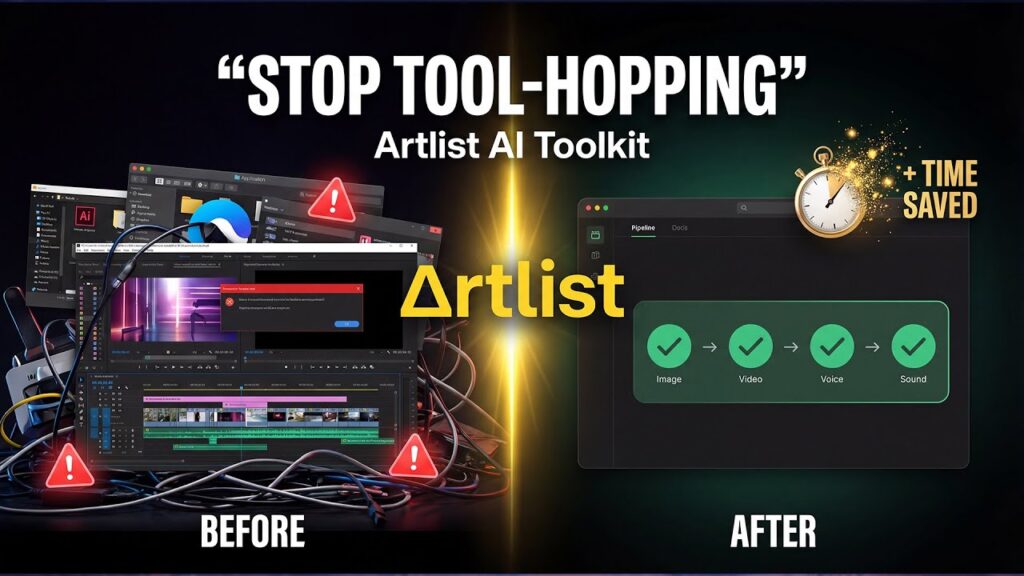
The Artlist AI Toolkit, launched in early 2026, is the clearest articulation of this vision. It brings together over 64 image and video generation models alongside a robust AI voiceover suite — all under a single, unified interface. The goal, as Artlist describes it, is to eliminate the “tab-hopping” that has become a defining feature of the modern AI creative workflow. Instead of juggling Midjourney, Runway, ElevenLabs, and a stock library simultaneously, Artlist wants to be the single environment in which all of that happens.
Whether it fully delivers on that promise is what this review intends to find out.
The Stock Catalog: Still the Foundation
Before diving into AI, it’s worth acknowledging what Artlist built its reputation on — because it’s still a significant part of the platform’s value.
The stock catalog includes over 28,000 music tracks curated from Grammy-level composers and independent artists, with stems available for fine editing. Advanced filtering by BPM, key, mood, duration, and genre makes finding the right track surprisingly fast. The sound effects library runs over 72,000 clips. Stock footage reaches over 1 million clips, some available in up to 8K resolution, alongside 5,000+ video templates and LUTs.
What makes this catalog more than just a numbers game is the licensing model. Every asset on Artlist — music, SFX, footage, templates — is covered under a royalty-free license that applies to social media, advertising, broadcast TV, client work, and monetized YouTube content. There are two main license tiers: Social (for personal social channels) and Pro/Business (for commercial, broadcast, and client use).
Crucially, Artlist’s licenses are “forever” licenses — once you download an asset under a valid subscription, you retain the right to use it in perpetuity, even if you cancel. This is a meaningful distinction compared to platforms like Epidemic Sound, where your rights to use content expire with your subscription.
The Premiere Pro and DaVinci Resolve plugins deserve a special mention here. Rather than downloading assets and manually importing them, editors can search the entire Artlist catalog — including AI-generated outputs — directly from within their editing timeline. It’s the kind of workflow integration that separates a product built for professionals from one built for casual users.
The AI Toolkit: An Organized Platform in a Chaotic Market
The AI landscape has a discovery and fragmentation problem. New models appear weekly, each with its own interface, pricing model, credit system, and quirks. Keeping up — let alone integrating multiple tools into a coherent workflow — is genuinely exhausting.
Artlist’s answer is aggregation with organization. The AI Toolkit doesn’t build every model from scratch. Instead, it licenses and integrates the best models available — from Google, OpenAI, ByteDance, ElevenLabs, xAI, and Artlist’s own proprietary model — and presents them through a single, consistent interface. As of the toolkit’s launch, that means access to over 64 image and video generation models.
The interface clearly explains each model’s strengths, credit costs, and optimal use-cases before you commit to generating anything. That transparency is genuinely helpful, especially for users who are new to AI generation and don’t know whether to reach for Veo 3.1, Kling 3.0, or Sora 2 for a given project.
And critically, the toolkit remembers your session. Images, videos, and voiceovers from the same session live side by side. You can favorite a generated image and convert it directly into a video start frame without leaving the page. The workflow described as going from “text → image → animated video → voiceover within one session” isn’t marketing hyperbole — it’s how the tool actually works.
AI Image Generation: More Models Than You’ll Know What to Do With
The image generation side of the toolkit is, perhaps, where the sheer breadth of Artlist’s model library is most apparent. Users can choose from models including Artlist’s proprietary Artlist Original 1.0, Nano Banana Pro and Nano Banana 2 (Google’s Gemini-based models), Seedream 5.0 (ByteDance), GPT Image 1.5, Imagen 4 Ultra, Grok Imagine, FLUX.2 Pro, Ideogram v3, ImagineArt 1.5, and many more.
Each model has a distinct personality. Real-world testing across the YouTube demos reviewed for this article reveals clear differences:
Nano Banana Pro is the standout performer for complex, high-detail work. In a head-to-head comparison between models, Nano Banana Pro consistently produced the most cinematic, detail-rich results — particularly for complex prompts like a Roman gladiator in the Colosseum. The description from the test: “super, super epic.” It costs more credits (around 400 per generation) but delivers noticeably superior output for demanding use-cases.
Nano Banana 2 (the mid-tier option at around 150 credits for two images) punches significantly above its price point. In comparative testing across four categories — turning complex ideas into visuals, precision text and editing, visualizing complex knowledge, and cinematic/complex scenes — Nano Banana 2 outperformed Seedream 5.0 in three of the four. For an infographic about the global water cycle, Nano Banana 2 produced a clean, accurately labeled, visually rich diagram, while Seedream 5.0 generated a simpler version with a spelling error (“Rundff” instead of “Runoff”) and a misaligned arrow.
Seedream 5.0 (ByteDance’s model, at around 100 credits) is the budget-friendly option and performs best for product-focused visuals and cleaner, simpler compositions. For a luxury perfume brand concept prompt, Seedream produced crisp, product-style results with legible branding (“Lumière Enfant”), while Nano Banana 2 leaned toward lifestyle imagery. Neither is definitively better — they’re optimized for different things.
Artlist Original 1.0 is Artlist’s own proprietary image model, trained on the company’s premium footage catalog. It’s designed specifically for cinema-grade, film-like stills in four style categories: Cinematic, Commercial, Indie, and Professional. This is the model to reach for when you need outputs that look like stills from a high-end feature film or ad campaign.
Beyond model selection, the image tools include: text-to-image, image-to-image (uploading a photo to generate stylistically consistent variants), negative prompts, guidance scale controls, aspect ratio selection, resolution up to 4K, and reference-based consistency (maintaining character likeness across multiple generations). An “auto-prompt” feature can improve user-written prompts automatically, which is genuinely useful for less experienced users.
One demonstrated workflow that particularly impressed: taking a reference image of a character, generating a green-screen isolated version, then creating multiple background variations (a New York City sidewalk, a beach with jungle and ocean, the surface of the Moon with Earth visible) — all while maintaining exact character consistency across every image. This kind of character consistency workflow, which previously required ControlNet setups or highly specialized model training, is now a standard feature in the Artlist interface.
AI Video Generation: Directing, Not Just Generating
If image generation is where Artlist’s breadth is most visible, video generation is where the real creative leap is happening.
The AI Toolkit integrates the following video generation models (among others): Google’s Veo 3.1 and Veo 3.1 Fast, Kling 3.0 and Kling O3 (from Kuaishou), Sora 2 and Sora 2 Pro (OpenAI), Seedance 1.5 Pro and Seedance 2.0 (upcoming, ByteDance), Wan 2.6, and others.
The flagship video model for 2026 appears to be Kling 3.0, and the results justify the attention. As one video creator put it after testing: “Kling 3.0 is a huge step forward. It finally feels like you’re directing a scene, not just generating a clip.”
What makes Kling 3.0 different from earlier video AI models is its support for multi-shot cinematic sequences from a single prompt, up to 15 seconds of continuous storytelling, storyboard-level control over framing and camera movement, strong character and object consistency (especially with image references), native audio including bilingual dialogue with realistic accents, and stable lighting with smooth color transitions.
In practical testing, Kling 3.0 Pro was used to generate a cinematic pirate sequence using a detailed prompt that specified four distinct shots — a medium close-up, a camera pan behind the character, an over-the-shoulder reveal of the ocean, and a wide cinematic shot of a fleet of ships. The model delivered a result that closely matched the described shot progression, with consistent character appearance, atmospheric ocean effects, and an ambient soundscape.
An equally impressive test was a modern commercial scene: a well-dressed realtor in a New York penthouse delivering dialogue directly to camera. Kling 3.0’s lip-sync accuracy and natural pacing in the generated video were noticeably better than what earlier models produced in similar conditions.
Veo 3.1 (Google’s model) excels at detail and lighting, particularly for natural environments and outdoor scenes. It supports audio-video sync and is limited to 8-second clips. Sora 2 Pro adds depth and world-building capability for longer-form narrative generation. Seedance 1.5 Pro delivers precise audio-video sync across diverse artistic styles.
One workflow that elegantly demonstrates the platform’s integration is the “start frame” approach: you generate an image using any image model, then immediately select that image as the start frame for a video generation. The generated image becomes the visual anchor for the video’s opening shot. This image-to-video pipeline, done entirely within Artlist’s single interface, is one of the most compelling arguments for the toolkit’s unified approach.
As a proof of concept, Artlist itself used the toolkit to create a Super Bowl-style commercial — in five days, for a fraction of the traditional cost. The resulting ad, which aired alongside parodies of iconic commercials including Apple’s “1984” and Budweiser’s Clydesdale spots, was made entirely with AI-generated visuals, demonstrating that the gap between “AI video” and “production-quality video” is closing faster than many expected.
AI Voiceover: The Most Underrated Feature on the Platform
Artlist’s voiceover tools are arguably the most underrated part of the AI Toolkit, and they deserve more attention than they typically receive in platform reviews.
The voiceover suite supports over 30 voice models covering 71+ languages, including ElevenLabs v2, ElevenLabs v3 (Alpha), MiniMax Speech 02 HD, Cartesia Sonic 2, and a Cartesia Voice Changer. The range of voice types spans standard narration voices to highly specialized options — character voices with distinctive qualities like “monster” or “elderly male,” accented deliveries, emotional range controls, and multi-language support.
Features include text-to-speech, speech-to-speech (feeding in your own audio to change the voice), and voice cloning from a 10-second audio sample. The voice cloning feature is particularly powerful: record a short sample of any voice (with appropriate permissions), and the platform will generate a custom AI voice that can narrate any script.
Independent testing has rated Artlist’s voiceover tools as “exceptional” for expressiveness and character voice variety. This depth genuinely exceeds most competitors — Shutterstock has no voiceover tools at all, and Adobe Firefly focuses primarily on visual generation.
The integration of voiceover into the broader toolkit is seamless. You can move from generating an image, to animating it as a video, to adding an AI voiceover — all without leaving the interface. For a short-form content creator producing a commercial, a YouTube video intro, or a social media ad, this end-to-end capability within a single session is a substantial time saving.
Licensing and Legal: What You Actually Own
The licensing question is where many AI platforms get murky. Artlist is relatively clear on its position, though there are nuances worth understanding.
For AI-generated content: Artlist assigns full ownership of all AI outputs to the user. The platform’s official terms state that it “assign[s] to you all our right, title, and interest in and to [AI] Output” and does not restrict commercial use. You retain full IP rights to everything you generate, with no royalties owed. This is a genuinely creator-friendly policy that is stated explicitly on Artlist’s license page.
For stock assets: Music, SFX, footage, and templates are covered by the Social or Pro/Business license depending on your plan. Pro licenses cover commercial use, broadcast, client work, advertising, and monetized content. These are “forever” rights — your right to use downloaded assets does not expire when your subscription does.
The important caveat: Artlist’s license does not indemnify users against third-party IP claims. If a generated output inadvertently resembles protected content, the legal risk sits with the user. Competitors like Storyblocks and Shutterstock (at their higher tiers) offer explicit indemnification clauses that cover users in such scenarios, potentially to six or seven figures. Artlist disclaims all warranties in this regard, which is an important distinction for commercial and enterprise users who need legal protection as part of their contract requirements.
Also important: Artlist has confirmed that your prompts, uploads, and outputs are never used to train AI models. Everything you create is private, protected by security standards, and accessible only to you. This is a meaningful privacy assurance that not all AI platforms can credibly offer.
The credit system also interacts with licensing in an important way: credits expire monthly and do not roll over. This means if you don’t use your AI credits in a given month, they’re gone. This has been a source of frustration for some users, and it’s an important consideration when planning your subscription tier.
Pricing: Powerful, But Complex
Artlist’s pricing structure is one of the more complex in the creator tools space, and it’s worth breaking down clearly.
The platform offers several subscription categories:
Stock-only plans range from Music & SFX Social (approximately $9.99/month annually) up to Footage & Templates plans at around $20–32/month annually. These provide unlimited downloads of included asset categories.
AI-only plans (AI Suite) are structured around credit bundles. Starter plans begin at approximately $9.99–$23.99/month annually for 7,500–40,000 credits. Professional plans start at around $89.99/month annually for 180,000 credits and add priority generation speed and up to 5 team seats.
Artlist Max is the all-in-one tier, combining the full stock catalog with AI tools. The base fee starts at approximately $39.99/month annually, with credits purchased on top for AI generation. For most serious creators, Max is the recommended entry point — it removes the need to juggle separate stock and AI subscriptions.
Enterprise plans offer custom licensing, AI access, advanced security, dedicated support, and tailored terms for large organizations and agencies.
The credit system means that generation costs vary by model and output type. As a reference point from real-world usage in the reviewed demos: Nano Banana 2 costs approximately 150 credits for 2 images, Seedream 5.0 costs approximately 100 credits for 2 images, Nano Banana Pro costs approximately 400 credits per generation, and Kling 3.0 Pro costs approximately 1,500 credits per video generation. An 80-credit image from Artlist Original 1.0 sits at the more affordable end for the proprietary model.
For comparison: Epidemic Sound starts at around $9.99/month for creators (audio only, no AI). Storyblocks all-access is roughly $250–300/year with unlimited downloads. Runway’s AI video tools start at around $10–25/month with limited credits. Adobe Firefly is included in Creative Cloud at approximately $9.99/month for the standalone image plan.
Artlist occupies a middle-to-premium pricing tier, but it’s one of the few platforms attempting to deliver all of these capabilities — stock assets, AI image, AI video, and AI voiceover — under a single subscription. The value case is strongest for creators who would otherwise be paying for multiple separate services.
Strengths, Weaknesses, and Who It’s For
What Artlist gets right:
The unified workflow is the platform’s most compelling differentiator. The ability to move from concept to finished assets — image, video, voice, music — without changing tools or re-uploading files is not a minor convenience. It materially changes how fast and how fluidly creative work gets done. The session history, the start-frame pipeline, the in-editor plugin — these are thoughtful, professional-grade features.
The model library is genuinely exceptional. Rather than betting everything on one proprietary model, Artlist has integrated the best-in-class models from across the AI landscape and organized them in a way that’s actually navigable. Kling 3.0 for cinematic narrative. Veo 3.1 for detail and audio sync. Sora 2 Pro for depth. Artlist Original 1.0 for proprietary, film-quality imagery. Nano Banana Pro for detailed precision work. Users get the best of each model rather than being locked into one.
The licensing terms for AI outputs — full ownership, no royalties, no commercial restrictions beyond Artlist’s terms of use — are among the most creator-friendly available. Combined with the platform’s privacy commitment (no model training on your inputs), this is a strong foundation for professional use.
Where it falls short:
The credit system introduces complexity and potential frustration. Monthly credit expiration means unused generation budget is lost, and heavy use of premium models can burn through credits quickly. This creates pressure to plan usage carefully, which runs counter to the platform’s “create without limits” messaging.
The lack of indemnification in the license is a genuine gap for enterprise users or anyone producing content for major brand campaigns. Competitors with explicit indemnity clauses offer a level of legal protection that Artlist currently doesn’t.
The toolkit is not a video editor. It generates assets — excellent, professional-quality assets — but final assembly still happens in Premiere Pro, DaVinci Resolve, or another NLE. This is expected behavior, and Artlist is honest about it, but it means the “one-stop shop” experience has a natural boundary where the toolkit hands off to external software. The Premiere Pro plugin helps bridge this gap, but it’s not the same as a fully integrated editing environment.
Some users report interface slowdowns, generation hiccups, and occasional credit accounting bugs. These seem to be the growing pains of a platform rapidly scaling up its AI capabilities, and recent reports suggest ongoing improvements, but they’re worth noting.
Video generation is currently capped at approximately 15 seconds per clip. For short-form social content, ads, and B-roll, this is sufficient. For long-form narrative work, it requires stitching multiple clips together externally.
Who should use Artlist:
The platform is an ideal fit for independent content creators and YouTubers who need both stock assets and AI generation under one subscription, freelance videographers and motion designers who want fast, professional-quality visual asset generation with flexible licensing, marketing teams producing social and ad content at scale who need a tool that can go from brief to deliverable in a single workflow, and indie filmmakers using AI for storyboarding, concept visualization, and pre-production.
It’s less immediately compelling for audio-first podcasters (who would be better served by Epidemic Sound’s deeper music curation), enterprise legal teams requiring hard indemnification guarantees (where Shutterstock’s enterprise licensing may be more appropriate), and dedicated AI video power users who need advanced editing and compositing features beyond generation (where Runway’s NLE-adjacent tools may be a better fit).
What’s Coming Next: Artlist Studio and the Road Ahead
At a 2026 launch event in New York, Artlist announced its forward roadmap, and the ambition is significant. Artlist Studio, expected in Spring 2026, is described as “the first true AI production platform” — offering end-to-end control over casting, locations, lighting, and camera direction. This would move the platform well beyond asset generation into genuine production management, potentially collapsing the entire pre-production and production workflow into a single environment.
Also in development are an AI Agent and a Smart Canvas feature, designed to introduce smarter assistance and more intuitive creation across every stage of the process. And Seedance 2.0, ByteDance’s next-generation video model, is coming soon to the toolkit.
The pattern is consistent: Artlist continues to add new models as they’re released without requiring users to change how they work. This is a compelling value proposition for creators who want to stay at the cutting edge without the overhead of constantly evaluating and onboarding new tools.
Final Verdict
Artlist in 2026 is not the platform it was in 2016, or even 2022. It has evolved into something genuinely novel: a creative platform that sits at the intersection of premium stock assets and frontier AI generation tools, unified in a workflow that’s been thoughtfully designed for real-world video production.
The AI Toolkit is the most organized, most comprehensive AI generation environment currently available for video creators. The image quality is excellent. The video generation — particularly with Kling 3.0 — has crossed a threshold where it can legitimately be described as “directing a scene.” The voiceover tools are underrated and genuinely powerful. And the licensing terms, whatever their limitations, are clearly written and creator-first.
There are real trade-offs: the credit system is complex, the lack of indemnification matters for some use-cases, and the toolkit is a generator, not an editor. But for the 50 million creators already in Artlist’s orbit — and the many more evaluating it for the first time — the platform represents the most credible attempt yet to build a unified creative operating system for the AI video era.
The old rules of production are breaking. All you need is a big idea — and apparently, now, an Artlist subscription.
Explore Artlist and the AI Toolkit at artlist.io. Access the AI image and video generator directly at toolkit.artlist.io. Read the official AI Toolkit announcement on the Artlist blog. See the 2026 NYC launch event recap, including the Artlist Original 1.0 and Studio announcements, here.