Last updated: July 11, 2026
Last verified: July 11, 2026
TL;DR: Google released LiteRT.js on July 9, 2026 as an open-source JavaScript binding for running compatible .tflite models inside web browsers. It brings the LiteRT C++ runtime to the web through WebAssembly, with XNNPACK for CPU execution, WebGPU for GPU acceleration, and an experimental WebNN path. It is a credible option for teams that already have a suitable model and need local inference, but production adoption depends on model compatibility, download size, browser coverage, hardware variation, and careful testing on the devices users actually own.
What Google released
Google’s July 9 announcement introduced LiteRT.js, the web member of the broader LiteRT on-device inference stack. The initial release includes the @litertjs/core package, documentation, model-testing tools, and browser demos. The runtime is designed for JavaScript and TypeScript applications that need to execute a compatible LiteRT model locally instead of sending every inference request to a hosted API.
That distinction matters. LiteRT.js is not a hosted model service or a new foundation model. It is an execution layer for models packaged in the .tflite format. A developer still needs a model, the preprocessing and post-processing code around it, a way to deliver its files to the browser, and a user interface that turns the output into a useful feature.
How LiteRT.js runs a model in the browser
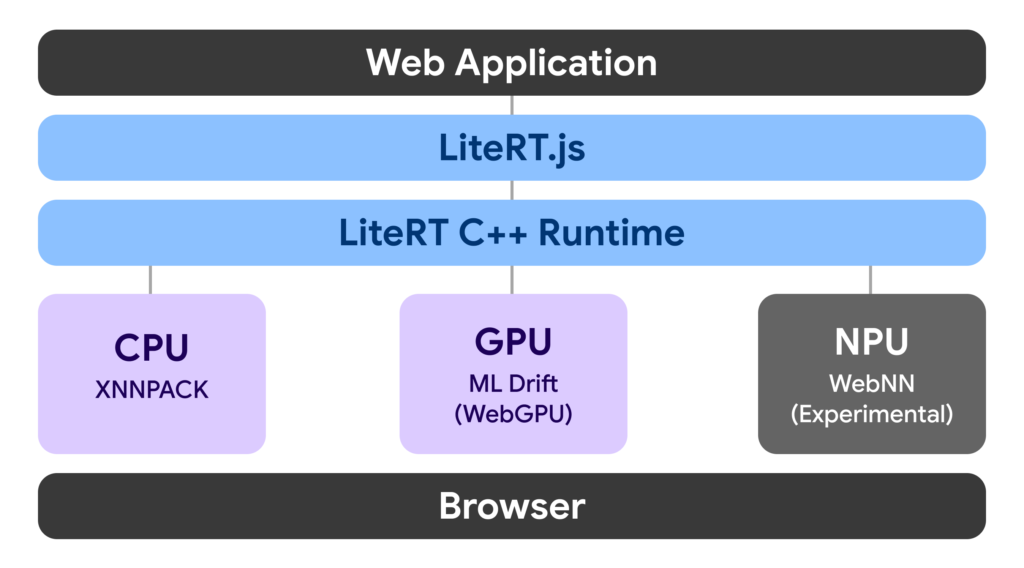
The LiteRT.js overview describes a common runtime beneath the JavaScript API. The browser loads the LiteRT WebAssembly files, fetches or receives a .tflite model, compiles that model for a selected accelerator, and then passes tensors through the model. Google documents three execution paths:
- CPU: the LiteRT runtime uses XNNPACK through WebAssembly. This is the broadest fallback target and does not require a GPU.
- GPU: LiteRT’s ML Drift backend targets WebGPU, which can use an integrated or discrete GPU in a supported browser.
- NPU or system ML framework: the WebNN path can target dedicated neural hardware or an operating-system ML framework, but Google labels this route experimental.
The architecture is important because application code talks to LiteRT.js while the lower-level runtime handles the hardware backend. That does not guarantee that every model works on every accelerator. Operator coverage, tensor types, browser implementation, drivers, and available memory still determine whether a particular model can run successfully.
The practical setup path
Google’s end-to-end guide starts with a PyTorch model, converts it to LiteRT, and then connects it to a browser application. A realistic proof of concept has five parts:
- Choose a compatible model. Existing
.tflitemodels can be used directly when their operations and tensor boundaries are supported. PyTorch models can be converted with LiteRT Torch, but the conversion path has its own export constraints. - Add the runtime. Install
@litertjs/core, then serve the package’s Wasm files from the application or a suitable content-delivery location. - Load and compile. The application initializes LiteRT.js and calls the documented model-loading API with
wasm,webgpu, orwebnnas the requested accelerator. - Build the model pipeline. Image resizing, tokenization, audio preparation, normalization, and output decoding remain application responsibilities. Google also documents TensorFlow.js interoperation for teams that want to keep existing TensorFlow.js preprocessing and post-processing.
- Test before integrating the feature. Google’s model tester can run random inputs on CPU, WebGPU, and WebNN to expose unsupported operations and shape problems before a team writes the full pipeline.
This is a developer workflow, not a no-code deployment path. Teams should plan for model conversion, front-end engineering, performance measurement, caching, error handling, and device-specific QA.
What it can power
Google’s announcement highlights client-side text generation, object detection, and audio processing. Its launch demos also show vector search with EmbeddingGemma, computer-vision pipelines, monocular depth estimation, and image upscaling. These examples illustrate the range of tasks the runtime can execute; they are not a promise that any arbitrary model or workload will fit comfortably in a browser.
The most convincing use cases have a reason to stay close to the user’s device. A camera feature may need immediate feedback. An audio tool may benefit from avoiding a network round trip. A private search or classification feature may be designed so the input remains local. Offline or intermittently connected applications may also value a runtime that can continue after its code and model files have been cached.
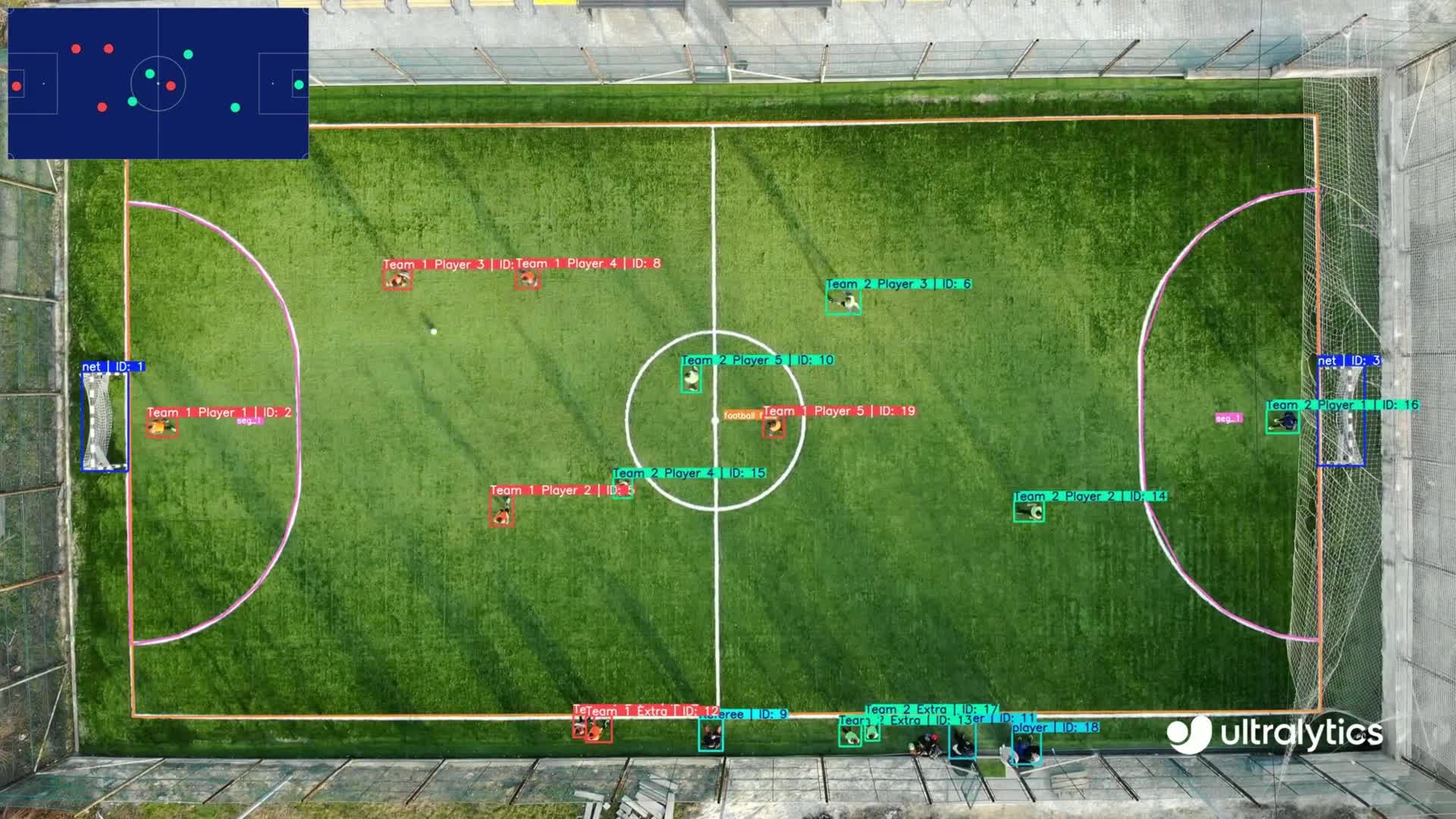
The image above is a frame from the official Google launch demo of YOLO26 export support. It shows a real computer-vision workload with tracked players on a soccer pitch, not a generic AI illustration. The Ultralytics mark is preserved because Google credits Ultralytics for the launch media and performance data.
How to read Google’s benchmark claims
Google reports meaningful gains, but the numbers should be treated as vendor benchmarks rather than universal expectations. In the launch post, Google compares LiteRT.js with ONNX Runtime across five computer-vision and audio models on CPU and WebGPU. The published chart shows normalized results ranging from 1.11× to 3.33× for the tested model-and-backend combinations. Google summarizes the result as performance of up to roughly 3× across CPU and GPU inference.
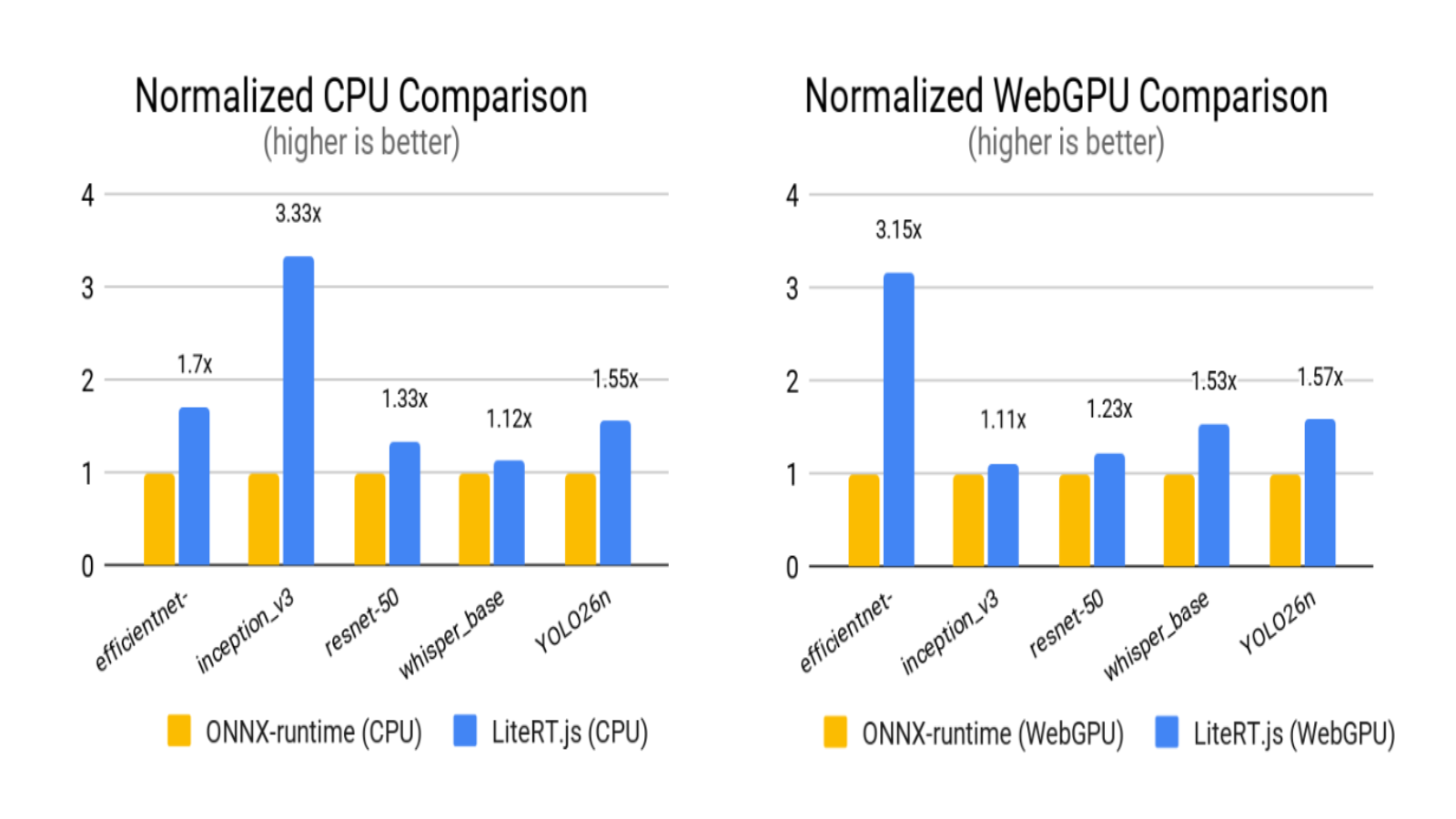
Google also reports 5–60× acceleration when comparing its tested WebGPU or WebNN paths with CPU execution for selected workloads. Both benchmark sections were run in a controlled browser environment on a 2024 Apple MacBook Pro with M4 Apple silicon. Google explicitly warns that results vary with the local GPU, thermal conditions, and browser-driver optimization. These figures are useful evidence that the architecture can accelerate supported models; they are not a substitute for measuring the exact model, browser, and device mix in a production application.
Browser support and current limits
The launch is usable today, but its backends do not have identical reach. Google’s current requirements list WebGPU support in Chrome and Microsoft Edge 113 or later, Safari 17.4 or later, and partial Firefox support from version 121. A system also needs an integrated or discrete GPU that the browser can expose through WebGPU.
WebNN is a different maturity level. Google’s guide says no browser has made it generally available and describes experimental Chromium support that requires browser flags. It also requires JavaScript Promise Integration when LiteRT.js bridges asynchronous WebNN device work. The operating-system path differs as well: Google lists DirectML-capable hardware on Windows, Apple silicon on macOS, and OpenVINO configurations on Linux.
Model compatibility is another gate. Google’s guide identifies several failure classes that teams should test explicitly:
- Unsupported operations: a model graph may contain an operation that the chosen backend does not implement.
- Shape restrictions: the documented PyTorch conversion path does not support dynamic input or output dimensions, including a dynamic batch dimension.
- Tensor-boundary limits: LiteRT.js currently supports
int32andfloat32tensors for model inputs and outputs. - No partial delegation: Google says a model cannot currently split execution so that one section runs on CPU and another on GPU. If an accelerator cannot run the graph, a team may need to select the Wasm backend or modify and reconvert the model.
- Large-model pressure: model artifacts and buffer layouts can exceed browser or Wasm memory limits. Quantization may reduce weight size, but it does not remove every compatibility or memory constraint.
Those constraints make broad device testing essential. A demo on a recent laptop does not prove that the same model will load quickly, stay within memory limits, or maintain interactive latency on older phones and lower-powered computers.
Privacy and cost: what local execution changes
Running inference in the browser can reduce the need to transmit raw inputs to a server. That can be useful for sensitive images, audio, or text, and it can eliminate per-request inference charges for the local portion of a feature. The design still needs an honest data-flow review. Analytics, crash reporting, browser storage, model downloads, and other application services may send or retain data even when model inference itself is local.
LiteRT.js should not be described as having a “free plan.” It is an open-source library in Google’s Apache-2.0-licensed LiteRT repository, not a subscription product with plan tiers. Teams still pay their own engineering, hosting, content-delivery, bandwidth, observability, and support costs. Large model downloads can move expense from inference servers to delivery infrastructure and can create a slow first-run experience for users.
LiteRT.js versus TensorFlow.js
Google positions LiteRT.js as an evolution for executing .tflite models on the web, not as a blanket replacement for every TensorFlow.js application. LiteRT.js brings the native LiteRT runtime and its hardware backends through Wasm. TensorFlow.js remains useful for browser-side tensor operations and has an established JavaScript ecosystem.
The official migration guidance supports a hybrid path. Developers can install the LiteRT.js TensorFlow.js interoperation package, keep TensorFlow.js preprocessing and post-processing, and replace the model-execution step. Google warns that converted models may require input reordering, transposition, or renamed tensor inputs. Migration should therefore be treated as a measured engineering project, not a package swap that is guaranteed to preserve behavior.
Who should test it now
LiteRT.js is a strong prototype candidate for teams that already control a compatible model and can define a real benefit from local execution: lower interaction latency, reduced server inference, offline behavior, or keeping a model input on the device. It is especially relevant when the same LiteRT model is being considered across mobile, desktop, and web surfaces.
Teams should wait or run a narrower experiment when they depend on very large models, dynamic shapes, unsupported operations, consistent NPU access, or identical performance across a wide browser and device fleet. A cloud endpoint may remain simpler when model updates must be instant, hardware variability is unacceptable, or the model is too large to deliver efficiently to users.
A sensible evaluation checklist
- Confirm that the exact model converts and loads without unsupported operators.
- Measure model download size, first-run time, warm inference latency, and memory use.
- Test Wasm and WebGPU separately on representative low-, mid-, and high-end devices.
- Treat WebNN as experimental and provide a supported path when it is unavailable.
- Verify output quality after conversion and quantization; runtime speed alone is not a successful result.
- Review the complete application data flow instead of assuming “local inference” means “no data leaves the browser.”
- Design a clear error or fallback experience for model-loading and accelerator failures.
Verdict
LiteRT.js makes Google’s on-device runtime materially more accessible to web developers. The combination of a JavaScript API, Wasm CPU execution, WebGPU acceleration, TensorFlow.js interoperation, conversion tools, and official demos gives teams enough to build a serious proof of concept. The launch is most compelling for bounded, compatible models where local execution has a concrete product advantage.
The limits are equally important: WebNN remains experimental, browser and hardware coverage varies, model operators and tensor boundaries can block deployment, and Google’s strongest performance numbers come from its own controlled benchmarks. The right next step is not an automatic migration. It is a device-tested prototype using the actual model and workflow a product intends to ship.
FAQ
What is LiteRT.js?
LiteRT.js is Google’s open-source JavaScript binding for running compatible LiteRT .tflite models inside web browsers.
Does LiteRT.js require an internet connection?
The browser needs a way to receive the application, Wasm runtime, and model files. Once those assets are available locally, inference can run on the device, but offline behavior depends on how the application caches and serves its assets.
Does LiteRT.js work in every browser?
No. CPU execution through Wasm has the broadest path, WebGPU requires a supported browser and GPU, and WebNN is still experimental. Model compatibility can also vary by backend.
Is LiteRT.js free?
LiteRT is open source under the Apache 2.0 license. LiteRT.js is a library, not a hosted service plan. Development, model delivery, hosting, bandwidth, and support still carry costs.
Official sources
- Google Developers Blog: LiteRT.js launch announcement
- Google AI Edge: LiteRT for Web overview
- Google AI Edge: LiteRT.js get-started guide and platform requirements
- Google AI Edge LiteRT repository
Explore more on Kingy AI
The Kingy Brief
Get The Kingy Brief.
AI changes, original tests and one practical thing to try. Fridays at 09:00 Vancouver time.
Free · Double opt-in · Unsubscribe anytime
Sign up for The Kingy Brief on Beehiiv.
Signup help and newsletter schedule
Signup form provided by Beehiiv. After submitting, check your inbox for "Confirm your subscription to The Kingy Brief" and open its confirmation link. Check Spam or Promotions if you cannot find it.
Fridays at 09:00 Vancouver time: source-checked AI changes, original tests and one practical thing to try. The weekly restart begins October 9, 2026. We skip a week when there is not enough verified material. Free. Unsubscribe anytime.