Last updated: 2026-07-10
Last verified: 2026-07-10
TL;DR: GitHub’s June 2026 Copilot roundup for Visual Studio Code brings browser tools for agents to general availability, improves parallel-session organization, exposes session and subagent costs, adds model-provider discovery, and makes Autopilot more independent. The release is significant because it turns Copilot from a chat panel into a managed build-test-review environment. Availability still depends on the VS Code version, Copilot plan, selected model, and organization policy.
What the June roundup covers
GitHub published its Copilot in Visual Studio Code roundup on July 8, 2026. It covers VS Code versions 1.123 through 1.127, shipped throughout June and early July. It does not cover every feature in the newer 1.128 release.
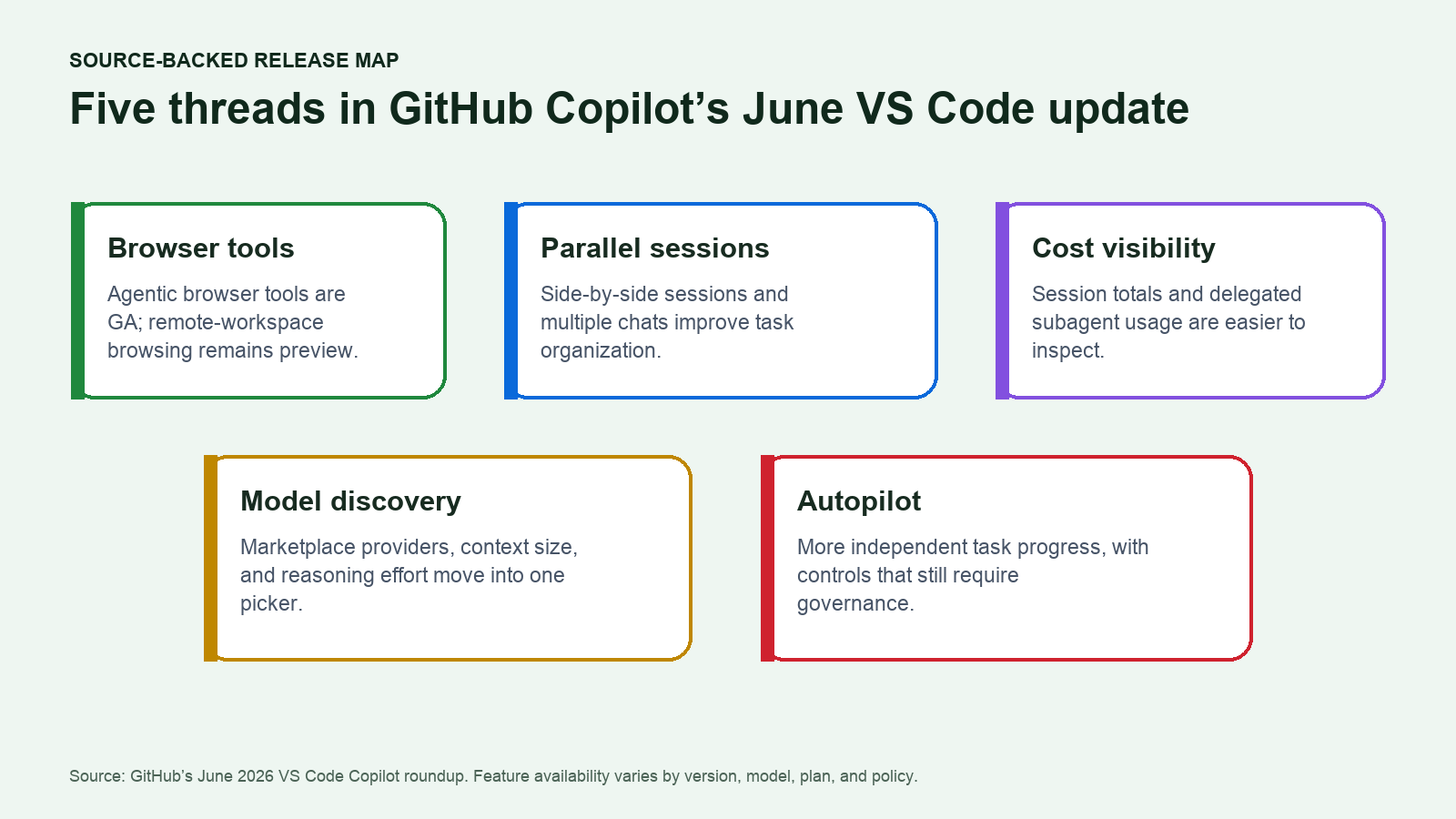
The common thread is workflow management. Agents can validate web applications inside the editor, developers can organize several sessions at once, usage is more visible, and model discovery is moving into a single picker. Those changes matter more together than any one feature does alone.
Browser tools for agents are generally available
VS Code’s integrated browser can now give agents tools to open pages, inspect content and console errors, select elements, type, navigate, capture screenshots, and validate a web application. GitHub says these browser tools are generally available and enabled by default, although an organization can manage them through policy.
The browser itself also gained favorites, history, search, and per-site permissions for capabilities such as camera, microphone, location, clipboard, and connected devices. A developer can add a full-page or area screenshot to chat when visual context is more useful than a text description.
One boundary remains important: proxying integrated-browser traffic through a remote workspace is still in public preview. Teams using remote environments should test network routing, allowed domains, and authentication separately rather than treating all browser behavior as generally available.
Parallel sessions are becoming easier to manage
The Agents window can keep separate agent sessions visible at the same time, group related sessions, and reorder them with drag and drop. Multi-chat sessions let a developer split related work into focused conversations instead of mixing implementation, review, tests, and documentation into one thread.
This supports a more deliberate workflow. A developer can keep a feature implementation in one session, investigate a failing test in another, and review documentation in a third. The advantage is separation of context; the risk is starting more work than the developer can meaningfully supervise.
Cost visibility now reaches the full session
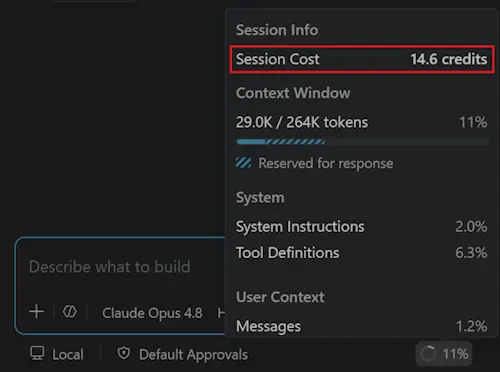
GitHub added clearer usage reporting across an entire chat, additional spend in the Copilot status dashboard, and individual subagent sections. In VS Code 1.127, a developer can hover over a delegated subagent section to see the AI Credits used by that work.
That visibility is useful because agentic tasks can involve several model calls, tools, and delegated steps. A cheap initial prompt can become an expensive session if the agent repeatedly browses, edits, tests, and delegates. Teams can now connect cost to the part of the workflow that generated it instead of seeing only an opaque total later.
Model discovery moves into the editor
The Language Models editor can open filtered Visual Studio Marketplace results for extensions that provide models. The unified model picker also exposes controls such as context size and reasoning effort where a provider supports them.
GitHub says compatible Anthropic and OpenAI models can use context windows up to one million tokens. That can help with large repositories or long conversations, but a larger window does not remove the need to choose focused files and instructions. More context can increase both latency and AI-credit consumption.
The built-in Ollama provider is also being replaced by an official Ollama extension, which GitHub says will allow faster model and capability updates.
Autopilot is more independent
Autopilot is the permission level that lets an agent continue without asking for approval at every step. The June updates improve its ability to decide when a task is complete and to continue through intermediate steps with less steering.
That can be useful for long, well-specified tasks, but it changes the supervision model. Autopilot should be evaluated with bounded repository permissions, clear success criteria, reliable tests, and a review of every resulting change. Faster continuation is not evidence that an agent made the right product or security decision.
Additional workflow and governance improvements
- Session sync and chronicle: synchronize chat sessions to a GitHub account and search coding history across machines and workspaces.
- Gutter feedback: leave comments directly on an agent’s changes from the editor gutter.
- Pull-request creation: generate a pull-request title and description from session context.
- Managed settings: distribute Copilot configuration through device management or a managed JSON file.
- MCP OAuth storage: preregister OAuth client IDs and keep client secrets in VS Code secret storage.
- Extension update delay: wait two hours before automatically installing newly published extension versions.
- Workspace Trust: browse a new folder before deciding whether to trust it.
Practical use cases
- Closed-loop web validation: ask an agent to implement a UI change, open the application, inspect errors, and capture evidence inside VS Code.
- Parallel implementation and review: keep a feature session separate from tests, documentation, or a review pass.
- Cost-aware delegation: compare the AI Credits used by a main session and its subagents before standardizing the workflow.
- Large-repository analysis: use a compatible large-context model for cross-cutting review while monitoring latency and cost.
- Enterprise rollout: govern browser access, models, settings, extension timing, and OAuth credentials across managed devices.
Pricing and plan differences
GitHub’s current individual plan page lists Copilot Free at $0 with limited chat and agent usage. Pro is $10 per month with $15 in monthly total GitHub AI Credits, Pro+ is $39 with $70 in credits, and Max is $100 with $200 in credits. Additional usage can require a budget after included credits are exhausted.
Those prices do not mean every feature in the roundup appears on every account. Browser policy, model availability, context size, Autopilot, preview features, and managed settings can depend on the VS Code build, Copilot tier, compatible model, and organization configuration. Business and Enterprise customers use organization licensing and pooled controls rather than the individual plan table.
GitHub’s billing documentation defines one GitHub AI Credit as $0.01 and explains that model and token use drive consumption. That makes the new session-cost views operationally useful rather than cosmetic.
How to test the update
- Update to a VS Code build that contains the feature being evaluated. The June roundup spans 1.123 through 1.127, while later builds can add or change behavior.
- Sign in to GitHub Copilot and check which browser, agent, model, and Autopilot controls are actually available for the account.
- Use a small web project with automated tests and a local preview environment.
- Ask an agent to make one visible change, validate it in the integrated browser, and capture a screenshot or console result.
- Run implementation, testing, and review as separate sessions, then judge whether the organization controls reduce confusion or merely create more concurrent work.
- Record session and subagent AI Credits, elapsed time, defects found in review, and manual corrections.
- For managed teams, verify browser-domain policy, MCP credentials, update timing, and Workspace Trust before broad rollout.
Comparison snapshot
| Workflow | New VS Code advantage | What still needs review |
|---|---|---|
| Web implementation | Agent browser tools can inspect, interact with, and capture the application in the editor | Visual correctness, accessibility, security, and unsupported browser states |
| Parallel agent work | Groups, side-by-side sessions, and multiple chats improve organization | Conflicting edits, duplicated work, and supervision capacity |
| Model selection | Marketplace discovery and model controls are available from one editor surface | Provider trust, model fit, context cost, and organization policy |
| Cost management | Session, dashboard, and subagent credit visibility | Whether the extra cost produces a better reviewed result |
Risks and limitations
- Feature availability varies across VS Code versions and can roll out gradually.
- Remote-workspace browser proxying remains a public preview.
- Autopilot can continue through more steps with less oversight, increasing the importance of permissions and tests.
- Parallel sessions can produce conflicting changes or overwhelm the developer responsible for review.
- Long sessions, large contexts, higher-cost models, and delegated subagents can consume more AI Credits.
- Browser tools can reach external sites and request device permissions, so enterprise network and data rules still apply.
Verdict
The June release is worth testing for teams that already use Copilot as part of daily development. Browser validation, session organization, and cost visibility address real friction in agentic coding. The best pilot is a measured build-test-review loop with conservative permissions and explicit cost tracking. Autopilot and large-context models should earn broader access through evidence, not be enabled simply because the controls are available.
FAQ
Which VS Code releases are included?
GitHub’s roundup covers versions 1.123 through 1.127, shipped throughout June and early July 2026.
Are browser tools still in preview?
The agent browser tools are generally available. Proxying browser traffic through a remote workspace remains in public preview.
Is GitHub Copilot free in VS Code?
GitHub offers a Free plan with limited chat and agent usage. Paid tiers include more features and AI Credits; specific capabilities can also depend on the model and organization policy.
Why does subagent cost visibility matter?
A delegated task can use additional model calls and tokens. Showing the credits for each subagent helps a developer see which part of a session generated the cost.
Official sources
- GitHub changelog: Copilot in Visual Studio Code, June 2026 releases
- Visual Studio Code 1.127 release notes
- GitHub Copilot plans and pricing
- GitHub Copilot billing
- GitHub Docs: what is GitHub Copilot?
Related Kingy AI coverage
The Kingy Brief
Get The Kingy Brief.
AI changes, original tests and one practical thing to try. Fridays at 09:00 Vancouver time.
Free · Double opt-in · Unsubscribe anytime
Sign up for The Kingy Brief on Beehiiv.
Signup help and newsletter schedule
Signup form provided by Beehiiv. After submitting, check your inbox for "Confirm your subscription to The Kingy Brief" and open its confirmation link. Check Spam or Promotions if you cannot find it.
Fridays at 09:00 Vancouver time: source-checked AI changes, original tests and one practical thing to try. The weekly restart begins October 9, 2026. We skip a week when there is not enough verified material. Free. Unsubscribe anytime.