The phrase “AI agent” is now attached to almost everything — chatbots, macros, Zapier flows, browser extensions, and full autonomous systems. That makes it harder, not easier, to decide what to build, what to buy, and what to ignore.
Continue with Kingy’s AI Agents hub to connect this definition with workflows, security boundaries, product records and live changes.
If you are moving from definition to deployment, start with Kingy’s guide to adopting AI agents safely so the workflow has permissions, review gates, QA, and cost controls before it touches real work.
This guide is written for the people who actually have to make those calls: founders shipping product, developers wiring up tools, marketers running campaigns, creators producing content, and operators trying to keep a business running. The goal is simple — give you a clear, honest mental model of what an AI agent is, when it works, when it doesn’t, and how to evaluate one before you commit budget or engineering hours to it.
It also pairs with the Kingy AI Agent Directory & Readiness Scorecard, so by the end you’ll know exactly how to score a workflow and find an agent that fits.

1. What is an AI agent?
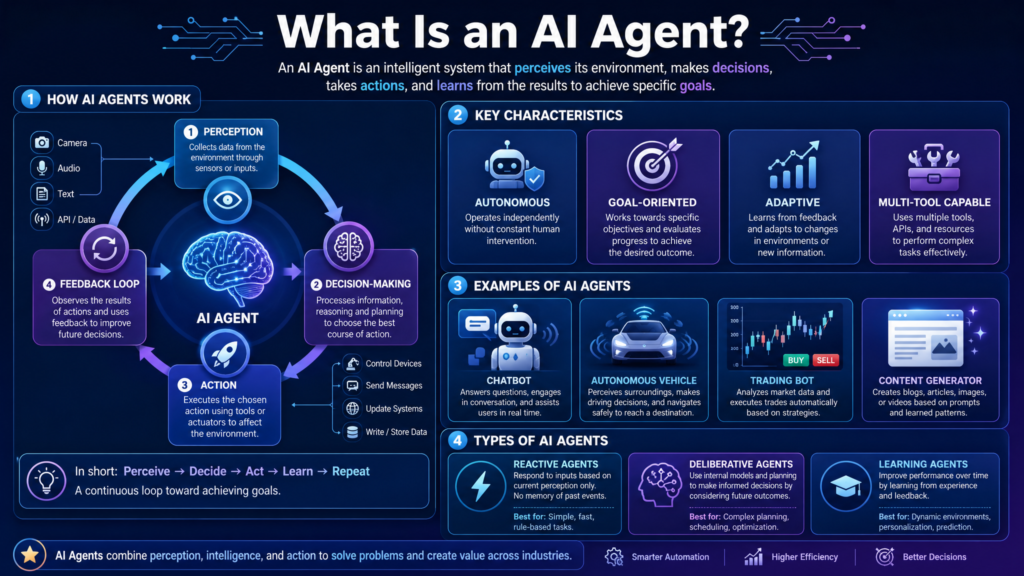
An AI agent is a software system that pursues a goal by reasoning, choosing tools, taking actions, observing the result, and adjusting until the task is done or it hits a limit it can’t cross.
The cleanest working definition comes from Anthropic, which draws the line between workflows — “orchestrated through predefined code paths” — and agents, which “dynamically direct their own processes and tool usage.” That distinction is repeated across the industry: a system isn’t really an agent unless it can decide mid-task to do something different than originally planned, as Firecrawl summarizes in its 2026 overview.
In practice, an agent has three components a chatbot does not:
- Planning — it breaks a goal into steps.
- Memory — it carries context across those steps.
- Tool use — it calls APIs, browsers, databases, code, or other agents.
A typical agent runs a loop sometimes called ReAct — think, act, observe, repeat — until it has an answer, performs an action, or asks a human for approval. The loop is what makes it an agent. Without that feedback step, you have a generator or a script, not an agent.
Importantly, agents are not magic. They inherit every weakness of the underlying model: hallucination, stale training data, brittle reasoning under pressure, and overconfidence. The art of building or buying agents is matching them to workflows where those weaknesses are tolerable.
2. AI agent vs chatbot
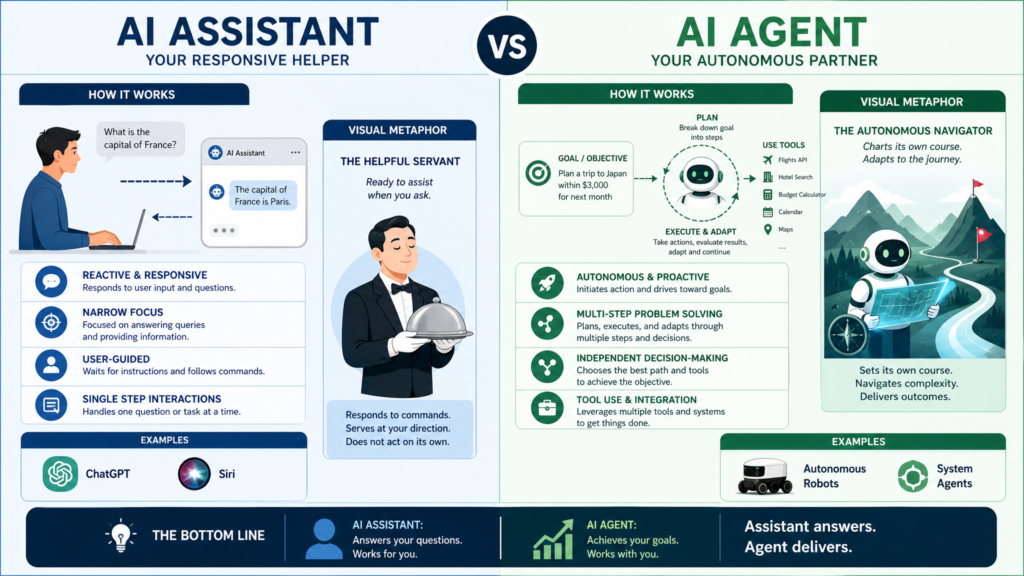
A chatbot answers. An agent acts.
A chatbot is built to hold a conversation — usually rule-based or LLM-driven — and respond inside a defined scope. Most production chatbots handle FAQs, intake forms, ID verification, or first-line support, and they hand off to a human when the request goes off-script. Cognigy’s breakdown puts it well: chatbots are “rule-based, reactive tools that follow scripts,” while AI agents are “intelligent, proactive systems that can reason, adapt, and take independent action.”
The difference matters because the failure modes are different.
A chatbot fails by being unhelpful — it doesn’t understand the question, or the question is outside its tree. The cost of failure is mostly frustration. An agent fails differently: it can take a wrong action confidently, send the wrong email, change the wrong file, or commit to the wrong decision. As DigitalOcean notes, agents can “interpret nuanced instructions, break down complex tasks into smaller steps, and execute actions” — which is the upside, but it’s also the risk surface.
A practical rule: if the task ends when the user gets information, a chatbot is usually enough. If the task ends only when something in the world has changed — a record updated, a message sent, a PR opened — you need an agent.
3. AI agent vs automation
Automation runs the same path every time. An agent decides the path.
Classic automation — RPA, Zapier, n8n, cron jobs, Make scenarios — is deterministic. You wire trigger → action → action, and if the input shape changes, it breaks. That predictability is a feature: you know exactly what will happen and you can audit it. As the aimultiple open-source agent survey puts it, agents introduce “memory management, tool orchestration, error handling, and control loops which increase latency and cost.” Sometimes that overhead is worth it. Often it isn’t.
A good way to think about it:
- Automation is best for repeatable, structured, low-variance tasks: “every Monday at 9am, pull this sheet and email it.”
- Agents are best for tasks where you can’t enumerate every branch upfront — research, triage, drafting, debugging, navigating a UI that keeps changing.
If a Zapier flow would do the job in five steps, build the Zapier flow. The moment you’re writing thirty “if/else” branches to handle messy inputs, an agent starts to look reasonable. The honest answer for most teams is a hybrid: deterministic automation for the predictable parts, an agent for the judgment-heavy middle, and a human for sign-off at the end.
4. AI agent vs AI assistant
The line between agent and assistant is fuzzier, and most vendors use the words interchangeably. But there’s a useful distinction.
An AI assistant is designed to help a human do their work better. It drafts, summarizes, suggests, retrieves, and explains — but the human stays in the driver’s seat. GitHub Copilot suggesting code, Microsoft Copilot drafting an email, or an AI assistant pulling up documentation are all examples. Microsoft’s own framing describes Copilot as a “companion” that “responds to prompts” — collaboration, not autonomy.
An AI agent is designed to do the work. Once given a goal, it plans, acts, and only loops the human in for approval or when stuck.
Moveworks draws a similar distinction, describing assistants as “context-aware” collaborators and agents as “task-focused” systems that follow instructions and “take proactive steps when needed.”
The practical implication: assistants are safer to roll out broadly because the human still owns the outcome. Agents need more guardrails because they own a piece of the outcome themselves. Pick based on who you want holding the steering wheel.
5. Common types of AI agents
The category is broad, but a handful of agent types dominate real-world usage. Firecrawl’s 2026 production survey identified four that dominate deployments, and the rest tend to be variations on the same patterns.
- Coding agents — Tools like Claude Code, Cursor, GitHub Copilot, and Devin write features, fix bugs, generate tests, and open PRs. The AI Builder Club’s 5 levels framework is useful here: level 1 is a one-shot reviewer, level 5 is an autonomous engineer that triages issues and ships fixes.
- Research agents — Plan searches, read sources, and produce cited reports. OpenAI’s Deep Research and Google’s Gemini Deep Research are the best-known examples.
- Browser agents — Control a web browser to fill forms, click, extract data, and complete tasks across sites. Browser Use, Skyvern, Stagehand, and Firecrawl’s Browser Sandbox are popular in this space, per Firecrawl’s browser agent roundup.
- Sales & GTM agents — Lead enrichment, prospect research, outbound drafting, CRM hygiene. Clay and Apollo are common references.
- Customer support agents — Multi-step issue resolution, contextual handoffs, knowledge-base reasoning. Deployed at scale by airlines, telcos, and retailers.
- Marketing & content agents — Briefing, drafting, repurposing, asset generation, campaign QA.
- Creative production agents — Image, video, audio, and design pipelines that handle storyboarding, generation, and editing steps.
- Business operations agents — Document processing, finance reconciliation, HR onboarding, internal ticketing.
- Workflow automation agents — Sit on top of existing tools, replacing brittle automations with goal-based execution.
- Data analysis agents — Query, transform, and explain structured data without requiring SQL skills from the user.
Most production deployments are narrow specialists, not general “do anything” agents. Narrow agents are easier to evaluate, easier to fix, and easier to trust.
6. Best workflows for AI agents
The best agent workflows share a recognizable shape. They are clear, repeatable, valuable, supported by accessible context, tolerant of small mistakes, and safe to run with human approval at key moments.
Workflows that tend to work well:
- Repeat tasks with messy inputs — triaging inbound emails, classifying support tickets, summarizing long documents, drafting first-pass responses.
- Multi-source research — pulling competitor pricing, reading dispersed documentation, building briefs.
- Browser-based busywork without an API — filling forms on legacy portals, scraping data from sites that block traditional scrapers, navigating internal tools.
- Code maintenance — generating tests, fixing flaky tests, refactoring small chunks, opening review-ready PRs.
- Lead enrichment and CRM hygiene — pulling firmographic data, matching records, drafting outreach.
- Content operations — repurposing long-form content into shorter formats, transcribing and tagging media, generating variants for testing.
The common thread is that the task is goal-shaped, not step-shaped. You can describe the outcome clearly, examples of good output exist, and a mistake won’t take the business down. The Anthropic guidance on agents and aimultiple’s open-source survey converge here: use an agent when “the steps cannot be easily predicted or hardcoded” and avoid one when “task logic is static or predictable.”
If the workflow already has a clean API and a deterministic flow, automate it. If it has messy inputs, ambiguous steps, and a human-judgment element, an agent is a better fit.
7. Workflows that are not ready for AI agents
Not every workflow is agent-ready, and pretending otherwise is the fastest way to burn budget. The most common bad fits:
- Irreversible, high-stakes actions without review — wiring money, deleting customer data, publishing to production, making legally binding commitments. These need human approval, not autonomy.
- Strict compliance environments — anything where an auditable, deterministic path matters more than flexibility. Use rules-based systems and let an agent assist a human, not replace them.
- Tasks the team can’t describe in a sentence — if you can’t write the goal clearly, the agent won’t be able to pursue it.
- Tasks with no source of truth — if your data is scattered across people’s heads, an agent will hallucinate the gaps.
- Latency-critical interactions — real-time, sub-second workflows are usually better served by deterministic code. Agent loops are not fast.
- Tasks where the cost of being subtly wrong is high — medical, legal, financial advice without a qualified human reviewing the output.
- One-off tasks — the overhead of building and validating an agent isn’t worth it if the task happens twice a year.
A useful gut check: if you wouldn’t trust a new hire to do this task unsupervised on day one, you shouldn’t trust an agent to do it unsupervised either. Start with assist-only, add autonomy slowly, and only on tasks where the worst-case outcome is recoverable.
8. Why human approval matters
Human-in-the-loop is not a sign that agents are weak. It is what makes deployment defensible.
As the CAMEL-AI HITL review explains, HITL frameworks “integrate human expertise at key decision points to improve efficiency, accuracy, and accountability,” letting the agent handle routine work while escalating uncertain or critical decisions. That balance is the difference between an agent you can pilot in production and a demo that lives forever in a sandbox.
The clearest places to insert a human checkpoint:
- Before sending external messages — outbound emails, customer replies, social posts.
- Before money moves — payments, refunds, vendor commitments.
- Before code merges — PR approval, deployment gates.
- Before customer-facing changes — content publishing, account changes, pricing updates.
- Before working with sensitive data — PII, health, financial, security.
Approval doesn’t have to be a bottleneck. A well-designed agent batches its proposals, explains its reasoning, and surfaces only what genuinely needs a human eye. Over time, as confidence grows on specific actions, you can graduate them from “ask first” to “notify after” to “run autonomously.” Treat autonomy as something the agent earns, not a default.
9. How to evaluate an AI agent
Most agent evaluation goes wrong because people grade the demo. Real evaluation looks at the workflow, the team, the data, and the risk together.
A useful checklist:
- Workflow fit — Is the task clear, repeatable, and valuable? Are examples of good outputs available?
- Context access — Can the agent actually reach the data, files, and systems it needs? A great model with no context is useless.
- Tool quality — Does it integrate cleanly with browser, API, email, calendar, CRM, code editor, files? Or is every integration a custom build?
- Autonomy level — Does the vendor describe what the agent does on its own vs. with approval? Be skeptical of “fully autonomous” marketing copy.
- Failure behavior — What happens when it gets stuck? Does it loop forever, ask for help, or quietly fail?
- Observability — Can you see the agent’s reasoning, the tools it called, and the outputs it produced? Black-box agents are operational debt.
- Permissions and safety — Can you run it with least-privilege access? Are destructive actions gated?
- Proof — Real demos, real customer references, real evaluation runs. Be careful with cherry-picked benchmark numbers; the Firecrawl writeup is blunt that “most agent failures trace back to what the agent can’t see, not what the model can’t reason about.”
- Cost shape — Per-task, per-token, per-seat, per-action? Model the worst-case month.
- Exit ramp — Can you turn it off without breaking the workflow?
A short pilot on a single workflow, with clear success metrics, beats a long sales cycle. If a vendor can’t articulate what success looks like in 30 days, you don’t have enough information to buy.
10. How to use the Kingy AI Agent Readiness Scorecard
The Kingy AI Agent Readiness Scorecard was built to take the guesswork out of “should we put an agent on this?”
It scores a workflow across six practical dimensions:
- Task clarity — Can you describe it in a sentence? Are outputs and success criteria definable?
- Repeatability and volume — How often does this happen, and would automating it save real time?
- Context and data readiness — Does the agent have access to the source of truth, examples, and prior work?
- Tool access and integrations — Can the agent reach the tools the task requires, safely?
- Risk and human approval — How costly is a mistake, and can a human review before final action?
- Business value — Is this worth piloting in the next 30 days?
How to use it well:
- Score a specific workflow, not a vague aspiration. “Triage inbound sales emails for the founder” is scorable. “Sales agent” is not.
- Be honest about context and data. This is where most pilots die.
- If risk is high and approval is hard, that’s not a failed score — it’s a sign to keep a human in the loop, not to skip the agent entirely.
- Use the score to write a one-paragraph pilot brief: what the agent will do, what it won’t touch, who approves, and what success looks like in 30 days.
The scorecard is meant to save you from spending real money on a workflow that wasn’t ready in the first place.
11. How to browse the Kingy AI Agent Directory
Once you know what kind of workflow you want to automate, the Kingy AI Agent Directory helps you narrow the search without falling into vendor marketing.
The directory is built to be filterable by:
- Category — coding, research, sales, marketing, support, ops, data, creative, browser, workflow.
- Audience — founder, developer, marketer, creator, sales, support, ops, researcher, exec, individual, mixed team.
- Autonomy level — how much the agent does on its own.
- Pricing — so you can sort by what’s plausibly in budget.
- Review status — verified entries vs. items still marked “Needs verification.”
A few suggested moves:
- Start with the workflow, not the brand. Filter by category and audience first.
- Compare autonomy levels directly. A “high-autonomy” agent is not better — it’s higher-risk and higher-reward.
- Look for entries with real demos, customer references, and dated review notes.
- Pair the directory with the scorecard. The directory tells you what exists; the scorecard tells you whether your workflow is ready for any of it.
The current directory is intentionally cautious about unverified claims — unknown facts are marked “Needs verification” instead of being smoothed over. That’s a feature when you’re making buying decisions.
12. Submit your AI agent to Kingy AI
If you’re building an AI agent and want it in front of an AI-native audience, Kingy AI supports product discovery through hands-on reviews, walkthroughs, sponsored videos, comparison content, and creator-led coverage.
Use the Submit an Agent form on the directory page to:
- Submit a product for possible directory inclusion.
- Request a hands-on Kingy AI review or product walkthrough.
- Explore sponsored video opportunities for launches, updates, and education campaigns.
For factual listings, Kingy AI works from verified product pages, official docs, pricing pages, and dated review notes. If you want to be listed, the easiest path is to make those sources easy to find and link.
Closing thought
The interesting question is no longer “is AI real?” It’s “which workflows in your business are actually ready for an agent right now?” Most teams have at least a few. Most teams also have workflows where adding an agent would be expensive, slow, and risky. The difference between a team that gets value from agents and a team that doesn’t is usually the willingness to be honest about which is which.
Score the workflow first. Pick the agent second. Keep a human in the loop until the agent has earned its way out of it.
The Kingy Brief
Get future Kingy Brief editions.
Source-checked AI changes, original tests and one practical thing to try.
Free · Choose your subjects · Double opt-in · Unsubscribe anytime
Regular sending is paused; no restart date is set.