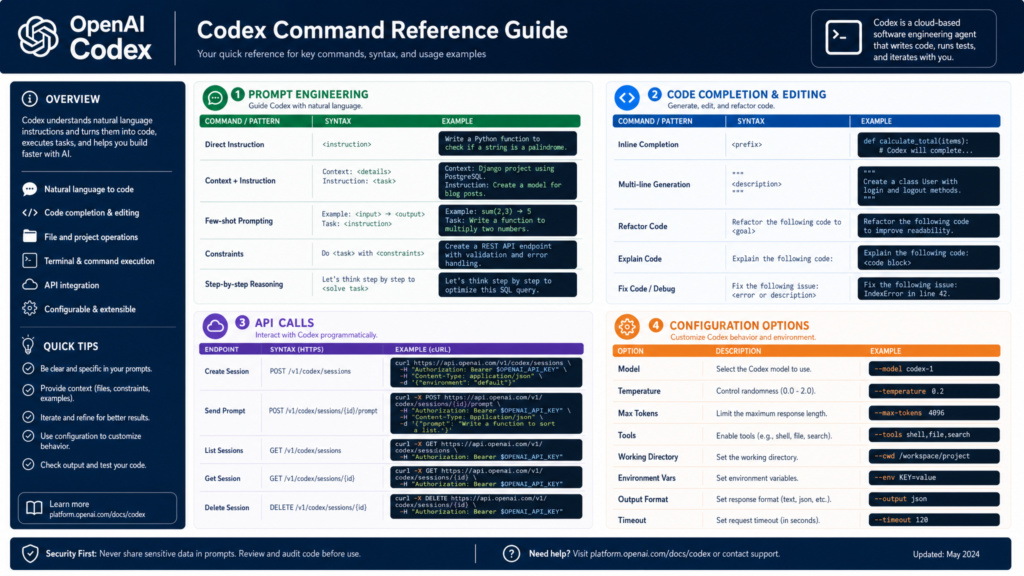
1. Install, launch, and update
| Command | What it does |
|---|---|
npm i -g @openai/codex | Installs Codex CLI globally. |
codex | Launches the interactive Codex CLI/TUI. |
npm i -g @openai/codex@latest | Updates Codex CLI to the latest published version. |
OpenAI’s CLI docs say Codex runs on macOS, Windows, and Linux, and that first launch prompts you to sign in.
2. Documented desktop slash commands
Type / in the ChatGPT desktop app to see the commands available in your current environment. OpenAI notes that availability varies by environment and access.
| Slash command | Documented purpose |
|---|---|
/approve | Approve one retry of a recent automatic-review denial, when automatic review is active. |
/cloud | Run the chat in the cloud, when available. |
/cloud-environment | Choose the cloud environment for the chat. |
/compact | Compact the current chat’s context. |
/fast | Turn a catalog-provided Fast service tier on or off, when available. |
/feedback | Open the feedback dialog. |
/fork | Copy a local chat into a new local chat or worktree. |
/goal | Set a persistent goal; use /plan first when the outcome needs shaping. |
/ide-context | Turn shared IDE context on or off. |
/init | Generate an AGENTS.md scaffold for the current project. |
/local | Run the chat in the selected local project. |
/mcp | Open MCP status to view connected servers. |
/memories | Configure memory behavior, when available. |
/model | Choose the model for the current chat. |
/pet | Wake or tuck away the desktop pet. |
/personality | Choose a response personality, when supported. |
/plan | Toggle plan mode for multi-step planning. |
/project | Choose a project for new chats. |
/reasoning | Choose the reasoning effort for the current chat. |
/review | Start code review mode. |
/side | Start a temporary side chat without interrupting the main chat. |
/status | Show chat ID, context usage, and rate limits. |
/task | Start a chat without a project. |
/worktree | Run the chat in a new Git worktree. |
This table follows the public desktop-app reference captured on August 29, 2026. It intentionally excludes internal, debug-build, legacy, and source-only commands that are not in that public reference. The Codex CLI has a separate top-level command surface; verify it with codex --help for the installed version.
3. High-value slash command patterns
/goal
Use /goal for a persistent objective that Codex should continue working toward until the result is verified, the goal is paused, or more input is required.
/goal Complete the migration to TypeScript, preserve behavior, and keep going until the full test suite passes.OpenAI’s current guidance recommends defining the outcome, constraints, and verification criteria. In the desktop app, use the progress row to pause, resume, edit, or clear the goal; continue the same CLI or IDE session to steer it. Start with /plan when the objective still needs refinement.
/side
Use /side to open a temporary side conversation without permanently derailing the main thread.
/side explain why this test is failingTypical uses:
/side summarize the current plan
/side what are the risks in this migration?
/side explain this error without changing files
OpenAI describes /side as an ephemeral fork of the conversation. It is not available inside nested side or review modes.
/mcp
Use /mcp to inspect MCP tools and resources available to Codex.
/mcp
/mcp verbose
/mcp verbose shows expanded MCP details.
/fast
/fast on
/fast off
/fast status
Fast mode toggles faster behavior where supported.
/personality
/personality friendly
/personality pragmatic
/personality none
OpenAI’s docs list those three personality modes.
4. CLI keyboard and input shortcuts
| Shortcut or prefix | What it does |
|---|---|
/ | Open slash-command menu. |
@ | Fuzzy-search files; use Tab or Enter to insert a path. |
!<command> | Run a local shell command. |
Enter while Codex is running | Inject instructions into the current turn. |
Tab while Codex is running | Queue a follow-up instruction or command for the next turn. |
Ctrl+G | Open the prompt composer in your external editor using VISUAL or EDITOR. |
Ctrl+L | Clear the terminal view only. |
/clear | Clear the conversation and start a new chat. |
Esc twice with an empty composer | Edit the previous user message; continuing to press Esc walks backward. |
Enter after editing a previous message | Fork from that point. |
OpenAI’s CLI tips document the @, !, Enter, Tab, Ctrl+G, and Esc behaviors. The slash docs distinguish /clear from Ctrl+L.
5. Top-level Codex CLI commands
| Command | Alias | What it does |
|---|---|---|
codex | — | Launches the interactive TUI. |
codex app | — | Opens the Codex desktop app. |
codex app-server | — | Runs the experimental app server. |
codex apply | codex a | Applies a patch generated by Codex. |
codex cloud | codex cloud-tasks | Works with cloud tasks. |
codex completion | — | Generates shell completion scripts. |
codex debug app-server send-message-v2 | — | Debug app-server message command. |
codex debug models | — | Debug model listing. |
codex exec | codex e | Runs Codex non-interactively. |
codex execpolicy | — | Tests command policy behavior. |
codex features | — | Lists, enables, or disables feature flags. |
codex fork | — | Forks a saved session. |
codex login | — | Logs in. |
codex logout | — | Logs out. |
codex mcp | — | Manages MCP servers. |
codex mcp-server | — | Deprecated; use codex app-server. |
codex plugin marketplace | — | Manages plugin marketplaces. |
codex resume | — | Resumes a saved session. |
codex sandbox | — | Runs a command under Codex sandboxing helpers. |
codex update | — | Updates Codex. |
OpenAI’s CLI reference lists these command groups. The August 24 changelog deprecates codex mcp-server and directs integrations to the Codex app server.
6. Global CLI flags
These can be used with top-level codex where applicable.
| Flag | Values / shape | What it does |
|---|---|---|
--add-dir | path | Adds a directory as writable or readable context. |
--ask-for-approval, -a | untrusted, on-request, never | Sets approval policy. |
--cd, -C | path | Sets working directory. |
--config, -c | key=value | Overrides a config value. |
--dangerously-bypass-approvals-and-sandbox | boolean | Disables approvals and sandboxing. |
--yolo | boolean | Alias for bypassing approvals and sandboxing. |
--disable | feature | Disables a feature flag. |
--enable | feature | Enables a feature flag. |
--image, -i | path or comma-separated paths | Adds image input. |
--model, -m | model name | Selects model. |
--no-alt-screen | boolean | Avoids alternate screen behavior. |
--oss | boolean | Uses the local open-source model provider. |
--profile, -p | profile name | Uses a config profile. |
--remote | ws://... or wss://... | Connects to a remote endpoint. |
--remote-auth-token-env | env var name | Reads remote auth token from an environment variable. |
--sandbox, -s | read-only, workspace-write, danger-full-access | Sets sandbox policy. |
--search | boolean | Enables web search where supported. |
PROMPT | string | Starts Codex with an initial prompt. |
OpenAI’s CLI reference lists these global options.
7. Important subcommand details
codex exec
Use this for non-interactive automation.
codex exec "fix the failing tests"
codex exec -m gpt-5.1-codex --sandbox workspace-write "review this repo"
Common options include:
| Option | What it does |
|---|---|
--cd | Set working directory. |
--color | always, never, or auto. |
--dangerously-bypass-approvals-and-sandbox, --yolo | Disable approvals and sandboxing. |
--ephemeral | Run without saving the session. |
--full-auto | Deprecated full-auto behavior. |
--ignore-rules | Ignore rules. |
--ignore-user-config | Ignore user config. |
--image | Include images. |
--json, --experimental-json | Emit JSON events. |
--model | Select model. |
--oss | Use local OSS provider. |
--output-last-message, -o | Save last message to a file. |
--output-schema | Constrain output to a schema. |
--profile | Use config profile. |
--sandbox | Set sandbox. |
--skip-git-repo-check | Skip Git repo check. |
-c, --config | Override config. |
PROMPT or - | Prompt string or stdin. |
OpenAI’s CLI reference documents these codex exec flags, plus codex exec resume.
codex cloud
Common forms:
codex cloud "investigate this issue"
codex cloud list
Useful options:
| Option | What it does |
|---|---|
--attempts | Sets 1–4 attempts. |
--env | Selects environment ID. |
--cursor | Pagination cursor for listing. |
--json | JSON output. |
--limit | Number of cloud tasks to list. |
OpenAI’s reference documents codex cloud, codex cloud exec, and codex cloud list.
codex features
codex features list
codex features enable <feature>
codex features disable <feature>
Use this to inspect or change feature flags.
codex mcp
| Command | What it does |
|---|---|
codex mcp add <name> -- <command...> | Adds a stdio MCP server. |
codex mcp add <name> --url <url> | Adds a URL-based MCP server. |
codex mcp get <name> | Shows one MCP server. |
codex mcp list | Lists MCP servers. |
codex mcp login <name> | Authenticates an MCP server. |
codex mcp logout <name> | Logs out of an MCP server. |
codex mcp remove <name> | Removes an MCP server. |
Useful options include --env, --bearer-token-env-var, --json, and --scopes.
codex plugin marketplace
| Command | What it does |
|---|---|
codex plugin marketplace add <source> | Adds a plugin marketplace. |
codex plugin marketplace remove <marketplace-name> | Removes a marketplace. |
codex plugin marketplace upgrade [marketplace-name] | Upgrades one or all marketplaces. |
Options include --ref and --sparse for marketplace add.
codex resume and codex fork
codex resume
codex resume --last
codex resume --all
codex resume <SESSION_ID>

codex fork
codex fork --last
codex fork --all
codex fork <SESSION_ID>
These resume or fork previous sessions.
codex sandbox
codex sandbox runs a command inside Codex’s sandbox helper. Subcommands vary by platform, including macOS seatbelt and Linux/Windows modes.
Common options include:
| Option | What it does |
|---|---|
--cd | Sets working directory. |
--config | Overrides config. |
--include-managed-config | Includes managed config. |
--permissions-profile | Selects permissions profile. |
--allow-unix-socket | macOS seatbelt option. |
--log-denials | macOS seatbelt option. |
COMMAND... | Command to run in the sandbox. |
OpenAI’s reference documents platform-specific sandbox helper options and warns that bypassing sandboxing should be used carefully.
8. Codex app commands
App command source boundary
The public desktop slash-command table is maintained in section 2. Commands vary by environment and access, so the in-app / menu is the final check for a particular installation.
App keyboard shortcuts
| Shortcut | Action |
|---|---|
Cmd+Shift+P or Cmd+K | Command menu. |
Cmd+, | Settings. |
Cmd+O | Open folder. |
Cmd+[ | Navigate back. |
Cmd+] | Navigate forward. |
Cmd++ or Cmd+= | Increase font size. |
Cmd+- or Cmd+_ | Decrease font size. |
Cmd+B | Toggle sidebar. |
Cmd+Option+B | Toggle diff panel. |
Cmd+J | Toggle terminal. |
Ctrl+L | Clear terminal. |
Cmd+N or Cmd+Shift+O | New thread. |
Cmd+F | Find in thread. |
Cmd+Shift+[ | Previous thread. |
Cmd+Shift+] | Next thread. |
Ctrl+M | Dictation. |
OpenAI’s app docs list these shortcuts for macOS.
App deeplinks
| Deeplink | What it opens |
|---|---|
codex://settings | Settings. |
codex://skills | Skills. |
codex://automations | Automations. |
codex://threads/<thread-id> | Specific thread. |
codex://new | New thread. |
codex://new supports query parameters such as prompt, originUrl, and path.
9. IDE extension commands
IDE slash commands
| Slash command | What it does |
|---|---|
/auto-context | Configure automatic context. |
/cloud | Use cloud behavior. |
/cloud-environment | Select or configure cloud environment. |
/feedback | Send feedback. |
/local | Use local behavior. |
/review | Review changes. |
/status | Show status. |
OpenAI’s IDE docs say typing / in the Codex chat input shows available IDE slash commands.
VS Code command IDs
| Command ID | What it does |
|---|---|
chatgpt.addToThread | Add current selection to thread. |
chatgpt.addFileToThread | Add file to thread. |
chatgpt.newChat | New chat; default shortcut Cmd+N on macOS and Ctrl+N on Windows/Linux. |
chatgpt.implementTodo | Implement a TODO. |
chatgpt.newCodexPanel | Open a new Codex panel. |
chatgpt.openSidebar | Open the Codex sidebar. |
OpenAI documents these as VS Code command-palette commands that can be bound to shortcuts.
10. Custom slash commands and reusable prompts
OpenAI says custom prompts are deprecated in favor of skills, but existing custom prompts can still expose slash commands in the CLI and IDE.
Create a custom prompt slash command
Directory:
~/.codex/promptsExample file:
~/.codex/prompts/draftpr.mdExample contents:
---
description: Draft a pull request description
argument-hint: FILES=<files> PR_TITLE=<title>
---

Review the following files and draft a concise PR description.

Files: $FILES
Title: $PR_TITLE
All arguments: $ARGUMENTS
After restarting Codex, it appears as:
/prompts:draftprCustom prompt files support front matter such as description and argument-hint, positional placeholders like $1 through $9, $ARGUMENTS, named placeholders such as KEY=value, and $$ for a literal dollar sign.
11. Safety defaults for a practical guide
For a user-facing Codex guide, I’d include this rule of thumb:
| Situation | Recommended setting |
|---|---|
| Normal repo work | --sandbox workspace-write |
| Read-only investigation | --sandbox read-only |
| Trusted automation in isolated environment | Consider stricter explicit approvals first. |
| Dangerous local bypass | Avoid --dangerously-bypass-approvals-and-sandbox / --yolo unless inside a disposable or isolated environment. |
OpenAI’s CLI reference includes safety guidance around sandboxing and warns about bypassing approvals and sandbox restrictions.
Related setup: Use the full OpenAI Codex guide for installation and workflows, then add durable repository instructions with the AGENTS.md setup and examples guide.
The Kingy Brief
Get The Kingy Brief.
AI changes, original tests and one practical thing to try. Fridays at 09:00 Vancouver time.
Free · Double opt-in · Unsubscribe anytime
Signup help and newsletter schedule
Signup form provided by Beehiiv. After submitting, check your inbox for "Confirm your subscription to The Kingy Brief" and open its confirmation link. Check Spam or Promotions if you cannot find it.
Fridays at 09:00 Vancouver time: source-checked AI changes, original tests and one practical thing to try. The weekly restart begins October 9, 2026. We skip a week when there is not enough verified material. Free. Unsubscribe anytime.