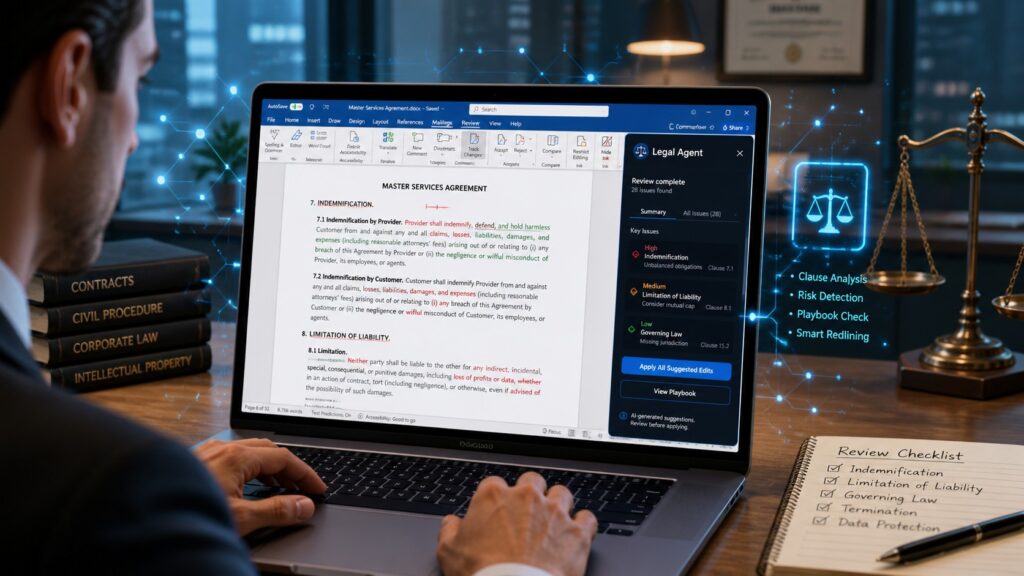
The most-used tool in legal history just got a serious AI upgrade. Here’s everything you need to know.
The Document That Changed Everything
Picture this. It’s a Tuesday morning. A contract lands in your inbox. It’s 87 pages long. It’s full of dense legalese, tracked changes from three different parties, and a deadline that’s already breathing down your neck. You open Microsoft Word, because of course you do, you always open Word, and you stare at the blinking cursor.
Now imagine the cursor stares back. And it actually helps.
That’s the promise behind Microsoft’s brand-new Legal Agent, a purpose-built AI tool embedded directly inside Microsoft Word. Announced on April 30, 2026, and rolling out to early-access users in the US, this isn’t just another chatbot bolted onto a toolbar. This is something different. Something that legal professionals have been quietly waiting for, even if they didn’t know it yet.
Let’s break it down.
What Exactly Is the Legal Agent?
At its core, the Legal Agent is an AI-powered assistant that lives inside Word and knows how to think like a lawyer. Not a general-purpose AI that you have to coax and prompt into doing legal work. A specialized agent built from the ground up for legal workflows.
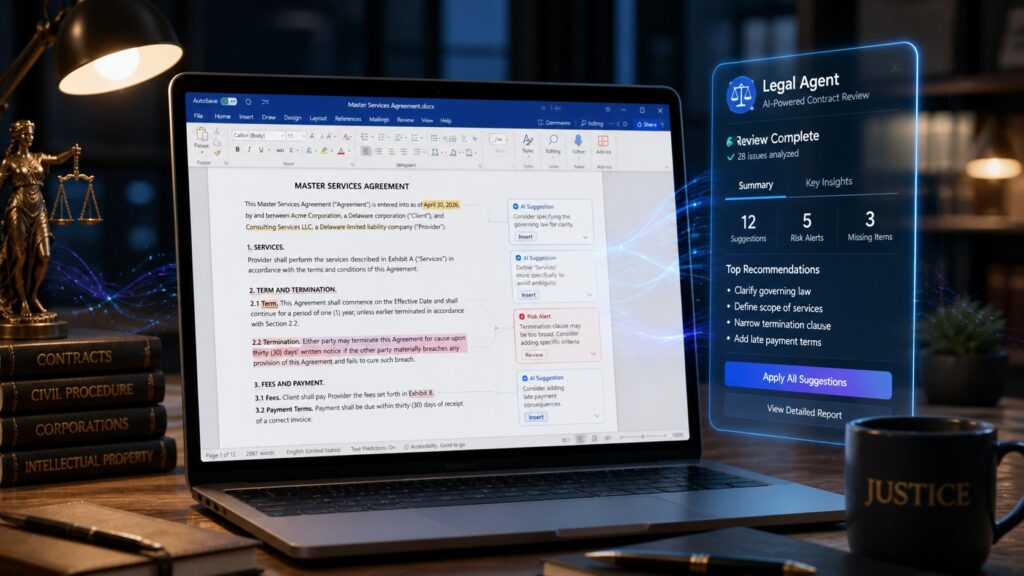
It reviews contracts. Clause by clause. It flags risks, It spots obligations, It compares document versions. It suggests edits using tracked changes, the kind lawyers already use every day. And it keeps your formatting intact, which, if you’ve ever had an AI tool mangle a table or destroy a numbered list, you know is not a small thing.
According to The Decoder, the agent also lets users check contracts against their own internal guidelines and playbooks. So if your company has specific standards for how indemnification clauses should read, the Legal Agent can check every contract against that standard automatically.
No installation required. No new software to buy. It runs inside the existing Microsoft 365 security and compliance setup. You just restart Word and it’s there.
That’s a big deal.
The Robin AI Connection — A Startup’s Second Life
Here’s where the story gets interesting. The Legal Agent didn’t appear out of thin air. It has a backstory.
A few months ago, Microsoft quietly hired a significant number of engineers and AI specialists from a company called Robin AI. Robin AI was a legal tech startup that had been building an AI-powered contract review system. The startup ultimately failed. But the talent? The talent was gold.
As The Verge reported, the Legal Agent “comes from the work of former Robin AI engineers.” These weren’t generalist developers. These were people who had spent years thinking about how lawyers actually work. How contracts actually get negotiated. What legal teams actually need from a tool.
That expertise shows. The Legal Agent doesn’t just process text. It understands the structure of a Word document, tables, lists, formatting, tracked changes, author-specific revisions; Legal Agent knows the difference between a clean draft and a heavily negotiated redline. It can separate earlier revisions from new proposals.
Alex Herrity, director of legal operations at Adidas, put it perfectly when speaking to Legal IT Insider: “Word is where legal work happens. It always has been. And for the first time in my career, Microsoft has actually built something that suggests they know that, not a general Copilot that lawyers can try to bend toward legal tasks, but a product with legal workflows, playbook review, and redlining logic built in from the ground up by people who came out of legal tech.”
That’s a ringing endorsement. And it comes from someone who uses these tools every day.
The Tech Behind the Magic — Deterministic AI in a Probabilistic World
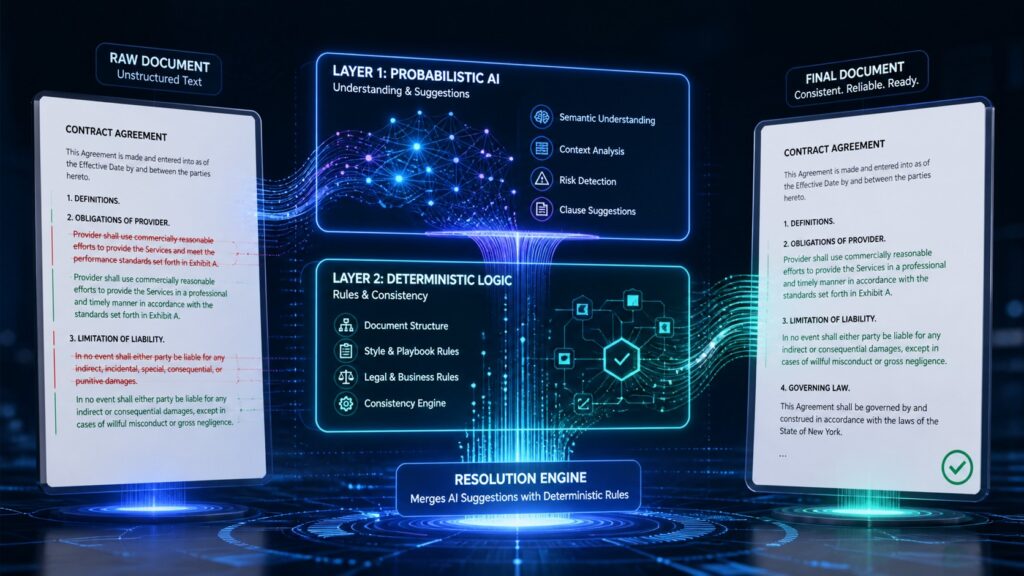
Okay, let’s get a little nerdy for a second. Because the way the Legal Agent actually works under the hood is genuinely fascinating.
Most AI tools rely entirely on large language models (LLMs) to generate every output. You ask a question, the model predicts the most likely response. That works great for writing emails or summarizing articles. But for legal work? Consistency matters enormously. A contract clause that reads slightly differently every time you generate it is a liability, not a feature.
Microsoft knew this. So they built something smarter.
Sumit Chauhan, corporate vice president of Microsoft’s Office Product Group, explained it this way: “The agent applies edits in the document through a purpose-built insertion algorithm to drive consistency regardless of how each edit was introduced. The agent’s redlining engine understands the structure of a Word document, not just visible text.”
Here’s the key part: the Legal Agent uses a deterministic resolution layer on top of the AI. That means instead of letting the LLM generate every revision directly, the system applies consistent, rule-based logic to handle edits. The AI identifies what needs to change. The deterministic layer decides how to apply it, reliably, every single time.
As 4sysops noted, this approach “allows legal teams to maintain a clear negotiation history while the agent flags non-standard provisions and suggests compliant alternatives.”
One legal tech vendor told Legal IT Insider that Microsoft is essentially trying to “derisk the probabilism in the LLM with deterministic rules.” In plain English? They’re making AI less random and more reliable. For legal work, that’s not just nice to have. It’s essential.
Microsoft vs. Claude — The Battle for the Legal Desktop
Now here’s where things get spicy. Microsoft didn’t launch the Legal Agent in a vacuum. They launched it in the middle of a competitive war.
Just recently, Anthropic launched Claude for Word. Yes, that Claude, the AI assistant from Anthropic, one of OpenAI’s biggest rivals. Claude’s Word integration can assist with various documents, but Anthropic has been specifically targeting legal workflows: contract review, NDA analysis, clause redlining. Business Insider called it “another challenge to Microsoft’s software empire.”
And apparently, Claude for Word has been having some trouble. According to Legal IT Insider, Claude has reportedly been “breaking Word’s notoriously difficult document structure.” One legal tech vendor described the Legal Agent as “a silent dig at Claude.”
That makes sense. Microsoft owns every line of Word’s code. They know exactly how the document format works, They built the tracked changes system. They designed the table structure. When Microsoft builds a redlining engine for Word, it has a home-field advantage that no outside company can match.
One head of innovation at a major UK law firm told Legal IT Insider: “They [Microsoft] were on the ropes taking punches with zero reaction, so at least this is a response.”
Microsoft has shown up to its own fight. And they came prepared.
What This Means for Legal Teams Right Now
So what does this actually mean for lawyers, paralegals, and legal ops professionals in the real world?
A lot. And also, not everything. Let’s be honest about both.
The Legal Agent is currently available through Microsoft’s Frontier program, which is an early-access program for US-based organizations. It’s not a full public rollout yet. If you want in, you need to sign up for Frontier.
And while the tool is impressive, Herrity is careful to manage expectations. “From what I’ve seen of it,” he says, “the functionality isn’t blowing anyone away who’s already across the specialist tools. But that’s almost not the point yet.”
The point, he argues, is the signal. Microsoft is upstream of every other vendor. They’re already approved and trusted by IT and procurement departments. They’re sitting inside the tool lawyers open every single morning. They have a clear run at the majority of the market that still hasn’t committed to any AI legal tool.
That’s most firms. Most in-house teams. Still waiting. Still evaluating. And now Microsoft is right there, inside Word, ready to go.
The Bigger Picture — AI Is Coming for Legal Work
Zoom out for a moment. The Legal Agent isn’t just a product launch. It’s a signal about where the entire legal industry is heading.
AI is no longer a futuristic concept for law firms. It’s a present-tense reality. Tools like Harvey, Legora, and now Microsoft’s Legal Agent are actively changing how contracts get reviewed, how risks get flagged, and how legal teams spend their time.
Adam Curphey, director of innovation at Macfarlanes, told Legal IT Insider: “In the past people have picked one solution, but I just think we’re going to see more and more that it’s not a case of I’ve just got Harvey or I’ve just got Legora. You’re going to have to use a package of these things because they will be in every tool that you use.”
That’s the future. AI everywhere. In your email, In your document editor. In your contract management system. Not one tool to rule them all, a whole ecosystem of specialized agents, each doing what it does best.
Microsoft’s Legal Agent is one piece of that puzzle. A big piece. But still just one piece.
What Lawyers Should Know Before They Dive In
A few important caveats before you hand your entire contract portfolio to the Legal Agent.
First, Microsoft is clear: the Legal Agent does not provide legal advice. It automates repetitive tasks, It flags issues. It suggests edits. But it requires professional oversight. A human lawyer still needs to review the output. Always.
Second, all AI-generated suggestions come with citations, so you can verify where the recommendation came from. That’s a smart design choice. Transparency matters in legal work.
Third, the tool is a vertical-specific experience within Microsoft 365 Copilot. You need a Microsoft 365 Copilot license to access it. And right now, you need to be enrolled in the Frontier program.
Derek Southall, founder and CEO of Hyperscale Group, offered a measured take: “Many firms want both Microsoft AI and a Platform AI tool in terms of wider capabilities and so should we perhaps just view this as a further build of the Microsoft aspect as both capabilities become stronger.”
In other words? Don’t throw out your other tools just yet. But absolutely pay attention to what Microsoft is building.
The Verdict — A Genuine Leap Forward

Here’s the bottom line. Microsoft’s Legal Agent is a genuinely exciting development. Not because it’s perfect. Not because it replaces specialist legal tech tools overnight. But because it brings serious, purpose-built AI legal capability to the most widely used document tool on the planet.
Millions of lawyers already live in Word. Now Word is starting to understand them back.
The next 18 months will be telling. As Herrity put it: “Microsoft will have done some of the education heavy lifting. The real question plays out over time: as the product improves, and it will, they have the money and the Robin AI team know what they’re doing — does Microsoft eat the specialist vendors’ lunch, or is there enough of a marketplace for everyone to find their level?”
We don’t know the answer yet. But the game has officially changed.
Sources
- The Verge — Microsoft wants lawyers to trust its new AI agent in Word documents
- The Decoder — Microsoft puts an AI legal agent inside Word for contract review
- Legal IT Insider — Microsoft turns up to its own fight with new Word Legal Agent
- 4sysops — Microsoft launches specialized AI Legal Agent for contract review in Word
The Kingy Brief
Get the next Kingy Brief.
Source-checked AI changes, original tests and one practical thing to try.
Free · Choose your subjects · Double opt-in · Unsubscribe anytime