AI coding tools have moved far beyond autocomplete. The serious contenders are no longer just “smarter Copilot alternatives.” They are becoming full development environments, terminal-native coding agents, programmable SDKs, background workers, pull-request generators, and eventually something closer to software engineering coworkers.
Three names dominate this conversation: Cursor, Claude Code, and OpenAI Codex. Each represents a different philosophy for how AI should fit into software development.
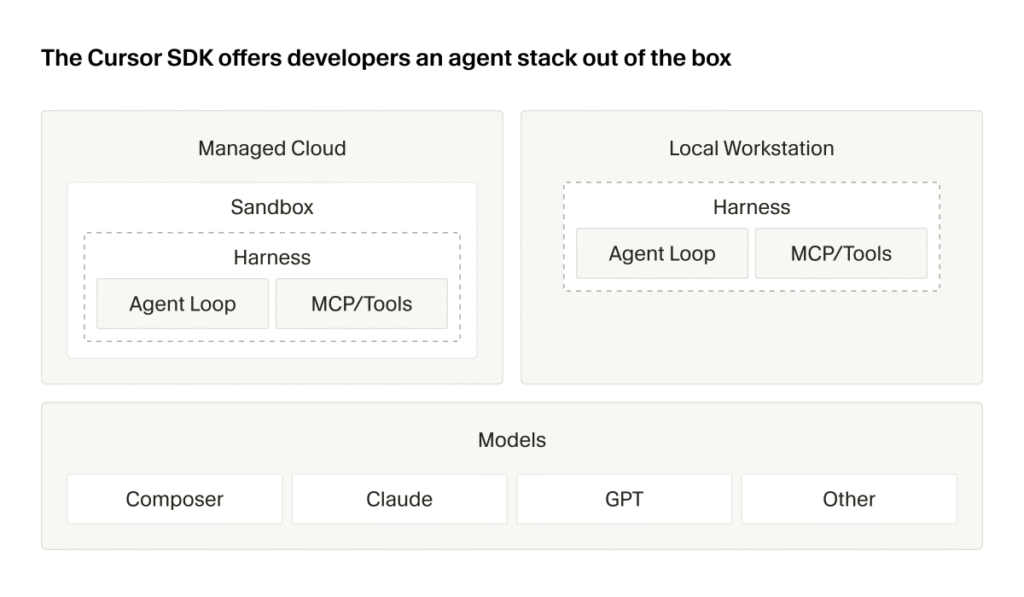
Cursor is an AI-native IDE. It puts AI directly into the place where many developers already spend most of their day: the editor. Its pitch is not merely “ask questions about your code,” but “code with AI as a first-class part of the editing experience.” Cursor also now has a Cursor SDK, which expands its value from an IDE into a programmable platform for building custom coding agents.
Claude Code, from Anthropic, approaches the problem differently. It is terminal-native, repo-aware, and deeply agentic. Instead of primarily living inside an editor, Claude Code works closer to the command line, git workflow, build scripts, and shell environment. Its core promise is that Claude can inspect your codebase, reason about it, make changes, run commands, fix failures, and collaborate with you through an agentic development loop. Anthropic describes Claude Code as an agentic coding tool that “lives in your terminal” and helps with understanding, editing, testing, and managing codebases through natural language commands via the Claude Code overview.
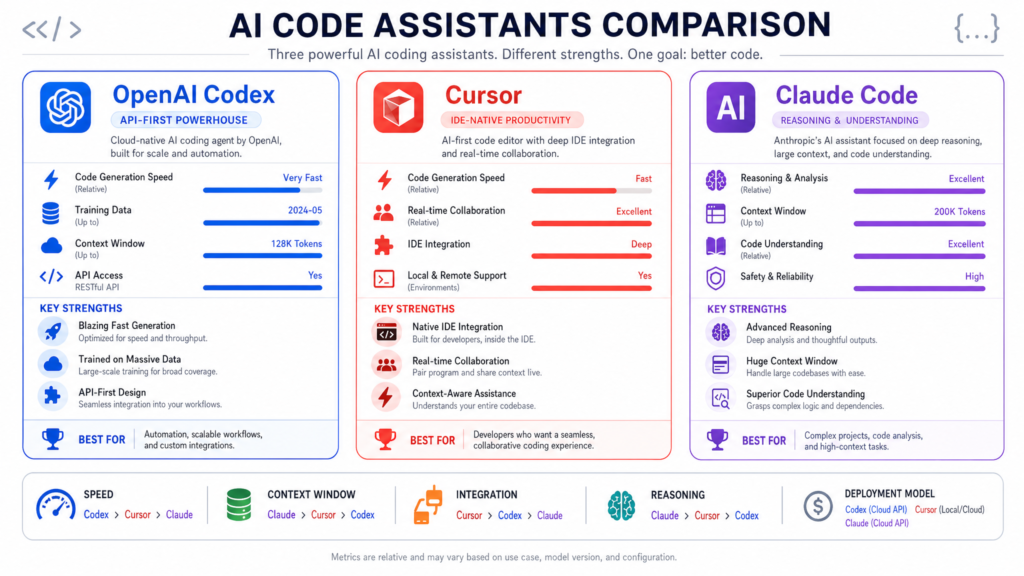
OpenAI Codex, meanwhile, has evolved from the original Codex model into a broader coding-agent product line. Today’s Codex is not just a model for generating code snippets. It is a coding workflow layer around OpenAI’s models, designed to handle software engineering tasks, work in the background, interact with repositories, produce patches, and support agentic coding flows. OpenAI describes Codex as a cloud-based software engineering agent on the OpenAI Codex page, with newer Codex-focused model updates such as GPT-5.3-Codex.
The central question is not simply “which one is best?” The better question is: which one best matches the way you build software?
If you want AI embedded directly into your editor, Cursor is the obvious candidate. If you want a programmable agent framework around the same ecosystem, Cursor SDK becomes very interesting. If you want a terminal-native, reasoning-heavy coding partner, Claude Code is one of the strongest options. If you want to delegate coding tasks to an OpenAI-powered agent that can work asynchronously and produce results, Codex is compelling.
In practice, sophisticated teams may use all three.
Continue through Kingy’s AI Coding Agents hub for the wider decision map across execution surfaces, permission models, workflows, product records and current launch intelligence.
1. The Categories: IDE, CLI, SDK, and Coding Agent
Before comparing the tools, it is important to separate several categories that are often collapsed together.
AI IDE
An AI IDE is an editor or integrated development environment where AI is built directly into the coding workflow. Cursor is the clearest example here. It gives you autocomplete, inline editing, chat, repo awareness, code generation, multi-file editing, and visual diff review inside an editor interface.
The strength of an AI IDE is flow. You stay in the code. You highlight a section, ask for a change, review the diff, accept or reject, and keep moving. The AI is not a separate system; it is embedded in the act of coding.
Terminal Coding Agent
A terminal coding agent is designed to work from the command line. Claude Code is the strongest representative of this category. It can inspect files, run shell commands, use git context, edit code, interpret test failures, and iterate.
The strength of a terminal agent is power and composability. Developers already use terminals for package managers, test runners, build systems, deployment scripts, git commands, linters, and project automation. A terminal-native agent can sit close to the real execution environment of the project.
Cloud or Background Coding Agent
A background coding agent is designed to accept a task and work on it semi-autonomously. Codex is strongly associated with this model. You give it a task, it examines the code, makes changes, runs tests where possible, and produces an output such as a patch or pull request.
The strength here is delegation. Instead of pairing with the AI every second, you assign work to it.
Coding SDK
A coding SDK lets developers build their own custom coding agents or workflows. This is where Cursor SDK becomes especially important. According to the Cursor SDK documentation, Cursor SDK provides a TypeScript-based way to build coding agents programmatically. This changes Cursor from “just an editor” into a platform for creating custom engineering automation.
SDKs matter because the future of AI coding is not just individual productivity. It is also repeatable automation: test-writing agents, migration agents, dependency upgrade agents, documentation agents, security remediation agents, issue triage agents, and code-review agents.
2. Cursor: The AI-Native IDE
Cursor’s core value proposition is simple: it is an editor built around AI from the ground up. According to Cursor’s website, the product is positioned as a way to build software faster with AI, combining familiar coding workflows with AI-native features.
Cursor feels closest to a next-generation VS Code experience. That matters. Developers do not necessarily want to abandon their editor habits. They want AI to meet them where they already work: files, tabs, diffs, symbols, imports, tests, git changes, and project folders.
Cursor’s Main Strength: Flow
Cursor’s biggest advantage is workflow integration. In many AI tools, you copy code into a chat window, ask for a change, copy the output back, fix the formatting, run the tests, notice something broke, go back to the chat, and repeat. Cursor collapses much of that loop.
A developer can:
- Open a project.
- Ask questions about the codebase.
- Select code and request edits.
- Generate a function inline.
- Ask Cursor to modify multiple files.
- Review proposed diffs.
- Accept, reject, or refine changes.
- Continue coding without leaving the editor.
That tight loop is extremely powerful for everyday development.
Cursor shines when the task is interactive. For example:
- “Add loading states to this React component.”
- “Refactor this function to use the new API client.”
- “Explain how this service is wired.”
- “Generate tests for this module.”
- “Update this endpoint to support pagination.”
- “Find where this error is coming from.”
- “Convert this callback-based code to async/await.”
In these cases, the human is still steering. Cursor is not necessarily being asked to disappear for an hour and return with a complete pull request. It is more like an always-available AI pair programmer embedded in the editor.
Cursor’s Codebase Awareness
One of Cursor’s major selling points is codebase awareness. The tool can index and reason over a project so that prompts are not limited to the currently open file. This is essential because real development almost always requires context from multiple files.
For instance, if you ask Cursor to “add support for organization-level billing,” a useful assistant needs to know:
- Existing billing models.
- Database schema.
- API routes.
- Authentication and authorization patterns.
- Existing tests.
- Naming conventions.
- Error-handling patterns.
- Frontend components.
- Internal utilities.
A generic chat model without repo context may produce plausible but wrong code. Cursor’s advantage is that it can connect the prompt to the actual codebase.
Cursor’s Editing Experience
Cursor’s editor-native experience is particularly strong for reviewability. AI-generated code is dangerous when it appears as a giant opaque answer. Cursor’s diff-based workflow helps reduce that risk.
Good AI coding workflows need a strong review loop. Developers should be able to inspect:
- Which files changed.
- Which lines changed.
- Whether imports were added.
- Whether tests were modified.
- Whether unrelated code was touched.
- Whether naming conventions were followed.
- Whether the solution is smaller or larger than necessary.
Cursor is strong because it keeps the developer close to the patch.
Cursor’s Model Flexibility
Another Cursor advantage is that it is not strictly tied to a single model family. Cursor has historically emphasized model choice, allowing users to select between different advanced models depending on availability and plan. This matters because model performance varies by task.
Some models are better at:
- Frontend generation.
- Long-context reasoning.
- Concise edits.
- Algorithmic tasks.
- Test generation.
- Debugging.
- Refactoring.
- Explaining legacy code.
A multi-model environment can be more resilient than a single-model tool, assuming the user understands when to switch.
Cursor’s Weaknesses
Cursor’s biggest weakness is the flip side of its strength: it is editor-first.
That is excellent for developers who want to work in an IDE. It is less ideal for developers who prefer terminal workflows, vim/neovim setups, JetBrains-heavy workflows, or highly customized local environments.
Cursor can also encourage a mode of development where developers accept changes quickly because the UX is so smooth. This is not a Cursor-specific problem; it applies to all AI coding tools. But an IDE with fast inline suggestions can make it easy to accept plausible code before fully understanding it.
Potential weaknesses include:
- The developer must still supervise code carefully.
- Large multi-file changes can become difficult to audit.
- AI-generated changes may follow visible patterns while missing hidden business rules.
- It may be less natural for deeply terminal-native workflows.
- Heavy use can run into plan or usage constraints.
- Enterprise teams need to understand data handling, code indexing, and permissions.
Best Use Cases for Cursor
Cursor is excellent for:
- Daily coding.
- Frontend and full-stack iteration.
- Interactive refactoring.
- Writing tests while editing.
- Understanding unfamiliar code.
- Small-to-medium feature development.
- Code review assistance.
- Documentation generation.
- Developer onboarding.
- Rapid prototyping.
Cursor is less ideal as the only solution for fully automated, headless engineering workflows. That is where Cursor SDK becomes more important.
3. Cursor SDK: Cursor as a Programmable Agent Platform
Cursor SDK is one of the most important developments in this comparison because it changes Cursor’s category. Cursor is no longer just an AI IDE. With the SDK, it becomes a programmable agent platform.
The Cursor TypeScript SDK announcement and Cursor SDK docs describe a TypeScript SDK for building coding agents programmatically. This matters because many engineering organizations do not just want individual developers to use AI. They want to automate recurring software engineering work.
Why Cursor SDK Matters
Most teams have repetitive engineering chores:
- Updating deprecated APIs.
- Writing tests for uncovered files.
- Fixing lint errors.
- Migrating from one framework version to another.
- Updating documentation after code changes.
- Applying security patches.
- Resolving dependency upgrade issues.
- Creating boilerplate.
- Fixing flaky tests.
- Refactoring repeated patterns.
- Triage of bugs and issues.
An IDE helps an individual developer perform these tasks faster. An SDK helps a team automate them repeatedly.
That is a major difference.
Cursor IDE vs. Cursor SDK
Cursor IDE is for interactive work. Cursor SDK is for programmable workflows.
| Dimension | Cursor IDE | Cursor SDK |
|---|---|---|
| Primary user | Individual developer | Platform/devtools engineer |
| Interface | Editor | TypeScript API |
| Workflow | Human-in-the-loop coding | Custom coding agents |
| Best for | Daily development | Automation and integration |
| Review mode | Visual editor diffs | Depends on workflow design |
| Typical output | Local edits | Patches, PRs, reports, automation results |
| Skill required | Normal developer usage | Engineering workflow design |
This distinction is critical. Cursor SDK is not just “Cursor but in code.” It enables a different class of use cases.
Example Cursor SDK Workflows
A team could use Cursor SDK to build an agent that watches for failing CI jobs, inspects logs, attempts a fix, runs relevant tests, and opens a pull request.
Another team might build a documentation synchronization agent:
- Detect changed API routes.
- Inspect OpenAPI definitions.
- Update markdown docs.
- Generate examples.
- Create a PR.
- Tag the owning team.
A security team might build a remediation agent:
- Detect vulnerable dependency.
- Upgrade package.
- Modify affected code.
- Run tests.
- Update lockfiles.
- Produce a risk summary.
A platform team might build a migration agent:
- Identify services using old framework patterns.
- Apply a standard migration.
- Run test suites.
- Generate a migration report.
- Open one PR per service.
This is where SDKs become much more valuable than ordinary coding assistants.
Cursor SDK Strengths
Cursor SDK’s biggest strength is customizability. Every organization has different engineering workflows, repo structures, review rules, CI systems, and release processes. A generic coding agent can help, but a custom agent can follow your organization’s conventions.
Cursor SDK is promising for:
- Internal developer platforms.
- CI/CD automation.
- Code maintenance at scale.
- Multi-repo migrations.
- Custom code review bots.
- Test generation pipelines.
- Documentation automation.
- Issue-to-PR systems.
- Engineering productivity tooling.
Cursor SDK Weaknesses
The SDK also introduces new risks.
A poorly designed agent can create noisy PRs, make unsafe changes, or waste developer review time. Automation scales both good and bad behavior. If an individual developer misuses an IDE assistant, the blast radius may be one branch. If a CI-integrated coding agent is poorly governed, it can create confusion across many repos.
Teams using Cursor SDK need:
- Clear permissions.
- Sandboxed execution.
- Test requirements.
- Human approval gates.
- Logging.
- Auditability.
- Branch protection.
- Secrets protection.
- Rate and cost controls.
- Rollback plans.
Cursor SDK is best for mature teams that understand their development lifecycle. It is powerful, but it requires engineering discipline.
4. Claude Code: The Terminal-Native Agent
Claude Code is Anthropic’s answer to agentic software development. Unlike Cursor, which starts from the editor, Claude Code starts from the terminal and the repository.
According to the Claude Code overview, Claude Code helps developers work with their codebase through natural language, including reading code, editing files, running commands, and managing workflows. This makes it especially compelling for developers who already live in the shell.
Claude Code’s Philosophy
Claude Code feels less like an AI autocomplete system and more like a command-line collaborator. You ask it to investigate, plan, edit, test, and iterate.
A typical workflow might look like:
- “Explain how authentication works in this repo.”
- “Find where subscription cancellation is handled.”
- “Add support for this edge case.”
- “Run the relevant tests.”
- “Fix the failures.”
- “Summarize the diff.”
- “Prepare a commit message.”
This is closer to how a senior engineer might work through a problem: explore the system, form a hypothesis, make a change, validate it, and explain the result.
Claude Code’s Strength: Reasoning Over Complex Codebases
Claude models are widely used for long-form reasoning, careful explanation, and complex code understanding. Claude Code benefits from that positioning. It is particularly strong when the problem is not simply “write this function,” but “understand this system.”
Examples:
- Debugging a subtle production issue.
- Refactoring a core subsystem.
- Understanding an unfamiliar monorepo.
- Identifying why tests fail after a migration.
- Explaining how multiple services interact.
- Planning a safe architectural change.
- Updating code while preserving business rules.
Claude Code is often most useful when the task requires investigation before implementation.
Terminal-Native Power
The terminal is where software becomes real. Code either compiles or it does not. Tests pass or they do not. Linters complain or they do not. Build systems produce artifacts or fail.
Claude Code’s ability to work near shell commands is a major strength. A terminal-native agent can:
- Run tests.
- Inspect logs.
- Use grep/ripgrep.
- Examine git history.
- Run package managers.
- Execute linters.
- Generate build output.
- Modify files.
- Re-run failing commands.
- Work through errors iteratively.
This is different from a pure chat assistant. The agent can participate in the actual development loop.
Claude Code and MCP
Claude Code’s ecosystem also benefits from Anthropic’s broader support for tool integration and the Model Context Protocol ecosystem. MCP is important because coding rarely exists in isolation. Real engineering work touches:
- GitHub.
- Jira.
- Linear.
- Slack.
- Documentation systems.
- Databases.
- Observability tools.
- CI systems.
- Cloud infrastructure.
- Internal APIs.
When an agent can access relevant tools safely, it becomes far more useful.
Claude Code Security
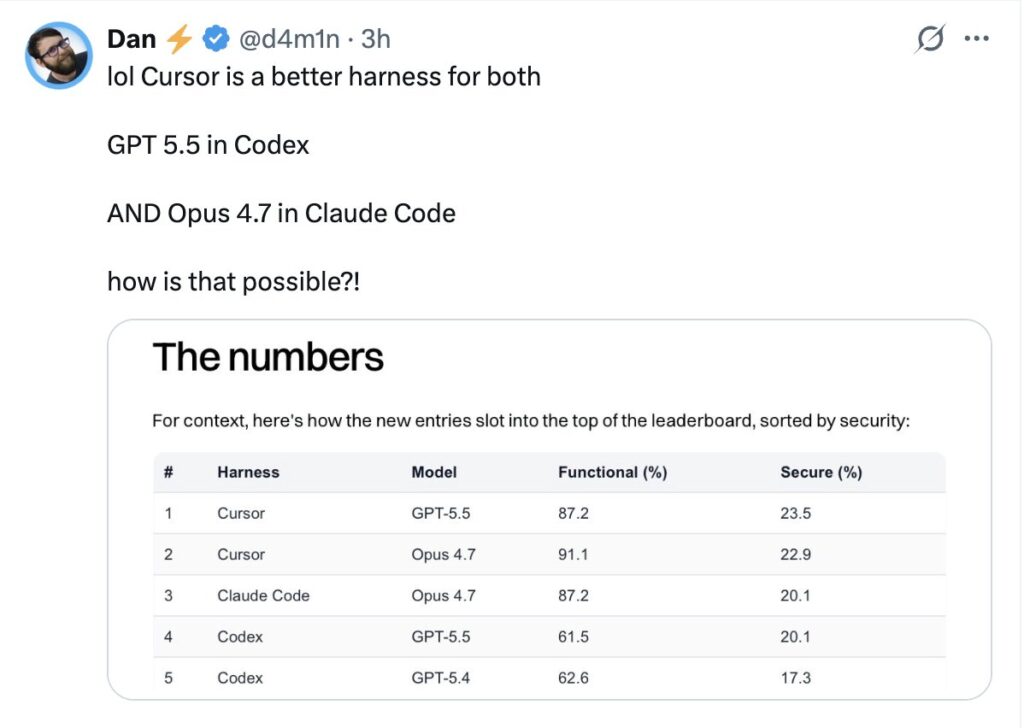
Anthropic has also discussed Claude Code in the context of security tooling. The Claude Code security announcement highlights security-focused use cases such as identifying and fixing vulnerabilities. This is an important direction because code agents are not only about productivity; they are also about code quality and risk reduction.
Security use cases include:
- Vulnerability remediation.
- Dependency patching.
- Secure coding guidance.
- Static analysis follow-up.
- Fixing unsafe patterns.
- Reviewing authentication or authorization logic.
- Generating safer defaults.
That said, AI-generated security fixes require careful human review. A model can identify plausible vulnerabilities while missing deeper threat models.
Claude Code Weaknesses
Claude Code’s main weakness is accessibility for editor-first developers. If you are not comfortable in the terminal, Claude Code may feel less natural than Cursor.
Other weaknesses:
- Less visual than an IDE.
- Diffs may require separate review tooling.
- Terminal command execution requires trust and supervision.
- It is tied primarily to Anthropic’s model ecosystem.
- Heavy usage can be constrained by plan limits or API costs.
- Less ideal for rapid inline UI tweaking than Cursor.
Claude Code is powerful, but it expects a developer who is comfortable supervising an agent inside a real development environment.
Best Use Cases for Claude Code
Claude Code is excellent for:
- Large-codebase understanding.
- Debugging.
- Backend work.
- Refactoring.
- Terminal-heavy workflows.
- Test-driven bug fixing.
- Architecture exploration.
- Complex multi-file changes.
- Legacy code modernization.
- Security remediation.
- DevOps-adjacent tasks.
Claude Code is less ideal for developers who want a polished visual editor experience above all else.
5. OpenAI Codex: The Delegated Coding Agent
OpenAI Codex has a complicated history because the name originally referred to an earlier OpenAI model for code generation. Today, Codex is better understood as OpenAI’s coding-agent product line. OpenAI describes Codex as a software engineering agent on the OpenAI Codex page. Newer model updates such as GPT-5.3-Codex show OpenAI continuing to optimize models specifically for agentic coding work.
Codex’s Philosophy
Codex’s strongest conceptual fit is delegation.
Instead of using AI only while actively editing, you give Codex a task:
- “Fix this bug.”
- “Add tests for this module.”
- “Update this API.”
- “Investigate this issue.”
- “Refactor this component.”
- “Review this PR.”
- “Implement this ticket.”
The agent works through the task and produces an output. This is especially useful when the task has clear acceptance criteria.
Codex as a Background Worker
The big value of Codex is that it can function more like a software engineering worker than a text generator. That does not mean it replaces human engineers. It means it can take on bounded tasks that would otherwise consume developer time.
Good Codex-style tasks include:
- Fixing straightforward bugs.
- Writing missing tests.
- Updating documentation.
- Handling dependency upgrades.
- Performing simple migrations.
- Creating small features.
- Cleaning up warnings.
- Addressing static-analysis findings.
- Producing first drafts of PRs.
The key phrase is bounded tasks. Codex works best when the task can be described clearly and validated with tests or review.
Codex Strengths
Codex’s strengths include:
- Strong general coding capability.
- OpenAI ecosystem integration.
- Suitability for autonomous or semi-autonomous task execution.
- Good fit for PR-style workflows.
- Potential for background work.
- Useful for teams already using ChatGPT or OpenAI APIs.
- Ability to support coding workflows across interfaces.
Codex also benefits from OpenAI’s model development pace. The GPT-5.3-Codex announcement emphasizes improvements for coding-agent behavior, speed, tool use, and software engineering tasks.
Codex Weaknesses
Codex may be less satisfying than Cursor for developers who want constant interactive editing inside the IDE. It may also feel less conversationally careful than Claude Code in some deep reasoning scenarios, depending on model and task.
Potential weaknesses include:
- Requires clear task specification.
- Can produce changes that need significant review.
- May over-edit if the prompt is broad.
- Needs strong repo tests to validate output.
- Less ideal for exploratory pair programming than Cursor.
- Less terminal-native than Claude Code in some workflows.
- Enterprises must manage data, permissions, and agent access carefully.
Best Use Cases for Codex
Codex is excellent for:
- Background bug fixing.
- Ticket-to-PR workflows.
- Test generation.
- PR review assistance.
- Repetitive engineering tasks.
- Dependency upgrades.
- Bounded refactors.
- Automated code maintenance.
- Teams already invested in OpenAI products.
Codex is less ideal when the task is ambiguous, architectural, or requires a lot of human discussion before implementation. In those cases, Claude Code or Cursor may feel better.
6. Head-to-Head Comparison
Summary Table
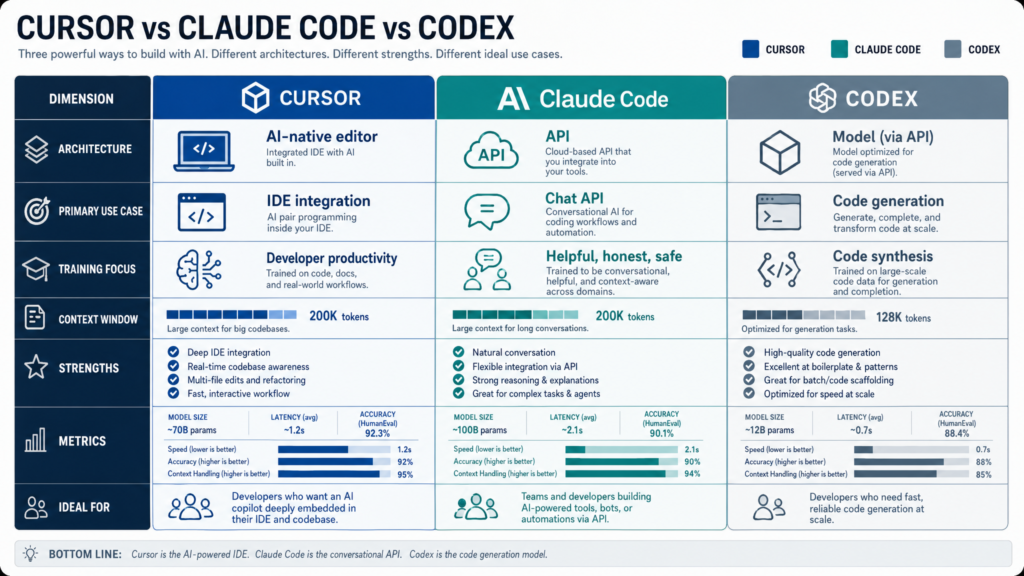
| Category | Cursor | Cursor SDK | Claude Code | Codex |
|---|---|---|---|---|
| Primary category | AI IDE | Coding-agent SDK | Terminal coding agent | Coding-agent platform |
| Primary interface | Editor | TypeScript API | CLI / terminal | OpenAI agent workflows |
| Best for | Interactive coding | Custom automation | Deep repo reasoning | Delegated tasks |
| Workflow style | Pair programming | Programmable agents | Terminal collaboration | Background execution |
| Model flexibility | Strong | Strong within Cursor ecosystem | Claude-focused | OpenAI-focused |
| Visual diffs | Strong | Depends on implementation | External/git-based | Depends on interface |
| Terminal integration | Moderate | Custom | Strong | Varies |
| CI/CD automation | Moderate | Strong | Strong with scripting | Strong |
| Learning curve | Low-medium | Medium-high | Medium | Low-medium |
| Best user | Editor-first developer | Platform/devtools team | Terminal-first engineer | Team delegating work |
| Main risk | Over-accepting edits | Scaling bad automation | Command supervision | Task drift |
7. Cursor vs. Claude Code
Cursor and Claude Code are often compared because both can inspect and modify codebases. But their center of gravity is different.
Cursor is editor-native. Claude Code is terminal-native.
If you are actively writing a React component, adjusting styles, changing props, adding form validation, and reviewing UI-oriented diffs, Cursor will often feel better. It keeps you in the visual editing loop.
If you are debugging a failing integration test, tracing a backend service, inspecting logs, running commands, and asking the agent to iterate until the test passes, Claude Code may feel better.
Cursor Wins When
- You want AI in the editor.
- You value inline completions.
- You want visual diffs.
- You are doing frontend or full-stack iteration.
- You want low friction.
- You prefer a polished GUI.
- You are making many small changes.
- You want autocomplete plus chat plus editing.
Claude Code Wins When
- You live in the terminal.
- You want the agent to run commands.
- You are doing deep debugging.
- You are refactoring a complex backend system.
- You want careful repo exploration.
- You need shell/git/build integration.
- You are comfortable supervising an autonomous agent.
Practical Example
Task: “Fix a flaky checkout test that fails only when discount codes expire.”
Cursor approach:
- Open the failing test.
- Ask Cursor to explain the failure.
- Jump to related checkout code.
- Apply inline edits.
- Review the diff.
- Run tests manually or through integrated tooling.
Claude Code approach:
- Ask Claude Code to investigate the failing test.
- It searches the repo.
- It runs the test.
- It inspects failure output.
- It edits the relevant files.
- It reruns tests.
- It explains the fix.
Both can work. Cursor feels like guided editing. Claude Code feels like delegated debugging with terminal supervision.
8. Cursor SDK vs. Claude Code
Cursor SDK and Claude Code are not direct substitutes. Cursor SDK is a developer tool for building agents. Claude Code is itself an agentic coding tool.
Use Cursor SDK when you want to create repeatable custom workflows. Use Claude Code when you want an out-of-the-box coding agent that works directly with a repo.
Cursor SDK Wins When
- You need custom automation.
- You are building internal developer tools.
- You want CI/CD integration.
- You need repeatable workflows across repos.
- You want agents triggered by issues, PRs, or CI failures.
- You have platform engineering capacity.
Claude Code Wins When
- You want a ready-to-use terminal agent.
- You want flexible exploration.
- You need deep reasoning.
- You want to interact naturally with the codebase.
- You do not want to build your own agent infrastructure.
The distinction is similar to buying a product versus building a workflow platform.
9. Cursor vs. Codex
Cursor and Codex differ primarily in interaction style.
Cursor is for working with the AI. Codex is often for assigning work to the AI.
Cursor Wins When
- The developer wants to stay involved.
- The task is exploratory.
- The UI matters.
- The diff needs careful interactive shaping.
- You want fast inline help.
- You are making frequent small decisions.
Codex Wins When
- The task is well specified.
- You want the AI to work in the background.
- A PR or patch is the desired output.
- Tests can validate success.
- You want to hand off repetitive tasks.
- You are already using OpenAI workflows.
Practical Example
Task: “Add pagination to the invoices endpoint.”
With Cursor, a developer might ask for help while navigating the API route, database query, schema types, tests, and frontend usage.
With Codex, a team might assign the task as a ticket: “Add cursor-based pagination to invoices endpoint; preserve existing filters; update tests; do not change response shape except adding pageInfo.”
Cursor is stronger for interactive design. Codex is stronger for well-defined delegation.
10. Claude Code vs. Codex
Claude Code and Codex are closer in spirit because both are agentic. But Claude Code is more terminal-collaborative, while Codex is more delegation-oriented.
Claude Code Wins When
- The task requires investigation.
- The codebase is large or confusing.
- The developer wants to ask many follow-up questions.
- The agent needs to run commands and explain results.
- Architecture and debugging matter.
- The problem is ambiguous.
Codex Wins When
- The task is clear.
- The output should be a PR or patch.
- You want background execution.
- The repo has strong tests.
- You want to process many small tasks.
- You are invested in OpenAI tooling.
Practical Example
Task: “Migrate authentication from sessions to JWT.”
Claude Code may be better for the planning phase:
- How does auth currently work?
- Which files are involved?
- What are the security implications?
- What migration path is safest?
- Which tests need to change?
Codex may be better once the plan is formalized:
- Implement the migration according to this spec.
- Update tests.
- Produce a PR.
The strongest workflow may use both.
11. Strengths and Weaknesses by Dimension
Developer Experience
Cursor has the best editor experience. It is polished, immediate, and familiar.
Claude Code has the best terminal experience. It integrates naturally with shell workflows.
Codex has the best delegation model. It is strongest when you think in tickets, tasks, patches, and PRs.
Cursor SDK has the best custom automation story among the tools compared here.
Refactoring
For small-to-medium interactive refactors, Cursor is excellent.
For large conceptual refactors, Claude Code is often better because it encourages exploration, planning, command execution, and iterative validation.
For well-scoped refactors with tests, Codex is strong.
For repeated refactors across many services or repos, Cursor SDK may be the best fit.
Testing
All three can help write and fix tests. The difference is workflow.
Cursor helps you write tests while editing.
Claude Code helps you run tests, inspect failures, and iterate in the terminal.
Codex helps generate or repair tests as part of a delegated task.
Cursor SDK can automate test generation or test repair workflows at scale.
Security
Claude Code has a visible security-oriented direction through Anthropic’s Claude Code security work. Cursor and Codex can also be used for security-related code remediation, but enterprises need to evaluate each product’s controls carefully.
For all tools, the security questions are the same:
- What code does the agent access?
- Is code retained?
- Is code used for training?
- Can the agent access secrets?
- Can it run shell commands?
- Can it make network calls?
- Can it push branches?
- Are logs available?
- Can admins enforce policies?
- Are changes auditable?
AI coding tools increase productivity, but they also increase the importance of governance.
12. Pricing and Cost Considerations
Pricing changes frequently, so teams should verify official pages such as Cursor pricing, OpenAI pricing, and Anthropic pricing.
But the deeper point is that sticker price is not the real metric.
The real metric is:Cost per Accepted Engineering Change=Useful Merged ChangesTotal Tool Cost + Review Cost + Failure Cost
A $20/month tool that creates many bad diffs can be more expensive than a $100/month tool that reliably saves senior engineering time.
Teams should measure:
- Subscription cost.
- API cost.
- Token usage.
- CI compute cost.
- Human review time.
- Failed task rate.
- Rework rate.
- Security review burden.
- Time saved per merged PR.
- Developer satisfaction.
For individual developers, Cursor and Claude Code may feel like productivity subscriptions. For teams, Codex and Cursor SDK may become operational costs tied to automation volume.
13. Enterprise Readiness
Enterprise adoption requires more than model quality. Large companies need governance.
Important enterprise criteria include:
- SSO/SAML.
- RBAC.
- Audit logs.
- Data retention controls.
- Admin policy controls.
- Repo-level permissions.
- Secret redaction.
- Network restrictions.
- Compliance certifications.
- Model access controls.
- Usage analytics.
- Centralized billing.
- Approval workflows.
- PR-only change policies.
Cursor’s enterprise value is strongest around IDE adoption and developer productivity. Cursor SDK adds platform automation potential.
Claude Code’s enterprise value is strongest for advanced engineering workflows, terminal-heavy teams, and complex codebase reasoning.
Codex’s enterprise value is strongest for task delegation, PR automation, and OpenAI-centered workflows.
No enterprise should allow coding agents to push directly to production without review. The safest pattern is:
- Agent works on a branch.
- Agent opens a PR.
- CI runs.
- Human reviews.
- Security checks run.
- Protected branch rules apply.
- Deployment remains controlled.
14. Benchmarking These Tools Internally
Public benchmarks such as SWE-bench are useful, but they are not enough. Your codebase is not a public benchmark. Your architecture, tests, conventions, build system, and domain logic matter.
A serious team should run its own benchmark.
Suggested Benchmark Tasks
Create 15 representative tasks:
- Fix a failing unit test.
- Add a small API feature.
- Write tests for an uncovered module.
- Refactor a duplicated helper.
- Update deprecated framework usage.
- Fix a TypeScript type error.
- Modify a frontend component.
- Debug an integration test.
- Update documentation after API changes.
- Upgrade a dependency.
- Fix a lint failure.
- Add input validation.
- Investigate a performance issue.
- Resolve a merge conflict.
- Implement a ticket with clear acceptance criteria.
Run each task through Cursor, Claude Code, and Codex. For Cursor SDK, choose repeatable workflows rather than one-off interactive tasks.
Scoring Rubric
Score each from 1 to 5:
| Criterion | Meaning |
|---|---|
| Correctness | Did it solve the problem? |
| Test quality | Did it add or fix useful tests? |
| Diff quality | Was the change minimal and readable? |
| Code style | Did it follow project conventions? |
| Autonomy | How much help did it need? |
| Safety | Did it avoid risky actions? |
| Speed | How long did it take? |
| Review burden | How hard was the result to review? |
| Explanation quality | Did it explain the change well? |
| Cost | Was the usage reasonable? |
A useful weighted formula:Overall Score=0.30C+0.20T+0.15D+0.15R+0.10S+0.10A
Where:
- C = correctness
- T = test quality
- D = diff quality
- R = reviewability
- S = safety
- A = autonomy
This will tell you much more than generic internet comparisons.
15. Best Tool by Use Case
Solo Developer
Best choice: Cursor or Claude Code
If you prefer an editor, choose Cursor. If you prefer the terminal, choose Claude Code. If you want task delegation, add Codex.
Startup Team
Best stack:
- Cursor for daily development.
- Claude Code for complex debugging and refactors.
- Codex for ticket-based task delegation.
- Cursor SDK later, once repeated workflows emerge.
Enterprise Team
Best stack:
- Cursor for broad developer productivity.
- Claude Code for advanced engineering workflows.
- Codex for controlled background work.
- Cursor SDK for custom internal automation.
- Strong governance across all tools.
Platform Engineering Team
Best choice: Cursor SDK plus Codex-style automation
Platform teams should think in workflows, not just coding assistance. They can build agents for migrations, test repair, documentation, dependency upgrades, and repo maintenance.
Legacy Codebase Team
Best choice: Claude Code plus Cursor
Claude Code is useful for understanding and planning changes in messy systems. Cursor is useful for applying and reviewing edits interactively.
Frontend/Product Engineering Team
Best choice: Cursor
Cursor’s editor-native experience is especially strong for frontend iteration, component editing, styling, and fast feedback loops.
Backend/Infrastructure Team
Best choice: Claude Code or Codex
Claude Code is excellent for terminal-heavy backend workflows. Codex is good for delegated tasks with clear specs and tests.
16. Final Recommendations
Choose Cursor If…
You want the best AI-native IDE experience. Cursor is the strongest choice for developers who want AI directly inside their editor, with autocomplete, inline editing, codebase chat, multi-file changes, and visual diffs.
Cursor is best for:
- Daily coding.
- Frontend work.
- Interactive refactoring.
- Pair-programming-style workflows.
- Fast iteration.
- Developers who like VS Code-style environments.
Choose Cursor SDK If…
You want to build custom coding agents. Cursor SDK is not just a personal productivity tool; it is an automation layer for engineering organizations.
Cursor SDK is best for:
- CI/CD coding automation.
- Internal developer tools.
- Issue-to-PR agents.
- Migration agents.
- Test generation agents.
- Documentation agents.
- Multi-repo maintenance.
Choose Claude Code If…
You want a terminal-native agent with strong reasoning. Claude Code is ideal for developers who want the AI to inspect the repo, run commands, reason through failures, and collaborate on complex changes.
Claude Code is best for:
- Debugging.
- Large refactors.
- Backend work.
- Legacy systems.
- Architecture exploration.
- Terminal-heavy workflows.
- Security remediation.
Choose Codex If…
You want to delegate software engineering tasks to an OpenAI-powered coding agent. Codex is especially compelling for clear, bounded work that can produce a patch or pull request.
Codex is best for:
- Background bug fixing.
- PR generation.
- Test generation.
- Dependency updates.
- Repetitive coding tasks.
- OpenAI-centered teams.
- Task-based development workflows.
17. The Real Answer: Use the Right Tool for the Workflow
There is no single winner.
Cursor, Claude Code, Codex, and Cursor SDK represent different layers of the AI coding stack:
| Layer | Best Tool |
|---|---|
| AI-native editor | Cursor |
| Programmable coding agents | Cursor SDK |
| Terminal-native repo agent | Claude Code |
| Delegated background coding | Codex |
The best engineering teams will not ask, “Which one replaces the others?” They will ask, “Which workflows should be editor-native, which should be terminal-native, which should be delegated, and which should be automated?”
A practical advanced stack could look like this:
- Cursor for everyday coding.
- Claude Code for debugging, refactors, and architecture.
- Codex for delegated tickets and background PRs.
- Cursor SDK for custom internal automation.
That is likely the direction software development is heading. AI coding tools are becoming less like autocomplete plugins and more like a distributed engineering system: some tools help you think, some help you edit, some run in the background, and some become programmable agents embedded into your organization’s workflows.
The teams that benefit most will not be the ones that blindly accept the most AI-generated code. They will be the ones that design the best human-AI development process: clear prompts, strong tests, safe permissions, reviewable diffs, automated validation, and disciplined engineering judgment.
In short:
- Cursor is the best fit for flow.
- Claude Code is the best fit for depth.
- Codex is the best fit for delegation.
- Cursor SDK is the best fit for automation.
The future is not one AI coding tool. The future is an AI coding toolchain.
The Kingy Brief
Get the next Kingy Brief.
Source-checked AI changes, original tests and one practical thing to try.
Free · Choose your subjects · Double opt-in · Unsubscribe anytime