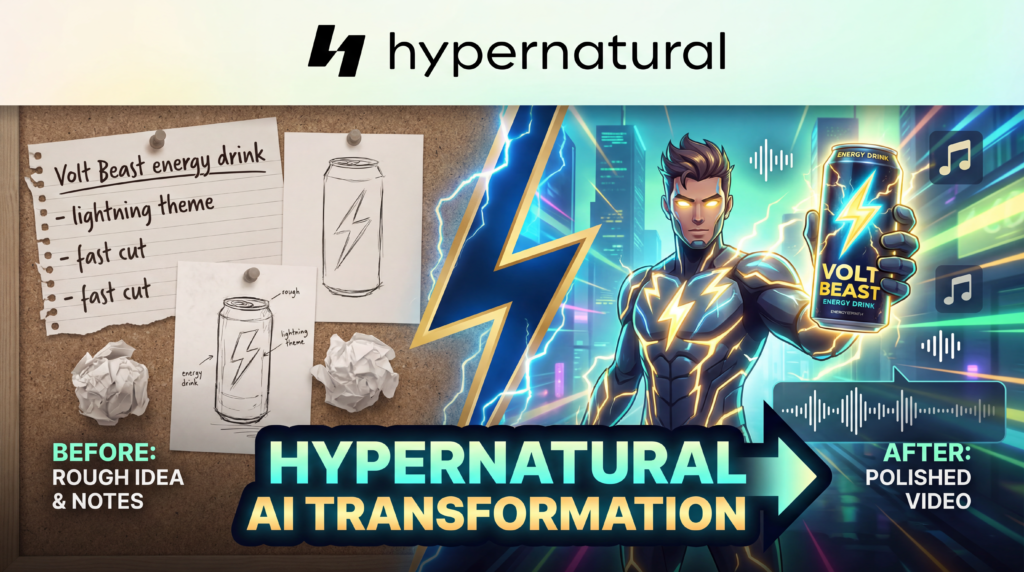
A deep dive into the platform that wants to turn any idea into a polished, animated video — and largely delivers on that promise.
There’s a specific kind of frustration that anyone who has tried to produce a video from scratch knows intimately. You have a great idea. Maybe it’s for a product launch, a short film concept, a social media ad, or a brand story you’ve been sitting on for months. But then reality sets in: you need a camera, a studio, actors, a scriptwriter, a video editor, and a budget that most independent creators simply don’t have.
The gap between “having a good idea” and “shipping a finished video” is enormous, and it has historically only been closeable with either significant resources or significant time.
Hypernatural AI is a platform that positions itself as the bridge across that gap. Its tagline — “Bring your story to life” — could easily come across as generic marketing copy. But after watching a hands-on walkthrough of the full production workflow and spending time examining every corner of the platform, it’s hard not to conclude that Hypernatural is doing something genuinely interesting.
This isn’t just a text-to-video tool. It’s a fully integrated, end-to-end AI video editor that handles everything from ideation to animated export, and it does so with a level of creative control that most of its competitors simply don’t offer.
This review covers everything: the interface, the workflow, the features, the pricing, the limitations, and who this platform is — and isn’t — built for.
What Is Hypernatural AI, Exactly?
Hypernatural describes itself as “the best end to end AI video editor.” The company behind it, Hypernatural Systems, Inc., frames its mission clearly on the About page: “We believe great ideas, not money or technical know-how, should be what drives video creators’ success.” That’s a bold claim, but it reflects a genuine philosophy baked into the product design.
At its core, Hypernatural lets you go from a prompt or a script to a full-length animated video — complete with characters, narration, music, captions, and motion — without touching a camera, a microphone, or a professional editing suite. You can start from several different inputs: a raw idea, a pasted prompt, your own script, or even a product photograph you want to feature in a campaign. The system generates a visual storyboard, populates it with AI-generated scenes that match your chosen style, assigns narration via an AI voice you select, and then optionally animates every frame with its “Full Motion” feature.
The platform is available on iOS, Android, and mobile web, which means you can build, edit, and export videos entirely from your phone. There’s no desktop requirement. That’s a meaningful design choice, especially for the creator economy audience Hypernatural is clearly targeting.
First Impressions: The Interface Is Refreshingly Unintimidating
Many AI creative tools suffer from what you might call the “power user problem” — they’re built by engineers who want to expose every possible control surface, resulting in dashboards that feel more like airplane cockpits than creative studios. Hypernatural doesn’t have this problem.
The main interface is clean and intuitive. When you land on the platform, you’re greeted with a homepage that offers featured sample videos and a simple “Make a video” call to action. Navigation is organized around the concept of a project-based workflow: you create or manage characters, define styles, build storyboards, and then generate or export finished videos. The learning curve is shallow, and the mental model maps well to how a human director might actually think about assembling a video production.
The “Inspiration” section is a particularly clever onboarding feature. It surfaces example ideas and styles — including categories like 3D Animation, Scary Video, and others — with one-click access to pre-generated prompts you can adapt. Rather than staring at a blank text box wondering where to start, you have a launchpad. This matters enormously for casual or first-time users. One of Hypernatural’s testimonials from the App Store speaks to exactly this: “I’m very much impressed with this software. I produced my first video at the age of 72.” That quote isn’t just feel-good marketing copy; it’s a signal about how low the friction is.
The Full Workflow: From Concept to Finished Ad in One Session
The best way to understand what Hypernatural can do is to trace the complete workflow. A hands-on walkthrough of the platform demonstrates the full pipeline using the creation of a fictional product ad for an energy drink called “Volt Beast Ultra White.” It’s a genuinely instructive use case because it stresses multiple parts of the system simultaneously: product consistency, character creation, narration, editing, and full motion animation.
Step 1: Defining the Product
The workflow begins in the “Products” section. Hypernatural allows you to upload photos of a real product — in this case, images of a fictional energy drink can — and the platform creates a persistent product reference. This is a standout feature. As the Products page explains: “Upload a product photo once. Hypernatural keeps it consistent across every shot, every style, and every video you make — no reshooting, no recreating from scratch.”
This is a genuine differentiator. In traditional AI video generation, every frame is essentially generated from scratch, which means a product that appears in scene one might look completely different in scene four. Hypernatural’s product pinning system is designed to prevent exactly that kind of inconsistency, maintaining brand fidelity across the entire video. Traditional video production for a single ad campaign can range from $1,000 to $10,000+, depending on agency involvement. The ability to generate unlimited variations of product-featuring videos from a single uploaded image is a compelling value proposition for small brands and solo marketers.
Step 2: Creating the Character
Once the product is defined, the next step is building a character. The prompt used in this case was something like: “Create a cinematic ad about the energy drink Volt Beast. The ad is focused around a young female athlete featuring her in different activities like running, gym and studying.”
From this input, Hypernatural generates a character automatically. The resulting character — dubbed “Leila” — becomes a persistent visual asset just like the product. Hypernatural’s Characters feature is designed around a core principle: “Create your character once and carry it through every moment of a video, so the story feels continuous and intentional rather than fragmented.”
There’s also a library of over 60 ready-made stock characters to choose from if you don’t want to build a custom one from scratch. The range apparently includes characters like Abraham Lincoln and Alice in Wonderland — a wide stylistic and thematic range that reflects the platform’s ambition to serve everything from educational content to fantastical narratives. For paid plans, custom characters are created by uploading a moodboard or a few reference images and optionally describing the character via text. The system then builds a character you own and can reuse across any future project.
The ability to “cast and recast without starting over” is also notable. Hypernatural allows you to swap one character for another while keeping the rest of the video structure intact. This kind of non-destructive editing is what separates a mature creative tool from a basic generator. You can experiment with different faces, tones, and personalities without losing your scene structure, pacing, or creative momentum.
Step 3: Choosing a Style
With character and product defined, the next creative decision is visual style. Hypernatural offers 16 predefined stock styles including Photographic, 3D Animation, Anime, Bioluminescent, Classic Horror, Cyberpunk, Digital Art, 8-bit Retro, Fantasy, Goth, Impressionist, Storyboard, Surreal, Grunge, Watchmen, and Wes Anderson. The breadth of this list is remarkable. The ability to produce a video in a “Wes Anderson” style or a “Watchmen” style without any artistic training is a testament to how far AI image generation has come.
For the energy drink ad, the creator chose “Photographic” — a realistic, lifelike aesthetic appropriate for a commercial product advertisement. Aspect ratio was set to 16:9. These choices feel natural and are easy to adjust.
Beyond the stock styles, the platform offers a custom style system that is arguably even more powerful. Upload 3-5 reference images that define your desired aesthetic. The system analyzes the lighting, colors, and visual mood of those references and creates a named style you can apply to any future video. The community-generated custom style library includes aesthetics like “Pixar Animation,” “Film Noir Hollywood,” “Pastel Kawaii,” “Salvador Dali’s Cinematic Aesthetics,” “Tim Burton Gothic,” and “Sergio Leone’s Spaghetti Western,” among dozens of others. This is creative infrastructure that democratizes visual identity at a scale that would have been unimaginable just two years ago.
Step 4: Script and Narration Generation
After setting style and character, the platform generates a full script with narration. In the energy drink example, the generated script ran approximately 26 seconds and included lines like: “When every second counts, you need more than just a boost to conquer your limits. You need relentless power. And when the day demands your sharpest mind, unleash your ultimate focus. Volt Beast Ultra White. Explosive energy. Unwavering clarity. Dominate your day.”
That’s a competent advertising script. It’s not going to win a Clio Award, but it’s functional, on-brand, and contextually appropriate. More importantly, it’s editable. If the script doesn’t suit you, you can revise it directly in the platform before proceeding.
The AI Narration feature is one of the more polished components of the product. The platform offers multiple voice options, and the one chosen for this walkthrough — referred to as “Ashes” — was described as sounding “fantastic” and fitting the tone of the ad well. The Pro and upper-tier plans include access to 40+ premium narrators, while the free plan offers 6 basic AI narrators. The voice selection process is as simple as clicking through options and playing samples until you find the right fit.
Narration volume is also adjustable. In the walkthrough, the music track (a piece called “Crimson Accent”) was tuned down to just 5% volume relative to the voice, allowing the narration to take center stage without completely eliminating the ambient energy of the background music. It’s a small detail, but it illustrates the kind of granular creative control that separates Hypernatural from simpler “one button” AI video generators.
Step 5: Generating the Storyboard
Once all the inputs are defined — product, character, style, script, and voice — Hypernatural generates a project framework: a series of individual static scenes aligned to the script. Each scene is a still image rendered in the chosen style, featuring the character and product. You can preview these individually before committing to full video generation.
This storyboard phase is where a lot of the fine-tuning happens. Individual scenes can be regenerated with adjusted prompts. In the Volt Beast walkthrough, one scene was re-prompted to show the character “curling a pair of dumbbells” instead of the original generated pose. The regenerated image matched the intent — a simple, natural edit made entirely through text. Another scene was regenerated because the energy drink can’s appearance wasn’t consistent enough, and the second version was notably more faithful.
This iterative, scene-by-scene editing workflow is central to Hypernatural’s value proposition. You’re not locked into the first output. You get a first draft, you tweak it, you refine it, and then you escalate to the full animated stage only when you’re happy with the foundation.
Step 6: Full Motion — The Feature That Changes Everything
This is where the platform’s “wow factor” lives. Once all the static scenes are finalized and approved, you click “Full Motion” at the top of the interface, select all scenes, and hit “Add Motion.” Hypernatural then animates every single scene, transforming the video from a slideshow of still images into a living, breathing, moving sequence.
The difference is dramatic. What was a functional but static storyboard becomes a cohesive video with character movement, environmental motion, and emotional dynamism. As the walkthrough describes it: “You can really see the difference in terms of the creative control that we achieved with our final output — the entire sequence, our character coming to life — the whole thing feels much more alive.”
Full Motion is the feature that most directly addresses the central limitation of most AI image generation tools: static output. It’s the difference between a PDF and a film. Hypernatural’s implementation of motion generation across the entire video — not just individual scenes — is what makes it feel like a genuine end-to-end production tool rather than just a fancy image generator with an export button.
Feature Deep Dive: What Else Can It Do?
The Volt Beast walkthrough covers the core workflow, but Hypernatural’s feature set extends beyond that single use case. Here’s a closer look at what else the platform offers.
Hypernatural offers automatic caption generation, which is increasingly non-negotiable for video content in 2026. The majority of social media video is consumed without sound, and captions improve accessibility. The platform’s caption feature applies instantly to generated videos and is designed to be editable.
The B-Roll feature expands your visual storytelling toolkit by generating supplementary footage to complement your main narrative scenes. This is particularly valuable for documentary-style content, explainer videos, and brand storytelling where you need context shots to support the primary narrative.
This feature allows you to paste in a complete script — with dialogue, stage directions, and character assignments — and have Hypernatural build the entire video around that structure. Writers and screenwriters in particular will find this appealing: it’s essentially a fast visualization tool for your existing written work. As the platform describes it on the Writers page: you can turn a log line, chapter, or novel idea into a video or book trailer.
For those who don’t have a structured script, the text-to-video feature lets you start from a raw prompt. Paste in an idea, and Hypernatural generates the whole thing. This is the most accessible entry point for non-writers.
Post-generation editing is available within the platform. You can add scenes, edit narration, adjust timing, and refine pacing without leaving the editor. This is meaningful because it means you’re not forced to export to a separate editing tool just to make corrections. The full workflow lives in one place.
Mobile Accessibility
One of Hypernatural’s genuinely underappreciated features is its mobile-first philosophy. The platform works on iOS, Android, and mobile web. The App Store and Google Play ratings reflected in user testimonials suggest the mobile experience is strong enough to attract and retain users who primarily create on their phones. One user described it as “hands down the best AI video app I’ve ever experienced.” Another noted that the platform lets them bring “imagination and fantasy stories to life.”
Who Is Hypernatural For?
Hypernatural has thought carefully about its audience, and it shows in how the platform segments its use cases. The website explicitly identifies the following target user groups:
Marketers will find the product consistency feature and custom style system particularly useful. The ability to create on-brand ad campaigns without hiring a production crew is the obvious pitch, and it’s a compelling one. Campaign variations — different scripts, characters, or visual worlds around the same product — are fast to generate once the core product asset is uploaded.
Writers can use the script-to-video pipeline to visualize their work. Book trailers, chapter previews, short film pitches, and narrative shorts are all reasonable use cases.
Entrepreneurs get a low-cost, fast-turnaround video production capability that previously required either an agency budget or significant DIY technical skill.
Influencers and content creators can use Hypernatural to produce faceless content, animated shorts, and consistent branded video series with a signature visual style and recurring character persona.
Podcasters can generate video accompaniments to audio content — a growing expectation on platforms like YouTube and Spotify.
Families represent a perhaps surprising but touching entry in the use case list. The platform’s simplicity and accessibility make it genuinely usable by people with no technical background, which opens up creative storytelling as an activity for personal memory-making, not just commercial production.
The platform is, to its credit, honest about not being a one-size-fits-all tool. Some use cases — like high-end brand filmmaking or complex narrative productions with sophisticated visual effects — still require human production infrastructure. But for the use cases Hypernatural targets, it covers the waterfront.
Pricing: A Free Tier That Actually Lets You Try It
Hypernatural’s pricing structure is tiered and, importantly, includes a genuinely functional free plan. Let’s break it down:
Free Plan ($0/month) gives you stock-only video creation, no custom characters, no custom voices, no products, videos up to 30 seconds, 6 basic AI narrators, and export directly to social platforms. The watermark is included on free exports. It’s a limited tier, but it’s real enough to evaluate the core workflow before spending anything.
Creator Plan ($12/month, billed annually) unlocks 6,000 credits per year, 4 custom characters, 1 custom voice, unlimited video length, audio/video uploads, 40+ premium narrators, HD exports, and up to 10 uploaded images or video clips per project, with no watermark. For solo creators doing consistent video work, this is likely the sweet spot.
Pro Plan ($22/month, billed annually) — labeled as “Recommended” — gives you 18,000 credits per year, 12 custom characters, 2 custom voices, 2 custom products, and the same unlimited length/HD export capabilities. For anyone doing product-focused video marketing with multiple brand assets, the 2 custom products feature alone may justify the upgrade.
Ultimate Plan ($48/month, billed annually) is built for high-volume creators and small teams: 96,000 credits per year, 48 custom characters, 4 custom voices, 4 custom products, and all the same HD export capabilities. This is the tier for agencies, prolific content creators, or brands running multiple simultaneous campaigns.
Enterprise is available via custom quote for teams requiring shared seats, custom packages, or dedicated support.
It’s worth noting that the annual billing provides substantial savings over monthly billing — the platform advertises “Save 52%” when you commit to annual pricing. If you’re testing the platform, the free plan or a monthly subscription is a sensible starting point. For committed users, the annual plans offer significantly better value per credit.
For context, as Hypernatural itself points out on the Products page, traditional professional video production typically costs between $1,000 and $10,000+ per video. Even the Ultimate plan at $48/month represents a fraction of what a single traditionally produced video would cost — and that plan includes enough credits to generate multiple videos per month.
What Could Be Better?
No honest review should be entirely promotional, and Hypernatural does have some minor limitations worth acknowledging.
Learning Curve for Prompt Crafting: The platform is intuitive, but getting consistently high-quality output from the image generation stage still rewards users who invest time in learning how to write effective prompts. A beginner using vague inputs will get vague outputs. The more specific and visually descriptive your prompts, the better your results. This is a general truth about generative AI, not a Hypernatural-specific failure, but it’s a reality that new users should be prepared for.
Product Consistency Isn’t Perfect: While the product pinning system is one of Hypernatural’s strongest differentiators, user experience in hands-on testing suggests it isn’t flawless. In the Volt Beast walkthrough, one scene needed regeneration specifically because the can’s appearance wasn’t consistent enough with the reference. This is the kind of thing that still requires manual review and iteration rather than end-to-end automated fidelity.
The Competitive Landscape: Where Hypernatural Fits
The AI video space has exploded over the past two years, with tools like Runway, Pika, Sora, Kling, and others all competing for creator attention. What distinguishes Hypernatural from most of these competitors is its integrated, story-first workflow.
Tools like Runway and Pika are exceptional at animating individual clips or extending short video sequences. Sora is impressive at generating short video from text prompts. But none of them offer the same combination of consistent characters, persistent products, custom styles, narration integration, storyboard editing, and full motion animation across an entire multi-scene video — all within a single interface accessible on mobile.
Hypernatural isn’t trying to win on any single technical capability. It’s trying to win on end-to-end workflow cohesion, and that’s a meaningfully different and arguably more useful product vision for the creators it’s targeting.
The About page describes the team as “a small, curious team with deep experience in AI, video, and design” who “move fast, collaborate candidly, and obsess over building tools that feel like creative superpowers.” That description comes through in the product. Hypernatural feels like it was built by people who actually think about what it’s like to make a video, not just what it’s like to generate an image.
Final Verdict
Hypernatural AI is one of the most complete AI video creation platforms currently available, and it earns that description not by doing any single thing perfectly, but by doing every part of the pipeline competently within a unified, accessible interface.
The consistent characters feature is genuinely impressive and solves a real problem. The custom style system is vast and creatively liberating. The product consistency feature addresses a critical gap for marketing applications. Full Motion turns static storyboards into living videos with a single click. The narration and voice selection is polished and flexible. And the free plan gives you enough access to evaluate the platform before committing a dollar.
For independent creators, marketers, writers, entrepreneurs, and influencers who want to produce polished video content without a production crew, Hypernatural represents a serious leap in creative accessibility. The gap between having an idea and shipping a finished video has never been smaller — and Hypernatural is a big part of why.
Whether you’re building a brand campaign for a product launch, producing animated shorts for a story concept, creating faceless YouTube content, or just trying to visualize an idea that’s been sitting in your notes app for six months, Hypernatural is worth your time. Start with the free plan. Pick an idea. Build a character. Hit “Full Motion.” You’ll understand the appeal immediately.