Last updated: 2026-07-11
Last verified: 2026-07-11
TL;DR: GitHub Copilot for JetBrains now offers OpenAI Codex as a selectable agent provider in public preview. The setup requires the Codex CLI on the developer’s machine and a recent Copilot plugin. This is a meaningful option for JetBrains teams that want to compare coding agents without leaving the IDE, but the preview status, plan requirements, administrator policy, approval settings, and MCP access all deserve a controlled pilot before broad use.
GitHub added Codex to the JetBrains agent picker
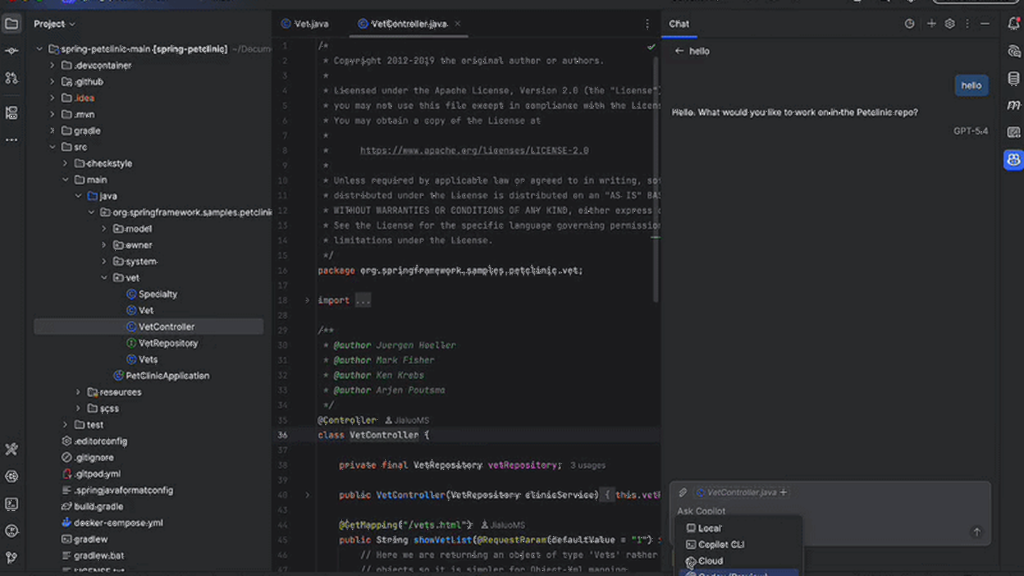
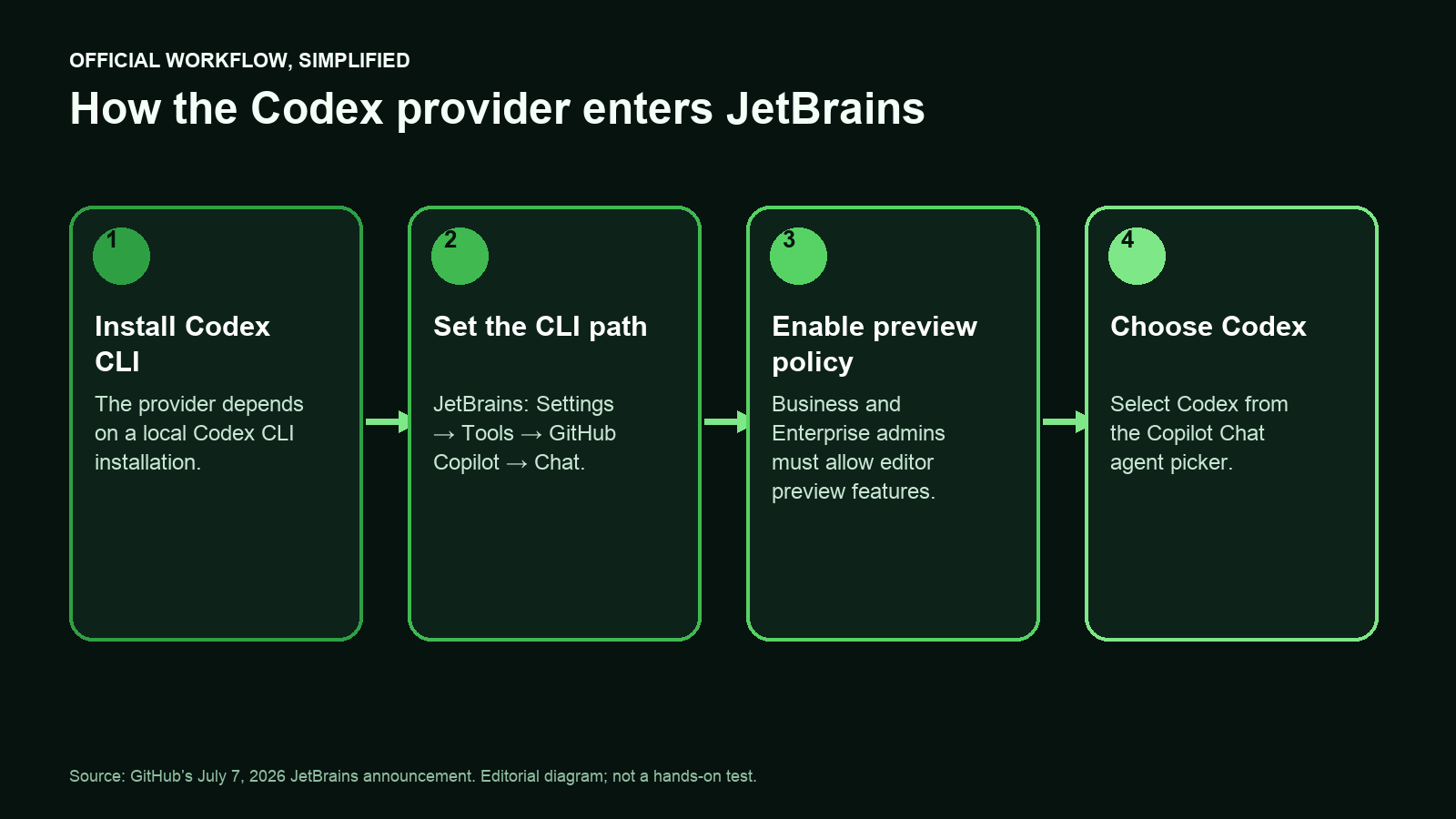
GitHub announced the new provider on July 7, 2026 as part of a wider Copilot for JetBrains update. Codex appears in the Copilot Chat agent picker after a user installs the Codex CLI, enables Codex under Settings > Tools > GitHub Copilot > Chat, and points the plugin to the CLI path.
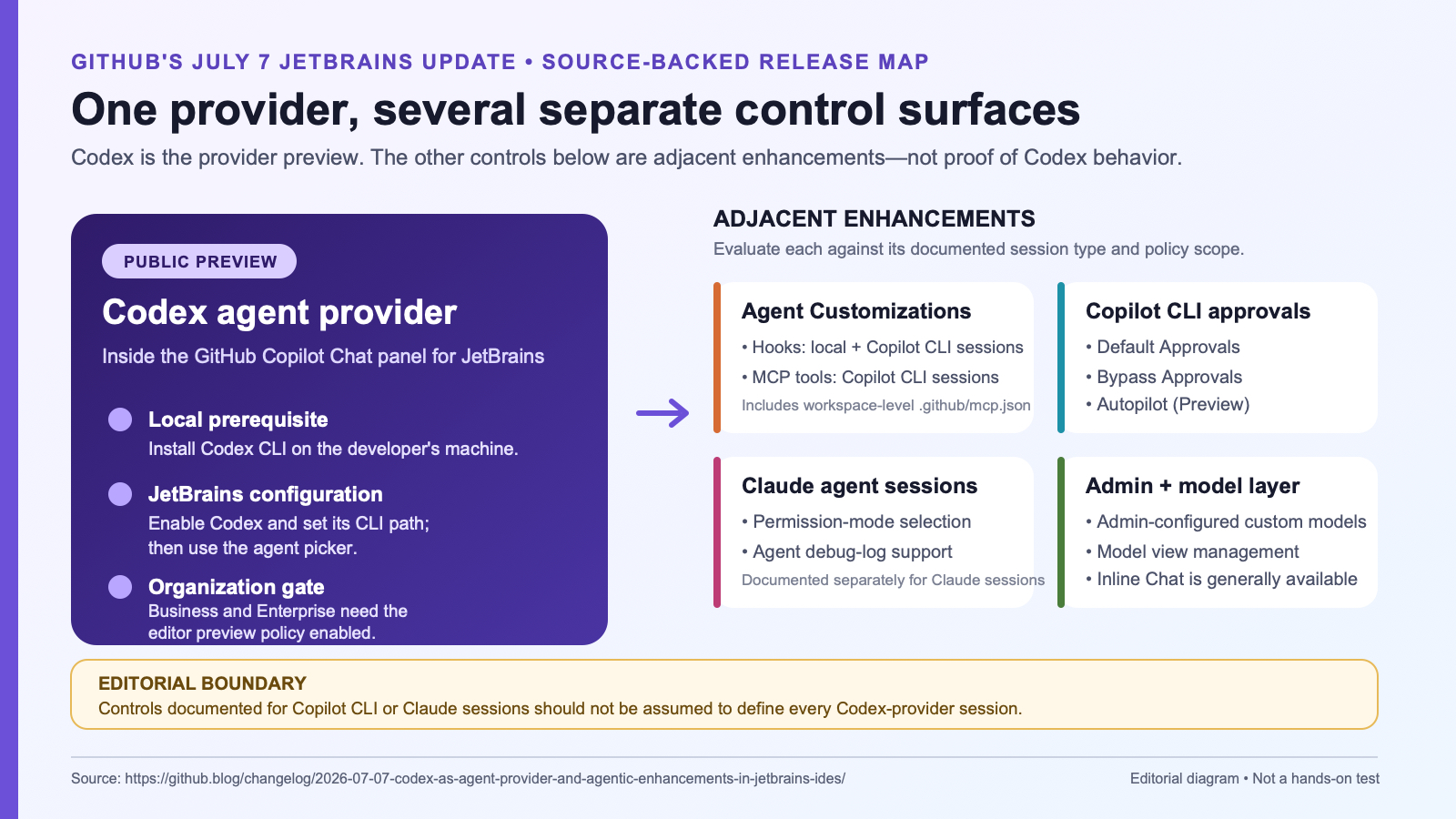
The important distinction is that Codex provider support is one part of the release. GitHub also shipped hooks management, richer MCP server controls, approval settings for Copilot CLI sessions, Claude-agent permission modes and debug logs, model-list management, administrator-configured custom models, and the general availability of Inline Chat. Those adjacent capabilities improve the overall JetBrains agent environment, but they are not all intrinsic features of the Codex provider itself.
How the Codex provider works
The provider gives a JetBrains user another agent choice inside the same Copilot Chat panel. Once configured, a developer can select Codex for a session rather than moving to a separate terminal or editor. GitHub describes the integration as a public preview, so teams should expect the setup and behavior to change as the plugin evolves.
- Install or update the GitHub Copilot plugin for JetBrains.
- Install the Codex CLI locally.
- Open the Copilot Chat settings, enable Codex, and set the local CLI path.
- Select Codex from the agent picker and start a session in a test repository.
GitHub’s launch note is the most direct setup reference. Its general guide to installing Copilot in an IDE covers the surrounding plugin installation and account requirements.
What else changed in the JetBrains release
Hooks and MCP server management
Agent Customizations can now manage hooks for local and Copilot CLI sessions. For Copilot CLI sessions, the same area can browse, add, start, stop, restart, and uninstall MCP servers, including command and HTTP servers. Workspace-level MCP configuration is supported through .github/mcp.json.
This can reduce setup friction, but it also makes server review important. An MCP server can expose data or actions to an agent, so teams should approve servers, commands, network destinations, and credentials before enabling them across a repository.
Approval controls for Copilot CLI sessions
The update adds Default Approvals, Bypass Approvals, and an Autopilot preview for Copilot CLI sessions. GitHub says Bypass auto-approves tool calls, while Autopilot also answers clarifying questions so the agent can continue iterating. These controls apply to Copilot CLI sessions described in the release; they should not be presented as proof that every Codex session behaves identically.
Custom models and administration
GitHub Copilot Business and Enterprise administrators can make configured custom models available to organization members. Business and Enterprise administrators also need to enable the editor preview features policy before members can use the Codex provider. That policy dependency makes the launch as much an administration decision as a developer preference.
Where this could be useful
- JetBrains-first development teams: compare Codex with other available agents while keeping project navigation, diffs, and chat inside IntelliJ-based IDEs.
- Controlled agent pilots: give a small group a representative bug fix or refactor and compare completion quality, review effort, and cost.
- MCP-assisted development: test approved documentation, issue-tracker, or internal-tool servers from the same customization surface.
- Governed enterprise workflows: combine organization policies, approved models, hooks, and session review instead of relying on an unmanaged local setup.
- Provider comparison: run equivalent tasks through Codex and another supported agent to see which produces the smaller, clearer, and more testable change.
Pricing and access
GitHub’s current individual plan page lists Copilot Free at $0, Pro at $10 per month, Pro+ at $39 per month, and Max at $100 per month. Its Cloud agent comparison includes third-party agent delegation for Pro+ and Max, and excludes it for Free and Pro. That is a separate feature from the JetBrains Codex-provider preview; the JetBrains announcement does not state a minimum eligible individual plan. Pro currently includes $15 in monthly total GitHub AI Credits, with larger included amounts on higher tiers.
The JetBrains announcement establishes the local Codex CLI setup and administrator preview-policy requirements, but does not establish whether every individual Copilot plan includes this provider. The user’s Copilot plan, included AI Credits, model choice, and any organization policy can affect access and usage. Business and Enterprise pricing and credit pools follow organization terms rather than the individual prices above.
GitHub’s launch note does not fully document every authentication, account, or cost interaction between the local Codex CLI and Copilot. A pilot should confirm which account is active, where usage appears, and which administrator controls apply before the workflow is standardized.
How to evaluate the preview
- Choose a bounded task. Use a repository with tests and select a real but reversible issue, such as a small bug fix or targeted refactor.
- Start with conservative permissions. Avoid bypass or Autopilot settings until the team has reviewed tool calls and failure modes.
- Review the full diff. Check tests, new dependencies, generated files, secret handling, and changes outside the requested scope.
- Measure review effort. Record whether the agent reduced total work or simply moved effort from implementation to correction.
- Check usage. Compare AI-credit consumption and session duration with an equivalent task using another provider or the team’s existing workflow.
- Audit integrations. Verify every hook and MCP server separately; provider convenience does not replace access review.
Comparison snapshot
| Option | Where it runs | What to evaluate |
|---|---|---|
| Codex provider in Copilot | Copilot Chat in a JetBrains IDE, backed by a local Codex CLI setup | Preview stability, plan access, diff quality, permissions, and credit visibility |
| Claude provider in Copilot | Copilot Chat in a JetBrains IDE after provider configuration | Model fit, permission behavior, session diagnostics, and organization policy |
| Direct CLI workflow | Terminal or a separate agent surface | Control, context switching, automation options, and local environment access |
| JetBrains-native assistance | JetBrains IDE tools | IDE integration, model choice, organization controls, and existing team adoption |
Risks and limitations
- Public preview: behavior, eligibility, and settings can change.
- Administrator dependency: Business and Enterprise users may be blocked until an administrator enables editor preview features.
- Local prerequisite: the integration depends on a working Codex CLI installation and a correctly configured path.
- Broad tool access: hooks, MCP servers, bypass approvals, and Autopilot can increase the consequences of a poor instruction or an untrusted integration.
- Cost variability: longer sessions, delegated work, and higher-cost models can consume more AI Credits.
- Review remains mandatory: provider choice does not guarantee correct, secure, or production-ready code.
Verdict
This preview is worth testing for teams already using both JetBrains IDEs and GitHub Copilot. The strongest benefit is not a new model benchmark; it is the ability to compare agent providers inside a familiar IDE workflow. Start with one repository, conservative permissions, an approved MCP list, and a measurable task. Broad rollout should wait until the team understands access, usage, and the amount of human review each session requires.
FAQ
Is Codex in GitHub Copilot for JetBrains generally available?
No. GitHub describes Codex provider support as a public preview.
What must a developer install?
A recent GitHub Copilot plugin for JetBrains and the Codex CLI. The user then enables Codex and sets the CLI path in Copilot Chat settings.
Does the Copilot Free plan include the Codex provider?
The JetBrains preview announcement does not state a minimum individual plan. GitHub’s separate Cloud agent table includes third-party delegation in Pro+ and Max, not Free or Pro; do not use that row as proof of this local provider’s eligibility. Confirm access in the account and organization settings before planning a rollout.
Do Bypass Approvals and Autopilot describe Codex permissions?
GitHub documents those modes for Copilot CLI sessions in the same JetBrains release. They should be evaluated separately rather than assumed to define every Codex-provider session.
Official sources
- GitHub changelog: Codex as agent provider and agentic enhancements in JetBrains IDEs
- GitHub Copilot plans and pricing
- GitHub Docs: installing Copilot in an environment
- GitHub Copilot product page
Related Kingy AI coverage
The Kingy Brief
Get The Kingy Brief.
AI changes, original tests and one practical thing to try. Fridays at 09:00 Vancouver time.
Free · Double opt-in · Unsubscribe anytime
Sign up for The Kingy Brief on Beehiiv.
Signup help and newsletter schedule
Signup form provided by Beehiiv. After submitting, check your inbox for "Confirm your subscription to The Kingy Brief" and open its confirmation link. Check Spam or Promotions if you cannot find it.
Fridays at 09:00 Vancouver time: source-checked AI changes, original tests and one practical thing to try. The weekly restart begins October 9, 2026. We skip a week when there is not enough verified material. Free. Unsubscribe anytime.