


ChatGPT Plan Recommendation Calculator
Find the cheapest ChatGPT plan that fully covers how you actually use AI.
Find the ChatGPT Plan You Actually Need (Without Overpaying)
OpenAI’s pricing page is doing you a disservice. Not because the information is wrong, exactly, but because it’s wrapped in the kind of deliberately vague language that makes it nearly impossible to figure out what you’re actually getting. “Limited.” “Expanded.” “Maximum.” These aren’t specs — they’re vibes. And when you’re deciding between $20 a month and $200 a month, vibes aren’t good enough.
That’s why we built this calculator (above). It’s a free, independent tool — not affiliated with OpenAI in any way — that asks you seven straightforward questions about how you actually use ChatGPT and tells you the cheapest plan that fully covers your workflow. No upselling, no affiliate links, no “just get Pro to be safe.” You answer the questions, and it gives you a detailed, personalized recommendation with a confidence level, a clear explanation of why, and even a cheaper fallback option if you want to start conservative.
Let’s talk about why something like this is necessary in the first place.
Seven Plans Is a Lot of Plans
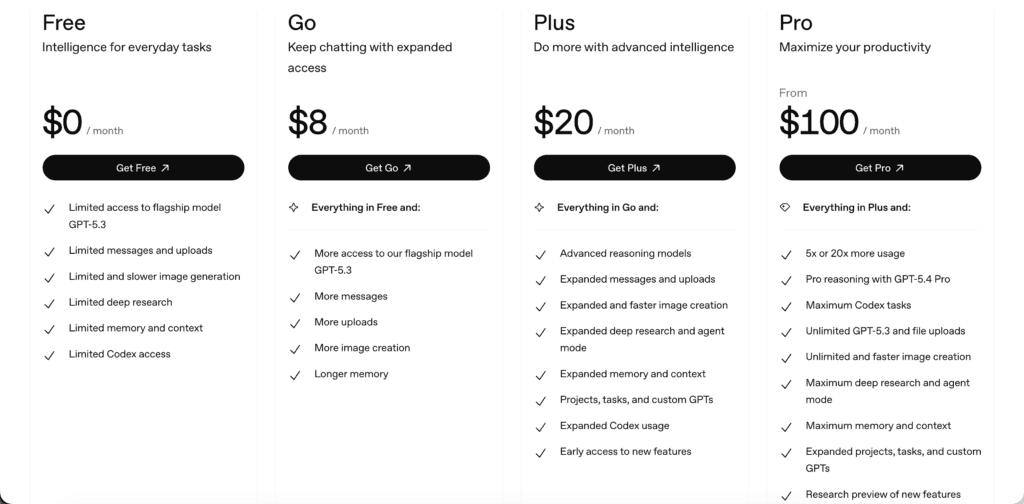
As of early 2026, OpenAI offers seven distinct pricing tiers: Free, Go ($8/mo), Plus ($20/mo), Pro $100 ($100/mo), Pro $200 ($200/mo), Business ($25/user/mo), and Enterprise (custom pricing). The recent addition of the $100/mo Pro tier — slotted between Plus and the existing $200 Pro — made an already confusing lineup genuinely bewildering.
Here’s the thing most people miss: the jump from Pro $100 to Pro $200 isn’t a different product. It’s the same feature set with a different usage allowance — roughly 5× Plus capacity versus 20× Plus capacity. But you wouldn’t know that from the pricing page, which presents them as separate tiers with their own feature grids. Meanwhile, Business isn’t “better” or “worse” than Pro; it serves a completely different purpose. And the Go plan, which a lot of people skip right over, is genuinely solid for casual users who want a step up from Free without paying for tools they’ll never open.
The result? Most people either overpay for features they don’t touch or underpay and slam into usage caps that derail their workflow at the worst possible moment. This calculator exists to fix that.
What the Calculator Actually Asks (and Why It Matters)
The tool walks you through seven questions. Each one targets a specific dimension of how ChatGPT plans differ from each other. Here’s what they are and why they’re important.
How Many People Need Access?
This is the first fork in the road. If two or more people on your team need ChatGPT access, you’re immediately looking at Business or Enterprise — not because they’re more powerful in every way, but because they’re built for teams. Centralized billing, admin controls, workspace management, and critically, default privacy protections that personal plans don’t offer. Solo users have the full range of options. Teams don’t, and that’s actually a good thing.
How Heavily Do You Use It?
This is the single biggest factor in your recommendation. The difference between Plus, Pro $100, and Pro $200 is overwhelmingly about usage headroom. If you’re an occasional user — a few conversations a day, maybe some help drafting emails or brainstorming — Plus covers you comfortably, and Pro is money you’re lighting on fire.
If you’re running ChatGPT as a core part of your daily workflow, hammering it with long conversations, complex tasks, and heavy tool use, Plus will leave you staring at rate-limit messages by mid-afternoon. Usage intensity determines where you land on the spectrum more than any other single factor.
Which Models Do You Need?
Plus gives you access to GPT-5.4 Thinking, which is excellent for the vast majority of tasks. What it doesn’t give you is GPT-5.4 Pro — the higher-capability model reserved for Pro-tier subscribers. For most people, the standard model is more than enough. But if you’re doing complex multi-step reasoning, deep research synthesis, or serious coding work, the Pro model can produce noticeably better results. The calculator helps you figure out whether you’re in the “more than enough” camp or the “I actually need this” camp, because that distinction alone can save you $80 a month.
Which Advanced Tools Do You Actually Use?
ChatGPT isn’t just a chatbot anymore. It’s a platform with Deep Research, Agent Mode, Codex for coding, image generation, voice mode, task automation, app connectors, and custom GPTs. Each plan gates these tools differently. Someone who only uses ChatGPT for conversation and light writing doesn’t need to pay for Codex access they’ll never open.
Someone who lives in Deep Research and Agent Mode needs a plan that doesn’t throttle those tools into uselessness. The calculator maps your actual tool usage to the plans that support it, so you’re not paying for capabilities that sit untouched.
How Sensitive Is Your Data?
This one catches people off guard. Personal ChatGPT plans — Free through Pro — may use your conversations to train OpenAI’s models. You can opt out manually in your settings, but it’s not the default. Business and Enterprise workspaces, on the other hand, do not use your data for training by default.
If you’re doing client work, handling proprietary information, working under compliance requirements, or just uncomfortable with the idea of your conversations feeding a training pipeline, this distinction matters enormously. It’s not a feature bullet point — it’s a dealbreaker for a lot of professionals.
How Do You Feel About Ads?
OpenAI has been testing advertisements on Free and Go plans in the US. Plus and everything above it remain ad-free. For some people, this is a non-issue — a small banner isn’t going to ruin their day. For others, especially anyone using ChatGPT in professional settings, during screen shares, or in client-facing contexts, ads are a legitimate concern. The calculator factors in your sensitivity here so you’re not surprised by a sponsored message popping up mid-presentation.
Do You Need API Access?
This is probably the single biggest source of confusion in OpenAI’s entire pricing structure. ChatGPT subscriptions — every tier from Free through Pro $200 — do not include API access. The API is a completely separate product, billed separately through OpenAI’s developer platform. If you’re building apps, running automations through the API, or integrating ChatGPT into other tools via API calls, your subscription doesn’t cover that. The calculator flags this explicitly so you don’t buy a $200/month Pro plan thinking it includes your API usage. It doesn’t. Not even a little.
How the Recommendation Engine Works
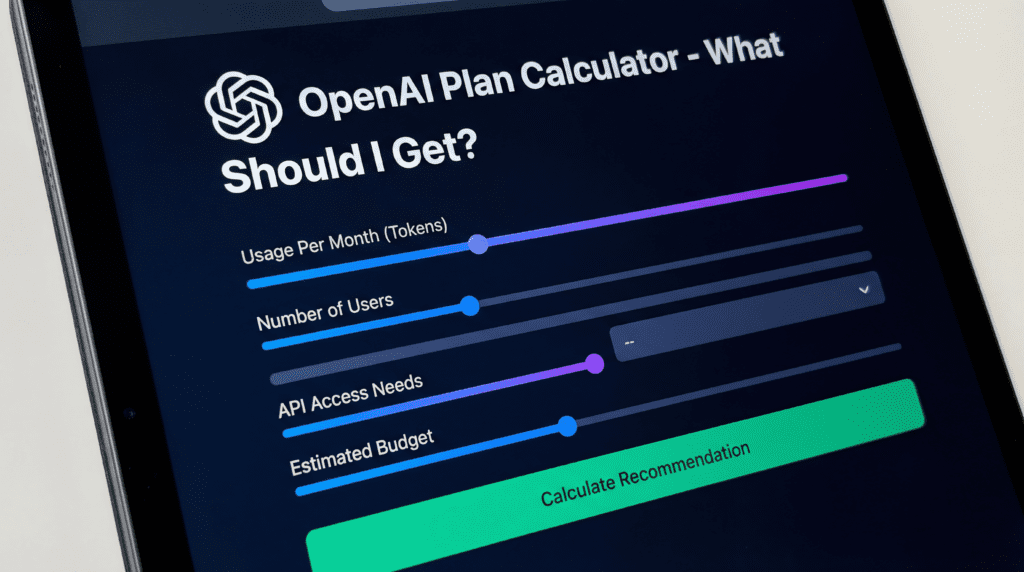
The calculator doesn’t just look at one answer and spit out a plan name. It weighs all seven inputs together, because real-world usage doesn’t fit into a single dimension. Someone with heavy usage but no advanced tool needs lands in a very different place than someone with moderate usage who depends on Deep Research and Codex daily.
When you get your result, it doesn’t just say “get Plus.” It gives you a confidence level for the recommendation, a plain-English explanation of why that plan fits your profile, a breakdown of what you unlock with that plan, a note about features you’re paying for but probably don’t need yet, a cheaper fallback option if you want to start lower and upgrade later, and a specific trigger — “upgrade when X happens” — so you know exactly what signal to watch for.
The philosophy is simple: find the cheapest plan that fully covers your actual workflow. Not the plan with the most impressive feature list. Not the plan that gives you the most headroom “just in case.” The one that fits.
The Trade-offs Worth Understanding
A few insights that come up repeatedly in recommendations and are worth internalizing:
The biggest value jump for most solo users is Plus. Going from Free or Go to Plus unlocks the core advanced experience — better models, advanced tools, no ads — at a price point that’s reasonable for regular use. Pro is for people who’ve already hit the ceiling on Plus and know it.
Pro $100 and Pro $200 share the same features. The only meaningful difference is usage allowance. If you’re bumping up against Pro $100 limits regularly, the upgrade makes sense. If you’re not, you’re paying double for headroom you don’t use.
Pro is not “better than Business.” They serve fundamentally different needs. Pro is for high-usage individual power users. Business is for teams that need governance, centralized management, and default privacy protections. Comparing them on a feature grid misses the point entirely.
And don’t sleep on the Go plan. At $8 a month, it’s a genuine sweet spot for casual users who want more than the Free tier offers — faster responses, fewer restrictions — without paying for advanced tools they’ll never touch.
A Quick Note on Accuracy
The plans, pricing, and feature details reflected in this calculator are based on OpenAI’s official pricing page and help documentation as of April 2026. OpenAI updates its plans, features, and usage limits regularly — sometimes without much fanfare — so while the tool reflects the latest available information, it’s always worth checking openai.com for the most current details before committing.
It’s also worth noting that some of the plan descriptions use intentionally vague language because that’s what OpenAI publishes. When OpenAI says a plan offers “expanded” access versus “limited” access without providing exact message caps, there’s only so much precision any third-party tool can offer. The calculator works with the best available information and is transparent about where the ambiguity lives.
Now go find out which plan you actually need. It might be cheaper than you think.






Comments 1