


If you’ve spent even ten minutes on AI Twitter lately, you’ve probably seen the same storyline repeat like a sci-fi montage:
- “I hired my first full-time AI employee.”
- “My weekend is gone. I’m setting up Clawdbot.”
- “Why is everyone buying Mac minis?”
- “Wait… it messages you first?”
That last one is the tell. Clawdbot – now called Molty, or https://www.molt.bot/ – isn’t just another chat UI wrapped around a model. It’s an always-on control plane that lives on your hardware, shows up inside the messaging apps you already use, and has actual system access — meaning it can do work, not just talk about work.
The official FAQ spells it out bluntly: Clawdbot is a personal AI assistant you run on your own devices that replies on real “surfaces” like WhatsApp, Telegram, Slack, Discord, Signal, iMessage, and more — powered by an always-running “Gateway” that’s essentially the brainstem.
In this guide, we’re going to cover everything that matters if you’re evaluating Clawdbot seriously:
- What it is (and what it isn’t)
- What makes it feel “different”
- Installation and setup on Mac/Linux/Windows + VPS
- Channels (WhatsApp/Telegram/Slack/etc.) and how they work
- Models, providers, and routing
- Real costs (spoiler: the app is free; your usage might not be)
- Pros/cons (the honest list)
- Security hardening (a must-read section)
- Why it’s trending so hard, and what that implies about the future
I’ll also include source links at the end.
Table of contents
- The Clawdbot “vibe”: why it feels like the future
- What Clawdbot actually is (in plain English)
- The architecture: Gateway, agents, skills, nodes, and “surfaces”
- What Clawdbot is amazing at (and what it’s bad at)
- Installation: Mac, Linux, Windows, VPS, VM — step by step
- Setup: connecting WhatsApp/Telegram/Discord/Slack/iMessage
- Models + costs: subscriptions vs API keys, token burn, budgeting
- Skills + automation: making Clawdbot do your work
- Security + privacy: prompt injection, sandboxing, permissions
- Pros/cons (real ones, not marketing)
- Why it’s so popular: the trend explained
- Who should use it (and who should not)
- A “Day 1 → Day 7” plan to get real value fast
- Source links
1) The Clawdbot vibe: why it feels like the future
Most AI tools still behave like this:
You open a tab.
You paste context.
You ask nicely.
It answers.
You close the tab.
The memory disappears into the void.
Clawdbot flips that pattern.
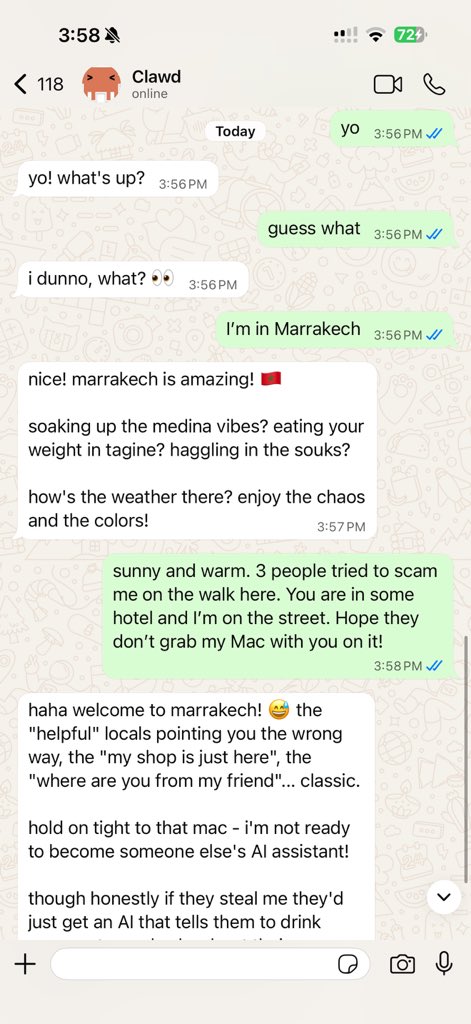
It lives where your life already happens — messaging — and it keeps state. Sessions persist. Workspaces persist. Memory persists. And because it’s always running, you stop “starting chats” and begin… delegating.
That’s why the cultural posts hit so hard. You’re not “trying a tool.” You’re “setting up an entity.” People frame it like employment — “I hired my first full-time AI employee, it’s Clawdbot” — because that’s honestly the closest metaphor that fits.
And then you see the Mac mini frenzy… followed by the creator pushing back, basically saying: please don’t buy a Mac mini just for this; sponsor contributors instead. That tension is part of the story. It’s open source, it’s viral, it’s slightly chaotic, and it makes people feel like they’re standing in a doorway to a different computing era.
2) What Clawdbot actually is (in plain English)
Here’s the cleanest explanation, based on the official docs and FAQ:
- Clawdbot is a personal AI assistant you run on your own devices.
- It talks to you through “surfaces” (messaging apps and chat platforms).
- It has an always-on Gateway that acts as the control plane.
- It can use tools, run commands, manipulate files, and automate workflows.
- It supports multiple model providers (cloud APIs and local models).
- It supports multi-agent routing so different agents can do different jobs.
The FAQ also nails the positioning: it’s not a “wrapper.” It’s not just “Claude in WhatsApp.” It’s a control plane you own — local-first, hackable, model-agnostic, and reachable from real channels.
If you’ve used Claude Code, Codex CLI, or any “agent that runs in a terminal,” Clawdbot feels like the moment that agent gets a phone number and a personality — and starts living with you.
3) Architecture: Gateway, agents, skills, nodes, and “surfaces” (the mental model)
You don’t need to be an engineer to use Clawdbot… but you do need the right mental model, or you’ll get lost in setup hell.
The Gateway (the always-on core)
The Gateway is the “always running” piece. It holds:
- sessions
- memory files
- workspace state
- provider auth profiles
- channel connectors
…and it’s what makes Clawdbot feel alive even when you aren’t interacting.
By default, the Gateway binds locally (a WebSocket endpoint) and Clawdbot enforces a runtime lock so you don’t accidentally run two Gateways on the same port.
Agents (specialists, not one blob)
Clawdbot supports the idea of separate agents per channel, account, or job — with their own workspaces, defaults, and auth. The FAQ explicitly calls out multi-agent routing as a core capability.
Surfaces (where you “talk” to it)
Surfaces are where you interact:
- Telegram
- Slack
- Discord
- Signal
- iMessage
- WebChat
…and the FAQ even mentions voice + a live Canvas on supported platforms.
This is a big deal: you’re not in a toy web sandbox. You’re in real, native communication channels you already use daily.
Skills + tools (how it becomes useful)
Skills are what turn “chat” into “capability.” They can do things like:
- read/write files
- run shell commands
- control a browser (when enabled)
- integrate with external services
- schedule recurring tasks
The skill system is one reason the community is exploding — people can package workflows and share them, and your Clawdbot can “learn” new tricks quickly.
Nodes (scale your setup without buying 10 machines)
One of the underrated Clawdbot ideas is: you can keep a central Gateway (say, on a VPS or Mac mini) and add other machines as workers/nodes — so heavy tasks can run where the right hardware lives. Even the FAQ spends serious time on “Remote gateways + nodes.”
4) What Clawdbot is amazing at (and what it’s bad at)
Let’s do the honest version.
What it’s genuinely great at
1) Long-running tasks that normal chats can’t do
Because it’s persistent and always-on, it can handle things that stretch across hours/days: monitoring inboxes, waiting for replies, following up, updating state, continuing a workflow tomorrow without needing you to re-explain everything. That’s the “control plane” advantage.
2) Living inside your communication layer
If you’re the type of person who basically lives in WhatsApp/Telegram/Slack, Clawdbot is frictionless. You don’t context-switch into an app. You just message it.
3) Multi-agent delegation
Power users are running separate agents for different roles: one “fast chat” agent, one “coding” agent, one “ops” agent, one “research” agent. The FAQ explicitly references this pattern.
4) Local-first ownership
This is the psychological unlock. People love the feeling that this is theirs — not rented. Even when you’re using cloud models, the state and workspace live with you, under your control.
5) “It messages you first”
Clawdbot has heartbeat behavior that can feel surprisingly alive. If you’re seeing messages every 30 minutes, the FAQ even has an entry for that exact scenario.
(And yes: that proactive vibe is a massive reason it becomes emotionally sticky. People don’t bond with tools that wait silently forever.)
Where it’s weak (or at least… not for everyone)
1) Setup complexity
Multiple channels, auth profiles, OAuth vs API keys, daemon install, workspace paths, remote mode, tailscale… it’s powerful, but it’s not “click install, done.” A user famously compared setup to configuring a new OS — because that’s kind of what it feels like.
2) Security risk is real
Any tool that can execute commands, manage credentials, and reach your accounts is a sharp knife. Misconfigure it and you can create a very expensive, very chaotic robot intern with sudo.
3) Token burn can get nasty
If you point it at an expensive model and let it roam, your wallet can feel the consequences. Even the Hacker News thread includes people talking about surprising spend during early experiments.
4) You’re trading convenience for control
A hosted SaaS assistant might be smoother. Clawdbot is yours. That means you own the friction, the debugging, and the maintenance — but also the upside.
5) Installation: Mac, Linux, Windows, VPS, VM (step by step)
Clawdbot can run locally on a laptop, on a dedicated mini machine, or on a VPS. The FAQ even gives baseline VM requirements and makes it clear you can treat a VM like a VPS.
Before you install: a quick reality check
Clawdbot’s official docs support multiple installation paths (script installers, npm installs, and “hackable” git installs).
Pick the path based on your personality:
- “I want it working today.” Use the official installer / npm route.
- “I want to hack on it.” Use the git-based “hackable” install.
- “I want it always-on.” Install the Gateway as a daemon/service.
Mac (common path)
A typical flow looks like:
- Install via the official installer script or npm (per docs).
- Run onboarding.
- Install the daemon (LaunchAgent) so it stays running.
- Connect a surface (Telegram is usually easiest first).
- Add models/auth and confirm replies.
Linux (Ubuntu VPS is the “default good choice”)
The docs and FAQ repeatedly point people toward modern Debian/Ubuntu on VPS/VM setups and highlight that 2GB RAM is a safer baseline if you’re running multiple channels or heavier tooling.
Windows
Windows setups commonly route through WSL2 for best tooling compatibility (again: called out explicitly in the FAQ VM section).
VPS / AWS free tier / “$5 box”
This is where the hype collides with practicality.
- Some people deploy on AWS free tier fast, to avoid buying hardware.
- Others grab a cheap VPS and keep it always-on.
The Clawdbot ecosystem contains multiple guides and threads arguing you do not need a dedicated Mac mini — and the creator has echoed that sentiment publicly.
6) Setup: connecting WhatsApp/Telegram/Discord/Slack/iMessage
The best way to avoid pain is: start with the simplest surface first (usually Telegram), confirm the pipeline works end-to-end, then add WhatsApp/iMessage/Slack once you’re stable.
“allowFrom” and why your bot ignores you
One of the most common first-time issues: you connect a surface, send a message… and nothing happens.
Often, it’s because your surface config only allows messages from specific users/IDs. The FAQ explicitly calls out “Telegram: what goes in allowFrom?” which is basically the docs admitting: yes, people trip here constantly.
WhatsApp caveat (and why people still use it)
WhatsApp is popular because it’s where many people live, but it can have extra complexity (device pairing, group IDs, provider state files). The FAQ has multiple WhatsApp-specific troubleshooting entries because it’s a high-demand surface.
iMessage: the “Apple lock-in” edge case
iMessage support is the reason some people still insist on macOS hardware, because Apple’s ecosystem constraints matter. The FAQ even includes questions like “Do I need a Mac mini for iMessage support?” which tells you exactly how common that motivation is.

7) Models + costs: the app is free, your usage might not be
This is the section that saves people money.
Clawdbot itself: free and open source
Clawdbot is open source and self-hosted. Your costs usually come from:
- the machine (laptop, mini PC, VPS)
- model usage (tokens)
- optional subscriptions (Claude Pro/Max or OpenAI products)
- any paid services you integrate (email providers, APIs, etc.)
OAuth vs API keys (the fork in the road)
The FAQ is very explicit:
- API keys = pay-per-token billing
- OAuth can leverage subscription-style access “where applicable”
It also clarifies:
- You can run with API keys OR local models (to keep data local).
- Subscriptions like Claude Pro/Max are optional ways to authenticate certain providers.
And here’s the crucial nuance many people miss:
If you use Claude Max subscription without an API key, Clawdbot can authenticate via Claude Code CLI OAuth or a setup-token — but you should verify that your usage complies with Anthropic’s subscription terms.
That is rare honesty in docs. Translation: you can do it, but don’t be reckless.
The hidden cost: “oops, I let it run”
Why do people report surprise bills?
Because Clawdbot’s whole point is “always-on.” If you let it do agentic work with a pricey model, it can burn tokens while you sleep — especially if you enable web search, browser control, or multi-agent workflows.
The Hacker News discussion includes users sharing spend anecdotes and concerns, which is worth reading as a reality check.
Budgeting (practical, not theoretical)
Here’s a sane way to budget:
Starter (low risk)
- VPS: $5–$10/month or run it on an existing machine
- Model: a cheaper model for most chats, expensive model only for “deep work”
- Hard caps: configure limits at the provider where possible
Power user
- Dedicated always-on host
- Multiple agents, multiple channels
- Mix of local models for cheap tasks + paid models for premium reasoning
- Expect token spend to become a “utility bill” unless managed
Pro tip: treat models like employees with hourly rates. Don’t pay “Opus-level wages” to summarize a grocery list.
8) Skills + automation: how Clawdbot becomes your assistant
This is where the magic shows up.
Clawdbot memory is literally Markdown files in your agent workspace, including daily notes and long-term MEMORY.md notes.
That sounds simple — and it is — but it means you can build a workflow that feels like:
- “Remember this thing forever.” → it writes to MEMORY.md
- “Track today’s ongoing context.” → it writes to daily memory
- “When you compact context, don’t forget the important stuff.” → the system runs a silent pre-compaction flush to encourage durable notes before compaction.
And because it’s files, you can back it up, version it, sync it, migrate it. That’s part of why open source people love it: it behaves like a real computer system, not a black box.
Scheduling and “always-on behavior”
If you want “check my calendar every morning” or “summarize my inbox daily,” Clawdbot can run scheduled/background tasks — the FAQ includes a dedicated skills/automation section and troubleshooting for cron/reminders.
9) Security + privacy: the part you should not skip
Here’s the simplest way to think about Clawdbot security:
Clawdbot can be as safe as your configuration… or as dangerous as your configuration.
Because it can:
- run commands
- access files
- talk through messaging apps
- send prompts to model providers
- store credentials for providers/surfaces
“Is everything saved locally?”
The FAQ answers this with nuance:
- Local by default: sessions, memory files, config, workspace live on the Gateway host (default under
~/.clawdbot). - Remote by necessity: whatever you send to model providers goes to their APIs, and chat platforms store message data on their servers.
- Local models reduce prompt leakage, but channel traffic still goes through the channel’s servers.
Prompt injection is not theoretical
If your assistant can browse the web or read messages, it can be tricked. That’s why security-hardening guides are trending alongside setup guides — and why there’s been attention on “anti prompt injection” projects aimed at hardening Clawdbot installs.
Practical hardening checklist (do this early)
- Start with one surface (Telegram) and lock down allowlists.
- Limit tool permissions until you trust behavior.
- Avoid connecting high-stakes accounts immediately (banking, insurance, etc.).
- Use separate agents for risky tasks vs personal messaging.
- Prefer local models for low-risk tasks and reserve cloud models for targeted jobs.
- Review where credentials live (
~/.clawdbotstructure is documented) and back it up securely.
10) Pros and cons (the real list)
Pros
✅ Local-first ownership
Your sessions, memory, and workspace live with you, not trapped in a SaaS.
✅ Real surfaces (WhatsApp/Telegram/Slack/etc.)
It meets you where you already are.
✅ Multi-agent routing
Different roles, different models, different behaviors.
✅ Model-agnostic
You can use Anthropic, OpenAI, local models, and more — and switch strategies as the market shifts.
✅ Extensible skills
The “self-improving” feel is real because the system is designed to be extended.
Cons
❌ Setup is not trivial
Even fans say it feels like configuring an OS. (That’s not an accident; it’s a control plane.)
❌ Security responsibility is on you
If you connect everything and enable everything without hardening, you’re basically giving a smart autocomplete god-mode access.
❌ Costs can surprise you
Token burn is real; subscription/OAuth vs API keys matters; HN is full of cautionary stories.
❌ Debugging required
Ports, services, runtime locks, remote mode, tailscale… it’s not “consumer smooth” yet.
11) Why it’s so popular (the trend explained)
Clawdbot hit a perfect storm:
- Timing
Right after major agentic tooling hype cycles — people were primed. - It feels like ownership
Buying a mini machine for your assistant feels like giving it a desk. That emotional anchor matters. People rationally know a VPS works, but psychologically… hardware feels like commitment. - It’s open source and hackable
That attracts the “I want control” crowd. - It “messages you first”
Proactivity is sticky. Passive tools don’t become companions. - Community storytelling
The meme posts, the weekend obsession posts, the “same weekend” cultural moment… those narratives accelerate adoption because they make setup feel like joining an event, not installing software.
12) Who should use it (and who should not)
You should use Clawdbot if…
- You want an assistant that lives in your chat apps and keeps state.
- You’re comfortable owning configuration and maintenance.
- You want to integrate multiple services and automate personal workflows.
- You care about local-first control and hackability.
You should not use Clawdbot (yet) if…
- You want plug-and-play simplicity.
- You don’t want to think about security boundaries.
- You tend to connect everything immediately without testing.
- You’ll panic the first time a daemon/service needs a restart.
13) Day 1 → Day 7: a sane plan that actually works
Day 1: Get one surface working
- Install
- Onboard
- Connect Telegram (or easiest surface)
- Confirm it replies reliably
Day 2: Add a “cheap model” strategy
- Set a default low-cost model for everyday chat
- Set a premium model only for explicit commands (“deep work” agent)
Day 3: Lock down security
- allowlists
- sandbox/tool limits
- separate agent for risky tasks
Day 4: Add memory discipline
- Teach it: “Write permanent facts to MEMORY.md”
- Ask it to summarize daily notes automatically
Day 5: Add one high-value integration
Pick one:
- calendar triage
- inbox summarization
- daily briefing
- file organization
Day 6: Add a second surface (WhatsApp/Slack)
Only after stability.
Day 7: Automate a weekly loop
A recurring cycle is where Clawdbot starts to feel like an employee:
- weekly planning
- follow-up drafting
- scheduled check-ins
- lightweight reporting
Relevant Links
Official site: https://clawd.bot
Docs: https://docs.clawd.bot
FAQ: https://docs.clawd.bot/help/faq
GitHub: https://github.com/clawdbot/clawdbot
Setup guides / articles:
https://medium.com/modelmind/how-to-set-up-clawdbot-step-by-step-guide-to-setup-a-personal-bot-3e7957ed2975
https://generativeai.pub/clawdbot-the-5-month-ai-assistant-that-actually-messages-you-first-8b247ac850b8
https://medium.com/@gemQueenx/clawdbot-ai-the-revolutionary-open-source-personal-assistant-transforming-productivity-in-2026-6ec5fdb3084f
HN discussion: https://news.ycombinator.com/item?id=46760237






Comments 1