Anthropic’s latest mobile update sounds modest at first. It isn’t.
The headline arrived on March 25, 2026, with the kind of understatement that often accompanies genuinely significant product shifts: Claude’s work tools are now available on mobile. No hyperbole. No dramatic language. Just a quiet announcement that the same interactive apps, live dashboards, and agentic workflows already accessible on desktop are now surfacing inside Claude for iOS and Android.
But read past the headline, and you find something that deserves a lot more attention than it’s gotten. This isn’t a quality-of-life update. It’s a product philosophy made tangible — and it has implications for how AI assistants are built, sold, and used across every professional context.

What Actually Shipped
According to Anthropic’s release notes, the March 25 update enables Claude for iOS and Android to connect to fully interactive apps. Users can now pull up live charts, sketch diagrams, and build shareable assets — all from within a conversation on their phone. That wording is deliberate. Anthropic isn’t summarizing external tools in text. It’s letting software remain software-shaped inside Claude.
The list of interactive connectors currently supported includes Amplitude, Asana, Box, Canva, Clay, Figma, Hex, and Slack — as TechCrunch reported when Anthropic first unveiled the broader connector initiative in January. These aren’t novelty integrations. They’re core work surfaces: analytics, project management, file access, design, outreach, notebooks, and messaging. In other words, Claude mobile is not being built for casual use. It’s being positioned as a front end for the systems people already use to run their work.
And the interactions aren’t passive. Users can filter, sort, and drill into data; toggle settings and check boxes; confirm and execute actions like marking tasks complete, sending messages, or saving files; and expand or collapse sections. Claude can also update the interface when you ask it to refine a result or navigate to a different context. That’s materially different from a screenshot-based or summary-based workflow. You’re not reading what Claude says about a tool. You’re working inside the tool, through Claude.
Anthropic also says these interactive connectors are enabled by default once the relevant service is connected, requiring no extra setup. That detail matters more than it might seem. The biggest risk for any new AI workflow is friction. If a feature requires parallel configuration, a new mental model, or a separate login flow, adoption stalls. Anthropic has deliberately removed those barriers.
March 2026: A Month of Deliberately Connected Releases
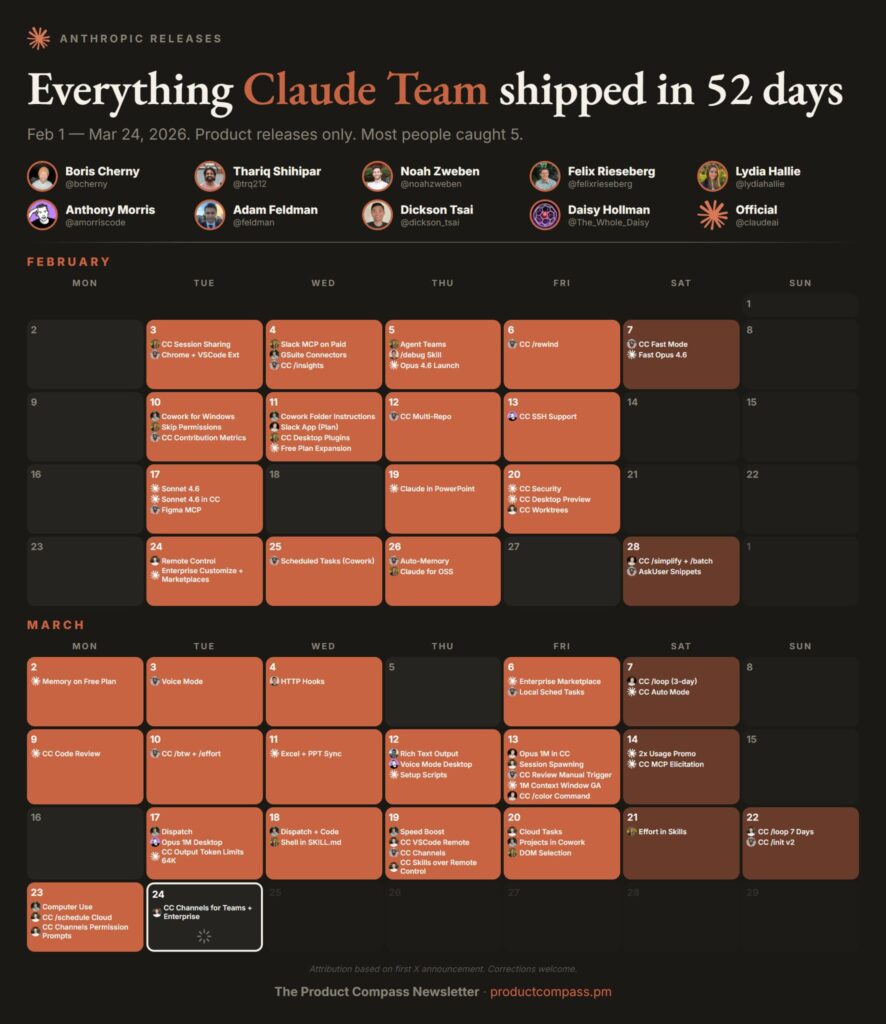
To understand the full weight of the mobile update, you need to look at what surrounded it. Anthropic’s March 2026 releases weren’t random feature drops. They form a coherent sequence.
On March 17, Anthropic added a persistent Cowork thread that lets Pro and Max users control ongoing tasks from their phone or desktop in one continuous conversation. On March 23, it expanded that with computer use — allowing Claude to point, click, open files, navigate browsers, and interact directly with what’s on your screen. As CNBC reported, Anthropic demonstrated the capability with a video showing a user dispatching a task from their phone — exporting a pitch deck as a PDF and attaching it to a meeting invite — while Claude executed the entire workflow on the desktop without further intervention.
Then on March 25, the mobile interactive app update completed the loop.
These releases connect into a single product logic: Claude is becoming something you dispatch from your phone, run on your desktop, and interact with through live tools in the same continuous conversation. According to CNET’s coverage, the new computer-use feature is explicitly designed to work with Dispatch — Anthropic’s tool for assigning tasks from mobile to desktop — “such as checking your email every morning or opening up a Claude Cowork or Claude Code session.”
The phone isn’t where the work happens. It’s where work gets initiated, steered, reviewed, and approved.
The Architecture Behind the Feature
Anthropic’s product hierarchy here is worth understanding in detail, because it reveals the company’s architectural thinking. According to Anthropic’s Cowork product page, when Claude is asked to complete a task, it uses the most precise tool available first. Connectors to supported services like Slack and Google Calendar come first. When no connector exists, Claude falls back to direct browser navigation. Only when neither option is available does it use direct screen interaction — pointing, clicking, and typing via keyboard-and-mouse control.
This is not brute-force desktop automation. It’s a tiered execution model, and the prioritization is intentional. Connectors are the fastest and most reliable path. Browser navigation is next. Screen interaction is the slower, more error-prone fallback. As WinBuzzer noted in their coverage of the March 25 launches, this connector-first design “sets it apart from rivals that rely solely on pixel-level screen reading.”
That architectural choice matters commercially too. Screen-reading automation is brittle. It breaks when UI layouts change, when pop-ups appear unexpectedly, or when apps update. Structured API connectors don’t. By building the connector layer as the primary execution path — and treating screen interaction as a fallback — Anthropic is betting on durability as a competitive differentiator in a market where competitors are racing to automate desktop control as the main event.
And the performance benchmarks show the investment is paying off. According to mlq.ai’s analysis, models like Sonnet 4.6 now achieve a 72.5% score on OSWorld-Verified benchmarks — up from just 14.9% at launch. That’s a substantial leap in reliability, and it matters because computer use that fails more than half the time isn’t a feature; it’s a liability.
Why Live Interfaces Beat Text Summaries
A persistent assumption in AI product design is that every external system should be converted into language. Claude reads your dashboard and tells you what it says. Claude reviews your design and summarizes the changes. Claude checks your project board and gives you a list. This approach has genuine utility, but it degrades what made the original tools valuable in the first place.
Dashboards matter because you can change filters and explore segments in real time. Design tools matter because you can see structure, annotations, and hierarchy — not just hear a prose description of them. Project boards matter because state, ownership, ordering, and dependency are all relational and visual. Text summaries flatten that.
Anthropic’s interactive connector approach implicitly acknowledges this limitation. Rather than collapsing software into language, it lets software keep its native shape inside the conversation. That gives Claude a more powerful role: not replacing the interface, but mediating it. Claude can answer questions, navigate to the relevant view, draft something, or reshape a visualization — while the user still sees the live artifact.
That’s one of the most underappreciated aspects of this release. As TechCrunch observed, “analyzing data, designing content, and managing projects all work better with a dedicated visual interface. Combined with Claude’s intelligence, you can work and iterate faster than either could offer alone.” The key word is combined. Anthropic isn’t trying to replace Figma, Slack, or Amplitude. It’s trying to sit at the center of how you use all of them.
On mobile specifically, this distinction becomes even more important. Small screens make bad abstractions hurt more. If Claude mobile were only a text interface that summarized dashboards and designs, it would be useful to a point — but that point comes quickly. Live interfaces make the phone far more viable as a work surface by preserving the structure of the underlying software. An Amplitude dashboard on a phone screen is constrained, but it’s infinitely more actionable than four paragraphs describing what the dashboard says.
The Security Picture: Honest About the Risks
One reason this launch feels more credible than many AI announcements is that Anthropic hasn’t hidden the risks. The company’s documentation is blunt. According to its Use Cowork Safely guidance, Cowork is a research preview with “unique risks due to its agentic nature and internet access.” Anthropic warns users to avoid granting access to sensitive local files, to monitor for suspicious actions that could indicate prompt injection, and to be “especially cautious with computer use because Claude is interacting with your actual desktop and apps.”
The caution is historically grounded. WinBuzzer’s coverage noted that a data exfiltration vulnerability in Cowork surfaced just two days after its January 13 launch, reported by security researcher Johann Rehberger. That incident adds weight to Anthropic’s warnings. Granting an AI agent direct access to a desktop raises the stakes considerably if similar vulnerabilities emerge in the new computer use feature.
The company also notes that Cowork activity is not captured in audit logs, the Compliance API, or data exports — making it unsuitable for regulated workloads or compliance-sensitive environments. Anthropic advises against using Cowork for healthcare, finance, or other contexts involving sensitive personal data.
On the connector side, the security posture is more structured. Anthropic says interactive connectors run in sandboxed iframes with strict content security policies. Communication between the interface and Claude uses auditable JSON-RPC messaging. Purchases through third-party interactive connectors are not supported — a meaningful line to draw. Live interfaces inside chat are one capability; unconstrained transactional authority would be another category entirely. Anthropic appears to be drawing that line deliberately, at least for now.
This honesty about risk is itself a product signal. It’s the language of a company that wants to move fast but understands it’s operating in a trust-sensitive market. The strongest version of Claude’s mobile work story isn’t “hand over your workflow to your phone.” It’s “keep real workflows moving from your phone, with Claude handling more of the connective tissue between tools and devices.”
What This Means for Creators, Professionals, and Teams
For individual creators and knowledge workers, the update addresses a genuine friction point. A large portion of professional work happens in the margins — between meetings, while commuting, in the fifteen minutes before a call. That’s time when you’re checking a design revision, reviewing a metric spike, approving a message, or nudging a project along. If Claude on mobile can surface a live Figma view, let you edit a Canva draft, or pull an Amplitude dashboard inline, those fragments become useful work time without requiring a laptop.
For operators and managers, the more significant shift is continuity. Dispatch — Anthropic’s persistent thread feature — means a task started on your phone can continue running on your desktop while you’re in a meeting, with Claude delivering the result when you return. Anthropic’s documented examples include morning briefings, metrics pulls, reports, and pull requests. When combined with interactive connectors, mobile stops being a passive status-check tool and becomes an active workflow surface.
For organizations, there’s also an administrative dimension. Anthropic says Team and Enterprise administrators can disable the specific tool calls that render interactive connectors while keeping the underlying text-based connector functionality. That staged control matters for enterprise rollouts, where security and compliance reviews often determine adoption speed. At the same time, computer use remains limited to Pro and Max individual plans — currently macOS only, with Windows support “coming soon” according to AI Business’s reporting — which underlines that the riskiest capabilities are still being managed as an early preview rather than a mature enterprise offering.
The Competitive Context: A Market That Has Changed Fast
Anthropic isn’t operating in a vacuum. The market for desktop and mobile AI agents has accelerated dramatically in early 2026. The viral spread of OpenClaw — a personal agent framework that lets users message AI models through apps like WhatsApp and Telegram to carry out tasks locally on a device — set off a wave of competitive responses. As CNBC reported, Nvidia CEO Jensen Huang called OpenClaw “definitely the next ChatGPT,” and Nvidia subsequently launched NemoClaw, an enterprise-grade version of the framework.
Perplexity, Standard Intelligence, and others have also launched or announced computer-use and personal-agent capabilities in the same window. The capability is rapidly becoming table stakes rather than a differentiator. What Anthropic is betting on is not being first but being most integrated — a platform of overlapping tools (Cowork, Code, Dispatch, Channels, connectors, computer use) that are harder to dislodge than any single feature.
WinBuzzer’s analysis put it directly: “Desktop AI agents are now transitioning from experimental curiosity to competitive battleground.” Claude Code has surpassed $2.5 billion in annualized revenue — up from $1 billion in early January — a commercial signal that Anthropic’s developer-first strategy is working. The mobile interactive app update extends that momentum to a broader user base.
What This Doesn’t Mean
It doesn’t mean the smartphone has replaced the laptop. Anthropic’s own documentation makes clear that computer use requires the Claude Desktop app to be open and the desktop machine to be awake. Complex tasks may need a second try. Screen interaction is slower than direct integrations. Mobile is the command surface, not the execution environment.
It also doesn’t mean the hard problems are solved. Auto mode — Anthropic’s new AI safety classifier for Claude Code, which automatically approves routine developer actions while flagging potentially destructive ones — carries its own caveats. As WinBuzzer noted, Anthropic has not published the specific criteria the classifier uses, “leaving developers to trust a black box when granting their coding assistant greater autonomy.” That’s a transparency gap that will matter to enterprise teams with compliance requirements.
And the availability gaps are real. Computer use is macOS-only at launch. Windows and Linux users are waiting without a committed timeline. Individual Max plan subscribers — Anthropic’s highest-tier individual plan at $100/month — don’t have access to auto mode at launch, a notable gap. Claude Code Channels, which lets developers control the coding agent through Discord and Telegram, currently supports only two platforms, while OpenClaw supports five.
The Bigger Takeaway: A New Kind of AI Product
What Anthropic shipped on March 25 is less a mobile feature than a product philosophy made explicit. Claude is increasingly being built as a layer that sits above software, not just beside it. It can connect to tools, render interactive interfaces, keep a persistent thread across phone and desktop, schedule recurring tasks, and fall back to direct computer control when structured integrations aren’t available.
If that sounds less like a chatbot and more like a work runtime, it’s because Anthropic’s recent releases increasingly point in that direction. The mobile update is the most visible consumer expression of an architecture the company has been quietly assembling: Cowork for knowledge work, Code for engineering, Dispatch for cross-device continuity, computer use for unstructured tasks, and interactive connectors for structured ones.
The next competitive battle in AI is not only about which model gives the best answer. It’s about which platform becomes the most useful operating layer between people, software, and action. Anthropic is making a serious bid for that layer — and the decision to bring live interactive work tools to mobile, rather than constraining the phone to text-only interactions, is one of the clearest signals yet about where this is heading.
The usual mental model for a mobile AI app — ask a question, get a summary, paste the result into another tool — is becoming obsolete. Claude’s mobile update doesn’t just extend desktop functionality to the phone. It reframes the phone as something it hasn’t quite been before: a control plane for work that happens everywhere else.
That’s a different category of product. And it changes what “AI assistant” means.