Anthropic’s new “Computer Use” feature doesn’t just answer questions. It opens your apps, moves your files, exports your decks, and screenshots your dev server — all while you’re out to dinner.
On March 23, 2026, Anthropic’s official Claude account posted a 73-second video to X that has since racked up over 12 million views and 44,000 likes. It shows someone chatting with Claude from their phone, and then watching — from a distance — as Claude autonomously opens Finder, locates a contract, exports a pitch deck to PDF, attaches it to a calendar invite, launches a terminal, runs a dev server, grabs a browser screenshot, and bulk-processes 150 photos through a photo editing app.
The tagline at the end: “Reach your desktop from your pocket.”
It’s the kind of product demo that makes you stop scrolling. And while plenty of AI demos overpromise and underdeliver, this one is backed by years of increasingly rigorous research, a strategically timed acquisition, and benchmark numbers that are genuinely hard to argue with. According to Anthropic’s own announcement of the Vercept acquisition, Claude’s models went from under 15% on the OSWorld benchmark for real desktop tasks in late 2024 to 72.5% today — approaching human-level performance.
This isn’t just another update. It’s the moment the AI coworker stops being a metaphor.
What Is Claude Computer Use, Exactly?
To understand why this matters, it helps to understand what “computer use” actually means in this context. It is not screen sharing. It is not remote desktop access. It is not a series of rigid scripts that break whenever software updates.
Claude Computer Use — now available as a research preview inside Claude Cowork and Claude Code — means Claude can view your screen, identify interactive elements in real time, and then point, click, scroll, type, and navigate exactly the way a human sitting at your keyboard would. It works across live applications with no special API integration required from the target software. If a person can use it, in theory, Claude can use it.
The feature launched today as a research preview for Claude Pro and Max subscribers, available on macOS only. To use it, you update the Claude desktop app and pair it with the Claude mobile app through Dispatch, a mobile task-delegation interface that Anthropic debuted just last week. The pairing is what gives the feature its cinematic quality: you send a task from your phone, walk away, and return to finished work.
As SiliconANGLE reported, Claude first checks whether it has the right connectors to complete a task — tools like Google Calendar, Slack, and other integrations. If it does, it uses those. If it doesn’t, it falls back on directly controlling the screen. In other words, it tries to be as efficient as possible before reaching for the “brute-force” approach of clicking around like a human.
The Demo That Broke the Internet
The promotional video is polished and deliberate — Anthropic clearly knew what it was showing off. Let’s walk through the actual scenarios demonstrated:
Scenario 1: Finding a file. The user sends a message from their phone: “Where did the contract end up saving yesterday?” Claude opens Finder, locates the file by date, and moves it to the right location. No terminal commands. No folder diving. Just done.
Scenario 2: Running late for a meeting. “I’m running late — export my pitch deck as PDF and attach it to my 2 PM invite.” Claude opens the file, exports it at full quality, navigates to the calendar app, finds the 2 PM event, attaches the PDF, and sends a confirmation. The user never touched the laptop.
Scenario 3: Developer workflow. “Start the dev server, screenshot the library page, and send it to me.” Claude opens a terminal, runs the appropriate commands, waits for the server to boot, opens a browser, navigates to the library page, takes a screenshot, and sends it back to the user’s phone. This is the kind of multi-step, multi-application choreography that previously required either an entire DevOps setup or a very patient junior developer.
Scenario 4: Bulk photo processing. With 150 images to process — watermarks, exports, formatting — the user delegates the whole thing to Claude while heading out for dinner. Claude opens a photo editing application, selects all files, applies the relevant settings, and completes the job. The user returns to finished work.
Each scenario is chosen to hit a different pain point: the knowledge worker who can’t find their files, the professional scrambling before a meeting, the developer who hates switching contexts, the freelancer drowning in repetitive tasks. Together, they make a compelling argument that this feature is genuinely useful across a broad range of everyday work.
How We Got Here: The Road from 15% to 72.5%
This isn’t Claude’s first foray into computer control. Anthropic quietly introduced “computer use” in late 2024 as an API-only, developer-facing beta — a raw capability that let Claude view a screen and simulate mouse and keyboard actions. At the time, its score on OSWorld — the industry-standard benchmark for evaluating how well AI can complete real desktop tasks — was under 15%. Impressive as a proof of concept, but not ready for your mom’s MacBook.
A lot has changed since then. The improvement to 72.5% on OSWorld represents more than a 4x jump in capability in roughly 15 months. To put that in perspective, many of those OSWorld tasks — navigating complex spreadsheets, completing multi-tab web forms, coordinating actions across live applications — are things that routinely frustrate human users. Claude is now handling nearly three-quarters of them correctly.
A critical milestone in that improvement trajectory was Anthropic’s acquisition of Vercept on February 25, 2026. Vercept was a Seattle-based AI startup founded by alumni of the Allen Institute for AI (Ai2), built around a very specific thesis: that making AI useful for complex tasks requires solving hard perception and interaction problems. Its nine-person team included co-founders Kiana Ehsani, Luca Weihs, and Ross Girshick — the latter a recognized computer vision expert with prior work at Facebook AI Research and Microsoft Research.
As Anthropic explained in its announcement, the Vercept team had “spent years thinking carefully about how AI systems can see and act within the same software humans use every day.” That expertise maps directly onto the most technically challenging part of computer use: not understanding language, but understanding screens. Knowing the difference between a button and a label. Understanding what will happen if you click something. Recovering gracefully when an unexpected dialog box appears. Vercept’s entire research agenda was built around solving exactly those problems. Bringing that team in-house was a pointed, strategic move.
The Architecture: How Dispatch, Cowork, and Computer Use Fit Together
Understanding the full product requires understanding how three pieces fit together.
Claude Cowork is the desktop-based agent framework that gives Claude access to your local files and applications. As VentureBeat reported when it launched in January 2026, Cowork grew directly out of observations from Claude Code — Anthropic’s developer-facing coding agent. Engineers noticed that developers were using the coding tool for all kinds of non-coding work: planning vacations, organizing folders, building presentations. Anthropic essentially stripped out the terminal complexity and built a consumer-friendly interface on top of the same underlying agentic architecture.
Claude Code is the developer-facing counterpart — the command-line agent for software engineers who want Claude to write, run, and test code across repositories, submit pull requests, and manage multi-step engineering workflows.
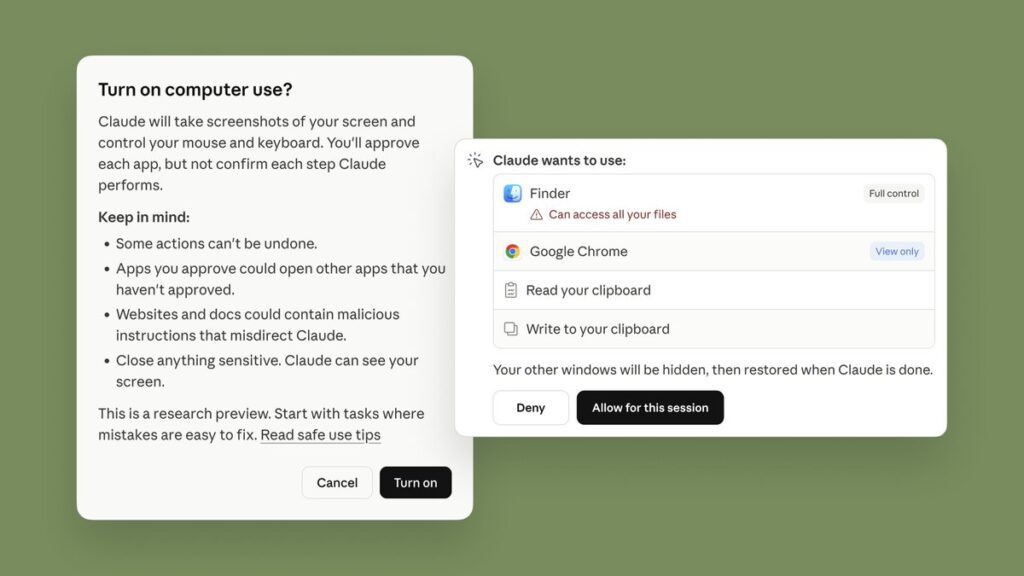
Dispatch is the mobile bridge. It’s what makes the whole thing feel like science fiction — the ability to delegate a task from your iPhone, walk away, and have your Mac handle it while you do something else. Claude first checks its integrations (Slack, Calendar, etc.) and uses those when possible. When direct computer control is needed, it requests permission and then takes the wheel.
Together, these three pieces form something coherent: a layered system where Claude can work at the integration level when it has connectors, drop down to screen-level control when it doesn’t, and be managed remotely from wherever you are. It’s a genuine attempt at a universal automation layer, not a collection of one-off shortcuts.
Permission-First: How Anthropic Is Thinking About Safety
Anthropic has been unusually candid about the risks of this feature, which is worth acknowledging. Rather than treating safety as a footnote, the company has built a permission-first architecture and has been forthright about limitations.
As SiliconANGLE explains, Claude requests access before touching a new application and users can stop it at any time. But Anthropic goes further: the company explicitly warns that Claude “can take potentially destructive actions (such as deleting local files) if it’s instructed to.” They advise users not to give Claude access to sensitive data during the research preview. They acknowledge that prompt injection attacks — where malicious content embedded in a webpage tries to hijack Claude’s behavior — are a real threat, and that while they’ve built defenses, “agent safety is still an active area of development in the industry.”
This level of transparency is notable in a product launch context. Most companies bury the caveats. Anthropic is leading with them, which either reflects genuine epistemic humility or an awareness that agentic AI is going to face intense scrutiny, and getting ahead of the narrative is strategic. Probably both.
The company also launched with a built-in virtual machine for isolation, and the feature requires explicit folder-level and application-level access grants. Nothing happens without permission. Nothing persists without the desktop app remaining open. These are meaningful guardrails for a research preview.
The Race: Where Claude Computer Use Sits in the Competitive Landscape
Make no mistake: every major AI lab is building toward this. The question is who gets there first, who makes it feel most natural, and who keeps the safety posture strong enough that users trust it.
OpenAI has been working on Operator, its agentic browsing tool, as well as Codex for code execution. The company has made significant investments in computer use through its own API, but as 9to5Mac noted, what Anthropic is doing now is “OpenClaw stuff” — a reference to OpenClaw, the AI agent movement that actually started on Claude before being spun out and eventually acquired by OpenAI. The irony is not lost on observers.
Microsoft has been trying to make AI work in Windows and across its productivity suite for years, with Copilot embedded in everything from Teams to Excel. But Microsoft’s approach has been top-down: design an AI assistant, then add agent capabilities. Anthropic’s approach has been bottom-up: build a capable agent (Claude Code) and then abstract it upward for mainstream users. That lineage difference may matter in terms of how reliable and capable the agentic behavior is from day one.
Perplexity launched its own “Computer” product in late February 2026, an agentic multi-model orchestration system that can run tasks for hours using a fleet of different AI models. It’s powerful in its own right but positioned more at power users and enterprises.
Google DeepMind is investing heavily in agentic AI across its products, with Gemini expanding into multi-step tasks on Android and elsewhere.
The landscape is genuinely competitive. But Anthropic’s launch today has something the others haven’t fully cracked yet: a polished, consumer-facing product with a coherent narrative, a mobile interface for delegation, and benchmark numbers that prove the underlying capability has reached a threshold worth shipping.
The Public Reaction: 12 Million Views and What They Tell Us
The social response to the official X post has been extraordinary — over 12 million views, thousands of quote-reposts, and a comment section that reads like a cultural Rorschach test for how people feel about AI in 2026.
The excitement is genuine and immediate. People are talking about automating their taxes, their expense reports, their photo libraries, their inbox. There are jokes about retiring, about delegating entire job functions, about never opening their laptop again. The productivity hype is real.
But so is the anxiety. Reply threads are full of memes about white-collar displacement — “Claude applied to the same jobs and got callbacks” — and commentary about the pace of change feeling genuinely disorienting. Anthropic has itself published research on AI’s labor market impact, and the irony of that research sitting next to a product announcement that arguably accelerates the very disruption it documents is not lost on observers.
There’s also competitive commentary. Replies declaring that Anthropic “just killed OpenClaw” (the rival desktop agent that was itself born out of the Claude ecosystem). Windows users lamenting that the feature is macOS only. Developers excited about the Claude Code integration for running dev servers and submitting pull requests without switching contexts.
What’s striking is how quickly the conversation moved from “is this real?” to “how do I use this?” — which is perhaps the best indicator that the demo landed as intended. When people skip straight to use cases, the feature has cleared the credibility threshold.
Who Can Use It Right Now — and What’s Coming
The current research preview is available to Claude Pro ($20/month) and Claude Max ($100-200/month) subscribers on macOS only. As CNET reported, you need to update the Claude desktop app and pair it with the mobile app via Dispatch. Pro users will hit usage limits faster than Max users, but both tiers have access.
The macOS-only restriction is a deliberate choice. As noted by the Cowork guide at AI.cc, the initial agentic architecture relies heavily on macOS-specific virtualization tools for security isolation. Windows support is planned but not yet available. The company has committed to bringing it — along with cross-device sync and other improvements — based on what they learn from the research preview.
For developers specifically, Claude Code is the access point: Claude can make changes within a development environment, run tests, submit pull requests, and manage multi-step engineering workflows, all while you focus on higher-level architecture decisions. The Dispatch integration means you can kick off a test suite from your phone and get a screenshot of the results sent back to you. That’s genuinely useful for teams.
For everyone else, Cowork is the entry point. You grant Claude access to a specific folder, describe what you need in plain language, and Claude formulates a plan, executes it in steps, and checks in when it needs clarification. The feel, as ADTMag described it, is “much less like a back-and-forth and much more like leaving messages for a coworker.”
What This Actually Means
Strip away the hype and the benchmark numbers and the viral video, and what you’re left with is a genuine inflection point in how AI assistants work.
For years, the complaint about AI was that it was all talk. It could write a plan, draft an email, suggest a strategy — but executing that strategy still required a human to sit down at a keyboard and do the actual work. The gap between “AI tells you what to do” and “AI does it for you” has been the defining limitation of the category.
That gap is narrowing. Claude Computer Use doesn’t close it entirely — 72.5% on OSWorld means there’s still a meaningful failure rate on complex tasks, and the research preview framing is a real caveat, not just boilerplate. But it narrows the gap substantially enough that real users doing real work will find real value in it right now. Not in 2028. Not when AGI arrives. Today.
The combination of Dispatch (delegate from mobile), Cowork (desktop agent for files and apps), and Computer Use (full screen control when needed) creates something that feels architecturally coherent for the first time. You have a system where the AI knows to use the lightest touch available — integration first, screen control second — and where you can supervise, pause, or redirect it at any moment.
The broader significance is this: every technology that genuinely changes work does so by abstracting away a layer of friction. The spreadsheet abstracted arithmetic. The search engine abstracted the library. The smartphone abstracted presence. What Claude Computer Use is attempting to abstract away is the actual execution of digital tasks — the clicking, the opening, the navigating, the repeating.
Whether it fully succeeds in this release, or whether success comes in the next one or the one after that, is somewhat beside the point. The direction is set, the capability is real, and the gap between “AI coworker as metaphor” and “AI coworker as literal thing sitting at your computer” is now measurable in months, not years.
Reach your desktop from your pocket. We’re here.