TL;DR
Wandesk is a new AI desktop app that lets users build local apps simply by describing what they want.
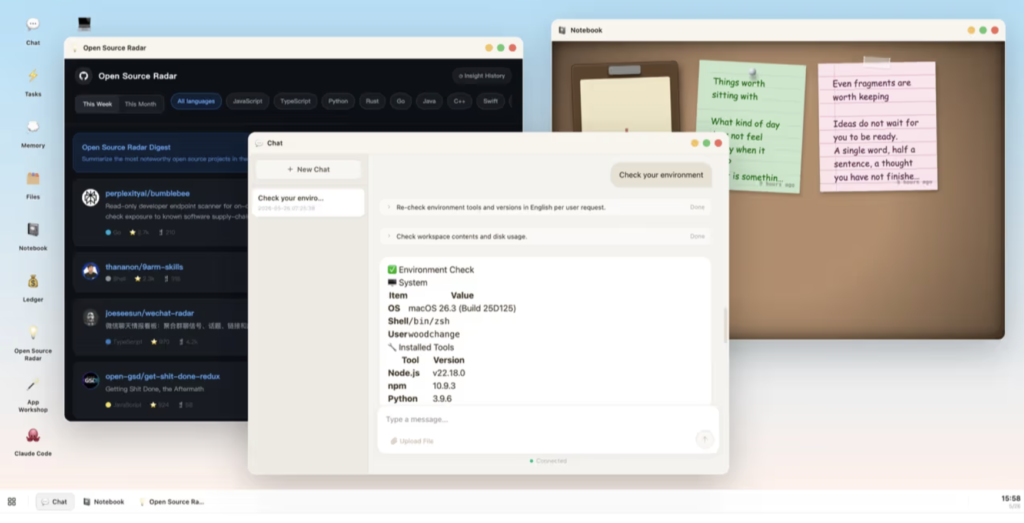
Instead of treating AI as a separate chatbot that sits outside your workflow, Wandesk is trying to turn the desktop itself into an AI workspace. The pitch is that users can build apps, chat with AI, use memory, connect coding agents, and keep everything running locally on their own machine.
That makes Wandesk one of the more interesting AI productivity launches of the week. It is not just another “chat with your files” tool. It is closer to an AI operating layer for your desktop.
The big question is whether Wandesk can make local AI app-building feel simple enough for normal users, while still being powerful enough for developers and AI power users.
What launched
Wandesk launched as an AI desktop for building local apps from natural-language prompts.
The product’s Product Hunt launch page describes it as an AI desktop where users can “build the apps you need just by describing them.” It also says users can plug in Claude Code, Codex, DeepSeek, OpenAI, Kimi, Qwen, and other OpenAI-compatible models.
That last part is important. Wandesk is not positioning itself as only one more AI chat interface. It is trying to become a local workspace where apps, memory, chat, coding agents, and model providers all come together.
In practical terms, that means you can ask Wandesk to create a small local app, keep it inside your desktop environment, and continue iterating with AI.
Why it matters
The AI app-builder market is already crowded.
There are tools for building web apps, tools for building websites, AI coding assistants, no-code builders, vibe-coding platforms, AI IDEs, and browser-based app generators.
Wandesk is interesting because it is not only trying to generate an app. It is trying to make the generated app live inside a larger AI desktop.
That matters because most AI workflows are still fragmented.
You chat in one app. You code in another app. You take notes somewhere else. You store files in another system. You use memory in a separate tool. You then copy and paste context from one place to another, hoping the AI remembers what you were trying to do.
Wandesk is betting that the better interface is a shared local workspace.
If it works, the value is not just “AI made an app for me.” The value is “AI made an app that lives beside my notes, memory, files, and other AI workflows.”
That could be useful for founders, operators, creators, analysts, developers, and anyone who constantly builds small internal tools.
What Wandesk can do
According to the official Wandesk site, users can describe what they want to build and Wandesk can generate a local app with a React interface, backend API, and SQLite storage.
That means the app is not just a mockup. It is meant to be a working local utility.
Examples of what this could be useful for include:
- A personal content planner.
- A sponsorship tracker.
- A lightweight CRM.
- A local invoice generator.
- A reading list.
- A research dashboard.
- A YouTube script tracker.
- A simple habit tracker.
- A local tool for tracking AI launches.
The AI desktop angle
The strongest part of Wandesk is the desktop framing.
Most AI tools still live in browsers. That is not necessarily bad, but it does create friction. Browser tabs pile up. Files move between apps. Context gets lost. The user ends up managing the workflow instead of the AI helping manage it.
Wandesk is trying to make AI feel more native to the computer.
The official site says apps, files, and memory live on the user’s machine. It also says users can bring their own API keys or use trial credits.
That local-first positioning could appeal to people who care about control, privacy, and owning their workflow. It also makes Wandesk feel different from purely cloud-based AI app builders.
Pricing
Wandesk says the desktop app is free. The official site says there is no signup, no email, no subscription, and no ads.
The important caveat is model usage.
A free desktop app does not necessarily mean unlimited free AI inference forever. Wandesk says it includes trial model credits, and users can also plug in their own API keys. If you bring your own OpenAI, Claude, DeepSeek, Kimi, Qwen, or other model access, you may still pay that model provider for usage.
So the clean way to describe the pricing is:
Wandesk’s desktop app is free, but AI model usage may depend on trial credits or user-provided API keys.
Who should care
Wandesk is most interesting for builders.
That includes developers, indie hackers, AI power users, creators, operators, and founders who constantly need small tools but do not always want to create a full software project.
It may also appeal to non-technical users who like experimenting with new AI tools. But the product is likely most useful right now for people who are comfortable with concepts like local apps, AI models, API keys, and coding agents.
That does not mean beginners should ignore it. It means beginners should approach it as an experiment rather than a polished mainstream productivity app.
What feels promising
The most promising part of Wandesk is that it connects several trends at once.
AI app generation is growing.
Local AI tools are getting more attention.
AI coding agents are becoming more capable.
Users want better memory and shared context.
People are tired of jumping between disconnected AI apps.
Wandesk sits at the intersection of all of those trends.
If it can make app generation, local memory, AI chat, and coding agents feel like one coherent desktop experience, that is a real product idea.
What feels unproven
The biggest open question is reliability.
It is easy for an AI tool to create a simple demo app. It is much harder to create an app that keeps working, handles errors, stores data properly, respects local permissions, and can be modified by a non-technical user without breaking.
Wandesk also needs to make its interface understandable. If the user does not know what an API key is, what a local backend is, or what Claude Code and Codex are, the product could feel intimidating.
There is also a safety question. If AI can generate local apps and interact with files, users need clear boundaries. What can the app access? What can it change? How easy is it to inspect what was created?
Those questions do not make Wandesk less interesting. They make it more worth testing carefully.
Kingy AI verdict
Wandesk is one of the most interesting AI productivity launches right now because it points toward a bigger shift.
AI tools are moving from chat windows into work environments.
The old model was: ask AI a question, copy the answer, paste it somewhere else.
The new model is: ask AI to build the tool, keep the tool in your workspace, and continue working from there.
That is why Wandesk is worth covering.
It may not be fully beginner-proof yet. It may still need polish. But the product idea is strong, visual, and easy to demonstrate.
For Kingy AI, this is a strong candidate for a full article and a hands-on YouTube test.
Should you try Wandesk?
Yes, if you are an AI power user, builder, developer, creator, or founder who wants to experiment with local AI apps.
Wait if you need something extremely polished, enterprise-ready, or beginner-proof.
The best way to evaluate Wandesk is simple: try to build one genuinely useful app you would actually keep using. If it can do that, this is more than a fun demo.
FAQ
What is Wandesk?
Wandesk is an AI desktop app that lets users build local apps by describing what they want.
Is Wandesk free?
Wandesk says the desktop app is free. AI model usage may depend on included trial credits or user-provided API keys.
Does Wandesk work with OpenAI and Claude?
Wandesk says it supports OpenAI-compatible models and references tools such as Claude Code and Codex.
Is Wandesk local?
Wandesk says apps, files, and memory live on the user’s machine.
Who is Wandesk best for?
Wandesk is best for developers, AI power users, builders, creators, and founders who want to create small local tools quickly.
For AI founders and marketers
If your AI product needs to be explained clearly to a large AI-native audience, Kingy AI can help turn your product into a useful, demo-driven story.
You can get a sponsorship fit review, try the sponsored video ROI calculator, or see more at Kingy AI.
The Kingy Brief
Get The Kingy Brief.
AI changes, original tests and one practical thing to try. Fridays at 09:00 Vancouver time.
Free · Double opt-in · Unsubscribe anytime
Signup help and newsletter schedule
Signup form provided by Beehiiv. After submitting, check your inbox for "Confirm your subscription to The Kingy Brief" and open its confirmation link. Check Spam or Promotions if you cannot find it.
Fridays at 09:00 Vancouver time: source-checked AI changes, original tests and one practical thing to try. The weekly restart begins October 9, 2026. We skip a week when there is not enough verified material. Free. Unsubscribe anytime.