MCP, AGENTS.md, and Context Engineering for Beginners
Learn how to make AI coding tools, agents, and assistants understand your project before they start changing things.
This course explains MCP for beginners, AGENTS.md, CLAUDE.md, and context engineering in plain English. You will learn how to write simple AI project instructions so tools like Codex, Claude Code, Cursor, and Replit make fewer mistakes.
Built for creators, founders, marketers, WordPress site owners, and non-technical builders.
AI tools do better work when you give them the right background first
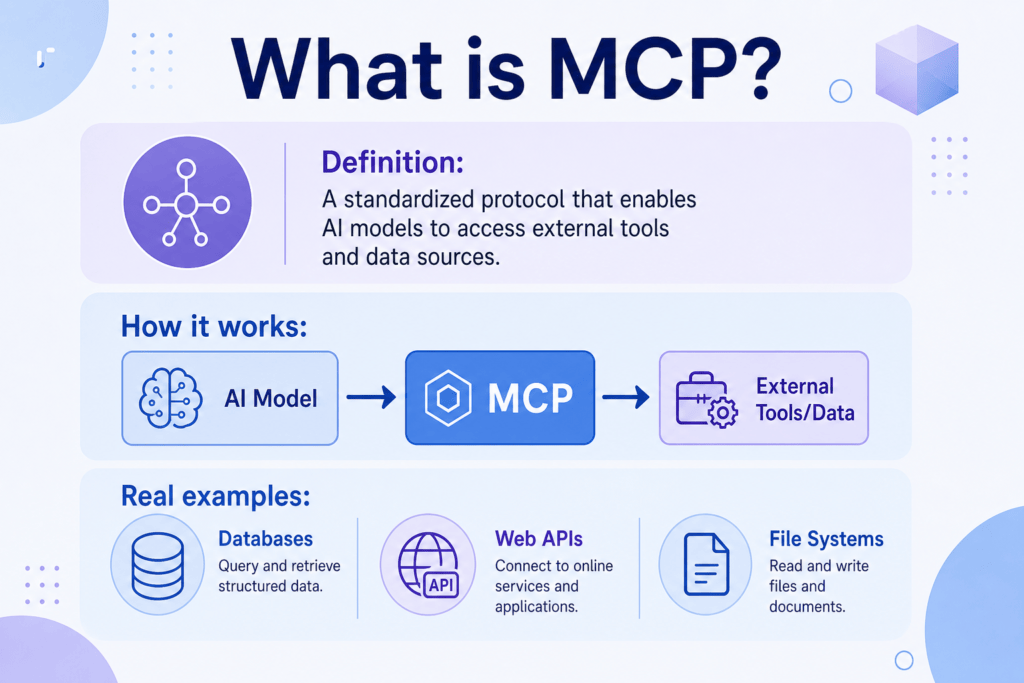
MCP helps AI tools connect to other tools and context, like a universal adapter. AGENTS.md gives AI coding agents instructions for your project, like a project instruction manual. CLAUDE.md gives Claude-specific notes. Context engineering means preparing the right background, rules, examples, and limits before asking AI to do work.
The goal is simple: fewer mistakes, safer edits, and better outputs.
Who this course is for
This AGENTS.md guide is for people who use AI tools but do not want to become full-time developers just to get safer, clearer results.
Document what the AI can edit, what it must protect, and how to test a page before you paste or publish.
Turn your content process, style rules, and examples into instructions an assistant can follow.
Give AI coding agents for beginners a clear picture of your product, audience, and risk areas.
Protect SEO-critical pages, analytics, tracking scripts, and brand voice while still moving faster.
Use plain language to explain your project before asking Codex, Claude Code, Cursor, or Replit to edit files.
Learn the difference between a one-off prompt and reusable AI project instructions.
What you will learn
By the end, you will understand context engineering for beginners and know how to create project instructions for AI tools.
- Why AI tools forget context
- Prompting vs context engineering
- What MCP means in plain English
- What AGENTS.md is
- What CLAUDE.md is
- What project instructions should include
- How to document a WordPress project for AI tools
- How to write testing instructions
- How to prevent AI tools from making dangerous changes
- How to use templates safely
MCP vs AGENTS.md vs CLAUDE.md
These terms overlap, but they are not the same thing.
MCP
AGENTS.md
CLAUDE.md
Context engineering
Project instructions
10 short lessons for safer AI work
Open each lesson to see a plain-English explanation, why it matters, a beginner example, a copyable prompt, and a simple action step.
Plain-English explanation: AI tools usually know only what is in the current chat, file, or task. If you do not tell them your project rules, they may guess.
Missing context can lead to broken layouts, changed tracking code, removed SEO text, or edits that do not match your brand.
You ask an AI to improve a WordPress page. It changes the design but removes a copy button because it did not know that button was important.
Before editing anything, ask me what project context, protected areas, and testing steps you need to know.Mini action step: Write down three things your AI tool should always know about your project.
Plain-English explanation: Prompting is the request you type now. Context engineering is the setup you give the AI before the request, including background, examples, rules, and limits.
A great prompt can still fail if the AI does not understand the project. Context makes your prompt safer and more specific.
Instead of only saying “improve this page,” you also say who the page is for, what sections to keep, and what the AI must test.
Use the project instructions before you make changes. If the instructions do not cover this task, ask me before guessing.Mini action step: Pick one recurring AI task and list the background information it needs every time.
Plain-English explanation: MCP means Model Context Protocol. Think of it as a shared connector that can help AI tools access approved context from other tools.
As AI tools become more useful, they often need access to files, docs, tickets, or other systems. MCP is one way to make those connections more consistent.
Instead of copying every detail into a chat, an AI tool may connect to the right source of context when it is allowed to.
Imagine you ask an AI assistant to improve a landing page. Without connected context, you may need to paste the page copy, brand notes, SEO rules, analytics goals, and protected areas into the chat manually. With approved MCP-style connections, an AI tool may be able to access the right files, docs, or tools directly, but only when you have safely granted that access.
More access can mean more usefulness, but it also means permissions matter.
Explain which tools or files you can access for this task, and tell me what context you still need from me.Mini action step: Write one sentence describing what outside context would help your AI assistant most.
Beginner MCP Safety Rules
MCP is powerful because it can help AI tools connect to outside tools, files, apps, APIs, databases, docs, and workflows. That is useful, but beginners should treat those connections like browser extensions, plugins, or app integrations, not like ordinary prompts.
- Only use MCP servers from trusted sources.
- Review what permissions a server asks for before connecting it.
- Do not expose API keys, passwords, private files, payment data, customer data, analytics credentials, login credentials, or sensitive business information.
- Use least-privilege access: only give the AI the minimum access it needs for the task.
- Keep human review before anything that edits files, sends messages, changes a live website, touches money, accesses private data, changes tracking, changes SEO metadata, changes security settings, or uses external tools.
- Remember that instruction files like AGENTS.md and CLAUDE.md guide AI behavior, but they are not perfect safety systems.
Plain-English explanation: AGENTS.md is a text file that tells AI coding agents how to work in your project. Codex reads AGENTS.md, and other coding agents may use it as a general project instruction file.
It turns repeated instructions into a reusable project manual, so you do not have to explain the same rules every time.
Your AGENTS.md can say: keep CSS scoped, do not edit payment code, test mobile layout, and ask before publishing.
Create a beginner-friendly AGENTS.md file for this project. Include project overview, allowed changes, protected areas, testing steps, and approval rules.Mini action step: Create a rough list of what your AI tool can and cannot change.
Plain-English explanation: CLAUDE.md is the file Claude Code uses for persistent project instructions. Claude Code reads CLAUDE.md, not AGENTS.md directly, so CLAUDE.md is the best place for Claude-specific notes.
Different AI tools may look for different instruction files. Keeping general rules and tool-specific notes clear helps avoid confusion.
AGENTS.md can hold your general project rules. CLAUDE.md can import or reference those rules and add Claude-specific notes, such as when to ask before editing sensitive files.
Create a CLAUDE.md file that references my general AGENTS.md rules and adds Claude-specific notes, including when to ask before editing sensitive files.Mini action step: If you use Claude Code, write one Claude-specific instruction you want it to remember.
Plain-English explanation: Good project instructions explain the project, audience, tools, important files, allowed changes, protected areas, testing steps, and approval rules.
The AI needs both permission and limits. Clear instructions reduce accidental changes and make review easier.
For a landing page, the AI can edit headline copy and CSS, but it cannot change analytics tags or legal disclaimers.
Turn my notes into clear AI project instructions with sections for overview, audience, allowed changes, protected areas, testing, and approvals.Mini action step: Fill in the sentence: “The AI can change ___, but must not change ___.”
Plain-English explanation: Your first file does not need to be perfect. Start with a short, useful version and improve it as you learn what the AI gets wrong.
A simple instruction file is better than no instruction file. It gives the AI a starting point before it touches your work.
Create project-instructions.md with your website name, audience, goal, protected areas, and testing checklist.
Ask me simple questions, one at a time, then create my first project-instructions.md file from my answers.Mini action step: Use the generator on this page to create your first draft.
Plain-English explanation: WordPress AI coding instructions should say where the code will be used, what theme or page is involved, and what must remain untouched.
WordPress pages often include theme styles, plugins, analytics, forms, and SEO elements. The AI needs to know what is safe.
If you paste HTML into a Custom HTML block, tell the AI to avoid global CSS like body, h1, or button unless scoped to your wrapper.
Create WordPress AI coding instructions for this page. Include the page URL, theme if known, Custom HTML block rules, SEO rules, protected areas, and testing checklist.Mini action step: Write your website URL and the exact page or block the AI is allowed to edit.
Plain-English explanation: Testing instructions tell the AI what to check before it says the work is done. They should cover buttons, mobile layout, links, forms, and visual issues.
AI tools can create changes that look fine in code but fail in the browser. Testing instructions catch more of those problems.
After adding an accordion, the AI should click each item, test keyboard use, and check the mobile view.
Before you finish, test every button, link, form field, accordion, copy action, and mobile layout. Tell me what passed and what you could not test.Mini action step: Add three testing steps to your instruction file.
Plain-English explanation: Dangerous changes are edits that could affect money, logins, customer data, legal pages, tracking, security, or live theme files.
AI can move quickly. Clear safety rules slow it down where a human review point is needed.
Your instruction file can say: do not edit checkout, login, database, analytics, or legal pages without permission.
Before making this change, identify whether it touches payment, login, database, customer data, legal, analytics, tracking, SEO-critical, or security areas. Ask before editing any risky area.Mini action step: Add a “Protected Areas” section to your instruction file.
Beginner translation
Use these simple definitions when technical terms start to blur together.
A connector standard that helps AI tools reach approved tools and context.
A project instruction manual for AI coding agents.
Claude-specific notes for Claude Code.
Giving the AI the right background before asking it to work.
Reusable rules that explain your project, goals, limits, and tests.
An AI tool that can inspect or change project files when you allow it.
A moment where the AI must stop and ask you before continuing.
A low-risk edit, such as improving text or styling inside an approved section.
A risky edit involving payments, logins, data, security, tracking, or legal content.
Source and Accuracy Note
MCP, AGENTS.md, Claude Code, Codex, and AI coding agents can change over time. This course teaches durable beginner concepts, not every advanced implementation detail, so check official documentation before using these tools in production, sensitive workflows, client work, or risky website changes.
Who should use which file?
You do not need every file on day one. Choose the simplest option that matches your tool.
When you use Codex or another AI coding agent and want general project instructions.
When you use Claude Code and want persistent Claude-specific project notes. It can import or reference AGENTS.md when you already keep general rules there.
When you want a plain-language instruction file that works even if your tool does not look for a special filename.
Copyable AI project instructions
These templates are practical starting points. Replace bracketed placeholders like [PROJECT NAME] and [WEBSITE URL] with your own details.
Basic AGENTS.md Template
Use this for general AI coding agent instructions in any project.
# AGENTS.md

## Project
- Name: [PROJECT NAME]
- Website or app: [WEBSITE URL]
- Audience: [TARGET AUDIENCE]
- Main goal: [PROJECT GOAL]

## How the AI should work
- Read these instructions before editing.
- Keep changes focused on the task.
- Explain risky changes before making them.
- Ask if instructions are unclear.

## Allowed changes
- [WHAT AI CAN CHANGE]

## Do not change without permission
- [DO NOT CHANGE]

## Testing steps
- [TESTING STEPS]

## Approval rules
- Show what changed.
- Mention anything that was not tested.
- Do not publish or deploy without human review.
WordPress Website AGENTS.md Template
Use this when Codex, Claude Code, Cursor, or another AI tool is helping with a WordPress-related page.
# WordPress Website AGENTS.md

## Project
- Project name: [PROJECT NAME]
- Website URL: [WEBSITE URL]
- WordPress theme, if known: [THEME NAME]
- Page URL: [PAGE URL]
- Goal: [GOAL]
- Audience: [TARGET AUDIENCE]

## Files or page sections involved
- [FILES OR PAGE SECTIONS]

## Design rules
- Match the existing brand and page style.
- Keep layout mobile-friendly.
- Do not add external fonts, scripts, or libraries unless approved.

## SEO rules
- Preserve SEO-critical headings, links, titles, and important page copy.
- Do not make unsupported claims.
- Do not keyword stuff.

## AI can change
- [WHAT AI CAN CHANGE]

## AI must not change
- Payment systems
- Login systems
- Databases
- Customer data
- Tracking scripts
- Analytics tags
- Legal pages
- Live theme files
- [DO NOT CHANGE]

## Testing checklist
- Test links and buttons.
- Check desktop and mobile layout.
- Check forms, accordions, copy buttons, and interactive elements.
- Confirm no obvious visual overlap.
- [TESTING STEPS]

## Rollback instructions
- Tell me which file or block changed.
- Keep a copy of the previous version if possible.
- If something breaks, restore the last working version.
Custom HTML Block Template
Use this when building a single copy/paste HTML block inside WordPress.
# Custom HTML Block Instructions

## Goal
Create or edit a single self-contained HTML block for [PROJECT NAME].

## Requirements
- Must be one copy/paste block for WordPress Custom HTML.
- Use vanilla HTML, CSS, and JavaScript only.
- Do not use React.
- Do not use external libraries.
- Do not use external fonts.
- Do not use external scripts.
- Do not require a build step.
- Scope all CSS under [WRAPPER CLASS].
- Do not use global CSS that affects body, html, headings, buttons, inputs, or tables outside the wrapper.
- Keep JavaScript scoped to this block.
- Build mobile-first.
- Use accessible buttons and form labels.
- Make text readable on mobile.

## AI can change
- [WHAT AI CAN CHANGE]

## AI must not change
- [DO NOT CHANGE]

## Testing steps
- Paste into a test WordPress Custom HTML block.
- Preview desktop and mobile.
- Test all buttons, links, copy actions, forms, and accordions.
- Confirm no console errors if testing tools are available.
AI Calculator/App Template
Use this for small tools like calculators, quizzes, checklists, or lead magnets.
# AI Calculator or App Instructions

## Project
- Tool name: [PROJECT NAME]
- Tool type: [CALCULATOR / QUIZ / CHECKLIST / LEAD MAGNET]
- Audience: [TARGET AUDIENCE]
- User goal: [WHAT USER WANTS TO DO]

## Inputs
- [INPUT FIELD 1]
- [INPUT FIELD 2]
- [INPUT FIELD 3]

## Outputs
- [RESULT OR RECOMMENDATION]
- Include plain-English explanations.
- Do not make medical, legal, financial, or technical claims unless I provide approved wording.

## Design rules
- Keep the tool easy to use on mobile.
- Use clear labels and buttons.
- Show helpful error messages.

## Testing steps
- Test empty fields.
- Test normal examples.
- Test unusually long answers.
- Test mobile layout.
- Test reset or copy buttons if included.
Blog SEO Template
Use this for creating or improving SEO articles without hallucinating or making unsupported claims.
# Blog SEO Instructions

## Article
- Topic: [TOPIC]
- Target reader: [TARGET AUDIENCE]
- Primary keyword: [PRIMARY KEYWORD]
- Related phrases: [RELATED PHRASES]
- Search intent: [WHAT THE READER WANTS]

## Writing rules
- Write for humans first.
- Use beginner-friendly language.
- Explain technical terms immediately.
- Do not keyword stuff.
- Do not invent facts, stats, quotes, or sources.
- Flag anything that needs verification.

## SEO rules
- Use clear H2 and H3 sections.
- Answer the main question early.
- Include examples and practical steps.
- Preserve important internal links.

## Do not change
- [DO NOT CHANGE]

## Review
- Check claims.
- Check headings.
- Check links.
- Check readability on mobile.
Testing Instructions Template
Use this to tell the AI how to test buttons, mobile layout, links, forms, accordions, copy buttons, and visual layout.
# Testing Instructions

Before saying the work is done, test:

## Interaction
- Buttons
- Links
- Forms
- Accordions
- Copy buttons
- Navigation

## Layout
- Desktop view
- Tablet view if possible
- Mobile view
- Long text
- Narrow screens
- Tables and code boxes

## Accessibility
- Buttons are real buttons.
- Form fields have labels.
- Keyboard focus is visible.
- Text contrast is readable.

## Report back
- What passed: [TESTING STEPS]
- What failed:
- What could not be tested:
- Any risky areas that need human review:
Safety Rules Template
Use this when you want the AI to stop before making risky changes.
# Safety Rules

The AI must ask before making risky changes.

## Do not edit without permission
- Payment systems
- Checkout flows
- Login systems
- User accounts
- Databases
- Customer data
- Tracking scripts
- Analytics tags
- Legal pages
- Privacy policy
- Terms pages
- Live WordPress theme files
- Security settings
- SEO-critical pages
- [DO NOT CHANGE]

## Publishing rule
- Do not publish without review.
- Do not deploy without approval.
- Do not remove analytics or tracking.
- Ask before making any change that could affect money, access, data, legal content, security, or search visibility.Create a starter instruction file
Fill in the fields and generate a simple AGENTS.md or project-instructions.md draft. This tool runs in your browser. It does not send your answers anywhere.
Do not let AI change these without review
These areas can affect money, access, customer trust, legal risk, search visibility, or site security.
- Payment systems and checkout flows
- Login systems and user accounts
- Databases and customer data
- SEO-critical pages and metadata
- Legal pages, privacy policy, and terms pages
- Live WordPress theme files
- Tracking scripts, analytics tags, and conversion pixels
- Security settings, redirects, and access rules
Examples by use case
Here are simple ways to use AI project instructions in real work.
Tell the AI the page URL, Custom HTML block rules, protected plugins, SEO rules, and mobile testing steps.
Document inputs, outputs, assumptions, disclaimers, and edge cases before the AI builds the tool.
Give audience, search intent, approved claims, internal links, and facts that need verification.
Define the offer, CTA, audience, brand voice, conversion goal, and sections that must stay intact.
Describe screens, user flow, allowed features, data rules, and testing steps.
List title rules, script style, thumbnail notes, publishing steps, and review points.
Final project
Create your first project instruction file for your website, app, or content workflow.
- Describe the project
- Describe the audience
- List tools involved
- List files or pages involved
- Write what AI can change
- Write what AI cannot change
- Write testing steps
- Write approval rules
- Save the file as AGENTS.md or project-instructions.md
Related Kingy AI guides
Continue with beginner-friendly courses that build on project context, AI coding, agents, workflows, search, and video.
Questions beginners ask about MCP, AGENTS.md, and context engineering
What is MCP in simple terms?
MCP is a standard way for AI tools to connect to approved tools and context. A simple analogy is a universal adapter.
Do I need to know code to understand MCP?
No. You only need the basic idea: MCP helps AI tools connect to useful context instead of relying only on what you type.
What is AGENTS.md?
AGENTS.md is a project instruction file for AI coding agents. It tells the AI how to work, what it can change, what it must protect, and how to test.
Is AGENTS.md only for developers?
No. Non-technical builders can use AGENTS.md to explain goals, rules, protected areas, and review steps in plain language.
Is AGENTS.md the same as a prompt?
No. A prompt is usually one request you type in the moment. AGENTS.md is reusable project context that an AI coding agent can read before working.
Where do I put an AGENTS.md file?
For coding projects, AGENTS.md usually belongs near the root of the project so the AI agent can find the general instructions. Non-technical users can keep the same information in project-instructions.md.
What is CLAUDE.md?
CLAUDE.md is a Claude-specific instruction file often used with Claude Code. It can hold notes that are meant for Claude in particular.
What is the difference between AGENTS.md and CLAUDE.md?
AGENTS.md is useful for general AI coding agent instructions. Claude Code reads CLAUDE.md for persistent project instructions and Claude-specific notes.
Should I use both AGENTS.md and CLAUDE.md?
Use AGENTS.md for general AI coding agent instructions. Use CLAUDE.md when you use Claude Code and want Claude-specific notes. Some projects use both.
What is context engineering?
Context engineering means giving AI the right background, rules, examples, and limits before asking it to do work.
Is MCP safe for beginners?
MCP can be useful, but beginners should be careful. Only connect trusted servers, review permissions, avoid sensitive data, and keep human approval for risky actions.
Can I use this with WordPress?
Yes. You can document WordPress pages, Custom HTML blocks, theme limits, SEO rules, and testing steps before asking AI to edit anything.
Can I use project instructions even if I do not code?
Yes. Project instructions can explain the goal, audience, protected areas, allowed changes, and review steps for WordPress pages, content workflows, calculators, and small website tools.
What should I put in an AGENTS.md file?
Include project overview, audience, allowed changes, protected areas, testing steps, style rules, and approval rules.
Does Claude Code read AGENTS.md?
Claude Code reads CLAUDE.md. If your project already uses AGENTS.md, you can create a CLAUDE.md file that imports or references AGENTS.md and then adds Claude-specific notes.
Can I use this with Codex?
Yes. Codex can use project instructions to understand what you want changed, what should stay protected, and how to verify the work.
Can I use this with Claude Code or Cursor?
Yes. The same ideas work across Claude Code, Cursor, Replit, and other AI coding tools, though each tool may handle instruction files differently.
Can AI tools break my website?
Yes, especially if they edit risky areas without review. That is why protected areas, testing steps, and approval rules matter.
What should I do before letting AI edit code?
Tell the AI the goal, allowed changes, protected areas, testing steps, and review rules. If possible, keep a backup or previous version.
Need to explain an AI product before people understand why it matters?
Kingy AI can help turn complex AI products into clear YouTube demos, tutorials, and category education for a large AI-native audience.
The Kingy Brief
Get The Kingy Brief.
AI changes, original tests and one practical thing to try. Fridays at 09:00 Vancouver time.
Free · Double opt-in · Unsubscribe anytime
Signup help and newsletter schedule
Signup form provided by Beehiiv. After submitting, check your inbox for "Confirm your subscription to The Kingy Brief" and open its confirmation link. Check Spam or Promotions if you cannot find it.
Fridays at 09:00 Vancouver time: source-checked AI changes, original tests and one practical thing to try. The weekly restart begins October 9, 2026. We skip a week when there is not enough verified material. Free. Unsubscribe anytime.